mySAP PLM
Easy Document
Management 6.0
Introduction
Functionality
Screenshots
Customer and Analyst voices
 SAP AG 2007, Title of Presentation, Speaker Name / 3
Business Challenges
 easy use
 secure data storage without redundancies
 seamless Integration in the ERP-System without additional Interfaces
 high performance despite high information flow-rate
 simplified team and internal cooperation
 easy object linking to other business objects
 distinctive authorization concept
 management of every type of documents inclusive mails
 …
A companywide Document Management has many
challenges:
 SAP AG 2007, Title of Presentation, Speaker Name / 4
mySAP Product Lifecycle Management
SAPNetWeaver
Product and project
portfolio management
Ideen Management und
Konzeptentwicklung
Projekt Planung
Zeit- und Ressourcen
Management
Projektausführung
Strategisches Portfolio
Management
Life-cycle process
support
Produkt
Entwicklung
Entwicklungs-
collaboration und
strategische
Beschaffung
Musterbau und
Produktions-
anlauf
Übergabe an
Verkauf, Service
und Wartung
Qualitätstechnik
und Verbesserung
Produktkosten-
kalkulation
Life-cycle data
management
Dokument
Management
Produkt Stammdaten
und Struktur
Management
Spezifikations und
Rezept Management
Service und
Instandhaltung
Struktur Management
Änderungs- und
Konfigurations
management
Corporate services Audit Management
Gefahrstoffe/gefährliche
Inhaltsstoffe/
Produktsicherheit
Gefahrgut-/Abfall
Management
Arbeitsschutz/
Arbeitssicherheit/
Arbeitsmedizin
Solution Map 2006
 SAP AG 2007, Title of Presentation, Speaker Name / 5
The Document as Central Object
The Document Information
Record in SAP:
Content:
 Original files (any formats, any
quantity)
 Content versions
 Redlining Layer
Metadata:
 Management data (specialist,
release status, version etc.)
 Class data
 Object linking e.g. material,
project, etc. (optional)
 Workflow
Introduction
Functionality
Screenshots
Customer and Analyst voices
 SAP AG 2007, Title of Presentation, Speaker Name / 7
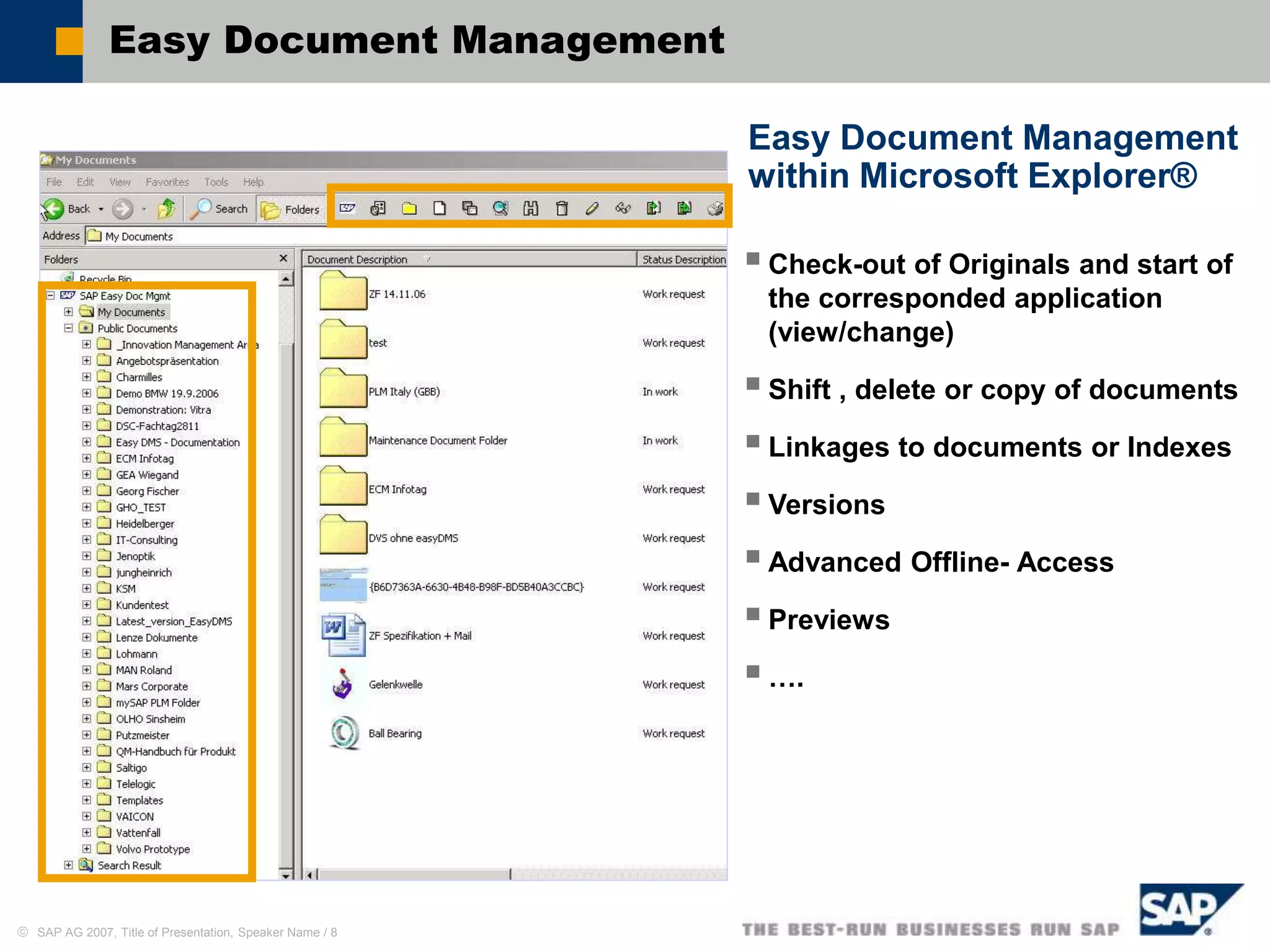
Easy Document Management
within Microsoft Explorer®
Management of Documents
(Originals) and Document
Structures with Windows Explorer
Check-in of Originals with
drag&drop
Distinct document search
Display and maintenance of a
personal index structure
Display and maintenance of a
public index structure
Check-in /-out of documents
directly from Microsoft Office
Applications with ‘Save as’ and
‘Open’
 SAP AG 2007, Title of Presentation, Speaker Name / 8
Easy Document Management
within Microsoft Explorer®
Check-out of Originals and start of
the corresponded application
(view/change)
Shift , delete or copy of documents
Linkages to documents or Indexes
Versions
Advanced Offline- Access
Previews
….
 SAP AG 2007, Title of Presentation, Speaker Name / 9
Easy Document Management – Basic Functions
 Creation of document information
records and storage of originals
 Document characteristics show all
document data in a view (description,
status, …)
 Additional data by the SAP class system
 Display of preview pictures
 Authorization assignment by Access
Control Lists (ACL)
 Creation of object linking to other
Business objects
 Control by SAP R/3 Customizing
The Document Information Record in Easy Document Management
 SAP AG 2007, Title of Presentation, Speaker Name / 10
The Benefit for your Company
Company advantages:
 Simple document storage in SAP Document Management system
 Fast information access
 Minimize the time and effort for the data maintenance
 Simplifies group and teamwork working with group structures
 Intuitive operation due to the integration into the Microsoft Explorer®
 Particularly suitable for occasional users
 Lower training time, particularly suitable for occasional users
 High user acceptance
Plus technical use:
 Safe, central data storage for all Business Documents
 Easy installation
 Support with distributed storage system
 Possible integration of Business Addins (BADI)
 Use of SAP R/3 Customizing
 Use of SAP R/3 Authorization concept
 SAP AG 2007, Title of Presentation, Speaker Name / 11
Why Different User Interface for the SAP DVS?
Further UIs for SAP DVS ...
 Portal iViews
 KM (DMS Connector)
 WebDocuments
 Easy access to SAP-Documents
over the Web
mySAP PLM Easy Doc. Mgmt
 Easy access to SAP-Documents
in Windows-based Applications
Standard user interface
 Very efficiently with very complex
functionalities
 Training necessarily
 For occasional users rather not
suitable
Introduction
Functionality
Screenshots
Customer and Analyst voices
 SAP AG 2007, Title of Presentation, Speaker Name / 13
Easy Document Management - Login
User-specific login on mySAP PLM System (SAP Document
Management) with Windows-Explorer
 SAP AG 2007, Title of Presentation, Speaker Name / 14
Index Structure
Public Folder*:
quickly access to information and data
of all project participants
My Documents*:
Personal documents and structures
Search Results:
Search Results list (temporary)
* Folder names can be labeled freely
 SAP AG 2007, Title of Presentation, Speaker Name / 15
Extended Menus
Additional Buttons in the Explorer Bar
Extended mouse context menus
(dependent on the object)
 SAP AG 2007, Title of Presentation, Speaker Name / 16
Working with Windows Explorer®
Easily (and used) working with the Windows Explorer® surface
 SAP AG 2007, Title of Presentation, Speaker Name / 17
Document Structures Management
 Personal folder structures (e.g. <my Documents>)
 Create, Change, Rename and Delete Folders
 Status net, Classification, Versions for folders ...
 SAP AG 2007, Title of Presentation, Speaker Name / 18
How does the personal folder structure in SAP look like?
 The folder structure is managed in the document structure
 Each folder is the top of a on-level document structure
Document Structures Management
 SAP AG 2007, Title of Presentation, Speaker Name / 19
Document Management – Original files
 Shift documents from Microsoft Explorer into the appropriated Folder of
the Easy Document Management Interface
 Cut, copy and paste documents
 SAP AG 2007, Title of Presentation, Speaker Name / 20
Document Management – Original files
 Change the fields in document
information record
 Automatic check-in into the file
 SAP AG 2007, Title of Presentation, Speaker Name / 21
Document Management – Original files
Add further originals over Windows-Browse-Function
 SAP AG 2007, Title of Presentation, Speaker Name / 22
Document Management – Original files
Any desired quantity of originals is storable for each document
information record
 SAP AG 2007, Title of Presentation, Speaker Name / 23
Save from Office-Applications
Save files with ‘Save as’ from Windows-Programs: Word, Excel,
PowerPoint, …
 SAP AG 2007, Title of Presentation, Speaker Name / 24
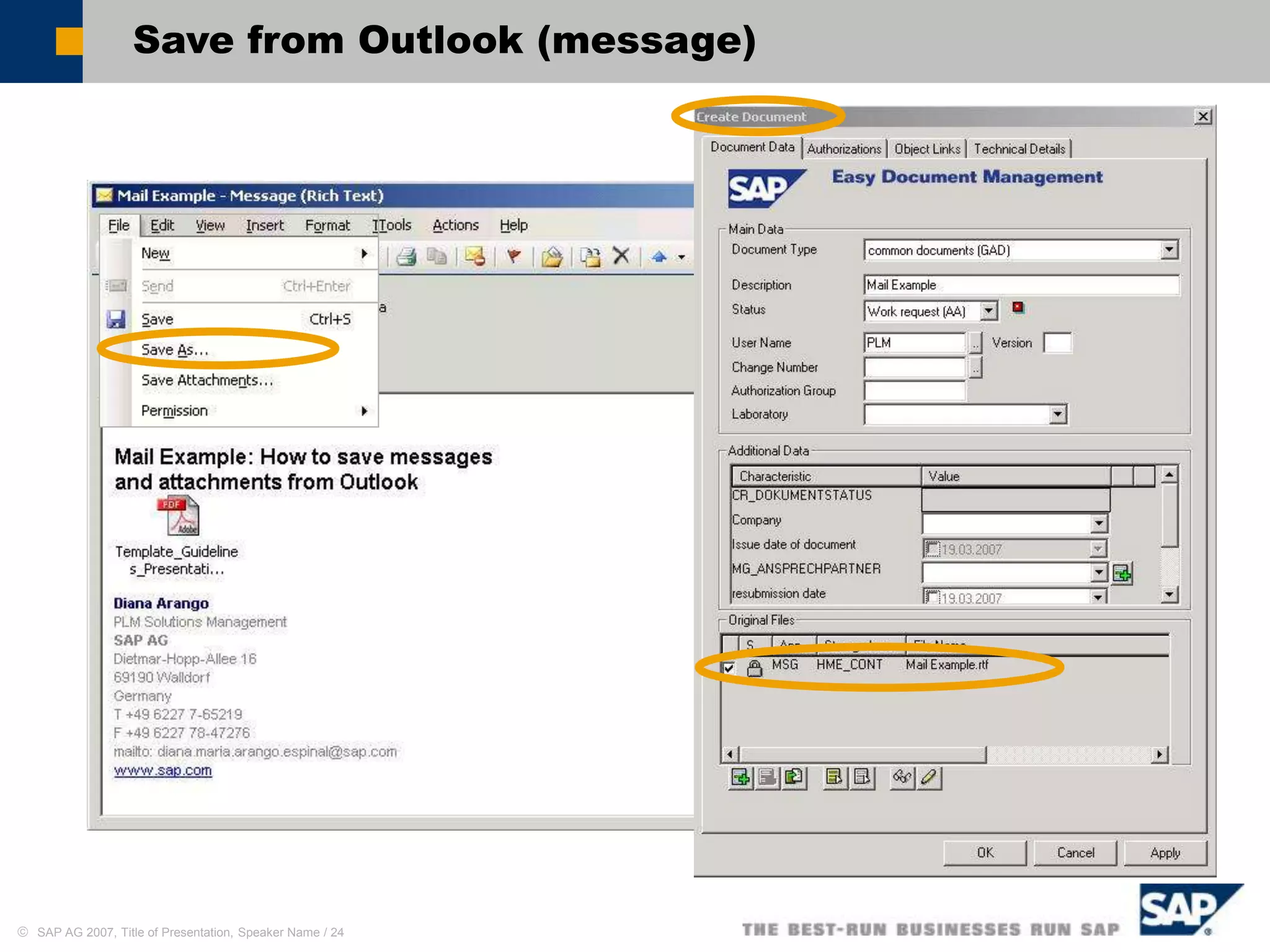
Save from Outlook (message)
 SAP AG 2007, Title of Presentation, Speaker Name / 25
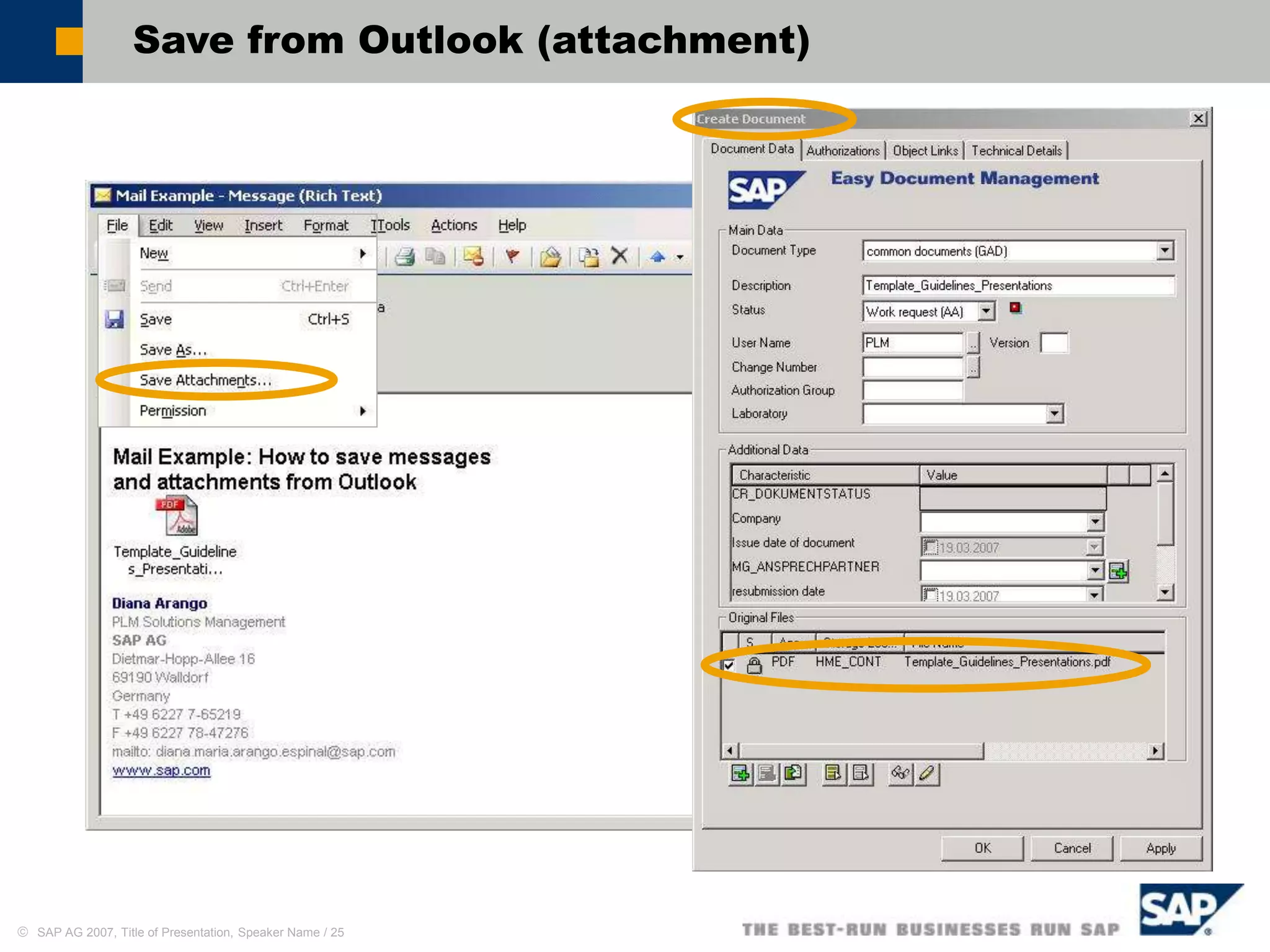
Save from Outlook (attachment)
 SAP AG 2007, Title of Presentation, Speaker Name / 26
Edit Original Files (Check Out)
 SAP AG 2007, Title of Presentation, Speaker Name / 27
Display Originals
SAP ECL Viewer or any Viewer usable
 SAP AG 2007, Title of Presentation, Speaker Name / 28
Object Linking
Object linking possible to all defined Business objects in SAP DVS
Display in the SAP surface (SAP GUI) Display in Easy Document Management
 SAP AG 2007, Title of Presentation, Speaker Name / 29
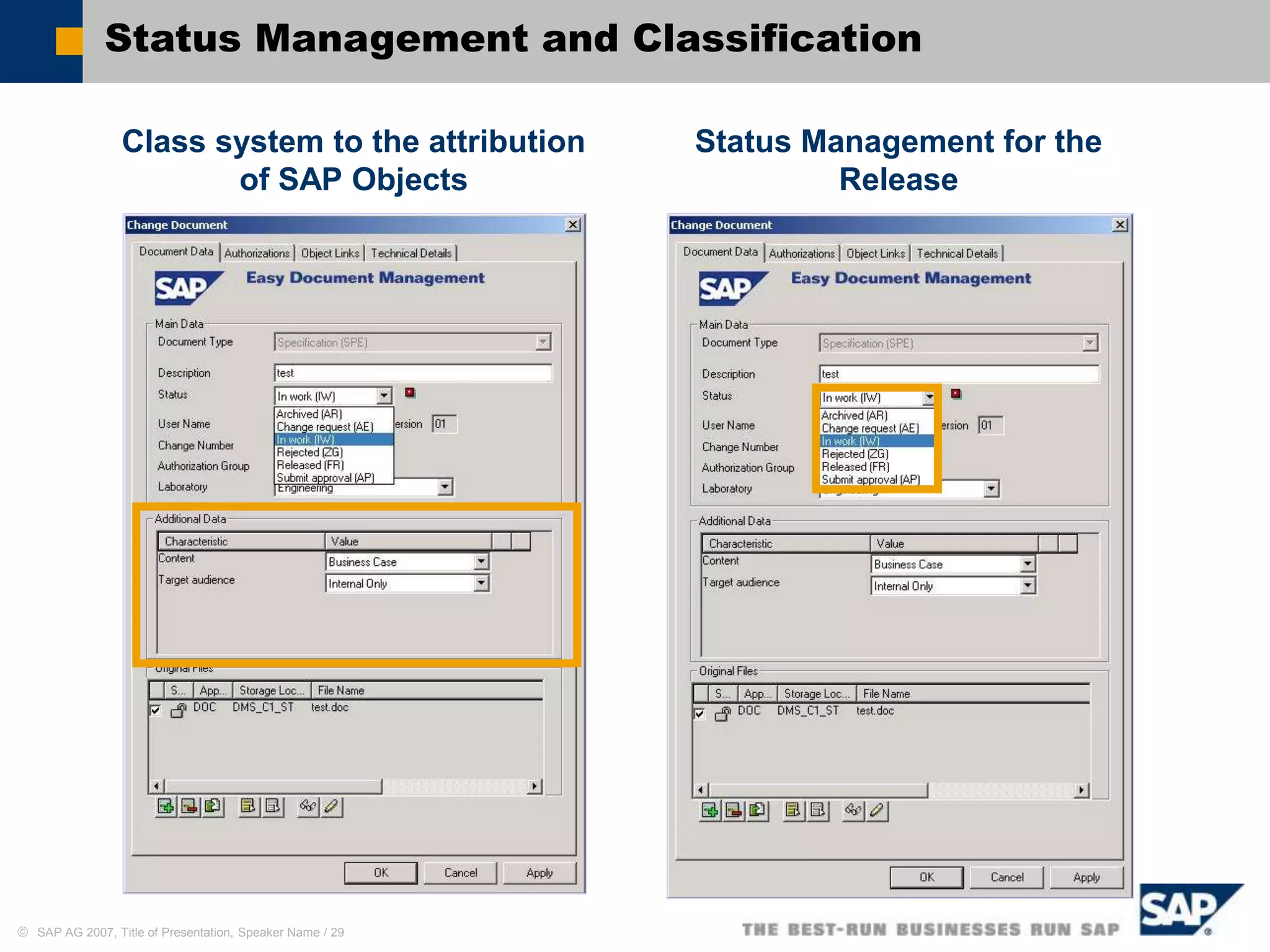
Status Management and Classification
Class system to the attribution
of SAP Objects
Status Management for the
Release
 SAP AG 2007, Title of Presentation, Speaker Name / 30
Enhancement with ERP 2005
Change status in context menu: Change status of many selected documents
 SAP AG 2007, Title of Presentation, Speaker Name / 31
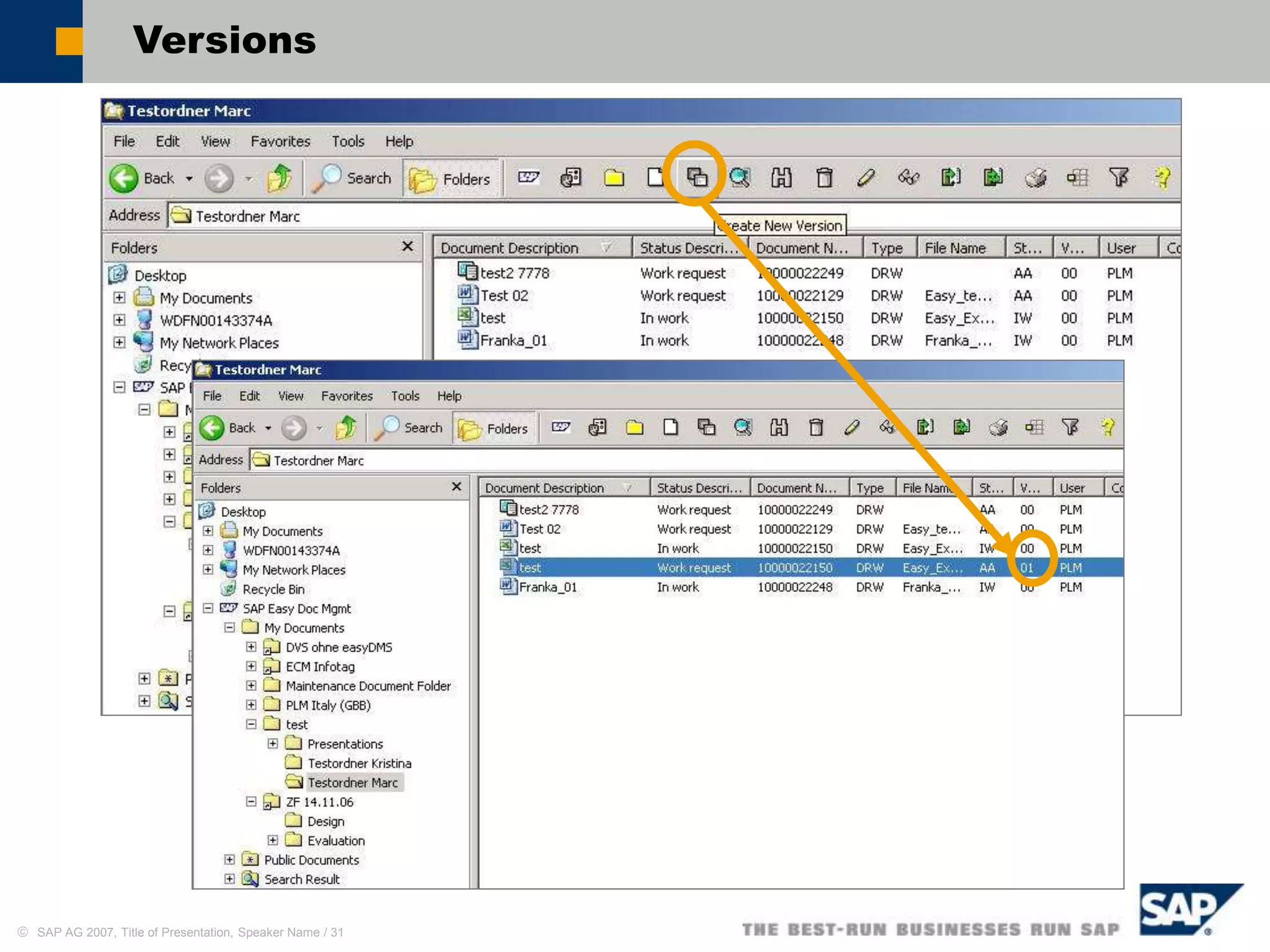
Versions
 SAP AG 2007, Title of Presentation, Speaker Name / 32
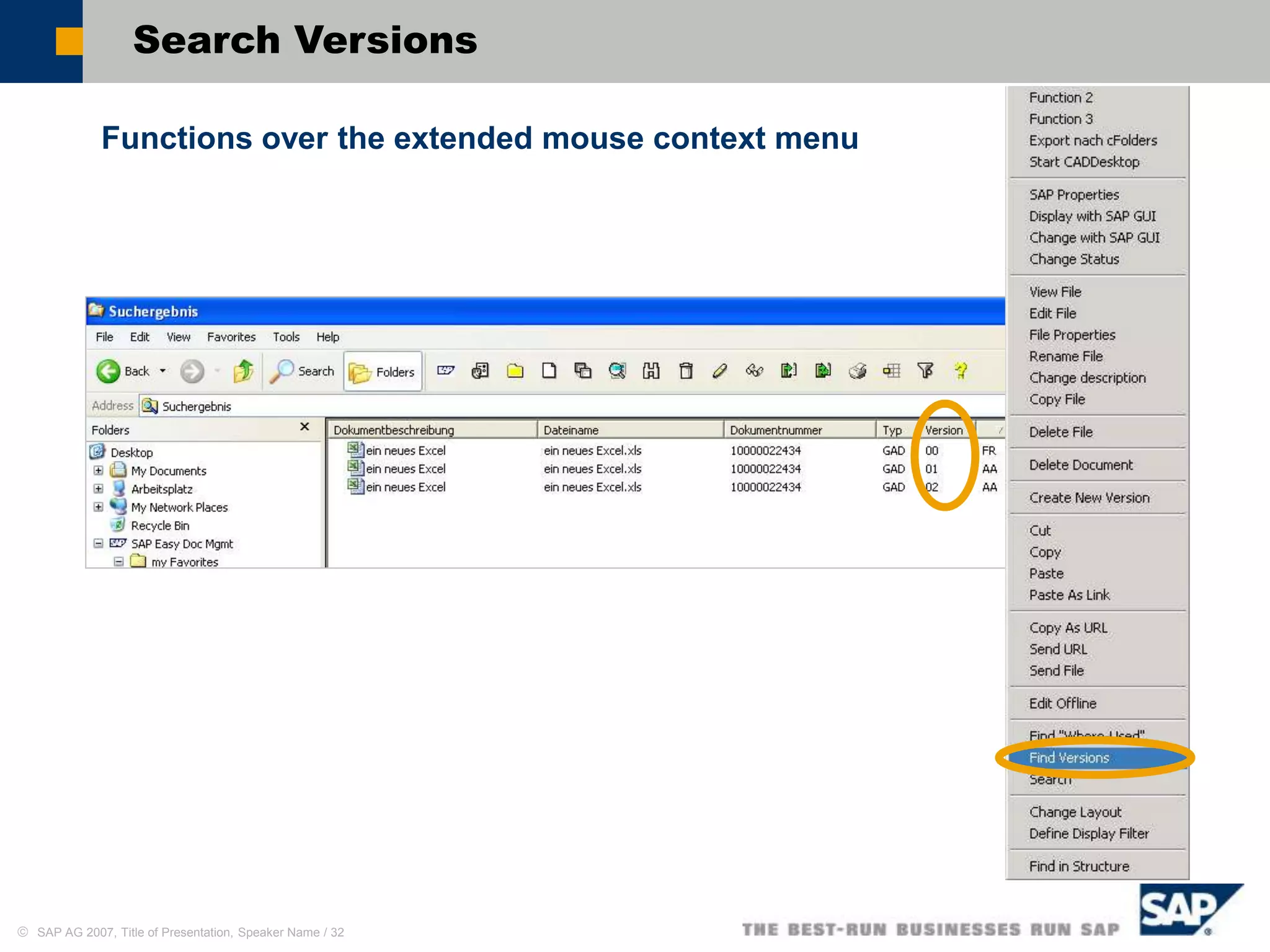
Search Versions
Functions over the extended mouse context menu
 SAP AG 2007, Title of Presentation, Speaker Name / 33
Search Documents
Search by Meta Data
 SAP AG 2007, Title of Presentation, Speaker Name / 34
Search by Object Linking
Search Documents
 SAP AG 2007, Title of Presentation, Speaker Name / 35
Advanced Search for Classification Characteristics
Search Documents
 SAP AG 2007, Title of Presentation, Speaker Name / 36
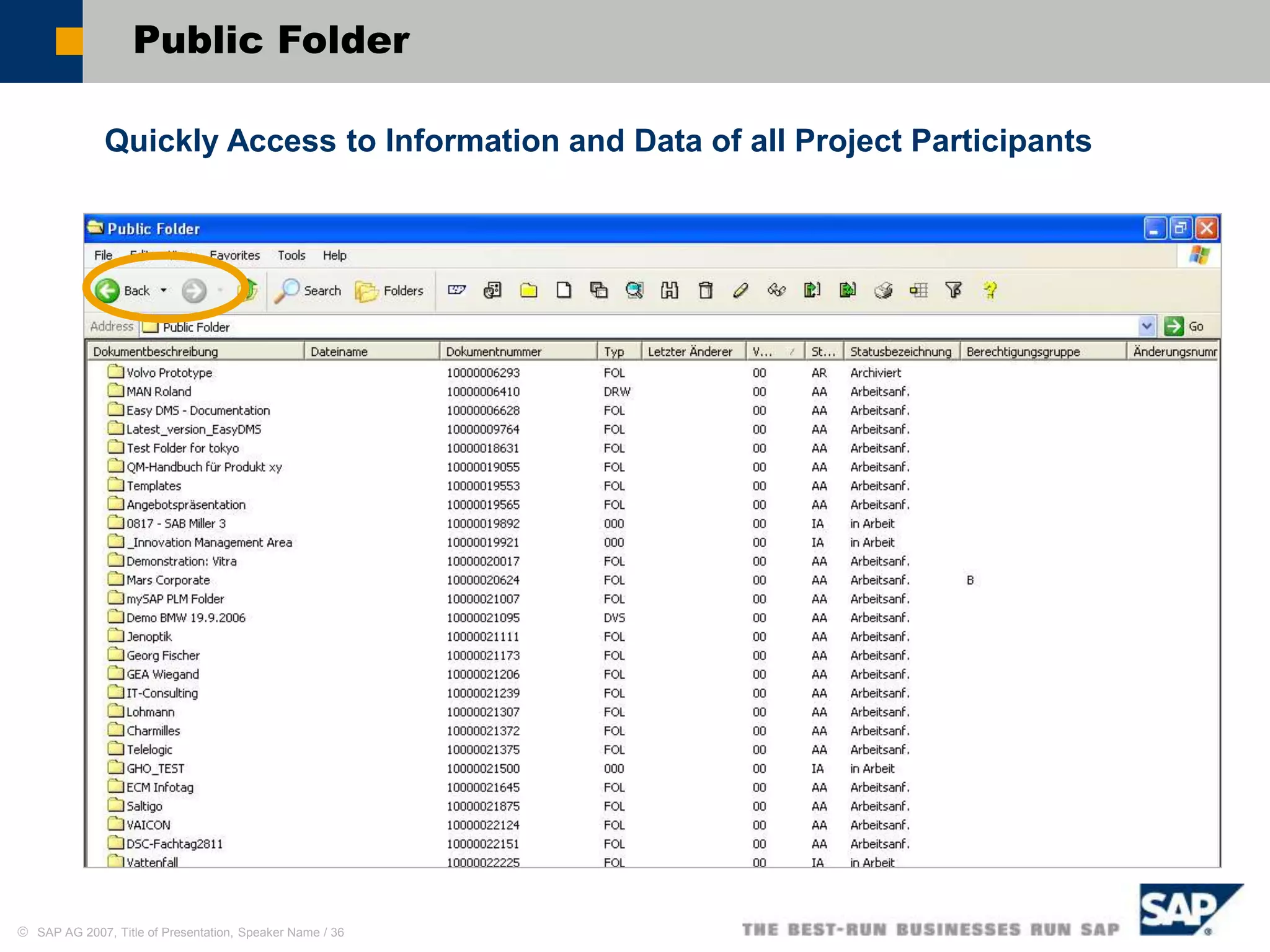
Public Folder
Quickly Access to Information and Data of all Project Participants
 SAP AG 2007, Title of Presentation, Speaker Name / 37
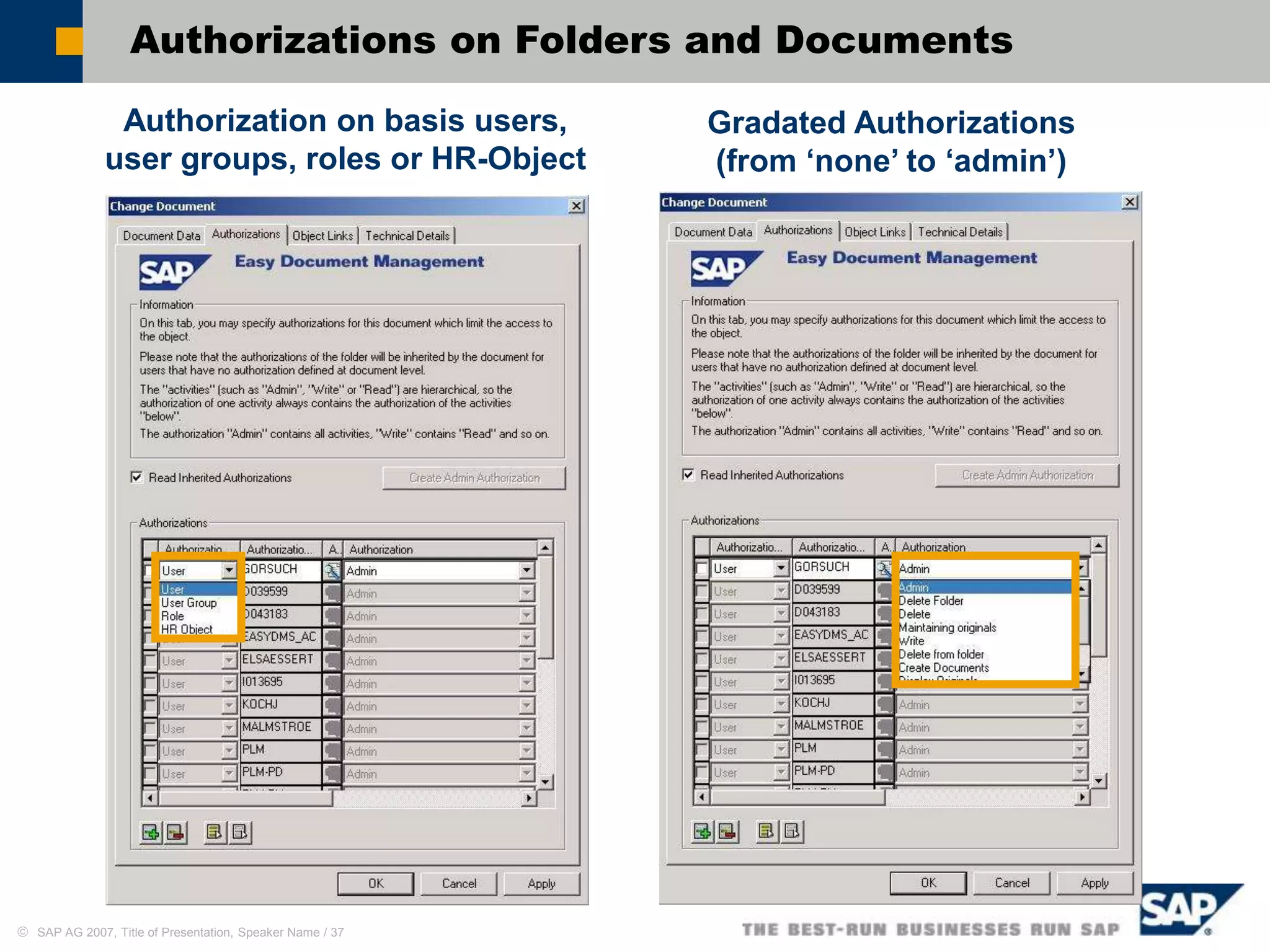
Authorizations on Folders and Documents
Authorization on basis users,
user groups, roles or HR-Object
Gradated Authorizations
(from ‘none’ to ‘admin’)
 SAP AG 2007, Title of Presentation, Speaker Name / 38
Offline Functionality
Local Download of Indexes and Documents for offline Editing
 SAP AG 2007, Title of Presentation, Speaker Name / 39
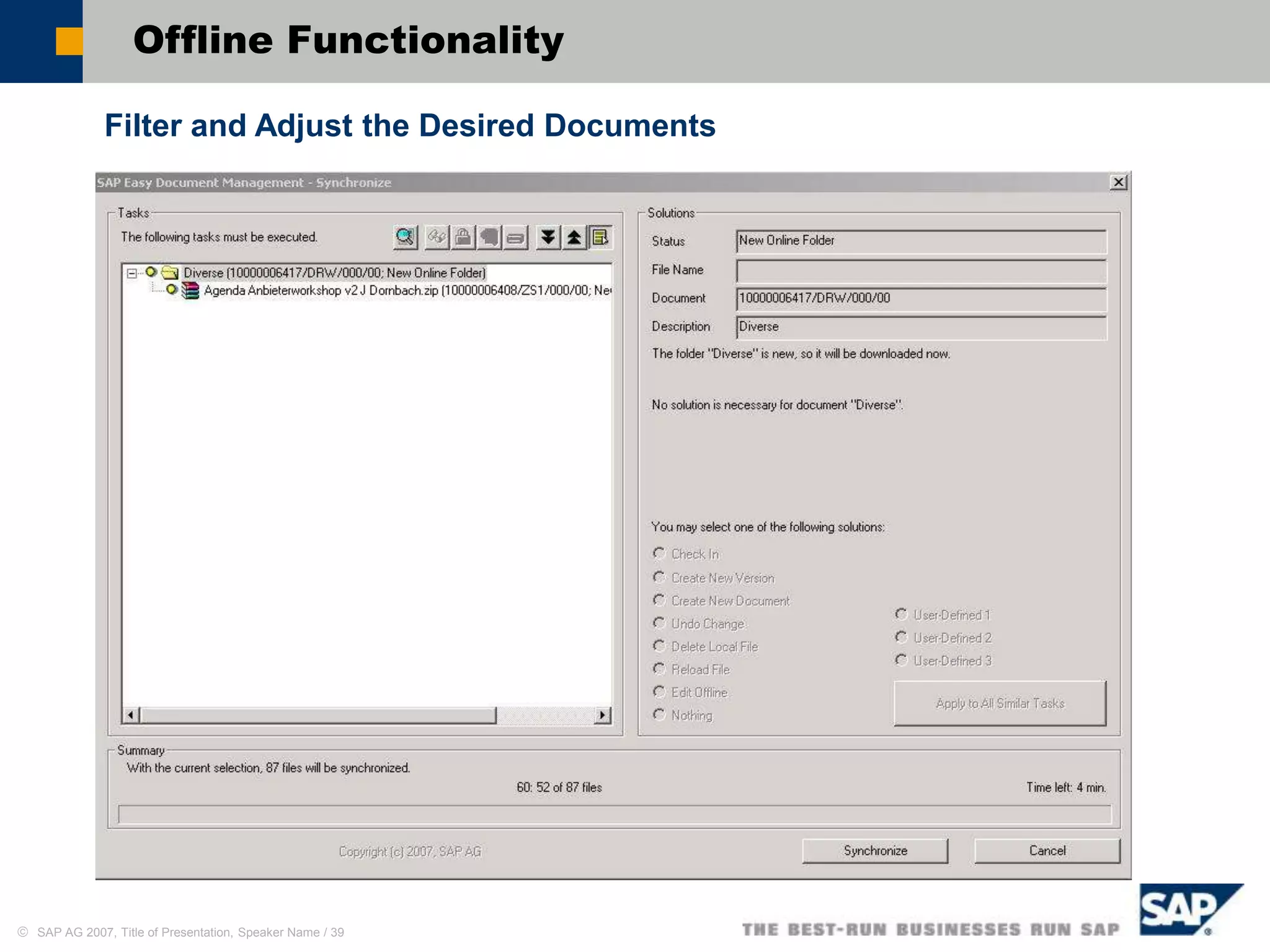
Filter and Adjust the Desired Documents
Offline Functionality
 SAP AG 2007, Title of Presentation, Speaker Name / 40
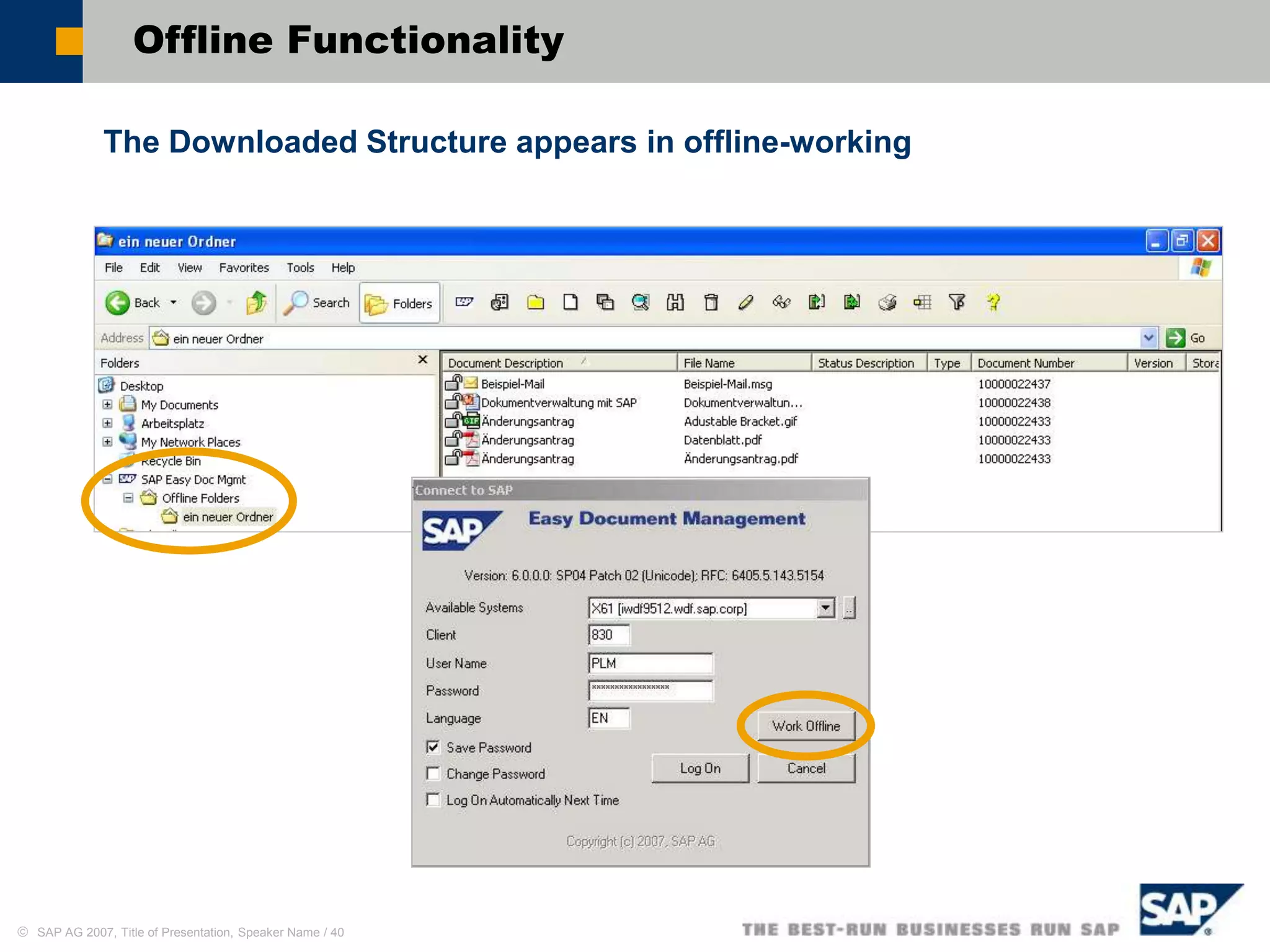
The Downloaded Structure appears in offline-working
Offline Functionality
 SAP AG 2007, Title of Presentation, Speaker Name / 41
3. Schritt: Dialog nach
Strukturabgleich
ermöglicht eine
Entscheidung des
Umgangs z.B. mit
neuen oder geänderten
Originalen
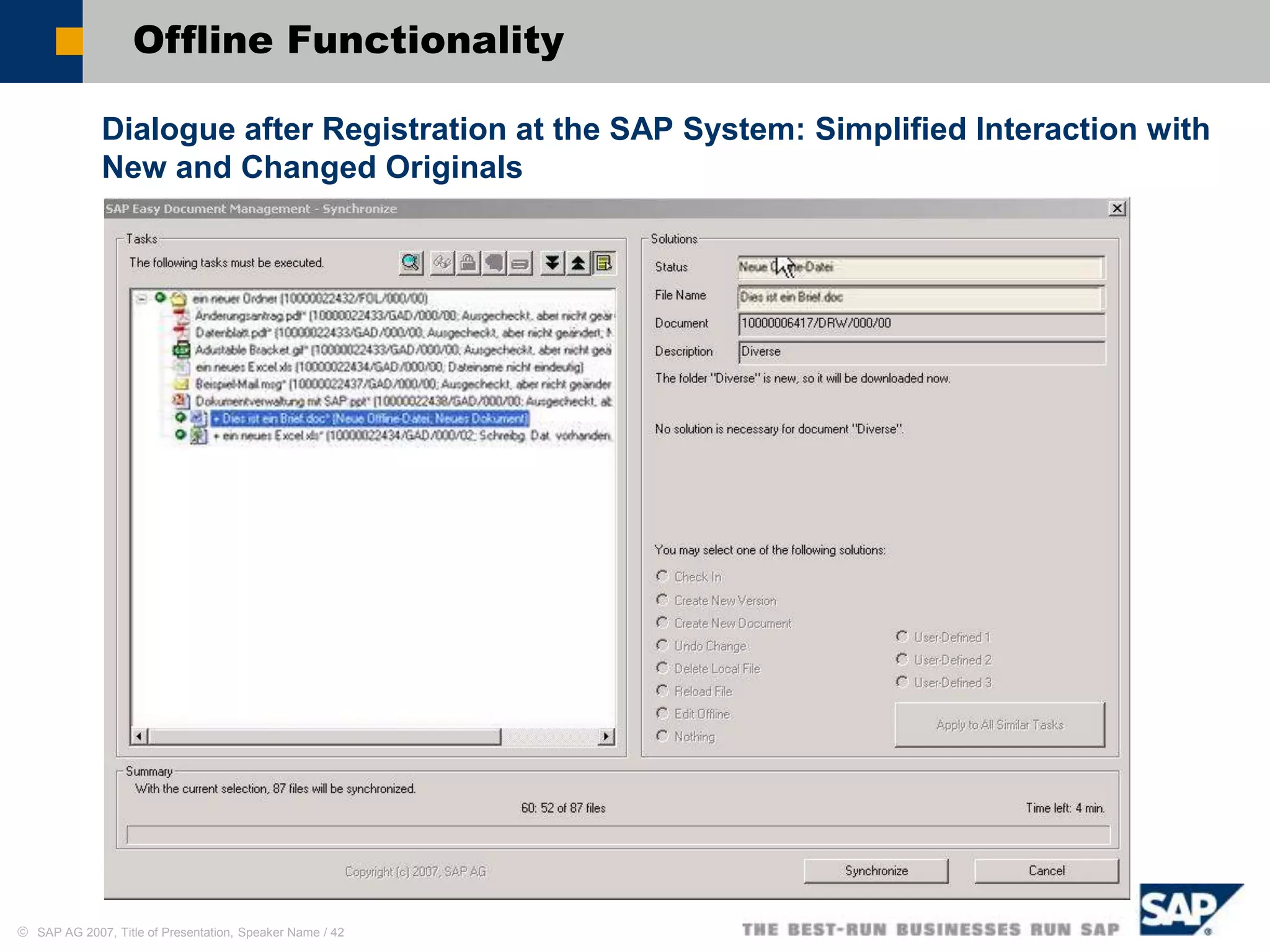
New Originals can be copied in the folder, existing ones can be changed
or deleted
Offline Functionality
 SAP AG 2007, Title of Presentation, Speaker Name / 42
Dialogue after Registration at the SAP System: Simplified Interaction with
New and Changed Originals
Offline Functionality
 SAP AG 2007, Title of Presentation, Speaker Name / 43
Distribution of Information
Forwarding of Document Information via URL
 SAP AG 2007, Title of Presentation, Speaker Name / 44
Digital Signature
The digital signature assignment can be done directly from the Easy
Document Management
 SAP AG 2007, Title of Presentation, Speaker Name / 45
Adjustment of Layouts
Adjustment of the column
layout:
Meta data or classification
characteristics as column
label
Display variants can be
stored global or user-
specific
Display thumbnail view
(Size adjustable)
 SAP AG 2007, Title of Presentation, Speaker Name / 46
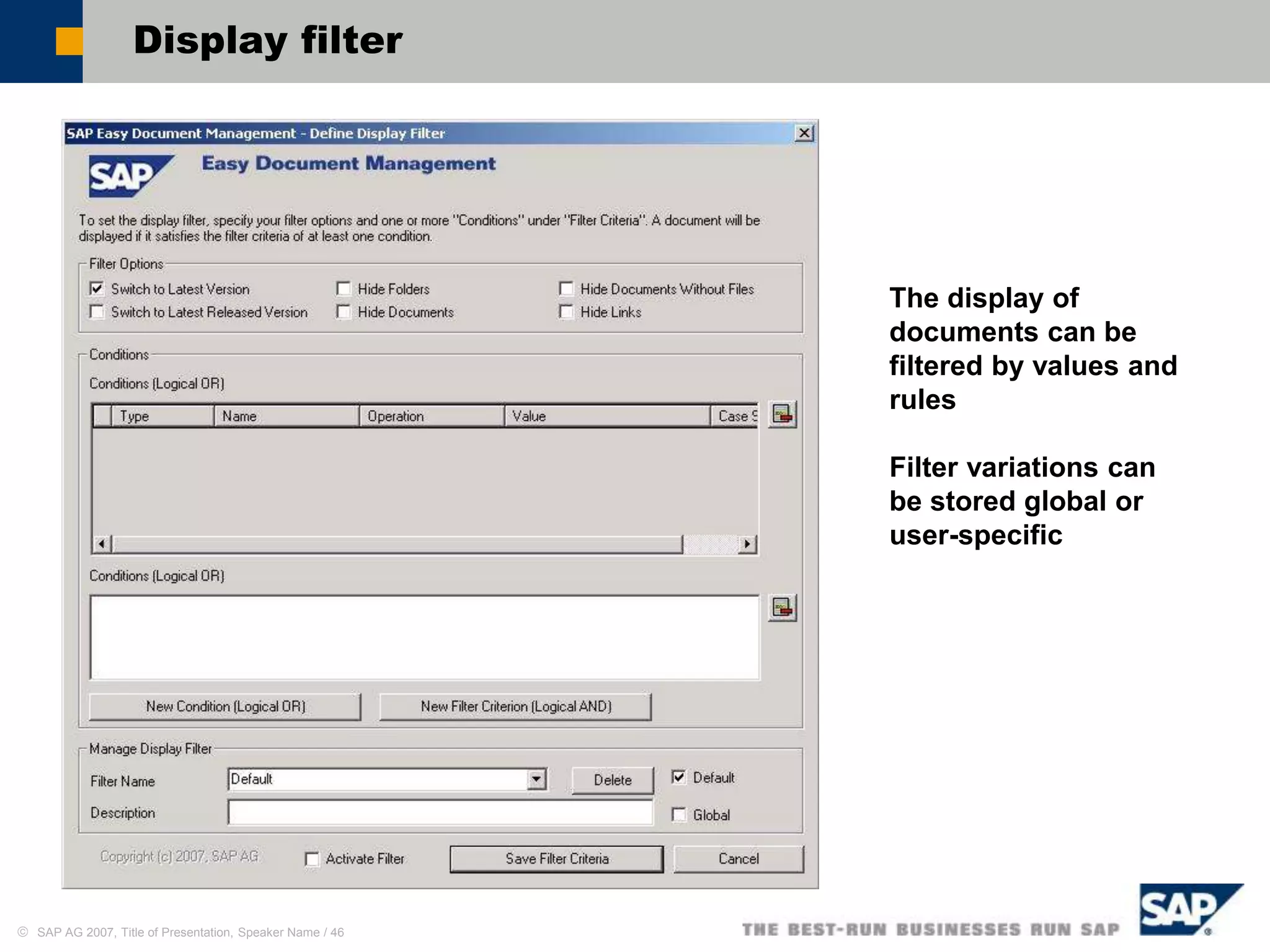
Display filter
The display of
documents can be
filtered by values and
rules
Filter variations can
be stored global or
user-specific
Introduction
Functionality
Screenshots
Customer and Analyst voices
 SAP AG 2007, Title of Presentation, Speaker Name / 48
Customer Voice
"With Easy DM, we can use our existing SAP resources
to best advantage, whilst integrating new user groups
in our logistics processes. Aesculap uses Easy DMS to
manage all documents that are created during the
product development process worldwide. The tight
integration of Easy DMS in the Windows environment
achieves high user acceptance, without sacrificing the
advantages of SAP document management, of which
integration with other SAP objects is especially
important.“
─ Matthias Neubrand
Aesculap AG & Co. KG
Director Technical Applications
 SAP AG 2007, Title of Presentation, Speaker Name / 49
Analyst‘s voice
“ ….. Easy Document Management delivers benefits to
SAP customers by simplifying the handling of
documents in the SAP® Document Management System.
Its user interface is similar to MS Explorer, which makes
it easy for the occasional user and reduces the time and
effort required for the maintenance of documents within
SAP.
SAP Easy Document Management and the document
management capabilities of mySAP PLM can be used as
stand-alone or in conjunction with the complete mySAP
PLM offering. …”
Quelle November 2006
SAP’s Easy Document Management
CIMdata Commentary

SAP EASY DMS

  • 1.
  • 2.
  • 3.
     SAP AG2007, Title of Presentation, Speaker Name / 3 Business Challenges  easy use  secure data storage without redundancies  seamless Integration in the ERP-System without additional Interfaces  high performance despite high information flow-rate  simplified team and internal cooperation  easy object linking to other business objects  distinctive authorization concept  management of every type of documents inclusive mails  … A companywide Document Management has many challenges:
  • 4.
     SAP AG2007, Title of Presentation, Speaker Name / 4 mySAP Product Lifecycle Management SAPNetWeaver Product and project portfolio management Ideen Management und Konzeptentwicklung Projekt Planung Zeit- und Ressourcen Management Projektausführung Strategisches Portfolio Management Life-cycle process support Produkt Entwicklung Entwicklungs- collaboration und strategische Beschaffung Musterbau und Produktions- anlauf Übergabe an Verkauf, Service und Wartung Qualitätstechnik und Verbesserung Produktkosten- kalkulation Life-cycle data management Dokument Management Produkt Stammdaten und Struktur Management Spezifikations und Rezept Management Service und Instandhaltung Struktur Management Änderungs- und Konfigurations management Corporate services Audit Management Gefahrstoffe/gefährliche Inhaltsstoffe/ Produktsicherheit Gefahrgut-/Abfall Management Arbeitsschutz/ Arbeitssicherheit/ Arbeitsmedizin Solution Map 2006
  • 5.
     SAP AG2007, Title of Presentation, Speaker Name / 5 The Document as Central Object The Document Information Record in SAP: Content:  Original files (any formats, any quantity)  Content versions  Redlining Layer Metadata:  Management data (specialist, release status, version etc.)  Class data  Object linking e.g. material, project, etc. (optional)  Workflow
  • 6.
  • 7.
     SAP AG2007, Title of Presentation, Speaker Name / 7 Easy Document Management Easy Document Management within Microsoft Explorer® Management of Documents (Originals) and Document Structures with Windows Explorer Check-in of Originals with drag&drop Distinct document search Display and maintenance of a personal index structure Display and maintenance of a public index structure Check-in /-out of documents directly from Microsoft Office Applications with ‘Save as’ and ‘Open’
  • 8.
     SAP AG2007, Title of Presentation, Speaker Name / 8 Easy Document Management Easy Document Management within Microsoft Explorer® Check-out of Originals and start of the corresponded application (view/change) Shift , delete or copy of documents Linkages to documents or Indexes Versions Advanced Offline- Access Previews ….
  • 9.
     SAP AG2007, Title of Presentation, Speaker Name / 9 Easy Document Management – Basic Functions  Creation of document information records and storage of originals  Document characteristics show all document data in a view (description, status, …)  Additional data by the SAP class system  Display of preview pictures  Authorization assignment by Access Control Lists (ACL)  Creation of object linking to other Business objects  Control by SAP R/3 Customizing The Document Information Record in Easy Document Management
  • 10.
     SAP AG2007, Title of Presentation, Speaker Name / 10 The Benefit for your Company Company advantages:  Simple document storage in SAP Document Management system  Fast information access  Minimize the time and effort for the data maintenance  Simplifies group and teamwork working with group structures  Intuitive operation due to the integration into the Microsoft Explorer®  Particularly suitable for occasional users  Lower training time, particularly suitable for occasional users  High user acceptance Plus technical use:  Safe, central data storage for all Business Documents  Easy installation  Support with distributed storage system  Possible integration of Business Addins (BADI)  Use of SAP R/3 Customizing  Use of SAP R/3 Authorization concept
  • 11.
     SAP AG2007, Title of Presentation, Speaker Name / 11 Why Different User Interface for the SAP DVS? Further UIs for SAP DVS ...  Portal iViews  KM (DMS Connector)  WebDocuments  Easy access to SAP-Documents over the Web mySAP PLM Easy Doc. Mgmt  Easy access to SAP-Documents in Windows-based Applications Standard user interface  Very efficiently with very complex functionalities  Training necessarily  For occasional users rather not suitable
  • 12.
  • 13.
     SAP AG2007, Title of Presentation, Speaker Name / 13 Easy Document Management - Login User-specific login on mySAP PLM System (SAP Document Management) with Windows-Explorer
  • 14.
     SAP AG2007, Title of Presentation, Speaker Name / 14 Index Structure Public Folder*: quickly access to information and data of all project participants My Documents*: Personal documents and structures Search Results: Search Results list (temporary) * Folder names can be labeled freely
  • 15.
     SAP AG2007, Title of Presentation, Speaker Name / 15 Extended Menus Additional Buttons in the Explorer Bar Extended mouse context menus (dependent on the object)
  • 16.
     SAP AG2007, Title of Presentation, Speaker Name / 16 Working with Windows Explorer® Easily (and used) working with the Windows Explorer® surface
  • 17.
     SAP AG2007, Title of Presentation, Speaker Name / 17 Document Structures Management  Personal folder structures (e.g. <my Documents>)  Create, Change, Rename and Delete Folders  Status net, Classification, Versions for folders ...
  • 18.
     SAP AG2007, Title of Presentation, Speaker Name / 18 How does the personal folder structure in SAP look like?  The folder structure is managed in the document structure  Each folder is the top of a on-level document structure Document Structures Management
  • 19.
     SAP AG2007, Title of Presentation, Speaker Name / 19 Document Management – Original files  Shift documents from Microsoft Explorer into the appropriated Folder of the Easy Document Management Interface  Cut, copy and paste documents
  • 20.
     SAP AG2007, Title of Presentation, Speaker Name / 20 Document Management – Original files  Change the fields in document information record  Automatic check-in into the file
  • 21.
     SAP AG2007, Title of Presentation, Speaker Name / 21 Document Management – Original files Add further originals over Windows-Browse-Function
  • 22.
     SAP AG2007, Title of Presentation, Speaker Name / 22 Document Management – Original files Any desired quantity of originals is storable for each document information record
  • 23.
     SAP AG2007, Title of Presentation, Speaker Name / 23 Save from Office-Applications Save files with ‘Save as’ from Windows-Programs: Word, Excel, PowerPoint, …
  • 24.
     SAP AG2007, Title of Presentation, Speaker Name / 24 Save from Outlook (message)
  • 25.
     SAP AG2007, Title of Presentation, Speaker Name / 25 Save from Outlook (attachment)
  • 26.
     SAP AG2007, Title of Presentation, Speaker Name / 26 Edit Original Files (Check Out)
  • 27.
     SAP AG2007, Title of Presentation, Speaker Name / 27 Display Originals SAP ECL Viewer or any Viewer usable
  • 28.
     SAP AG2007, Title of Presentation, Speaker Name / 28 Object Linking Object linking possible to all defined Business objects in SAP DVS Display in the SAP surface (SAP GUI) Display in Easy Document Management
  • 29.
     SAP AG2007, Title of Presentation, Speaker Name / 29 Status Management and Classification Class system to the attribution of SAP Objects Status Management for the Release
  • 30.
     SAP AG2007, Title of Presentation, Speaker Name / 30 Enhancement with ERP 2005 Change status in context menu: Change status of many selected documents
  • 31.
     SAP AG2007, Title of Presentation, Speaker Name / 31 Versions
  • 32.
     SAP AG2007, Title of Presentation, Speaker Name / 32 Search Versions Functions over the extended mouse context menu
  • 33.
     SAP AG2007, Title of Presentation, Speaker Name / 33 Search Documents Search by Meta Data
  • 34.
     SAP AG2007, Title of Presentation, Speaker Name / 34 Search by Object Linking Search Documents
  • 35.
     SAP AG2007, Title of Presentation, Speaker Name / 35 Advanced Search for Classification Characteristics Search Documents
  • 36.
     SAP AG2007, Title of Presentation, Speaker Name / 36 Public Folder Quickly Access to Information and Data of all Project Participants
  • 37.
     SAP AG2007, Title of Presentation, Speaker Name / 37 Authorizations on Folders and Documents Authorization on basis users, user groups, roles or HR-Object Gradated Authorizations (from ‘none’ to ‘admin’)
  • 38.
     SAP AG2007, Title of Presentation, Speaker Name / 38 Offline Functionality Local Download of Indexes and Documents for offline Editing
  • 39.
     SAP AG2007, Title of Presentation, Speaker Name / 39 Filter and Adjust the Desired Documents Offline Functionality
  • 40.
     SAP AG2007, Title of Presentation, Speaker Name / 40 The Downloaded Structure appears in offline-working Offline Functionality
  • 41.
     SAP AG2007, Title of Presentation, Speaker Name / 41 3. Schritt: Dialog nach Strukturabgleich ermöglicht eine Entscheidung des Umgangs z.B. mit neuen oder geänderten Originalen New Originals can be copied in the folder, existing ones can be changed or deleted Offline Functionality
  • 42.
     SAP AG2007, Title of Presentation, Speaker Name / 42 Dialogue after Registration at the SAP System: Simplified Interaction with New and Changed Originals Offline Functionality
  • 43.
     SAP AG2007, Title of Presentation, Speaker Name / 43 Distribution of Information Forwarding of Document Information via URL
  • 44.
     SAP AG2007, Title of Presentation, Speaker Name / 44 Digital Signature The digital signature assignment can be done directly from the Easy Document Management
  • 45.
     SAP AG2007, Title of Presentation, Speaker Name / 45 Adjustment of Layouts Adjustment of the column layout: Meta data or classification characteristics as column label Display variants can be stored global or user- specific Display thumbnail view (Size adjustable)
  • 46.
     SAP AG2007, Title of Presentation, Speaker Name / 46 Display filter The display of documents can be filtered by values and rules Filter variations can be stored global or user-specific
  • 47.
  • 48.
     SAP AG2007, Title of Presentation, Speaker Name / 48 Customer Voice "With Easy DM, we can use our existing SAP resources to best advantage, whilst integrating new user groups in our logistics processes. Aesculap uses Easy DMS to manage all documents that are created during the product development process worldwide. The tight integration of Easy DMS in the Windows environment achieves high user acceptance, without sacrificing the advantages of SAP document management, of which integration with other SAP objects is especially important.“ ─ Matthias Neubrand Aesculap AG & Co. KG Director Technical Applications
  • 49.
     SAP AG2007, Title of Presentation, Speaker Name / 49 Analyst‘s voice “ ….. Easy Document Management delivers benefits to SAP customers by simplifying the handling of documents in the SAP® Document Management System. Its user interface is similar to MS Explorer, which makes it easy for the occasional user and reduces the time and effort required for the maintenance of documents within SAP. SAP Easy Document Management and the document management capabilities of mySAP PLM can be used as stand-alone or in conjunction with the complete mySAP PLM offering. …” Quelle November 2006 SAP’s Easy Document Management CIMdata Commentary

Editor's Notes

  • #18 The left part of the screenshot shows the MS Explorer. The right part of the screenshot shows the Easy DMS Interface. Just drag a document on MS Explorer and drop it onto the appropriate folder on the Easy DMS Interface.