Accumulo
Granular Access
Control
Using Cell Level
Security
In Accumulo
Tableof Contents
1.0 SUMMARY/ABSTRACT .........................................................................................................................................2
1.1 PROBLEM STATEMENT ......................................................................................................................................2
1.2 OVERVIEW OF STEPS ..........................................................................................................................................2
1.3 TECHNOLOGY USED............................................................................................................................................2
1.1 ISSUES ...................................................................................................................................................................2
1.1 LESSON LEARNED................................................................................................................................................2
1.1 SUMMARY............................................................................................................................................................2
2.0 TECHNOLOGY USED...............................................................................................................................................3
3.0 INSTALLATION/CONFIGURATION.......................................................................................................................6
3.1 HIGH LEVELOVERVIEW......................................................................................................................................6
3.2 DETAILED STEPS ..................................................................................................................................................6
PHASE1: DOWNLOAD...................................................................................................................................6
PHASE2: INSTALLATION ...............................................................................................................................6
INSTALL HADOOP................................................................................................................................7
INSTALL ZOOKEEPER..........................................................................................................................10
INSTALL ACCUMULO..........................................................................................................................11
PHASE3: RUNNING ACCUMULO...............................................................................................................14
PHASE4: RUN JAVAPROGRAM TO POPULATEDEMO DATASET .........................................................19
PHASE5: DEMONSTRATE ACCUMULO CAPABILITIES USINGSHELL....................................................20
PHASE6: STOPPING ACCUMULO ..............................................................................................................21
4.0 DEMO AND WORKING CODE ............................................................................................................................21
4.1 JAVACODE.........................................................................................................................................................21
4.2 DEMO..................................................................................................................................................................24
CASE 1 .............................................................................................................................................................24
CASE 2 .............................................................................................................................................................24
CASE 3 .............................................................................................................................................................24
CASE 4 .............................................................................................................................................................25
CASE 5 .............................................................................................................................................................25
CASE 6 .............................................................................................................................................................26
CASE 7 .............................................................................................................................................................27
5.0 ISSUES ENCOUNTERED........................................................................................................................................28
6.0 LESSONS LEARNED ...............................................................................................................................................28
7.0 CONCLUSION.........................................................................................................................................................29
8.0 REFERENCES/USEFUL RESOURCES ...................................................................................................................29
8.1 REFERENCES ......................................................................................................................................................29
8.2 USEFULRESOURCES .........................................................................................................................................29
8.3 YOUTUBELINKS FOR PRESENTATIONS ......................................................................................................................29
1.0 Summary/Abstract
1.1 Problem Statement
Organizations and governments rely heavily on information provided by big data however, secrecy and
privacy issues become magnified because systems are more exposed to vulnerabilities from the use of
large-scalecloud infrastructures,with a diversity of software platforms, spread across largenetworks of
computers. Traditional security mechanisms are no longer adequate due to the velocity, volume and
variety of big data used today.
In this paper, we will be looking at the security property that matters from the perspective of access
control i.e. how do we prevent access to data by people that should not have access?
1.2 Overview of Steps
As a solution to the problem statement, I will be looking at the concept of granular access control (the
ability to allowdata sharingas much as possible without compromising secrecy) to show how its theory
can be adapted to bigdata sets.After installingZookeeper and Accumulo on my MacOS, I ran both servers
and used a Java Scriptto create a largerandomized data set simulatinga claims processor.The example
demonstrates how different levels of access can be administered depending on who you are: an
administrator, insurer or part of the general public.
1.3 Technology Used
Accumulo is based on Google’s BigTable design and is built on top of Apache Hadoop, Zookeeper, and
Thrift. Accumulo’s key feature is that it is well suited to store sparse high dimensional data and uses
ColumnVisibility to allowthefilteringof users based on the presentation of the appropriateauthorization
i.e. only data that has the correct visibility label will be returned to the user. This allows the
implementation of granular access control at the cell in contrast to more traditional access methods
where rows, columns or even tables would be restricted to users. This form of security maximizes the
utility we receive by aggregating various sources of big data without compromising privacy or secrecy.
This is particularly useful for BigData where concerns around privacy of data has been risingover the past
few years.
1.4 Issues
Throughout the installation of Zookeeper and Accumulo, there were some issues encountered but the
biggest one would be the scarcity of documentation available.There was a great deal of research done in
user forums in order to resolve some of the installation issues. However, there are good conceptual
presentations in Slideshare.
1.5 Lessons Learned
1.6 Summary
Accumulo proved to be a relatively straightforward technology to use once installation humps had been
overcome. Its cell-based security model is very useful as data sharingwithout compromisingsecrecy is a
big security issue we face in terms of big data. The ability of implementing granular access control with
Accumulo gives data managers more flexibility in sharing data securely.
Pros Cons
Accumulo does not require a schema Accumulo does not perform query optimization
Accuulo is a wide column database, similar to
HBase or Cassandra
Accumulo does not have a standard query
language like RDF or SQL
Accumulo scales horizontally
2.0 Technology Used
According the book Accumulo by Rinaldi, Wall and Cordova6:
Apache Accumulo is a highly scalable, distributed, open source database modeled after Google’s BigTable
design.
Accumulo is built to store up to trillions of data elements and keeps them organized so that users can
perform fast lookups. Accumulo supports flexible data schemas and scales horizontally across thousands
of machines. Applications built on Accumulo are capable of serving a large number of users and can
process many requests per second, making Accumulo an ideal choice for terabyte to petabyte-scale
projects.
Accumulo began its development in 2008 when a group of computer scientists and mathematiciansatthe
National Security Agency were evaluatingvarious bigdata technologies to help solvethe issues involved
with storingand processinglargeamounts of data of different sensitivity levels.In 2011,Accumulo j oined
Apache community with Doug Cutting (founder of Hadoop) as its sponsoringchampion.In March of the
following year, Accumulo graduated to a top level project1.
Apache Accumulo is based on Google's BigTabledesign and is built on top of Apache Hadoop, Zookeeper,
and Thrift.Accumulo relies on Hadoop HDFS to providepersistentstorage,replication,and faulttolerance,
Zookeeper for highly reliabledistributed coordination of servers and Thrift to define and create services
in languages other than Java - Accumulo is written in the latter.
At its core, Accumulo stores key-value pairs which allowusers to look up the value of a particular key or
range of keys very quickly.Values arestored as byte arrays and Accumulo doesn’t restrictthe type or size
of the values stored. The data model is illustrated below.
The key is multi-dimensional and consistof a rowid,a column family,a column qualifier,a column visibility
and a timestamp. In the Accumulo, all data that sharethe same Row ID are considered to be part of the
samerecord i.e.multiplerows usually contributeto one record.This is in contrastto more traditional data
models where each record is stored on a row. The columnFamily and the ColumnQualifier are used as
attributes to uniquely qualify each row of the Accumulo such that each row in Accumulo can be thought
as a cell of traditional data model.This ability to store data in individual cell makes Accumulo well suited
to store sparsehigh dimensional data.The ColumnVisibility is used to allowthe filteringof users based on
the presentation of the appropriateauthorization i.e.only data that has the correctvisibility label will be
returned to the user. This allows the implementation of granular access control atthe cell in contrast to
more traditional access methods where rows, columns or even tables would be restricted to users. This
form of security maximizes the utility we receive by aggregating various sources of big data without
compromisingprivacy or secrecy. This particularly useful for Big Data where concerns around privacy of
data has been rising over the past few years.
In the physical data representation below,only data that with the ColumnVisibility Public will bereturned
to a user that has the authorization publicwhiletheremainingdata with the inappropriateVisibility label
are not returned to the user.
Accumulo will also notallowusers to write data that does not match their visibility label.In our previous
example, someone with the Public ColumnVisibility label cannotwrite a row where the ColumnVisibility
is set to Private
Accumulo supports user access control level.However it is usually easier to label information visibility
based on groups. For example if John is leavingthe Financedepartment for the Marketing department,
it is easier to change the authorization associated with John from Financeto Marketing rather than
havingall visibilities associated with visibility label John in the databasechanged to the person that is
replacingJohn. Accumulo supports logical AND & and OR | combinations of tokens, as well as nesting
groups () of tokens together. This allows only users thatmeet a combination of labels to read those
rows.
Usingthis approach we can further dividefrom groups to functions within that group. For example two
people working for the Financedepartment could have the label Finance&Reporting and
Finance&Auditing.
A typical useof granular access control isshown below.
Label Description
A & B Both 'A' and 'B' are required
A | B Either 'A' or 'B' is required
A & (C | B) 'A' and 'C' or 'A' and 'B' are required
A | (B & C) 'A' or both 'B' and 'C' are required
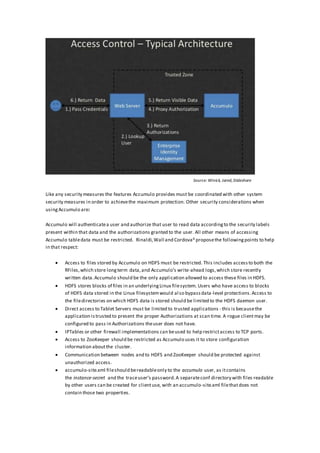
Like any security measures the features Accumulo provides must be coordinated with other system
security measures in order to achievethe maximum protection. Other security considerations when
using Accumulo are:
Accumulo will authenticatea user and authorize that user to read data accordingto the security labels
present within that data and the authorizations granted to the user. All other means of accessing
Accumulo tabledata must be restricted. Rinaldi,Wall and Cordova6 proposethe followingpoints to help
in that respect:
 Access to files stored by Accumulo on HDFS must be restricted. This includes accessto both the
RFiles,which store longterm data,and Accumulo’s write-ahead logs,which store recently
written data.Accumulo should be the only application allowed to access these files in HDFS.
 HDFS stores blocks of files in an underlyingLinux filesystem. Users who have access to blocks
of HDFS data stored in the Linux filesystemwould also bypassdata-level protections.Access to
the filedirectories on which HDFS data is stored should be limited to the HDFS daemon user.
 Direct access to Tablet Servers must be limited to trusted applications - this is becausethe
application istrusted to present the proper Authorizations at scan time. A rogue clientmay be
configured to pass in Authorizations theuser does not have.
 IPTables or other firewall implementations can beused to help restrictaccess to TCP ports.
 Access to ZooKeeper should be restricted as Accumulo uses it to store configuration
information aboutthe cluster.
 Communication between nodes and to HDFS and ZooKeeper should be protected against
unauthorized access.
 accumulo-site.xml fileshould bereadableonly to the accumulo user, as itcontains
the instance-secret and the traceuser’s password.A separateconf directory with files readable
by other users can be created for clientuse, with an accumulo-site.xml filethatdoes not
contain those two properties.
Source: Winick, Jared,Slideshare
3.0 Installation/Configuration
3.1: High-level overview
Phase1: Download
Phase2: Installation
Phase3: RunningAccumulo
Phase4: Run Java program to populate the demo dataset
Phase5: Demonstrate Accumulo capabilities usingshell
Phase6: Stopping Accumulo
3.2: Detailed steps
Phase 1: Download
1. Download Accumulo 1.6.2.tar.gz
2. Download Hadoop 2.7.0.tar.gz
3. Download Zookeeper-3.4.6.tar.gz
Phase 2: Installation
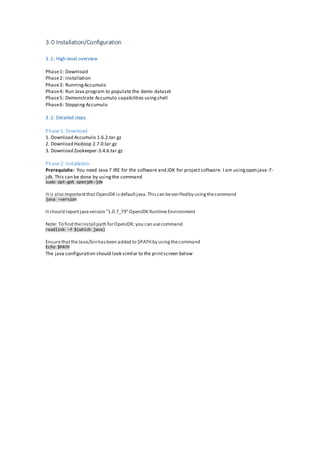
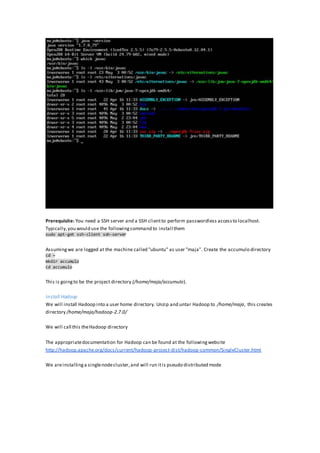
Prerequisite: You need Java 7 JRE for the software and JDK for projectsoftware. I am usingopenjava-7-
jdk. This can be done by usingthe command
Itis also importantthatOpenJDK isdefaultjava.Thiscan beverifiedby usingthecommand
java –version
Itshould reportjavaversion "1.0.7_79" OpenJDK RuntimeEnvironment
Note: To find theinstall path forOpenJDK;you can usecommand
readlink -f $(which java)
EnsurethattheJava/binhasbeen added to $PATHby usingthecommand
The java configuration should look similar to the printscreen below
sudo apt-get openjdk-jdk
Echo $PATH
Prerequisite: You need a SSH server and a SSH clientto perform passwordless accessto localhost.
Typically,you would use the followingcommand to install them
sudo apt-get ssh-client ssh-server
Assumingwe are logged at the machine called "ubuntu" as user "maja". Create the accumulo directory
cd ~
mkdir accumulo
cd accumulo
This is goingto be the project directory (/home/maja/accumulo).
Install Hadoop
We will install Hadoop into a user home directory. Unzip and untar Hadoop to /home/maja, this creates
directory /home/maja/hadoop-2.7.0/
We will call this theHadoop directory
The appropriatedocumentation for Hadoop can be found at the followingwebsite
http://hadoop.apache.org/docs/current/hadoop-project-dist/hadoop-common/SingleCluster.html
We areinstallinga singlenodecluster,and will run itis pseudo distributed mode
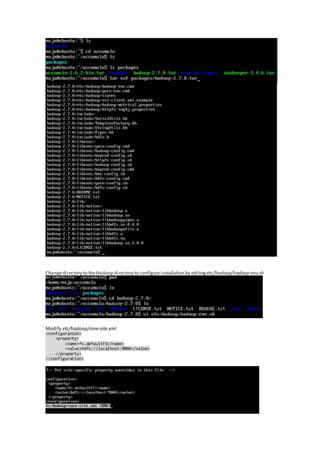
Changedirectory to theHadoop directory to configureinstallation by editingetc/hadoop/hadoop-env.sh
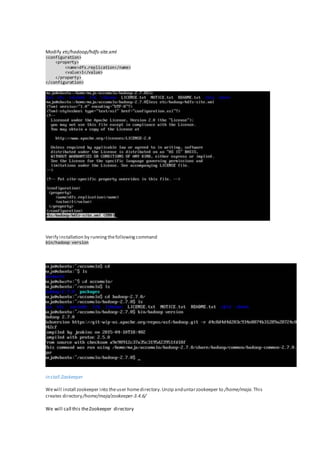
Modify etc/hadoop/core-site.xml
<configuration>
<property>
<name>fs.defaultFS</name>
<value>hdfs://localhost:9000</value>
</property>
</configuration>
Modify etc/hadoop/hdfs-site.xml
<configuration>
<property>
<name>dfs.replication</name>
<value>1</value>
</property>
</configuration>
Verify installation by runningthefollowingcommand
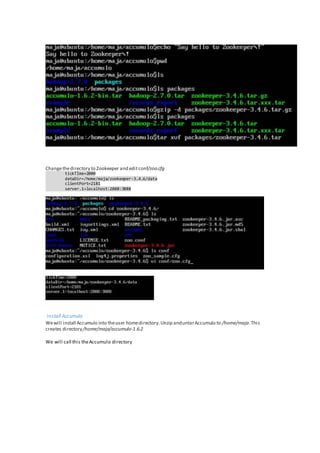
Install Zookeeper
Wewill install zookeeper into theuser homedirectory.Unzip anduntarzookeeper to /home/maja.This
creates directory/home/maja/zookeeper-3.4.6/
We will call this theZookeeper directory
bin/hadoop version
Changethedirectory to Zookeeper and editconf/zoo.cfg
tickTIme=2000
dataDir=/home/maja/zookeeper-3.4.6/data
clientPort=2181
server.1=localhost:2888:3888
Install Accumulo
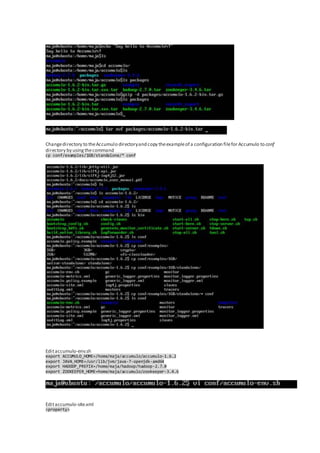
Wewill install Accumulo into theuser homedirectory.Unzip anduntarAccumulo to /home/maja.This
creates directory/home/maja/accumulo-1.6.2
We will call this theAccumulo directory
Changedirectory to theAccumulo directoryand copy theexampleof a configuration filefor Accumulo to conf
directory by usingthecommand
cp conf/examples/1GB/standalone/* conf
Editaccumulo-env.sh
export ACCUMULO_HOME=/home/maja/accumulo/accumulo-1.6.2
export JAVA_HOME=/usr/lib/jvm/java-7-openjdk-amd64
export HADOOP_PREFIX=/home/maja/hadoop/hadoop-2.7.0
export ZOOKEEPER_HOME=home/maja/accumulo/zookeeper-3.4.6
Editaccumulo-site.xml
<property>
<name>instance.zookeeper.host</name>
<value>localhost:2181</value>
</property>
Editbin/start-server.sh (thereis somebug,thatprevents startingthemonitor).After line50 addthe
following:
# ACCUMULO-1985 patch
if [ ${SERVICE} == "monitor" -a ${ACCUMULO_MONITOR_BIND_ALL} == "true" ]; then
ADDRESS = "0.0.0.0"
fi
Phase 3: Running Accumulo
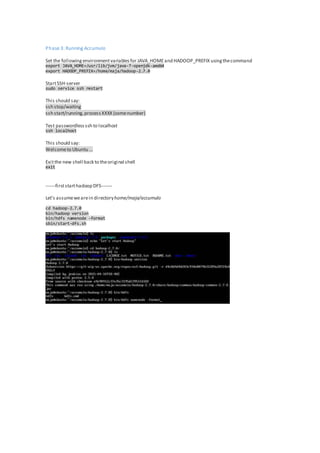
Set the followingenvironmentvariablesfor JAVA_HOMEand HADOOP_PREFIX usingthecommand
export JAVA_HOME=/usr/lib/jvm/java-7-openjdk-amd64
export HADOOP_PREFIX=/home/maja/hadoop-2.7.0
StartSSH-server
sudo service ssh restart
This should say:
ssh stop/waiting
ssh start/running,processXXXX (somenumber)
Test passwordlessssh to localhost
ssh localhost
This should say:
Welcometo Ubuntu ...
Exitthe new shell back to theoriginal shell
exit
------firststarthadoop DFS-------
Let's assumewearein directoryhome/maja/accumulo
cd hadoop-2.7.0
bin/hadoop version
bin/hdfs namenode -format
sbin/start-dfs.sh
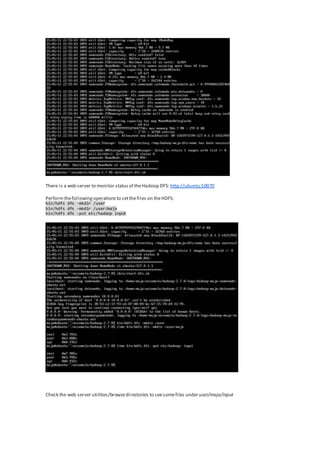
There is a web server to monitor statusof theHadoop DFS: http://ubuntu:50070
Performthefollowing operations to setthefiles on theHDFS:
bin/hdfs dfs -mkdir /user
bin/hdfs dfs -mkdir /user/maja
bin/hdfs dfs -put etc/hadoop input
Check the web server utilities/browsedirectories to seesomefiles under user/maja/input
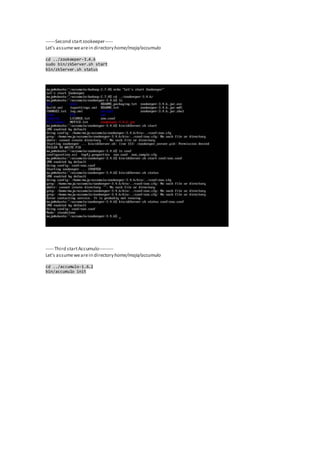
------Second startzookeeper-----
Let's assumewearein directoryhome/maja/accumulo
cd ../zookeeper-3.4.6
sudo bin/zkServer.sh start
bin/zkServer.sh status
----- Third startAccumulo---------
Let's assumewearein directoryhome/maja/accumulo
cd ../accumulo-1.6.2
bin/accumulo init
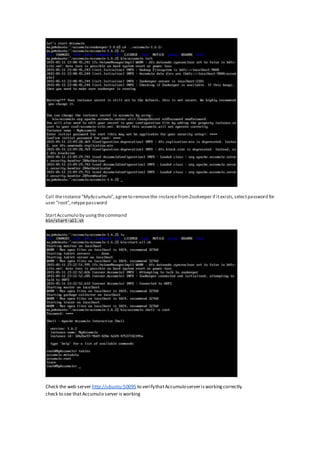
Call theinstance"MyAccumulo",agreeto removethe instancefromZookeeper if itexists,selectpassword for
user "root",retypepassword
StartAccumulo by usingthecommand
bin/start-all.sh
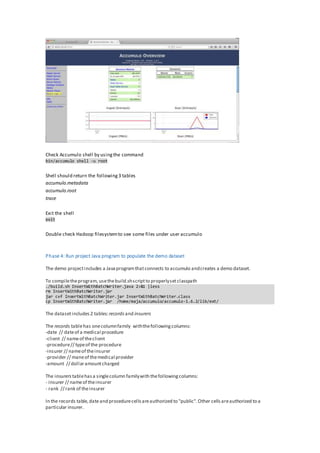
Check the web server http://ubuntu:50095 to verifythatAccumuloserverisworkingcorrectly
check to see thatAccumulo server isworking
Check Accumulo shell by usingthe command
bin/accumulo shell -u root
Shell should return the following3 tables
accumulo.metadata
accumulo.root
trace
Exit the shell
exit
Double check Hadoop filesystemto see some files under user accumulo
Phase 4: Run project Java program to populate the demo dataset
The demo projectincludes a Javaprogramthatconnects to accumulo andcreates a demo dataset.
To compiletheprogram,usethebuild.shscriptto properlysetclasspath
The datasetincludes2 tables:records and insurers
The records tablehas onecolumnfamily withthefollowingcolumns:
-date // dateof a medical procedure
-client // nameof theclient
-procedure// typeof the procedure
-insurer // nameof theinsurer
-provider // maneof themedical provider
-amount // dollaramountcharged
The insurers tablehasa singlecolumn familywith thefollowingcolumns:
- insurer // nameof theinsurer
- rank // rank of theinsurer
In the records table,dateand procedurecellsareauthorized to "public".Other cellsareauthorized to a
particular insurer.
./build.sh InsertWithBatchWriter.java 2>&1 |less
rm InsertWithBatchWriter.jar
jar cvf InsertWithBatchWriter.jar InsertWithBatchWriter.class
cp InsertWithBatchWriter.jar /home/maja/accumulo/accumulo-1.6.2/lib/ext/
First,manually createtableinsurers
bin/accumulo shell -u root
createtable insurers
You check thatthe new tablehasbeen created by usingthecommand
tables
Exitthe Accumulo Shell
exit
Run the InsertWithBatchWriter program
bin/accumulo InsertWithBatchWriter -i MyAccumulo -z localhost:2181 -u root -t records
The programgeneratesrandomsetof insurers,randomsetof providersand a randomsetof proceduretypes.
Then itgenerates a demo datasetof 1,000,000recordswith randomdatesin theperiod1900-2015,and
randompatientnames.Each sensitivecell hasthevisibility of thecorrespondingprovider. Differentcellsin
the tablehavedifferentvisibilities.
The programprintsto screen after each 1000records.
Go back to theAccumulo Shell to validatethatthetableshavebeen created
bin/accumulo shell -u root
tables
The records and insurers tables will belisted
Phase 5: Demonstrate Accumulo capabilities using shell
This isshownin thenextsection.
Phase 6: Stop Accumulo
1.Stop Accumulo
cd accumulo-1.6.2
bin/stop-all.sh
2.Stop Zookeeper
cd ../zookeeper-3.4.6
sudo bin/zkServer.sh stop
3.Stop Hadoop
cd ../hadoop-2.7.0
sbin/stop-dfs.sh
4.0 Demo and Working Code
4.1 Java Code:
import org.apache.accumulo.core.cli.BatchWriterOpts;
import org.apache.accumulo.core.cli.ClientOnRequiredTable;
import org.apache.accumulo.core.client.AccumuloException;
import org.apache.accumulo.core.client.AccumuloSecurityException;
import org.apache.accumulo.core.client.BatchWriter;
import org.apache.accumulo.core.client.Connector;
import org.apache.accumulo.core.client.MultiTableBatchWriter;
import org.apache.accumulo.core.client.MutationsRejectedException;
import org.apache.accumulo.core.client.TableExistsException;
import org.apache.accumulo.core.client.TableNotFoundException;
import org.apache.accumulo.core.data.Mutation;
import org.apache.accumulo.core.data.Value;
import org.apache.hadoop.io.Text;
import org.apache.accumulo.core.security.ColumnVisibility;
import java.util.Random;
import java.util.GregorianCalendar;
/**
* Inserts 10K rows (50K entries) into accumulo with each row having 5
entries.
*/
public class InsertWithBatchWriter {
public static void main(String[] args) throws AccumuloException,
AccumuloSecurityException, MutationsRejectedException,
TableExistsException,
TableNotFoundException {
// public static void main(String[] args) {
ClientOnRequiredTable opts = new ClientOnRequiredTable();
BatchWriterOpts bwOpts = new BatchWriterOpts();
opts.parseArgs(InsertWithBatchWriter.class.getName(), args, bwOpts);
Connector connector = opts.getConnector();
MultiTableBatchWriter mtbw =
connector.createMultiTableBatchWriter(bwOpts.getBatchWriterConfig());
if (!connector.tableOperations().exists(opts.tableName))
connector.tableOperations().create(opts.tableName);
BatchWriter bw = mtbw.getBatchWriter(opts.tableName);
int maxProc=20;
String[] proc=new String[maxProc+1];
for(int i=0;i<maxProc;i++) {
proc[i]=randomString(5);
}
BatchWriter ibw=mtbw.getBatchWriter("insurers");
Text coli=new Text("insurer");
int maxIns=50;
String[] insurer=new String[maxIns+1];
for(int i=0;i<maxIns;i++) {
insurer[i]=randomString(5);
System.out.println("Generating Insurer "+i+insurer[i]);
Mutation mi = new Mutation(new Text(String.format("ins_%d",i)));
long ts=System.currentTimeMillis();
ColumnVisibility colVisAdmin = new ColumnVisibility("Admin");
mi.put(coli, new Text("name"), colVisAdmin, ts, new
Value(insurer[i].getBytes()));
int rank=rnd.nextInt( 10 );
// System.out.println("rank=" + rank);
mi.put(coli, new Text("rank"), colVisAdmin, ts, new
Value((Integer.toString(rank)).getBytes()));
ibw.addMutation(mi);
}
int maxPro=50;
String[] provider=new String[maxPro+1];
for(int i=0;i<maxPro;i++) {
provider[i]=randomString(5);
}
Text colf = new Text("colfam");
System.out.println("writing ...");
for (int i = 0; i < 1000000; i++) {
Mutation m = new Mutation(new Text(String.format("id_%d", i)));
long timestamp=System.currentTimeMillis();
int ppi=rnd.nextInt( maxIns );
// System.out.println("insurer #=" + ppi);
String ins=insurer[ ppi ];
// System.out.println("insurer=" + ins);
String dd=randomDate();
ColumnVisibility colVisPublic = new ColumnVisibility("public");
m.put(colf, new Text("date"), colVisPublic, timestamp, new
Value(dd.getBytes()));
ColumnVisibility colVis = new ColumnVisibility( ins );
String cl=randomString(8);
// System.out.println("client=" + cl);
m.put(colf, new Text("client"), colVis, timestamp, new
Value(cl.getBytes()));
ppi=rnd.nextInt( maxProc );
// System.out.println("procedure #=" + ppi);
String pp=proc[ ppi ];
// System.out.println("procedure=" + pp);
m.put(colf, new Text("procedure"), colVisPublic, timestamp, new
Value(pp.getBytes()));
m.put(colf, new Text("insurer"), colVis, timestamp, new
Value(ins.getBytes()));
ppi=rnd.nextInt( maxPro );
// System.out.println("provider #=" + ppi);
String pro=provider[ ppi];
// System.out.println("provider=" + pro);
m.put(colf, new Text("provider"), colVis, timestamp, new
Value(pro.getBytes()));
int amt=rnd.nextInt( 10000 );
// System.out.println("amount=" + amt);
m.put(colf, new Text("amount"), colVis, timestamp, new
Value((Integer.toString(amt)).getBytes()));
bw.addMutation(m);
if (i % 100 == 0)
System.out.println(i);
}
mtbw.close();
}
static final String AB="0123456789ABCDEFGIJKLMNOPQRSTUVWXYZ";
static Random rnd=new Random();
static String randomString( int len ) {
StringBuilder sb = new StringBuilder( len );
for( int i=0;i<len; i++ )
sb.append( AB.charAt( rnd.nextInt(AB.length())));
return sb.toString();
}
static String randomDate() {
GregorianCalendar gc=new GregorianCalendar();
int year=randomBetween(1900,2015);
gc.set(gc.YEAR, year);
int dayOfYear = randomBetween(1,gc.getActualMaximum(gc.DAY_OF_YEAR));
gc.set(gc.DAY_OF_YEAR, dayOfYear);
String yymmdd=gc.get(gc.YEAR)+"-"+gc.get(gc.MONTH)+"-
"+gc.get(gc.DAY_OF_MONTH);
// System.out.println( "date="+yymmdd);
return yymmdd;
}
private static int randomBetween(int start, int end) {
return start+(int)Math.round(Math.random() * (end-start));
}
}
Pleasenote that this code generates the randomized claims processordata thatis used in the demo. Each
clienthas an identifier,the procedure they got, the year and the insurer through which the clientgot paid
through. When Accumulo is up and running,the Java scriptis then run and the data is populated and used
for further demonstration.
4.2 Demo
Now let’s demonstrate the different visibility settings we have once the code has generated our
randomized data. We have two tables produced, records and insurer. Based on which table we are
scanningthrough and under which authorization,we are restricted to certain types of information as per
what is allowed. Let’s start with just looking in the records table.
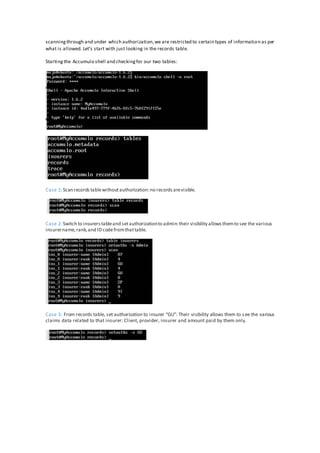
Startingthe Accumulo shell and checkingfor our two tables:
Case 1: Scan recordstablewithoutauthorization:no recordsarevisible.
Case 2: Switch to insurerstableand setauthorizationto admin:their visibility allowsthemto see the various
insurername,rank,and ID codefromthattable.
Case 3: From records table, set authorization to insurer “GU”: Their visibility allows them to see the various
claims data related to that insurer: Client, provider, insurer and amount paid by them only.
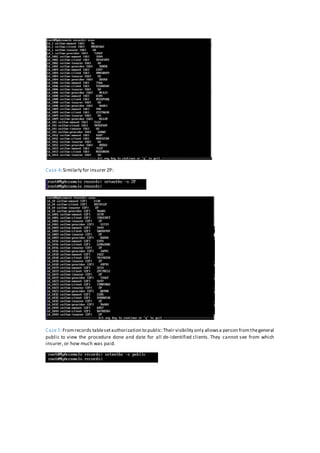
Case 4: Similarly for insurer ZP:
Case 5:Fromrecords tablesetauthorization to public:Their visibility only allowsa person fromthegeneral
public to view the procedure done and date for all de-identified clients. They cannot see from which
insurer, or how much was paid.
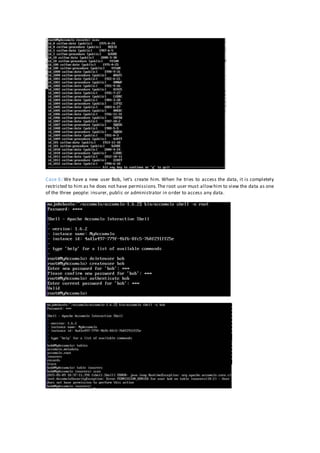
Case 6: We have a new user Bob, let’s create him. When he tries to access the data, it is completely
restricted to him as he does not have permissions.The root user must allowhim to view the data as one
of the three people: insurer, public or administrator in order to access any data.
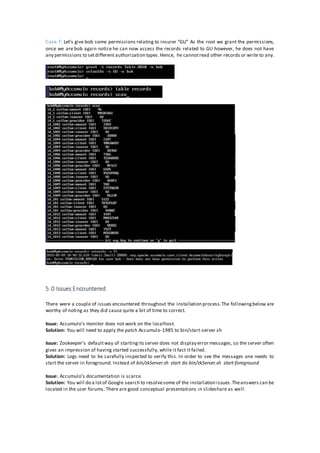
Case 7: Let’s give bob some permissions relating to insurer “GU” As the root we grant the permissions,
once we are bob again notice he can now access the records related to GU however, he does not have
any permissions to setdifferent authorization types.Hence, he cannotread other records or write to any.
5.0 Issues Encountered
There were a couple of issues encountered throughout the installation process.The followingbelow are
worthy of noting as they did cause quite a bit of time to correct.
Issue: Accumulo's monitor does not work on the localhost.
Solution: You will need to apply the patch Accumulo-1985 to bin/start-server.sh
Issue: Zookeeper’s defaultway of startingits server does not display error messages, so the server often
gives an impression of having started successfully, while it fact it failed.
Solution: Logs need to be carefully inspected to verify this. In order to see the messages one needs to
start the server in foreground. Instead of bin/zkServer.sh start do bin/zkServer.sh start-foreground
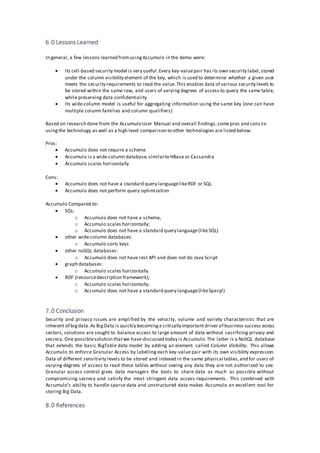
Issue: Accumulo's documentation is scarce.
Solution: You will do a lotof Google search to resolvesome of the installation issues.Theanswers can be
located in the user forums. There are good conceptual presentations in slideshare as well.
6.0 Lessons Learned
In general, a few lessons learned fromusingAccumulo in the demo were:
 Its cell-based security model is very useful.Every key-valuepair has its own security label,stored
under the column visibility element of the key, which is used to determine whether a given user
meets the security requirements to read the value.This enables data of various security levels to
be stored within the same row, and users of varyingdegrees of access to query the same table,
while preserving data confidentiality.
 Its wide-column model is useful for aggregating information using the same key (one can have
multiple column families and column qualifiers)
Based on research done from the Accumulo User Manual and overall findings,somepros and cons to
usingthe technology as well as a high level comparison to other technologies are listed below:
Pros:
 Accumulo does not require a schema
 Accumulo is a wide-column database,similarto HBase or Cassandra
 Accumulo scales horizontally
Cons:
 Accumulo does not have a standard query languagelikeRDF or SQL
 Accumulo does not perform query optimization
Accumulo Compared to:
 SQL:
o Accumulo does not have a schema,
o Accumulo scales horizontally;
o Accumulo does not have a standard query language(likeSQL)
 other wide-column databases:
o Accumulo sorts keys
 other noSQL databases:
o Accumulo does not have rest API and does not do Java Script
 graph databases:
o Accumulo scales horizontally
 RDF (resourcedescription framework);
o Accumulo scales horizontally,
o Accumulo does not have a standard query language(likeSparql)
7.0 Conclusion
Security and privacy issues are amplified by the velocity, volume and variety characteristic that are
inherent of bigdata.As BigData is quickly becominga critically importantdriver of business success across
sectors, solutions are sought to balance access to large amount of data without sacrificing privacy and
secrecy. One possiblesolution thatwe have discussed today is Accumulo.The latter is a NoSQL database
that extends the basic BigTable data model by adding an element called Column Visibility. This allows
Accumulo to enforce Granular Access by labelling each key-value pair with its own visibility expression.
Data of different sensitivity levels to be stored and indexed in the same physical tables,and for users of
varying degrees of access to read these tables without seeing any data they are not authorized to see.
Granular access control gives data managers the tools to share data as much as possible without
compromising secrecy and satisfy the most stringent data access requirements. This combined with
Accumulo’s ability to handle sparse data and unstructured data makes Accumulo an excellent tool for
storing Big Data.
8.0 References
8.1 References
1. http://www.apache.org/
2. Winick,Jared,Introduction to Accumulo Presentation
http://www.slideshare.net/jaredwinick/introduction-to-apache-accumulo
3. Miner,Donald , Introduction to Accumulo Presentation
http://www.slideshare.net/DonaldMiner/an-introduction-to-accumulo
4. Cardova,Aaron , Introduction to Accumulo Presentation
http://www.slideshare.net/acordova00/introductory-training
5. BillieRinaldi,Aaron Cordova, and Michael Wall. Accumulo (early release). O'Reilly Media,Inc.
2015.Ebook. Availableatsafaribooksonline.com
8.2 Useful Resources
Download Accumulo: https://accumulo.apache.org/
Download Zookeeper: https://zookeeper.apache.org/
Download Hadoop: https://hadoop.apache.org/
Apache Accumulo 1.6 User Manual: http://accumulo.apache.org/1.6/accumulo_user_manual.html
Accumulo Installation Instruction: http://sqrrl.com/quick-accumulo-install/

Granular Access Control Using Cell Level Security In Accumulo

  • 1.
  • 2.
    Tableof Contents 1.0 SUMMARY/ABSTRACT.........................................................................................................................................2 1.1 PROBLEM STATEMENT ......................................................................................................................................2 1.2 OVERVIEW OF STEPS ..........................................................................................................................................2 1.3 TECHNOLOGY USED............................................................................................................................................2 1.1 ISSUES ...................................................................................................................................................................2 1.1 LESSON LEARNED................................................................................................................................................2 1.1 SUMMARY............................................................................................................................................................2 2.0 TECHNOLOGY USED...............................................................................................................................................3 3.0 INSTALLATION/CONFIGURATION.......................................................................................................................6 3.1 HIGH LEVELOVERVIEW......................................................................................................................................6 3.2 DETAILED STEPS ..................................................................................................................................................6 PHASE1: DOWNLOAD...................................................................................................................................6 PHASE2: INSTALLATION ...............................................................................................................................6 INSTALL HADOOP................................................................................................................................7 INSTALL ZOOKEEPER..........................................................................................................................10 INSTALL ACCUMULO..........................................................................................................................11 PHASE3: RUNNING ACCUMULO...............................................................................................................14 PHASE4: RUN JAVAPROGRAM TO POPULATEDEMO DATASET .........................................................19 PHASE5: DEMONSTRATE ACCUMULO CAPABILITIES USINGSHELL....................................................20 PHASE6: STOPPING ACCUMULO ..............................................................................................................21 4.0 DEMO AND WORKING CODE ............................................................................................................................21 4.1 JAVACODE.........................................................................................................................................................21 4.2 DEMO..................................................................................................................................................................24 CASE 1 .............................................................................................................................................................24 CASE 2 .............................................................................................................................................................24 CASE 3 .............................................................................................................................................................24 CASE 4 .............................................................................................................................................................25 CASE 5 .............................................................................................................................................................25 CASE 6 .............................................................................................................................................................26 CASE 7 .............................................................................................................................................................27 5.0 ISSUES ENCOUNTERED........................................................................................................................................28 6.0 LESSONS LEARNED ...............................................................................................................................................28 7.0 CONCLUSION.........................................................................................................................................................29 8.0 REFERENCES/USEFUL RESOURCES ...................................................................................................................29 8.1 REFERENCES ......................................................................................................................................................29 8.2 USEFULRESOURCES .........................................................................................................................................29 8.3 YOUTUBELINKS FOR PRESENTATIONS ......................................................................................................................29
  • 3.
    1.0 Summary/Abstract 1.1 ProblemStatement Organizations and governments rely heavily on information provided by big data however, secrecy and privacy issues become magnified because systems are more exposed to vulnerabilities from the use of large-scalecloud infrastructures,with a diversity of software platforms, spread across largenetworks of computers. Traditional security mechanisms are no longer adequate due to the velocity, volume and variety of big data used today. In this paper, we will be looking at the security property that matters from the perspective of access control i.e. how do we prevent access to data by people that should not have access? 1.2 Overview of Steps As a solution to the problem statement, I will be looking at the concept of granular access control (the ability to allowdata sharingas much as possible without compromising secrecy) to show how its theory can be adapted to bigdata sets.After installingZookeeper and Accumulo on my MacOS, I ran both servers and used a Java Scriptto create a largerandomized data set simulatinga claims processor.The example demonstrates how different levels of access can be administered depending on who you are: an administrator, insurer or part of the general public. 1.3 Technology Used Accumulo is based on Google’s BigTable design and is built on top of Apache Hadoop, Zookeeper, and Thrift. Accumulo’s key feature is that it is well suited to store sparse high dimensional data and uses ColumnVisibility to allowthefilteringof users based on the presentation of the appropriateauthorization i.e. only data that has the correct visibility label will be returned to the user. This allows the implementation of granular access control at the cell in contrast to more traditional access methods where rows, columns or even tables would be restricted to users. This form of security maximizes the utility we receive by aggregating various sources of big data without compromising privacy or secrecy. This is particularly useful for BigData where concerns around privacy of data has been risingover the past few years. 1.4 Issues Throughout the installation of Zookeeper and Accumulo, there were some issues encountered but the biggest one would be the scarcity of documentation available.There was a great deal of research done in user forums in order to resolve some of the installation issues. However, there are good conceptual presentations in Slideshare. 1.5 Lessons Learned 1.6 Summary Accumulo proved to be a relatively straightforward technology to use once installation humps had been overcome. Its cell-based security model is very useful as data sharingwithout compromisingsecrecy is a big security issue we face in terms of big data. The ability of implementing granular access control with Accumulo gives data managers more flexibility in sharing data securely. Pros Cons Accumulo does not require a schema Accumulo does not perform query optimization Accuulo is a wide column database, similar to HBase or Cassandra Accumulo does not have a standard query language like RDF or SQL Accumulo scales horizontally
  • 4.
    2.0 Technology Used Accordingthe book Accumulo by Rinaldi, Wall and Cordova6: Apache Accumulo is a highly scalable, distributed, open source database modeled after Google’s BigTable design. Accumulo is built to store up to trillions of data elements and keeps them organized so that users can perform fast lookups. Accumulo supports flexible data schemas and scales horizontally across thousands of machines. Applications built on Accumulo are capable of serving a large number of users and can process many requests per second, making Accumulo an ideal choice for terabyte to petabyte-scale projects. Accumulo began its development in 2008 when a group of computer scientists and mathematiciansatthe National Security Agency were evaluatingvarious bigdata technologies to help solvethe issues involved with storingand processinglargeamounts of data of different sensitivity levels.In 2011,Accumulo j oined Apache community with Doug Cutting (founder of Hadoop) as its sponsoringchampion.In March of the following year, Accumulo graduated to a top level project1. Apache Accumulo is based on Google's BigTabledesign and is built on top of Apache Hadoop, Zookeeper, and Thrift.Accumulo relies on Hadoop HDFS to providepersistentstorage,replication,and faulttolerance, Zookeeper for highly reliabledistributed coordination of servers and Thrift to define and create services in languages other than Java - Accumulo is written in the latter. At its core, Accumulo stores key-value pairs which allowusers to look up the value of a particular key or range of keys very quickly.Values arestored as byte arrays and Accumulo doesn’t restrictthe type or size of the values stored. The data model is illustrated below. The key is multi-dimensional and consistof a rowid,a column family,a column qualifier,a column visibility and a timestamp. In the Accumulo, all data that sharethe same Row ID are considered to be part of the samerecord i.e.multiplerows usually contributeto one record.This is in contrastto more traditional data models where each record is stored on a row. The columnFamily and the ColumnQualifier are used as attributes to uniquely qualify each row of the Accumulo such that each row in Accumulo can be thought as a cell of traditional data model.This ability to store data in individual cell makes Accumulo well suited
  • 5.
    to store sparsehighdimensional data.The ColumnVisibility is used to allowthe filteringof users based on the presentation of the appropriateauthorization i.e.only data that has the correctvisibility label will be returned to the user. This allows the implementation of granular access control atthe cell in contrast to more traditional access methods where rows, columns or even tables would be restricted to users. This form of security maximizes the utility we receive by aggregating various sources of big data without compromisingprivacy or secrecy. This particularly useful for Big Data where concerns around privacy of data has been rising over the past few years. In the physical data representation below,only data that with the ColumnVisibility Public will bereturned to a user that has the authorization publicwhiletheremainingdata with the inappropriateVisibility label are not returned to the user. Accumulo will also notallowusers to write data that does not match their visibility label.In our previous example, someone with the Public ColumnVisibility label cannotwrite a row where the ColumnVisibility is set to Private Accumulo supports user access control level.However it is usually easier to label information visibility based on groups. For example if John is leavingthe Financedepartment for the Marketing department, it is easier to change the authorization associated with John from Financeto Marketing rather than havingall visibilities associated with visibility label John in the databasechanged to the person that is replacingJohn. Accumulo supports logical AND & and OR | combinations of tokens, as well as nesting groups () of tokens together. This allows only users thatmeet a combination of labels to read those rows. Usingthis approach we can further dividefrom groups to functions within that group. For example two people working for the Financedepartment could have the label Finance&Reporting and Finance&Auditing. A typical useof granular access control isshown below. Label Description A & B Both 'A' and 'B' are required A | B Either 'A' or 'B' is required A & (C | B) 'A' and 'C' or 'A' and 'B' are required A | (B & C) 'A' or both 'B' and 'C' are required
  • 6.
    Like any securitymeasures the features Accumulo provides must be coordinated with other system security measures in order to achievethe maximum protection. Other security considerations when using Accumulo are: Accumulo will authenticatea user and authorize that user to read data accordingto the security labels present within that data and the authorizations granted to the user. All other means of accessing Accumulo tabledata must be restricted. Rinaldi,Wall and Cordova6 proposethe followingpoints to help in that respect:  Access to files stored by Accumulo on HDFS must be restricted. This includes accessto both the RFiles,which store longterm data,and Accumulo’s write-ahead logs,which store recently written data.Accumulo should be the only application allowed to access these files in HDFS.  HDFS stores blocks of files in an underlyingLinux filesystem. Users who have access to blocks of HDFS data stored in the Linux filesystemwould also bypassdata-level protections.Access to the filedirectories on which HDFS data is stored should be limited to the HDFS daemon user.  Direct access to Tablet Servers must be limited to trusted applications - this is becausethe application istrusted to present the proper Authorizations at scan time. A rogue clientmay be configured to pass in Authorizations theuser does not have.  IPTables or other firewall implementations can beused to help restrictaccess to TCP ports.  Access to ZooKeeper should be restricted as Accumulo uses it to store configuration information aboutthe cluster.  Communication between nodes and to HDFS and ZooKeeper should be protected against unauthorized access.  accumulo-site.xml fileshould bereadableonly to the accumulo user, as itcontains the instance-secret and the traceuser’s password.A separateconf directory with files readable by other users can be created for clientuse, with an accumulo-site.xml filethatdoes not contain those two properties. Source: Winick, Jared,Slideshare
  • 7.
    3.0 Installation/Configuration 3.1: High-leveloverview Phase1: Download Phase2: Installation Phase3: RunningAccumulo Phase4: Run Java program to populate the demo dataset Phase5: Demonstrate Accumulo capabilities usingshell Phase6: Stopping Accumulo 3.2: Detailed steps Phase 1: Download 1. Download Accumulo 1.6.2.tar.gz 2. Download Hadoop 2.7.0.tar.gz 3. Download Zookeeper-3.4.6.tar.gz Phase 2: Installation Prerequisite: You need Java 7 JRE for the software and JDK for projectsoftware. I am usingopenjava-7- jdk. This can be done by usingthe command Itis also importantthatOpenJDK isdefaultjava.Thiscan beverifiedby usingthecommand java –version Itshould reportjavaversion "1.0.7_79" OpenJDK RuntimeEnvironment Note: To find theinstall path forOpenJDK;you can usecommand readlink -f $(which java) EnsurethattheJava/binhasbeen added to $PATHby usingthecommand The java configuration should look similar to the printscreen below sudo apt-get openjdk-jdk Echo $PATH
  • 8.
    Prerequisite: You needa SSH server and a SSH clientto perform passwordless accessto localhost. Typically,you would use the followingcommand to install them sudo apt-get ssh-client ssh-server Assumingwe are logged at the machine called "ubuntu" as user "maja". Create the accumulo directory cd ~ mkdir accumulo cd accumulo This is goingto be the project directory (/home/maja/accumulo). Install Hadoop We will install Hadoop into a user home directory. Unzip and untar Hadoop to /home/maja, this creates directory /home/maja/hadoop-2.7.0/ We will call this theHadoop directory The appropriatedocumentation for Hadoop can be found at the followingwebsite http://hadoop.apache.org/docs/current/hadoop-project-dist/hadoop-common/SingleCluster.html We areinstallinga singlenodecluster,and will run itis pseudo distributed mode
  • 9.
    Changedirectory to theHadoopdirectory to configureinstallation by editingetc/hadoop/hadoop-env.sh Modify etc/hadoop/core-site.xml <configuration> <property> <name>fs.defaultFS</name> <value>hdfs://localhost:9000</value> </property> </configuration>
  • 10.
    Modify etc/hadoop/hdfs-site.xml <configuration> <property> <name>dfs.replication</name> <value>1</value> </property> </configuration> Verify installationby runningthefollowingcommand Install Zookeeper Wewill install zookeeper into theuser homedirectory.Unzip anduntarzookeeper to /home/maja.This creates directory/home/maja/zookeeper-3.4.6/ We will call this theZookeeper directory bin/hadoop version
  • 11.
    Changethedirectory to Zookeeperand editconf/zoo.cfg tickTIme=2000 dataDir=/home/maja/zookeeper-3.4.6/data clientPort=2181 server.1=localhost:2888:3888 Install Accumulo Wewill install Accumulo into theuser homedirectory.Unzip anduntarAccumulo to /home/maja.This creates directory/home/maja/accumulo-1.6.2 We will call this theAccumulo directory
  • 12.
    Changedirectory to theAccumulodirectoryand copy theexampleof a configuration filefor Accumulo to conf directory by usingthecommand cp conf/examples/1GB/standalone/* conf Editaccumulo-env.sh export ACCUMULO_HOME=/home/maja/accumulo/accumulo-1.6.2 export JAVA_HOME=/usr/lib/jvm/java-7-openjdk-amd64 export HADOOP_PREFIX=/home/maja/hadoop/hadoop-2.7.0 export ZOOKEEPER_HOME=home/maja/accumulo/zookeeper-3.4.6 Editaccumulo-site.xml <property>
  • 13.
    <name>instance.zookeeper.host</name> <value>localhost:2181</value> </property> Editbin/start-server.sh (thereis somebug,thatpreventsstartingthemonitor).After line50 addthe following: # ACCUMULO-1985 patch if [ ${SERVICE} == "monitor" -a ${ACCUMULO_MONITOR_BIND_ALL} == "true" ]; then ADDRESS = "0.0.0.0" fi
  • 14.
    Phase 3: RunningAccumulo Set the followingenvironmentvariablesfor JAVA_HOMEand HADOOP_PREFIX usingthecommand export JAVA_HOME=/usr/lib/jvm/java-7-openjdk-amd64 export HADOOP_PREFIX=/home/maja/hadoop-2.7.0 StartSSH-server sudo service ssh restart This should say: ssh stop/waiting ssh start/running,processXXXX (somenumber) Test passwordlessssh to localhost ssh localhost This should say: Welcometo Ubuntu ... Exitthe new shell back to theoriginal shell exit ------firststarthadoop DFS------- Let's assumewearein directoryhome/maja/accumulo cd hadoop-2.7.0 bin/hadoop version bin/hdfs namenode -format sbin/start-dfs.sh
  • 15.
    There is aweb server to monitor statusof theHadoop DFS: http://ubuntu:50070 Performthefollowing operations to setthefiles on theHDFS: bin/hdfs dfs -mkdir /user bin/hdfs dfs -mkdir /user/maja bin/hdfs dfs -put etc/hadoop input Check the web server utilities/browsedirectories to seesomefiles under user/maja/input
  • 16.
    ------Second startzookeeper----- Let's assumeweareindirectoryhome/maja/accumulo cd ../zookeeper-3.4.6 sudo bin/zkServer.sh start bin/zkServer.sh status ----- Third startAccumulo--------- Let's assumewearein directoryhome/maja/accumulo cd ../accumulo-1.6.2 bin/accumulo init
  • 17.
    Call theinstance"MyAccumulo",agreeto removetheinstancefromZookeeper if itexists,selectpassword for user "root",retypepassword StartAccumulo by usingthecommand bin/start-all.sh Check the web server http://ubuntu:50095 to verifythatAccumuloserverisworkingcorrectly check to see thatAccumulo server isworking
  • 18.
    Check Accumulo shellby usingthe command bin/accumulo shell -u root Shell should return the following3 tables accumulo.metadata accumulo.root trace Exit the shell exit Double check Hadoop filesystemto see some files under user accumulo Phase 4: Run project Java program to populate the demo dataset The demo projectincludes a Javaprogramthatconnects to accumulo andcreates a demo dataset. To compiletheprogram,usethebuild.shscriptto properlysetclasspath The datasetincludes2 tables:records and insurers The records tablehas onecolumnfamily withthefollowingcolumns: -date // dateof a medical procedure -client // nameof theclient -procedure// typeof the procedure -insurer // nameof theinsurer -provider // maneof themedical provider -amount // dollaramountcharged The insurers tablehasa singlecolumn familywith thefollowingcolumns: - insurer // nameof theinsurer - rank // rank of theinsurer In the records table,dateand procedurecellsareauthorized to "public".Other cellsareauthorized to a particular insurer. ./build.sh InsertWithBatchWriter.java 2>&1 |less rm InsertWithBatchWriter.jar jar cvf InsertWithBatchWriter.jar InsertWithBatchWriter.class cp InsertWithBatchWriter.jar /home/maja/accumulo/accumulo-1.6.2/lib/ext/
  • 19.
    First,manually createtableinsurers bin/accumulo shell-u root createtable insurers You check thatthe new tablehasbeen created by usingthecommand tables Exitthe Accumulo Shell exit Run the InsertWithBatchWriter program bin/accumulo InsertWithBatchWriter -i MyAccumulo -z localhost:2181 -u root -t records The programgeneratesrandomsetof insurers,randomsetof providersand a randomsetof proceduretypes. Then itgenerates a demo datasetof 1,000,000recordswith randomdatesin theperiod1900-2015,and randompatientnames.Each sensitivecell hasthevisibility of thecorrespondingprovider. Differentcellsin the tablehavedifferentvisibilities. The programprintsto screen after each 1000records. Go back to theAccumulo Shell to validatethatthetableshavebeen created bin/accumulo shell -u root tables The records and insurers tables will belisted Phase 5: Demonstrate Accumulo capabilities using shell This isshownin thenextsection. Phase 6: Stop Accumulo 1.Stop Accumulo cd accumulo-1.6.2 bin/stop-all.sh 2.Stop Zookeeper cd ../zookeeper-3.4.6 sudo bin/zkServer.sh stop 3.Stop Hadoop cd ../hadoop-2.7.0 sbin/stop-dfs.sh
  • 20.
    4.0 Demo andWorking Code 4.1 Java Code: import org.apache.accumulo.core.cli.BatchWriterOpts; import org.apache.accumulo.core.cli.ClientOnRequiredTable; import org.apache.accumulo.core.client.AccumuloException; import org.apache.accumulo.core.client.AccumuloSecurityException; import org.apache.accumulo.core.client.BatchWriter; import org.apache.accumulo.core.client.Connector; import org.apache.accumulo.core.client.MultiTableBatchWriter; import org.apache.accumulo.core.client.MutationsRejectedException; import org.apache.accumulo.core.client.TableExistsException; import org.apache.accumulo.core.client.TableNotFoundException; import org.apache.accumulo.core.data.Mutation; import org.apache.accumulo.core.data.Value; import org.apache.hadoop.io.Text; import org.apache.accumulo.core.security.ColumnVisibility; import java.util.Random; import java.util.GregorianCalendar; /** * Inserts 10K rows (50K entries) into accumulo with each row having 5 entries. */ public class InsertWithBatchWriter { public static void main(String[] args) throws AccumuloException, AccumuloSecurityException, MutationsRejectedException, TableExistsException, TableNotFoundException {
  • 21.
    // public staticvoid main(String[] args) { ClientOnRequiredTable opts = new ClientOnRequiredTable(); BatchWriterOpts bwOpts = new BatchWriterOpts(); opts.parseArgs(InsertWithBatchWriter.class.getName(), args, bwOpts); Connector connector = opts.getConnector(); MultiTableBatchWriter mtbw = connector.createMultiTableBatchWriter(bwOpts.getBatchWriterConfig()); if (!connector.tableOperations().exists(opts.tableName)) connector.tableOperations().create(opts.tableName); BatchWriter bw = mtbw.getBatchWriter(opts.tableName); int maxProc=20; String[] proc=new String[maxProc+1]; for(int i=0;i<maxProc;i++) { proc[i]=randomString(5); } BatchWriter ibw=mtbw.getBatchWriter("insurers"); Text coli=new Text("insurer"); int maxIns=50; String[] insurer=new String[maxIns+1]; for(int i=0;i<maxIns;i++) { insurer[i]=randomString(5); System.out.println("Generating Insurer "+i+insurer[i]); Mutation mi = new Mutation(new Text(String.format("ins_%d",i))); long ts=System.currentTimeMillis(); ColumnVisibility colVisAdmin = new ColumnVisibility("Admin"); mi.put(coli, new Text("name"), colVisAdmin, ts, new Value(insurer[i].getBytes())); int rank=rnd.nextInt( 10 ); // System.out.println("rank=" + rank); mi.put(coli, new Text("rank"), colVisAdmin, ts, new Value((Integer.toString(rank)).getBytes())); ibw.addMutation(mi); } int maxPro=50; String[] provider=new String[maxPro+1]; for(int i=0;i<maxPro;i++) { provider[i]=randomString(5); } Text colf = new Text("colfam"); System.out.println("writing ..."); for (int i = 0; i < 1000000; i++) { Mutation m = new Mutation(new Text(String.format("id_%d", i))); long timestamp=System.currentTimeMillis(); int ppi=rnd.nextInt( maxIns ); // System.out.println("insurer #=" + ppi); String ins=insurer[ ppi ]; // System.out.println("insurer=" + ins); String dd=randomDate(); ColumnVisibility colVisPublic = new ColumnVisibility("public"); m.put(colf, new Text("date"), colVisPublic, timestamp, new Value(dd.getBytes())); ColumnVisibility colVis = new ColumnVisibility( ins ); String cl=randomString(8); // System.out.println("client=" + cl); m.put(colf, new Text("client"), colVis, timestamp, new Value(cl.getBytes())); ppi=rnd.nextInt( maxProc );
  • 22.
    // System.out.println("procedure #="+ ppi); String pp=proc[ ppi ]; // System.out.println("procedure=" + pp); m.put(colf, new Text("procedure"), colVisPublic, timestamp, new Value(pp.getBytes())); m.put(colf, new Text("insurer"), colVis, timestamp, new Value(ins.getBytes())); ppi=rnd.nextInt( maxPro ); // System.out.println("provider #=" + ppi); String pro=provider[ ppi]; // System.out.println("provider=" + pro); m.put(colf, new Text("provider"), colVis, timestamp, new Value(pro.getBytes())); int amt=rnd.nextInt( 10000 ); // System.out.println("amount=" + amt); m.put(colf, new Text("amount"), colVis, timestamp, new Value((Integer.toString(amt)).getBytes())); bw.addMutation(m); if (i % 100 == 0) System.out.println(i); } mtbw.close(); } static final String AB="0123456789ABCDEFGIJKLMNOPQRSTUVWXYZ"; static Random rnd=new Random(); static String randomString( int len ) { StringBuilder sb = new StringBuilder( len ); for( int i=0;i<len; i++ ) sb.append( AB.charAt( rnd.nextInt(AB.length()))); return sb.toString(); } static String randomDate() { GregorianCalendar gc=new GregorianCalendar(); int year=randomBetween(1900,2015); gc.set(gc.YEAR, year); int dayOfYear = randomBetween(1,gc.getActualMaximum(gc.DAY_OF_YEAR)); gc.set(gc.DAY_OF_YEAR, dayOfYear); String yymmdd=gc.get(gc.YEAR)+"-"+gc.get(gc.MONTH)+"- "+gc.get(gc.DAY_OF_MONTH); // System.out.println( "date="+yymmdd); return yymmdd; } private static int randomBetween(int start, int end) { return start+(int)Math.round(Math.random() * (end-start)); } } Pleasenote that this code generates the randomized claims processordata thatis used in the demo. Each clienthas an identifier,the procedure they got, the year and the insurer through which the clientgot paid through. When Accumulo is up and running,the Java scriptis then run and the data is populated and used for further demonstration. 4.2 Demo Now let’s demonstrate the different visibility settings we have once the code has generated our randomized data. We have two tables produced, records and insurer. Based on which table we are
  • 23.
    scanningthrough and underwhich authorization,we are restricted to certain types of information as per what is allowed. Let’s start with just looking in the records table. Startingthe Accumulo shell and checkingfor our two tables: Case 1: Scan recordstablewithoutauthorization:no recordsarevisible. Case 2: Switch to insurerstableand setauthorizationto admin:their visibility allowsthemto see the various insurername,rank,and ID codefromthattable. Case 3: From records table, set authorization to insurer “GU”: Their visibility allows them to see the various claims data related to that insurer: Client, provider, insurer and amount paid by them only.
  • 24.
    Case 4: Similarlyfor insurer ZP: Case 5:Fromrecords tablesetauthorization to public:Their visibility only allowsa person fromthegeneral public to view the procedure done and date for all de-identified clients. They cannot see from which insurer, or how much was paid.
  • 25.
    Case 6: Wehave a new user Bob, let’s create him. When he tries to access the data, it is completely restricted to him as he does not have permissions.The root user must allowhim to view the data as one of the three people: insurer, public or administrator in order to access any data.
  • 26.
    Case 7: Let’sgive bob some permissions relating to insurer “GU” As the root we grant the permissions, once we are bob again notice he can now access the records related to GU however, he does not have any permissions to setdifferent authorization types.Hence, he cannotread other records or write to any. 5.0 Issues Encountered There were a couple of issues encountered throughout the installation process.The followingbelow are worthy of noting as they did cause quite a bit of time to correct. Issue: Accumulo's monitor does not work on the localhost. Solution: You will need to apply the patch Accumulo-1985 to bin/start-server.sh Issue: Zookeeper’s defaultway of startingits server does not display error messages, so the server often gives an impression of having started successfully, while it fact it failed. Solution: Logs need to be carefully inspected to verify this. In order to see the messages one needs to start the server in foreground. Instead of bin/zkServer.sh start do bin/zkServer.sh start-foreground Issue: Accumulo's documentation is scarce. Solution: You will do a lotof Google search to resolvesome of the installation issues.Theanswers can be located in the user forums. There are good conceptual presentations in slideshare as well.
  • 27.
    6.0 Lessons Learned Ingeneral, a few lessons learned fromusingAccumulo in the demo were:  Its cell-based security model is very useful.Every key-valuepair has its own security label,stored under the column visibility element of the key, which is used to determine whether a given user meets the security requirements to read the value.This enables data of various security levels to be stored within the same row, and users of varyingdegrees of access to query the same table, while preserving data confidentiality.  Its wide-column model is useful for aggregating information using the same key (one can have multiple column families and column qualifiers) Based on research done from the Accumulo User Manual and overall findings,somepros and cons to usingthe technology as well as a high level comparison to other technologies are listed below: Pros:  Accumulo does not require a schema  Accumulo is a wide-column database,similarto HBase or Cassandra  Accumulo scales horizontally Cons:  Accumulo does not have a standard query languagelikeRDF or SQL  Accumulo does not perform query optimization Accumulo Compared to:  SQL: o Accumulo does not have a schema, o Accumulo scales horizontally; o Accumulo does not have a standard query language(likeSQL)  other wide-column databases: o Accumulo sorts keys  other noSQL databases: o Accumulo does not have rest API and does not do Java Script  graph databases: o Accumulo scales horizontally  RDF (resourcedescription framework); o Accumulo scales horizontally, o Accumulo does not have a standard query language(likeSparql) 7.0 Conclusion Security and privacy issues are amplified by the velocity, volume and variety characteristic that are inherent of bigdata.As BigData is quickly becominga critically importantdriver of business success across sectors, solutions are sought to balance access to large amount of data without sacrificing privacy and secrecy. One possiblesolution thatwe have discussed today is Accumulo.The latter is a NoSQL database that extends the basic BigTable data model by adding an element called Column Visibility. This allows Accumulo to enforce Granular Access by labelling each key-value pair with its own visibility expression. Data of different sensitivity levels to be stored and indexed in the same physical tables,and for users of varying degrees of access to read these tables without seeing any data they are not authorized to see. Granular access control gives data managers the tools to share data as much as possible without compromising secrecy and satisfy the most stringent data access requirements. This combined with Accumulo’s ability to handle sparse data and unstructured data makes Accumulo an excellent tool for storing Big Data. 8.0 References
  • 28.
    8.1 References 1. http://www.apache.org/ 2.Winick,Jared,Introduction to Accumulo Presentation http://www.slideshare.net/jaredwinick/introduction-to-apache-accumulo 3. Miner,Donald , Introduction to Accumulo Presentation http://www.slideshare.net/DonaldMiner/an-introduction-to-accumulo 4. Cardova,Aaron , Introduction to Accumulo Presentation http://www.slideshare.net/acordova00/introductory-training 5. BillieRinaldi,Aaron Cordova, and Michael Wall. Accumulo (early release). O'Reilly Media,Inc. 2015.Ebook. Availableatsafaribooksonline.com 8.2 Useful Resources Download Accumulo: https://accumulo.apache.org/ Download Zookeeper: https://zookeeper.apache.org/ Download Hadoop: https://hadoop.apache.org/ Apache Accumulo 1.6 User Manual: http://accumulo.apache.org/1.6/accumulo_user_manual.html Accumulo Installation Instruction: http://sqrrl.com/quick-accumulo-install/