SAP IT Runs SAP Screen Personas
Martin Lang, SAP IT
TechEd 2013
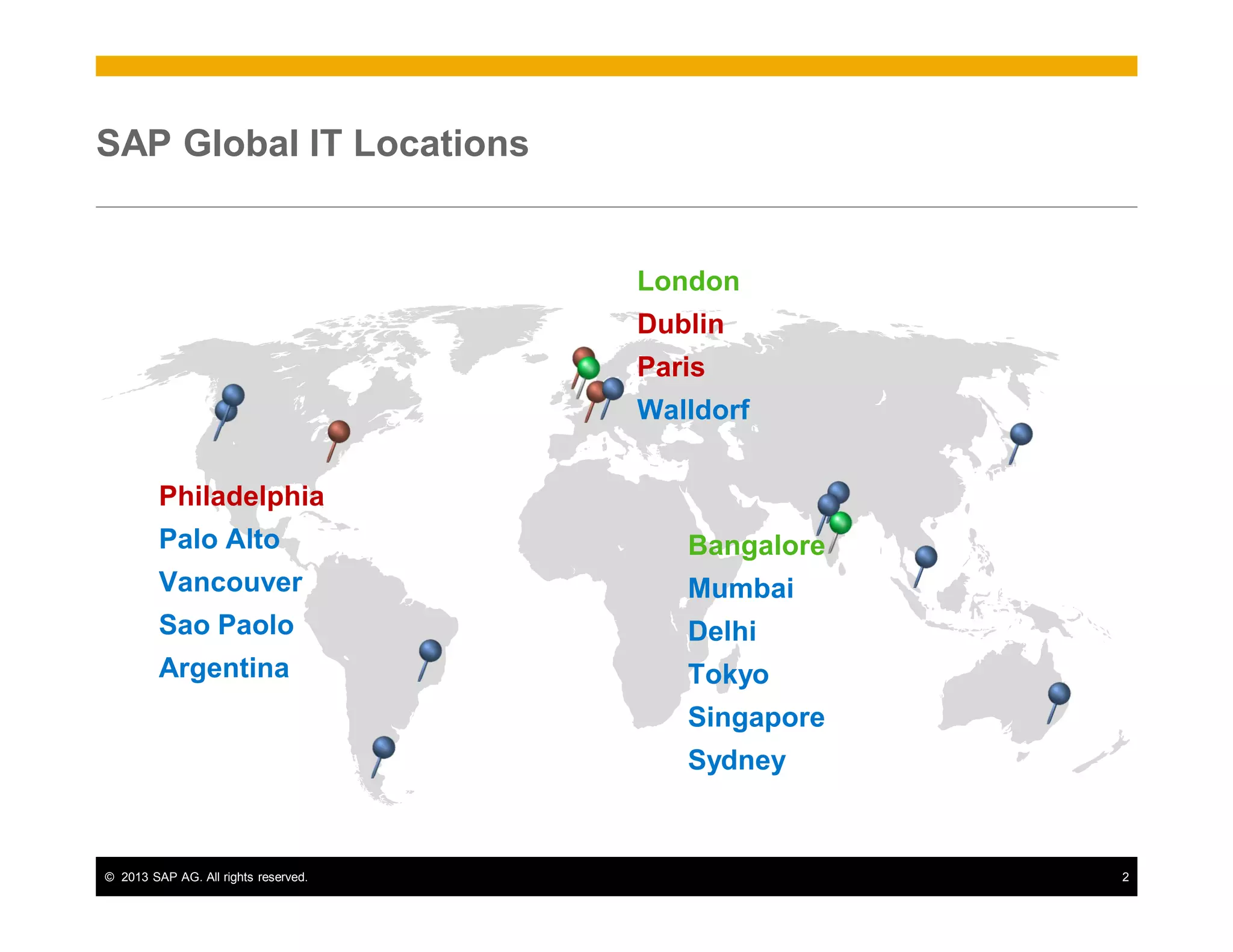
SAP Global IT Locations

London
Dublin
Paris
Walldorf
Philadelphia
Palo Alto

Bangalore

Vancouver

Mumbai

Sao Paolo

Delhi

Argentina

Tokyo
Singapore
Sydney

© 2013 SAP AG. All rights reserved.

2
Our Global IT Vision:
Be the strategic enabler and trusted business partner
Applications

SAP Corporate Strategy 2015:

Analytics

Mobile

Cloud

Database /
Technology

#1 in Mobility
Fastest Growing Database Company

SAP Lines of Business – driving strategy execution and successful go-to-market

Business Information Officers – turning business needs into strategic demand for Global IT
TIP

AGS

Products &
Solutions

GFO

Global
Marketing

Services

F&A

HR

Global IT

Office of the
CEO

SAP Global IT Operating Model
Scalable Global Delivery Model

Input
Governance:
IT Client Engagement
& Demand
Management

PLAN

BUILD

Output

RUN

Business
Value &
Innovation

Enterprise Architecture (EA)
Adoption & Risk Mitigation
Efficiency:IT Finance Management & Cost Transparency
Make Our People Best

© 2013 SAP AG. All rights reserved.

3
SAP Screen Personas project

Key business drivers
1.

Simplify how users interact with SAP

2.

Streamline complex transactions

3.

Improve adoption of key SAP processes

Use cases
1.

Accrual Cockpit

2.

Time Recording

© 2013 SAP AG. All rights reserved.

4
Use Case 1: Accrual Cockpit
PERSONAS FLAVOR

STANDARD

© 2013 SAP AG. All rights reserved.

5
Standard Selection Screen

© 2013 SAP AG. All rights reserved.

6
Flavored Result Screen – All Roles – DESIGN 1

© 2013 SAP AG. All rights reserved.

7
Flavored Result Screen – All Roles – DESIGN 1- Details
General and
mandatory selection
fields at the top

Selection fields
grouped by role for
easy access

Jump to Wiki

Navigate to
relevant
Reports
© 2013 SAP AG. All rights reserved.

Navigate to
relevant Info
sources

Promote or
announce
current infos
8
Flavored Result Screen – All Roles – DESIGN 2

© 2013 SAP AG. All rights reserved.

9
Flavored Result Screen – Role: Goods Recipients
Interviews with end users showed that 3 selection fields are sufficient

© 2013 SAP AG. All rights reserved.

10
Standard Result Screen
Consists only of one huge table

© 2013 SAP AG. All rights reserved.

11
Flavored Result Screen

© 2013 SAP AG. All rights reserved.

12
Flavored Result Screen - Details

Result table much
more clearer,
containing mainly
required input fields

Enriched with
script calculated
outputs
Other relevant data
is presented in info
boxes

© 2013 SAP AG. All rights reserved.

13
Use Case 2: Time recording

© 2013 SAP AG. All rights reserved.

14
Time Recording: Flavored Screen

Easy to use
Transaction Launcher
Short links to
Corporate Portal

Possibility to look up
information of
colleagues very fast

Simplified Activity
Recording, no
need for entering
CATSXT anymore

© 2013 SAP AG. All rights reserved.

Individual
information, e.g.
based on location

15
Lessons Learned

Technical
•

Follow the documentation

•

No surprises (just as I like it!)

Process
•

Collaborate with business owners – focus on needs

•

Use design thinking – whiteboard everything first

•

Prioritize – start small and build

•

Iterate – learn from your mistakes

© 2013 SAP AG. All rights reserved.

16
Thank You!

www.sapscreenpersonas.com

SAP IT session on SAP Screen Personas at TechEd 2013

  • 1.
    SAP IT RunsSAP Screen Personas Martin Lang, SAP IT TechEd 2013
  • 2.
    SAP Global ITLocations London Dublin Paris Walldorf Philadelphia Palo Alto Bangalore Vancouver Mumbai Sao Paolo Delhi Argentina Tokyo Singapore Sydney © 2013 SAP AG. All rights reserved. 2
  • 3.
    Our Global ITVision: Be the strategic enabler and trusted business partner Applications SAP Corporate Strategy 2015: Analytics Mobile Cloud Database / Technology #1 in Mobility Fastest Growing Database Company SAP Lines of Business – driving strategy execution and successful go-to-market Business Information Officers – turning business needs into strategic demand for Global IT TIP AGS Products & Solutions GFO Global Marketing Services F&A HR Global IT Office of the CEO SAP Global IT Operating Model Scalable Global Delivery Model Input Governance: IT Client Engagement & Demand Management PLAN BUILD Output RUN Business Value & Innovation Enterprise Architecture (EA) Adoption & Risk Mitigation Efficiency:IT Finance Management & Cost Transparency Make Our People Best © 2013 SAP AG. All rights reserved. 3
  • 4.
    SAP Screen Personasproject Key business drivers 1. Simplify how users interact with SAP 2. Streamline complex transactions 3. Improve adoption of key SAP processes Use cases 1. Accrual Cockpit 2. Time Recording © 2013 SAP AG. All rights reserved. 4
  • 5.
    Use Case 1:Accrual Cockpit PERSONAS FLAVOR STANDARD © 2013 SAP AG. All rights reserved. 5
  • 6.
    Standard Selection Screen ©2013 SAP AG. All rights reserved. 6
  • 7.
    Flavored Result Screen– All Roles – DESIGN 1 © 2013 SAP AG. All rights reserved. 7
  • 8.
    Flavored Result Screen– All Roles – DESIGN 1- Details General and mandatory selection fields at the top Selection fields grouped by role for easy access Jump to Wiki Navigate to relevant Reports © 2013 SAP AG. All rights reserved. Navigate to relevant Info sources Promote or announce current infos 8
  • 9.
    Flavored Result Screen– All Roles – DESIGN 2 © 2013 SAP AG. All rights reserved. 9
  • 10.
    Flavored Result Screen– Role: Goods Recipients Interviews with end users showed that 3 selection fields are sufficient © 2013 SAP AG. All rights reserved. 10
  • 11.
    Standard Result Screen Consistsonly of one huge table © 2013 SAP AG. All rights reserved. 11
  • 12.
    Flavored Result Screen ©2013 SAP AG. All rights reserved. 12
  • 13.
    Flavored Result Screen- Details Result table much more clearer, containing mainly required input fields Enriched with script calculated outputs Other relevant data is presented in info boxes © 2013 SAP AG. All rights reserved. 13
  • 14.
    Use Case 2:Time recording © 2013 SAP AG. All rights reserved. 14
  • 15.
    Time Recording: FlavoredScreen Easy to use Transaction Launcher Short links to Corporate Portal Possibility to look up information of colleagues very fast Simplified Activity Recording, no need for entering CATSXT anymore © 2013 SAP AG. All rights reserved. Individual information, e.g. based on location 15
  • 16.
    Lessons Learned Technical • Follow thedocumentation • No surprises (just as I like it!) Process • Collaborate with business owners – focus on needs • Use design thinking – whiteboard everything first • Prioritize – start small and build • Iterate – learn from your mistakes © 2013 SAP AG. All rights reserved. 16
  • 17.