
SAP Screen Personas
Enhanced usability with fewer clicks
January 2013
SAP Screen Personas Improves Usability
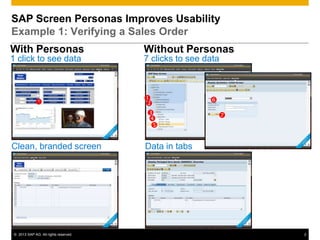
Example 1: Verifying a Sales Order
With Personas                         Without Personas
1 click to see data                   7 clicks to see data


                                                     
                                      
                                                          
                                       
                                       

Clean, branded screen                 Data in tabs


© 2013 SAP AG. All rights reserved.                            2
SAP Screen Personas Improves Usability
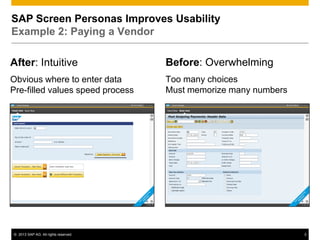
Example 2: Paying a Vendor

After: Intuitive                      Before: Overwhelming
Obvious where to enter data           Too many choices
Pre-filled values speed process       Must memorize many numbers


© 2013 SAP AG. All rights reserved.                                3
Example 1: Verifying a Sales Order


© 2013 SAP AG. All rights reserved.   4
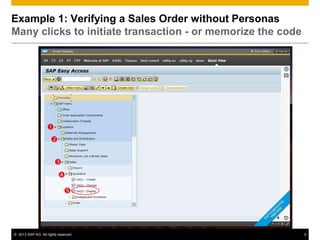
Example 1: Verifying a Sales Order without Personas
Many clicks to initiate transaction - or memorize the code


                   
                      

                        
                          
                             


© 2013 SAP AG. All rights reserved.                          5
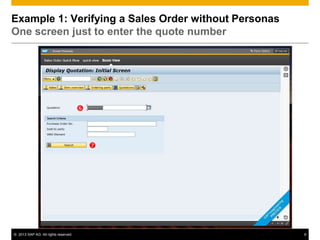
Example 1: Verifying a Sales Order without Personas
One screen just to enter the quote number


                                      


                                          


© 2013 SAP AG. All rights reserved.                   6
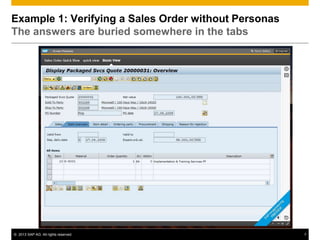
Example 1: Verifying a Sales Order without Personas
The answers are buried somewhere in the tabs


© 2013 SAP AG. All rights reserved.                   7
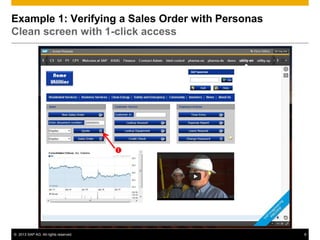
Example 1: Verifying a Sales Order with Personas
Clean screen with 1-click access


                                      


© 2013 SAP AG. All rights reserved.                8
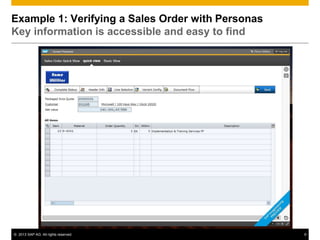
Example 1: Verifying a Sales Order with Personas
Key information is accessible and easy to find


© 2013 SAP AG. All rights reserved.                9
Example 2: Paying a vendor


© 2013 SAP AG. All rights reserved.   10
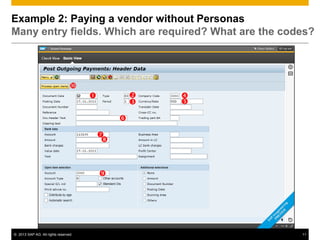
Example 2: Paying a vendor without Personas
Many entry fields. Which are required? What are the codes?


                                 
                                                     
                                                      

                                               

                                          
                                           


                                          


© 2013 SAP AG. All rights reserved.                        11
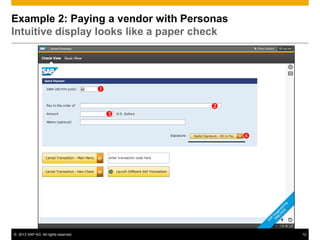
Example 2: Paying a vendor with Personas
Intuitive display looks like a paper check


                                      

                                              
                                          

                                                  


© 2013 SAP AG. All rights reserved.                   12

Personas enhances usability fewer clicks

  • 1.
    SAP Screen Personas Enhancedusability with fewer clicks January 2013
  • 2.
    SAP Screen PersonasImproves Usability Example 1: Verifying a Sales Order With Personas Without Personas 1 click to see data 7 clicks to see data         Clean, branded screen Data in tabs © 2013 SAP AG. All rights reserved. 2
  • 3.
    SAP Screen PersonasImproves Usability Example 2: Paying a Vendor After: Intuitive Before: Overwhelming Obvious where to enter data Too many choices Pre-filled values speed process Must memorize many numbers © 2013 SAP AG. All rights reserved. 3
  • 4.
    Example 1: Verifyinga Sales Order © 2013 SAP AG. All rights reserved. 4
  • 5.
    Example 1: Verifyinga Sales Order without Personas Many clicks to initiate transaction - or memorize the code      © 2013 SAP AG. All rights reserved. 5
  • 6.
    Example 1: Verifyinga Sales Order without Personas One screen just to enter the quote number   © 2013 SAP AG. All rights reserved. 6
  • 7.
    Example 1: Verifyinga Sales Order without Personas The answers are buried somewhere in the tabs © 2013 SAP AG. All rights reserved. 7
  • 8.
    Example 1: Verifyinga Sales Order with Personas Clean screen with 1-click access  © 2013 SAP AG. All rights reserved. 8
  • 9.
    Example 1: Verifyinga Sales Order with Personas Key information is accessible and easy to find © 2013 SAP AG. All rights reserved. 9
  • 10.
    Example 2: Payinga vendor © 2013 SAP AG. All rights reserved. 10
  • 11.
    Example 2: Payinga vendor without Personas Many entry fields. Which are required? What are the codes?           © 2013 SAP AG. All rights reserved. 11
  • 12.
    Example 2: Payinga vendor with Personas Intuitive display looks like a paper check     © 2013 SAP AG. All rights reserved. 12

Editor's Notes

  • #3 This is an 86% improvement in the number of keystrokes. This does not include the enhancements in visual appeal.