SAP INVENTORY MANAGEMENT
& PHYSICAL INVENTORY
Presented by :
Dodo M ,23 November 2014
SAP Inventory Management
(Part of Logistic Courses)
Inventory Management
Purpose:
This component deals with the following tasks:
• Management of material stocks on a quantity and value basis
• Planning, Entry, and Documentation of all Goods Movements
• Carrying out the Physical Inventory
All transactions that bring about a change in stock are entered in real time, as
are the stock updates resulting from these changes. You can obtain an
overview of the current stock situation of any given material at any time. This,
for example, applies to stocks that:
• Are located in the warehouse
• Have already been ordered, but have not yet been received
• Are located in the warehouse, but have already been reserved for
production or a customer
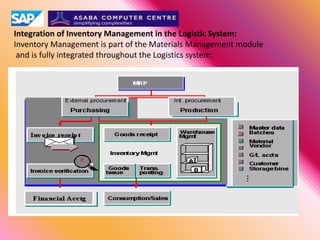
Integration of Inventory Management in the Logistic System:
Inventory Management is part of the Materials Management module
and is fully integrated throughout the Logistics system:
Material Master
Material Master:
The Material Master record is a company’s main source of material- specific data. It is
used by all components in the R/3 system.
The material master database (often referred to simply as the "material master",
comprising all the individual material master records stored in the system) contains
descriptions of all materials that an enterprise procures, produces, and keeps in
stock. It is the central repository of information on materials (such as inventory levels)
for the enterprise. The integration of all material data in a single database objects
prevents the problem of data redundancy. Every area, such as Purchasing, Inventory
Management,Material Planning and Invoice verification can use the data stored
Material Requirement Planning
(MRP)
Material is procured from external or internal sources on the basis of the
requirements determined by Material Requirements Planning. The delivery is
entered in Inventory Management as a goods receipt. The material is stored (and
managed under Inventory Management) until it is delivered to customers (Sales &
Distribution), or is used for internal purposes (for example, for production).
During all transactions, Inventory Management accesses both master data (such as
material master data) and transaction data (such as purchasing documents) shared
by all Logistics components
Goods Movement
Goods Movement can be define as: Transaction resulting in a change in stock.
Goods movements include both "external" movements (goods receipts from external
procurement, goods issues for sales orders) and "internal" movements (goods receipts
from production, withdrawals of material for internal purposes, stock transfers, and
transfer postings).
For each goods movement a document is created which is used by the system to update
quantities and values and serves as proof of goods movements.
You can print goods receipt/issue slips to facilitate physical movements and monitor the
individual stocks in the warehouse
Structure of Goods Movement:
Goods Receipt
Goods Issue
Stock Transfer
Transfer Posting
Movement Type
When you enter a goods movement in the system, you must enter a
movement type to differentiate between the various goods movements.
The movement type has important control functions in Inventory
Management.
For example, the movement type plays an important role in
• Updating of quantity fields
• Updating of stock and consumption accounts
• Determining which fields are displayed during entry of a document
in the system
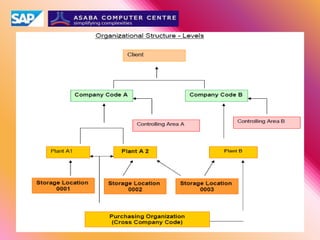
Organizational Level
Plant:
Plant can be a manufacturing plant in the true sense, or can represent a branch office or
site within a company code. A plant is an organizational logistic unit that structures the
enterprise from the perspective of production, procurement, plant maintenance and
material planning.
In SAP system, a plant must be assigned to one or more purchasing organizations.
Furthermore, a plant must always be assigned to a company code.
Storage Location:
The storage location is an organizational unit that allows the differentiation of material
stocks with in a plant. Physical inventory is carried out at storage location level.
Purchasing organization:
Purchasing organization is an organizational unit responsible for procuring materials and
services for one or more plants and for negotiating prices and terms of delivery with
vendors. The purchasing organization assumes legal responsibility for all external
purchase transactions.
You can incorporate purchasing into the company structure by assigning purchasing
organization to company code and plants. You can have a combination of centralized
and decentralized organizations.
Physical Inventory
Physical Inventory
Physical Inventory allows you to carry out a physical inventory of your company’s
warehouse stocks for balance sheet purposes.
In the R/3 System, physical inventory can be carried out both for a company’s own
stock and for special stock. Inventory for a company’s stock and for special stocks
(such as, consignment stock at customer, external consignment stock from vendor or
returnable packaging) must be taken separately (in different physical inventory
documents), however.
Furthermore, the stock can be divided into stock types. In the standard system, a
physical inventory can be carried out for the following stock types:
• Unrestricted-use stock in the warehouse
• Quality inspection stock
• Blocked stock
Physical Inventory Procedures
The R/3 System supports the following physical inventory procedures:
• Periodic inventory
• Continuous inventory
• Cycle counting
• Inventory sampling
Physical Inventory Steps
The physical inventory procedure is carried out in three steps:
1. Creating a Physical Inventory Document
2. Entering the Physical Inventory Count
3. Posing inventory differences
SAP R/3 Inventory Management
Table of Contents
Step 1: Goods Receipts: Purchasing Order
Step 2: Creating Reservation
Step 3: Goods Receipts: Reservation
Step 4: Display a Reservation
Step 5: Change Reservation
Step 6: Goods Issue: Purchase Order
Step 7: Goods Issue: Reservation
Step 8: Stock Overview
Step 9: Stock for Posting Date
Step10: Return Delivery
Step11: Stock Transfer: One step (With out Reservation)
(Storage Location to Storage Location)
Step12: Stock Transfer: One step (With Reservation)
(Storage Location to Storage Location)
Step13: Transfer Posting for Reservation
Step14: Stock Overview: After Transfer Posting
Step15: Stock Transfer from Plant to Plant
Step16: Plant Stock Availability
Step17: Stock Transfer: Two Step Procedure
Step18: Place In Storage
SAP R/3 Inventory Management
Table of Contents
Step19: Stock for Posting Date
Step20: Physical Inventory:
Creating Physical Inventory Document
Step21: Creating Sessions
Step22: Changing Physical Inventory Document
Step23: Physical Inventory Count
Step24: Inventory Count With out Reference
Step25: Changing physical Inventory Count
Step26: Initiating of Recount
Step27: Posting Inventory Differences
Step28: Posting Count & Differences Simultaneously
Step29: Physical Inventory Information
Step30: Consignment: Creating Info Record
Step31: Procurement of Consignment Material
Step32: Stock Movement: Goods Receipts (Consignment Material)
Step33: Displaying Consignment Overview
Step34: Goods Issue: Consignment Stock
Step35: Transferring Consignment Material
Step36: Settling Consignment Stock
Step37: Pipeline: Creating Pipeline Material
Step38: Pipeline: Creating Info Record
Step39: Goods Issue: Pipeline
Step40: Settling Pipeline Liabilities
Thank You
Presented by :
Dodo M, 23 November 2014

Sap inventory dmi

  • 1.
    SAP INVENTORY MANAGEMENT &PHYSICAL INVENTORY Presented by : Dodo M ,23 November 2014
  • 2.
    SAP Inventory Management (Partof Logistic Courses)
  • 3.
    Inventory Management Purpose: This componentdeals with the following tasks: • Management of material stocks on a quantity and value basis • Planning, Entry, and Documentation of all Goods Movements • Carrying out the Physical Inventory All transactions that bring about a change in stock are entered in real time, as are the stock updates resulting from these changes. You can obtain an overview of the current stock situation of any given material at any time. This, for example, applies to stocks that: • Are located in the warehouse • Have already been ordered, but have not yet been received • Are located in the warehouse, but have already been reserved for production or a customer
  • 4.
    Integration of InventoryManagement in the Logistic System: Inventory Management is part of the Materials Management module and is fully integrated throughout the Logistics system:
  • 5.
    Material Master Material Master: TheMaterial Master record is a company’s main source of material- specific data. It is used by all components in the R/3 system. The material master database (often referred to simply as the "material master", comprising all the individual material master records stored in the system) contains descriptions of all materials that an enterprise procures, produces, and keeps in stock. It is the central repository of information on materials (such as inventory levels) for the enterprise. The integration of all material data in a single database objects prevents the problem of data redundancy. Every area, such as Purchasing, Inventory Management,Material Planning and Invoice verification can use the data stored
  • 6.
    Material Requirement Planning (MRP) Materialis procured from external or internal sources on the basis of the requirements determined by Material Requirements Planning. The delivery is entered in Inventory Management as a goods receipt. The material is stored (and managed under Inventory Management) until it is delivered to customers (Sales & Distribution), or is used for internal purposes (for example, for production). During all transactions, Inventory Management accesses both master data (such as material master data) and transaction data (such as purchasing documents) shared by all Logistics components
  • 7.
    Goods Movement Goods Movementcan be define as: Transaction resulting in a change in stock. Goods movements include both "external" movements (goods receipts from external procurement, goods issues for sales orders) and "internal" movements (goods receipts from production, withdrawals of material for internal purposes, stock transfers, and transfer postings). For each goods movement a document is created which is used by the system to update quantities and values and serves as proof of goods movements. You can print goods receipt/issue slips to facilitate physical movements and monitor the individual stocks in the warehouse Structure of Goods Movement: Goods Receipt Goods Issue Stock Transfer Transfer Posting
  • 8.
    Movement Type When youenter a goods movement in the system, you must enter a movement type to differentiate between the various goods movements. The movement type has important control functions in Inventory Management. For example, the movement type plays an important role in • Updating of quantity fields • Updating of stock and consumption accounts • Determining which fields are displayed during entry of a document in the system
  • 10.
    Organizational Level Plant: Plant canbe a manufacturing plant in the true sense, or can represent a branch office or site within a company code. A plant is an organizational logistic unit that structures the enterprise from the perspective of production, procurement, plant maintenance and material planning. In SAP system, a plant must be assigned to one or more purchasing organizations. Furthermore, a plant must always be assigned to a company code. Storage Location: The storage location is an organizational unit that allows the differentiation of material stocks with in a plant. Physical inventory is carried out at storage location level. Purchasing organization: Purchasing organization is an organizational unit responsible for procuring materials and services for one or more plants and for negotiating prices and terms of delivery with vendors. The purchasing organization assumes legal responsibility for all external purchase transactions. You can incorporate purchasing into the company structure by assigning purchasing organization to company code and plants. You can have a combination of centralized and decentralized organizations.
  • 11.
    Physical Inventory Physical Inventory PhysicalInventory allows you to carry out a physical inventory of your company’s warehouse stocks for balance sheet purposes. In the R/3 System, physical inventory can be carried out both for a company’s own stock and for special stock. Inventory for a company’s stock and for special stocks (such as, consignment stock at customer, external consignment stock from vendor or returnable packaging) must be taken separately (in different physical inventory documents), however. Furthermore, the stock can be divided into stock types. In the standard system, a physical inventory can be carried out for the following stock types: • Unrestricted-use stock in the warehouse • Quality inspection stock • Blocked stock Physical Inventory Procedures The R/3 System supports the following physical inventory procedures: • Periodic inventory • Continuous inventory • Cycle counting • Inventory sampling Physical Inventory Steps The physical inventory procedure is carried out in three steps: 1. Creating a Physical Inventory Document 2. Entering the Physical Inventory Count 3. Posing inventory differences
  • 12.
    SAP R/3 InventoryManagement Table of Contents Step 1: Goods Receipts: Purchasing Order Step 2: Creating Reservation Step 3: Goods Receipts: Reservation Step 4: Display a Reservation Step 5: Change Reservation Step 6: Goods Issue: Purchase Order Step 7: Goods Issue: Reservation Step 8: Stock Overview Step 9: Stock for Posting Date Step10: Return Delivery Step11: Stock Transfer: One step (With out Reservation) (Storage Location to Storage Location) Step12: Stock Transfer: One step (With Reservation) (Storage Location to Storage Location) Step13: Transfer Posting for Reservation Step14: Stock Overview: After Transfer Posting Step15: Stock Transfer from Plant to Plant Step16: Plant Stock Availability Step17: Stock Transfer: Two Step Procedure Step18: Place In Storage
  • 13.
    SAP R/3 InventoryManagement Table of Contents Step19: Stock for Posting Date Step20: Physical Inventory: Creating Physical Inventory Document Step21: Creating Sessions Step22: Changing Physical Inventory Document Step23: Physical Inventory Count Step24: Inventory Count With out Reference Step25: Changing physical Inventory Count Step26: Initiating of Recount Step27: Posting Inventory Differences Step28: Posting Count & Differences Simultaneously Step29: Physical Inventory Information Step30: Consignment: Creating Info Record Step31: Procurement of Consignment Material Step32: Stock Movement: Goods Receipts (Consignment Material) Step33: Displaying Consignment Overview Step34: Goods Issue: Consignment Stock Step35: Transferring Consignment Material Step36: Settling Consignment Stock Step37: Pipeline: Creating Pipeline Material Step38: Pipeline: Creating Info Record Step39: Goods Issue: Pipeline Step40: Settling Pipeline Liabilities
  • 14.
    Thank You Presented by: Dodo M, 23 November 2014