ERP-EWM ORG STRUCTURE
TDANWALE@GMAIL.COM TUSHAR DANWALE NO - 8830635400
1
INTRODUCTION TO
ERP-EWM ORG STRUCTURE
TDANWALE@GMAIL.COM TUSHAR DANWALE NO - 8830635400
2
INDEX
1.) SAP ERP ORG STRUCTURE DEFINATION …………………………………. page 3
2.) SAP EWM DEFINATION ORG ELEMENTS ………………………………… page 5
3.) SAP ERP ORG STRUCTURE ………………………………………………………. page 7
4.) SAP EWM ORG STRUCTURE …………………………………………………………. page 14
• Purpose of this Document
This document is intended to give a brief introduction of ERP – EWM ORG
STRUCTURE definitions an implementation to the user and also includes a step-
by-step guide to create ERP-EWM org structure implementation.
• Who will benefit?
All technical and functional consultants getting introduced to ERP – EWM org
structure.
• Prerequisites
Basic knowledge of User exits.
• Scope of this document:
This BOK is mainly focusing on the ERP-EWM org structure & definition and
how to implement the ORG structure definition. The things I am putting here
are exclusively based on my understandings about ERP-EWM org structure.
ERP-EWM ORG STRUCTURE
TDANWALE@GMAIL.COM TUSHAR DANWALE NO - 8830635400
3
An organizational unit serving to subdivide an enterprise according to production,
procurement, maintenance, and materials planning aspects. It is a place where either
material is produced or goods and services provided. An organizational unit allowing the
differentiation of material stocks within a plant.
ERP MM ORG STRUCTURE DEFINATION -
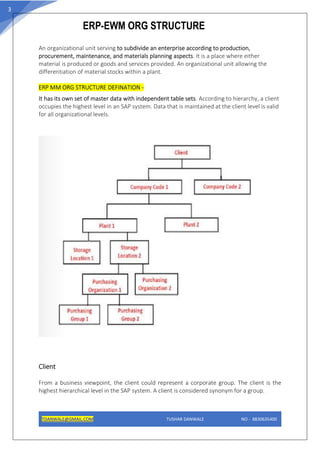
It has its own set of master data with independent table sets. According to hierarchy, a client
occupies the highest level in an SAP system. Data that is maintained at the client level is valid
for all organizational levels.
Client
From a business viewpoint, the client could represent a corporate group. The client is the
highest hierarchical level in the SAP system. A client is considered synonym for a group.
ERP-EWM ORG STRUCTURE
TDANWALE@GMAIL.COM TUSHAR DANWALE NO - 8830635400
4
Company Code
Company code represents an independent company. Company which is a legal entity and
statutory requirement is to maintain a separate balance sheet.
Profit and loss statement are created and maintained at the company code level.
Plant
Plant in the SAP system is a broad term which has a varying definition when different logistics
modules come into discussion.
• In Materials Management (MM) module, a plant is referred to as a facility where
the material stock is kept, stored and inventory is maintained.
• In Production Planning (PP) module, a plant is referred to as a production facility
where the production of goods is done.
Storage Location
Storage Location is an organizational unit in logistics which is assigned to a plant where the
stock is kept and inventory is managed.
Storage Location can be characterized and vary based on their properties like Raw Material
Storage Location, Finished Goods Storage Location, Spares Storage Location, Returns Sales
Storage Location, Temperature Controlled Storage Location, etc.
Purchasing Organization
A purchasing organization is responsible for all purchasing activities within a company and is
responsible for handling procurement activities and documentation.
such as RFQ, contracts, purchase orders, etc. In simple words, a Purchasing Organization is an
organizational unit in SAP Materials Management which is responsible for purchasing and
carries out procurement activities on behalf of the company.
ERP-EWM ORG STRUCTURE
TDANWALE@GMAIL.COM TUSHAR DANWALE NO - 8830635400
5
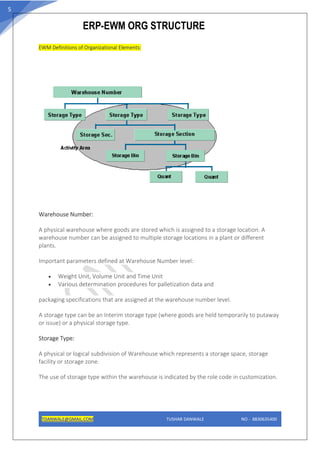
EWM Definitions of Organizational Elements:
Warehouse Number:
A physical warehouse where goods are stored which is assigned to a storage location. A
warehouse number can be assigned to multiple storage locations in a plant or different
plants.
Important parameters defined at Warehouse Number level:
• Weight Unit, Volume Unit and Time Unit
• Various determination procedures for palletization data and
packaging specifications that are assigned at the warehouse number level.
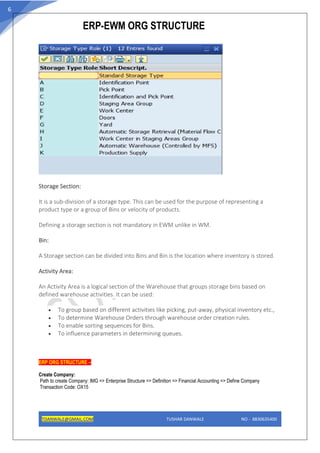
A storage type can be an Interim storage type (where goods are held temporarily to putaway
or issue) or a physical storage type.
Storage Type:
A physical or logical subdivision of Warehouse which represents a storage space, storage
facility or storage zone.
The use of storage type within the warehouse is indicated by the role code in customization.
ERP-EWM ORG STRUCTURE
TDANWALE@GMAIL.COM TUSHAR DANWALE NO - 8830635400
6
Storage Section:
It is a sub-division of a storage type. This can be used for the purpose of representing a
product type or a group of Bins or velocity of products.
Defining a storage section is not mandatory in EWM unlike in WM.
Bin:
A Storage section can be divided into Bins and Bin is the location where inventory is stored.
Activity Area:
An Activity Area is a logical section of the Warehouse that groups storage bins based on
defined warehouse activities. It can be used:
• To group based on different activities like picking, put-away, physical inventory etc.,
• To determine Warehouse Orders through warehouse order creation rules.
• To enable sorting sequences for Bins.
• To influence parameters in determining queues.
ERP ORG STRUCTURE –
Create Company:
Path to create Company: IMG => Enterprise Structure => Definition => Financial Accounting => Define Company
Transaction Code: OX15
ERP-EWM ORG STRUCTURE
TDANWALE@GMAIL.COM TUSHAR DANWALE NO - 8830635400
7
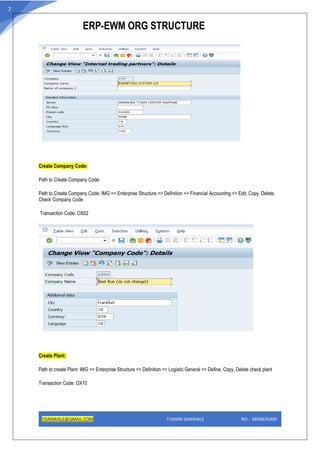
Create Company Code:
Path to Create Company Code:
Path to Create Company Code: IMG => Enterprise Structure => Definition => Financial Accounting => Edit, Copy, Delete,
Check Company Code
Transaction Code: OX02
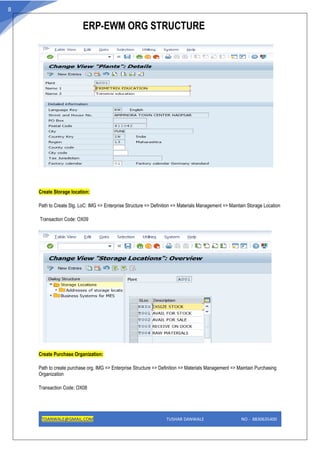
Create Plant:
Path to create Plant: IMG => Enterprise Structure => Definition => Logistic General => Define, Copy, Delete check plant
Transaction Code: OX10
ERP-EWM ORG STRUCTURE
TDANWALE@GMAIL.COM TUSHAR DANWALE NO - 8830635400
8
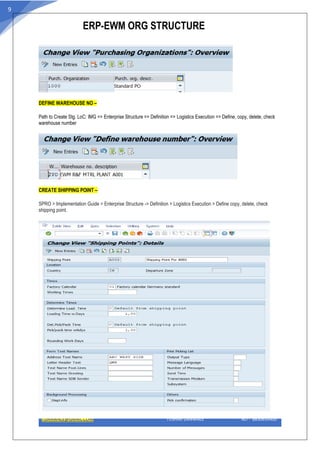
Create Storage location:
Path to Create Stg. LoC: IMG => Enterprise Structure => Definition => Materials Management => Maintain Storage Location
Transaction Code: OX09
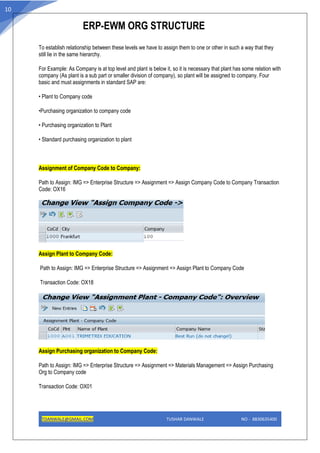
Create Purchase Organization:
Path to create purchase org. IMG => Enterprise Structure => Definition => Materials Management => Maintain Purchasing
Organization
Transaction Code: OX08
ERP-EWM ORG STRUCTURE
TDANWALE@GMAIL.COM TUSHAR DANWALE NO - 8830635400
9
DEFINE WAREHOUSE NO –
Path to Create Stg. LoC: IMG => Enterprise Structure => Definition => Logistics Execution => Define, copy, delete, check
warehouse number
CREATE SHIPPING POINT –
SPRO > Implementation Guide > Enterprise Structure -> Definition > Logistics Execution > Define copy, delete, check
shipping point.
ERP-EWM ORG STRUCTURE
TDANWALE@GMAIL.COM TUSHAR DANWALE NO - 8830635400
10
To establish relationship between these levels we have to assign them to one or other in such a way that they
still lie in the same hierarchy.
For Example: As Company is at top level and plant is below it, so it is necessary that plant has some relation with
company (As plant is a sub part or smaller division of company), so plant will be assigned to company. Four
basic and must assignments in standard SAP are:
• Plant to Company code
•Purchasing organization to company code
• Purchasing organization to Plant
• Standard purchasing organization to plant
Assignment of Company Code to Company:
Path to Assign: IMG => Enterprise Structure => Assignment => Assign Company Code to Company Transaction
Code: OX16
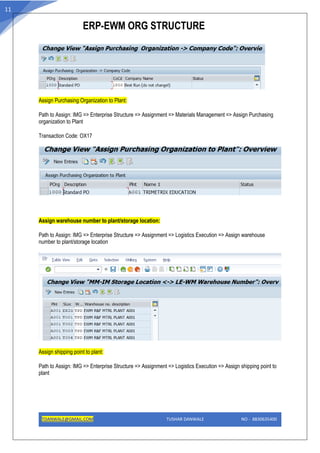
Assign Plant to Company Code:
Path to Assign: IMG => Enterprise Structure => Assignment => Assign Plant to Company Code
Transaction Code: OX18
Assign Purchasing organization to Company Code:
Path to Assign: IMG => Enterprise Structure => Assignment => Materials Management => Assign Purchasing
Org to Company code
Transaction Code: OX01
ERP-EWM ORG STRUCTURE
TDANWALE@GMAIL.COM TUSHAR DANWALE NO - 8830635400
11
Assign Purchasing Organization to Plant:
Path to Assign: IMG => Enterprise Structure => Assignment => Materials Management => Assign Purchasing
organization to Plant
Transaction Code: OX17
Assign warehouse number to plant/storage location:
Path to Assign: IMG => Enterprise Structure => Assignment => Logistics Execution => Assign warehouse
number to plant/storage location
Assign shipping point to plant:
Path to Assign: IMG => Enterprise Structure => Assignment => Logistics Execution => Assign shipping point to
plant
ERP-EWM ORG STRUCTURE
TDANWALE@GMAIL.COM TUSHAR DANWALE NO - 8830635400
12
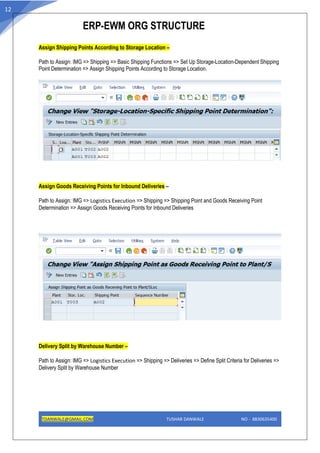
Assign Shipping Points According to Storage Location –
Path to Assign: IMG => Shipping => Basic Shipping Functions => Set Up Storage-Location-Dependent Shipping
Point Determination => Assign Shipping Points According to Storage Location.
Assign Goods Receiving Points for Inbound Deliveries –
Path to Assign: IMG => Logistics Execution => Shipping => Shipping Point and Goods Receiving Point
Determination => Assign Goods Receiving Points for Inbound Deliveries
Delivery Split by Warehouse Number –
Path to Assign: IMG => Logistics Execution => Shipping => Deliveries => Define Split Criteria for Deliveries =>
Delivery Split by Warehouse Number
ERP-EWM ORG STRUCTURE
TDANWALE@GMAIL.COM TUSHAR DANWALE NO - 8830635400
13
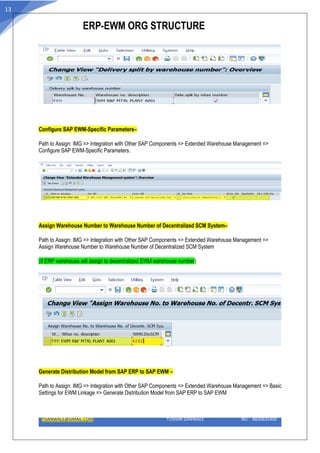
Configure SAP EWM-Specific Parameters–
Path to Assign: IMG => Integration with Other SAP Components => Extended Warehouse Management =>
Configure SAP EWM-Specific Parameters.
Assign Warehouse Number to Warehouse Number of Decentralized SCM System–
Path to Assign: IMG => Integration with Other SAP Components => Extended Warehouse Management =>
Assign Warehouse Number to Warehouse Number of Decentralized SCM System
(If ERP warehouse will assign to decentralized EWM warehouse number)
Generate Distribution Model from SAP ERP to SAP EWM –
Path to Assign: IMG => Integration with Other SAP Components => Extended Warehouse Management => Basic
Settings for EWM Linkage => Generate Distribution Model from SAP ERP to SAP EWM
ERP-EWM ORG STRUCTURE
TDANWALE@GMAIL.COM TUSHAR DANWALE NO - 8830635400
14
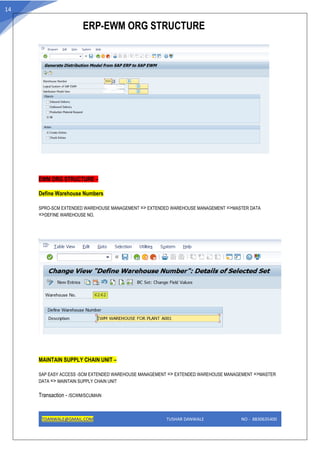
EWM ORG STRUCTURE –
Define Warehouse Numbers
SPRO-SCM EXTENDED WAREHOUSE MANAGEMENT => EXTENDED WAREHOUSE MANAGEMENT =>MASTER DATA
=>DEFINE WAREHOUSE NO.
MAINTAIN SUPPLY CHAIN UNIT –
SAP EASY ACCESS -SCM EXTENDED WAREHOUSE MANAGEMENT => EXTENDED WAREHOUSE MANAGEMENT =>MASTER
DATA => MAINTAIN SUPPLY CHAIN UNIT
Transaction - /SCWM/SCUMAIN
ERP-EWM ORG STRUCTURE
TDANWALE@GMAIL.COM TUSHAR DANWALE NO - 8830635400
15
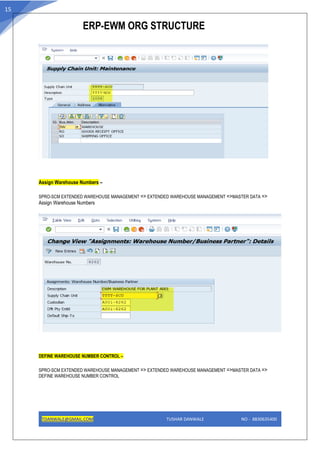
Assign Warehouse Numbers –
SPRO-SCM EXTENDED WAREHOUSE MANAGEMENT => EXTENDED WAREHOUSE MANAGEMENT =>MASTER DATA =>
Assign Warehouse Numbers
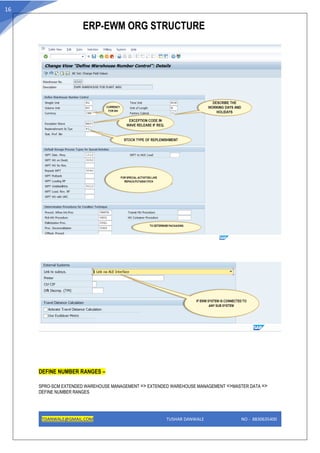
DEFINE WAREHOUSE NUMBER CONTROL –
SPRO-SCM EXTENDED WAREHOUSE MANAGEMENT => EXTENDED WAREHOUSE MANAGEMENT =>MASTER DATA =>
DEFINE WAREHOUSE NUMBER CONTROL
ERP-EWM ORG STRUCTURE
TDANWALE@GMAIL.COM TUSHAR DANWALE NO - 8830635400
16
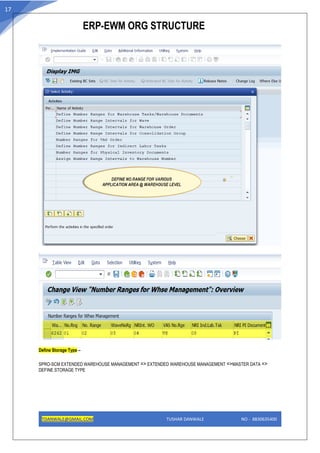
DEFINE NUMBER RANGES –
SPRO-SCM EXTENDED WAREHOUSE MANAGEMENT => EXTENDED WAREHOUSE MANAGEMENT =>MASTER DATA =>
DEFINE NUMBER RANGES
ERP-EWM ORG STRUCTURE
TDANWALE@GMAIL.COM TUSHAR DANWALE NO - 8830635400
17
Define Storage Type –
SPRO-SCM EXTENDED WAREHOUSE MANAGEMENT => EXTENDED WAREHOUSE MANAGEMENT =>MASTER DATA =>
DEFINE STORAGE TYPE
ERP-EWM ORG STRUCTURE
TDANWALE@GMAIL.COM TUSHAR DANWALE NO - 8830635400
18
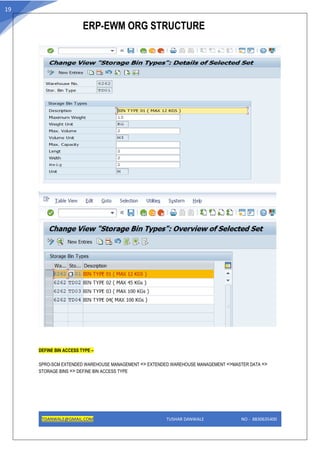
Define Storage Bin Types –
SPRO-SCM EXTENDED WAREHOUSE MANAGEMENT => EXTENDED WAREHOUSE MANAGEMENT =>MASTER DATA =>
STORAGE BINS => DEFINE STORAGE BIN TYPES
ERP-EWM ORG STRUCTURE
TDANWALE@GMAIL.COM TUSHAR DANWALE NO - 8830635400
19
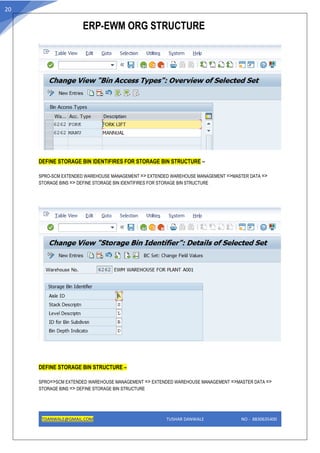
DEFINE BIN ACCESS TYPE –
SPRO-SCM EXTENDED WAREHOUSE MANAGEMENT => EXTENDED WAREHOUSE MANAGEMENT =>MASTER DATA =>
STORAGE BINS => DEFINE BIN ACCESS TYPE
ERP-EWM ORG STRUCTURE
TDANWALE@GMAIL.COM TUSHAR DANWALE NO - 8830635400
20
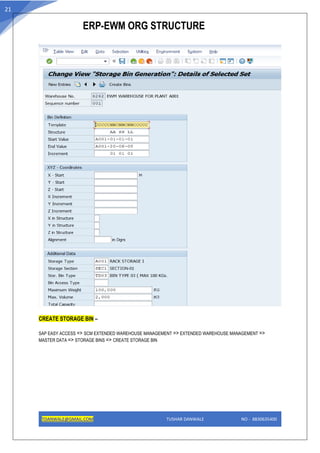
DEFINE STORAGE BIN IDENTIFIRES FOR STORAGE BIN STRUCTURE –
SPRO-SCM EXTENDED WAREHOUSE MANAGEMENT => EXTENDED WAREHOUSE MANAGEMENT =>MASTER DATA =>
STORAGE BINS => DEFINE STORAGE BIN IDENTIFIRES FOR STORAGE BIN STRUCTURE
DEFINE STORAGE BIN STRUCTURE –
SPRO=>SCM EXTENDED WAREHOUSE MANAGEMENT => EXTENDED WAREHOUSE MANAGEMENT =>MASTER DATA =>
STORAGE BINS => DEFINE STORAGE BIN STRUCTURE
ERP-EWM ORG STRUCTURE
TDANWALE@GMAIL.COM TUSHAR DANWALE NO - 8830635400
21
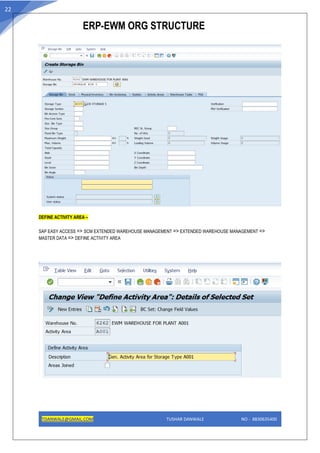
CREATE STORAGE BIN –
SAP EASY ACCESS => SCM EXTENDED WAREHOUSE MANAGEMENT => EXTENDED WAREHOUSE MANAGEMENT =>
MASTER DATA => STORAGE BINS => CREATE STORAGE BIN
ERP-EWM ORG STRUCTURE
TDANWALE@GMAIL.COM TUSHAR DANWALE NO - 8830635400
22
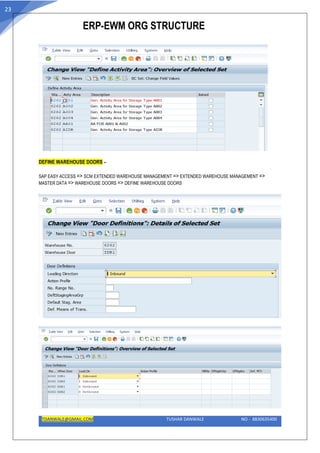
DEFINE ACTIVITY AREA –
SAP EASY ACCESS => SCM EXTENDED WAREHOUSE MANAGEMENT => EXTENDED WAREHOUSE MANAGEMENT =>
MASTER DATA => DEFINE ACTIVITY AREA
ERP-EWM ORG STRUCTURE
TDANWALE@GMAIL.COM TUSHAR DANWALE NO - 8830635400
23
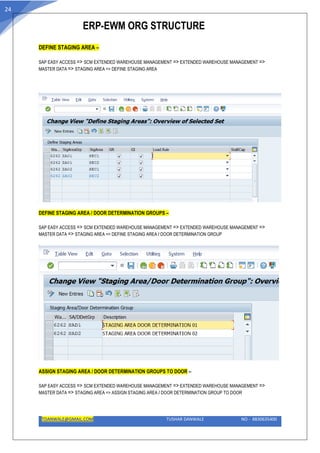
DEFINE WAREHOUSE DOORS –
SAP EASY ACCESS => SCM EXTENDED WAREHOUSE MANAGEMENT => EXTENDED WAREHOUSE MANAGEMENT =>
MASTER DATA => WAREHOUSE DOORS => DEFINE WAREHOUSE DOORS
ERP-EWM ORG STRUCTURE
TDANWALE@GMAIL.COM TUSHAR DANWALE NO - 8830635400
24
DEFINE STAGING AREA –
SAP EASY ACCESS => SCM EXTENDED WAREHOUSE MANAGEMENT => EXTENDED WAREHOUSE MANAGEMENT =>
MASTER DATA => STAGING AREA => DEFINE STAGING AREA
DEFINE STAGING AREA / DOOR DETERMINATION GROUPS –
SAP EASY ACCESS => SCM EXTENDED WAREHOUSE MANAGEMENT => EXTENDED WAREHOUSE MANAGEMENT =>
MASTER DATA => STAGING AREA => DEFINE STAGING AREA / DOOR DETERMINATION GROUP
ASSIGN STAGING AREA / DOOR DETERMINATION GROUPS TO DOOR –
SAP EASY ACCESS => SCM EXTENDED WAREHOUSE MANAGEMENT => EXTENDED WAREHOUSE MANAGEMENT =>
MASTER DATA => STAGING AREA => ASSIGN STAGING AREA / DOOR DETERMINATION GROUP TO DOOR
ERP-EWM ORG STRUCTURE
TDANWALE@GMAIL.COM TUSHAR DANWALE NO - 8830635400
25
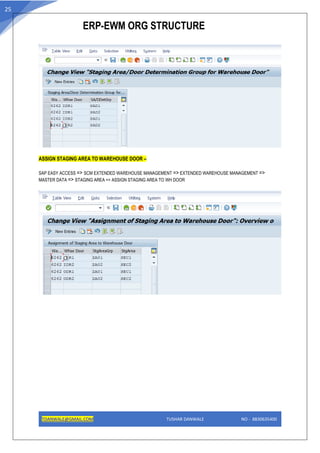
ASSIGN STAGING AREA TO WAREHOUSE DOOR –
SAP EASY ACCESS => SCM EXTENDED WAREHOUSE MANAGEMENT => EXTENDED WAREHOUSE MANAGEMENT =>
MASTER DATA => STAGING AREA => ASSIGN STAGING AREA TO WH DOOR

EWM Org structure.pdf

  • 1.
    ERP-EWM ORG STRUCTURE TDANWALE@GMAIL.COMTUSHAR DANWALE NO - 8830635400 1 INTRODUCTION TO
  • 2.
    ERP-EWM ORG STRUCTURE TDANWALE@GMAIL.COMTUSHAR DANWALE NO - 8830635400 2 INDEX 1.) SAP ERP ORG STRUCTURE DEFINATION …………………………………. page 3 2.) SAP EWM DEFINATION ORG ELEMENTS ………………………………… page 5 3.) SAP ERP ORG STRUCTURE ………………………………………………………. page 7 4.) SAP EWM ORG STRUCTURE …………………………………………………………. page 14 • Purpose of this Document This document is intended to give a brief introduction of ERP – EWM ORG STRUCTURE definitions an implementation to the user and also includes a step- by-step guide to create ERP-EWM org structure implementation. • Who will benefit? All technical and functional consultants getting introduced to ERP – EWM org structure. • Prerequisites Basic knowledge of User exits. • Scope of this document: This BOK is mainly focusing on the ERP-EWM org structure & definition and how to implement the ORG structure definition. The things I am putting here are exclusively based on my understandings about ERP-EWM org structure.
  • 3.
    ERP-EWM ORG STRUCTURE TDANWALE@GMAIL.COMTUSHAR DANWALE NO - 8830635400 3 An organizational unit serving to subdivide an enterprise according to production, procurement, maintenance, and materials planning aspects. It is a place where either material is produced or goods and services provided. An organizational unit allowing the differentiation of material stocks within a plant. ERP MM ORG STRUCTURE DEFINATION - It has its own set of master data with independent table sets. According to hierarchy, a client occupies the highest level in an SAP system. Data that is maintained at the client level is valid for all organizational levels. Client From a business viewpoint, the client could represent a corporate group. The client is the highest hierarchical level in the SAP system. A client is considered synonym for a group.
  • 4.
    ERP-EWM ORG STRUCTURE TDANWALE@GMAIL.COMTUSHAR DANWALE NO - 8830635400 4 Company Code Company code represents an independent company. Company which is a legal entity and statutory requirement is to maintain a separate balance sheet. Profit and loss statement are created and maintained at the company code level. Plant Plant in the SAP system is a broad term which has a varying definition when different logistics modules come into discussion. • In Materials Management (MM) module, a plant is referred to as a facility where the material stock is kept, stored and inventory is maintained. • In Production Planning (PP) module, a plant is referred to as a production facility where the production of goods is done. Storage Location Storage Location is an organizational unit in logistics which is assigned to a plant where the stock is kept and inventory is managed. Storage Location can be characterized and vary based on their properties like Raw Material Storage Location, Finished Goods Storage Location, Spares Storage Location, Returns Sales Storage Location, Temperature Controlled Storage Location, etc. Purchasing Organization A purchasing organization is responsible for all purchasing activities within a company and is responsible for handling procurement activities and documentation. such as RFQ, contracts, purchase orders, etc. In simple words, a Purchasing Organization is an organizational unit in SAP Materials Management which is responsible for purchasing and carries out procurement activities on behalf of the company.
  • 5.
    ERP-EWM ORG STRUCTURE TDANWALE@GMAIL.COMTUSHAR DANWALE NO - 8830635400 5 EWM Definitions of Organizational Elements: Warehouse Number: A physical warehouse where goods are stored which is assigned to a storage location. A warehouse number can be assigned to multiple storage locations in a plant or different plants. Important parameters defined at Warehouse Number level: • Weight Unit, Volume Unit and Time Unit • Various determination procedures for palletization data and packaging specifications that are assigned at the warehouse number level. A storage type can be an Interim storage type (where goods are held temporarily to putaway or issue) or a physical storage type. Storage Type: A physical or logical subdivision of Warehouse which represents a storage space, storage facility or storage zone. The use of storage type within the warehouse is indicated by the role code in customization.
  • 6.
    ERP-EWM ORG STRUCTURE TDANWALE@GMAIL.COMTUSHAR DANWALE NO - 8830635400 6 Storage Section: It is a sub-division of a storage type. This can be used for the purpose of representing a product type or a group of Bins or velocity of products. Defining a storage section is not mandatory in EWM unlike in WM. Bin: A Storage section can be divided into Bins and Bin is the location where inventory is stored. Activity Area: An Activity Area is a logical section of the Warehouse that groups storage bins based on defined warehouse activities. It can be used: • To group based on different activities like picking, put-away, physical inventory etc., • To determine Warehouse Orders through warehouse order creation rules. • To enable sorting sequences for Bins. • To influence parameters in determining queues. ERP ORG STRUCTURE – Create Company: Path to create Company: IMG => Enterprise Structure => Definition => Financial Accounting => Define Company Transaction Code: OX15
  • 7.
    ERP-EWM ORG STRUCTURE TDANWALE@GMAIL.COMTUSHAR DANWALE NO - 8830635400 7 Create Company Code: Path to Create Company Code: Path to Create Company Code: IMG => Enterprise Structure => Definition => Financial Accounting => Edit, Copy, Delete, Check Company Code Transaction Code: OX02 Create Plant: Path to create Plant: IMG => Enterprise Structure => Definition => Logistic General => Define, Copy, Delete check plant Transaction Code: OX10
  • 8.
    ERP-EWM ORG STRUCTURE TDANWALE@GMAIL.COMTUSHAR DANWALE NO - 8830635400 8 Create Storage location: Path to Create Stg. LoC: IMG => Enterprise Structure => Definition => Materials Management => Maintain Storage Location Transaction Code: OX09 Create Purchase Organization: Path to create purchase org. IMG => Enterprise Structure => Definition => Materials Management => Maintain Purchasing Organization Transaction Code: OX08
  • 9.
    ERP-EWM ORG STRUCTURE TDANWALE@GMAIL.COMTUSHAR DANWALE NO - 8830635400 9 DEFINE WAREHOUSE NO – Path to Create Stg. LoC: IMG => Enterprise Structure => Definition => Logistics Execution => Define, copy, delete, check warehouse number CREATE SHIPPING POINT – SPRO > Implementation Guide > Enterprise Structure -> Definition > Logistics Execution > Define copy, delete, check shipping point.
  • 10.
    ERP-EWM ORG STRUCTURE TDANWALE@GMAIL.COMTUSHAR DANWALE NO - 8830635400 10 To establish relationship between these levels we have to assign them to one or other in such a way that they still lie in the same hierarchy. For Example: As Company is at top level and plant is below it, so it is necessary that plant has some relation with company (As plant is a sub part or smaller division of company), so plant will be assigned to company. Four basic and must assignments in standard SAP are: • Plant to Company code •Purchasing organization to company code • Purchasing organization to Plant • Standard purchasing organization to plant Assignment of Company Code to Company: Path to Assign: IMG => Enterprise Structure => Assignment => Assign Company Code to Company Transaction Code: OX16 Assign Plant to Company Code: Path to Assign: IMG => Enterprise Structure => Assignment => Assign Plant to Company Code Transaction Code: OX18 Assign Purchasing organization to Company Code: Path to Assign: IMG => Enterprise Structure => Assignment => Materials Management => Assign Purchasing Org to Company code Transaction Code: OX01
  • 11.
    ERP-EWM ORG STRUCTURE TDANWALE@GMAIL.COMTUSHAR DANWALE NO - 8830635400 11 Assign Purchasing Organization to Plant: Path to Assign: IMG => Enterprise Structure => Assignment => Materials Management => Assign Purchasing organization to Plant Transaction Code: OX17 Assign warehouse number to plant/storage location: Path to Assign: IMG => Enterprise Structure => Assignment => Logistics Execution => Assign warehouse number to plant/storage location Assign shipping point to plant: Path to Assign: IMG => Enterprise Structure => Assignment => Logistics Execution => Assign shipping point to plant
  • 12.
    ERP-EWM ORG STRUCTURE TDANWALE@GMAIL.COMTUSHAR DANWALE NO - 8830635400 12 Assign Shipping Points According to Storage Location – Path to Assign: IMG => Shipping => Basic Shipping Functions => Set Up Storage-Location-Dependent Shipping Point Determination => Assign Shipping Points According to Storage Location. Assign Goods Receiving Points for Inbound Deliveries – Path to Assign: IMG => Logistics Execution => Shipping => Shipping Point and Goods Receiving Point Determination => Assign Goods Receiving Points for Inbound Deliveries Delivery Split by Warehouse Number – Path to Assign: IMG => Logistics Execution => Shipping => Deliveries => Define Split Criteria for Deliveries => Delivery Split by Warehouse Number
  • 13.
    ERP-EWM ORG STRUCTURE TDANWALE@GMAIL.COMTUSHAR DANWALE NO - 8830635400 13 Configure SAP EWM-Specific Parameters– Path to Assign: IMG => Integration with Other SAP Components => Extended Warehouse Management => Configure SAP EWM-Specific Parameters. Assign Warehouse Number to Warehouse Number of Decentralized SCM System– Path to Assign: IMG => Integration with Other SAP Components => Extended Warehouse Management => Assign Warehouse Number to Warehouse Number of Decentralized SCM System (If ERP warehouse will assign to decentralized EWM warehouse number) Generate Distribution Model from SAP ERP to SAP EWM – Path to Assign: IMG => Integration with Other SAP Components => Extended Warehouse Management => Basic Settings for EWM Linkage => Generate Distribution Model from SAP ERP to SAP EWM
  • 14.
    ERP-EWM ORG STRUCTURE TDANWALE@GMAIL.COMTUSHAR DANWALE NO - 8830635400 14 EWM ORG STRUCTURE – Define Warehouse Numbers SPRO-SCM EXTENDED WAREHOUSE MANAGEMENT => EXTENDED WAREHOUSE MANAGEMENT =>MASTER DATA =>DEFINE WAREHOUSE NO. MAINTAIN SUPPLY CHAIN UNIT – SAP EASY ACCESS -SCM EXTENDED WAREHOUSE MANAGEMENT => EXTENDED WAREHOUSE MANAGEMENT =>MASTER DATA => MAINTAIN SUPPLY CHAIN UNIT Transaction - /SCWM/SCUMAIN
  • 15.
    ERP-EWM ORG STRUCTURE TDANWALE@GMAIL.COMTUSHAR DANWALE NO - 8830635400 15 Assign Warehouse Numbers – SPRO-SCM EXTENDED WAREHOUSE MANAGEMENT => EXTENDED WAREHOUSE MANAGEMENT =>MASTER DATA => Assign Warehouse Numbers DEFINE WAREHOUSE NUMBER CONTROL – SPRO-SCM EXTENDED WAREHOUSE MANAGEMENT => EXTENDED WAREHOUSE MANAGEMENT =>MASTER DATA => DEFINE WAREHOUSE NUMBER CONTROL
  • 16.
    ERP-EWM ORG STRUCTURE TDANWALE@GMAIL.COMTUSHAR DANWALE NO - 8830635400 16 DEFINE NUMBER RANGES – SPRO-SCM EXTENDED WAREHOUSE MANAGEMENT => EXTENDED WAREHOUSE MANAGEMENT =>MASTER DATA => DEFINE NUMBER RANGES
  • 17.
    ERP-EWM ORG STRUCTURE TDANWALE@GMAIL.COMTUSHAR DANWALE NO - 8830635400 17 Define Storage Type – SPRO-SCM EXTENDED WAREHOUSE MANAGEMENT => EXTENDED WAREHOUSE MANAGEMENT =>MASTER DATA => DEFINE STORAGE TYPE
  • 18.
    ERP-EWM ORG STRUCTURE TDANWALE@GMAIL.COMTUSHAR DANWALE NO - 8830635400 18 Define Storage Bin Types – SPRO-SCM EXTENDED WAREHOUSE MANAGEMENT => EXTENDED WAREHOUSE MANAGEMENT =>MASTER DATA => STORAGE BINS => DEFINE STORAGE BIN TYPES
  • 19.
    ERP-EWM ORG STRUCTURE TDANWALE@GMAIL.COMTUSHAR DANWALE NO - 8830635400 19 DEFINE BIN ACCESS TYPE – SPRO-SCM EXTENDED WAREHOUSE MANAGEMENT => EXTENDED WAREHOUSE MANAGEMENT =>MASTER DATA => STORAGE BINS => DEFINE BIN ACCESS TYPE
  • 20.
    ERP-EWM ORG STRUCTURE TDANWALE@GMAIL.COMTUSHAR DANWALE NO - 8830635400 20 DEFINE STORAGE BIN IDENTIFIRES FOR STORAGE BIN STRUCTURE – SPRO-SCM EXTENDED WAREHOUSE MANAGEMENT => EXTENDED WAREHOUSE MANAGEMENT =>MASTER DATA => STORAGE BINS => DEFINE STORAGE BIN IDENTIFIRES FOR STORAGE BIN STRUCTURE DEFINE STORAGE BIN STRUCTURE – SPRO=>SCM EXTENDED WAREHOUSE MANAGEMENT => EXTENDED WAREHOUSE MANAGEMENT =>MASTER DATA => STORAGE BINS => DEFINE STORAGE BIN STRUCTURE
  • 21.
    ERP-EWM ORG STRUCTURE TDANWALE@GMAIL.COMTUSHAR DANWALE NO - 8830635400 21 CREATE STORAGE BIN – SAP EASY ACCESS => SCM EXTENDED WAREHOUSE MANAGEMENT => EXTENDED WAREHOUSE MANAGEMENT => MASTER DATA => STORAGE BINS => CREATE STORAGE BIN
  • 22.
    ERP-EWM ORG STRUCTURE TDANWALE@GMAIL.COMTUSHAR DANWALE NO - 8830635400 22 DEFINE ACTIVITY AREA – SAP EASY ACCESS => SCM EXTENDED WAREHOUSE MANAGEMENT => EXTENDED WAREHOUSE MANAGEMENT => MASTER DATA => DEFINE ACTIVITY AREA
  • 23.
    ERP-EWM ORG STRUCTURE TDANWALE@GMAIL.COMTUSHAR DANWALE NO - 8830635400 23 DEFINE WAREHOUSE DOORS – SAP EASY ACCESS => SCM EXTENDED WAREHOUSE MANAGEMENT => EXTENDED WAREHOUSE MANAGEMENT => MASTER DATA => WAREHOUSE DOORS => DEFINE WAREHOUSE DOORS
  • 24.
    ERP-EWM ORG STRUCTURE TDANWALE@GMAIL.COMTUSHAR DANWALE NO - 8830635400 24 DEFINE STAGING AREA – SAP EASY ACCESS => SCM EXTENDED WAREHOUSE MANAGEMENT => EXTENDED WAREHOUSE MANAGEMENT => MASTER DATA => STAGING AREA => DEFINE STAGING AREA DEFINE STAGING AREA / DOOR DETERMINATION GROUPS – SAP EASY ACCESS => SCM EXTENDED WAREHOUSE MANAGEMENT => EXTENDED WAREHOUSE MANAGEMENT => MASTER DATA => STAGING AREA => DEFINE STAGING AREA / DOOR DETERMINATION GROUP ASSIGN STAGING AREA / DOOR DETERMINATION GROUPS TO DOOR – SAP EASY ACCESS => SCM EXTENDED WAREHOUSE MANAGEMENT => EXTENDED WAREHOUSE MANAGEMENT => MASTER DATA => STAGING AREA => ASSIGN STAGING AREA / DOOR DETERMINATION GROUP TO DOOR
  • 25.
    ERP-EWM ORG STRUCTURE TDANWALE@GMAIL.COMTUSHAR DANWALE NO - 8830635400 25 ASSIGN STAGING AREA TO WAREHOUSE DOOR – SAP EASY ACCESS => SCM EXTENDED WAREHOUSE MANAGEMENT => EXTENDED WAREHOUSE MANAGEMENT => MASTER DATA => STAGING AREA => ASSIGN STAGING AREA TO WH DOOR