IDoc (Intermediate Documents)
IDoc (Intermediate Document)
IDoc is an SAP object that carries
data of business transactions from
one system to another system in
the form of electronic messages.
It stored in character format or
stored in structure but not in
binary format with file.
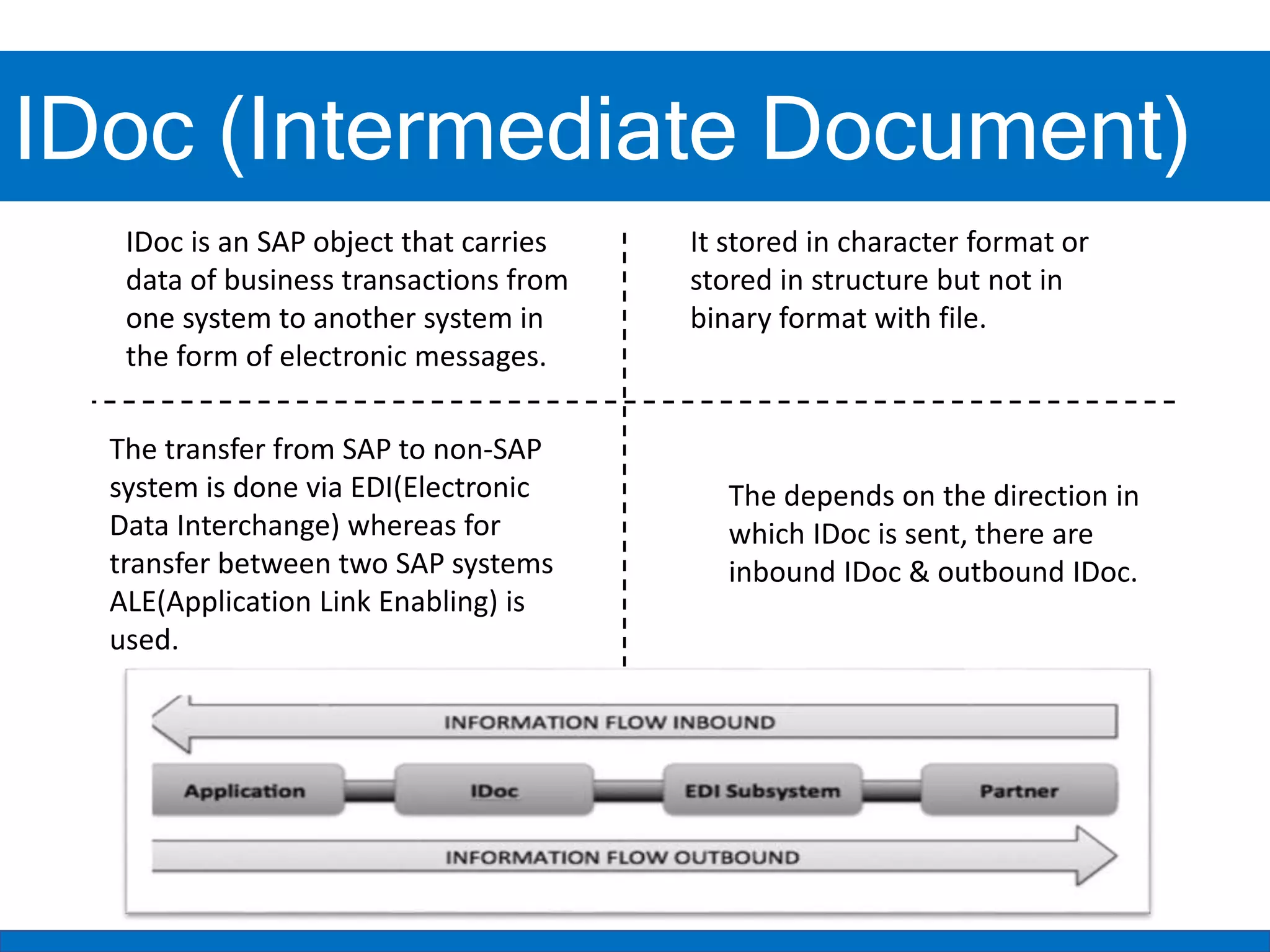
The transfer from SAP to non-SAP
system is done via EDI(Electronic
Data Interchange) whereas for
transfer between two SAP systems
ALE(Application Link Enabling) is
used.
The depends on the direction in
which IDoc is sent, there are
inbound IDoc & outbound IDoc.
IDoc (Intermediate Documents)
IDoc (Intermediate Document)
“EDI is electronic exchange of business document between the computer systems of
business partners, using a standard format over a communication network”. EDI stands
for Electronic Data Interchange.
For transmission of information electronically, two widely used standards are ANSI ASC
X12 and EDIFACT. ANSI ASC X12 is a committee formed by representatives of major
organizations, government bodies and EDI software companies which defines
standards and guidelines for information interchange over EDI. UN/EDIFACT stands for
United Nations EDI for Administration, commerce and Transport and was formed in
1985 using ANSI X12 and UNTDI (United Nations Trade Data interchange) as base
standards. ANSI X12 describes business document as transactions and each transaction
is represented by three-digit number e.g., 850 – Purchase Order, 855 - Purchase Order
Acknowledgement. EDIFACT describes business document as messages, represented by
standard names e.g., ORDERS for purchase order.
IDoc (Intermediate Documents)
IDoc (Intermediate Document)
IDoc Structure & Records
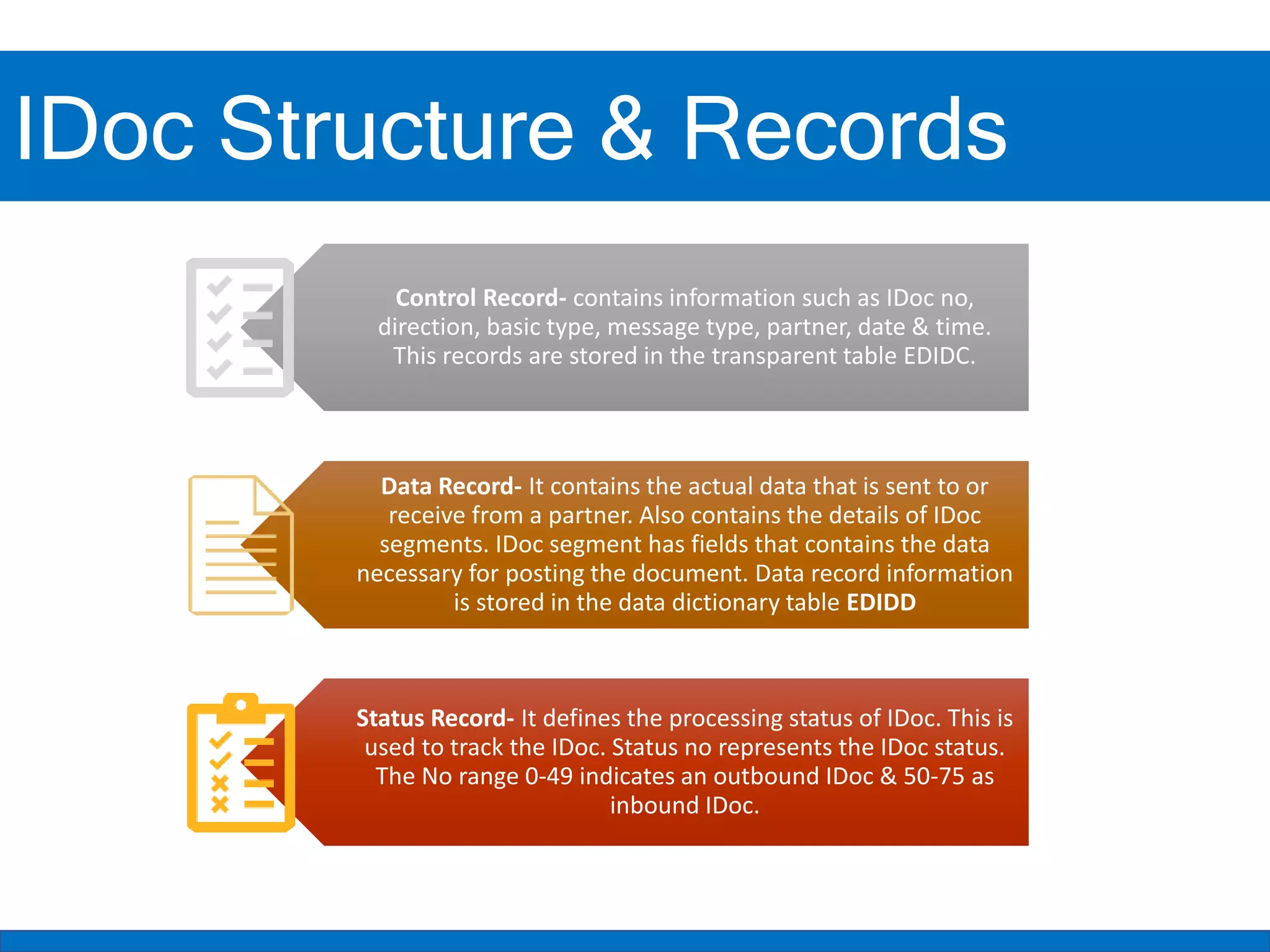
Control Record- contains information such as IDoc no,
direction, basic type, message type, partner, date & time.
This records are stored in the transparent table EDIDC.
Data Record- It contains the actual data that is sent to or
receive from a partner. Also contains the details of IDoc
segments. IDoc segment has fields that contains the data
necessary for posting the document. Data record information
is stored in the data dictionary table EDIDD
Status Record- It defines the processing status of IDoc. This is
used to track the IDoc. Status no represents the IDoc status.
The No range 0-49 indicates an outbound IDoc & 50-75 as
inbound IDoc.
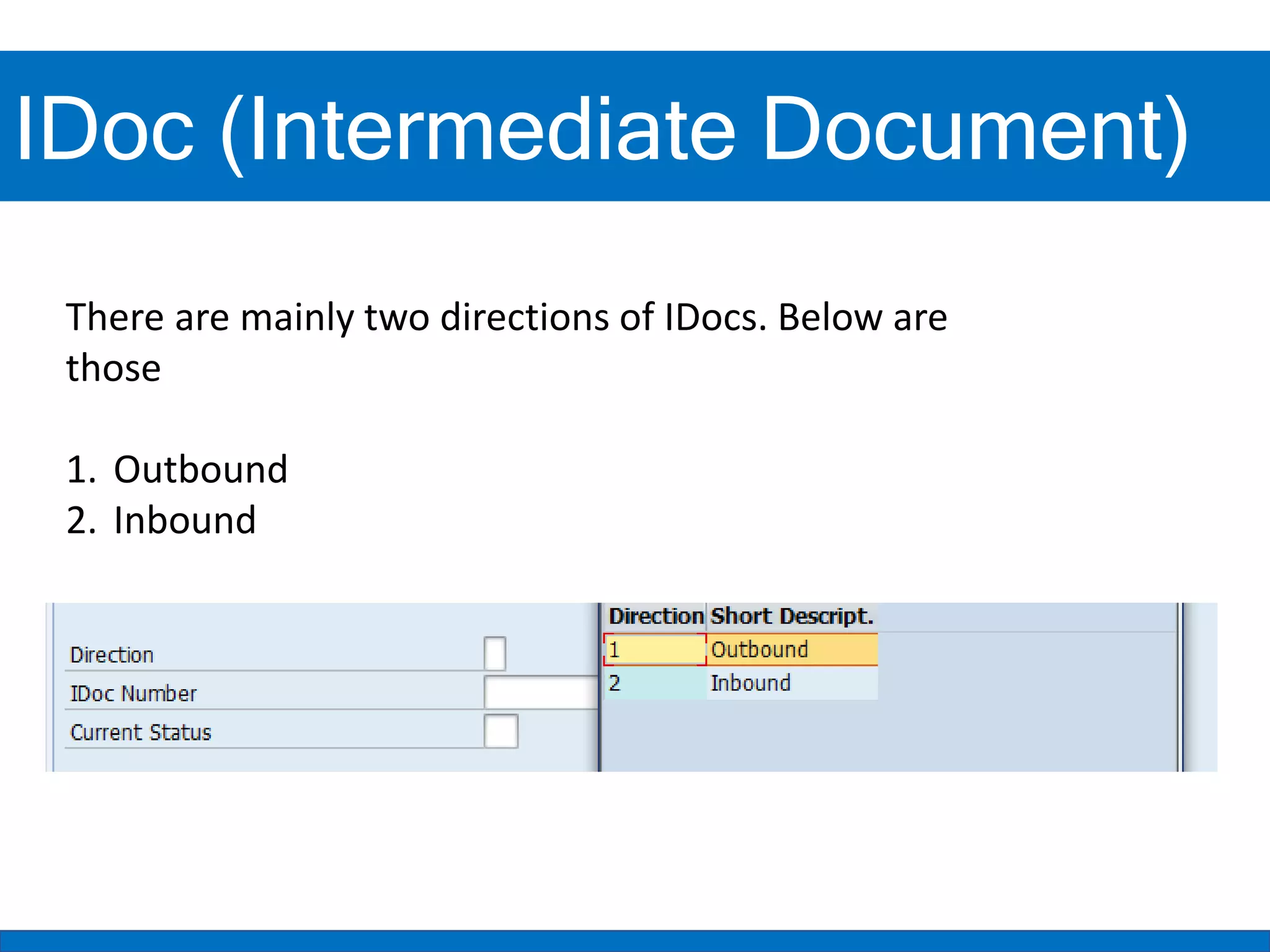
There are mainly two directions of IDocs. Below are
those
1. Outbound
2. Inbound
IDoc (Intermediate Documents)
IDoc (Intermediate Document)
IDoc (Intermediate Documents)
1- Outbound IDoc
Outbound IDoc
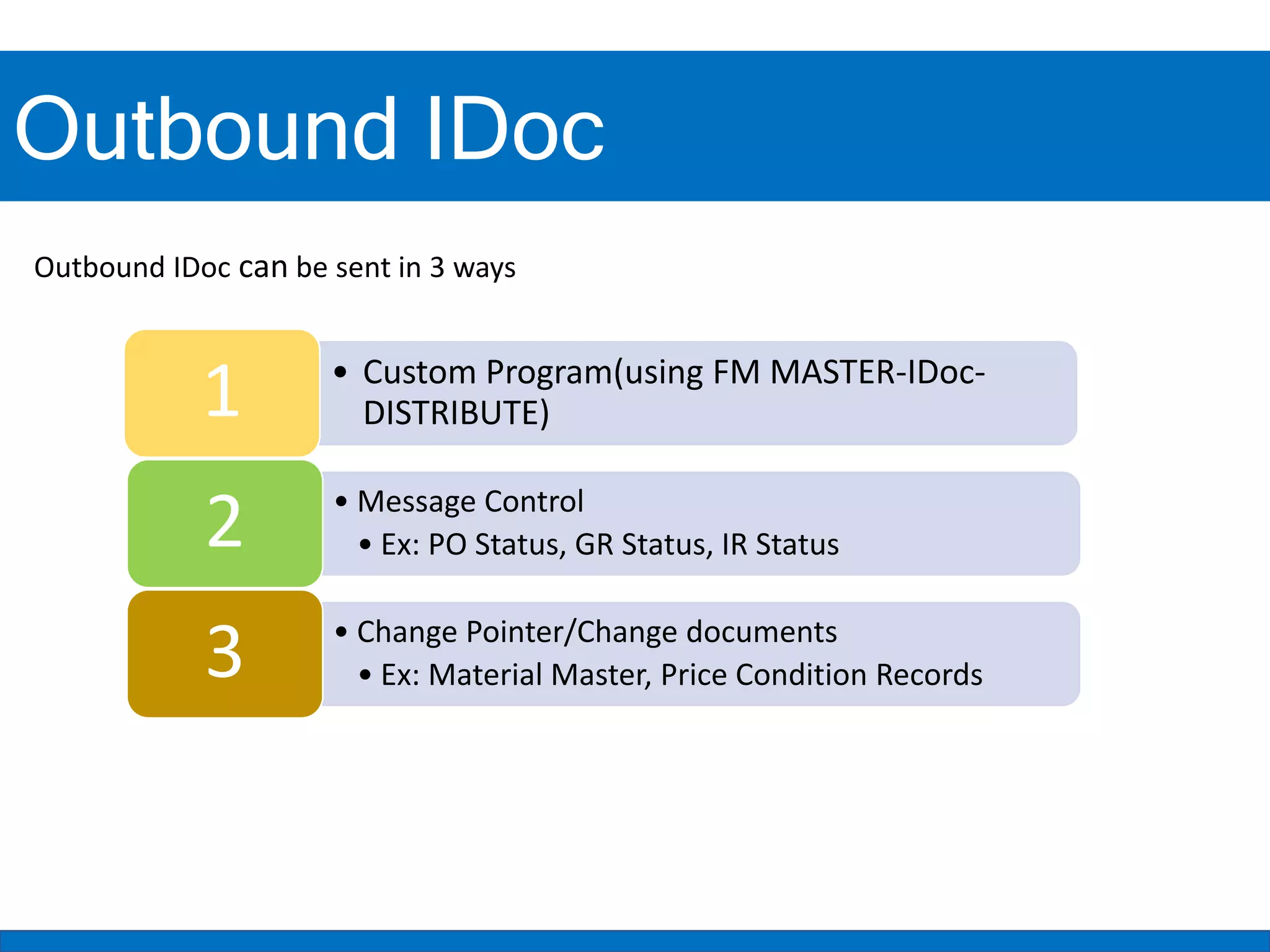
Outbound IDoc can be sent in 3 ways
• Custom Program(using FM MASTER-IDoc-
DISTRIBUTE)
1
• Message Control
• Ex: PO Status, GR Status, IR Status
2
• Change Pointer/Change documents
• Ex: Material Master, Price Condition Records
3
Outbound IDoc
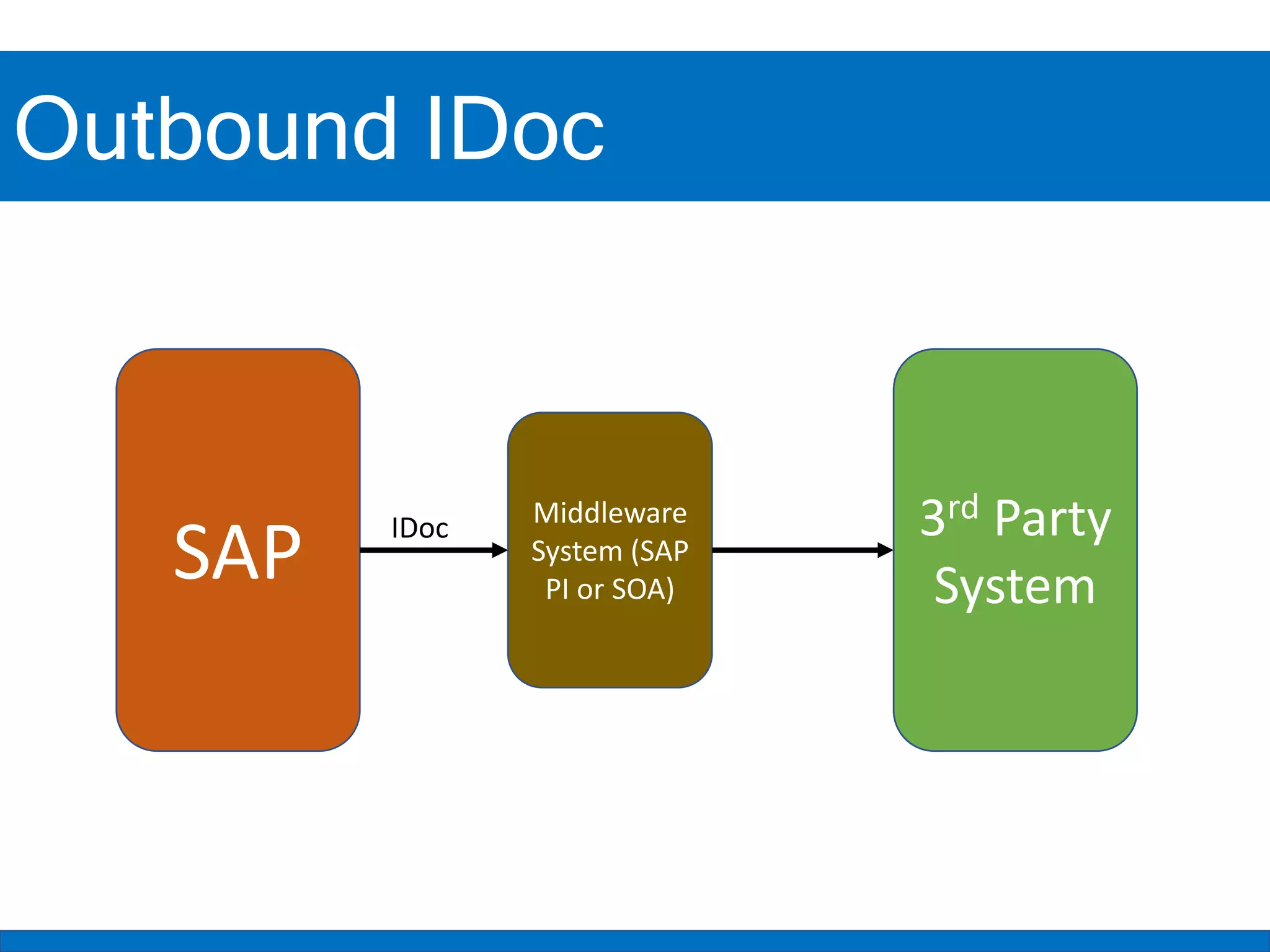
SAP
Middleware
System (SAP
PI or SOA)
3rd Party
System
IDoc
JSON/XML Format Sample
JSON XML
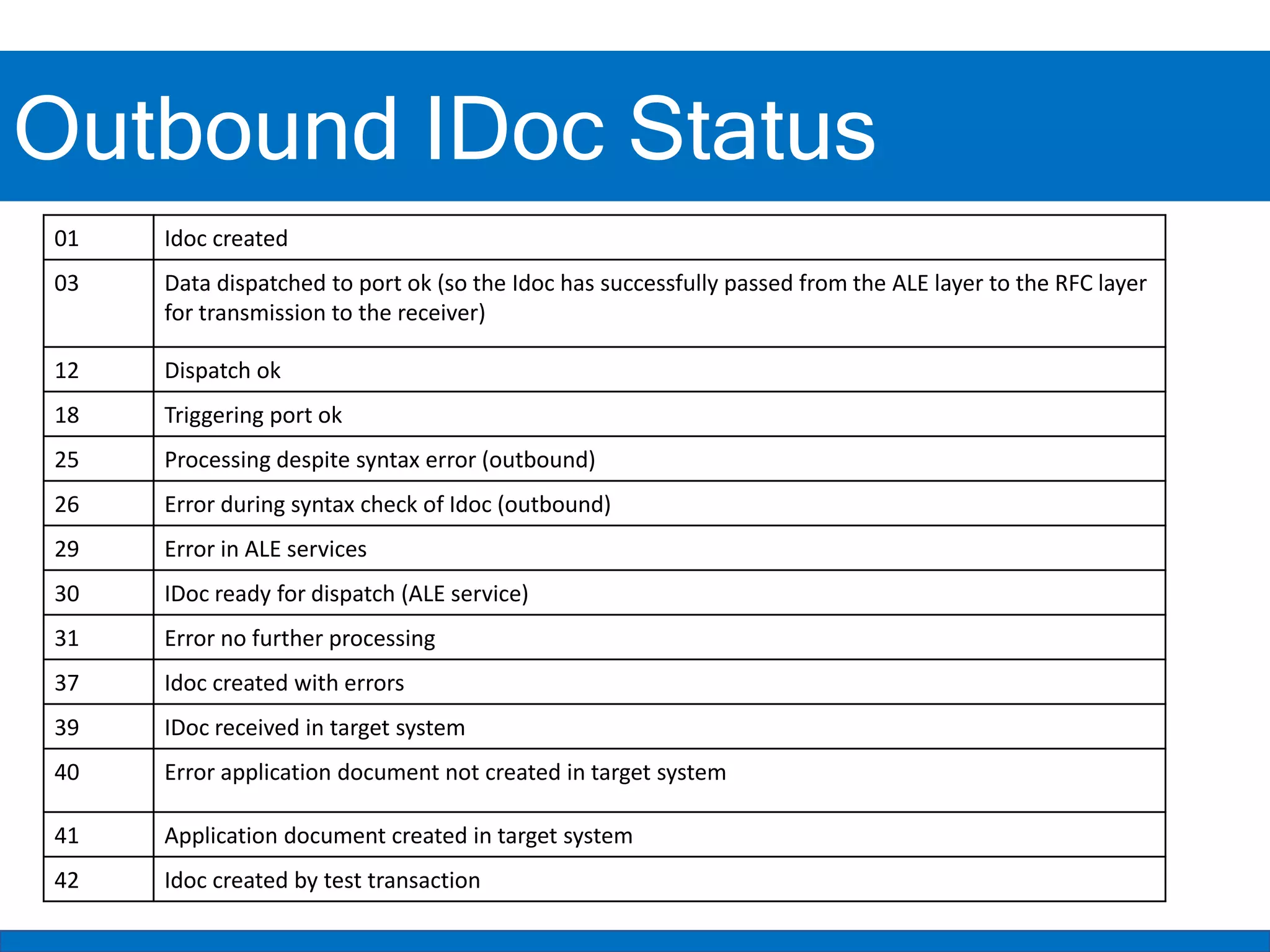
Outbound IDoc Status
01 Idoc created
03 Data dispatched to port ok (so the Idoc has successfully passed from the ALE layer to the RFC layer
for transmission to the receiver)
12 Dispatch ok
18 Triggering port ok
25 Processing despite syntax error (outbound)
26 Error during syntax check of Idoc (outbound)
29 Error in ALE services
30 IDoc ready for dispatch (ALE service)
31 Error no further processing
37 Idoc created with errors
39 IDoc received in target system
40 Error application document not created in target system
41 Application document created in target system
42 Idoc created by test transaction
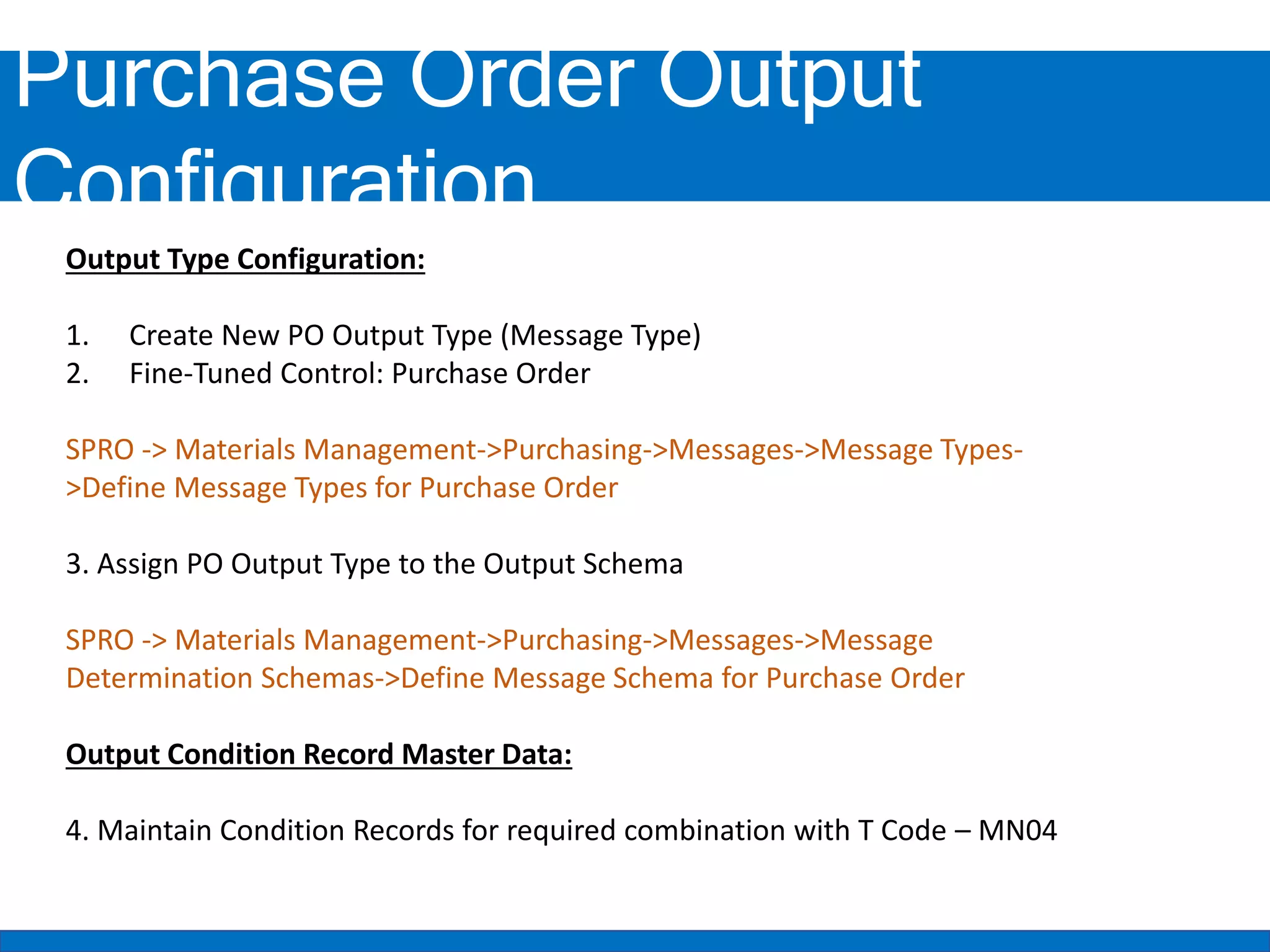
Purchase Order Output
Configuration
Output Type Configuration:
1. Create New PO Output Type (Message Type)
2. Fine-Tuned Control: Purchase Order
SPRO -> Materials Management->Purchasing->Messages->Message Types-
>Define Message Types for Purchase Order
3. Assign PO Output Type to the Output Schema
SPRO -> Materials Management->Purchasing->Messages->Message
Determination Schemas->Define Message Schema for Purchase Order
Output Condition Record Master Data:
4. Maintain Condition Records for required combination with T Code – MN04
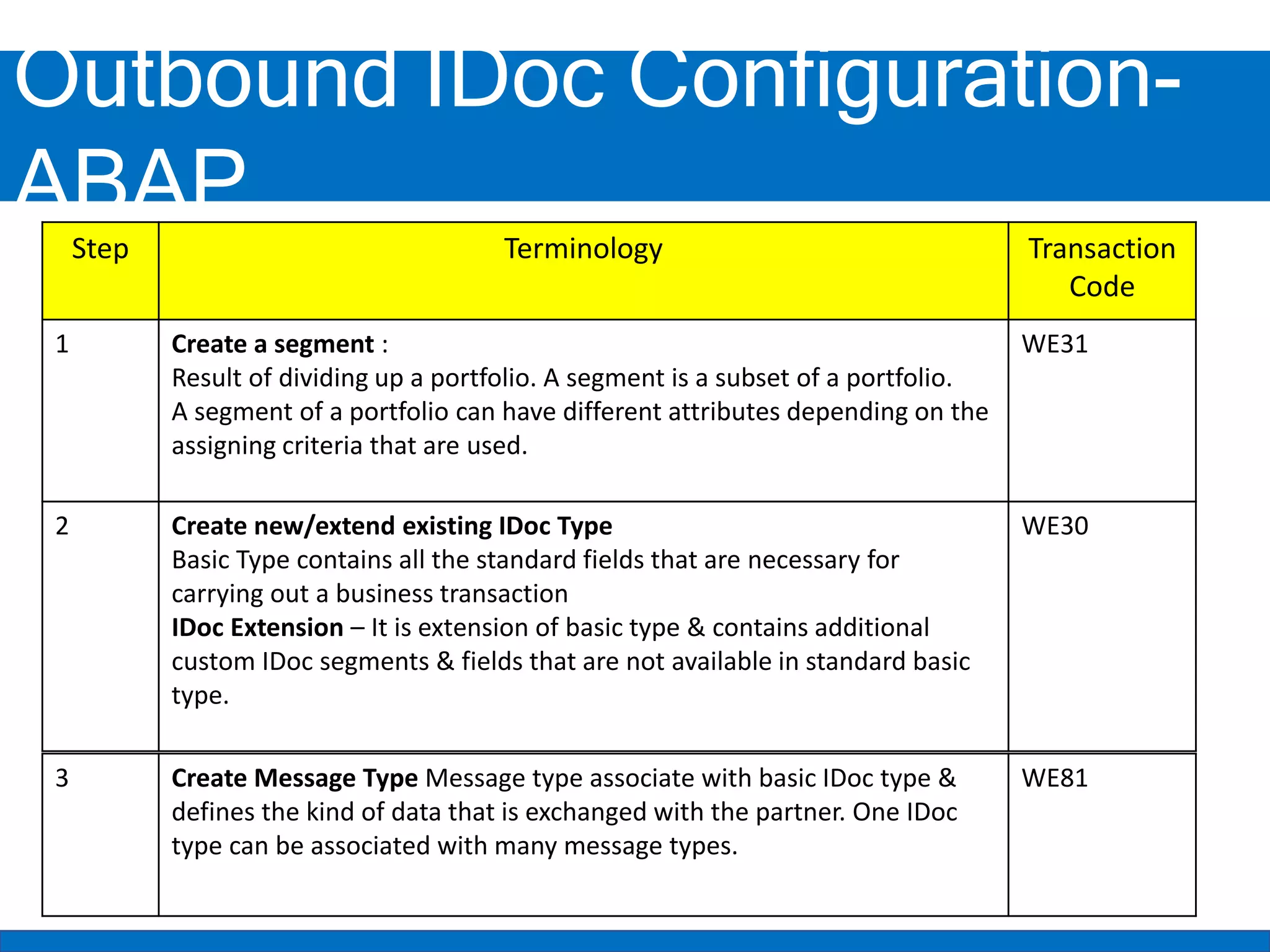
Outbound IDoc Configuration-
ABAP
Step Terminology Transaction
Code
1 Create a segment :
Result of dividing up a portfolio. A segment is a subset of a portfolio.
A segment of a portfolio can have different attributes depending on the
assigning criteria that are used.
WE31
2 Create new/extend existing IDoc Type
Basic Type contains all the standard fields that are necessary for
carrying out a business transaction
IDoc Extension – It is extension of basic type & contains additional
custom IDoc segments & fields that are not available in standard basic
type.
WE30
3 Create Message Type Message type associate with basic IDoc type &
defines the kind of data that is exchanged with the partner. One IDoc
type can be associated with many message types.
WE81
Outbound IDoc Configuration-
ABAP/Basis
Step Terminology Transaction
Code
4 Create Message Type- IDoc Type-Extension: In this step, Message type is
assigned to the IDOC type and extension if it is available.
WE82
5 Create the RFC Destination: RFC destination will be going to contain the
external system endpoint including Host, Path Prefix. Also maintain the basic
authentication. In order to send the outbound IDOC to we need to maintain
the RFC destination in SAP System
SM59
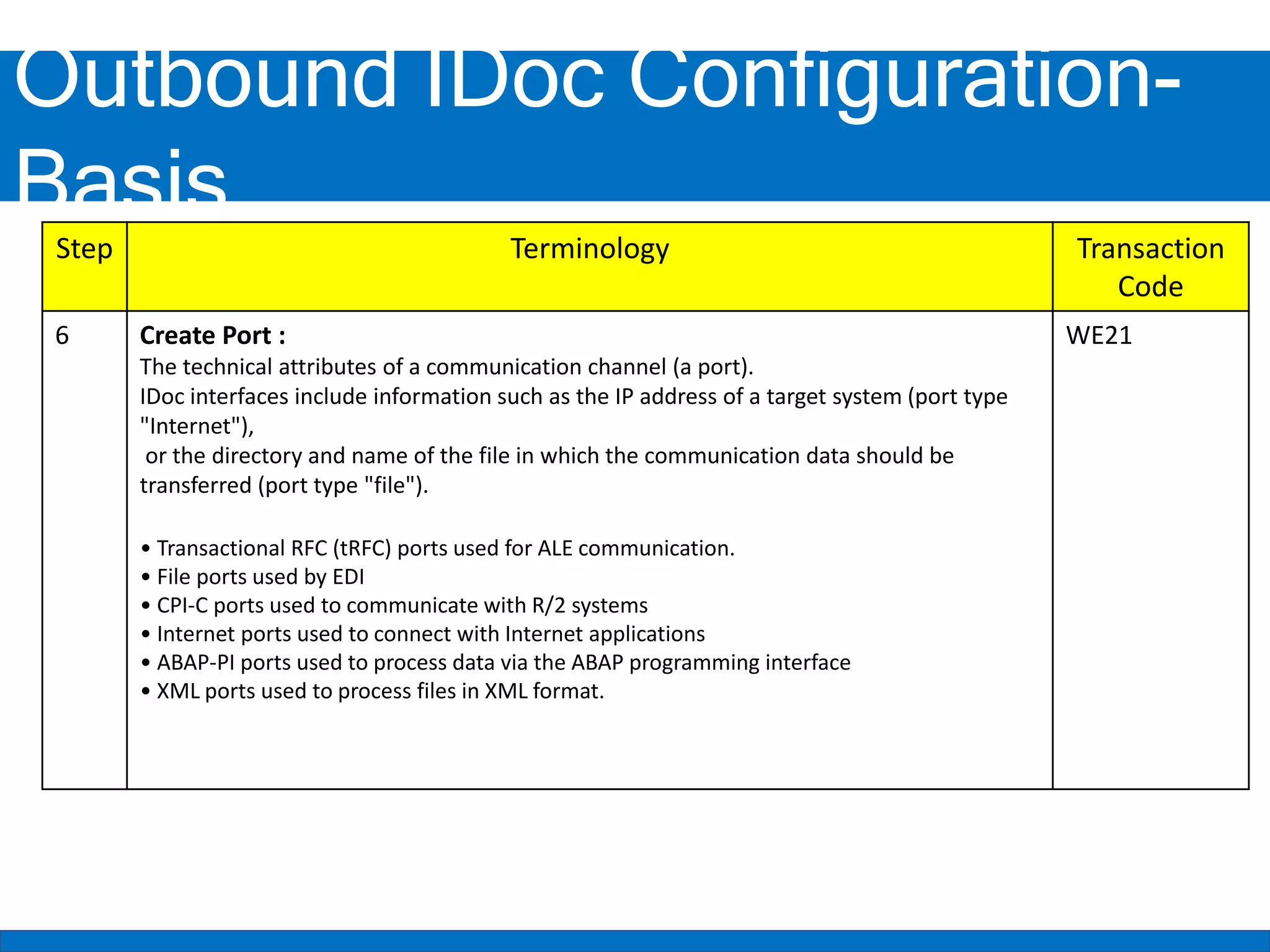
Outbound IDoc Configuration-
Basis
Step Terminology Transaction
Code
6 Create Port :
The technical attributes of a communication channel (a port).
IDoc interfaces include information such as the IP address of a target system (port type
"Internet"),
or the directory and name of the file in which the communication data should be
transferred (port type "file").
• Transactional RFC (tRFC) ports used for ALE communication.
• File ports used by EDI
• CPI-C ports used to communicate with R/2 systems
• Internet ports used to connect with Internet applications
• ABAP-PI ports used to process data via the ABAP programming interface
• XML ports used to process files in XML format.
WE21
Outbound IDoc Configuration-
ABAP
Step Terminology Transaction
Code
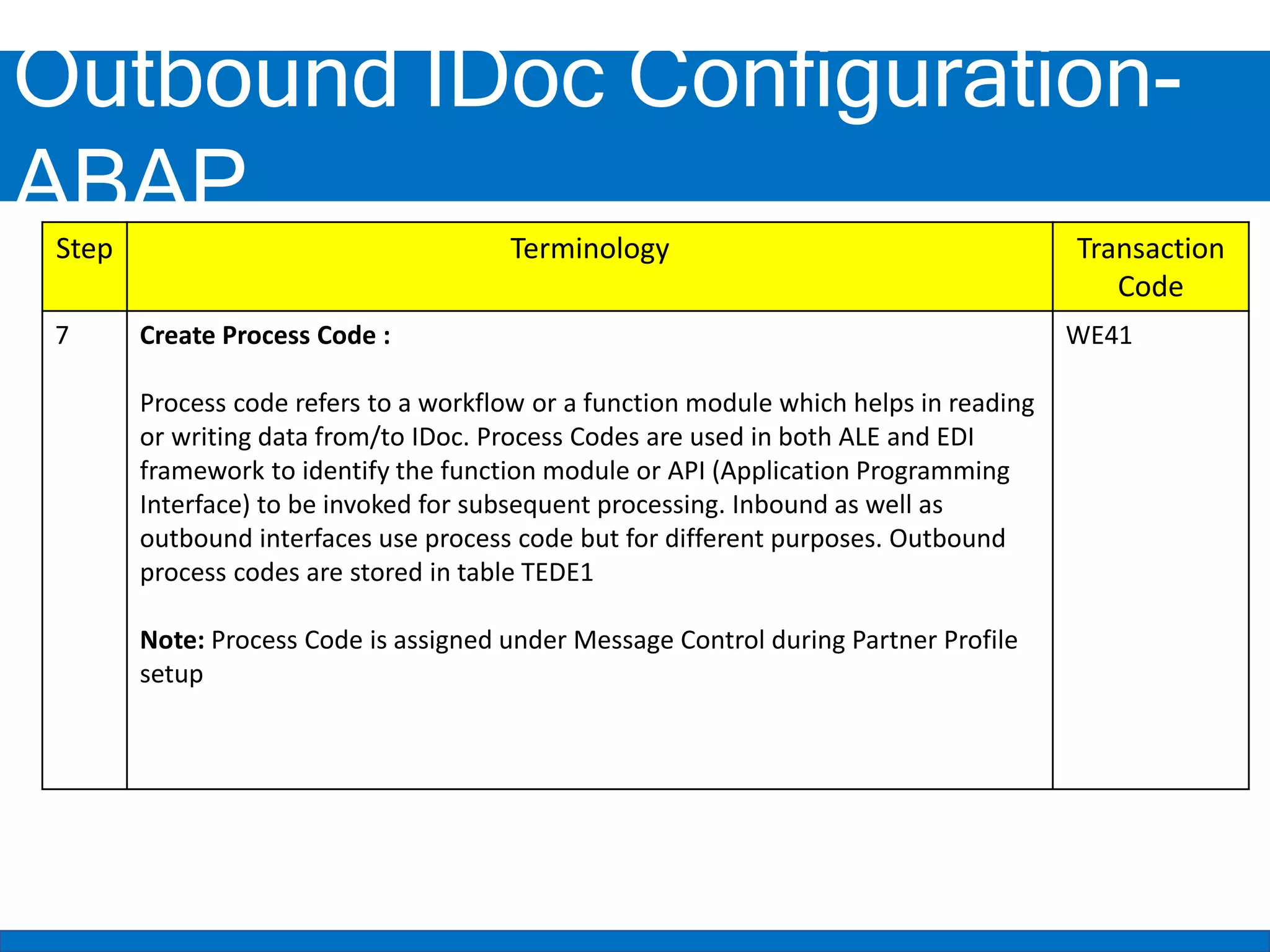
7 Create Process Code :
Process code refers to a workflow or a function module which helps in reading
or writing data from/to IDoc. Process Codes are used in both ALE and EDI
framework to identify the function module or API (Application Programming
Interface) to be invoked for subsequent processing. Inbound as well as
outbound interfaces use process code but for different purposes. Outbound
process codes are stored in table TEDE1
Note: Process Code is assigned under Message Control during Partner Profile
setup
WE41
Outbound IDoc Setup -
Functional
Step Terminology Transaction
Code
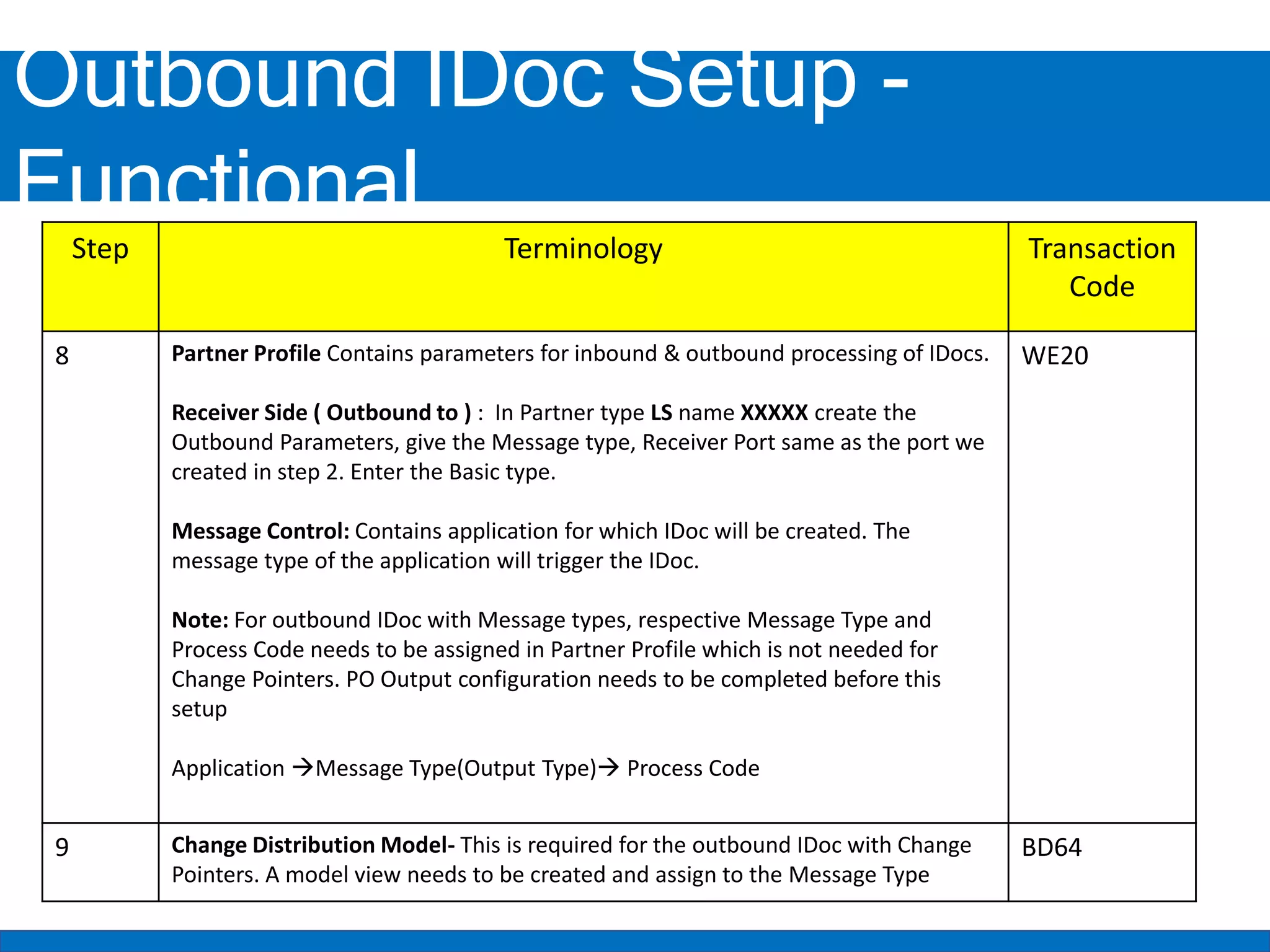
8 Partner Profile Contains parameters for inbound & outbound processing of IDocs.
Receiver Side ( Outbound to ) : In Partner type LS name XXXXX create the
Outbound Parameters, give the Message type, Receiver Port same as the port we
created in step 2. Enter the Basic type.
Message Control: Contains application for which IDoc will be created. The
message type of the application will trigger the IDoc.
Note: For outbound IDoc with Message types, respective Message Type and
Process Code needs to be assigned in Partner Profile which is not needed for
Change Pointers. PO Output configuration needs to be completed before this
setup
Application Message Type(Output Type) Process Code
WE20
9 Change Distribution Model- This is required for the outbound IDoc with Change
Pointers. A model view needs to be created and assign to the Message Type
BD64
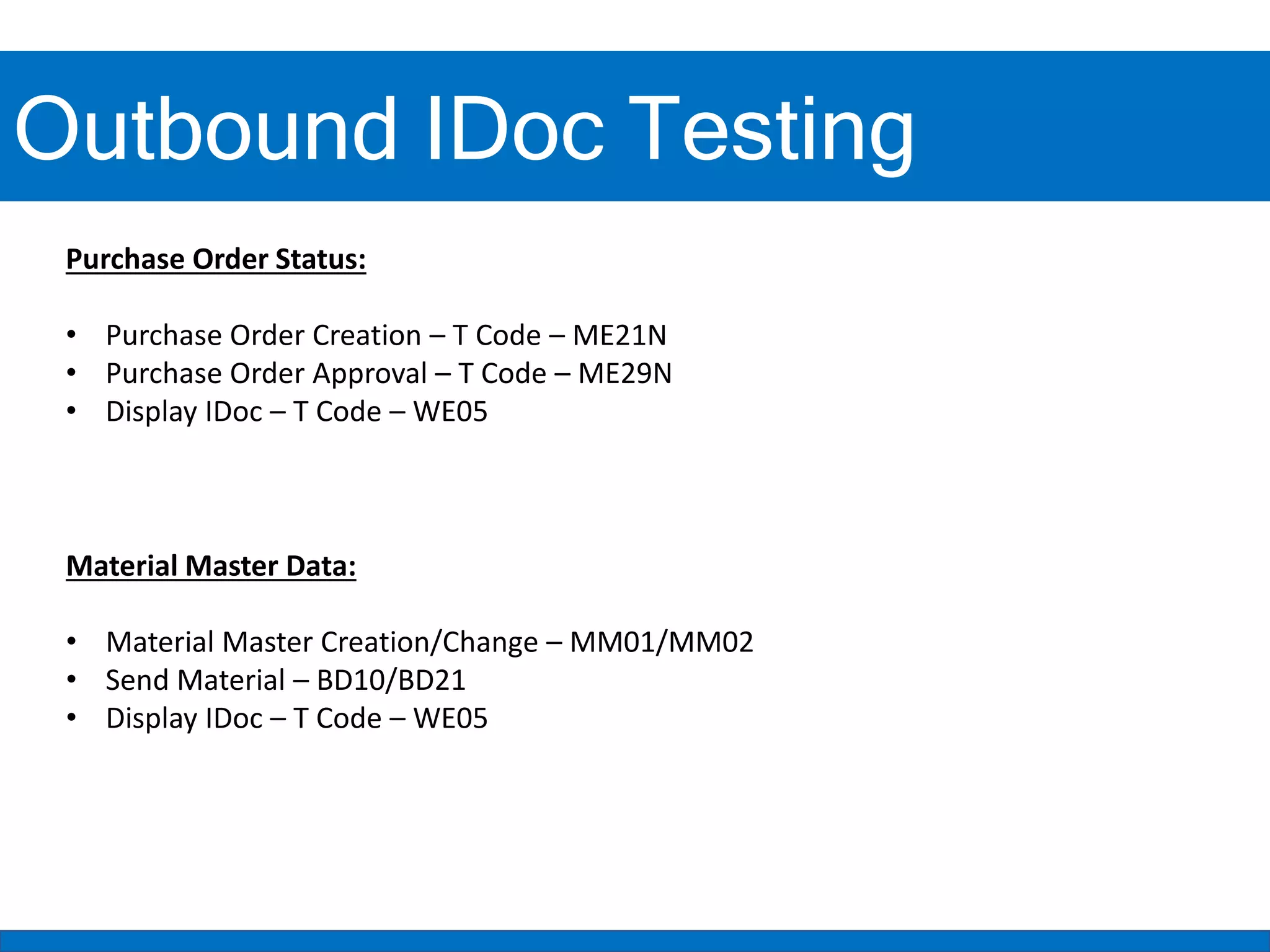
Outbound IDoc Testing
Purchase Order Status:
• Purchase Order Creation – T Code – ME21N
• Purchase Order Approval – T Code – ME29N
• Display IDoc – T Code – WE05
Material Master Data:
• Material Master Creation/Change – MM01/MM02
• Send Material – BD10/BD21
• Display IDoc – T Code – WE05
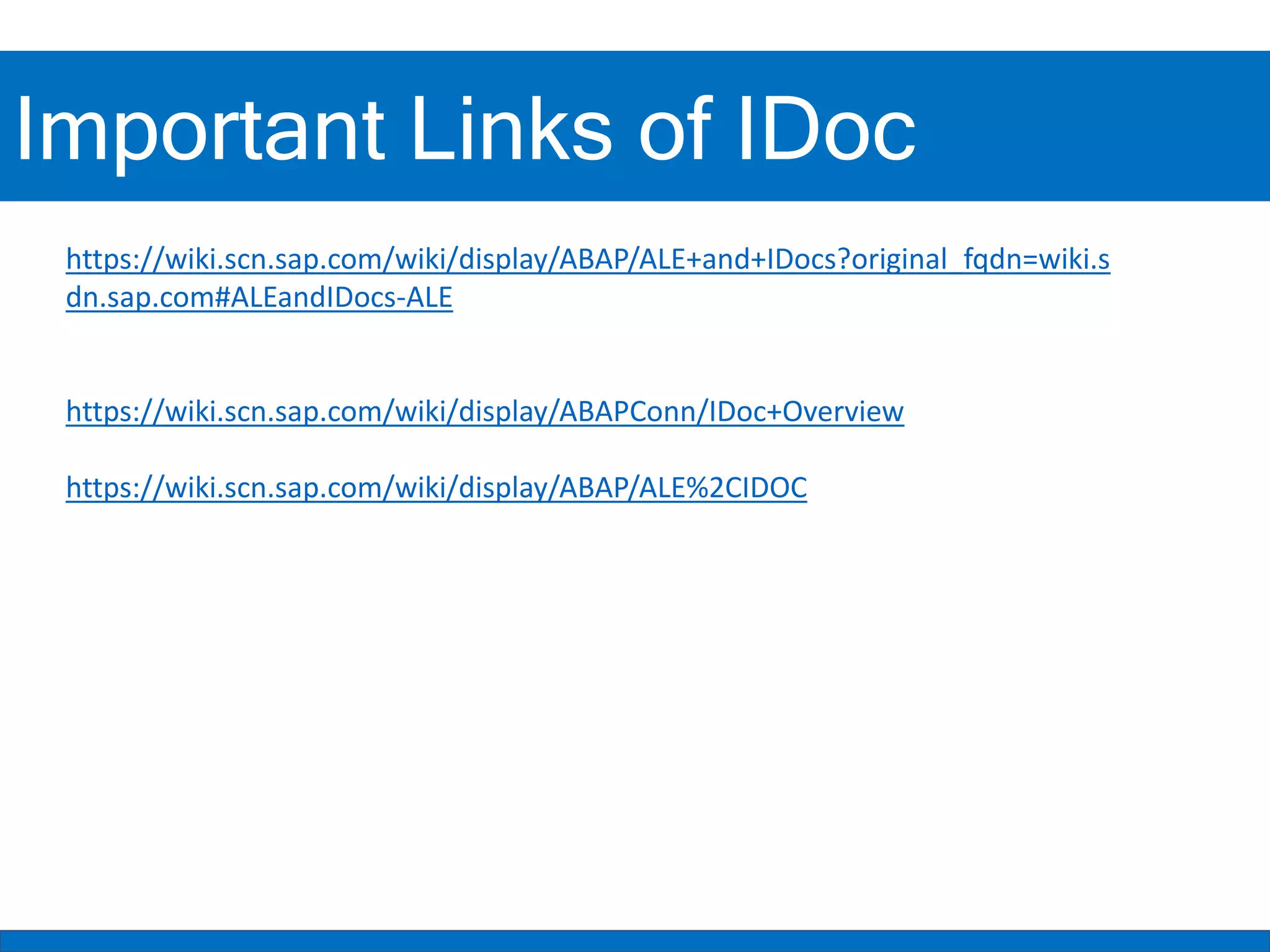
Important Links of IDoc
https://wiki.scn.sap.com/wiki/display/ABAP/ALE+and+IDocs?original_fqdn=wiki.s
dn.sap.com#ALEandIDocs-ALE
https://wiki.scn.sap.com/wiki/display/ABAPConn/IDoc+Overview
https://wiki.scn.sap.com/wiki/display/ABAP/ALE%2CIDOC
IDoc (Intermediate Documents)
THANK YOU
LIKE – SHARE – SUBSCRIBE

SAP IDoc Overview and Outbound IDoc.pptx

  • 1.
    IDoc (Intermediate Documents) IDoc(Intermediate Document)
  • 2.
    IDoc is anSAP object that carries data of business transactions from one system to another system in the form of electronic messages. It stored in character format or stored in structure but not in binary format with file. The transfer from SAP to non-SAP system is done via EDI(Electronic Data Interchange) whereas for transfer between two SAP systems ALE(Application Link Enabling) is used. The depends on the direction in which IDoc is sent, there are inbound IDoc & outbound IDoc. IDoc (Intermediate Documents) IDoc (Intermediate Document)
  • 3.
    “EDI is electronicexchange of business document between the computer systems of business partners, using a standard format over a communication network”. EDI stands for Electronic Data Interchange. For transmission of information electronically, two widely used standards are ANSI ASC X12 and EDIFACT. ANSI ASC X12 is a committee formed by representatives of major organizations, government bodies and EDI software companies which defines standards and guidelines for information interchange over EDI. UN/EDIFACT stands for United Nations EDI for Administration, commerce and Transport and was formed in 1985 using ANSI X12 and UNTDI (United Nations Trade Data interchange) as base standards. ANSI X12 describes business document as transactions and each transaction is represented by three-digit number e.g., 850 – Purchase Order, 855 - Purchase Order Acknowledgement. EDIFACT describes business document as messages, represented by standard names e.g., ORDERS for purchase order. IDoc (Intermediate Documents) IDoc (Intermediate Document)
  • 4.
    IDoc Structure &Records Control Record- contains information such as IDoc no, direction, basic type, message type, partner, date & time. This records are stored in the transparent table EDIDC. Data Record- It contains the actual data that is sent to or receive from a partner. Also contains the details of IDoc segments. IDoc segment has fields that contains the data necessary for posting the document. Data record information is stored in the data dictionary table EDIDD Status Record- It defines the processing status of IDoc. This is used to track the IDoc. Status no represents the IDoc status. The No range 0-49 indicates an outbound IDoc & 50-75 as inbound IDoc.
  • 5.
    There are mainlytwo directions of IDocs. Below are those 1. Outbound 2. Inbound IDoc (Intermediate Documents) IDoc (Intermediate Document)
  • 6.
  • 7.
    Outbound IDoc Outbound IDoccan be sent in 3 ways • Custom Program(using FM MASTER-IDoc- DISTRIBUTE) 1 • Message Control • Ex: PO Status, GR Status, IR Status 2 • Change Pointer/Change documents • Ex: Material Master, Price Condition Records 3
  • 8.
    Outbound IDoc SAP Middleware System (SAP PIor SOA) 3rd Party System IDoc
  • 9.
  • 10.
    Outbound IDoc Status 01Idoc created 03 Data dispatched to port ok (so the Idoc has successfully passed from the ALE layer to the RFC layer for transmission to the receiver) 12 Dispatch ok 18 Triggering port ok 25 Processing despite syntax error (outbound) 26 Error during syntax check of Idoc (outbound) 29 Error in ALE services 30 IDoc ready for dispatch (ALE service) 31 Error no further processing 37 Idoc created with errors 39 IDoc received in target system 40 Error application document not created in target system 41 Application document created in target system 42 Idoc created by test transaction
  • 11.
    Purchase Order Output Configuration OutputType Configuration: 1. Create New PO Output Type (Message Type) 2. Fine-Tuned Control: Purchase Order SPRO -> Materials Management->Purchasing->Messages->Message Types- >Define Message Types for Purchase Order 3. Assign PO Output Type to the Output Schema SPRO -> Materials Management->Purchasing->Messages->Message Determination Schemas->Define Message Schema for Purchase Order Output Condition Record Master Data: 4. Maintain Condition Records for required combination with T Code – MN04
  • 12.
    Outbound IDoc Configuration- ABAP StepTerminology Transaction Code 1 Create a segment : Result of dividing up a portfolio. A segment is a subset of a portfolio. A segment of a portfolio can have different attributes depending on the assigning criteria that are used. WE31 2 Create new/extend existing IDoc Type Basic Type contains all the standard fields that are necessary for carrying out a business transaction IDoc Extension – It is extension of basic type & contains additional custom IDoc segments & fields that are not available in standard basic type. WE30 3 Create Message Type Message type associate with basic IDoc type & defines the kind of data that is exchanged with the partner. One IDoc type can be associated with many message types. WE81
  • 13.
    Outbound IDoc Configuration- ABAP/Basis StepTerminology Transaction Code 4 Create Message Type- IDoc Type-Extension: In this step, Message type is assigned to the IDOC type and extension if it is available. WE82 5 Create the RFC Destination: RFC destination will be going to contain the external system endpoint including Host, Path Prefix. Also maintain the basic authentication. In order to send the outbound IDOC to we need to maintain the RFC destination in SAP System SM59
  • 14.
    Outbound IDoc Configuration- Basis StepTerminology Transaction Code 6 Create Port : The technical attributes of a communication channel (a port). IDoc interfaces include information such as the IP address of a target system (port type "Internet"), or the directory and name of the file in which the communication data should be transferred (port type "file"). • Transactional RFC (tRFC) ports used for ALE communication. • File ports used by EDI • CPI-C ports used to communicate with R/2 systems • Internet ports used to connect with Internet applications • ABAP-PI ports used to process data via the ABAP programming interface • XML ports used to process files in XML format. WE21
  • 15.
    Outbound IDoc Configuration- ABAP StepTerminology Transaction Code 7 Create Process Code : Process code refers to a workflow or a function module which helps in reading or writing data from/to IDoc. Process Codes are used in both ALE and EDI framework to identify the function module or API (Application Programming Interface) to be invoked for subsequent processing. Inbound as well as outbound interfaces use process code but for different purposes. Outbound process codes are stored in table TEDE1 Note: Process Code is assigned under Message Control during Partner Profile setup WE41
  • 16.
    Outbound IDoc Setup- Functional Step Terminology Transaction Code 8 Partner Profile Contains parameters for inbound & outbound processing of IDocs. Receiver Side ( Outbound to ) : In Partner type LS name XXXXX create the Outbound Parameters, give the Message type, Receiver Port same as the port we created in step 2. Enter the Basic type. Message Control: Contains application for which IDoc will be created. The message type of the application will trigger the IDoc. Note: For outbound IDoc with Message types, respective Message Type and Process Code needs to be assigned in Partner Profile which is not needed for Change Pointers. PO Output configuration needs to be completed before this setup Application Message Type(Output Type) Process Code WE20 9 Change Distribution Model- This is required for the outbound IDoc with Change Pointers. A model view needs to be created and assign to the Message Type BD64
  • 17.
    Outbound IDoc Testing PurchaseOrder Status: • Purchase Order Creation – T Code – ME21N • Purchase Order Approval – T Code – ME29N • Display IDoc – T Code – WE05 Material Master Data: • Material Master Creation/Change – MM01/MM02 • Send Material – BD10/BD21 • Display IDoc – T Code – WE05
  • 18.
    Important Links ofIDoc https://wiki.scn.sap.com/wiki/display/ABAP/ALE+and+IDocs?original_fqdn=wiki.s dn.sap.com#ALEandIDocs-ALE https://wiki.scn.sap.com/wiki/display/ABAPConn/IDoc+Overview https://wiki.scn.sap.com/wiki/display/ABAP/ALE%2CIDOC
  • 19.
    IDoc (Intermediate Documents) THANKYOU LIKE – SHARE – SUBSCRIBE