Training
on
SAP Implementation Project
(ASAP Methodology)
-Ganesh
Agenda
• History and importance of ASAP methodology
• Detailed explanation of each phase in Implementation
• Roles of consultants in different phases of Implementation
• Explaining the documents used in Implementation with sample documents
History of ASAP Methodology
• By the mid 1990s, SAP procedures got a significant among of negative publicity
related to some high profile disasters. Though the companies know that the ends
were inevitable, SAP was criticized of being complicated, expensive and required
long delivery schedules
• This is when SAP came up with its ASAP roadmap to sort out the numerous SAP
projects that were over budget, over time and were at the risk of failure
• The ASAP (Accelerated SAP) methodology provides the roadmap for optimizing
and continuous implementation of SAP systems in business processes
• The ASAP roadmap also includes various ITIL (Information Technology
Infrastructure Library) elements and Value SAP techniques to make project
solutions more robust, cost effective, timely and successful
• The roadmap brings in a multiple number of tools, information and accelerators to
assist team members with the implementation of R/3
Benefits of ASAP Methodology
• The ASAP Methodology covers the entire project life cycle right from the initial
evaluation via delivery and till post project management
• Proven and transparent approach that facilitates the project team to collaborate
efficiently thus reducing implementation costs, time and risks
• Sensible risk management
• Better knowledge management wherein SAP solutions helps organize, implement
and meet business objectives
• Steering committee tools and better communications planning
• Better results because ASAP methodology is based on the experience of others –
the roadmap requires both soft skills and hard facts
• Project times are almost brought down to half
• Combination of all best practice tools including ITIL, PMI(Project Management
Institute), Internal SAP and others
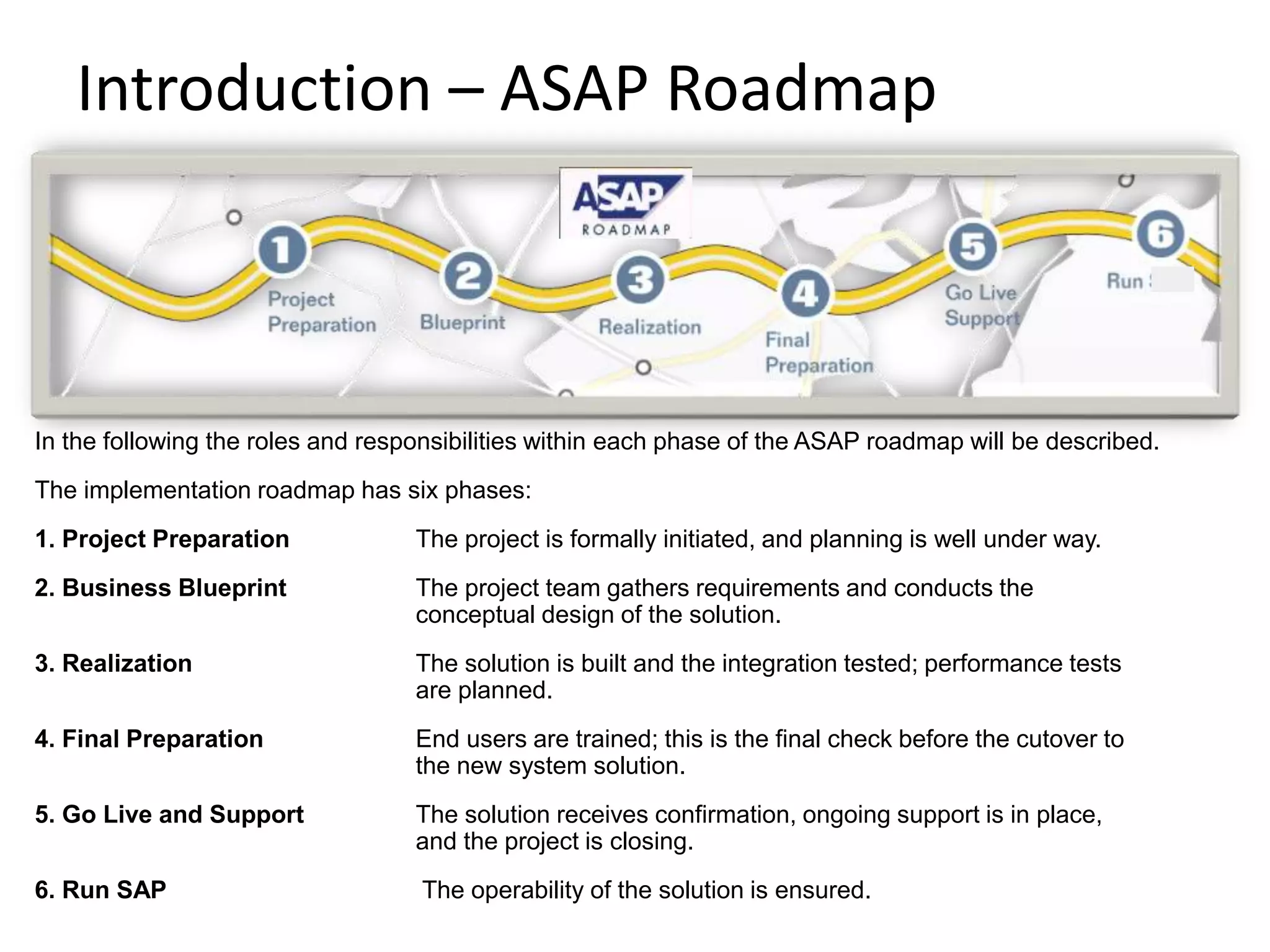
Introduction – ASAP Roadmap
In the following the roles and responsibilities within each phase of the ASAP roadmap will be described.
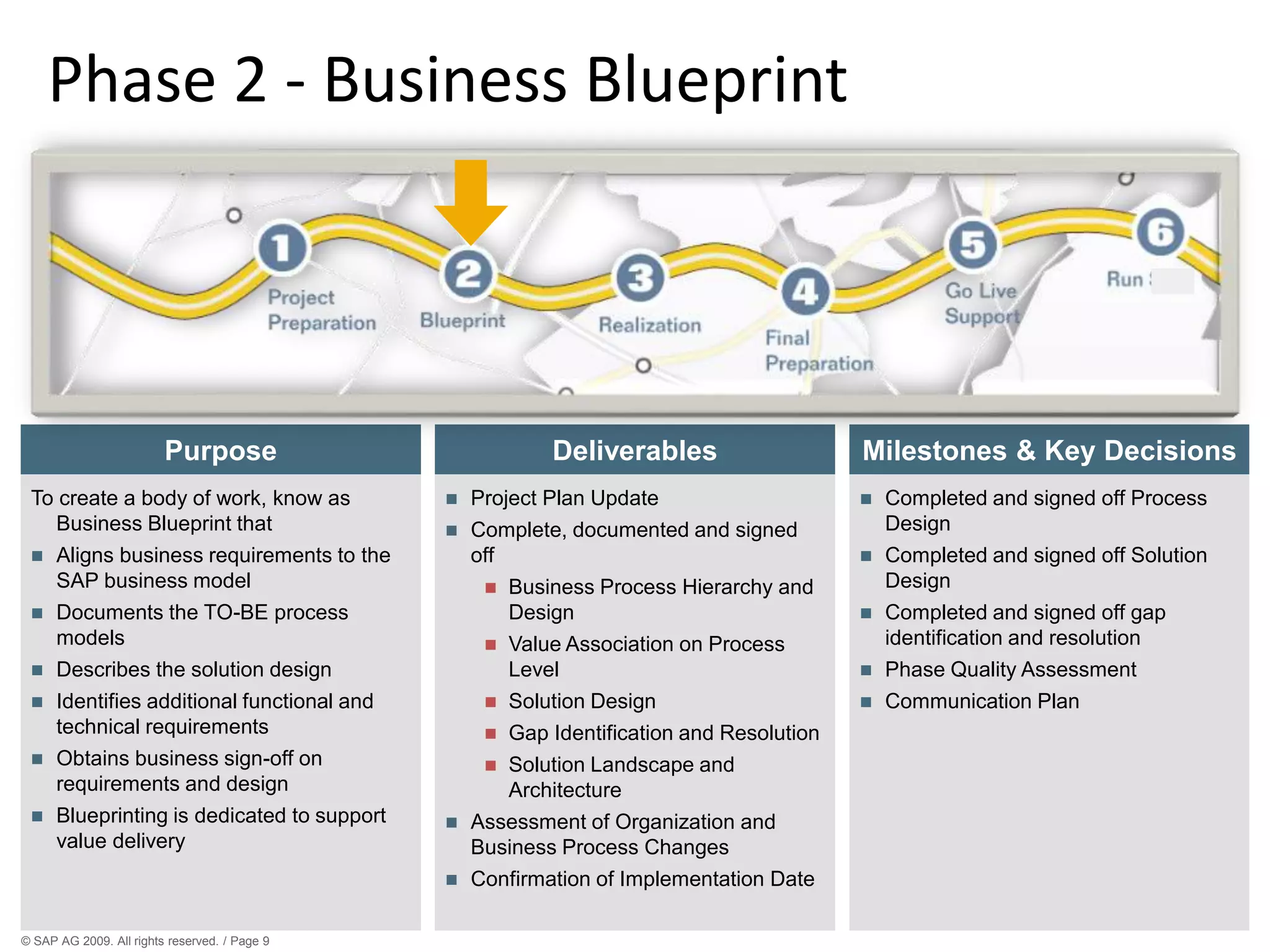
The implementation roadmap has six phases:
1. Project Preparation The project is formally initiated, and planning is well under way.
2. Business Blueprint The project team gathers requirements and conducts the
conceptual design of the solution.
3. Realization The solution is built and the integration tested; performance tests
are planned.
4. Final Preparation End users are trained; this is the final check before the cutover to
the new system solution.
5. Go Live and Support The solution receives confirmation, ongoing support is in place,
and the project is closing.
6. Run SAP The operability of the solution is ensured.
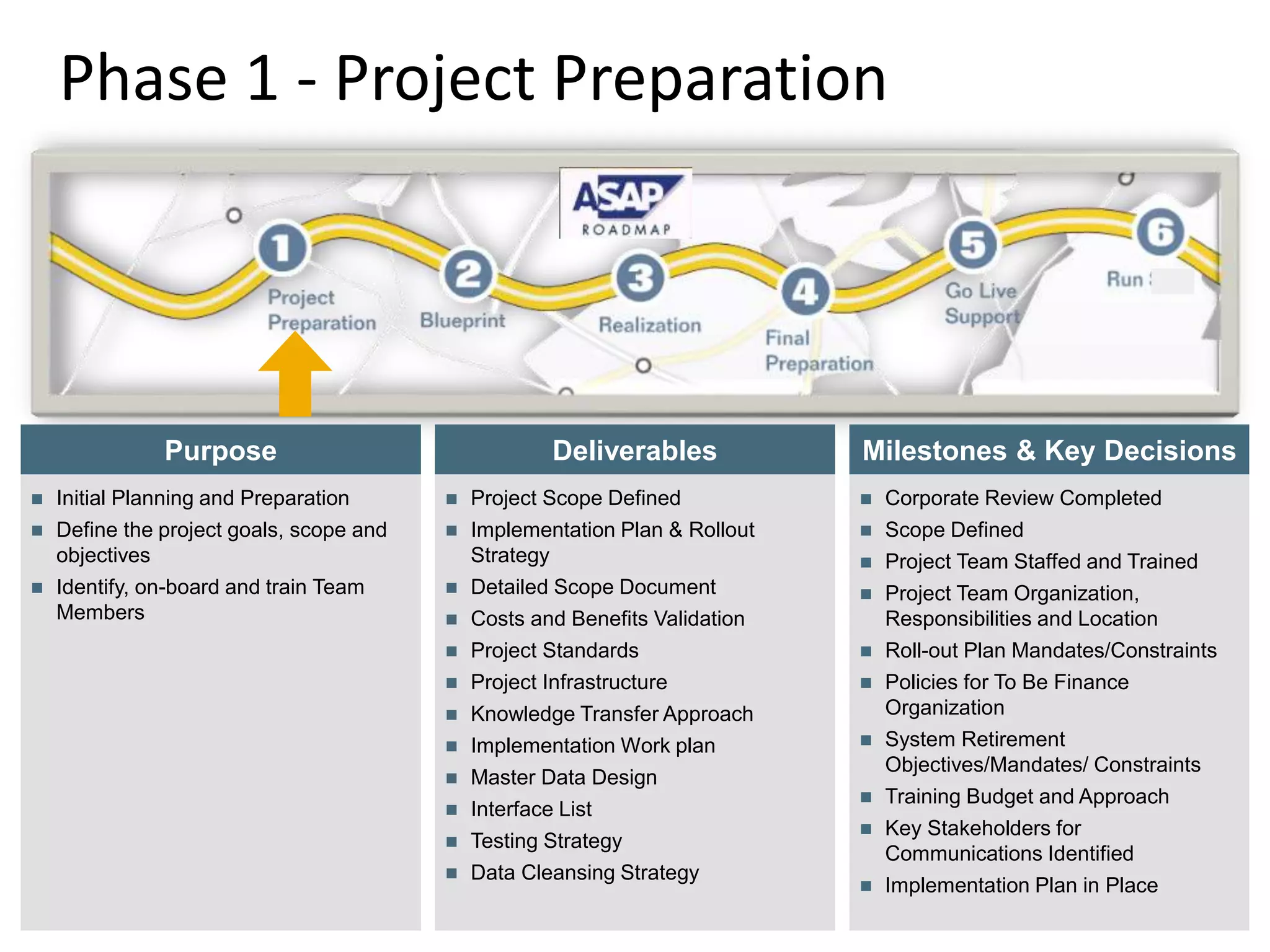
Phase 1 - Project Preparation
© SAP AG 2009. All rights
reserved. / Page 6
Deliverables
Purpose
 Initial Planning and Preparation
 Define the project goals, scope and
objectives
 Identify, on-board and train Team
Members
 Project Scope Defined
 Implementation Plan & Rollout
Strategy
 Detailed Scope Document
 Costs and Benefits Validation
 Project Standards
 Project Infrastructure
 Knowledge Transfer Approach
 Implementation Work plan
 Master Data Design
 Interface List
 Testing Strategy
 Data Cleansing Strategy
Milestones & Key Decisions
 Corporate Review Completed
 Scope Defined
 Project Team Staffed and Trained
 Project Team Organization,
Responsibilities and Location
 Roll-out Plan Mandates/Constraints
 Policies for To Be Finance
Organization
 System Retirement
Objectives/Mandates/ Constraints
 Training Budget and Approach
 Key Stakeholders for
Communications Identified
 Implementation Plan in Place
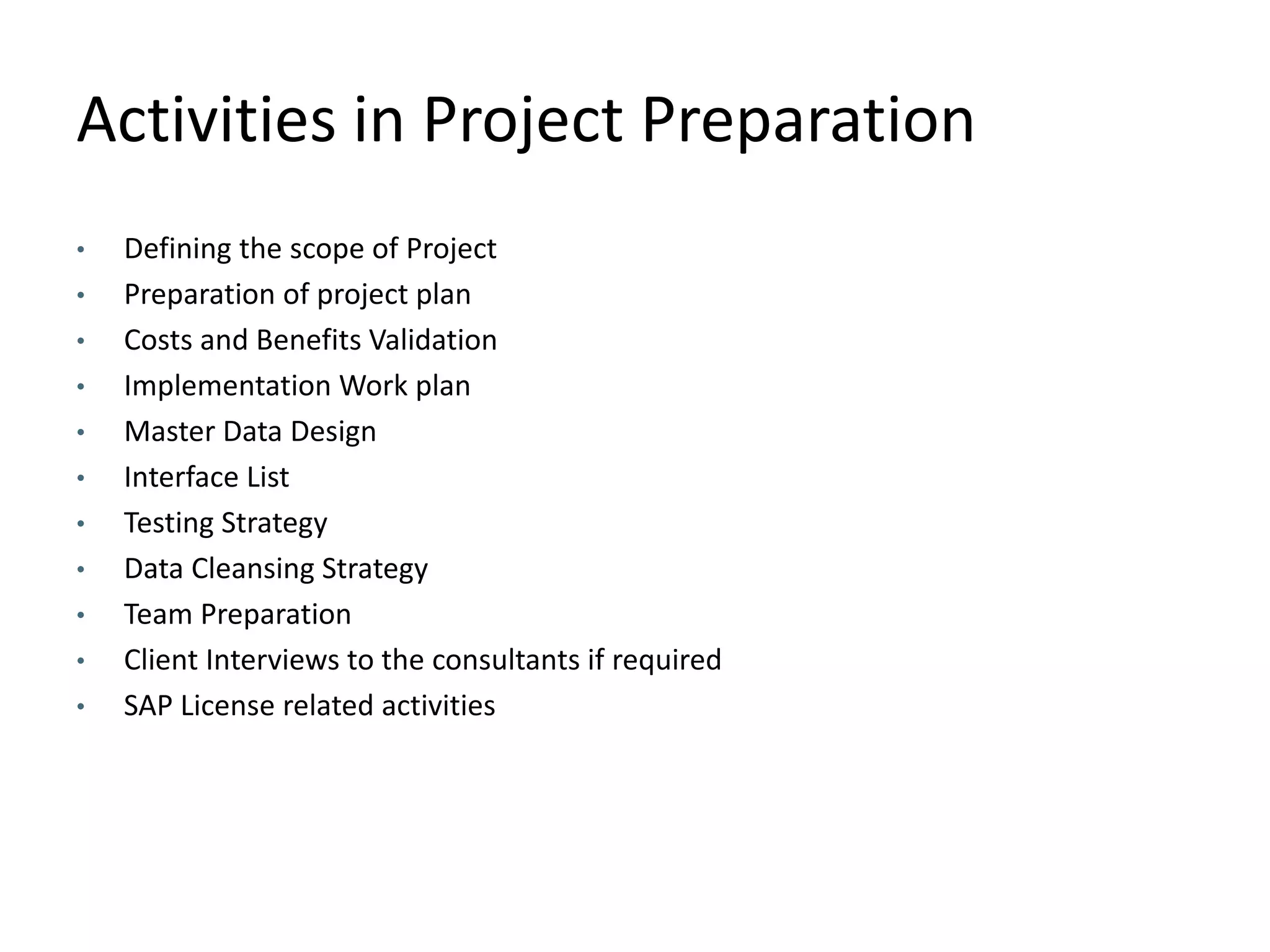
Activities in Project Preparation
• Defining the scope of Project
• Preparation of project plan
• Costs and Benefits Validation
• Implementation Work plan
• Master Data Design
• Interface List
• Testing Strategy
• Data Cleansing Strategy
• Team Preparation
• Client Interviews to the consultants if required
• SAP License related activities
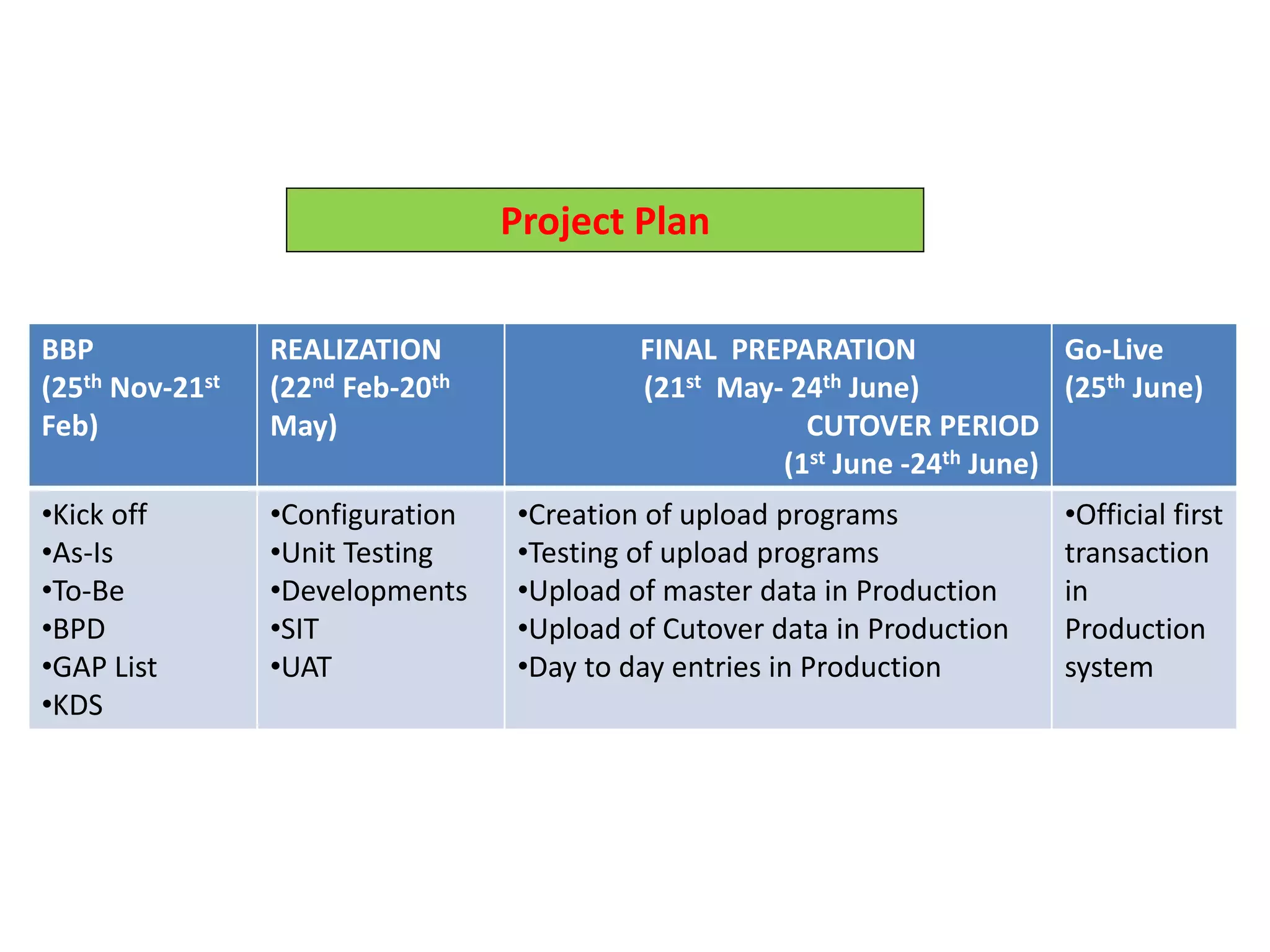
BBP
(25th Nov-21st
Feb)
REALIZATION
(22nd Feb-20th
May)
FINAL PREPARATION
(21st May- 24th June)
CUTOVER PERIOD
(1st June -24th June)
Go-Live
(25th June)
•Kick off
•As-Is
•To-Be
•BPD
•GAP List
•KDS
•Configuration
•Unit Testing
•Developments
•SIT
•UAT
•Creation of upload programs
•Testing of upload programs
•Upload of master data in Production
•Upload of Cutover data in Production
•Day to day entries in Production
•Official first
transaction
in
Production
system
Project Plan
© SAP AG 2009. All rights reserved. / Page 9
Phase 2 - Business Blueprint
Deliverables
Purpose
To create a body of work, know as
Business Blueprint that
 Aligns business requirements to the
SAP business model
 Documents the TO-BE process
models
 Describes the solution design
 Identifies additional functional and
technical requirements
 Obtains business sign-off on
requirements and design
 Blueprinting is dedicated to support
value delivery
 Project Plan Update
 Complete, documented and signed
off
 Business Process Hierarchy and
Design
 Value Association on Process
Level
 Solution Design
 Gap Identification and Resolution
 Solution Landscape and
Architecture
 Assessment of Organization and
Business Process Changes
 Confirmation of Implementation Date
Milestones & Key Decisions
 Completed and signed off Process
Design
 Completed and signed off Solution
Design
 Completed and signed off gap
identification and resolution
 Phase Quality Assessment
 Communication Plan
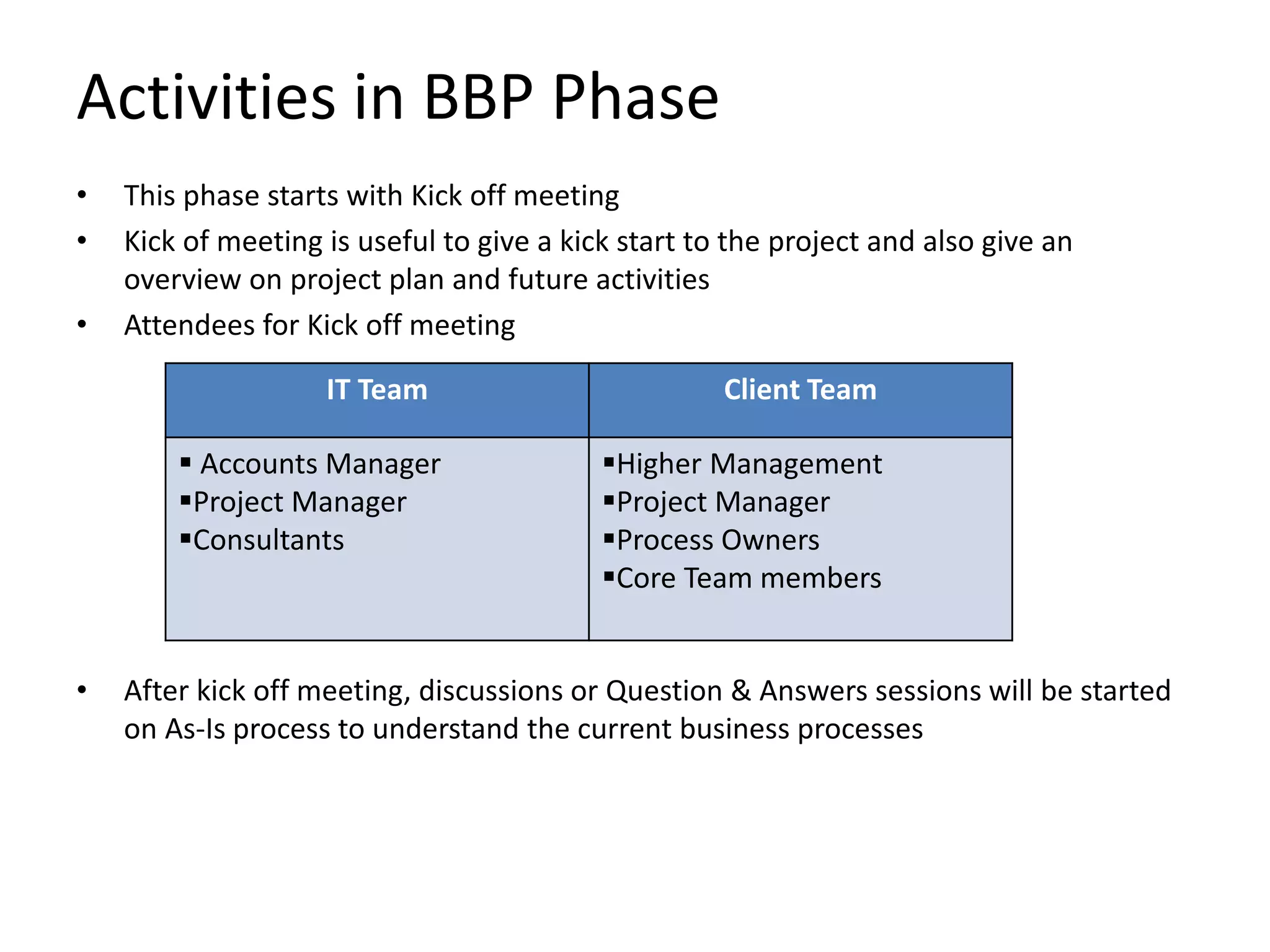
Activities in BBP Phase
• This phase starts with Kick off meeting
• Kick of meeting is useful to give a kick start to the project and also give an
overview on project plan and future activities
• Attendees for Kick off meeting
• After kick off meeting, discussions or Question & Answers sessions will be started
on As-Is process to understand the current business processes
IT Team Client Team
 Accounts Manager
Project Manager
Consultants
Higher Management
Project Manager
Process Owners
Core Team members
Activities in BBP Phase
• To Be process documents are prepared as per As-Is discussions
• Level 0 Training
• Business walk through presentation (Level 1 training) will be given to all the
process owners and core team members
• As per the inputs and corrections from the client, Business Blue print documents
are changed and share the copies to the client
• BBP documents have to be signed off from the client
• Key Data Structures(KDS) document has to be prepared and signed off
• GAP list has to be identified and required solutions have to be proposed
• As per the new developments, ABAP consultants are nominated for the project
• All the templates and sample documents are given below
Roles of Consultants in BPD Phase
Functional Consultant:
• Participating in Kick off meeting
• Understanding the As-Is processes
• Preparing To Be documents
• Preparing BPD walk through presentation
• Preparing BBP documents
• Preparing KDS document
• Preparing GAP list document
Technical Consultant:
• No major involvement
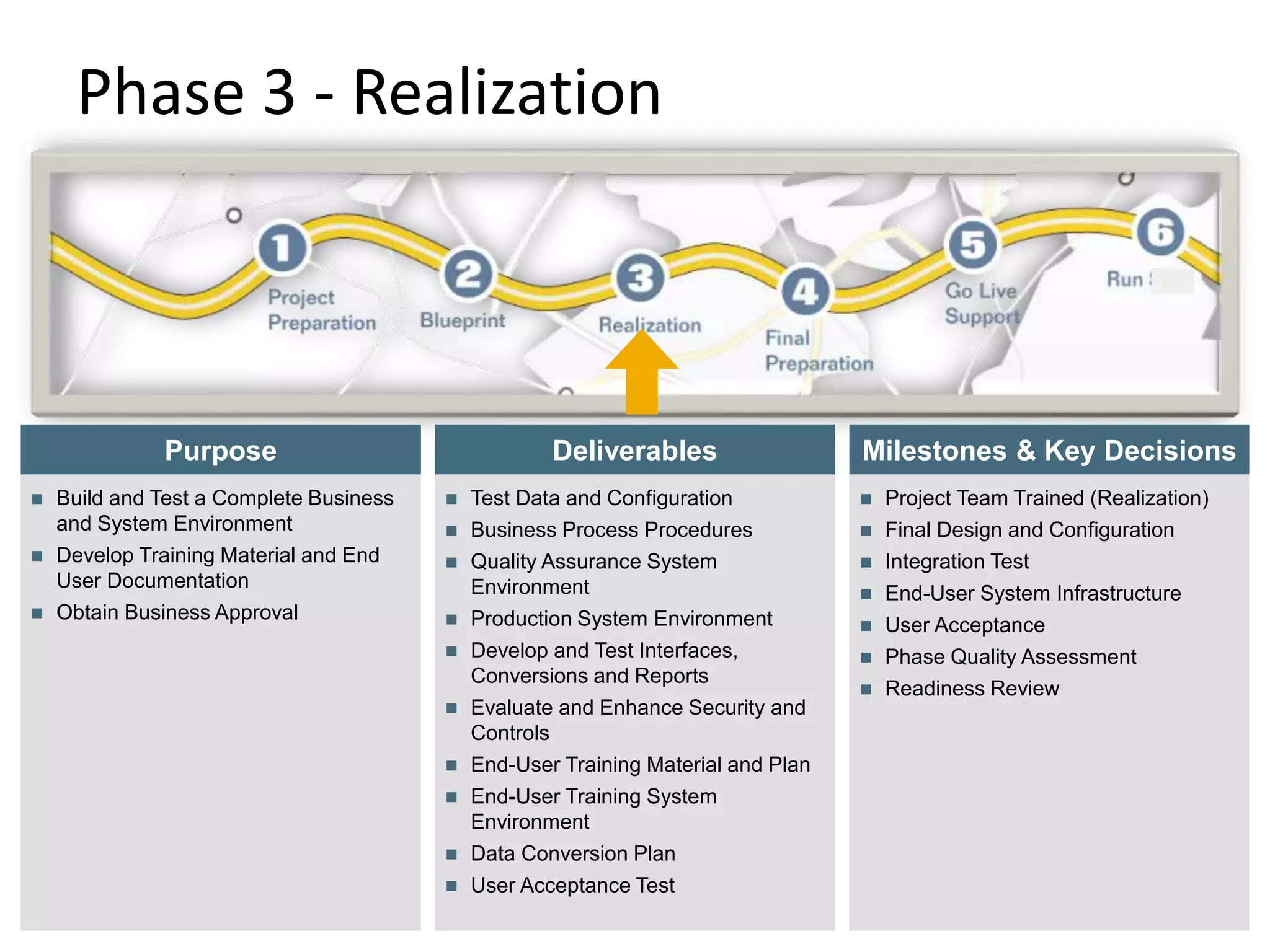
Phase 3 - Realization
© SAP AG 2009. All rights
reserved. / Page 13
Deliverables
Purpose
 Build and Test a Complete Business
and System Environment
 Develop Training Material and End
User Documentation
 Obtain Business Approval
 Test Data and Configuration
 Business Process Procedures
 Quality Assurance System
Environment
 Production System Environment
 Develop and Test Interfaces,
Conversions and Reports
 Evaluate and Enhance Security and
Controls
 End-User Training Material and Plan
 End-User Training System
Environment
 Data Conversion Plan
 User Acceptance Test
Milestones & Key Decisions
 Project Team Trained (Realization)
 Final Design and Configuration
 Integration Test
 End-User System Infrastructure
 User Acceptance
 Phase Quality Assessment
 Readiness Review
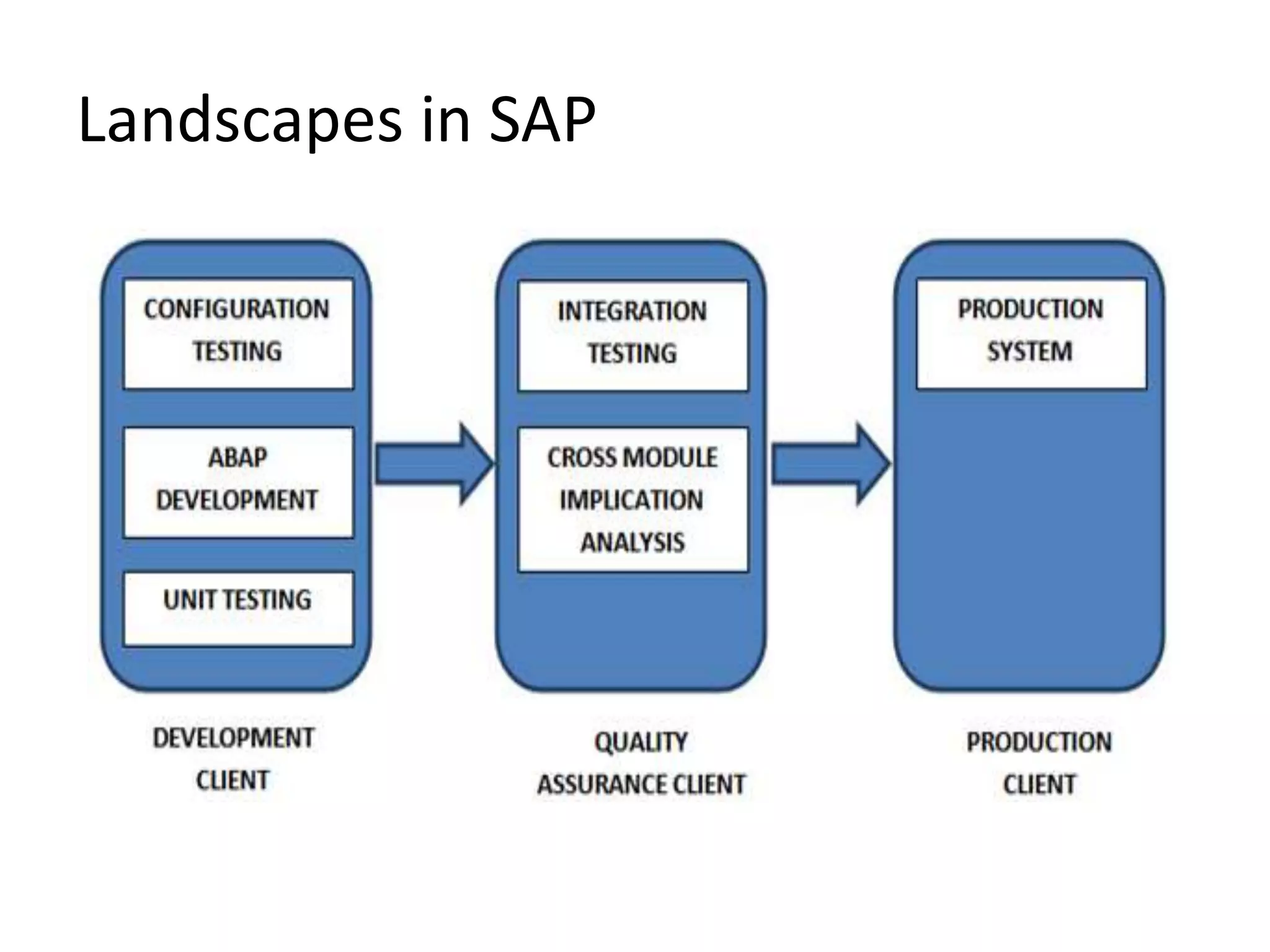
Landscapes in SAP
Activities
• Once server is received, system has to be verified and required nodes need to be
activated
• Configuration of Enterprise Structure and other processes
• Creating master data for Testing
• Unit Testing in Development system
• Detailed Level 2 training to Core Team members
• Releasing of Transport requests to Quality system
• System Integration and User Acceptance Testing in Quality System
• Developing Smart forms, Reports, Enhancements etc.
• Testing of new developments and developments have to be signed off from client
• Cleansing of Master Data
Templates of UT, SIT and FS
UT Template:
SIT Template:
Same template is used to for testing like System Integration Testing and User
Acceptance Testing. UAT is also called as Final Acceptance Testing and Business
acceptance Testing
Functional Specification (FS) sample:
Roles of Consultants in Realization
Functional Consultant:
• Configuration in Development client
• Doing Unit Testing in Development system
• Training to Core Team members
• Monitoring the UT of Core team and resolving the queries
• Preparing Functional Specifications and coordination with Technical consultants
• Testing of Developments
• Doing System Integration Testing (SIT) in Quality system
• Giving support to User Acceptance Testing (UAT or FAT)
Technical Consultant:
• Understand the list of developments as per the GAP list
• Understanding the FS and developing as per the requirement
• Coordinating with Functional consultant to meet the client’s requirement
• Preparing Technical Specification
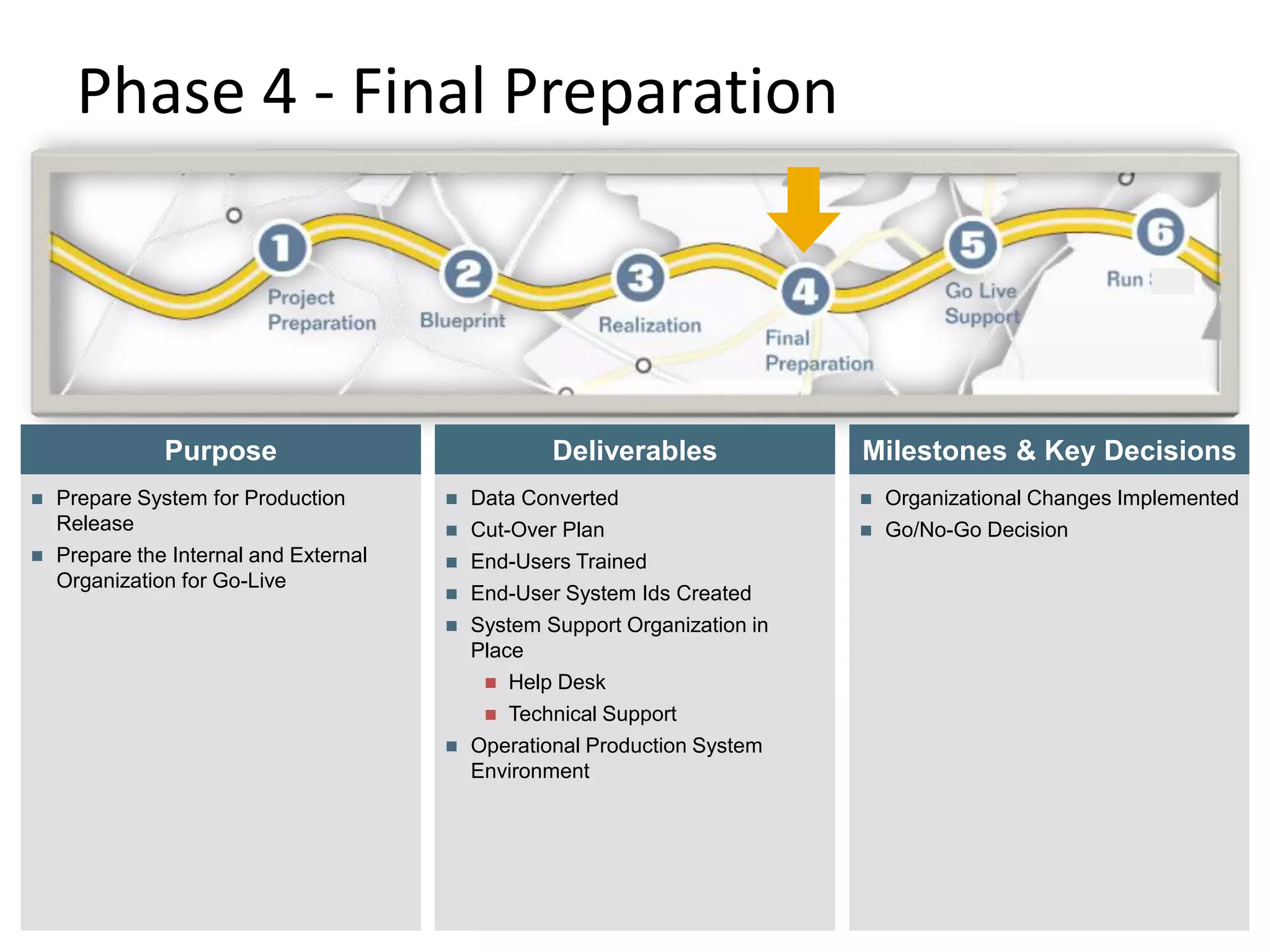
Phase 4 - Final Preparation
© SAP AG 2009. All rights
reserved. / Page 18
Deliverables
Purpose
 Prepare System for Production
Release
 Prepare the Internal and External
Organization for Go-Live
 Data Converted
 Cut-Over Plan
 End-Users Trained
 End-User System Ids Created
 System Support Organization in
Place
 Help Desk
 Technical Support
 Operational Production System
Environment
Milestones & Key Decisions
 Organizational Changes Implemented
 Go/No-Go Decision
Activities in Final Preparation
• Testing of uploading programs used for data migration
• End User Training
• Collecting Master data and Cutover data from business
• Migrating the Master data and Cutover data to SAP production system from non
legacy systems
• Creation of User IDs for End users
• Providing authorizations to the users as per the requirement
Templates of data migration programs and Authorization Matrix:
Cutover Data
MM Cutover Data:
• Open Purchase Orders
• Open Work Orders
• Open Stock
FI Cutover Data:
• Open Payments
• Vendor Balances
• Customer Balances
• Vendor Advances
• Customer Advances
SD Cutover Data:
• Open Sales Orders
• Open Billing
• Open Contracts
Roles of Consultants in Final Preparation
Functional Consultant:
• Identifying the cutover data and testing the upload programs in Quality system
• Uploading Master data in Production System
• Uploading Cutover Data in Production System
• Working to complete the activities within cutover period as per the plan
• End User Training
• Documentation of all the phases
Technical Consultant:
• Completing the pending developments as per the plan
• Preparing Technical Specifications
• Creating the upload programs for cutover data
• Coordinating with functional consultant
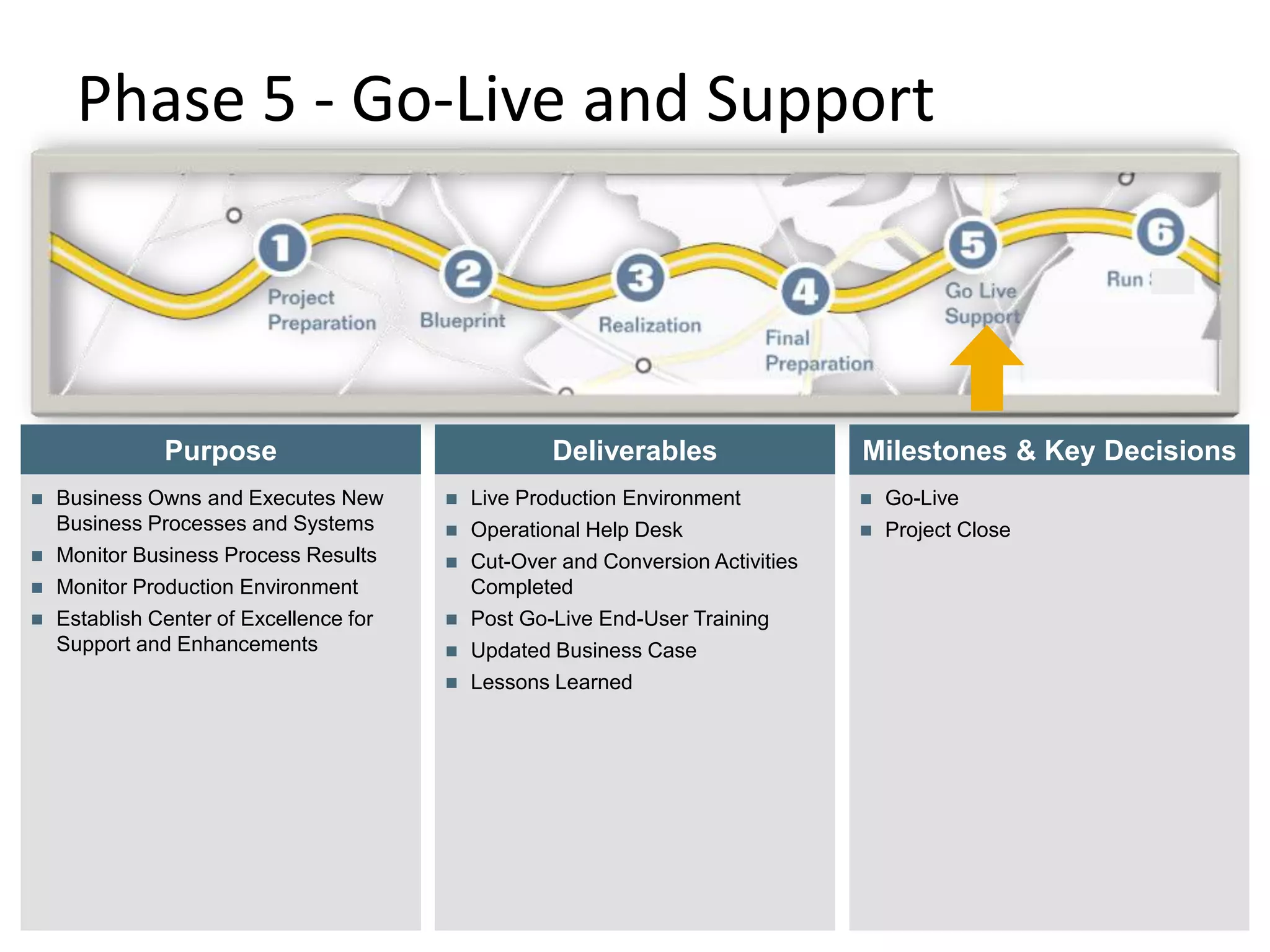
Phase 5 - Go-Live and Support
© SAP AG 2009. All rights
reserved. / Page 22
Deliverables
Purpose
 Business Owns and Executes New
Business Processes and Systems
 Monitor Business Process Results
 Monitor Production Environment
 Establish Center of Excellence for
Support and Enhancements
 Live Production Environment
 Operational Help Desk
 Cut-Over and Conversion Activities
Completed
 Post Go-Live End-User Training
 Updated Business Case
 Lessons Learned
 Go-Live
 Project Close
Milestones & Key Decisions
Activities in Go-Live & Support
• Resolution of tickets on day to day basis
• Monitoring initial tickets
• Handover of project to support team
Roles of Consultants in Go-live &
Support
Functional Consultant:
• Once the Go-Live is happened, initial support has to be given
• Handover to Support Team
• Changes in configuration as per the requirement
• Later support activities will be taken by support team
Technical Consultant:
• Completing pending developments
• Modifications to existing developments as per the requirement
• Preparing Technical Specifications
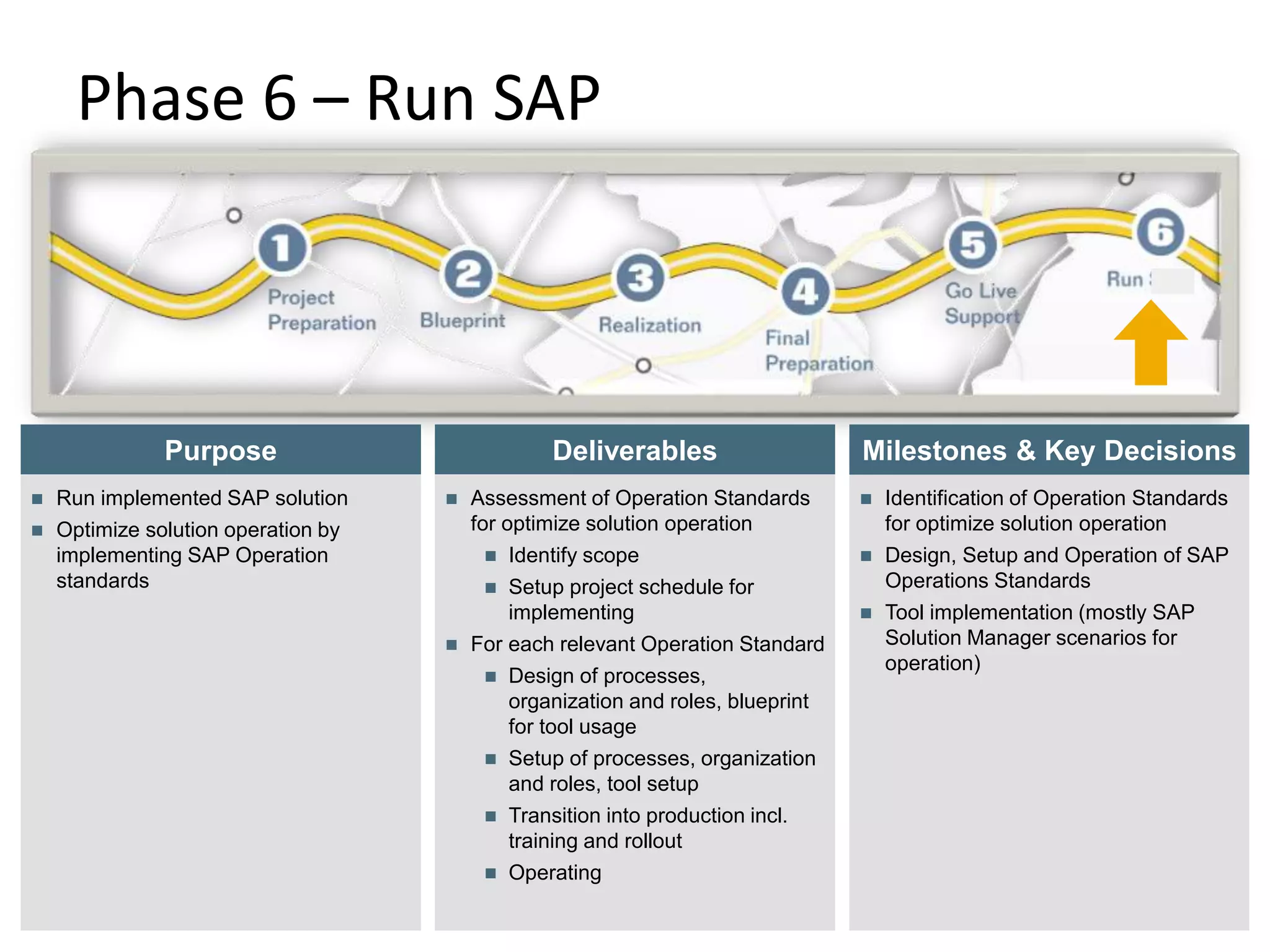
Phase 6 – Run SAP
© SAP AG 2009. All rights
reserved. / Page 25
Deliverables
Purpose
 Run implemented SAP solution
 Optimize solution operation by
implementing SAP Operation
standards
 Assessment of Operation Standards
for optimize solution operation
 Identify scope
 Setup project schedule for
implementing
 For each relevant Operation Standard
 Design of processes,
organization and roles, blueprint
for tool usage
 Setup of processes, organization
and roles, tool setup
 Transition into production incl.
training and rollout
 Operating
 Identification of Operation Standards
for optimize solution operation
 Design, Setup and Operation of SAP
Operations Standards
 Tool implementation (mostly SAP
Solution Manager scenarios for
operation)
Milestones & Key Decisions
Activities in Run
• Resolution of tickets as per Service Level Agreements
• Monitoring tickets in supporting tool such as Solution Manager
• Proper documentation of Service requests and Change requests
• Development of new customized tasks as per the business requirement
• Meetings on status of support tickets
Roles of Consultants in Run SAP
Functional Consultant:
• Handling tickets as per the Service Level Agreement(SLA)
• Preparing functional specifications for new developments
• Analyzing the tickets and changing configuration as per the requirement
• Giving End user trainings as per the requirement
Technical Consultant:
• Working on new developments as per the requirement
• Working on existing changes in developments
• Working on any technical or coding related tickets
Thank You
28

Training on ASAP Methodology.ppt

  • 1.
  • 2.
    Agenda • History andimportance of ASAP methodology • Detailed explanation of each phase in Implementation • Roles of consultants in different phases of Implementation • Explaining the documents used in Implementation with sample documents
  • 3.
    History of ASAPMethodology • By the mid 1990s, SAP procedures got a significant among of negative publicity related to some high profile disasters. Though the companies know that the ends were inevitable, SAP was criticized of being complicated, expensive and required long delivery schedules • This is when SAP came up with its ASAP roadmap to sort out the numerous SAP projects that were over budget, over time and were at the risk of failure • The ASAP (Accelerated SAP) methodology provides the roadmap for optimizing and continuous implementation of SAP systems in business processes • The ASAP roadmap also includes various ITIL (Information Technology Infrastructure Library) elements and Value SAP techniques to make project solutions more robust, cost effective, timely and successful • The roadmap brings in a multiple number of tools, information and accelerators to assist team members with the implementation of R/3
  • 4.
    Benefits of ASAPMethodology • The ASAP Methodology covers the entire project life cycle right from the initial evaluation via delivery and till post project management • Proven and transparent approach that facilitates the project team to collaborate efficiently thus reducing implementation costs, time and risks • Sensible risk management • Better knowledge management wherein SAP solutions helps organize, implement and meet business objectives • Steering committee tools and better communications planning • Better results because ASAP methodology is based on the experience of others – the roadmap requires both soft skills and hard facts • Project times are almost brought down to half • Combination of all best practice tools including ITIL, PMI(Project Management Institute), Internal SAP and others
  • 5.
    Introduction – ASAPRoadmap In the following the roles and responsibilities within each phase of the ASAP roadmap will be described. The implementation roadmap has six phases: 1. Project Preparation The project is formally initiated, and planning is well under way. 2. Business Blueprint The project team gathers requirements and conducts the conceptual design of the solution. 3. Realization The solution is built and the integration tested; performance tests are planned. 4. Final Preparation End users are trained; this is the final check before the cutover to the new system solution. 5. Go Live and Support The solution receives confirmation, ongoing support is in place, and the project is closing. 6. Run SAP The operability of the solution is ensured.
  • 6.
    Phase 1 -Project Preparation © SAP AG 2009. All rights reserved. / Page 6 Deliverables Purpose  Initial Planning and Preparation  Define the project goals, scope and objectives  Identify, on-board and train Team Members  Project Scope Defined  Implementation Plan & Rollout Strategy  Detailed Scope Document  Costs and Benefits Validation  Project Standards  Project Infrastructure  Knowledge Transfer Approach  Implementation Work plan  Master Data Design  Interface List  Testing Strategy  Data Cleansing Strategy Milestones & Key Decisions  Corporate Review Completed  Scope Defined  Project Team Staffed and Trained  Project Team Organization, Responsibilities and Location  Roll-out Plan Mandates/Constraints  Policies for To Be Finance Organization  System Retirement Objectives/Mandates/ Constraints  Training Budget and Approach  Key Stakeholders for Communications Identified  Implementation Plan in Place
  • 7.
    Activities in ProjectPreparation • Defining the scope of Project • Preparation of project plan • Costs and Benefits Validation • Implementation Work plan • Master Data Design • Interface List • Testing Strategy • Data Cleansing Strategy • Team Preparation • Client Interviews to the consultants if required • SAP License related activities
  • 8.
    BBP (25th Nov-21st Feb) REALIZATION (22nd Feb-20th May) FINALPREPARATION (21st May- 24th June) CUTOVER PERIOD (1st June -24th June) Go-Live (25th June) •Kick off •As-Is •To-Be •BPD •GAP List •KDS •Configuration •Unit Testing •Developments •SIT •UAT •Creation of upload programs •Testing of upload programs •Upload of master data in Production •Upload of Cutover data in Production •Day to day entries in Production •Official first transaction in Production system Project Plan
  • 9.
    © SAP AG2009. All rights reserved. / Page 9 Phase 2 - Business Blueprint Deliverables Purpose To create a body of work, know as Business Blueprint that  Aligns business requirements to the SAP business model  Documents the TO-BE process models  Describes the solution design  Identifies additional functional and technical requirements  Obtains business sign-off on requirements and design  Blueprinting is dedicated to support value delivery  Project Plan Update  Complete, documented and signed off  Business Process Hierarchy and Design  Value Association on Process Level  Solution Design  Gap Identification and Resolution  Solution Landscape and Architecture  Assessment of Organization and Business Process Changes  Confirmation of Implementation Date Milestones & Key Decisions  Completed and signed off Process Design  Completed and signed off Solution Design  Completed and signed off gap identification and resolution  Phase Quality Assessment  Communication Plan
  • 10.
    Activities in BBPPhase • This phase starts with Kick off meeting • Kick of meeting is useful to give a kick start to the project and also give an overview on project plan and future activities • Attendees for Kick off meeting • After kick off meeting, discussions or Question & Answers sessions will be started on As-Is process to understand the current business processes IT Team Client Team  Accounts Manager Project Manager Consultants Higher Management Project Manager Process Owners Core Team members
  • 11.
    Activities in BBPPhase • To Be process documents are prepared as per As-Is discussions • Level 0 Training • Business walk through presentation (Level 1 training) will be given to all the process owners and core team members • As per the inputs and corrections from the client, Business Blue print documents are changed and share the copies to the client • BBP documents have to be signed off from the client • Key Data Structures(KDS) document has to be prepared and signed off • GAP list has to be identified and required solutions have to be proposed • As per the new developments, ABAP consultants are nominated for the project • All the templates and sample documents are given below
  • 12.
    Roles of Consultantsin BPD Phase Functional Consultant: • Participating in Kick off meeting • Understanding the As-Is processes • Preparing To Be documents • Preparing BPD walk through presentation • Preparing BBP documents • Preparing KDS document • Preparing GAP list document Technical Consultant: • No major involvement
  • 13.
    Phase 3 -Realization © SAP AG 2009. All rights reserved. / Page 13 Deliverables Purpose  Build and Test a Complete Business and System Environment  Develop Training Material and End User Documentation  Obtain Business Approval  Test Data and Configuration  Business Process Procedures  Quality Assurance System Environment  Production System Environment  Develop and Test Interfaces, Conversions and Reports  Evaluate and Enhance Security and Controls  End-User Training Material and Plan  End-User Training System Environment  Data Conversion Plan  User Acceptance Test Milestones & Key Decisions  Project Team Trained (Realization)  Final Design and Configuration  Integration Test  End-User System Infrastructure  User Acceptance  Phase Quality Assessment  Readiness Review
  • 14.
  • 15.
    Activities • Once serveris received, system has to be verified and required nodes need to be activated • Configuration of Enterprise Structure and other processes • Creating master data for Testing • Unit Testing in Development system • Detailed Level 2 training to Core Team members • Releasing of Transport requests to Quality system • System Integration and User Acceptance Testing in Quality System • Developing Smart forms, Reports, Enhancements etc. • Testing of new developments and developments have to be signed off from client • Cleansing of Master Data
  • 16.
    Templates of UT,SIT and FS UT Template: SIT Template: Same template is used to for testing like System Integration Testing and User Acceptance Testing. UAT is also called as Final Acceptance Testing and Business acceptance Testing Functional Specification (FS) sample:
  • 17.
    Roles of Consultantsin Realization Functional Consultant: • Configuration in Development client • Doing Unit Testing in Development system • Training to Core Team members • Monitoring the UT of Core team and resolving the queries • Preparing Functional Specifications and coordination with Technical consultants • Testing of Developments • Doing System Integration Testing (SIT) in Quality system • Giving support to User Acceptance Testing (UAT or FAT) Technical Consultant: • Understand the list of developments as per the GAP list • Understanding the FS and developing as per the requirement • Coordinating with Functional consultant to meet the client’s requirement • Preparing Technical Specification
  • 18.
    Phase 4 -Final Preparation © SAP AG 2009. All rights reserved. / Page 18 Deliverables Purpose  Prepare System for Production Release  Prepare the Internal and External Organization for Go-Live  Data Converted  Cut-Over Plan  End-Users Trained  End-User System Ids Created  System Support Organization in Place  Help Desk  Technical Support  Operational Production System Environment Milestones & Key Decisions  Organizational Changes Implemented  Go/No-Go Decision
  • 19.
    Activities in FinalPreparation • Testing of uploading programs used for data migration • End User Training • Collecting Master data and Cutover data from business • Migrating the Master data and Cutover data to SAP production system from non legacy systems • Creation of User IDs for End users • Providing authorizations to the users as per the requirement Templates of data migration programs and Authorization Matrix:
  • 20.
    Cutover Data MM CutoverData: • Open Purchase Orders • Open Work Orders • Open Stock FI Cutover Data: • Open Payments • Vendor Balances • Customer Balances • Vendor Advances • Customer Advances SD Cutover Data: • Open Sales Orders • Open Billing • Open Contracts
  • 21.
    Roles of Consultantsin Final Preparation Functional Consultant: • Identifying the cutover data and testing the upload programs in Quality system • Uploading Master data in Production System • Uploading Cutover Data in Production System • Working to complete the activities within cutover period as per the plan • End User Training • Documentation of all the phases Technical Consultant: • Completing the pending developments as per the plan • Preparing Technical Specifications • Creating the upload programs for cutover data • Coordinating with functional consultant
  • 22.
    Phase 5 -Go-Live and Support © SAP AG 2009. All rights reserved. / Page 22 Deliverables Purpose  Business Owns and Executes New Business Processes and Systems  Monitor Business Process Results  Monitor Production Environment  Establish Center of Excellence for Support and Enhancements  Live Production Environment  Operational Help Desk  Cut-Over and Conversion Activities Completed  Post Go-Live End-User Training  Updated Business Case  Lessons Learned  Go-Live  Project Close Milestones & Key Decisions
  • 23.
    Activities in Go-Live& Support • Resolution of tickets on day to day basis • Monitoring initial tickets • Handover of project to support team
  • 24.
    Roles of Consultantsin Go-live & Support Functional Consultant: • Once the Go-Live is happened, initial support has to be given • Handover to Support Team • Changes in configuration as per the requirement • Later support activities will be taken by support team Technical Consultant: • Completing pending developments • Modifications to existing developments as per the requirement • Preparing Technical Specifications
  • 25.
    Phase 6 –Run SAP © SAP AG 2009. All rights reserved. / Page 25 Deliverables Purpose  Run implemented SAP solution  Optimize solution operation by implementing SAP Operation standards  Assessment of Operation Standards for optimize solution operation  Identify scope  Setup project schedule for implementing  For each relevant Operation Standard  Design of processes, organization and roles, blueprint for tool usage  Setup of processes, organization and roles, tool setup  Transition into production incl. training and rollout  Operating  Identification of Operation Standards for optimize solution operation  Design, Setup and Operation of SAP Operations Standards  Tool implementation (mostly SAP Solution Manager scenarios for operation) Milestones & Key Decisions
  • 26.
    Activities in Run •Resolution of tickets as per Service Level Agreements • Monitoring tickets in supporting tool such as Solution Manager • Proper documentation of Service requests and Change requests • Development of new customized tasks as per the business requirement • Meetings on status of support tickets
  • 27.
    Roles of Consultantsin Run SAP Functional Consultant: • Handling tickets as per the Service Level Agreement(SLA) • Preparing functional specifications for new developments • Analyzing the tickets and changing configuration as per the requirement • Giving End user trainings as per the requirement Technical Consultant: • Working on new developments as per the requirement • Working on existing changes in developments • Working on any technical or coding related tickets
  • 28.