Overview of ALE / EDI / IDOCs
EDI  What is EDI? Type of EDI process Outbound EDI Process Inbound EDI Process
What is EDI? EDI is electronic exchange of business documents between the computer systems of business partner using a standard format over a communication network EDI is also called a paperless exchange.
Typical EDI/IDOC Scenario
Outbound Process With Message Control Directly -With out Message Control
Inbound Process With Function Module
EDI Configuration How to Set Up an RFC Destination in SAP The Port Definitions Configure Partner Profile Configure Message Control
Complete EDI/ ALE scenario
ALE What is ALE? Components of ALE. Anatomy of an IDoc. ALE Processing Transactions For Monitoring and Processing IDocs. Questions
ALE Terminology ALE  -  Application Linking & Enabling IDoc  -  Intermediate Document EDI  -  Electronic Data Interchange
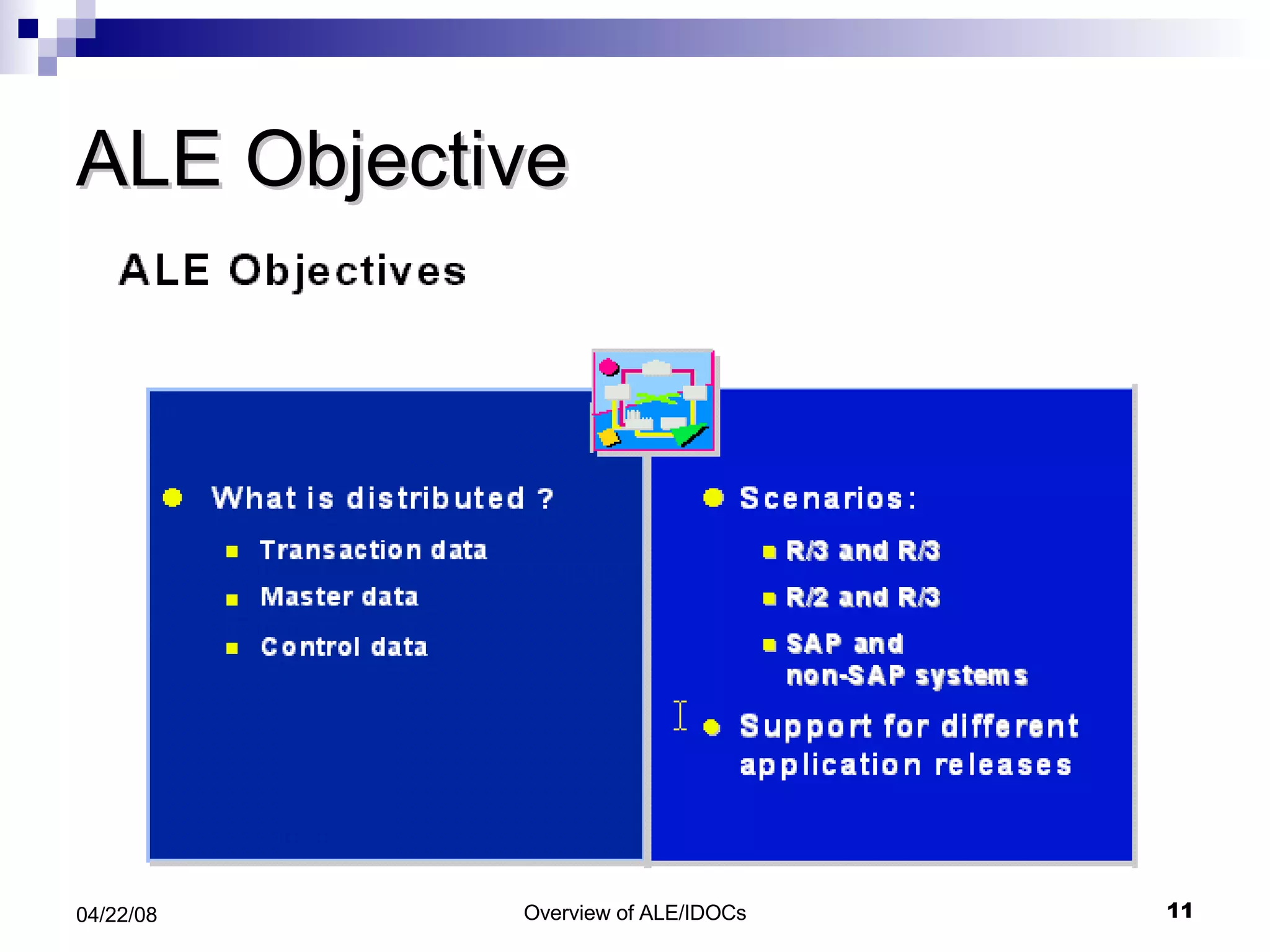
ALE Objective
ALE!!  What is it ?? It is a set of Tools,  programs and data definitions Provides distribution model and technology that enables SAP Customer to interconnect programs across various platforms and systems .
Features –ALE / IDocs Distributed System yet integrated with SAP R/3 Based on ‘Application-to-Application integration using ‘Message Architecture’  Reliable communication  Data is exchanged using “IDocs” Support both R/2, R/3 and External system If network problem, message is buffered ALE support backward compatibility ALE ensure that , data is transferred only once
ALE Scenario  Document SAP System R/3 SAP System R/3 IDoc EDI Subsystem EDI Subsystem IDoc IDoc
What is ALE ? Components of ALE. Anatomy of an IDoc. ALE Processing Transactions For Monitoring and Processing IDocs. Trouble Shooting Questions Topics to cover
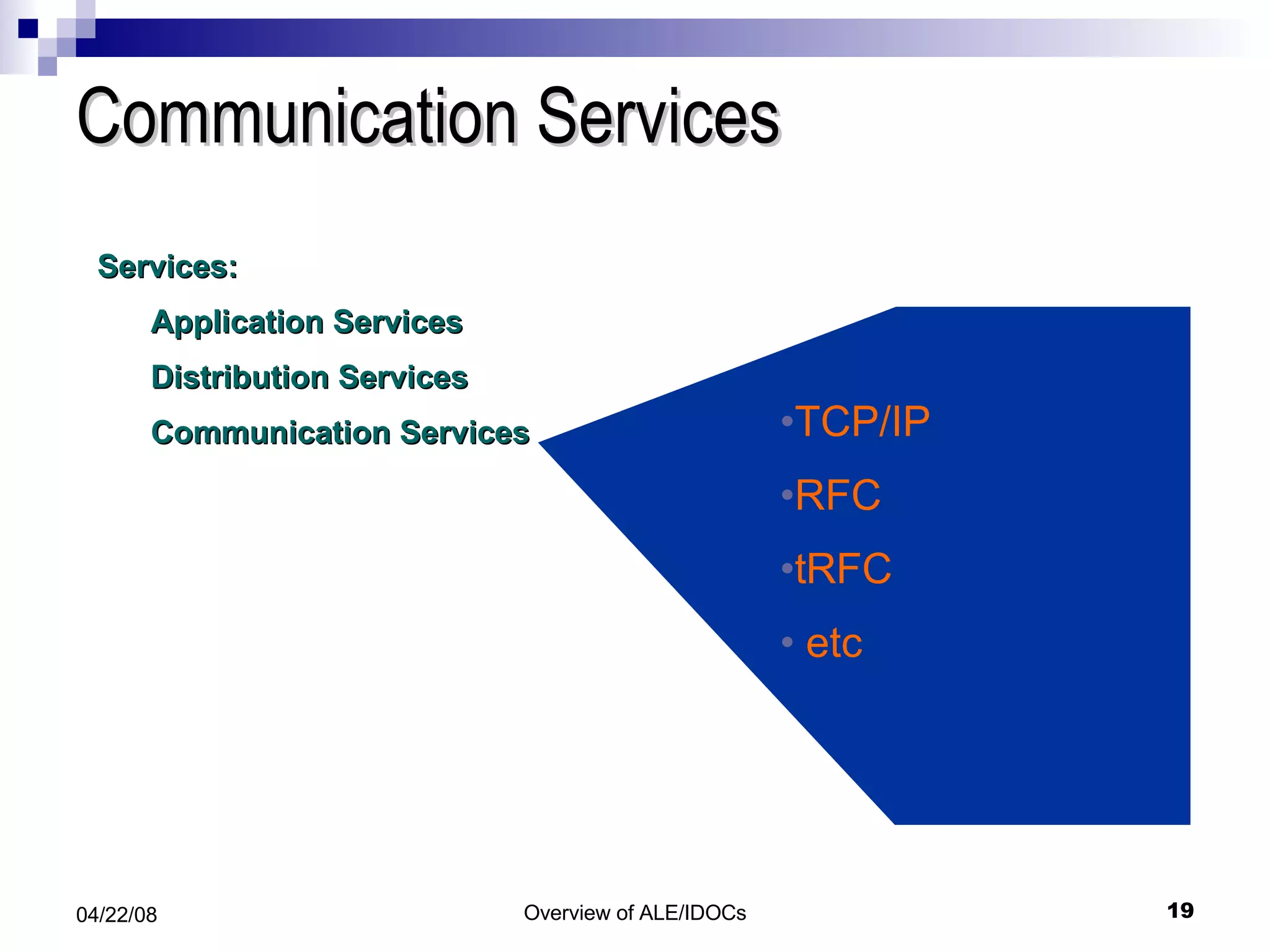
Components of ALE  Services: Application Services Distribution Services Communication Services
Application Services Services: Application Services Distribution Services Communication Services This is where the SAP applications ( SD, FI, MM etc. ) generate their data and documents
Distribution Services Services: Application Services Distribution Services Communication Services Recipients Formats and  Filters the data Creates IDocs  ( Intermediate Documents
Communication Services Services: Application Services Distribution Services Communication Services TCP/IP RFC tRFC etc
Determine Receipients Filter/Convert Data, Create IDOC Application  Functions Filter/Convert Data Carrier Application Layer Distribution/ ALE Layer Communication Layer Application In a Nut Shell Application Data Master IDOC Comm. IDOC Comm. IDOC
Topics to cover What is ALE ? Components of ALE . Anatomy of an IDoc. ALE Processing Transactions For Monitoring and Processing IDocs. Trouble Shooting Questions
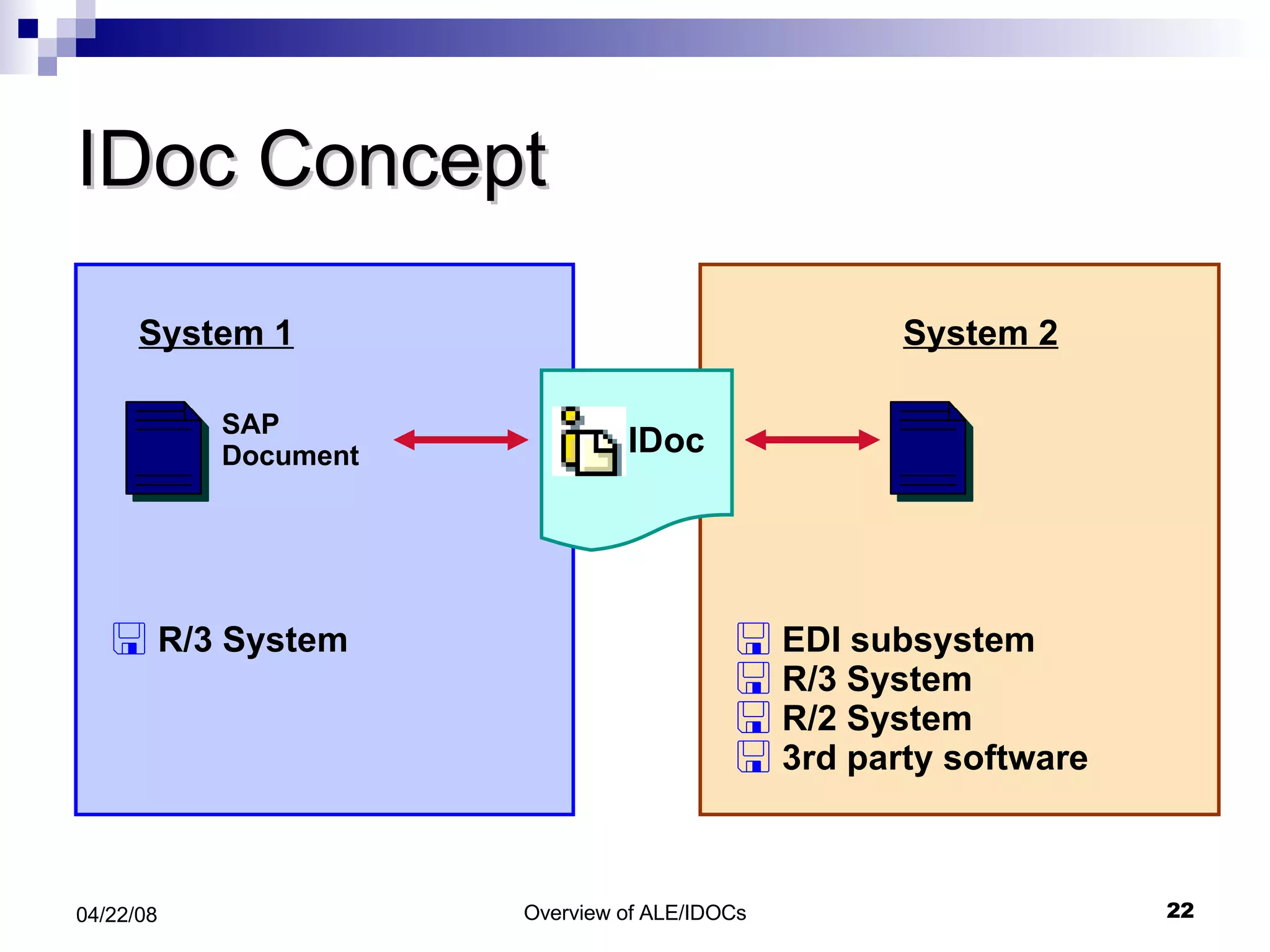
IDoc Concept R/3 System  System 1 SAP Document EDI subsystem R/3 System R/2 System  3rd party software System 2 IDoc
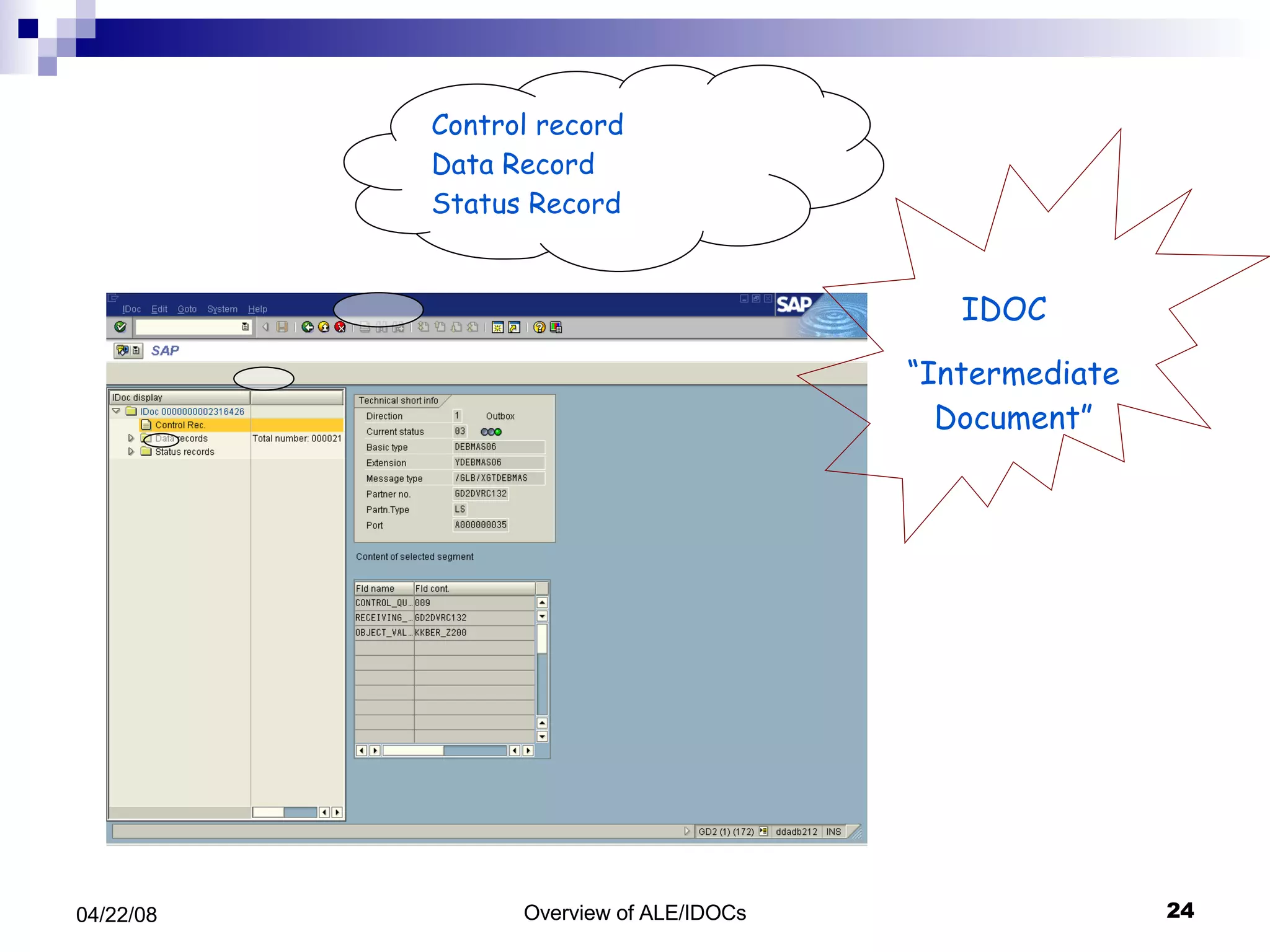
IDoc Structure Status Record IDoc-ID Status information Data Record IDoc-ID Sequence/Hierarchy Segment Format definition for header data item data Control Record IDoc-ID Sender-ID Receiver-ID IDoc type and logical message External structure
Control record Data Record Status Record IDOC  “ Intermediate Document”
Control Record The very first record of an IDoc package is always a control record. The structure of this control record of the structure  EDIDC  and describes the contents of the data contained in the package. The control record goes to table EDIDC
Message Type Message Type indicates How to Know what the data Means Data Exchanged by IDOC and EDI is known as Messages Message of same kind belong to the same message type. Message types are stored in table EDMSG
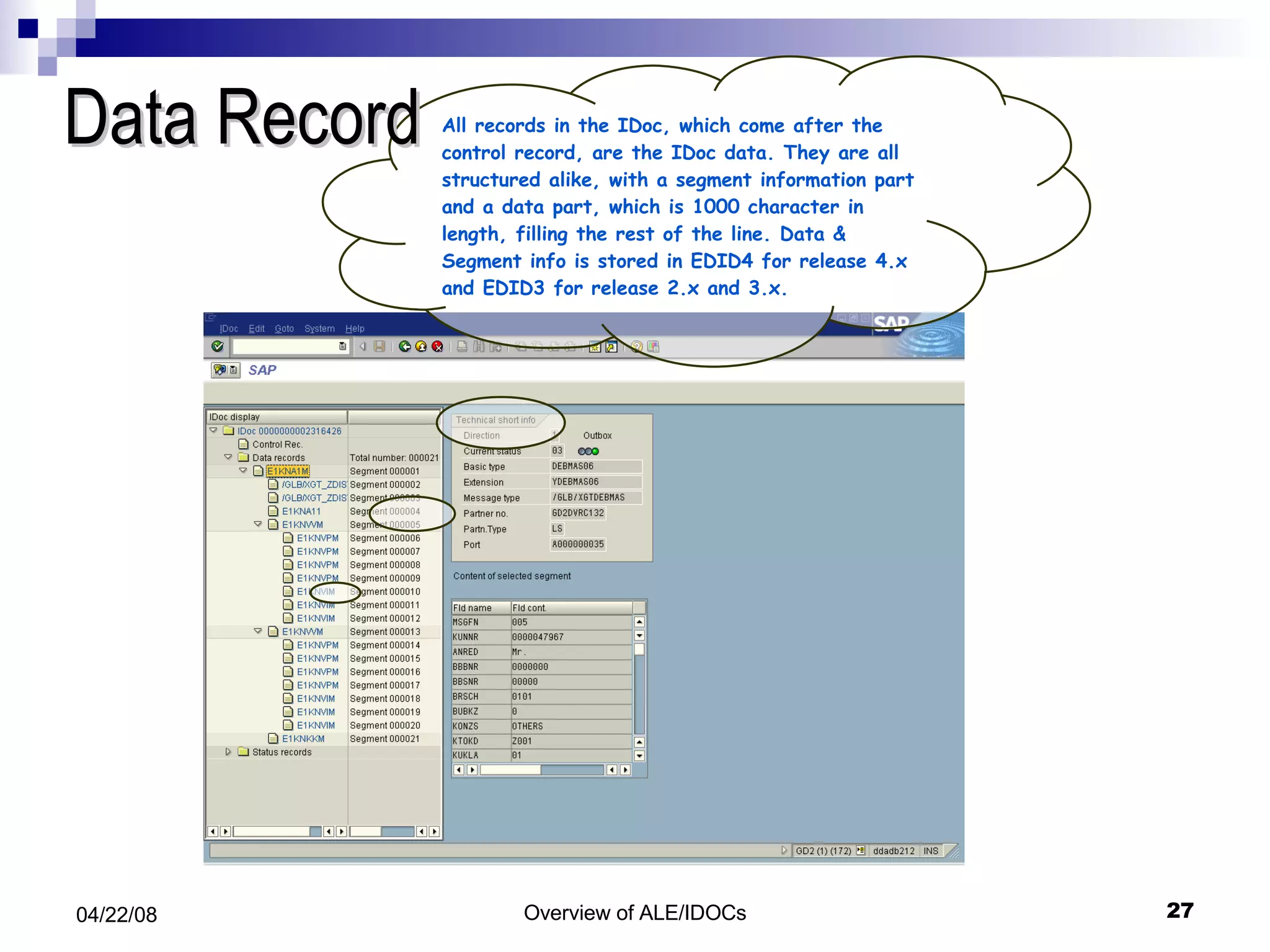
Data Record All records in the IDoc, which come after the control record, are the IDoc data. They are all structured alike, with a segment information part and a data part, which is 1000 character in length, filling the rest of the line. Data & Segment info is stored in EDID4 for release 4.x and EDID3 for release 2.x and 3.x.
Status Record Information about the IDoc status like: IDoc identification number Status number - table verified IDoc type Direction Data and time stamp; Structure: EDIDS
Status of IDOC A two-digit status is assigned to an IDoc to allow the processing to be monitored.  The statuses for outbound IDocs are between '01' and '49', while the statuses for inbound IDocs begin with '50'.
Idoc Segments TCODE: WE31
Idoc Types TCODE: WE30
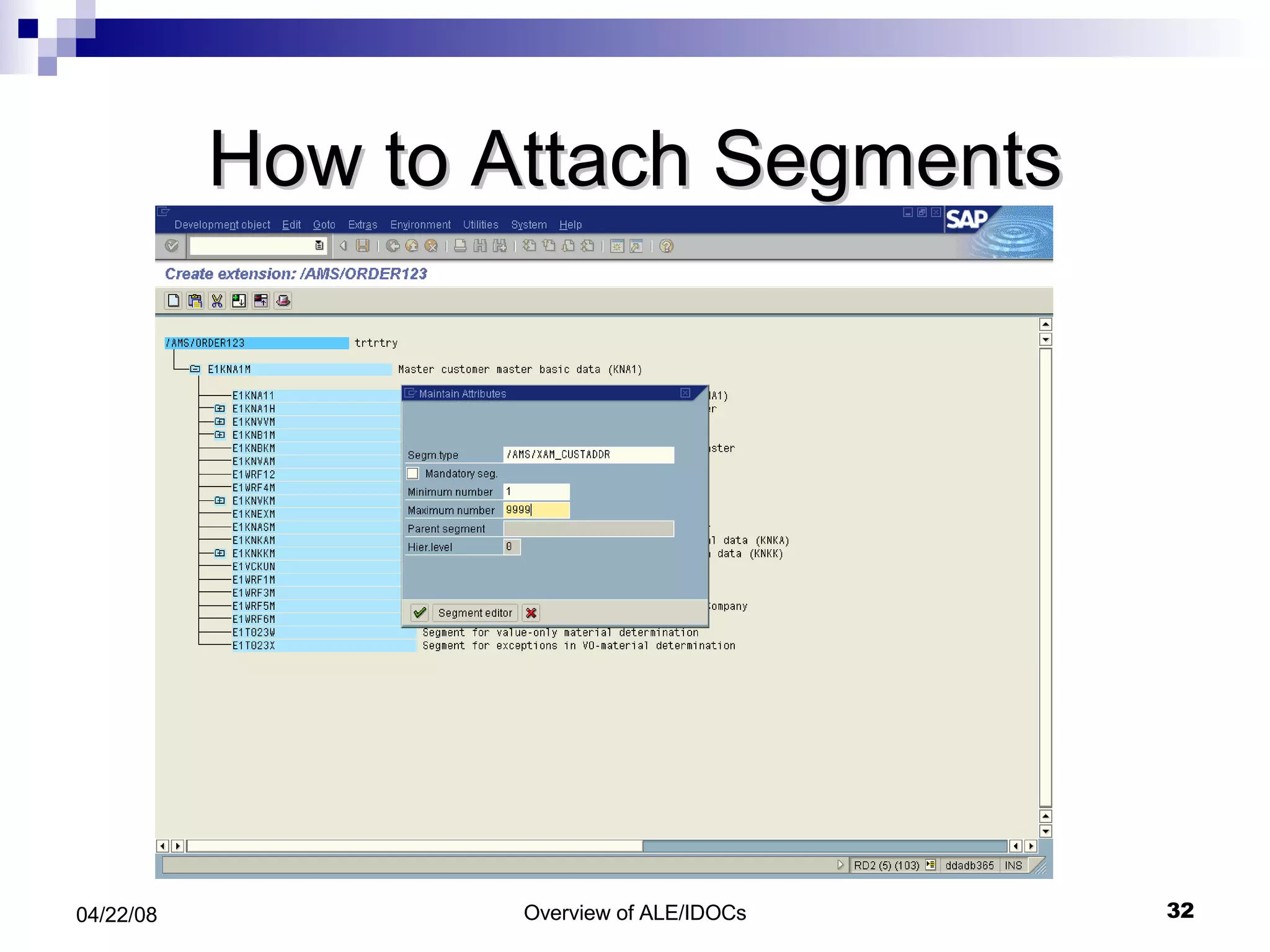
How to Attach Segments
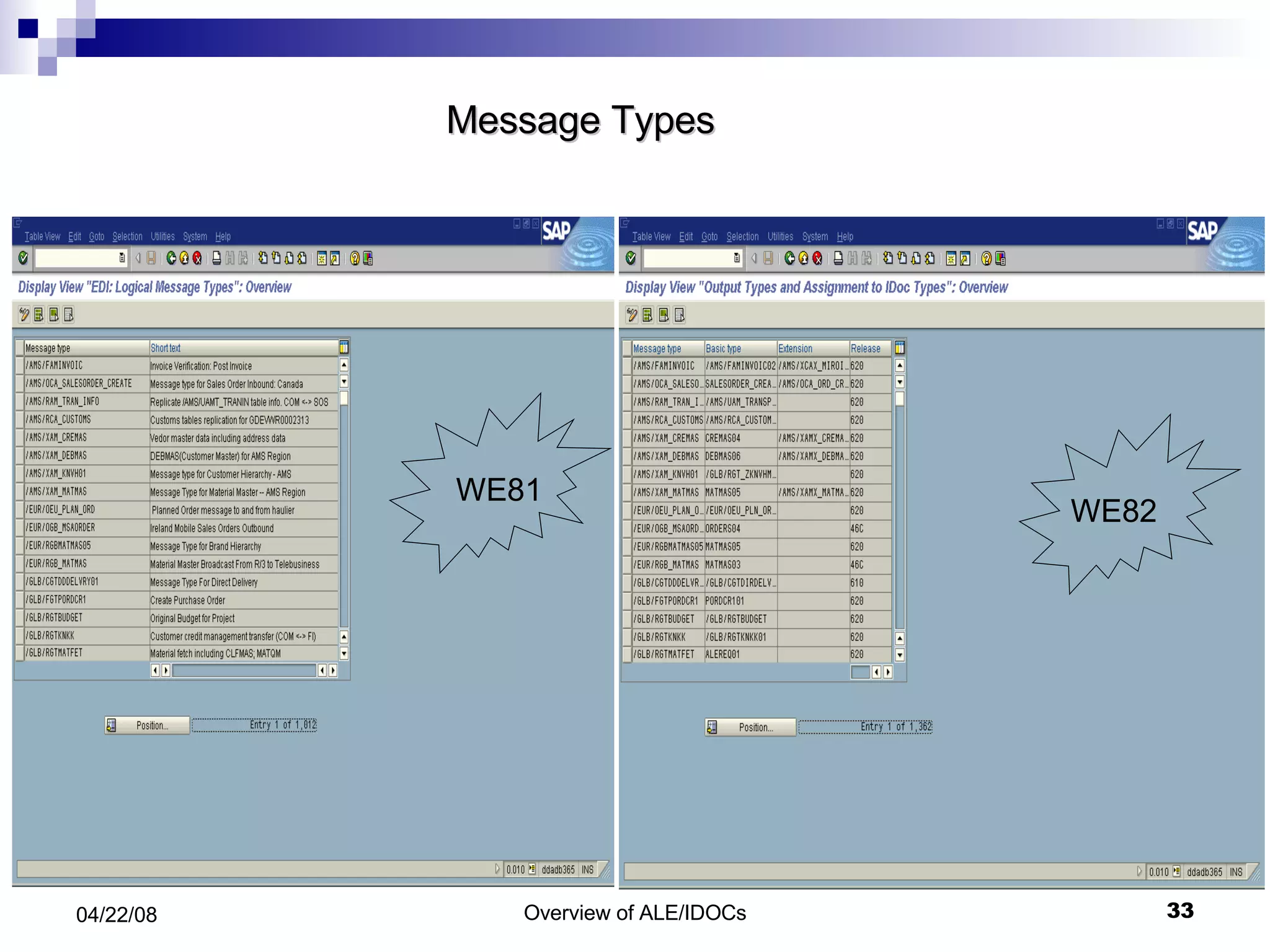
Message Types WE81 WE82
IDOC Type/ Message Type/ Processing Function Module Valid combination of Message type and IDOC type are stored in table EDIMSG Combination of message type and IDOC type determine the processing algorithm. This is usually a function module and is set up in table EDIFCT.
Topics to cover What is ALE ? Components of ALE . Anatomy of an IDoc. ALE Processing. i.Outbound Processing ii.Inbound Processing   Transactions For Monitoring and Processing IDocs. Trouble Shooting Questions
Outbound Processing
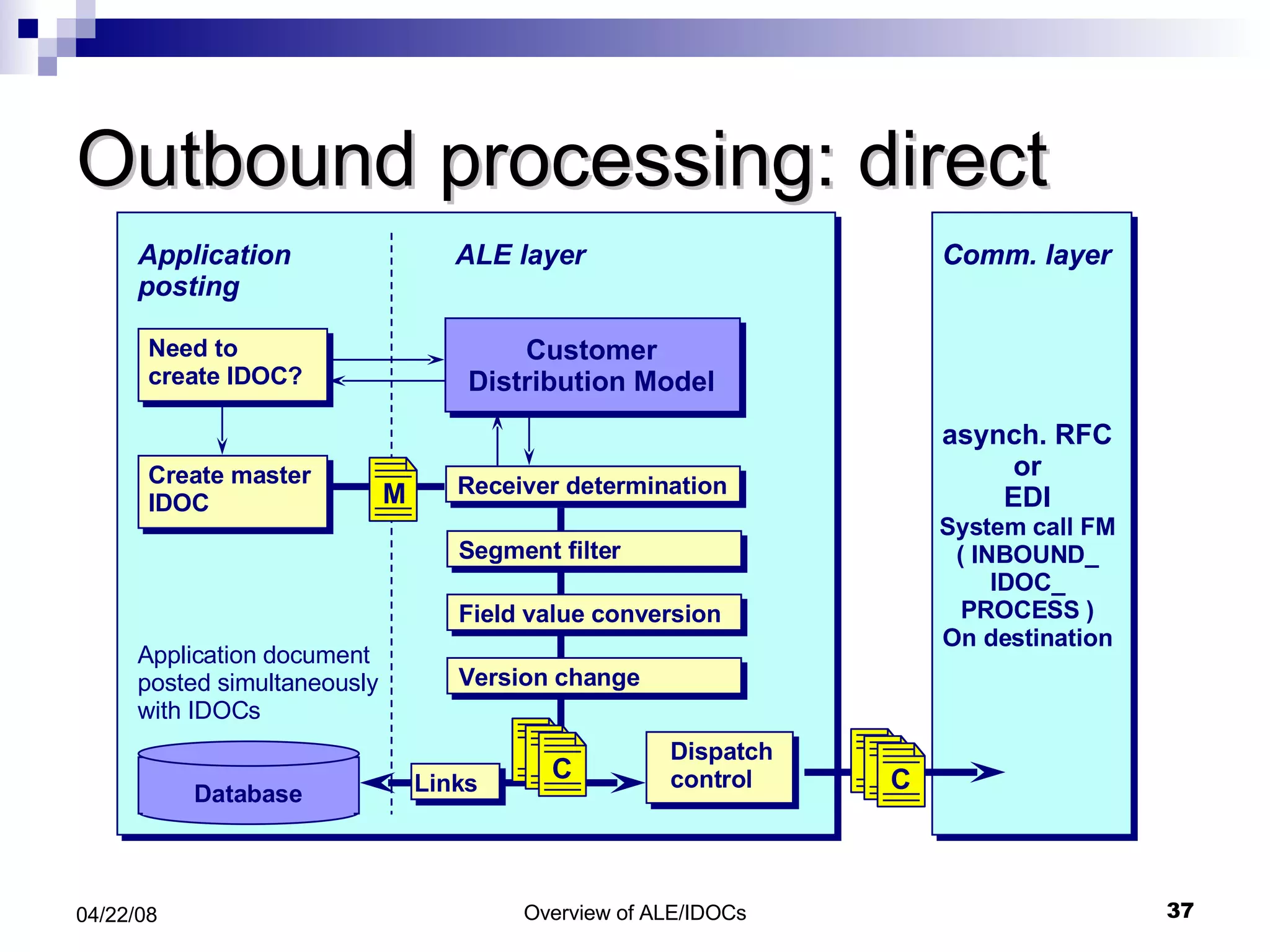
Outbound processing: direct Application posting ALE layer Database Application document posted simultaneously with IDOCs Comm. layer asynch. RFC or EDI System call FM ( INBOUND_ IDOC_ PROCESS ) On destination Comm. layer Need to create IDOC? Create master IDOC Customer Distribution Model Receiver determination Segment filter Field value conversion Version change Dispatch control M C Links C
Dispatch control Application posting ALE layer Database Application document posted simultaneously with IDocs asynch. RFC or EDI asynch. RFC or EDI Comm. layer Technical comms parameters are defined EDI or aRFC (asynch. remote function call) Send immediately or cumulate and send via batch job If batch, packet size is determined Need to create IDOC? Create master IDOC Customer Distribution Model Receiver determination Segment filter Field value conversion Version change Dispatch control M C Links C C
Scenario analysis How does the IDOC look like ? How is data being sent ? How is the data being received ?
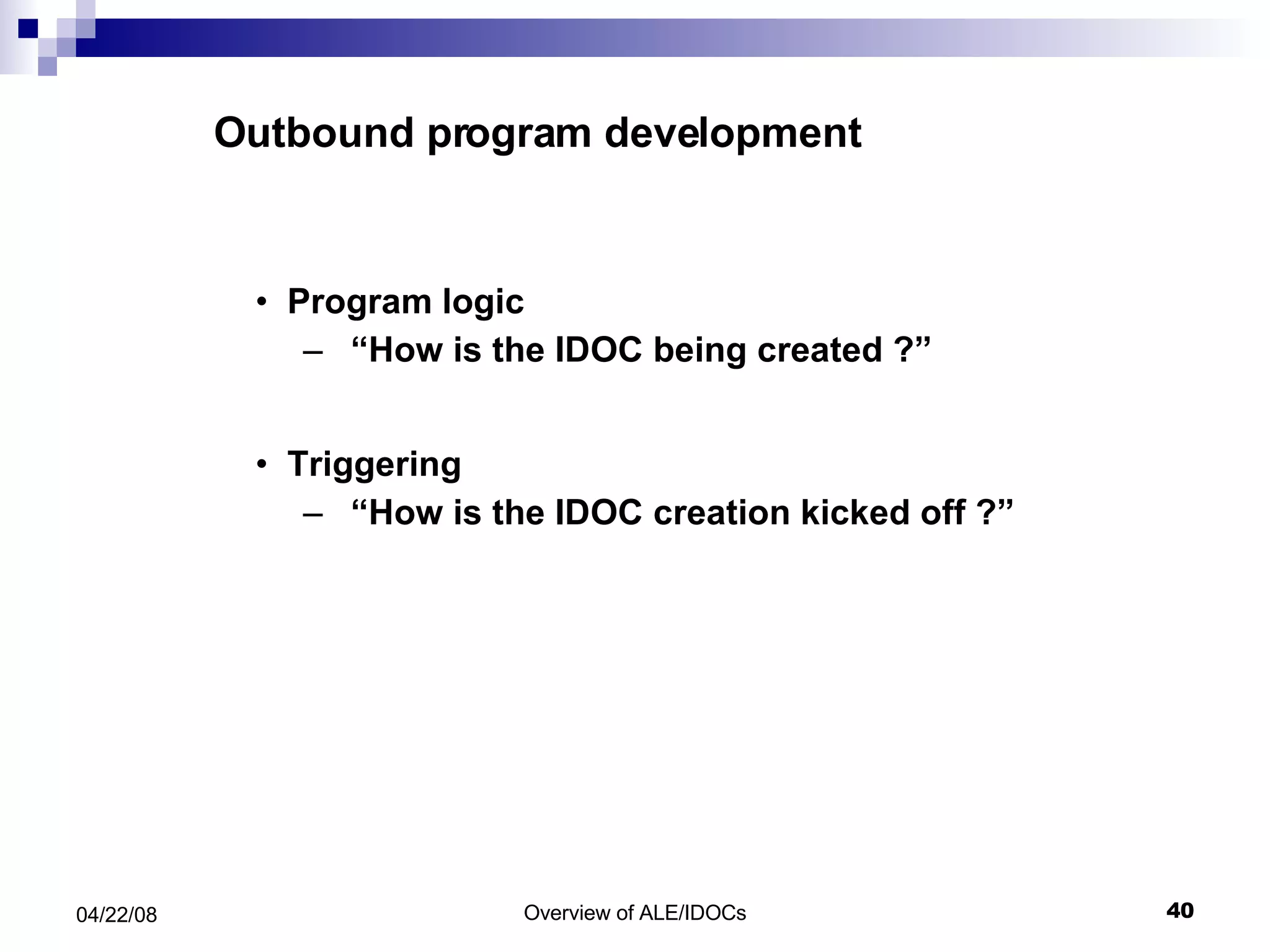
Outbound program development Program logic “ How is the IDOC being created ?” Triggering “ How is the IDOC creation kicked off ?”
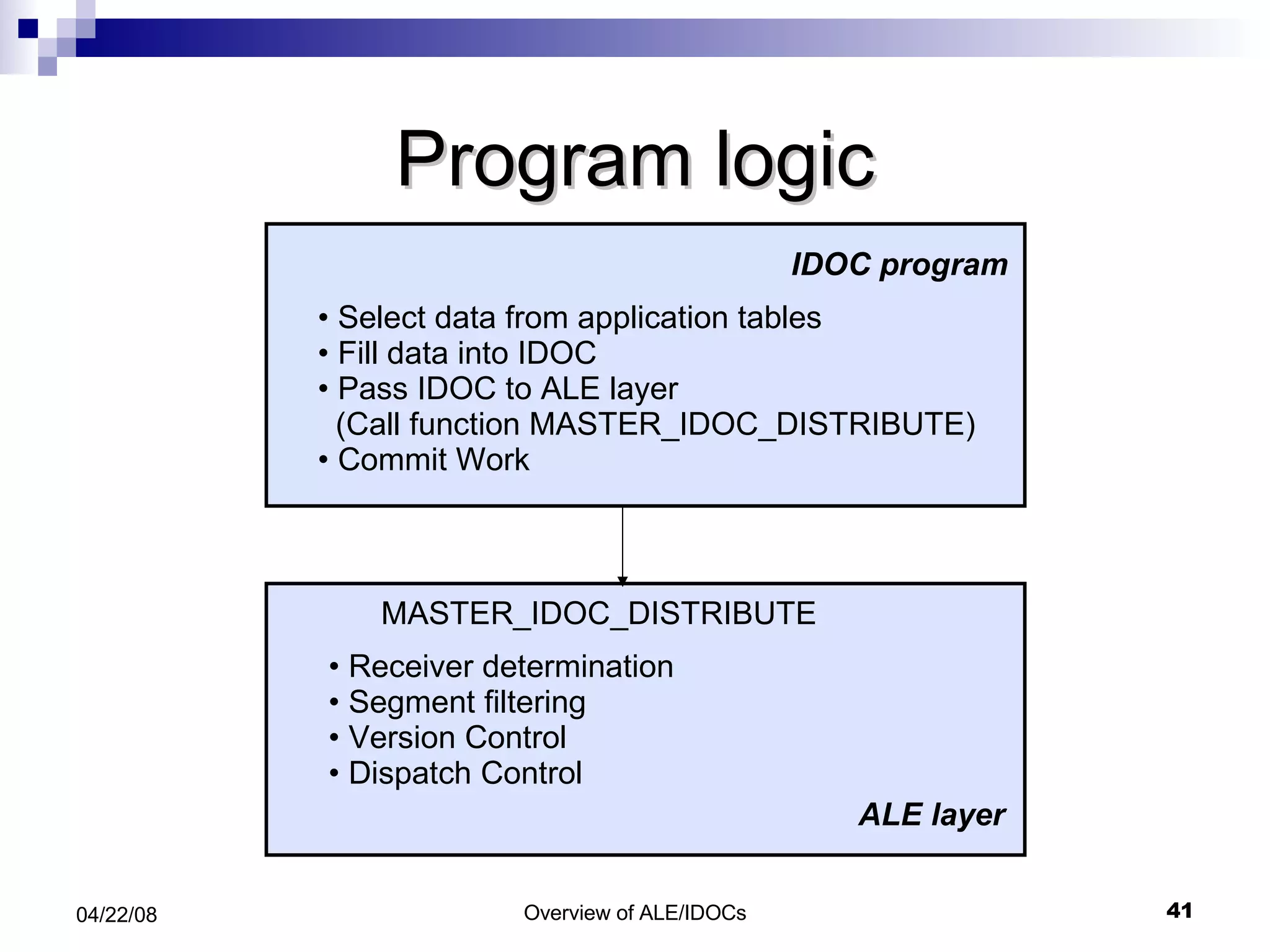
Program logic Select data from application tables Fill data into IDOC  Pass IDOC to ALE layer (Call function MASTER_IDOC_DISTRIBUTE) Commit Work Receiver determination Segment filtering Version Control Dispatch Control IDOC program ALE layer MASTER_IDOC_DISTRIBUTE
MASTER_IDOC_DISTRIBUTE Call function ‘MASTER_IDOC_DISTRIBUTE’ Exporting master_idoc_control:  IDOC control record Tables communication_idoc_control:  returned information  about the distribution master_idoc_data:  IDOC data segments
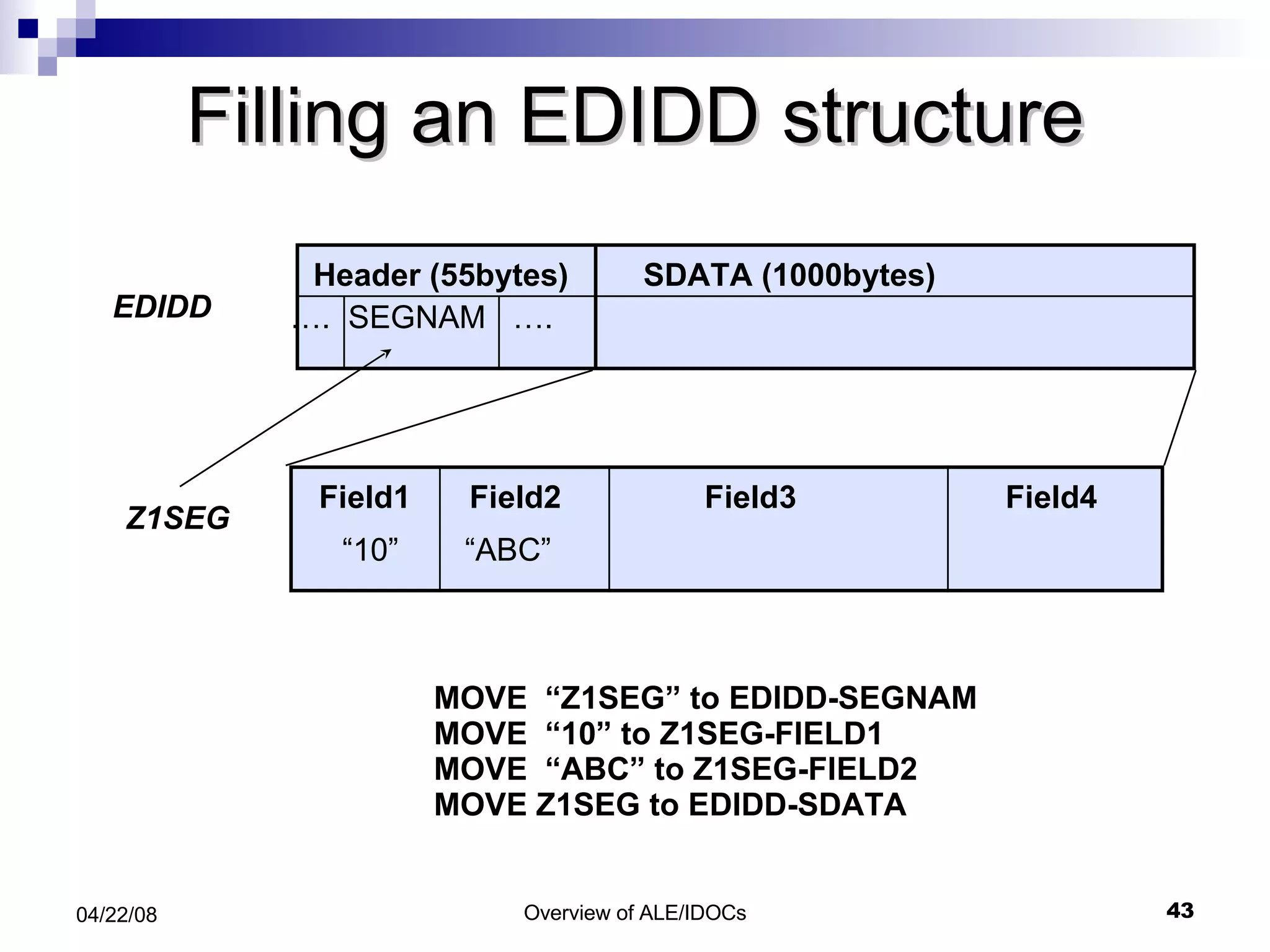
Filling an EDIDD structure MOVE  “Z1SEG” to EDIDD-SEGNAM MOVE  “10” to Z1SEG-FIELD1 MOVE  “ABC” to Z1SEG-FIELD2 MOVE Z1SEG to EDIDD-SDATA Header (55bytes) SDATA (1000bytes) … .  SEGNAM  …. EDIDD Z1SEG Field1 Field2 Field3 Field4 “ 10” “ ABC”
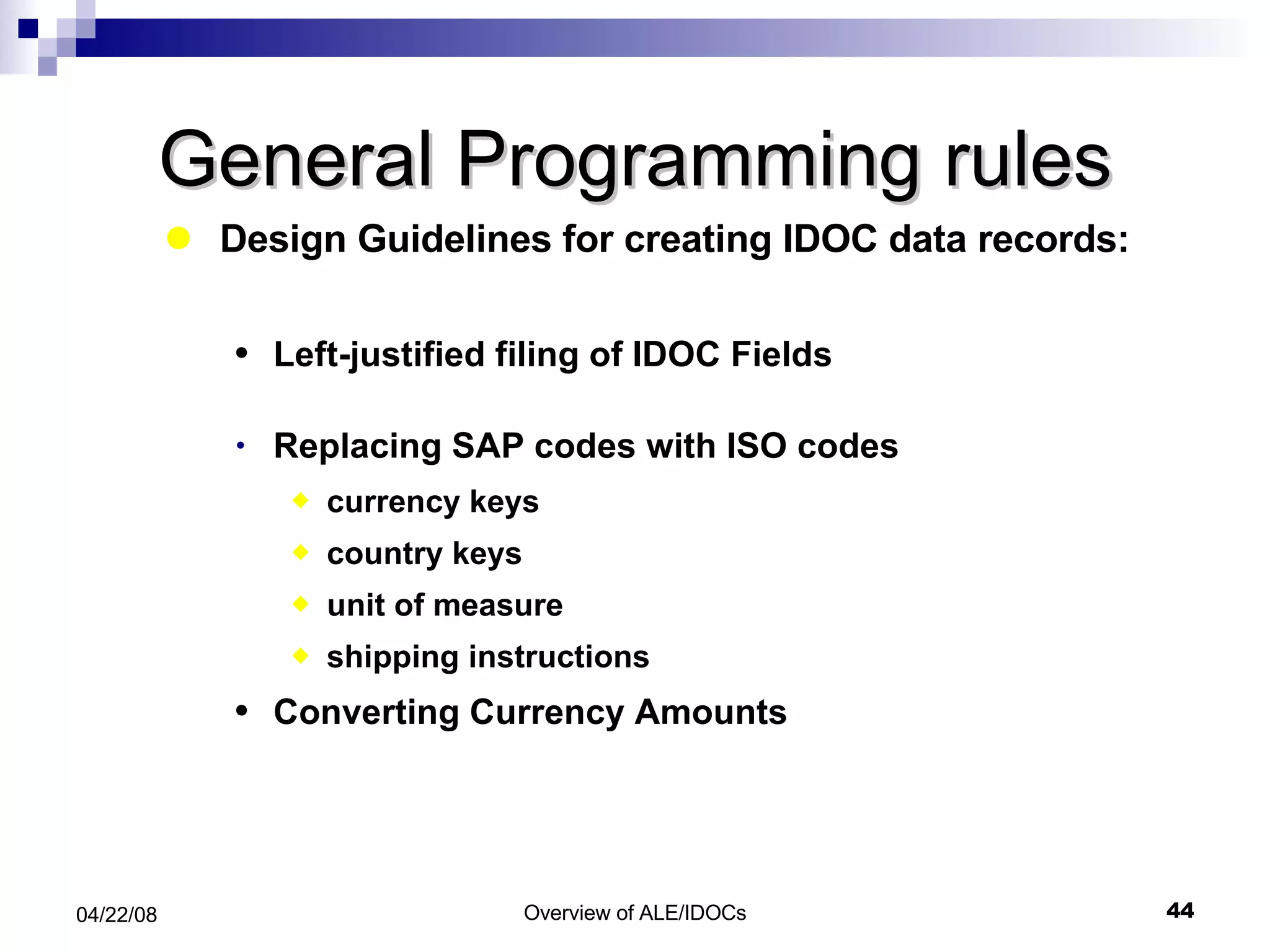
General Programming rules Design Guidelines for creating IDOC data records: Left-justified filing of IDOC Fields  Replacing SAP codes with ISO codes currency keys country keys unit of measure shipping instructions Converting Currency Amounts
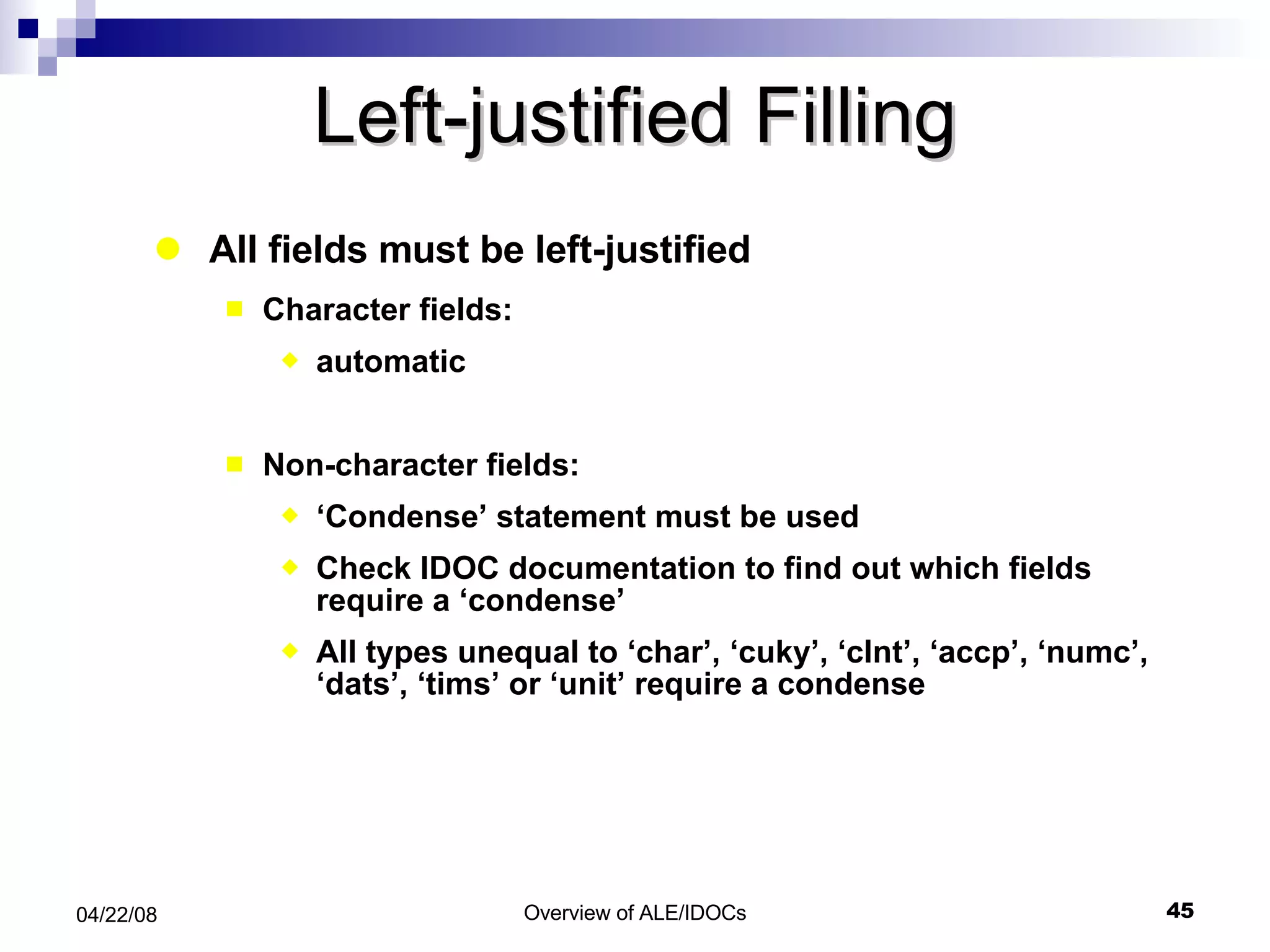
Left-justified Filling All fields must be left-justified Character fields:  automatic Non-character fields: ‘ Condense’ statement must be used Check IDOC documentation to find out which fields require a ‘condense’ All types unequal to ‘char’, ‘cuky’, ‘clnt’, ‘accp’, ‘numc’, ‘dats’, ‘tims’ or ‘unit’ require a condense
Code Conversions Replacing SAP codes with ISO codes Currency keys:  ‘currency_code_sap_to_iso’ Country keys:  ‘country_code_sap_to_iso’ Units of measure:  ‘unit_of_measure_sap_to_iso’ Shipping instructions: sap_iso_package_type_code’ Conversion of currency amounts ‘ currency_amount_sap_to_iso’
Basic Configuration Elements Define RFC Destinations Define Ports Maintain Customer Model Create Partner Profiles
Maintaining RFC Destinations TCODE: SM59
Displaying and Maintaining Ports A port is a logical representation of a communication channel in SAP with the data communicated being IDocs .   TCODE: WE21
Partner Profiles TCODE: WE20
Partner Profiles-Inbound
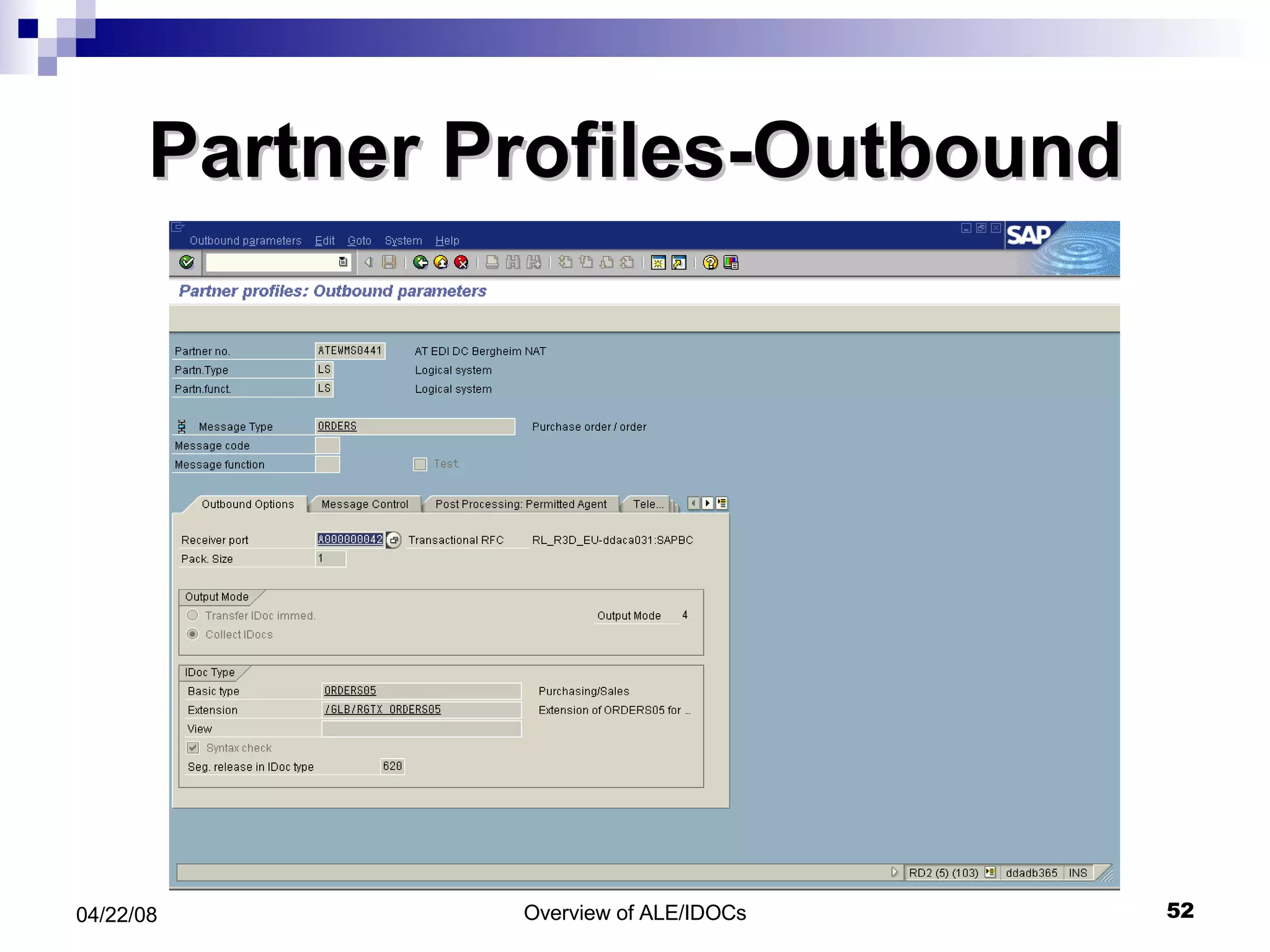
Partner Profiles-Outbound
ALE For Transactional data ---- Output Determination NACE
Output Determination  -- Output Types
Output Types  -- Details
Inbound Processing
Inbound Processing. Application posting ALE layer Input control Database Simultaneously update IDOC's status Field value conversion A Comm. layer asynch. RFC or EDI Version change Segment filter C A Post application document Process IDOC Serialization
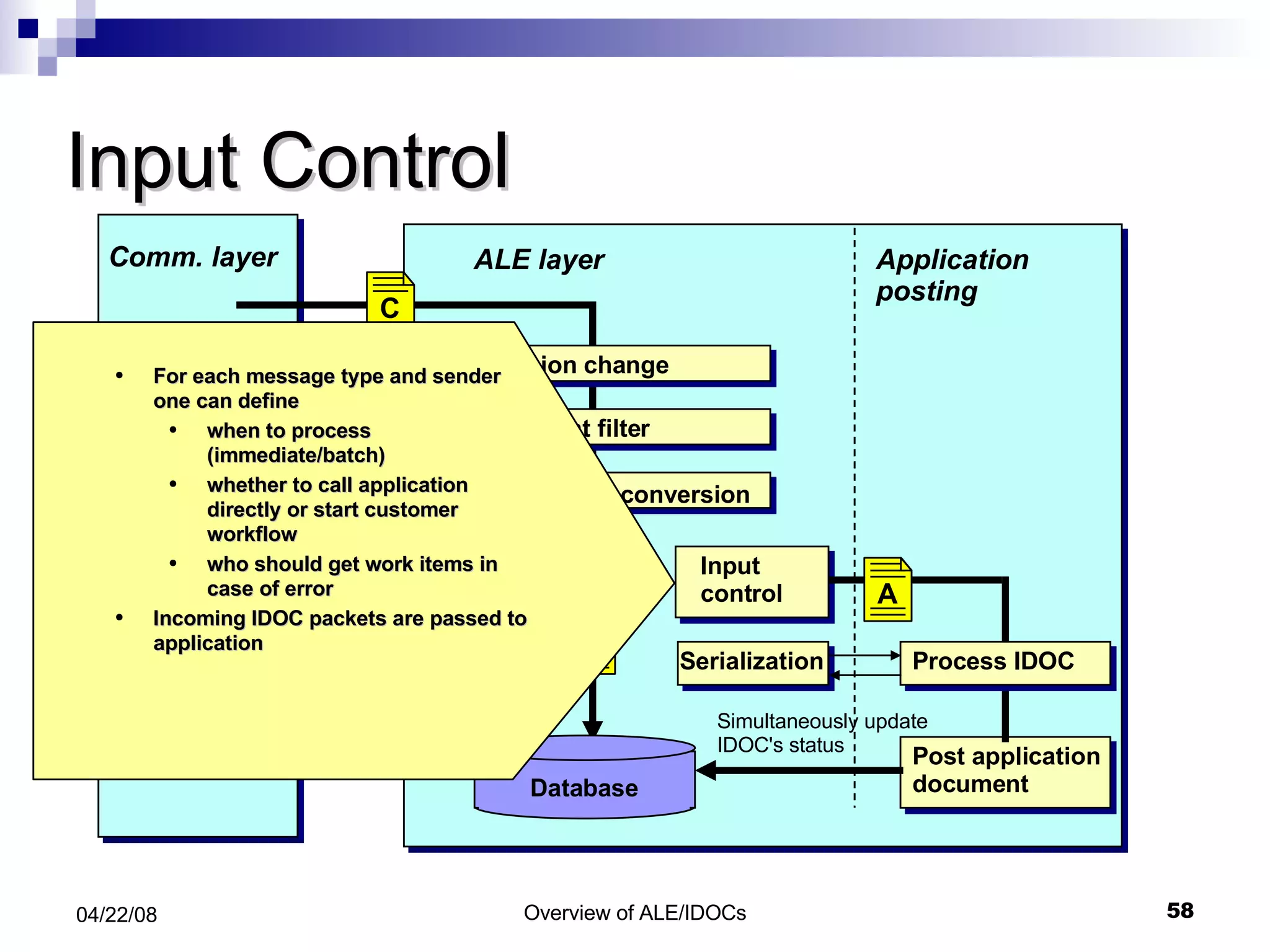
Input Control Application posting ALE layer Input control Database Simultaneously update IDOC's status For each message type and sender one can define when to process (immediate/batch) whether to call application directly or start customer workflow who should get work items in case of error Incoming IDOC packets are passed to application Field value conversion A Comm. layer asynch. RFC or EDI Version change Segment filter C A Post application document Process IDOC Serialization
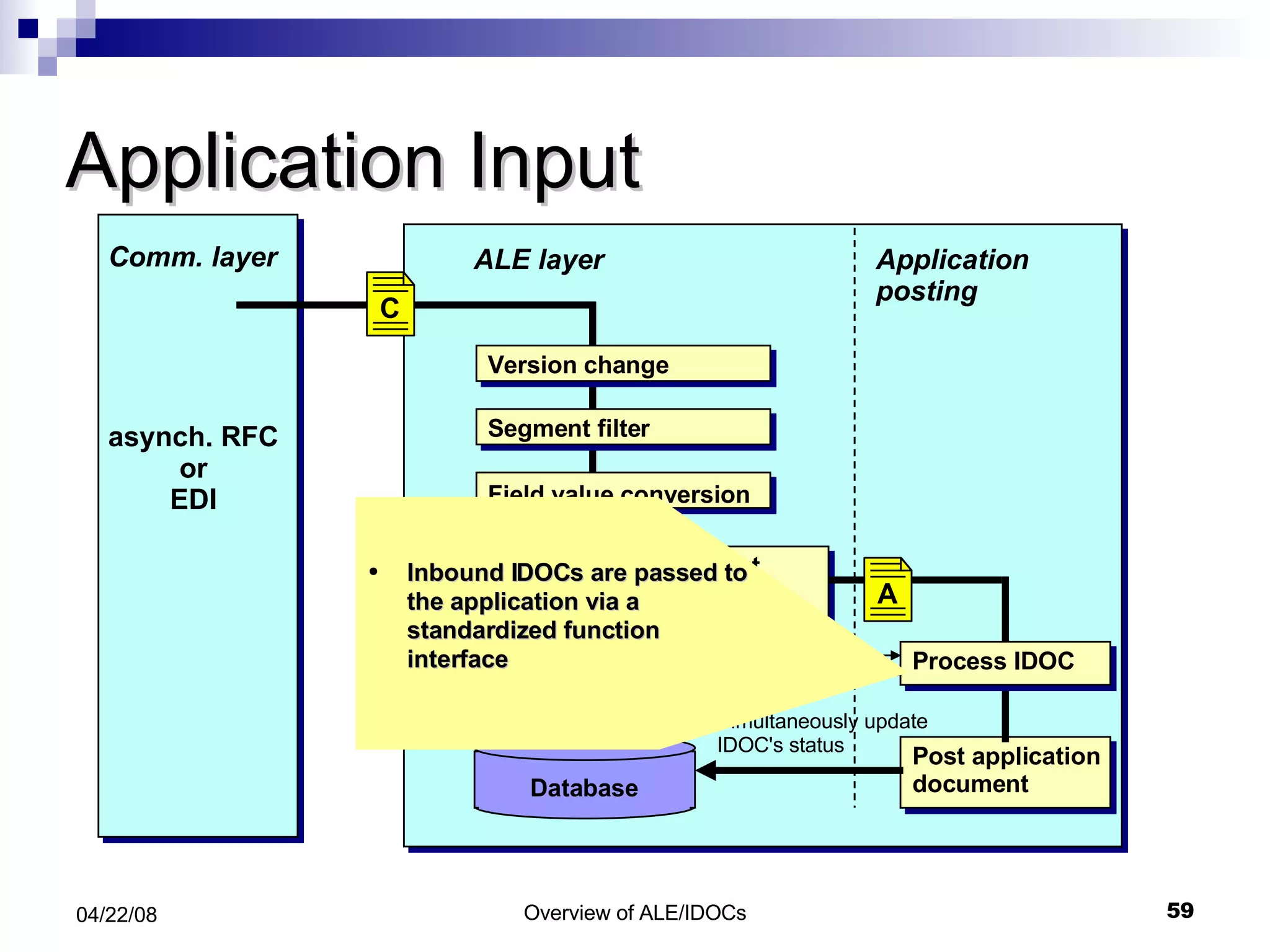
Application Input Application posting ALE layer Input control Database Simultaneously update IDOC's status Inbound IDOCs are passed to the application via a standardized function interface Field value conversion A Comm. layer asynch. RFC or EDI Version change Segment filter C A Post application document Process IDOC Serialization
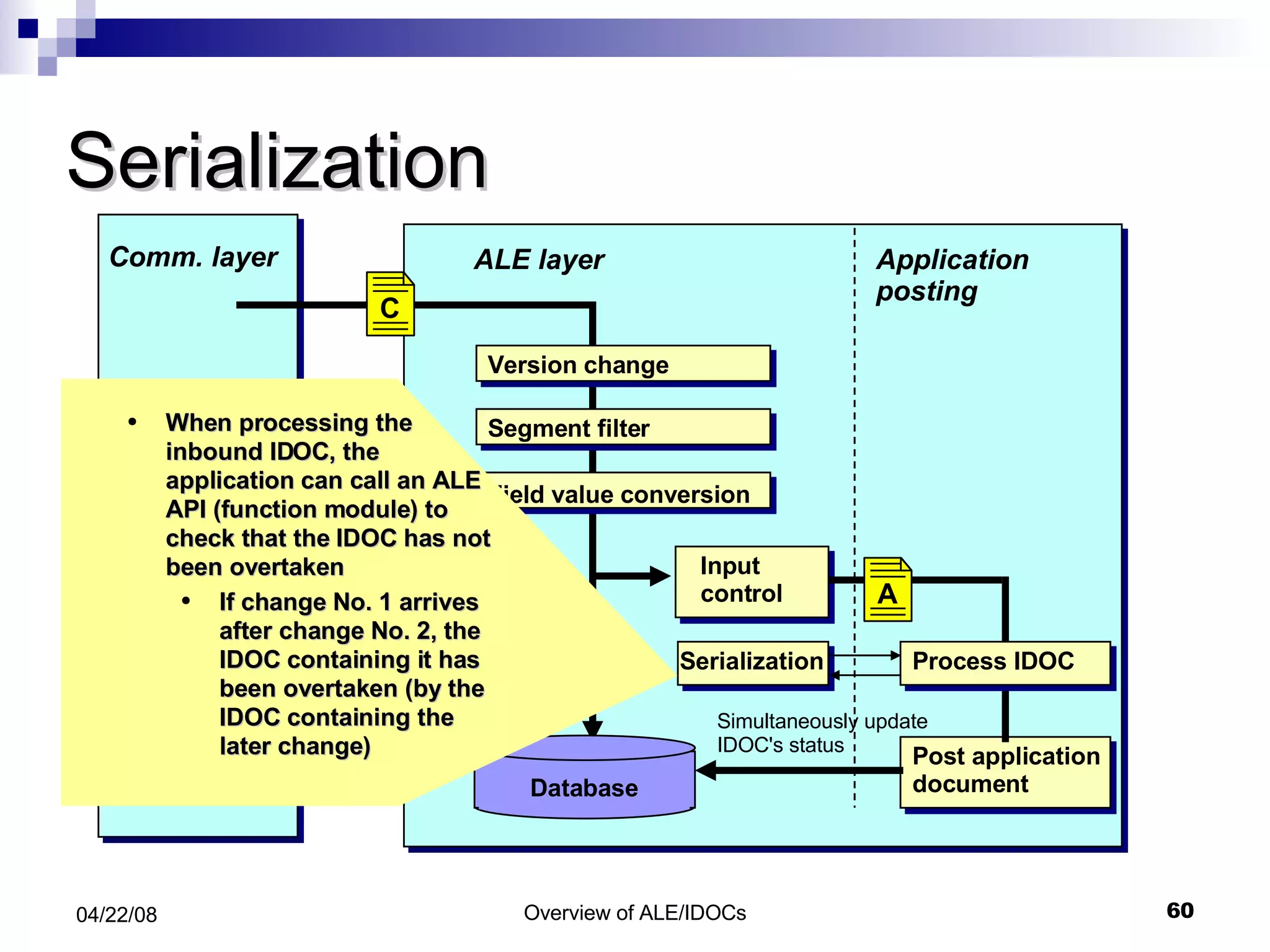
Serialization Application posting ALE layer Input control Database Simultaneously update IDOC's status When processing the inbound IDOC, the application can call an ALE API (function module) to check that the IDOC has not been overtaken If change No. 1 arrives after change No. 2, the IDOC containing it has been overtaken (by the IDOC containing the later change) Field value conversion A Comm. layer asynch. RFC or EDI Version change Segment filter C A Post application document Process IDOC Serialization
FM Assignment to Message Type and IDoc type TCODE: WE57
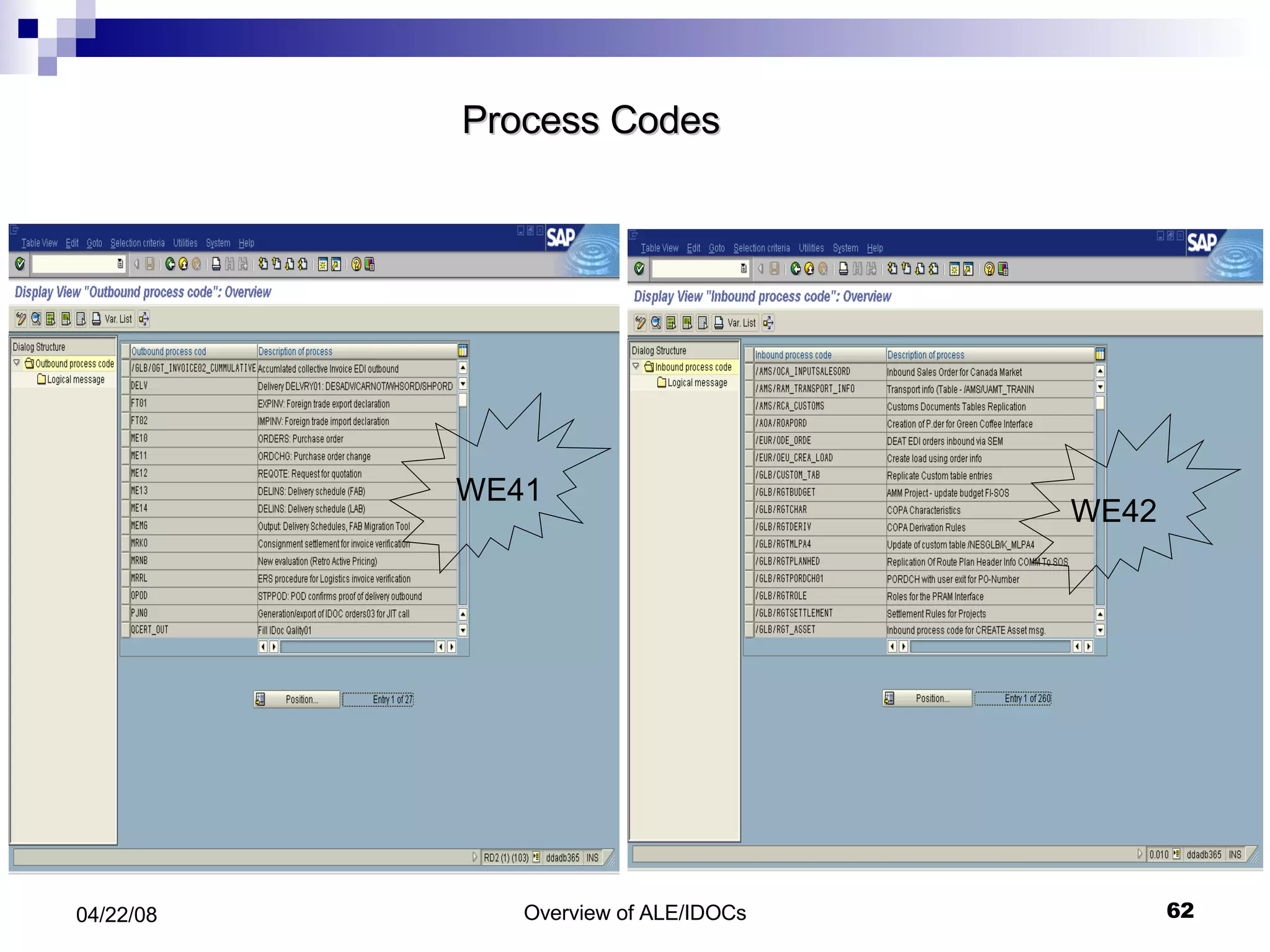
Process Codes WE41 WE42
Process Codes in Inbound and Outbound TCODE: WE64
FM For Inbound EDI  TCODE: BD67
Inbound Program Development INBOUND_IDOC_PROCESS ALE layer IDOC_INPUT_<MSGTYPE> Read IDOC data Post Application data Send Success info back to ALE layer ALE configuration Partner Profiles Process Code Function module attribute Function module registry Call function Return Variables If ERROR, trigger Version change Segment filter Field conversion IDOC Workflow Task
Basic Scenario Direct Method Call Transaction Method
Advanced Scenario Mass processing  Serialization Advanced Workflow
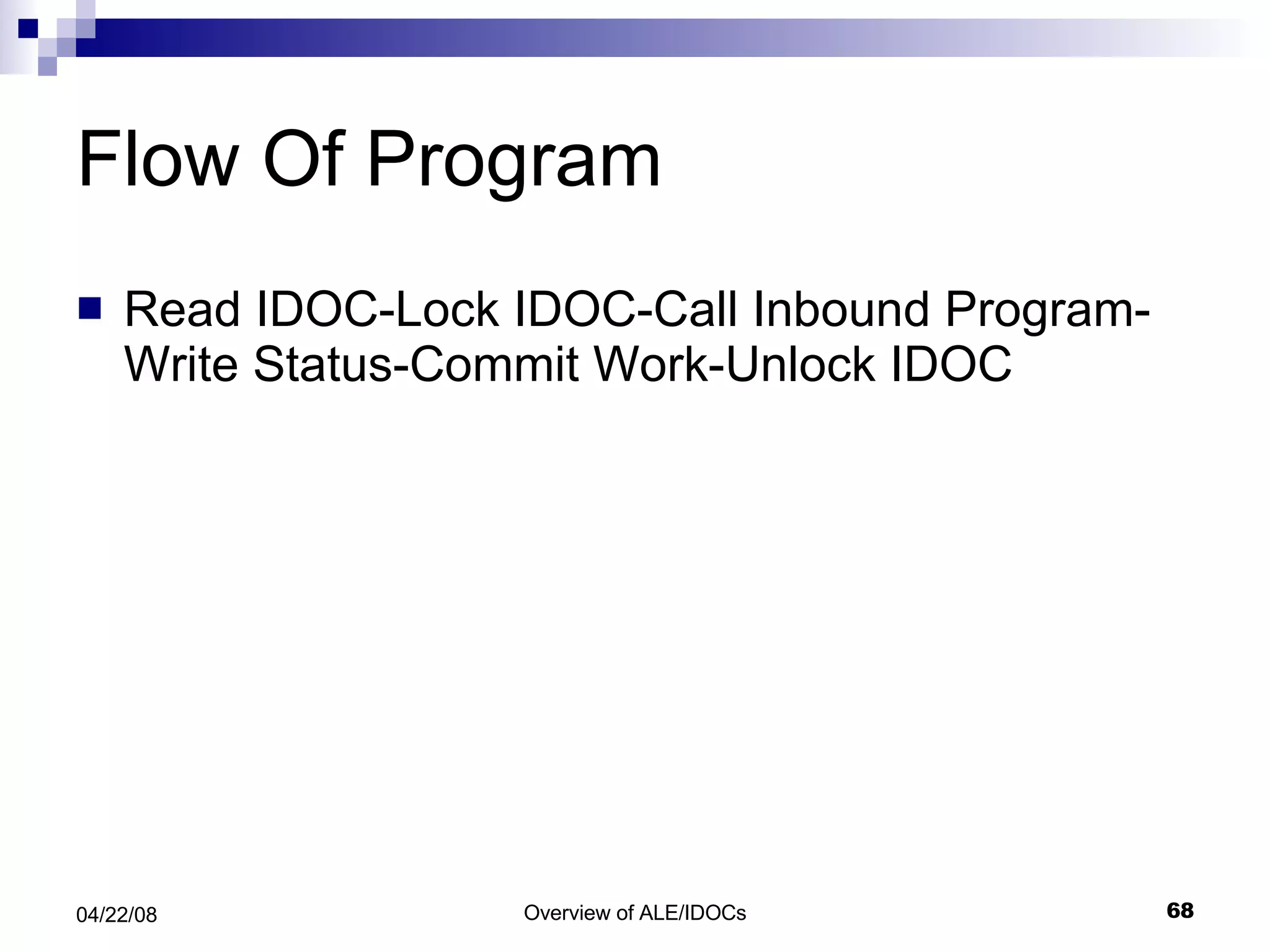
Flow Of Program Read IDOC-Lock IDOC-Call Inbound Program-Write Status-Commit Work-Unlock IDOC
Interface of Inbound FM Importing Parameter  -Input Method -Mass_processing EXPORT parameter  . -Workflow_result -Application_variable -In_Update_task -Call_transaction_done  Tables parameter :  IDOC_Control IDOC_DATA IDOC_STATUS Return_variable
Topics to cover What is ALE ? Components of ALE . Anatomy of an IDoc. ALE Processing Transactions For Monitoring and Processing IDocs. Questions
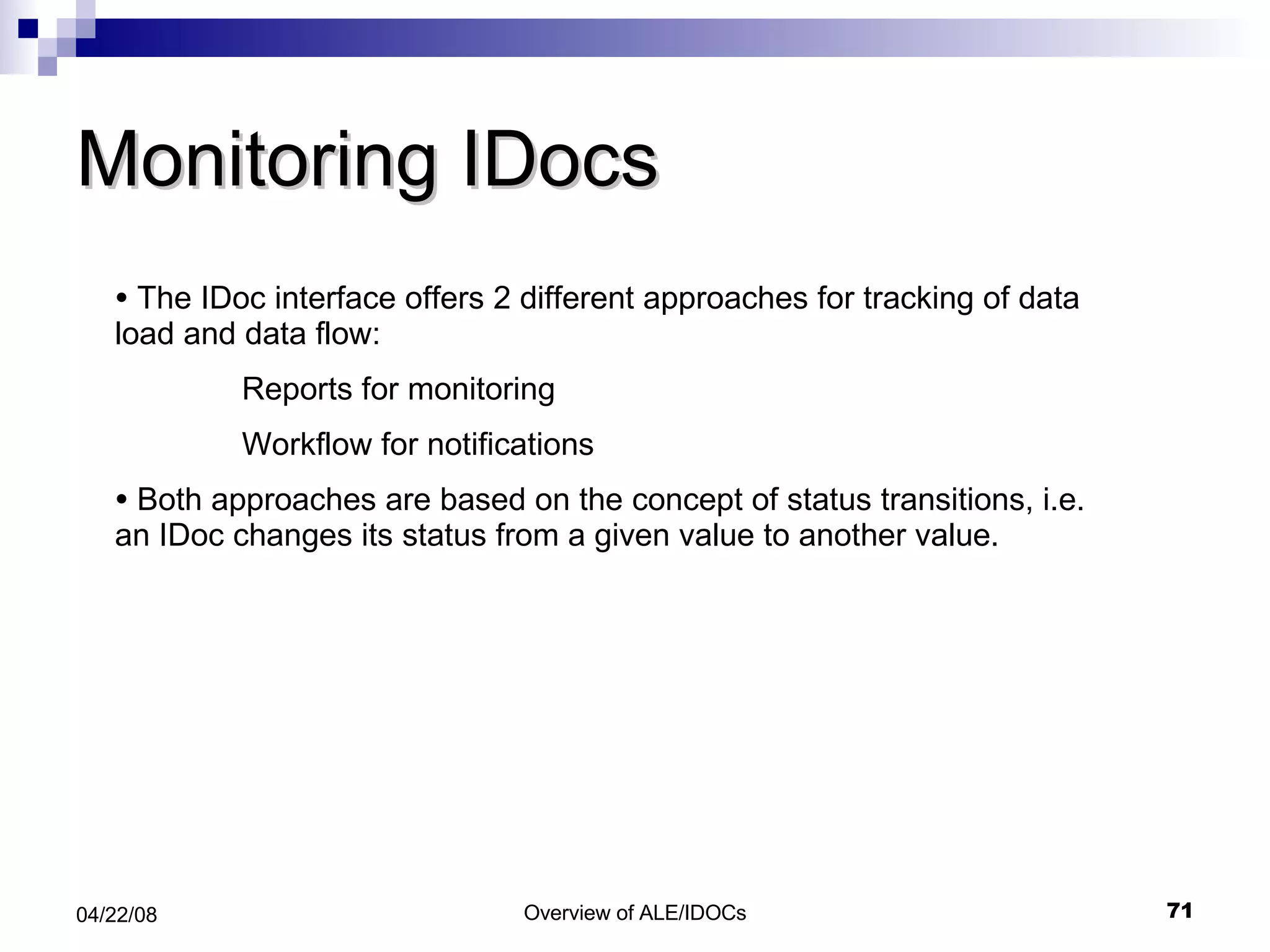
Monitoring IDocs The IDoc interface offers 2 different approaches for tracking of data load and data flow: Reports for monitoring Workflow for notifications Both approaches are based on the concept of status transitions, i.e. an IDoc changes its status from a given value to another value.
List Of All IDocs Created. (Default, Additional, EDI)-- WE02/ WE05
Selection Program For Issuing Output  -- WE15
Test Tool For Idoc Processing (WE19)
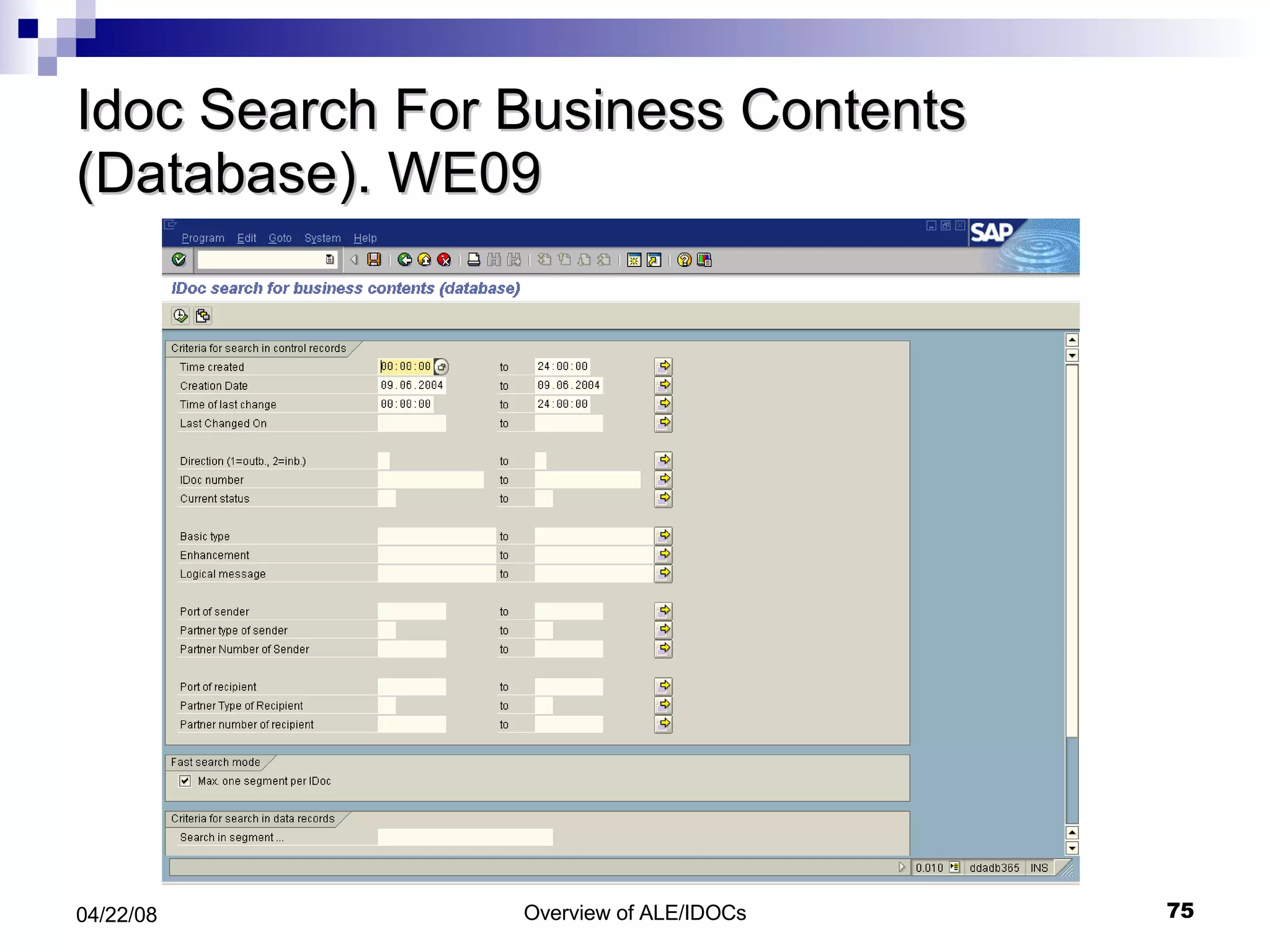
Idoc Search For Business Contents (Database). WE09
Questions

IDOC , ALE ,EDI

  • 1.
    Overview of ALE/ EDI / IDOCs
  • 2.
    EDI Whatis EDI? Type of EDI process Outbound EDI Process Inbound EDI Process
  • 3.
    What is EDI?EDI is electronic exchange of business documents between the computer systems of business partner using a standard format over a communication network EDI is also called a paperless exchange.
  • 4.
  • 5.
    Outbound Process WithMessage Control Directly -With out Message Control
  • 6.
    Inbound Process WithFunction Module
  • 7.
    EDI Configuration Howto Set Up an RFC Destination in SAP The Port Definitions Configure Partner Profile Configure Message Control
  • 8.
  • 9.
    ALE What isALE? Components of ALE. Anatomy of an IDoc. ALE Processing Transactions For Monitoring and Processing IDocs. Questions
  • 10.
    ALE Terminology ALE - Application Linking & Enabling IDoc - Intermediate Document EDI - Electronic Data Interchange
  • 11.
  • 12.
    ALE!! Whatis it ?? It is a set of Tools, programs and data definitions Provides distribution model and technology that enables SAP Customer to interconnect programs across various platforms and systems .
  • 13.
    Features –ALE /IDocs Distributed System yet integrated with SAP R/3 Based on ‘Application-to-Application integration using ‘Message Architecture’ Reliable communication Data is exchanged using “IDocs” Support both R/2, R/3 and External system If network problem, message is buffered ALE support backward compatibility ALE ensure that , data is transferred only once
  • 14.
    ALE Scenario Document SAP System R/3 SAP System R/3 IDoc EDI Subsystem EDI Subsystem IDoc IDoc
  • 15.
    What is ALE? Components of ALE. Anatomy of an IDoc. ALE Processing Transactions For Monitoring and Processing IDocs. Trouble Shooting Questions Topics to cover
  • 16.
    Components of ALE Services: Application Services Distribution Services Communication Services
  • 17.
    Application Services Services:Application Services Distribution Services Communication Services This is where the SAP applications ( SD, FI, MM etc. ) generate their data and documents
  • 18.
    Distribution Services Services:Application Services Distribution Services Communication Services Recipients Formats and Filters the data Creates IDocs ( Intermediate Documents
  • 19.
    Communication Services Services:Application Services Distribution Services Communication Services TCP/IP RFC tRFC etc
  • 20.
    Determine Receipients Filter/ConvertData, Create IDOC Application Functions Filter/Convert Data Carrier Application Layer Distribution/ ALE Layer Communication Layer Application In a Nut Shell Application Data Master IDOC Comm. IDOC Comm. IDOC
  • 21.
    Topics to coverWhat is ALE ? Components of ALE . Anatomy of an IDoc. ALE Processing Transactions For Monitoring and Processing IDocs. Trouble Shooting Questions
  • 22.
    IDoc Concept R/3System System 1 SAP Document EDI subsystem R/3 System R/2 System 3rd party software System 2 IDoc
  • 23.
    IDoc Structure StatusRecord IDoc-ID Status information Data Record IDoc-ID Sequence/Hierarchy Segment Format definition for header data item data Control Record IDoc-ID Sender-ID Receiver-ID IDoc type and logical message External structure
  • 24.
    Control record DataRecord Status Record IDOC “ Intermediate Document”
  • 25.
    Control Record Thevery first record of an IDoc package is always a control record. The structure of this control record of the structure EDIDC and describes the contents of the data contained in the package. The control record goes to table EDIDC
  • 26.
    Message Type MessageType indicates How to Know what the data Means Data Exchanged by IDOC and EDI is known as Messages Message of same kind belong to the same message type. Message types are stored in table EDMSG
  • 27.
    Data Record Allrecords in the IDoc, which come after the control record, are the IDoc data. They are all structured alike, with a segment information part and a data part, which is 1000 character in length, filling the rest of the line. Data & Segment info is stored in EDID4 for release 4.x and EDID3 for release 2.x and 3.x.
  • 28.
    Status Record Informationabout the IDoc status like: IDoc identification number Status number - table verified IDoc type Direction Data and time stamp; Structure: EDIDS
  • 29.
    Status of IDOCA two-digit status is assigned to an IDoc to allow the processing to be monitored. The statuses for outbound IDocs are between '01' and '49', while the statuses for inbound IDocs begin with '50'.
  • 30.
  • 31.
  • 32.
    How to AttachSegments
  • 33.
  • 34.
    IDOC Type/ MessageType/ Processing Function Module Valid combination of Message type and IDOC type are stored in table EDIMSG Combination of message type and IDOC type determine the processing algorithm. This is usually a function module and is set up in table EDIFCT.
  • 35.
    Topics to coverWhat is ALE ? Components of ALE . Anatomy of an IDoc. ALE Processing. i.Outbound Processing ii.Inbound Processing Transactions For Monitoring and Processing IDocs. Trouble Shooting Questions
  • 36.
  • 37.
    Outbound processing: directApplication posting ALE layer Database Application document posted simultaneously with IDOCs Comm. layer asynch. RFC or EDI System call FM ( INBOUND_ IDOC_ PROCESS ) On destination Comm. layer Need to create IDOC? Create master IDOC Customer Distribution Model Receiver determination Segment filter Field value conversion Version change Dispatch control M C Links C
  • 38.
    Dispatch control Applicationposting ALE layer Database Application document posted simultaneously with IDocs asynch. RFC or EDI asynch. RFC or EDI Comm. layer Technical comms parameters are defined EDI or aRFC (asynch. remote function call) Send immediately or cumulate and send via batch job If batch, packet size is determined Need to create IDOC? Create master IDOC Customer Distribution Model Receiver determination Segment filter Field value conversion Version change Dispatch control M C Links C C
  • 39.
    Scenario analysis Howdoes the IDOC look like ? How is data being sent ? How is the data being received ?
  • 40.
    Outbound program developmentProgram logic “ How is the IDOC being created ?” Triggering “ How is the IDOC creation kicked off ?”
  • 41.
    Program logic Selectdata from application tables Fill data into IDOC Pass IDOC to ALE layer (Call function MASTER_IDOC_DISTRIBUTE) Commit Work Receiver determination Segment filtering Version Control Dispatch Control IDOC program ALE layer MASTER_IDOC_DISTRIBUTE
  • 42.
    MASTER_IDOC_DISTRIBUTE Call function‘MASTER_IDOC_DISTRIBUTE’ Exporting master_idoc_control: IDOC control record Tables communication_idoc_control: returned information about the distribution master_idoc_data: IDOC data segments
  • 43.
    Filling an EDIDDstructure MOVE “Z1SEG” to EDIDD-SEGNAM MOVE “10” to Z1SEG-FIELD1 MOVE “ABC” to Z1SEG-FIELD2 MOVE Z1SEG to EDIDD-SDATA Header (55bytes) SDATA (1000bytes) … . SEGNAM …. EDIDD Z1SEG Field1 Field2 Field3 Field4 “ 10” “ ABC”
  • 44.
    General Programming rulesDesign Guidelines for creating IDOC data records: Left-justified filing of IDOC Fields Replacing SAP codes with ISO codes currency keys country keys unit of measure shipping instructions Converting Currency Amounts
  • 45.
    Left-justified Filling Allfields must be left-justified Character fields: automatic Non-character fields: ‘ Condense’ statement must be used Check IDOC documentation to find out which fields require a ‘condense’ All types unequal to ‘char’, ‘cuky’, ‘clnt’, ‘accp’, ‘numc’, ‘dats’, ‘tims’ or ‘unit’ require a condense
  • 46.
    Code Conversions ReplacingSAP codes with ISO codes Currency keys: ‘currency_code_sap_to_iso’ Country keys: ‘country_code_sap_to_iso’ Units of measure: ‘unit_of_measure_sap_to_iso’ Shipping instructions: sap_iso_package_type_code’ Conversion of currency amounts ‘ currency_amount_sap_to_iso’
  • 47.
    Basic Configuration ElementsDefine RFC Destinations Define Ports Maintain Customer Model Create Partner Profiles
  • 48.
  • 49.
    Displaying and MaintainingPorts A port is a logical representation of a communication channel in SAP with the data communicated being IDocs .   TCODE: WE21
  • 50.
  • 51.
  • 52.
  • 53.
    ALE For Transactionaldata ---- Output Determination NACE
  • 54.
    Output Determination -- Output Types
  • 55.
    Output Types -- Details
  • 56.
  • 57.
    Inbound Processing. Applicationposting ALE layer Input control Database Simultaneously update IDOC's status Field value conversion A Comm. layer asynch. RFC or EDI Version change Segment filter C A Post application document Process IDOC Serialization
  • 58.
    Input Control Applicationposting ALE layer Input control Database Simultaneously update IDOC's status For each message type and sender one can define when to process (immediate/batch) whether to call application directly or start customer workflow who should get work items in case of error Incoming IDOC packets are passed to application Field value conversion A Comm. layer asynch. RFC or EDI Version change Segment filter C A Post application document Process IDOC Serialization
  • 59.
    Application Input Applicationposting ALE layer Input control Database Simultaneously update IDOC's status Inbound IDOCs are passed to the application via a standardized function interface Field value conversion A Comm. layer asynch. RFC or EDI Version change Segment filter C A Post application document Process IDOC Serialization
  • 60.
    Serialization Application postingALE layer Input control Database Simultaneously update IDOC's status When processing the inbound IDOC, the application can call an ALE API (function module) to check that the IDOC has not been overtaken If change No. 1 arrives after change No. 2, the IDOC containing it has been overtaken (by the IDOC containing the later change) Field value conversion A Comm. layer asynch. RFC or EDI Version change Segment filter C A Post application document Process IDOC Serialization
  • 61.
    FM Assignment toMessage Type and IDoc type TCODE: WE57
  • 62.
  • 63.
    Process Codes inInbound and Outbound TCODE: WE64
  • 64.
    FM For InboundEDI TCODE: BD67
  • 65.
    Inbound Program DevelopmentINBOUND_IDOC_PROCESS ALE layer IDOC_INPUT_<MSGTYPE> Read IDOC data Post Application data Send Success info back to ALE layer ALE configuration Partner Profiles Process Code Function module attribute Function module registry Call function Return Variables If ERROR, trigger Version change Segment filter Field conversion IDOC Workflow Task
  • 66.
    Basic Scenario DirectMethod Call Transaction Method
  • 67.
    Advanced Scenario Massprocessing Serialization Advanced Workflow
  • 68.
    Flow Of ProgramRead IDOC-Lock IDOC-Call Inbound Program-Write Status-Commit Work-Unlock IDOC
  • 69.
    Interface of InboundFM Importing Parameter -Input Method -Mass_processing EXPORT parameter . -Workflow_result -Application_variable -In_Update_task -Call_transaction_done Tables parameter : IDOC_Control IDOC_DATA IDOC_STATUS Return_variable
  • 70.
    Topics to coverWhat is ALE ? Components of ALE . Anatomy of an IDoc. ALE Processing Transactions For Monitoring and Processing IDocs. Questions
  • 71.
    Monitoring IDocs TheIDoc interface offers 2 different approaches for tracking of data load and data flow: Reports for monitoring Workflow for notifications Both approaches are based on the concept of status transitions, i.e. an IDoc changes its status from a given value to another value.
  • 72.
    List Of AllIDocs Created. (Default, Additional, EDI)-- WE02/ WE05
  • 73.
    Selection Program ForIssuing Output -- WE15
  • 74.
    Test Tool ForIdoc Processing (WE19)
  • 75.
    Idoc Search ForBusiness Contents (Database). WE09
  • 76.