This document provides information about features that are often used to customize SAP systems, including a table listing many features with their descriptions and hints and tips for working with features.
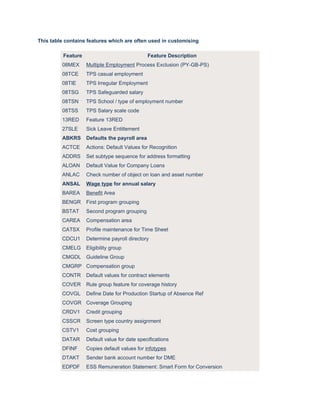
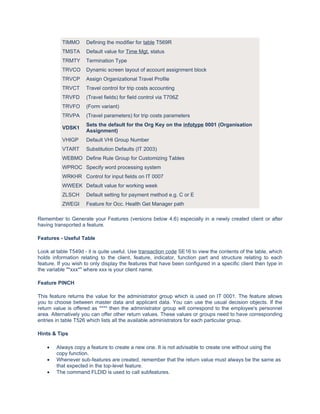
This table containsfeatures which are often used in customising
Feature Feature Description
08MEX Multiple Employment Process Exclusion (PY-GB-PS)
08TCE TPS casual employment
08TIE TPS Irregular Employment
08TSG TPS Safeguarded salary
08TSN TPS School / type of employment number
08TSS TPS Salary scale code
13RED Feature 13RED
27SLE Sick Leave Entitlement
ABKRS Defaults the payroll area
ACTCE Actions: Default Values for Recognition
ADDRS Set subtype sequence for address formatting
ALOAN Default Value for Company Loans
ANLAC Check number of object on loan and asset number
ANSAL Wage type for annual salary
BAREA Benefit Area
BENGR First program grouping
BSTAT Second program grouping
CAREA Compensation area
CATSX Profile maintenance for Time Sheet
CDCU1 Determine payroll directory
CMELG Eligibility group
CMGDL Guideline Group
CMGRP Compensation group
CONTR Default values for contract elements
COVER Rule group feature for coverage history
COVGL Define Date for Production Startup of Absence Ref
COVGR Coverage Grouping
CRDV1 Credit grouping
CSSCR Screen type country assignment
CSTV1 Cost grouping
DATAR Default value for date specifications
DFINF Copies default values for infotypes
DTAKT Sender bank account number for DME
EDPDF ESS Remuneration Statement: Smart Form for Conversion
2.
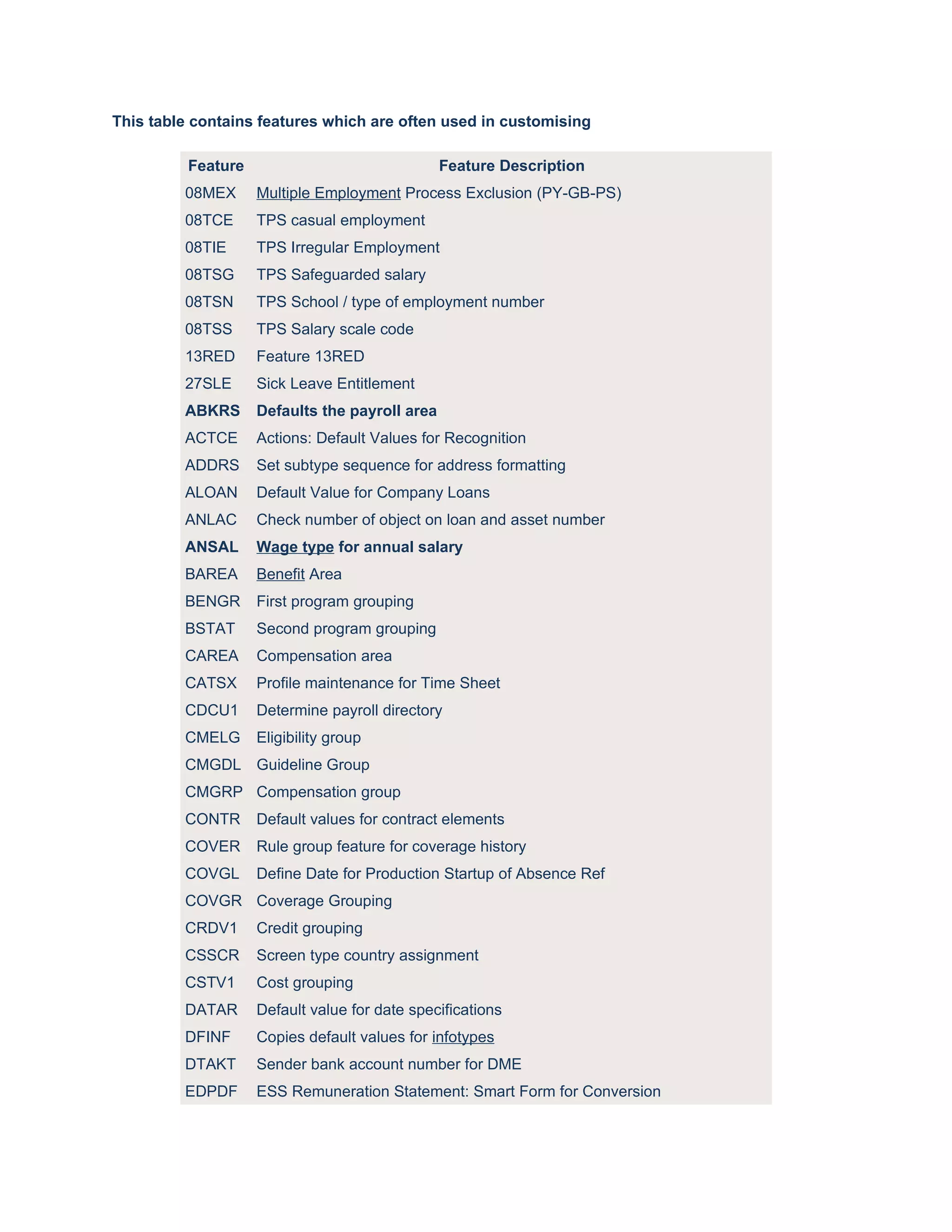
EDTIN Report Variant for ESS Service 'Display Remuneration Statement'
EECGR Employee Contribution Grouping
ELIGR Eligibility grouping
ENTRY Rule for determining entry date
ERCGR Employer Contribution Grouping
EVTGR Adjustment Grouping
EXCEP HR-XX: Exception Reporting - Determine Tolerance
GAGES Feature for the AGE Calculation used in Abs. Evaluation
GBACT Activate new GB solutions
GBCHG Solution Change-Over Date (Great Britain) for GB SxP phase I and II
GBENA Determination of employer name for legal reporting
GBQDP SSP Qualifying Day Pattern
GCPAB Stop payment of tax credit
GBPGL Payroll Go Live Date (Great Britain)
GLIVE Feature for the go-live date used in Abs. Eval.
GLOSS Feature for the seniority (LOS) calculation used in Abs. Eval.
GLTXC Tax code for late payments
GMSGD Termination reason for death
GNICD Default category for NI contributions calculation
GNICW Wage type generation for NI adjustments
GOFFA GB SAP Offsetting against OAP
GOFFM GB SMP Offsetting against OMP
GOFFP GB SPP Offsetting against OPP
GOFFS GB SSP Offsetting against OSP
GPRPC HR-GB: Pro-rating pension contributions
GRDWK Feature for grouping of reporting quotas
GRDWT Feature for grouping of reporting time types
GSALC Salary calculation wage type (Wage Type Group T539J)
HCP01 Organizational Grouping of Employees as Cost Object
HDATE Set date type for determining entry date
HRSIF Recording atts./absences without clock times
IGMOA Infogroup modifier for applicants
IGMOD Infogroup modifier
INTDF Default value for Internet medium
INTDY Default Values for Internet Applications
IVWID Infotype view ID
LDAYW Determines the last day of the week
3.
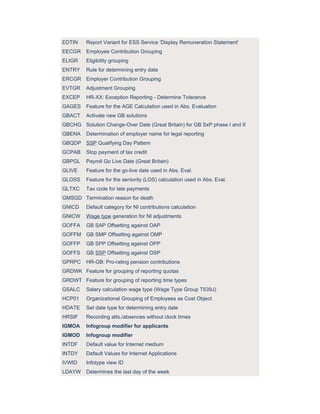
LEAVE Rule to determine the leaving date
Defaults wage type models to which certain wage types are
LGMST
associated
LIMIE Hourly limits for day balances
LLREP Time Management
MASSN Determine fast entry dialog module
MODDE Default value for payment model
MOLGA Payroll existence in country version
NSHLP Assign basic search help to PERNR
NUMAP Applicant number ranges
Defines the number range for Personnel Administration eg. internal
NUMKR
or external
Feature controlling the country-version org assignment
P0001
(infotype 0001)
P0002 Feature controlling the country-version personal data (infotype 0002)
P0006 Feature controlling the country-version addresses (infotype 0006)
P0008 Feature controlling the country-version basic pay (infotype 0008)
P2001 Screen control for all time infotypes (infotype 2001)
PACPA Parameter settings for follow-up activities
PACPP Default for follow-up actions
PACTV Parameter settings for applicant activity types
PAPLI Integration of Personnel Administration and Recruitment
PFREQ Payment frequency for annual salary
Controls which administrator groups (and administrators) are
PINCH
defaulted
PLOGI Integration switch between Personnel Administration and Org Mgt.
PM004 Determining the simulation variant for the payroll driver
PPMOD FI/CO employee sub-group grouping for symbolic account determination
PRELI Integration of 'internal' applicants
PRELR Integration applicant/employee
Determination of quota type selection rule group for Absence
QUOMO
Quotas
RCNEW Defining a distribution list or mail address
SCHID Default Pension Scheme ID
SCHKZ Default work schedule setting for each group of employee - IT 0007
SHPRO Text module for brief applicant description
STATU Consistency of overall status and vacancy assignment
TARIF Defaults the pay scale type & area etc for each specified group
4.
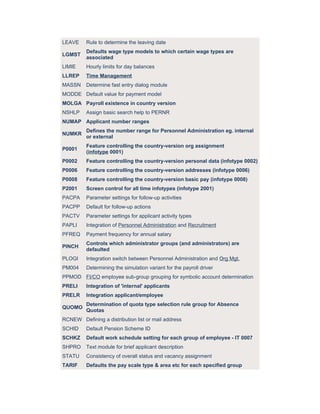
TIMMO Defining the modifier for table T569R
TMSTA Default value for Time Mgt. status
TRMTY Termination Type
TRVCO Dynamic screen layout of account assignment block
TRVCP Assign Organizational Travel Profile
TRVCT Travel control for trip costs accounting
TRVFD (Travel fields) for field control via T706Z
TRVFO (Form variant)
TRVPA (Travel parameters) for trip costs parameters
Sets the default for the Org Key on the infotype 0001 (Organisation
VDSK1
Assignment)
VHIGP Default VHI Group Number
VTART Substitution Defaults (IT 2003)
WEBMO Define Rule Group for Customizing Tables
WPROC Specify word processing system
WRKHR Control for input fields on IT 0007
WWEEK Default value for working week
ZLSCH Default setting for payment method e.g. C or E
ZWEGI Feature for Occ. Health Get Manager path
Remember to Generate your Features (versions below 4.6) especially in a newly created client or after
having transported a feature.
Features - Useful Table
Look at table T549d - it is quite useful. Use transaction code SE16 to view the contents of the table, which
holds information relating to the client, feature, indicator, function part and structure relating to each
feature. If you wish to only display the features that have been configured in a specific client then type in
the variable "*xxx*" where xxx is your client name.
Feature PINCH
This feature returns the value for the administrator group which is used on IT 0001. The feature allows
you to choose between master data and applicant data. You can use the usual decision objects. If the
return value is offered as **** then the administrator group will correspond to the employee's personnel
area. Alternatively you can offer other return values. These values or groups need to have corresponding
entries in table T526 which lists all the available administrators for each particular group.
Hints & Tips
• Always copy a feature to create a new one. It is not advisable to create one without using the
copy function.
• Whenever sub-features are created, remember that the return value must always be the same as
that expected in the top-level feature.
• The command FLDID is used to call subfeatures.
5.
• You can double-click a sub-feature in "tree" mode but not in table mode. To go to a sub-feature
you can either go back to the main feature editor screen or you can enter "f " in the Editor
command line.
• For sub-features, you need to edit the Structure to tick the checkbox indicating a sub-feature.
• When editing the structure relating to the feature, remember to turn fields on if you require them
to be used in the feature.
• If you are wanting to find out which feature calls another one - i.e. the relationships between
different features, you can get this information by running the report RPLMKM00. This report
gives the predecessors and successors for each feature stipulated.
• You can't cut and paste across clients by using the cut, copy buttons in the new tree editor. What
you need to do is use the table editor and cut and paste using Ctrl+Y to select and then Ctrl+C
Ctrl+V etc.
• If you can't activate your feature because of an error, save your feature temporarily from the
option in the menu path. This allows you to at least save what you have done - even if it does
contain errors which you will need to correct.
Common Errors
• If Features including sub-features become too big, they will fail with an ABAP failure. This can
occur whenever the feature and sub-features become too large. When the feature and its sub-
feature are generated, the program converts the feature into program code. When this reaches a
limit of more than 16 000 lines, the program fails.
• Even though the Structure can be changed to include fields on which decisions can be made, the
ABAP code that calls the feature at run-time may not have the necessary value at that point,
therefore the decision is never reached.
• Whenever you create a new SAP client, you should run the program RPUMKG00. This will copy
all the features from 000 to the new client and generate them.
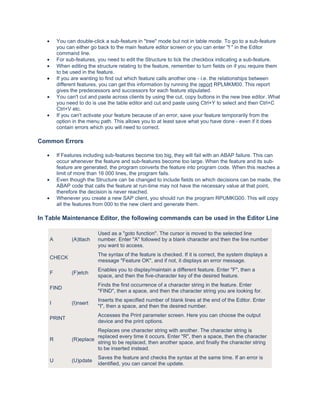
In Table Maintenance Editor, the following commands can be used in the Editor Line
Used as a "goto function". The cursor is moved to the selected line
A (A)ttach number. Enter "A" followed by a blank character and then the line number
you want to access.
The syntax of the feature is checked. If it is correct, the system displays a
CHECK
message "Feature OK", and if not, it displays an error message.
Enables you to display/maintain a different feature. Enter "F", then a
F (F)etch
space, and then the five-character key of the desired feature.
Finds the first occurrence of a character string in the feature. Enter
FIND
"FIND", then a space, and then the character string you are looking for.
Inserts the specified number of blank lines at the end of the Editor. Enter
I (I)nsert
"I", then a space, and then the desired number.
Accesses the Print parameter screen. Here you can choose the output
PRINT
device and the print options.
Replaces one character string with another. The character string is
replaced every time it occurs. Enter "R", then a space, then the character
R (R)eplace
string to be replaced, then another space, and finally the character string
to be inserted instead.
Saves the feature and checks the syntax at the same time. If an error is
U (U)pdate
identified, you can cancel the update.
6.
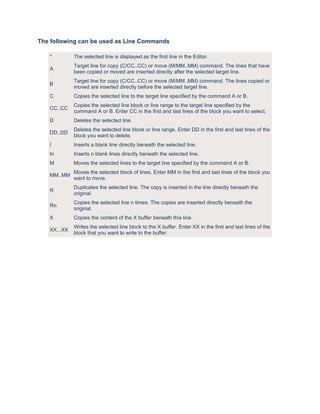
The following canbe used as Line Commands
* The selected line is displayed as the first line in the Editor.
Target line for copy (C/CC..CC) or move (M/MM..MM) command. The lines that have
A
been copied or moved are inserted directly after the selected target line.
Target line for copy (C/CC..CC) or move (M/MM..MM) command. The lines copied or
B
moved are inserted directly before the selected target line.
C Copies the selected line to the target line specified by the command A or B.
Copies the selected line block or line range to the target line specified by the
CC..CC
command A or B. Enter CC in the first and last lines of the block you want to select.
D Deletes the selected line.
Deletes the selected line block or line range. Enter DD in the first and last lines of the
DD..DD
block you want to delete.
I Inserts a blank line directly beneath the selected line.
In Inserts n blank lines directly beneath the selected line.
M Moves the selected lines to the target line specified by the command A or B.
Moves the selected block of lines. Enter MM in the first and last lines of the block you
MM..MM
want to move.
Duplicates the selected line. The copy is inserted in the line directly beneath the
R
original.
Copies the selected line n times. The copies are inserted directly beneath the
Rn
original.
X Copies the content of the X buffer beneath this line.
Writes the selected line block to the X buffer. Enter XX in the first and last lines of the
XX...XX
block that you want to write to the buffer.