Essential
          SAP PLM Tutorial
ESSENTIALS OF SAP BOM REDLINING
        By Shobhit Singhal
          SAP PLM Consultant
Agenda
        Introduction   to BOM Redlining
        Evolution   of SAP BOM Redlining
        SAP   7.02 BOM Redlining – Overview
        BOM   Redlining – Detailed look at capabilities
        How   to setup and implement?


27 Dec 2012                      2                 Copyrighted 2012 by LeverX, Inc.
Introduction to BOM Redlining
        BOM         Redlining refers to the act of marking up a
              Bill of Materials in order to describe the
              proposed changes to the Bill of Materials
        SAP      has released integrated BOM Redlining
              capability in PLM 7.02


27 Dec 2012                           3                 Copyrighted 2012 by LeverX, Inc.
Evolution of SAP BOM Redlining
             BOM Redlining has been a much sought after functionality among
              SAP customers for many years
             Traditionally, users have had to use a variety of techniques in order
              to carry out BOM Redlining, such as:
               Print out the BOM and mark it up
               Describe the proposed changes using free text
               Make required changes to the BOM and set the effectivity date in the future
                hoping that the changes will be approved
               If the changes are rejected, use transaction CCUNDO to back out the
                changes
               Other techniques such as spreadsheets, xml files etc.

27 Dec 2012                                        4                            Copyrighted 2012 by LeverX, Inc.
SAP PLM 7.02 BOM Redlining – Overview

             SAP PLM 7.02 is the latest release of web-based PLM functionality provided by SAP
             With PLM 7.01/02, SAP has been delivering an excellent set of tools that make
              management of key product data easier
             SAP BOM Redlining is a completely integrated functionality that lets users easily
              propose changes to a BOM in a user-friendly manner and route the changes for
              review and approval
             You can have multiple redlines on the same BOM for different effectivity dates
             Redlines are color coded to make it easier to read – Red means delete, yellow
              means change, green means add item
             Once the redline is approved, the changes can be automatically applied to the BOM
              using one click

27 Dec 2012                                           5                               Copyrighted 2012 by LeverX, Inc.
SAP PLM 7.02 BOM Redlining – Overview

             The redlines are stored in the SAP system and can have their own status network
              without affecting the production Bill of Material
             Seamlessly integrated with the change management process – create redline, add to
              change record, route for review, apply changes


27 Dec 2012                                         6                              Copyrighted 2012 by LeverX, Inc.
BOM Redlining – New Button
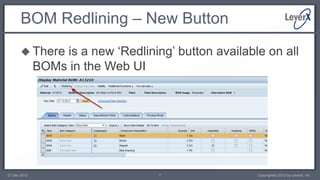
        There    is a new ‘Redlining’ button available on all
              BOMs in the Web UI


27 Dec 2012                         7                 Copyrighted 2012 by LeverX, Inc.
BOM Redlining – Redlining Header
             The redlining screen has a header with following
              fields:
               Redline Name
               Redline Description
               Redline Status
               Owner
               Validity
               Engineering Record/Change Number

27 Dec 2012                            8                 Copyrighted 2012 by LeverX, Inc.
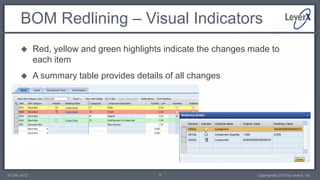
BOM Redlining – Visual Indicators
             Red, yellow and green highlights indicate the changes made to
              each item
             A summary table provides details of all changes


27 Dec 2012                                  9                       Copyrighted 2012 by LeverX, Inc.
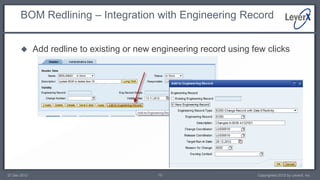
BOM Redlining – Integration with Engineering Record


             Add redline to existing or new engineering record using few clicks


27 Dec 2012                                   10                       Copyrighted 2012 by LeverX, Inc.
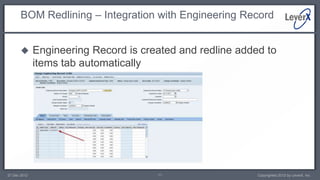
BOM Redlining – Integration with Engineering Record


             Engineering Record is created and redline added to
              items tab automatically


27 Dec 2012                            11                   Copyrighted 2012 by LeverX, Inc.
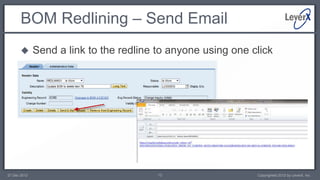
BOM Redlining – Send Email
             Send a link to the redline to anyone using one click


27 Dec 2012                              12                   Copyrighted 2012 by LeverX, Inc.
BOM Redlining – Status Network
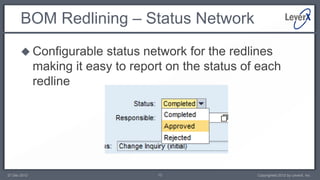
        Configurable      status network for the redlines
              making it easy to report on the status of each
              redline


27 Dec 2012                          13                Copyrighted 2012 by LeverX, Inc.
BOM Redlining – Apply Changes
             Click on Apply Changes to apply the redline to the BOM
              on the change number effectivity date


27 Dec 2012                            14                   Copyrighted 2012 by LeverX, Inc.
How to setup and implement?
             The simplest way to get started, whether transferring
              from existing SAP PLM system or starting from scratch,
              is to go with a sandbox/prototype approach
             If upgrading to SAP PLM 7.02 from an existing SAP
              PLM solution, you can clearly identify impacted items
              and start to define the benefits of the new solution
             If starting from scratch, you can get the system up and
              running and start doing some baseline reviews with
              business users in as little as 2-6 weeks depending upon
              scope

27 Dec 2012                             15                  Copyrighted 2012 by LeverX, Inc.
Contact Information


     Please contact us for more information about our services or solutions available.

                                     LeverX, Inc.
                          800 West El Camino Real, Suite 180
                            Mountain View, CA 94040 USA
                                Tel: (650) 625 – 8347
                              Web Site: www.LeverX.com
27 Dec 2012                                 16                           Copyrighted 2012 by LeverX, Inc.

SAP BOM Redlining

  • 1.
    Essential SAP PLM Tutorial ESSENTIALS OF SAP BOM REDLINING By Shobhit Singhal SAP PLM Consultant
  • 2.
    Agenda  Introduction to BOM Redlining  Evolution of SAP BOM Redlining  SAP 7.02 BOM Redlining – Overview  BOM Redlining – Detailed look at capabilities  How to setup and implement? 27 Dec 2012 2 Copyrighted 2012 by LeverX, Inc.
  • 3.
    Introduction to BOMRedlining  BOM Redlining refers to the act of marking up a Bill of Materials in order to describe the proposed changes to the Bill of Materials  SAP has released integrated BOM Redlining capability in PLM 7.02 27 Dec 2012 3 Copyrighted 2012 by LeverX, Inc.
  • 4.
    Evolution of SAPBOM Redlining  BOM Redlining has been a much sought after functionality among SAP customers for many years  Traditionally, users have had to use a variety of techniques in order to carry out BOM Redlining, such as:  Print out the BOM and mark it up  Describe the proposed changes using free text  Make required changes to the BOM and set the effectivity date in the future hoping that the changes will be approved  If the changes are rejected, use transaction CCUNDO to back out the changes  Other techniques such as spreadsheets, xml files etc. 27 Dec 2012 4 Copyrighted 2012 by LeverX, Inc.
  • 5.
    SAP PLM 7.02BOM Redlining – Overview  SAP PLM 7.02 is the latest release of web-based PLM functionality provided by SAP  With PLM 7.01/02, SAP has been delivering an excellent set of tools that make management of key product data easier  SAP BOM Redlining is a completely integrated functionality that lets users easily propose changes to a BOM in a user-friendly manner and route the changes for review and approval  You can have multiple redlines on the same BOM for different effectivity dates  Redlines are color coded to make it easier to read – Red means delete, yellow means change, green means add item  Once the redline is approved, the changes can be automatically applied to the BOM using one click 27 Dec 2012 5 Copyrighted 2012 by LeverX, Inc.
  • 6.
    SAP PLM 7.02BOM Redlining – Overview  The redlines are stored in the SAP system and can have their own status network without affecting the production Bill of Material  Seamlessly integrated with the change management process – create redline, add to change record, route for review, apply changes 27 Dec 2012 6 Copyrighted 2012 by LeverX, Inc.
  • 7.
    BOM Redlining –New Button  There is a new ‘Redlining’ button available on all BOMs in the Web UI 27 Dec 2012 7 Copyrighted 2012 by LeverX, Inc.
  • 8.
    BOM Redlining –Redlining Header  The redlining screen has a header with following fields:  Redline Name  Redline Description  Redline Status  Owner  Validity  Engineering Record/Change Number 27 Dec 2012 8 Copyrighted 2012 by LeverX, Inc.
  • 9.
    BOM Redlining –Visual Indicators  Red, yellow and green highlights indicate the changes made to each item  A summary table provides details of all changes 27 Dec 2012 9 Copyrighted 2012 by LeverX, Inc.
  • 10.
    BOM Redlining –Integration with Engineering Record  Add redline to existing or new engineering record using few clicks 27 Dec 2012 10 Copyrighted 2012 by LeverX, Inc.
  • 11.
    BOM Redlining –Integration with Engineering Record  Engineering Record is created and redline added to items tab automatically 27 Dec 2012 11 Copyrighted 2012 by LeverX, Inc.
  • 12.
    BOM Redlining –Send Email  Send a link to the redline to anyone using one click 27 Dec 2012 12 Copyrighted 2012 by LeverX, Inc.
  • 13.
    BOM Redlining –Status Network  Configurable status network for the redlines making it easy to report on the status of each redline 27 Dec 2012 13 Copyrighted 2012 by LeverX, Inc.
  • 14.
    BOM Redlining –Apply Changes  Click on Apply Changes to apply the redline to the BOM on the change number effectivity date 27 Dec 2012 14 Copyrighted 2012 by LeverX, Inc.
  • 15.
    How to setupand implement?  The simplest way to get started, whether transferring from existing SAP PLM system or starting from scratch, is to go with a sandbox/prototype approach  If upgrading to SAP PLM 7.02 from an existing SAP PLM solution, you can clearly identify impacted items and start to define the benefits of the new solution  If starting from scratch, you can get the system up and running and start doing some baseline reviews with business users in as little as 2-6 weeks depending upon scope 27 Dec 2012 15 Copyrighted 2012 by LeverX, Inc.
  • 16.
    Contact Information Please contact us for more information about our services or solutions available. LeverX, Inc. 800 West El Camino Real, Suite 180 Mountain View, CA 94040 USA Tel: (650) 625 – 8347 Web Site: www.LeverX.com 27 Dec 2012 16 Copyrighted 2012 by LeverX, Inc.