Zabbix 2.0


The next generation of real-time
IT infrastructure performance and availability monitoring
What’s New

          Low-level discovery
          Automatic host inventory population
          Web monitoring by Zabbix proxies
          Multiple-interface support per host
          Direct JMX monitoring support
          Visible host name
          A new look, more customization


Release     Upgrade
 notes                                     © 2012 by Zabbix SIA. All rights reserved.
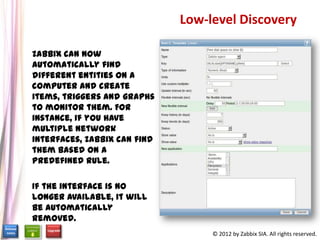
Low-level Discovery

          Zabbix can now automatically find
          different entities on a computer and
          create items, triggers and graphs to
          monitor them. For instance, if you
          have multiple network interfaces,
          Zabbix can find them based on a
          predefined rule.

          If the interface is no longer available,
          it will be automatically removed.


Release        Upgrade
 notes                                                    © 2012 by Zabbix SIA. All rights reserved.
Automatic Host Inventory Population

          Host inventory (previously known as Profile and Extended profile) now
          can be populated automatically. Items have a property that allows to
          store their value in any of the inventory fields if inventory is set to
          Automatic mode.


                             Web Monitoring by Zabbix Proxies

          Web scenarios can now be monitored by remote proxies. It allows
          monitoring web applications from various geographical locations.


Release       Upgrade
 notes                                                  © 2012 by Zabbix SIA. All rights reserved.
Direct JMX Monitoring Support

          Zabbix 2.0 adds native support for
          JMX monitoring by introducing a
          new Zabbix daemon called “Zabbix
          Java gateway”.

          When Zabbix server wants to know
          the value of a particular JMX
          counter on a host, it asks the
          Zabbix Java gateway, which in turn
          uses the JMX management API to
          query the application of interest
          remotely.


Release       Upgrade
 notes                                           © 2012 by Zabbix SIA. All rights reserved.
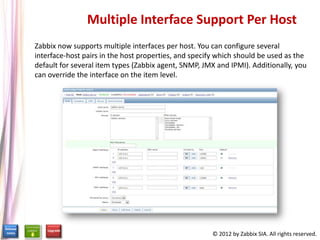
Multiple Interface Support Per Host
          Zabbix now supports multiple interfaces per host. You can configure several
          interface-host pairs in the host properties, and specify which should be used as the
          default for several item types (Zabbix agent, SNMP, JMX and IPMI). Additionally, you
          can override the interface on the item level.


Release      Upgrade
 notes                                                          © 2012 by Zabbix SIA. All rights reserved.
Visible Host Name


          Visible host name now supports:
            UTF8 charset
            New macros: {HOST.HOST}, {HOST.NAME} and {HOST.IP}


          The {IPADDRESS} and {HOSTNAME} macros are now deprecated.


Release      Upgrade
 notes                                         © 2012 by Zabbix SIA. All rights reserved.
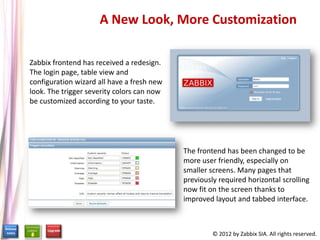
A New Look, More Customization

          Zabbix frontend has received a redesign.
          The login page, table view and
          configuration wizard all have a fresh new
          look. The trigger severity colors can now
          be customized according to your taste.


                                                      The frontend has been changed to be
                                                      more user friendly, especially on
                                                      smaller screens. Many pages that
                                                      previously required horizontal scrolling
                                                      now fit on the screen thanks to
                                                      improved layout and tabbed interface.


Release        Upgrade       Upgrae
 notes                                                         © 2012 by Zabbix SIA. All rights reserved.
Improvements

          Redesigned network maps icons & layout

          Better performance

          Reshaped tables and forms

          More user-friendly frontend


Release    Upgrade
 notes                                  © 2012 by Zabbix SIA. All rights reserved.
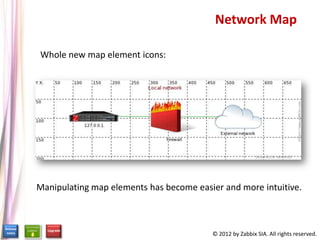
Network Map

          Whole new map element icons:


          Manipulating map elements has become easier and more intuitive.


Release     Upgrade
 notes                                             © 2012 by Zabbix SIA. All rights reserved.
Better Performance


           The server and agent can now
           handle more data.

           The frontend has become much
           more responsive.


            API performance has been drastically improved.


Release   Upgrade
 notes                                         © 2012 by Zabbix SIA. All rights reserved.
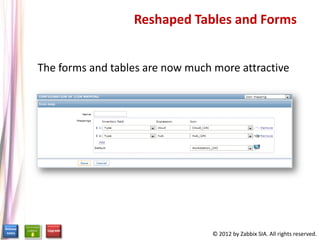
Reshaped Tables and Forms


          The forms and tables are now much more attractive


Release    Upgrade
 notes                                      © 2012 by Zabbix SIA. All rights reserved.
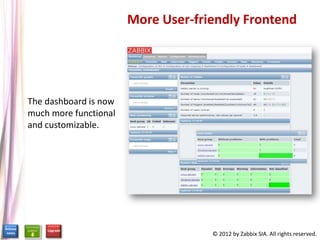
More User-friendly Frontend


          The dashboard is now
          much more functional
          and customizable.


Release       Upgrade
 notes                                        © 2012 by Zabbix SIA. All rights reserved.
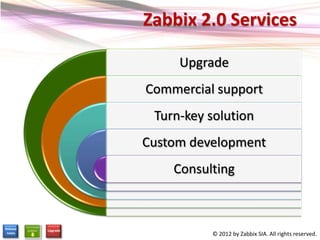
Zabbix 2.0 Services

                         Upgrade
                    Commercial support
                     Turn-key solution
                    Custom development
                        Consulting


Release   Upgrade
 notes                        © 2012 by Zabbix SIA. All rights reserved.
Why Migrate to Zabbix 2.0?

          Faster & better performance


          Perspectives for further development


          Support for Zabbix 1.8 expires

             Download: http://www.zabbix.com/download.php

Release     Upgrade
 notes                                       © 2012 by Zabbix SIA. All rights reserved.
Contact Details
Sales
Worldwide:       +371 6 778 4742
USA Toll-free:   1-877-4-Zabbix (1-877-4-922249)
Japan Toll-free: 0053 1130 907
Fax:             +371 6 778 4741
Email:           sales@zabbix.com


Partnership Inquiries                                               Zabbix SIA
                                                           117 Dzelzavas Street
Worldwide:       +371 6778 4702
                                                                 Riga, LV-1021
                                                                         Latvia


                                                   © 2012 by Zabbix SIA. All rights reserved.

Zabbix 2.0 - New Features and Improvements

  • 1.
    Zabbix 2.0 The nextgeneration of real-time IT infrastructure performance and availability monitoring
  • 2.
    What’s New Low-level discovery Automatic host inventory population Web monitoring by Zabbix proxies Multiple-interface support per host Direct JMX monitoring support Visible host name A new look, more customization Release Upgrade notes © 2012 by Zabbix SIA. All rights reserved.
  • 3.
    Low-level Discovery Zabbix can now automatically find different entities on a computer and create items, triggers and graphs to monitor them. For instance, if you have multiple network interfaces, Zabbix can find them based on a predefined rule. If the interface is no longer available, it will be automatically removed. Release Upgrade notes © 2012 by Zabbix SIA. All rights reserved.
  • 4.
    Automatic Host InventoryPopulation Host inventory (previously known as Profile and Extended profile) now can be populated automatically. Items have a property that allows to store their value in any of the inventory fields if inventory is set to Automatic mode. Web Monitoring by Zabbix Proxies Web scenarios can now be monitored by remote proxies. It allows monitoring web applications from various geographical locations. Release Upgrade notes © 2012 by Zabbix SIA. All rights reserved.
  • 5.
    Direct JMX MonitoringSupport Zabbix 2.0 adds native support for JMX monitoring by introducing a new Zabbix daemon called “Zabbix Java gateway”. When Zabbix server wants to know the value of a particular JMX counter on a host, it asks the Zabbix Java gateway, which in turn uses the JMX management API to query the application of interest remotely. Release Upgrade notes © 2012 by Zabbix SIA. All rights reserved.
  • 6.
    Multiple Interface SupportPer Host Zabbix now supports multiple interfaces per host. You can configure several interface-host pairs in the host properties, and specify which should be used as the default for several item types (Zabbix agent, SNMP, JMX and IPMI). Additionally, you can override the interface on the item level. Release Upgrade notes © 2012 by Zabbix SIA. All rights reserved.
  • 7.
    Visible Host Name Visible host name now supports: UTF8 charset New macros: {HOST.HOST}, {HOST.NAME} and {HOST.IP} The {IPADDRESS} and {HOSTNAME} macros are now deprecated. Release Upgrade notes © 2012 by Zabbix SIA. All rights reserved.
  • 8.
    A New Look,More Customization Zabbix frontend has received a redesign. The login page, table view and configuration wizard all have a fresh new look. The trigger severity colors can now be customized according to your taste. The frontend has been changed to be more user friendly, especially on smaller screens. Many pages that previously required horizontal scrolling now fit on the screen thanks to improved layout and tabbed interface. Release Upgrade Upgrae notes © 2012 by Zabbix SIA. All rights reserved.
  • 9.
    Improvements Redesigned network maps icons & layout Better performance Reshaped tables and forms More user-friendly frontend Release Upgrade notes © 2012 by Zabbix SIA. All rights reserved.
  • 10.
    Network Map Whole new map element icons: Manipulating map elements has become easier and more intuitive. Release Upgrade notes © 2012 by Zabbix SIA. All rights reserved.
  • 11.
    Better Performance The server and agent can now handle more data. The frontend has become much more responsive. API performance has been drastically improved. Release Upgrade notes © 2012 by Zabbix SIA. All rights reserved.
  • 12.
    Reshaped Tables andForms The forms and tables are now much more attractive Release Upgrade notes © 2012 by Zabbix SIA. All rights reserved.
  • 13.
    More User-friendly Frontend The dashboard is now much more functional and customizable. Release Upgrade notes © 2012 by Zabbix SIA. All rights reserved.
  • 14.
    Zabbix 2.0 Services Upgrade Commercial support Turn-key solution Custom development Consulting Release Upgrade notes © 2012 by Zabbix SIA. All rights reserved.
  • 15.
    Why Migrate toZabbix 2.0? Faster & better performance Perspectives for further development Support for Zabbix 1.8 expires Download: http://www.zabbix.com/download.php Release Upgrade notes © 2012 by Zabbix SIA. All rights reserved.
  • 16.
    Contact Details Sales Worldwide: +371 6 778 4742 USA Toll-free: 1-877-4-Zabbix (1-877-4-922249) Japan Toll-free: 0053 1130 907 Fax: +371 6 778 4741 Email: sales@zabbix.com Partnership Inquiries Zabbix SIA 117 Dzelzavas Street Worldwide: +371 6778 4702 Riga, LV-1021 Latvia © 2012 by Zabbix SIA. All rights reserved.