Robert Zientara
di-rz.pl
Domains in IBM Maximo Asset
Management
Where Domains are used
Domains create list of values, which can be used to
enter the information in the Maximo fields and
classification attributes.
The user can choose the values from the domain list
or enter them manually.
Object having a domain attached can accept only
values from that domain (manual values are also
validated). This mechanism introduces data
standardization and prevents entering wrong
information.
Creating Domains
Because the domains are closely related to the
database structure it is advised to leave domain
management to the system administrator. Wrong
domain length and type may cause errors.
Domains Application
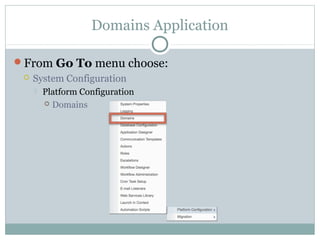
From Go To menu choose:
 System Configuration
 Platform Configuration
 Domains
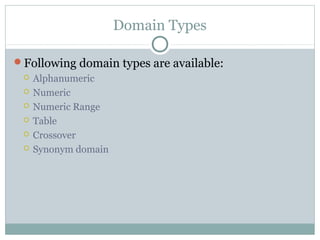
Domain Types
Following domain types are available:
 Alphanumeric
 Numeric
 Numeric Range
 Table
 Crossover
 Synonym domain
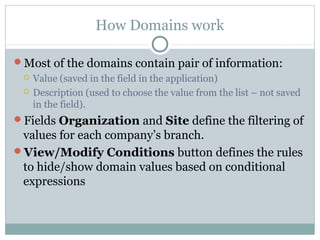
How Domains work
Most of the domains contain pair of information:
 Value (saved in the field in the application)
 Description (used to choose the value from the list – not saved
in the field).
Fields Organization and Site define the filtering of
values for each company’s branch.
View/Modify Conditions button defines the rules
to hide/show domain values based on conditional
expressions
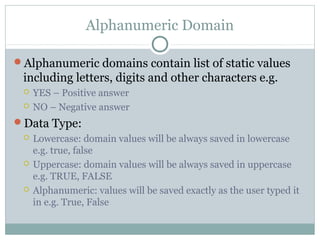
Alphanumeric Domain
Alphanumeric domains contain list of static values
including letters, digits and other characters e.g.
 YES – Positive answer
 NO – Negative answer
Data Type:
 Lowercase: domain values will be always saved in lowercase
e.g. true, false
 Uppercase: domain values will be always saved in uppercase
e.g. TRUE, FALSE
 Alphanumeric: values will be saved exactly as the user typed it
in e.g. True, False
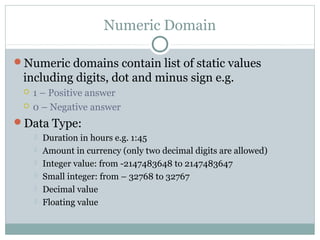
Numeric Domain
Numeric domains contain list of static values
including digits, dot and minus sign e.g.
 1 – Positive answer
 0 – Negative answer
Data Type:
 Duration in hours e.g. 1:45
 Amount in currency (only two decimal digits are allowed)
 Integer value: from -2147483648 to 2147483647
 Small integer: from – 32768 to 32767
 Decimal value
 Floating value
Numeric Range Domain
Numeric domains do not define the lists of allowed
values but rules: which numbers are allowed e.g.
 Values from 0 to 8
 Values from 0 to 100 with an interval 10 so only 10, 20, 30…
can be entered
Data Type:
 Duration in hours e.g. 1:45
 Amount in currency (only two decimal digits are allowed)
 Integer value: from -2147483648 to 2147483647
 Small integer: from – 32768 to 32767
 Decimal value
 Floating value
Numeric Range Domain cont.
You define following parameters of the domain:
 Segment id (integer value) – you can have multiple segments
for example with different intervals
 Minimal value
 Maximal value
 Interval – defines discrete values for the above range. If you
leave it empty, a continuous range of values will be used –
depending on the data type:
 For integer values it will be allowed to enter: 1, 2, 3…
 For decimal domain with 2 digits precision you can enter: 1.01,
1.02, 1.03...
Table Domain
Table domains are used to present data from other
application. The list of records can be filtered out.
You define following parameters of the domain:
 Object e.g. WORKORDER
 List Where Clause – condition to present the data from above
object
 Validation Where Clause – condition to check the content of
the field with attached table domain
 Optionally you can define Error Message Group and Error
Message Key to display an error message if value does not
match domain
Crossover Domain
Crossover domains do not provide list of values,
instead they are used to return a value from a field in
one application which will be saved in a field in
another application.
You define following parameters of the domain:
 Object e.g. WORKORDER
 List Where Clause – condition to find the data in the above
object
 Validation Where Clause – condition to check the content of
the target field
 Optionally you can define Error Message Group and Error
Message Key to display an error message if value does not
match domain
Crossover Domain cont.
Parameters of the domain cont.:
 Source Field – field from the above object (chosen from the
list)
 Destination Field – field in current application to which the
value from source field will be copied (entered manually!)
 Accept NULL Value? – defines if the target field can be set to
null
 No Overwrite? – defines if the target field can be overwritten
 Sequence – defines the order for copying the values
Crossover Domain cont.
You should not attach this domain to the destination
fields, but to the field which triggers an update.
For example you may have a domain, which will
copy information from Primary SMS field in
People application to new field SMS Number in
Work Order Tracking. We want this to happen
after Supervisor field gets populated. In the above
case the domain should be attached to Supervisor
field not to SMS Number.
Synonym Domain
Synonym domains are system domains. You cannot
create new domain of this type, it is only possible to
define new aliases for existing internal values.
Synonym domains are used for example to define
statuses in applications. Maximo uses internal values
in predefined workflows.
For example you can define an alias DRAFT for
WAPPR status in WOSTATUS domain to indicate
that this work order is still in early stage.
Synonym Domain cont.
You define following parameters of the domain:
 Internal Value – you should use one of predefined values
 Value – here is the place for your alias
 Description – information about alias
How to find a Domain
One field can have only one domain attached. To
find it you should first identify the field name in the
database. This information is available via Context
Help. Press ALT-F1 or ALT+I when the cursor is in
the field.
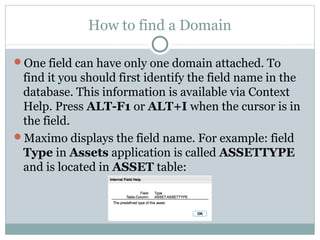
Maximo displays the field name. For example: field
Type in Assets application is called ASSETTYPE
and is located in ASSET table:
How to find a Domain cont.
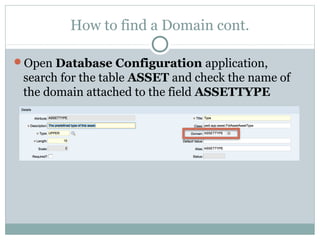
Open Database Configuration application,
search for the table ASSET and check the name of
the domain attached to the field ASSETTYPE
If you want to learn more about Maximo…
Please read my book:
IBM Maximo Asset Management.
The Consultant’s Guide
Legal information
All product and company names mentioned in this
publication may be trademarks or registered
trademarks of their respective owners.

Domains in IBM Maximo Asset Management

  • 1.
    Robert Zientara di-rz.pl Domains inIBM Maximo Asset Management
  • 2.
    Where Domains areused Domains create list of values, which can be used to enter the information in the Maximo fields and classification attributes. The user can choose the values from the domain list or enter them manually. Object having a domain attached can accept only values from that domain (manual values are also validated). This mechanism introduces data standardization and prevents entering wrong information.
  • 3.
    Creating Domains Because thedomains are closely related to the database structure it is advised to leave domain management to the system administrator. Wrong domain length and type may cause errors.
  • 4.
    Domains Application From GoTo menu choose:  System Configuration  Platform Configuration  Domains
  • 5.
    Domain Types Following domaintypes are available:  Alphanumeric  Numeric  Numeric Range  Table  Crossover  Synonym domain
  • 6.
    How Domains work Mostof the domains contain pair of information:  Value (saved in the field in the application)  Description (used to choose the value from the list – not saved in the field). Fields Organization and Site define the filtering of values for each company’s branch. View/Modify Conditions button defines the rules to hide/show domain values based on conditional expressions
  • 7.
    Alphanumeric Domain Alphanumeric domainscontain list of static values including letters, digits and other characters e.g.  YES – Positive answer  NO – Negative answer Data Type:  Lowercase: domain values will be always saved in lowercase e.g. true, false  Uppercase: domain values will be always saved in uppercase e.g. TRUE, FALSE  Alphanumeric: values will be saved exactly as the user typed it in e.g. True, False
  • 8.
    Numeric Domain Numeric domainscontain list of static values including digits, dot and minus sign e.g.  1 – Positive answer  0 – Negative answer Data Type:  Duration in hours e.g. 1:45  Amount in currency (only two decimal digits are allowed)  Integer value: from -2147483648 to 2147483647  Small integer: from – 32768 to 32767  Decimal value  Floating value
  • 9.
    Numeric Range Domain Numericdomains do not define the lists of allowed values but rules: which numbers are allowed e.g.  Values from 0 to 8  Values from 0 to 100 with an interval 10 so only 10, 20, 30… can be entered Data Type:  Duration in hours e.g. 1:45  Amount in currency (only two decimal digits are allowed)  Integer value: from -2147483648 to 2147483647  Small integer: from – 32768 to 32767  Decimal value  Floating value
  • 10.
    Numeric Range Domaincont. You define following parameters of the domain:  Segment id (integer value) – you can have multiple segments for example with different intervals  Minimal value  Maximal value  Interval – defines discrete values for the above range. If you leave it empty, a continuous range of values will be used – depending on the data type:  For integer values it will be allowed to enter: 1, 2, 3…  For decimal domain with 2 digits precision you can enter: 1.01, 1.02, 1.03...
  • 11.
    Table Domain Table domainsare used to present data from other application. The list of records can be filtered out. You define following parameters of the domain:  Object e.g. WORKORDER  List Where Clause – condition to present the data from above object  Validation Where Clause – condition to check the content of the field with attached table domain  Optionally you can define Error Message Group and Error Message Key to display an error message if value does not match domain
  • 12.
    Crossover Domain Crossover domainsdo not provide list of values, instead they are used to return a value from a field in one application which will be saved in a field in another application. You define following parameters of the domain:  Object e.g. WORKORDER  List Where Clause – condition to find the data in the above object  Validation Where Clause – condition to check the content of the target field  Optionally you can define Error Message Group and Error Message Key to display an error message if value does not match domain
  • 13.
    Crossover Domain cont. Parametersof the domain cont.:  Source Field – field from the above object (chosen from the list)  Destination Field – field in current application to which the value from source field will be copied (entered manually!)  Accept NULL Value? – defines if the target field can be set to null  No Overwrite? – defines if the target field can be overwritten  Sequence – defines the order for copying the values
  • 14.
    Crossover Domain cont. Youshould not attach this domain to the destination fields, but to the field which triggers an update. For example you may have a domain, which will copy information from Primary SMS field in People application to new field SMS Number in Work Order Tracking. We want this to happen after Supervisor field gets populated. In the above case the domain should be attached to Supervisor field not to SMS Number.
  • 15.
    Synonym Domain Synonym domainsare system domains. You cannot create new domain of this type, it is only possible to define new aliases for existing internal values. Synonym domains are used for example to define statuses in applications. Maximo uses internal values in predefined workflows. For example you can define an alias DRAFT for WAPPR status in WOSTATUS domain to indicate that this work order is still in early stage.
  • 16.
    Synonym Domain cont. Youdefine following parameters of the domain:  Internal Value – you should use one of predefined values  Value – here is the place for your alias  Description – information about alias
  • 17.
    How to finda Domain One field can have only one domain attached. To find it you should first identify the field name in the database. This information is available via Context Help. Press ALT-F1 or ALT+I when the cursor is in the field. Maximo displays the field name. For example: field Type in Assets application is called ASSETTYPE and is located in ASSET table:
  • 18.
    How to finda Domain cont. Open Database Configuration application, search for the table ASSET and check the name of the domain attached to the field ASSETTYPE
  • 19.
    If you wantto learn more about Maximo… Please read my book: IBM Maximo Asset Management. The Consultant’s Guide
  • 20.
    Legal information All productand company names mentioned in this publication may be trademarks or registered trademarks of their respective owners.

Editor's Notes

  • #2 Historia zmian: 1.0.0, 2016-07-08 – wersja inicjalna