
IBM Maximo Asset Management
7.6 New Features
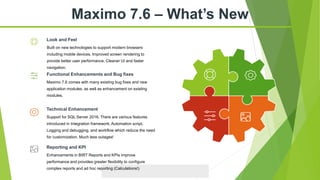
Maximo 7.6 – What’s New
Built on new technologies to support modern browsers
including mobile devices. Improved screen rendering to
provide better user performance. Cleaner UI and faster
navigation.
Look and Feel
Enhancements in BIRT Reports and KPIs improve
performance and provides greater flexibility to configure
complex reports and ad hoc reporting (Calculations!)
Reporting and KPI
Maximo 7.6 comes with many existing bug fixes and new
application modules, as well as enhancement on existing
modules.
Functional Enhancements and Bug fixes
Support for SQL Server 2016. There are various features
introduced in Integration framework, Automation script,
Logging and debugging, and workflow which reduce the need
for customization. Much less outages!
Technical Enhancement
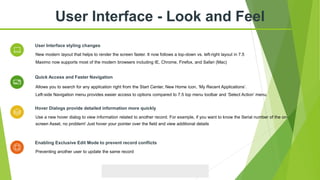
Allows you to search for any application right from the Start Center, New Home icon, ‘My Recent Applications’.
Left-side Navigation menu provides easier access to options compared to 7.5 top menu toolbar and ‘Select Action’ menu.
Quick Access and Faster Navigation
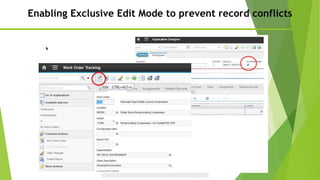
Preventing another user to update the same record
Enabling Exclusive Edit Mode to prevent record conflicts
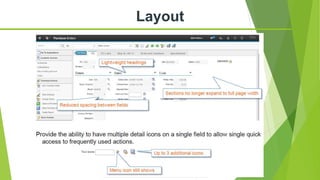
New modern layout that helps to render the screen faster. It now follows a top-down vs. left-right layout in 7.5
Maximo now supports most of the modern browsers including IE, Chrome, Firefox, and Safari (Mac)
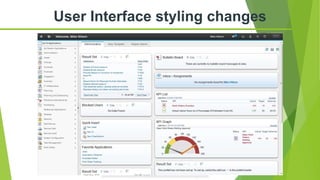
User Interface styling changes
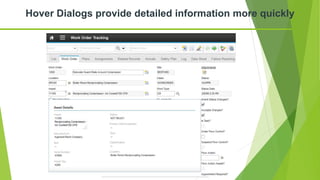
Use a new hover dialog to view information related to another record. For example, if you want to know the Serial number of the on-
screen Asset, no problem! Just hover your pointer over the field and view additional details
Hover Dialogs provide detailed information more quickly
User Interface - Look and Feel
User Interface styling changes
Layout
Hover Dialogs provide detailed information more quickly
Enabling Exclusive Edit Mode to prevent record conflicts
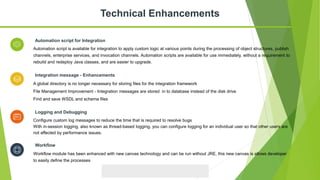
Configure custom log messages to reduce the time that is required to resolve bugs
With in-session logging, also known as thread-based logging, you can configure logging for an individual user so that other users are
not affected by performance issues.
Logging and Debugging
Automation script is available for integration to apply custom logic at various points during the processing of object structures, publish
channels, enterprise services, and invocation channels. Automation scripts are available for use immediately, without a requirement to
rebuild and redeploy Java classes, and are easier to upgrade.
Automation script for Integration
A global directory is no longer necessary for storing files for the integration framework
File Management Improvement - Integration messages are stored in to database instead of the disk drive
Find and save WSDL and schema files
Integration message - Enhancements
Technical Enhancements
Workflow module has been enhanced with new canvas technology and can be run without JRE, this new canvas is allows developer
to easily define the processes
Workflow
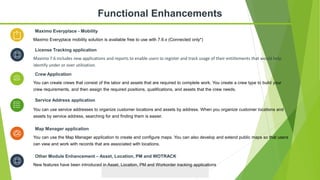
You can use service addresses to organize customer locations and assets by address. When you organize customer locations and
assets by service address, searching for and finding them is easier.
Service Address application
You can use the Map Manager application to create and configure maps. You can also develop and extend public maps so that users
can view and work with records that are associated with locations.
Map Manager application
You can create crews that consist of the labor and assets that are required to complete work. You create a crew type to build your
crew requirements, and then assign the required positions, qualifications, and assets that the crew needs.
Crew Application
Maximo Everyplace mobility solution is available free to use with 7.6.x (Connected only*)
Maximo Everyplace - Mobility
Functional Enhancements
New features have been introduced in Asset, Location, PM and Workorder tracking applications
Other Module Enhancement – Asset, Location, PM and WOTRACK
Maximo 7.6 includes new applications and reports to enable users to register and track usage of their entitlements that would help
identify under or over utilization.
License Tracking application
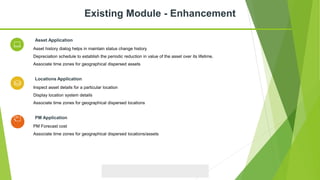
Asset history dialog helps in maintain status change history
Depreciation schedule to establish the periodic reduction in value of the asset over its lifetime.
Associate time zones for geographical dispersed assets
Asset Application
Inspect asset details for a particular location
Display location system details
Associate time zones for geographical dispersed locations
Locations Application
Existing Module - Enhancement
PM Forecast cost
Associate time zones for geographical dispersed locations/assets
PM Application
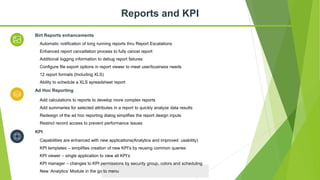
Automatic notification of long running reports thru Report Escalations
Enhanced report cancellation process to fully cancel report
Additional logging information to debug report failures
Configure file export options in report viewer to meet user/business needs
12 report formats (Including XLS)
Ability to schedule a XLS spreadsheet report
Birt Reports enhancements
Add calculations to reports to develop more complex reports
Add summaries for selected attributes in a report to quickly analyze data results
Redesign of the ad hoc reporting dialog simplifies the report design inputs
Restrict record access to prevent performance issues
Ad Hoc Reporting
Reports and KPI
Capabilities are enhanced with new applications(Analytics and improved usability)
KPI templates – simplifies creation of new KPI’s by reusing common queries
KPI viewer – single application to view all KPI’s
KPI manager – changes to KPI permissions by security group, colors and scheduling
New ‘Analytics’ Module in the go to menu
KPI
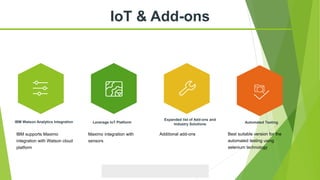
IoT & Add-ons
Leverage IoT Platform
Expanded list of Add-ons and
Industry Solutions
IBM Watson Analytics Integration Automated Testing
IBM supports Maximo
integration with Watson cloud
platform
Maximo integration with
sensors
Additional add-ons Best suitable version for the
automated testing using
selenium technology
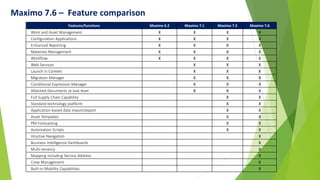
Maximo 7.6 – Feature comparison
Features/functions Maximo 6.2 Maximo 7.1 Maximo 7.5 Maximo 7.6
Work and Asset Management X X X X
Configuration Applications X X X X
Enhanced Reporting X X X X
Materials Management X X X X
Workflow X X X X
Web Services X X X
Launch in Context X X X
Migration Manager X X X
Conditional Expression Manager X X X
Attached Documents at task level X X X
Full Supply Chain Capability X X
Standard technology platform X X
Application-based data import/export X X
Asset Templates X X
PM Forecasting X X
Automation Scripts X X
Intuitive Navigation X
Business Intelligence Dashboards X
Multi-tenancy X
Mapping including Service Address X
Crew Management X
Built-in Mobility Capabilities X
Thank You

Maximo 7.6 Features

  • 1.
    IBM Maximo AssetManagement 7.6 New Features
  • 2.
    Maximo 7.6 –What’s New Built on new technologies to support modern browsers including mobile devices. Improved screen rendering to provide better user performance. Cleaner UI and faster navigation. Look and Feel Enhancements in BIRT Reports and KPIs improve performance and provides greater flexibility to configure complex reports and ad hoc reporting (Calculations!) Reporting and KPI Maximo 7.6 comes with many existing bug fixes and new application modules, as well as enhancement on existing modules. Functional Enhancements and Bug fixes Support for SQL Server 2016. There are various features introduced in Integration framework, Automation script, Logging and debugging, and workflow which reduce the need for customization. Much less outages! Technical Enhancement
  • 3.
    Allows you tosearch for any application right from the Start Center, New Home icon, ‘My Recent Applications’. Left-side Navigation menu provides easier access to options compared to 7.5 top menu toolbar and ‘Select Action’ menu. Quick Access and Faster Navigation Preventing another user to update the same record Enabling Exclusive Edit Mode to prevent record conflicts New modern layout that helps to render the screen faster. It now follows a top-down vs. left-right layout in 7.5 Maximo now supports most of the modern browsers including IE, Chrome, Firefox, and Safari (Mac) User Interface styling changes Use a new hover dialog to view information related to another record. For example, if you want to know the Serial number of the on- screen Asset, no problem! Just hover your pointer over the field and view additional details Hover Dialogs provide detailed information more quickly User Interface - Look and Feel
  • 4.
  • 5.
  • 6.
    Hover Dialogs providedetailed information more quickly
  • 7.
    Enabling Exclusive EditMode to prevent record conflicts
  • 8.
    Configure custom logmessages to reduce the time that is required to resolve bugs With in-session logging, also known as thread-based logging, you can configure logging for an individual user so that other users are not affected by performance issues. Logging and Debugging Automation script is available for integration to apply custom logic at various points during the processing of object structures, publish channels, enterprise services, and invocation channels. Automation scripts are available for use immediately, without a requirement to rebuild and redeploy Java classes, and are easier to upgrade. Automation script for Integration A global directory is no longer necessary for storing files for the integration framework File Management Improvement - Integration messages are stored in to database instead of the disk drive Find and save WSDL and schema files Integration message - Enhancements Technical Enhancements Workflow module has been enhanced with new canvas technology and can be run without JRE, this new canvas is allows developer to easily define the processes Workflow
  • 9.
    You can useservice addresses to organize customer locations and assets by address. When you organize customer locations and assets by service address, searching for and finding them is easier. Service Address application You can use the Map Manager application to create and configure maps. You can also develop and extend public maps so that users can view and work with records that are associated with locations. Map Manager application You can create crews that consist of the labor and assets that are required to complete work. You create a crew type to build your crew requirements, and then assign the required positions, qualifications, and assets that the crew needs. Crew Application Maximo Everyplace mobility solution is available free to use with 7.6.x (Connected only*) Maximo Everyplace - Mobility Functional Enhancements New features have been introduced in Asset, Location, PM and Workorder tracking applications Other Module Enhancement – Asset, Location, PM and WOTRACK Maximo 7.6 includes new applications and reports to enable users to register and track usage of their entitlements that would help identify under or over utilization. License Tracking application
  • 10.
    Asset history dialoghelps in maintain status change history Depreciation schedule to establish the periodic reduction in value of the asset over its lifetime. Associate time zones for geographical dispersed assets Asset Application Inspect asset details for a particular location Display location system details Associate time zones for geographical dispersed locations Locations Application Existing Module - Enhancement PM Forecast cost Associate time zones for geographical dispersed locations/assets PM Application
  • 11.
    Automatic notification oflong running reports thru Report Escalations Enhanced report cancellation process to fully cancel report Additional logging information to debug report failures Configure file export options in report viewer to meet user/business needs 12 report formats (Including XLS) Ability to schedule a XLS spreadsheet report Birt Reports enhancements Add calculations to reports to develop more complex reports Add summaries for selected attributes in a report to quickly analyze data results Redesign of the ad hoc reporting dialog simplifies the report design inputs Restrict record access to prevent performance issues Ad Hoc Reporting Reports and KPI Capabilities are enhanced with new applications(Analytics and improved usability) KPI templates – simplifies creation of new KPI’s by reusing common queries KPI viewer – single application to view all KPI’s KPI manager – changes to KPI permissions by security group, colors and scheduling New ‘Analytics’ Module in the go to menu KPI
  • 12.
    IoT & Add-ons LeverageIoT Platform Expanded list of Add-ons and Industry Solutions IBM Watson Analytics Integration Automated Testing IBM supports Maximo integration with Watson cloud platform Maximo integration with sensors Additional add-ons Best suitable version for the automated testing using selenium technology
  • 14.
    Maximo 7.6 –Feature comparison Features/functions Maximo 6.2 Maximo 7.1 Maximo 7.5 Maximo 7.6 Work and Asset Management X X X X Configuration Applications X X X X Enhanced Reporting X X X X Materials Management X X X X Workflow X X X X Web Services X X X Launch in Context X X X Migration Manager X X X Conditional Expression Manager X X X Attached Documents at task level X X X Full Supply Chain Capability X X Standard technology platform X X Application-based data import/export X X Asset Templates X X PM Forecasting X X Automation Scripts X X Intuitive Navigation X Business Intelligence Dashboards X Multi-tenancy X Mapping including Service Address X Crew Management X Built-in Mobility Capabilities X
  • 15.