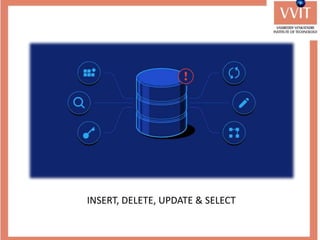
INSERT, DELETE, UPDATE & SELECT
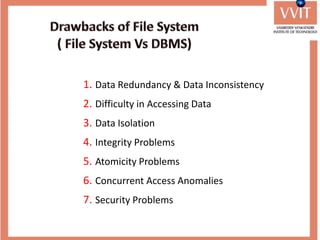
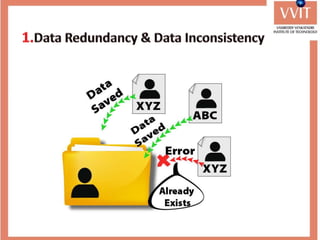
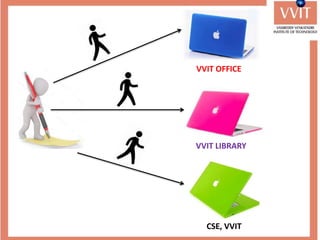
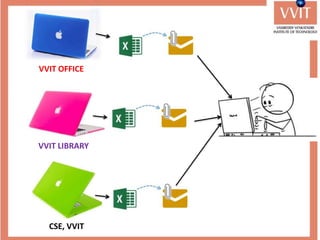
1. Data Redundancy & Data Inconsistency
2. Difficulty in Accessing Data
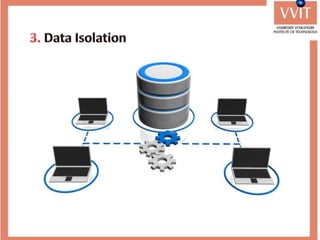
3. Data Isolation
4. Integrity Problems
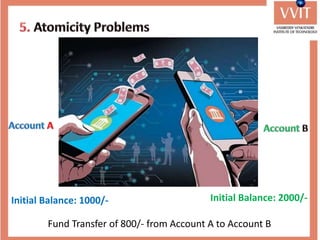
5. Atomicity Problems
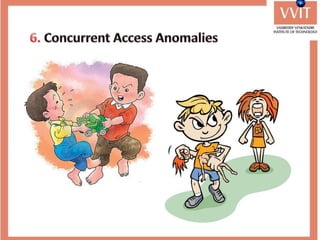
6. Concurrent Access Anomalies
7. Security Problems
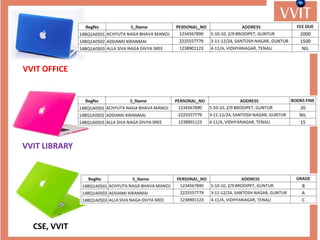
VVIT OFFICE
VVIT LIBRARY
CSE, VVIT
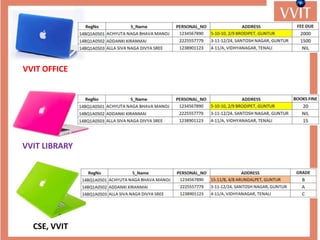
VVIT OFFICE
VVIT LIBRARY
CSE, VVIT
VVIT OFFICE
VVIT LIBRARY
CSE, VVIT
VVIT OFFICE
VVIT LIBRARY
CSE, VVIT
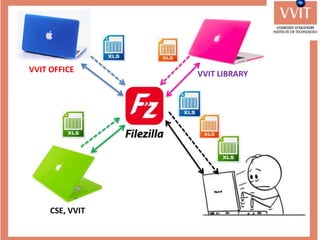
VVIT OFFICE VVIT LIBRARY
CSE, VVIT
Initial Balance: 1000/- Initial Balance: 2000/-
Fund Transfer of 800/- from Account A to Account B
1. Data Redundancy & Data Inconsistency
2. Difficulty in Accessing Data
3. Data Isolation
4. Integrity Problems
5. Atomicity Problems
6. Concurrent Access Anomalies
7. Security Problems
Purpose of DBMS
Database systems offer solutions to all the above problems
Advantages of DBMS over file system
1. Fast Data Access: The data response time increases in DBMS.
2. Minimized Data Redundancy: DBMS has different constraints
using them same data can't be stored in more than one
places.
3. Data Consistency: Since DBMS solves the problem of data
redundancy, the problem of data consistency is automatically
solved.
Advantages of DBMS over file system
4. No attributes for accessing the data: Here, we don't need to
know the location of the file. The user makes a request from
any web application or app and the server responds
accordingly.
5. Concurrent Access: Multiple users can access the database at
the same time when we are using the Database
Management System.
6. Security: We have role-based access control in DBMS. Each
user has a different set of access thus the data is secured
from problems like data leaks, misuse of data etc.
Applications of DBMS
1. Banking: all transactions.
2. Airlines: reservations, schedules.
3. Universities: registration, grades.
4. Sales: customers, products, purchases.
5. Manufacturing: production, inventory, orders, supply chain.
6. Human Resources: employee records, salaries, tax
deductions.
Data Abstraction refers to the process of hiding irrelevant
details from the user.
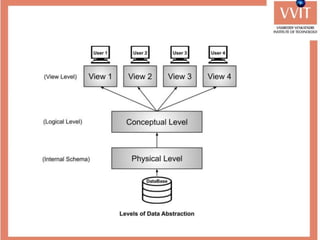
There are mainly three levels of data abstraction. They are
1. Physical Level
2. Conceptual Level
3. View Level
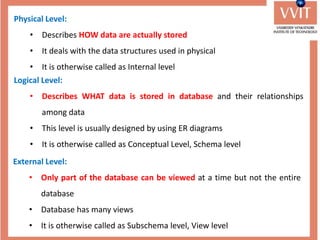
Physical Level:
• Describes HOW data are actually stored
• It deals with the data structures used in physical
• It is otherwise called as Internal level
Logical Level:
• Describes WHAT data is stored in database and their relationships
among data
• This level is usually designed by using ER diagrams
• It is otherwise called as Conceptual Level, Schema level
External Level:
• Only part of the database can be viewed at a time but not the entire
database
• Database has many views
• It is otherwise called as Subschema level, View level
Data Independence
Modify the schema definition at any level without changing
the schema definition at any higher level.
We have two levels of data independence that are defined on
the basis of these three levels of abstraction.
1. Physical Data Independence
2. Logical Data Independence
• It refers to the characteristic of changing the physical level
without affecting the logical level or conceptual level.
• Using this property we can easily change the
of the database without affecting the logical schema.
• Suppose you want to replace the storage device form
to or then it should not affect the
data stored at the logical level.
• It refers to the characteristics of changing the logical level
without affecting the external or view level.
• This also helps in separating the logical level from the view
level.
• If we do any changes in the logical level then the user view
of the data remains unaffected.
• The changes in the logical level may include:
• Changing the data definition.
• Adding, deleting, or updating any new attribute, entity
or relationship in the database.
Instances and Schemas
Similar to types and variables in programming languages
Schema:
The overall description of a database is called as Schema
Instance:
The collection of data stored in database at a particular
moment or time is called Instance
Data Models:
• Data model is a collection of conceptual tools for describing data, data
relationships, data semantics and consistency constraints.
• Data Models are used to show how data is stored, connected,
accessed and updated in the database management system
• There are many data models being used nowadays but the relational
model is the most widely used model.
• Data models are classified into two categories. They are:
• Object based logical models
• Record based logical models
Object Based Logical Models:
• There is no fixed format for representing data
• These models consists of conceptual tools
• These are used for designing the logical/ conceptual level of a
database
• Otherwise called as semantic models
• For example: ER Model. ER diagrams are used for designing logical
level of a database
Record Based Logical Models:
• There is fixed format for representing data
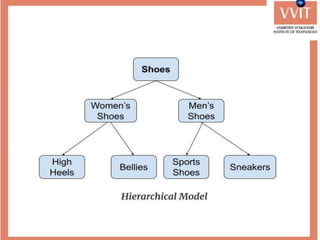
• Data Models in this category are: Network Model, Hierarchical Model &
Relational Model
• Network Model uses the data structure Graph for representing data
• Hierarchical Model uses the data structure Tree for representing the data
• Relational Model uses table (set of rows & columns) for representing
data
• Both network and hierarchical models are
involved with more number of pointers.
• A single misplaced pointer corrupts the entire
database.
• Relational Model is free from pointers
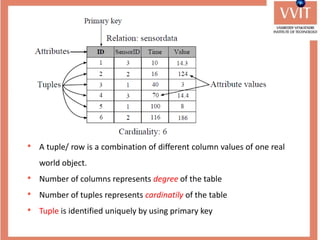
• A tuple/ row is a combination of different column values of one real
world object.
• Number of columns represents degree of the table
• Number of tuples represents cardinatily of the table
• Tuple is identified uniquely by using primary key
Properties of Relation:
• All values in a table are atomic.
• Rows are unordered from top to bottom.
• Columns are unordered from left to right.
• Relation must contain primary key for identifying rows
uniquely.
Advantages of Relational Model
• Simple: This model is more simple as compared to the
network and hierarchical model.
• Scalable: This model can be easily scaled as we can add as
many rows and columns we want.
• Structural Independence: We can make changes in
database structure without changing the way to access the
data.
Database Users:
• Any person who uses the database and takes benefits from the
database is considered as Database User.
• They can be programmers, scientists, engineers, business
person or can be an employee.
• They are:
1. Database Administrators.
2. Database Designers.
3. System Analysts.
4. Application Programmers.
5. Sophisticated Users.
6. Naïve Users/Parametric Users.
7. Casual/Temporary Users
DBA stands for database administrator
He is responsible for managing the overall database
management system like a superuser of the system.
DBA is responsible for:
• Deciding the Instances for the Database.
• Defining the Schema.
• Granting of Authorization for data access.
• Managing Database Users and Security.
• Routine Maintenance.
• New Software Installation.
• Monitoring the database Server’s health and Tuning
accordingly.
Database Designers
• Database designers design the appropriate structure for the
database, where we share data.
System Analyst
• System analyst analyses the requirements of end-users,
especially naïve and parametric end users.
• They are responsible for the design, structure, and properties
of the database.
Application Programmers
• Application programmers are computer professionals, who
write application programs.
• They develop application programs such as C, C++, Java,
PHP, Python, etc. through which other user can interact with
the database.
Sophisticated Users
• Sophisticated users can be engineers, scientists, business
analysts, who are familiar with the database.
• These users interact with the database but they do not write
programs
Naïve Users / Parametric Users
• Naïve Users are Unsophisticated users, who have no
knowledge of the database.
• They are the end-users of the database who work through the
menu-driven applications.
• For Example: Railway’s ticket booking users are naive users.
Or Clerical staff in any bank is a naïve user.
Casual Users / Temporary Users
• These types of users communicate with the database for a
little period of time.
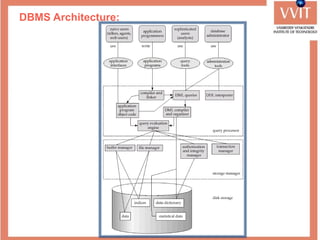
DBMS Architecture:
Storage Manager
• It is a program module which provides interface
between the low level data stored in the database and
the application programs and queries submitted to the
system.
• It is responsible for interaction with the File Manager.
• It translates DML commands into low level file system
commands.
• It is responsible for storing, retrieving and updating
data in database.
• It includes the following components:
• Authorization and Integrity Manager.
• Transaction Manager.
• File Manager.
• Buffer Manager.
The Query Processor
The Query Processor contains the following components:
• DDL Interpreter: Interpreters DDL statements and
records the definition into data dictionary.
• DML Compiler: Translates DML statements into an
evaluation plan consisting of low level instructions that
the query evaluation engine understands. It translates
the query into a number of evaluation plans. DML
Compiler performs query optimization i.e. selects the
optimal evaluation plan for execution of query.
• Query Evaluation Plan: Executes the low level
instructions generated by DML compiler.
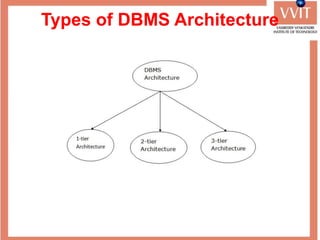
Types of DBMS Architecture
1-Tier Architecture
• In this, the database is directly available to the user. It
means the user can directly sit on the DBMS and uses it.
• Any changes done here will directly be done on the
database itself. It doesn't provide a handy tool for end
users.
• The 1-Tier architecture is used for development of the
local application, where programmers can directly
communicate with the database for the quick response.
2-Tier Architecture
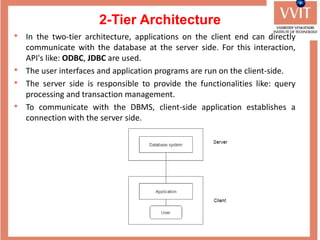
• In the two-tier architecture, applications on the client end can directly
communicate with the database at the server side. For this interaction,
API's like: ODBC, JDBC are used.
• The user interfaces and application programs are run on the client-side.
• The server side is responsible to provide the functionalities like: query
processing and transaction management.
• To communicate with the DBMS, client-side application establishes a
connection with the server side.
3-Tier Architecture
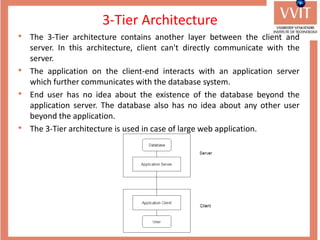
• The 3-Tier architecture contains another layer between the client and
server. In this architecture, client can't directly communicate with the
server.
• The application on the client-end interacts with an application server
which further communicates with the database system.
• End user has no idea about the existence of the database beyond the
application server. The database also has no idea about any other user
beyond the application.
• The 3-Tier architecture is used in case of large web application.

Introduction to Database Management Systems (DBMS)

  • 5.
  • 7.
    1. Data Redundancy& Data Inconsistency 2. Difficulty in Accessing Data 3. Data Isolation 4. Integrity Problems 5. Atomicity Problems 6. Concurrent Access Anomalies 7. Security Problems
  • 9.
  • 10.
  • 12.
  • 13.
  • 14.
    VVIT OFFICE VVITLIBRARY CSE, VVIT
  • 18.
    Initial Balance: 1000/-Initial Balance: 2000/- Fund Transfer of 800/- from Account A to Account B
  • 21.
    1. Data Redundancy& Data Inconsistency 2. Difficulty in Accessing Data 3. Data Isolation 4. Integrity Problems 5. Atomicity Problems 6. Concurrent Access Anomalies 7. Security Problems
  • 22.
    Purpose of DBMS Databasesystems offer solutions to all the above problems
  • 23.
    Advantages of DBMSover file system 1. Fast Data Access: The data response time increases in DBMS. 2. Minimized Data Redundancy: DBMS has different constraints using them same data can't be stored in more than one places. 3. Data Consistency: Since DBMS solves the problem of data redundancy, the problem of data consistency is automatically solved.
  • 24.
    Advantages of DBMSover file system 4. No attributes for accessing the data: Here, we don't need to know the location of the file. The user makes a request from any web application or app and the server responds accordingly. 5. Concurrent Access: Multiple users can access the database at the same time when we are using the Database Management System. 6. Security: We have role-based access control in DBMS. Each user has a different set of access thus the data is secured from problems like data leaks, misuse of data etc.
  • 25.
    Applications of DBMS 1.Banking: all transactions. 2. Airlines: reservations, schedules. 3. Universities: registration, grades. 4. Sales: customers, products, purchases. 5. Manufacturing: production, inventory, orders, supply chain. 6. Human Resources: employee records, salaries, tax deductions.
  • 26.
    Data Abstraction refersto the process of hiding irrelevant details from the user. There are mainly three levels of data abstraction. They are 1. Physical Level 2. Conceptual Level 3. View Level
  • 28.
    Physical Level: • DescribesHOW data are actually stored • It deals with the data structures used in physical • It is otherwise called as Internal level Logical Level: • Describes WHAT data is stored in database and their relationships among data • This level is usually designed by using ER diagrams • It is otherwise called as Conceptual Level, Schema level External Level: • Only part of the database can be viewed at a time but not the entire database • Database has many views • It is otherwise called as Subschema level, View level
  • 29.
    Data Independence Modify theschema definition at any level without changing the schema definition at any higher level. We have two levels of data independence that are defined on the basis of these three levels of abstraction. 1. Physical Data Independence 2. Logical Data Independence
  • 30.
    • It refersto the characteristic of changing the physical level without affecting the logical level or conceptual level. • Using this property we can easily change the of the database without affecting the logical schema. • Suppose you want to replace the storage device form to or then it should not affect the data stored at the logical level.
  • 31.
    • It refersto the characteristics of changing the logical level without affecting the external or view level. • This also helps in separating the logical level from the view level. • If we do any changes in the logical level then the user view of the data remains unaffected. • The changes in the logical level may include: • Changing the data definition. • Adding, deleting, or updating any new attribute, entity or relationship in the database.
  • 32.
    Instances and Schemas Similarto types and variables in programming languages Schema: The overall description of a database is called as Schema Instance: The collection of data stored in database at a particular moment or time is called Instance
  • 33.
    Data Models: • Datamodel is a collection of conceptual tools for describing data, data relationships, data semantics and consistency constraints. • Data Models are used to show how data is stored, connected, accessed and updated in the database management system • There are many data models being used nowadays but the relational model is the most widely used model. • Data models are classified into two categories. They are: • Object based logical models • Record based logical models
  • 34.
    Object Based LogicalModels: • There is no fixed format for representing data • These models consists of conceptual tools • These are used for designing the logical/ conceptual level of a database • Otherwise called as semantic models • For example: ER Model. ER diagrams are used for designing logical level of a database
  • 35.
    Record Based LogicalModels: • There is fixed format for representing data • Data Models in this category are: Network Model, Hierarchical Model & Relational Model • Network Model uses the data structure Graph for representing data • Hierarchical Model uses the data structure Tree for representing the data • Relational Model uses table (set of rows & columns) for representing data
  • 37.
    • Both networkand hierarchical models are involved with more number of pointers. • A single misplaced pointer corrupts the entire database. • Relational Model is free from pointers
  • 38.
    • A tuple/row is a combination of different column values of one real world object. • Number of columns represents degree of the table • Number of tuples represents cardinatily of the table • Tuple is identified uniquely by using primary key
  • 39.
    Properties of Relation: •All values in a table are atomic. • Rows are unordered from top to bottom. • Columns are unordered from left to right. • Relation must contain primary key for identifying rows uniquely.
  • 40.
    Advantages of RelationalModel • Simple: This model is more simple as compared to the network and hierarchical model. • Scalable: This model can be easily scaled as we can add as many rows and columns we want. • Structural Independence: We can make changes in database structure without changing the way to access the data.
  • 41.
    Database Users: • Anyperson who uses the database and takes benefits from the database is considered as Database User. • They can be programmers, scientists, engineers, business person or can be an employee. • They are: 1. Database Administrators. 2. Database Designers. 3. System Analysts. 4. Application Programmers. 5. Sophisticated Users. 6. Naïve Users/Parametric Users. 7. Casual/Temporary Users
  • 42.
    DBA stands fordatabase administrator He is responsible for managing the overall database management system like a superuser of the system. DBA is responsible for: • Deciding the Instances for the Database. • Defining the Schema. • Granting of Authorization for data access. • Managing Database Users and Security. • Routine Maintenance. • New Software Installation. • Monitoring the database Server’s health and Tuning accordingly.
  • 43.
    Database Designers • Databasedesigners design the appropriate structure for the database, where we share data. System Analyst • System analyst analyses the requirements of end-users, especially naïve and parametric end users. • They are responsible for the design, structure, and properties of the database. Application Programmers • Application programmers are computer professionals, who write application programs. • They develop application programs such as C, C++, Java, PHP, Python, etc. through which other user can interact with the database.
  • 44.
    Sophisticated Users • Sophisticatedusers can be engineers, scientists, business analysts, who are familiar with the database. • These users interact with the database but they do not write programs Naïve Users / Parametric Users • Naïve Users are Unsophisticated users, who have no knowledge of the database. • They are the end-users of the database who work through the menu-driven applications. • For Example: Railway’s ticket booking users are naive users. Or Clerical staff in any bank is a naïve user. Casual Users / Temporary Users • These types of users communicate with the database for a little period of time.
  • 45.
  • 46.
    Storage Manager • Itis a program module which provides interface between the low level data stored in the database and the application programs and queries submitted to the system. • It is responsible for interaction with the File Manager. • It translates DML commands into low level file system commands. • It is responsible for storing, retrieving and updating data in database. • It includes the following components: • Authorization and Integrity Manager. • Transaction Manager. • File Manager. • Buffer Manager.
  • 47.
    The Query Processor TheQuery Processor contains the following components: • DDL Interpreter: Interpreters DDL statements and records the definition into data dictionary. • DML Compiler: Translates DML statements into an evaluation plan consisting of low level instructions that the query evaluation engine understands. It translates the query into a number of evaluation plans. DML Compiler performs query optimization i.e. selects the optimal evaluation plan for execution of query. • Query Evaluation Plan: Executes the low level instructions generated by DML compiler.
  • 48.
    Types of DBMSArchitecture
  • 49.
    1-Tier Architecture • Inthis, the database is directly available to the user. It means the user can directly sit on the DBMS and uses it. • Any changes done here will directly be done on the database itself. It doesn't provide a handy tool for end users. • The 1-Tier architecture is used for development of the local application, where programmers can directly communicate with the database for the quick response.
  • 50.
    2-Tier Architecture • Inthe two-tier architecture, applications on the client end can directly communicate with the database at the server side. For this interaction, API's like: ODBC, JDBC are used. • The user interfaces and application programs are run on the client-side. • The server side is responsible to provide the functionalities like: query processing and transaction management. • To communicate with the DBMS, client-side application establishes a connection with the server side.
  • 51.
    3-Tier Architecture • The3-Tier architecture contains another layer between the client and server. In this architecture, client can't directly communicate with the server. • The application on the client-end interacts with an application server which further communicates with the database system. • End user has no idea about the existence of the database beyond the application server. The database also has no idea about any other user beyond the application. • The 3-Tier architecture is used in case of large web application.