Salesforce Files Connect
Drive productivity and collaboration within your organisation
Scott Gassmann
Solution Architect, 7 x Certified, Author at ScottTheForce.com & Salesforce Blogs
scott.m.gassmann@accenture.com
@scottgassmann
Forward-Looking Statements
Statement under the Private Securities Litigation Reform Act of 1995:
This presentation may contain forward-looking statements that involve risks, uncertainties, and assumptions. If any such uncertainties materialize or if any
of the assumptions proves incorrect, the results of salesforce.com, inc. could differ materially from the results expressed or implied by the forward-looking
statements we make. All statements other than statements of historical fact could be deemed forward-looking, including any projections of product or
service availability, subscriber growth, earnings, revenues, or other financial items and any statements regarding strategies or plans of management for
future operations, statements of belief, any statements concerning new, planned, or upgraded services or technology developments and customer contracts
or use of our services.
The risks and uncertainties referred to above include – but are not limited to – risks associated with developing and delivering new functionality for our
service, new products and services, our new business model, our past operating losses, possible fluctuations in our operating results and rate of growth,
interruptions or delays in our Web hosting, breach of our security measures, the outcome of any litigation, risks associated with completed and any possible
mergers and acquisitions, the immature market in which we operate, our relatively limited operating history, our ability to expand, retain, and motivate our
employees and manage our growth, new releases of our service and successful customer deployment, our limited history reselling non-salesforce.com
products, and utilization and selling to larger enterprise customers. Further information on potential factors that could affect the financial results of
salesforce.com, inc. is included in our annual report on Form 10-K for the most recent fiscal year and in our quarterly report on Form 10-Q for the most
recent fiscal quarter. These documents and others containing important disclosures are available on the SEC Filings section of the Investor Information
section of our Web site.
Any unreleased services or features referenced in this or other presentations, press releases or public statements are not currently available and may not
be delivered on time or at all. Customers who purchase our services should make the purchase decisions based upon features that are currently available.
Salesforce.com, inc. assumes no obligation and does not intend to update these forward-looking statements.
It’s time to tweet!
The challenge
External files are disconnected from business processes
More than one-third of employees’ days are spent
looking for and consolidating information, and almost
half the time they can’t find the information they need
to do their jobs (as quoted in CIO Today).
Source: http://www.cio-today.com/article/index.php?story_id=112003LU3NW0
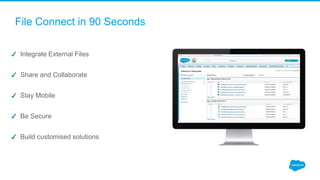
File Connect in 90 Seconds
Integrate External Files
Share and Collaborate
Stay Mobile
Be Secure
Build customised solutions
What is Salesforce Files Connect
Reinventing File Collaboration with a Connected, Unified Experience.
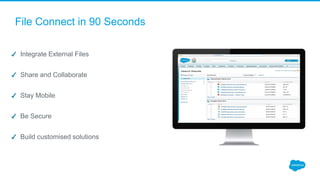
File Connect in 90 Seconds
Integrate External Files
Share and Collaborate
Stay Mobile
Be Secure
Build customised solutions
In Salesforce1
The challenge
External files are disconnected from business processes
The value proposition
Files
Files
Social
Files
Social
Business
Dimensions
Value
Dynamic Linking
The value proposition
Files
Files
Social
Files
Social
Business
Dimensions
Value
Demo Time!
What Coming
● Summer’16
○ Files Connect in Lightning Experience “Files Home”.
○ Files Connect for Box (GA).
○ Files in SalesforceIQ
● Winter’17+ (safe harbor):
○ Simplified setup for Google Drive, Box & Office365
○ Convert HTTP links to Files Connect file reference.
○ Full document preview for file references from Lightning Experience.
○ Full read/write access in external systems from Lightning Experience
thank y u
Federated search
Sharing an external file in Salesforce
In Communities (visualforce based only)
In Salesforce1
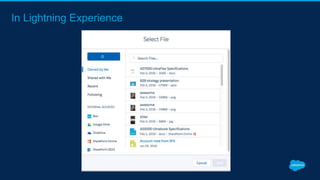
In Lightning Experience

Salesforce Files Connect

  • 1.
    Salesforce Files Connect Driveproductivity and collaboration within your organisation Scott Gassmann Solution Architect, 7 x Certified, Author at ScottTheForce.com & Salesforce Blogs scott.m.gassmann@accenture.com @scottgassmann
  • 2.
    Forward-Looking Statements Statement underthe Private Securities Litigation Reform Act of 1995: This presentation may contain forward-looking statements that involve risks, uncertainties, and assumptions. If any such uncertainties materialize or if any of the assumptions proves incorrect, the results of salesforce.com, inc. could differ materially from the results expressed or implied by the forward-looking statements we make. All statements other than statements of historical fact could be deemed forward-looking, including any projections of product or service availability, subscriber growth, earnings, revenues, or other financial items and any statements regarding strategies or plans of management for future operations, statements of belief, any statements concerning new, planned, or upgraded services or technology developments and customer contracts or use of our services. The risks and uncertainties referred to above include – but are not limited to – risks associated with developing and delivering new functionality for our service, new products and services, our new business model, our past operating losses, possible fluctuations in our operating results and rate of growth, interruptions or delays in our Web hosting, breach of our security measures, the outcome of any litigation, risks associated with completed and any possible mergers and acquisitions, the immature market in which we operate, our relatively limited operating history, our ability to expand, retain, and motivate our employees and manage our growth, new releases of our service and successful customer deployment, our limited history reselling non-salesforce.com products, and utilization and selling to larger enterprise customers. Further information on potential factors that could affect the financial results of salesforce.com, inc. is included in our annual report on Form 10-K for the most recent fiscal year and in our quarterly report on Form 10-Q for the most recent fiscal quarter. These documents and others containing important disclosures are available on the SEC Filings section of the Investor Information section of our Web site. Any unreleased services or features referenced in this or other presentations, press releases or public statements are not currently available and may not be delivered on time or at all. Customers who purchase our services should make the purchase decisions based upon features that are currently available. Salesforce.com, inc. assumes no obligation and does not intend to update these forward-looking statements.
  • 3.
  • 4.
    The challenge External filesare disconnected from business processes More than one-third of employees’ days are spent looking for and consolidating information, and almost half the time they can’t find the information they need to do their jobs (as quoted in CIO Today). Source: http://www.cio-today.com/article/index.php?story_id=112003LU3NW0
  • 5.
    File Connect in90 Seconds Integrate External Files Share and Collaborate Stay Mobile Be Secure Build customised solutions
  • 6.
    What is SalesforceFiles Connect Reinventing File Collaboration with a Connected, Unified Experience.
  • 7.
    File Connect in90 Seconds Integrate External Files Share and Collaborate Stay Mobile Be Secure Build customised solutions
  • 8.
  • 9.
    The challenge External filesare disconnected from business processes
  • 10.
  • 11.
  • 12.
  • 13.
  • 14.
    What Coming ● Summer’16 ○Files Connect in Lightning Experience “Files Home”. ○ Files Connect for Box (GA). ○ Files in SalesforceIQ ● Winter’17+ (safe harbor): ○ Simplified setup for Google Drive, Box & Office365 ○ Convert HTTP links to Files Connect file reference. ○ Full document preview for file references from Lightning Experience. ○ Full read/write access in external systems from Lightning Experience
  • 15.
  • 16.
  • 17.
    Sharing an externalfile in Salesforce
  • 18.
  • 19.
  • 20.