



Remove Security Risk
from Your Org with a
User Audit
Trailhead Live
Forward-Looking Statements
"Safe harbor" statement under the Private Securities Litigation Reform Act of 1995: This presentation contains forward-looking statements about the company's financial and
operating results, which may include expected GAAP and non-GAAP financial and other operating and non-operating results, including revenue, net income, diluted earnings
per share, operating cash flow growth, operating margin improvement, expected revenue growth, expected current remaining performance obligation growth, expected tax rates,
stock-based compensation expenses, amortization of purchased intangibles, shares outstanding, market growth, environmental, social and governance goals and expected capital
allocation, including mergers and acquisitions, capital expenditures and other investments. The achievement or success of the matters covered by such forward-looking statements
involves risks, uncertainties and assumptions. If any such risks or uncertainties materialize or if any of the assumptions prove incorrect, the company’s results could differ materially
from the results expressed or implied by the forward-looking statements it makes.
The risks and uncertainties referred to above include -- but are not limited to -- risks associated with the effect of general economic and market conditions; the impact of geopolitical
events, natural disasters and actual or threatened public health emergencies, such as the ongoing Coronavirus pandemic; the impact of foreign currency exchange rate and interest
rate fluctuations on our results; our business strategy and our plan to build our business, including our strategy to be the leading provider of enterprise cloud computing applications
and platforms; the pace of change and innovation in enterprise cloud computing services; the seasonal nature of our sales cycles; the competitive nature of the market in which we
participate; our international expansion strategy; the demands on our personnel and infrastructure resulting from significant growth in our customer base and operations, including
as a result of acquisitions; our service performance and security, including the resources and costs required to avoid unanticipated downtime and prevent, detect and remediate
potential security breaches; the expenses associated with our data centers and third-party infrastructure providers; additional data center capacity; real estate and office facilities
space; our operating results and cash flows; new services and product features, including any efforts to expand our services beyond the CRM market; our strategy of acquiring or
making investments in complementary businesses, joint ventures, services, technologies and intellectual property rights; the performance and fair value of our investments in
complementary businesses through our strategic investment portfolio; our ability to realize the benefits from strategic partnerships, joint ventures and investments; the impact of
future gains or losses from our strategic investment portfolio, including gains or losses from overall market conditions that may affect the publicly traded companies within our
strategic investment portfolio; our ability to execute our business plans; our ability to successfully integrate acquired businesses and technologies; our ability to continue to grow
unearned revenue and remaining performance obligation; our ability to protect our intellectual property rights; our ability to develop our brands; our reliance on third-party
hardware, software and platform providers; our dependency on the development and maintenance of the infrastructure of the Internet; the effect of evolving domestic and foreign
government regulations, including those related to the provision of services on the Internet, those related to accessing the Internet, and those addressing data privacy, cross-border
data transfers and import and export controls; the valuation of our deferred tax assets and the release of related valuation allowances; the potential availability of additional tax assets
in the future; the impact of new accounting pronouncements and tax laws; uncertainties affecting our ability to estimate our tax rate; uncertainties regarding our tax obligations in
connection with potential jurisdictional transfers of intellectual property, including the tax rate, the timing of the transfer and the value of such transferred intellectual property; the
impact of expensing stock options and other equity awards; the sufficiency of our capital resources; factors relatedto our outstanding debt, revolving credit facility and loan
associated with 50 Fremont; compliance with our debt covenants and lease obligations; current and potential litigation involving us; and the impact of climate change.
Further information on these and other factors that could affect the company’s financial results is included in the reports on Forms 10-K, 10-Q and 8-K and in other filings it makes
with the Securities and Exchange Commission from time to time. These documents are available on the SEC Filings section of the Investor
Information section of the company’s website at.
Salesforce.com, inc. assumes no obligation and does not intend to update these forward-looking statements, except as required by law.
Third party trademarks are the property of their owners.
Connect with Us!
Follow on Social
@salesforceadmns #AwesomeAdmin
@Salesforce Admins
Bookmark
admin.salesforce.com
Subscribe
Admin Digest
Connect and join us!
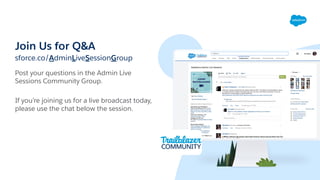
Join Us for Q&A
sforce.co/AdminLiveSessionGroup
Post your questions in the Admin Live
Sessions Community Group.
If you’re joining us for a live broadcast today,
please use the chat below the session.
Today’s Agenda
User Security Basics
How to get a quick security boost with a user audit
Demo: Performing a User Audit with Salesforce
Optimizer
Preparing for, Communicating and Managing Security
Changes
User Audit Resources for #AwesomeAdmins
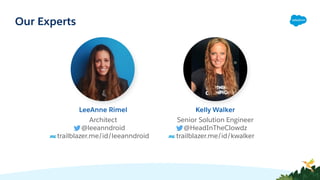
Architect
@leeanndroid
trailblazer.me/id/leeanndroid
LeeAnne Rimel
Senior Solution Engineer
@HeadInTheClowdz
trailblazer.me/id/kwalker
Kelly Walker
Our Experts
Security in 2021
Attacks that take advantage of
compromised user credentials have been
steadily rising since early 2020.
Your Salesforce data is incredibly valuable
to attackers; it's up to you as an admin to
protect it!
And why it's more critical
than ever to do it well
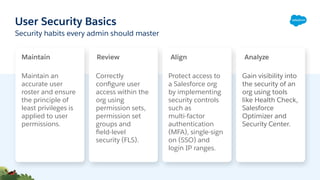
User Security Basics
Maintain an
accurate user
roster and ensure
the principle of
least privileges is
applied to user
permissions.
Protect access to
a Salesforce org
by implementing
security controls
such as
multi-factor
authentication
(MFA), single-sign
on (SSO) and
login IP ranges.
Correctly
configure user
access within the
org using
permission sets,
permission set
groups and
field-level
security (FLS).
Security habits every admin should master
Gain visibility into
the security of an
org using tools
like Health Check,
Salesforce
Optimizer and
Security Center.
Maintain Review Align Analyze
Principle of Least Privilege:
When evaluating user permissions, provide users
with the minimum amount of access needed to do
their job, and no additional privileges.
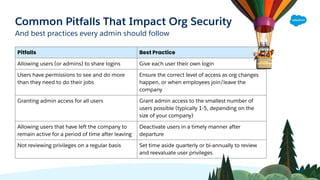
Common Pitfalls That Impact Org Security
And best practices every admin should follow
Pitfalls Best Practice
Allowing users (or admins) to share logins Give each user their own login
Users have permissions to see and do more
than they need to do their jobs
Ensure the correct level of access as org changes
happen, or when employees join/leave the
company
Granting admin access for all users Grant admin access to the smallest number of
users possible (typically 1-5, depending on the
size of your company)
Allowing users that have left the company to
remain active for a period of time after leaving
Deactivate users in a timely manner after
departure
Not reviewing privileges on a regular basis Set time aside quarterly or bi-annually to review
and reevaluate user privileges
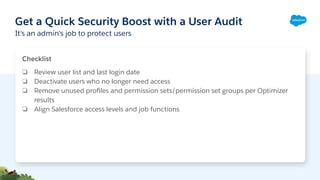
Get a Quick Security Boost with a User Audit
It's an admin's job to protect users
Checklist
❏ Review user list and last login date
❏ Deactivate users who no longer need access
❏ Remove unused profiles and permission sets/permission set groups per Optimizer
results
❏ Align Salesforce access levels and job functions
Demo!
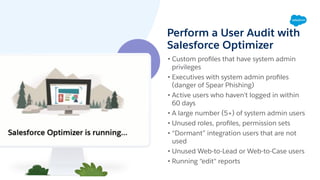
Perform a User Audit with
Salesforce Optimizer
• Custom profiles that have system admin
privileges
• Executives with system admin profiles
(danger of Spear Phishing)
• Active users who haven’t logged in within
60 days
• A large number (5+) of system admin users
• Unused roles, profiles, permission sets
• “Dormant” integration users that are not
used
• Unused Web-to-Lead or Web-to-Case users
• Running “edit" reports
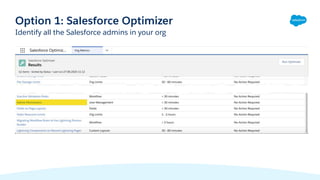
Identify all the Salesforce admins in your org
Option 1: Salesforce Optimizer
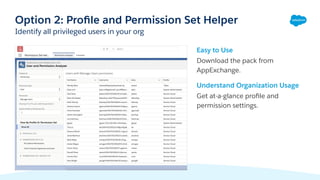
Easy to Use
Download the pack from
AppExchange.
Understand Organization Usage
Get at-a-glance profile and
permission settings.
Option 2: Profile and Permission Set Helper
Identify all privileged users in your org
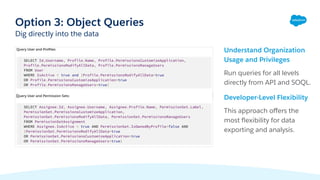
Understand Organization
Usage and Privileges
Run queries for all levels
directly from API and SOQL.
Developer-Level Flexibility
This approach offers the
most flexibility for data
exporting and analysis.
Option 3: Object Queries
Dig directly into the data
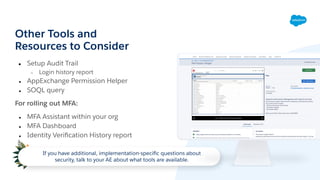
Other Tools and
Resources to Consider
● Setup Audit Trail
○ Login history report
● AppExchange Permission Helper
● SOQL query
For rolling out MFA:
● MFA Assistant within your org
● MFA Dashboard
● Identity Verification History report
If you have additional, implementation-specific questions about
security, talk to your AE about what tools are available.
What's Next
Preparing for, Communicating and
Managing Security Changes
❏ Perform your user audit
❏ Document proposed changes and security protocols
❏ Present findings to leadership; get executive
sponsorship
❏ Create a plan to update user permissions (build in
testing if necessary)
❏ Communicate the changes (and then communicate
again!) to users
❏ Make sure you're aware of ALL the implications of
changing user permissions/privileges before making
updates
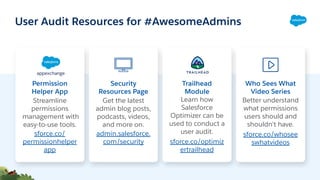
Permission
Helper App
Streamline
permissions
management with
easy-to-use tools.
sforce.co/
permissionhelper
app
Security
Resources Page
Get the latest
admin blog posts,
podcasts, videos,
and more on.
admin.salesforce.
com/security
Trailhead
Module
Learn how
Salesforce
Optimizer can be
used to conduct a
user audit.
sforce.co/optimiz
ertrailhead
User Audit Resources for #AwesomeAdmins
Who Sees What
Video Series
Better understand
what permissions
users should and
shouldn't have.
sforce.co/whosee
swhatvideos
blog posts | podcasts | videos
admin.salesforce.com
Thank You

Admin Best Practices: Remove Security Risk From Your Org with a User Audit

  • 1.
    Remove Security Risk fromYour Org with a User Audit Trailhead Live
  • 2.
    Forward-Looking Statements "Safe harbor"statement under the Private Securities Litigation Reform Act of 1995: This presentation contains forward-looking statements about the company's financial and operating results, which may include expected GAAP and non-GAAP financial and other operating and non-operating results, including revenue, net income, diluted earnings per share, operating cash flow growth, operating margin improvement, expected revenue growth, expected current remaining performance obligation growth, expected tax rates, stock-based compensation expenses, amortization of purchased intangibles, shares outstanding, market growth, environmental, social and governance goals and expected capital allocation, including mergers and acquisitions, capital expenditures and other investments. The achievement or success of the matters covered by such forward-looking statements involves risks, uncertainties and assumptions. If any such risks or uncertainties materialize or if any of the assumptions prove incorrect, the company’s results could differ materially from the results expressed or implied by the forward-looking statements it makes. The risks and uncertainties referred to above include -- but are not limited to -- risks associated with the effect of general economic and market conditions; the impact of geopolitical events, natural disasters and actual or threatened public health emergencies, such as the ongoing Coronavirus pandemic; the impact of foreign currency exchange rate and interest rate fluctuations on our results; our business strategy and our plan to build our business, including our strategy to be the leading provider of enterprise cloud computing applications and platforms; the pace of change and innovation in enterprise cloud computing services; the seasonal nature of our sales cycles; the competitive nature of the market in which we participate; our international expansion strategy; the demands on our personnel and infrastructure resulting from significant growth in our customer base and operations, including as a result of acquisitions; our service performance and security, including the resources and costs required to avoid unanticipated downtime and prevent, detect and remediate potential security breaches; the expenses associated with our data centers and third-party infrastructure providers; additional data center capacity; real estate and office facilities space; our operating results and cash flows; new services and product features, including any efforts to expand our services beyond the CRM market; our strategy of acquiring or making investments in complementary businesses, joint ventures, services, technologies and intellectual property rights; the performance and fair value of our investments in complementary businesses through our strategic investment portfolio; our ability to realize the benefits from strategic partnerships, joint ventures and investments; the impact of future gains or losses from our strategic investment portfolio, including gains or losses from overall market conditions that may affect the publicly traded companies within our strategic investment portfolio; our ability to execute our business plans; our ability to successfully integrate acquired businesses and technologies; our ability to continue to grow unearned revenue and remaining performance obligation; our ability to protect our intellectual property rights; our ability to develop our brands; our reliance on third-party hardware, software and platform providers; our dependency on the development and maintenance of the infrastructure of the Internet; the effect of evolving domestic and foreign government regulations, including those related to the provision of services on the Internet, those related to accessing the Internet, and those addressing data privacy, cross-border data transfers and import and export controls; the valuation of our deferred tax assets and the release of related valuation allowances; the potential availability of additional tax assets in the future; the impact of new accounting pronouncements and tax laws; uncertainties affecting our ability to estimate our tax rate; uncertainties regarding our tax obligations in connection with potential jurisdictional transfers of intellectual property, including the tax rate, the timing of the transfer and the value of such transferred intellectual property; the impact of expensing stock options and other equity awards; the sufficiency of our capital resources; factors relatedto our outstanding debt, revolving credit facility and loan associated with 50 Fremont; compliance with our debt covenants and lease obligations; current and potential litigation involving us; and the impact of climate change. Further information on these and other factors that could affect the company’s financial results is included in the reports on Forms 10-K, 10-Q and 8-K and in other filings it makes with the Securities and Exchange Commission from time to time. These documents are available on the SEC Filings section of the Investor Information section of the company’s website at. Salesforce.com, inc. assumes no obligation and does not intend to update these forward-looking statements, except as required by law. Third party trademarks are the property of their owners.
  • 3.
    Connect with Us! Followon Social @salesforceadmns #AwesomeAdmin @Salesforce Admins Bookmark admin.salesforce.com Subscribe Admin Digest Connect and join us!
  • 4.
    Join Us forQ&A sforce.co/AdminLiveSessionGroup Post your questions in the Admin Live Sessions Community Group. If you’re joining us for a live broadcast today, please use the chat below the session.
  • 5.
    Today’s Agenda User SecurityBasics How to get a quick security boost with a user audit Demo: Performing a User Audit with Salesforce Optimizer Preparing for, Communicating and Managing Security Changes User Audit Resources for #AwesomeAdmins
  • 6.
    Architect @leeanndroid trailblazer.me/id/leeanndroid LeeAnne Rimel Senior SolutionEngineer @HeadInTheClowdz trailblazer.me/id/kwalker Kelly Walker Our Experts
  • 7.
    Security in 2021 Attacksthat take advantage of compromised user credentials have been steadily rising since early 2020. Your Salesforce data is incredibly valuable to attackers; it's up to you as an admin to protect it! And why it's more critical than ever to do it well
  • 8.
    User Security Basics Maintainan accurate user roster and ensure the principle of least privileges is applied to user permissions. Protect access to a Salesforce org by implementing security controls such as multi-factor authentication (MFA), single-sign on (SSO) and login IP ranges. Correctly configure user access within the org using permission sets, permission set groups and field-level security (FLS). Security habits every admin should master Gain visibility into the security of an org using tools like Health Check, Salesforce Optimizer and Security Center. Maintain Review Align Analyze
  • 9.
    Principle of LeastPrivilege: When evaluating user permissions, provide users with the minimum amount of access needed to do their job, and no additional privileges.
  • 10.
    Common Pitfalls ThatImpact Org Security And best practices every admin should follow Pitfalls Best Practice Allowing users (or admins) to share logins Give each user their own login Users have permissions to see and do more than they need to do their jobs Ensure the correct level of access as org changes happen, or when employees join/leave the company Granting admin access for all users Grant admin access to the smallest number of users possible (typically 1-5, depending on the size of your company) Allowing users that have left the company to remain active for a period of time after leaving Deactivate users in a timely manner after departure Not reviewing privileges on a regular basis Set time aside quarterly or bi-annually to review and reevaluate user privileges
  • 11.
    Get a QuickSecurity Boost with a User Audit It's an admin's job to protect users Checklist ❏ Review user list and last login date ❏ Deactivate users who no longer need access ❏ Remove unused profiles and permission sets/permission set groups per Optimizer results ❏ Align Salesforce access levels and job functions
  • 12.
  • 13.
    Perform a UserAudit with Salesforce Optimizer • Custom profiles that have system admin privileges • Executives with system admin profiles (danger of Spear Phishing) • Active users who haven’t logged in within 60 days • A large number (5+) of system admin users • Unused roles, profiles, permission sets • “Dormant” integration users that are not used • Unused Web-to-Lead or Web-to-Case users • Running “edit" reports
  • 14.
    Identify all theSalesforce admins in your org Option 1: Salesforce Optimizer
  • 15.
    Easy to Use Downloadthe pack from AppExchange. Understand Organization Usage Get at-a-glance profile and permission settings. Option 2: Profile and Permission Set Helper Identify all privileged users in your org
  • 16.
    Understand Organization Usage andPrivileges Run queries for all levels directly from API and SOQL. Developer-Level Flexibility This approach offers the most flexibility for data exporting and analysis. Option 3: Object Queries Dig directly into the data
  • 17.
    Other Tools and Resourcesto Consider ● Setup Audit Trail ○ Login history report ● AppExchange Permission Helper ● SOQL query For rolling out MFA: ● MFA Assistant within your org ● MFA Dashboard ● Identity Verification History report If you have additional, implementation-specific questions about security, talk to your AE about what tools are available.
  • 18.
  • 19.
    Preparing for, Communicatingand Managing Security Changes ❏ Perform your user audit ❏ Document proposed changes and security protocols ❏ Present findings to leadership; get executive sponsorship ❏ Create a plan to update user permissions (build in testing if necessary) ❏ Communicate the changes (and then communicate again!) to users ❏ Make sure you're aware of ALL the implications of changing user permissions/privileges before making updates
  • 20.
    Permission Helper App Streamline permissions management with easy-to-usetools. sforce.co/ permissionhelper app Security Resources Page Get the latest admin blog posts, podcasts, videos, and more on. admin.salesforce. com/security Trailhead Module Learn how Salesforce Optimizer can be used to conduct a user audit. sforce.co/optimiz ertrailhead User Audit Resources for #AwesomeAdmins Who Sees What Video Series Better understand what permissions users should and shouldn't have. sforce.co/whosee swhatvideos
  • 21.
    blog posts |podcasts | videos admin.salesforce.com
  • 22.