Integrating Salesforce and
SharePoint 2013
Netwoven Inc.
Audience Background
• How many have some experience with:
– Salesforce.com: basic Sales or other Apps
– SharePoint 2013 Apps (SP or Cloud hosted)
– Development on force.com and SharePoint
platforms: REST, OAuth, .NET, Apex
Inbound Integration Approaches
• Inbound call to Salesforce from SharePoint:
– Use Force.com SOAP or REST APIs
• Leverage using toolkits such as the.NET / Java / PHP /
Adobe Flex Toolkits, Mobile SDK
– Authentication Pattern
• Use password and security token to set up the
connection (e.g. Secure Store)
• Use OAuth 2.0:
– Define a Remote Access app or Connected App in Salesforce
– Use Consumer Key and Secret and one of the supported OAuth
Flows to get access token
Inbound Integration Approaches
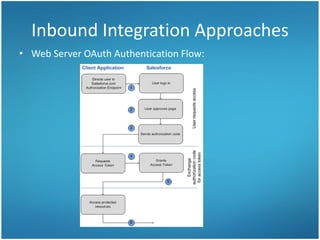
• Web Server OAuth Authentication Flow:
Inbound Integration Approaches
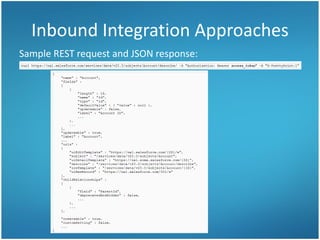
Sample REST request and JSON response:
Inbound Integration Approaches
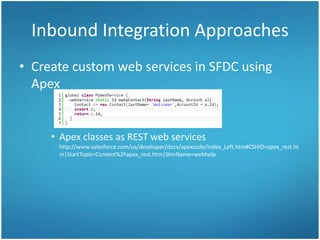
• Create custom web services in SFDC using
Apex
• Apex classes as REST web services
http://www.salesforce.com/us/developer/docs/apexcode/index_Left.htm#CSHID=apex_rest.ht
m|StartTopic=Content%2Fapex_rest.htm|SkinName=webhelp
Demo: Inbound Integration
• Scenario 1:
– Create a Lead in Saleforce from SharePoint
• Web Part leveraging Force.com SOAP APIs
• Scenario 2:
– Display Opportunities from Salesforce in
SharePoint
• SP Hosted App leveraging Force.com REST APIs
Outbound Integration Approaches
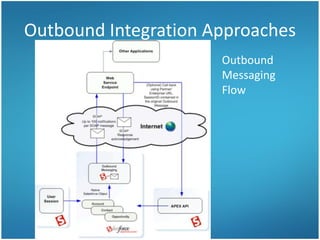
• Outbound call from Salesforce to SharePoint:
– Invoke external web services from Apex
• Feed WSDL to "Setup“ -> "Apex Classes" -> "Generate from WSDL"
– Outbound messaging to send SOAP-based messages to an
external web service endpoint
• Typically triggered by workflow rules on persisted objects
• allows easy callbacks to the Force.com platform using the
Force.com Soap API, as outbound messages contain the
enterprise/partner endpoint URLs, as well a session ID token.
• Retry feature
• HTTP/S and X.509 certificate based security
– Email integration for inbound and outbound messaging
Outbound Integration Approaches
Outbound
Messaging
Flow
Outbound Integration Approaches
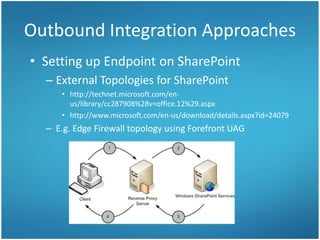
• Setting up Endpoint on SharePoint
– External Topologies for SharePoint
• http://technet.microsoft.com/en-
us/library/cc287908%28v=office.12%29.aspx
• http://www.microsoft.com/en-us/download/details.aspx?id=24079
– E.g. Edge Firewall topology using Forefront UAG
Demo: Outbound Integration
• Demo Scenario:
– Create a new project site in SharePoint when a
new Lead is created in Salesforce
• Other Useful Scenarios:
– Launch SharePoint Workflows based on defined changes in
Salesforce
– Keep Tasks / Contacts / User Profiles in sync
Search Integration
• Surfacing Salesforce content in SharePoint
search results
– Crawl Salesforce (e.g. Chatter) using custom crawl
connector
– User mapping and attaching ACLs for non-public
content non-trivial
– Map managed properties to crawled properties
and optionally specify other settings (e.g.
refinable)
• Demo: Search of public Chatter feed
Appendix
Background Information
Salesforce Introduction
• On-Demand, Multitenant Applications that
Run in the Cloud
• Variety of APIs to integrate
– Force.com SOAP API and REST API, Bulk API,
Streaming API, Metadata API, Chatter API
– https://help.salesforce.com/apex/HTViewHelpDoc?id=integrate_what_is_api.
htm&language=en_US
• Sign up for Developer Editon account at
http://developer.force.com/
– Simple Point and Click application
http://www.salesforce.com/us/developer/docs/fundamentals/index.h
tm
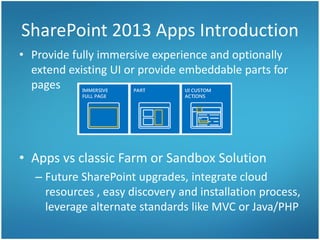
SharePoint 2013 Apps Introduction
• Provide fully immersive experience and optionally
extend existing UI or provide embeddable parts for
pages
• Apps vs classic Farm or Sandbox Solution
– Future SharePoint upgrades, integrate cloud
resources , easy discovery and installation process,
leverage alternate standards like MVC or Java/PHP
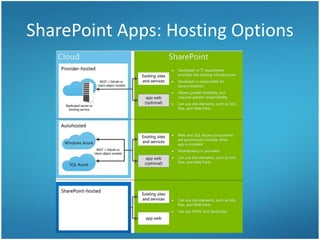
SharePoint Apps: Hosting Options
• Apps cannot contain custom code that runs on the
SharePoint server
– Not a significant limitation - custom business logic moves
either "down" to the client device or "up" to the cloud
• Cloud Hosting Option(Provider Hosted or
Autohosted)
– App uses SharePoint CSOM or REST endpoints to connect to
SharePoint
– Use STS’s OAuth support to access SP resources on behalf of the user
– Perform CRUD operations on SharePoint content and Leverage SP
capabilities (Docs, Search, Taxonomy, Workflow, Social)
– Server side code
SharePoint Apps: Hosting Options

Integrating Salesforce and SharePoint 2013

  • 1.
  • 2.
    Audience Background • Howmany have some experience with: – Salesforce.com: basic Sales or other Apps – SharePoint 2013 Apps (SP or Cloud hosted) – Development on force.com and SharePoint platforms: REST, OAuth, .NET, Apex
  • 3.
    Inbound Integration Approaches •Inbound call to Salesforce from SharePoint: – Use Force.com SOAP or REST APIs • Leverage using toolkits such as the.NET / Java / PHP / Adobe Flex Toolkits, Mobile SDK – Authentication Pattern • Use password and security token to set up the connection (e.g. Secure Store) • Use OAuth 2.0: – Define a Remote Access app or Connected App in Salesforce – Use Consumer Key and Secret and one of the supported OAuth Flows to get access token
  • 4.
    Inbound Integration Approaches •Web Server OAuth Authentication Flow:
  • 5.
    Inbound Integration Approaches SampleREST request and JSON response:
  • 6.
    Inbound Integration Approaches •Create custom web services in SFDC using Apex • Apex classes as REST web services http://www.salesforce.com/us/developer/docs/apexcode/index_Left.htm#CSHID=apex_rest.ht m|StartTopic=Content%2Fapex_rest.htm|SkinName=webhelp
  • 7.
    Demo: Inbound Integration •Scenario 1: – Create a Lead in Saleforce from SharePoint • Web Part leveraging Force.com SOAP APIs • Scenario 2: – Display Opportunities from Salesforce in SharePoint • SP Hosted App leveraging Force.com REST APIs
  • 8.
    Outbound Integration Approaches •Outbound call from Salesforce to SharePoint: – Invoke external web services from Apex • Feed WSDL to "Setup“ -> "Apex Classes" -> "Generate from WSDL" – Outbound messaging to send SOAP-based messages to an external web service endpoint • Typically triggered by workflow rules on persisted objects • allows easy callbacks to the Force.com platform using the Force.com Soap API, as outbound messages contain the enterprise/partner endpoint URLs, as well a session ID token. • Retry feature • HTTP/S and X.509 certificate based security – Email integration for inbound and outbound messaging
  • 9.
  • 10.
    Outbound Integration Approaches •Setting up Endpoint on SharePoint – External Topologies for SharePoint • http://technet.microsoft.com/en- us/library/cc287908%28v=office.12%29.aspx • http://www.microsoft.com/en-us/download/details.aspx?id=24079 – E.g. Edge Firewall topology using Forefront UAG
  • 11.
    Demo: Outbound Integration •Demo Scenario: – Create a new project site in SharePoint when a new Lead is created in Salesforce • Other Useful Scenarios: – Launch SharePoint Workflows based on defined changes in Salesforce – Keep Tasks / Contacts / User Profiles in sync
  • 12.
    Search Integration • SurfacingSalesforce content in SharePoint search results – Crawl Salesforce (e.g. Chatter) using custom crawl connector – User mapping and attaching ACLs for non-public content non-trivial – Map managed properties to crawled properties and optionally specify other settings (e.g. refinable) • Demo: Search of public Chatter feed
  • 13.
  • 14.
    Salesforce Introduction • On-Demand,Multitenant Applications that Run in the Cloud • Variety of APIs to integrate – Force.com SOAP API and REST API, Bulk API, Streaming API, Metadata API, Chatter API – https://help.salesforce.com/apex/HTViewHelpDoc?id=integrate_what_is_api. htm&language=en_US • Sign up for Developer Editon account at http://developer.force.com/ – Simple Point and Click application http://www.salesforce.com/us/developer/docs/fundamentals/index.h tm
  • 15.
    SharePoint 2013 AppsIntroduction • Provide fully immersive experience and optionally extend existing UI or provide embeddable parts for pages • Apps vs classic Farm or Sandbox Solution – Future SharePoint upgrades, integrate cloud resources , easy discovery and installation process, leverage alternate standards like MVC or Java/PHP
  • 16.
    SharePoint Apps: HostingOptions • Apps cannot contain custom code that runs on the SharePoint server – Not a significant limitation - custom business logic moves either "down" to the client device or "up" to the cloud • Cloud Hosting Option(Provider Hosted or Autohosted) – App uses SharePoint CSOM or REST endpoints to connect to SharePoint – Use STS’s OAuth support to access SP resources on behalf of the user – Perform CRUD operations on SharePoint content and Leverage SP capabilities (Docs, Search, Taxonomy, Workflow, Social) – Server side code
  • 17.