Salesforce.com Overview
Slide 2 www.edureka.co/crm-salesforce
Agenda
In this session, we will understand about:
» Fundamentals of CRM
» Introduction to Cloud Computing – SaaS and PaaS
» Overview of Salesforce.com (SFDC)
 Sales Cloud
 Marketing Cloud
 Service Cloud
» Introduction to Business Objects
» Salesforce Tools
» Salesforce Analytics
Slide 3 www.edureka.co/crm-salesforceSlide 3
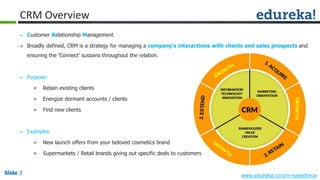
CRM Overview
 Customer Relationship Management
 Broadly defined, CRM is a strategy for managing a company’s interactions with clients and sales prospects and
ensuring the ‘Connect’ sustains throughout the relation.
 Purpose:
» Retain existing clients
» Energize dormant accounts / clients
» Find new clients
 Examples
» New launch offers from your beloved cosmetics brand
» Supermarkets / Retail brands giving out specific deals to customers
Slide 4 www.edureka.co/crm-salesforceSlide 4
CRM – The Why of the Journey...
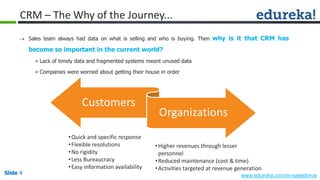
 Sales team always had data on what is selling and who is buying. Then why is it that CRM has
become so important in the current world?
» Lack of timely data and fragmented systems meant unused data
» Companies were worried about getting their house in order
•Quick and specific response
•Flexible resolutions
•No rigidity
•Less Bureaucracy
•Easy information availability
•Higher revenues through lesser
personnel
•Reduced maintenance (cost & time)
•Activities targeted at revenue generation
Customers
Organizations
Slide 5 www.edureka.co/crm-salesforceSlide 5
CRM – The Why of the Journey...
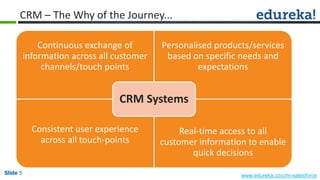
Continuous exchange of
information across all customer
channels/touch points
Personalised products/services
based on specific needs and
expectations
Consistent user experience
across all touch-points
Real-time access to all
customer information to enable
quick decisions
CRM Systems
Slide 6 www.edureka.co/crm-salesforceSlide 6
CRM – The Result (till now...)
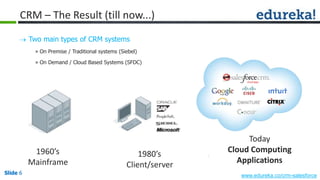
 Two main types of CRM systems
» On Premise / Traditional systems (Siebel)
» On Demand / Cloud Based Systems (SFDC)
Today
Cloud Computing
Applications
1960’s
Mainframe
1980’s
Client/server
Slide 7 www.edureka.co/crm-salesforceSlide 7
Introduction to Cloud Computing
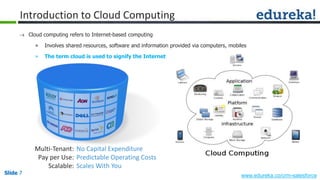
 Cloud computing refers to Internet-based computing
» Involves shared resources, software and information provided via computers, mobiles
» The term cloud is used to signify the Internet
Multi-Tenant:
Pay per Use:
Scalable:
No Capital Expenditure
Predictable Operating Costs
Scales With You
Slide 8 www.edureka.co/crm-salesforceSlide 8
Software as a Service - SaaS
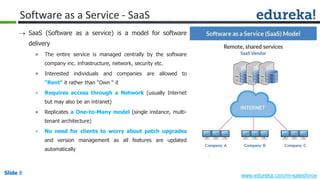
 SaaS (Software as a service) is a model for software
delivery
» The entire service is managed centrally by the software
company inc. infrastructure, network, security etc.
» Interested individuals and companies are allowed to
“Rent" it rather than “Own “ it
» Requires access through a Network (usually Internet
but may also be an intranet)
» Replicates a One-to-Many model (single instance, multi-
tenant architecture)
» No need for clients to worry about patch upgrades
and version management as all features are updated
automatically
Slide 9 www.edureka.co/crm-salesforceSlide 9
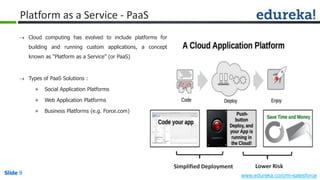
Platform as a Service - PaaS
 Cloud computing has evolved to include platforms for
building and running custom applications, a concept
known as “Platform as a Service” (or PaaS)
 Types of PaaS Solutions :
» Social Application Platforms
» Web Application Platforms
» Business Platforms (e.g. Force.com)
Simplified Deployment Lower Risk
Slide 10 www.edureka.co/crm-salesforceSlide 10
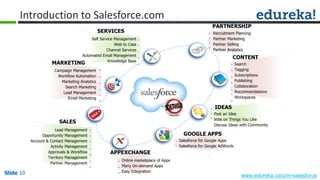
Introduction to Salesforce.com
Recruitment Planning
Partner Marketing
Partner Selling
Partner Analytics
PARTNERSHIP
Search
Tagging
Subscriptions
Publishing
Collaboration
Recommendations
Workspaces
CONTENT
Post an Idea
Vote on Things You Like
Discuss Ideas with Community
IDEAS
Lead Management
Opportunity Management
Account & Contact Management
Activity Management
Approvals & Workflow
Territory Management
Partner Management
SALES
Online marketplace of Apps
Many On-demand Apps
Easy Integration
APPEXCHANGE
Salesforce for Google Apps
Salesforce for Google AdWords
GOOGLE APPS
Self Service Management
Web to Case
Channel Services
Automated Email Management
Knowledge Base
SERVICES
Campaign Management
Workflow Automation
Marketing Analytics
Search Marketing
Lead Management
Email Marketing
MARKETING
Slide 11 www.edureka.co/crm-salesforceSlide 11
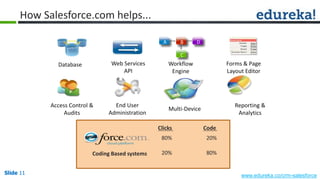
How Salesforce.com helps...
Multi-Device
End User
Administration
Access Control &
Audits
Database Web Services
API
Reporting &
Analytics
Workflow
Engine
Forms & Page
Layout Editor
A B D
C
Clicks Code
Coding Based systems
80% 20%
20% 80%
Slide 12 www.edureka.co/crm-salesforceSlide 12
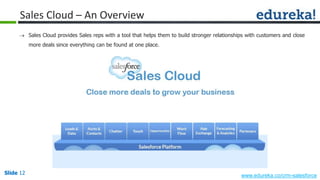
Sales Cloud – An Overview
 Sales Cloud provides Sales reps with a tool that helps them to build stronger relationships with customers and close
more deals since everything can be found at one place.
Slide 13 www.edureka.co/crm-salesforceSlide 13
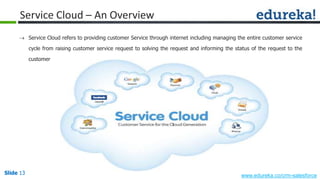
Service Cloud – An Overview
 Service Cloud refers to providing customer Service through internet including managing the entire customer service
cycle from raising customer service request to solving the request and informing the status of the request to the
customer
Slide 14 www.edureka.co/crm-salesforceSlide 14
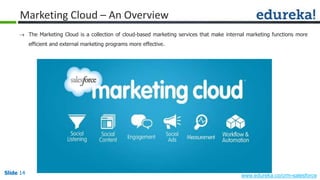
Marketing Cloud – An Overview
 The Marketing Cloud is a collection of cloud-based marketing services that make internal marketing functions more
efficient and external marketing programs more effective.
Slide 15 www.edureka.co/crm-salesforceSlide 15
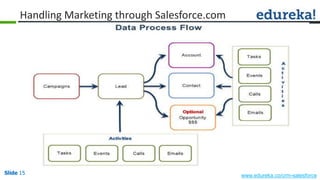
Handling Marketing through Salesforce.com
Slide 16 www.edureka.co/crm-salesforceSlide 16
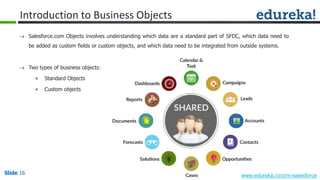
Introduction to Business Objects
 Salesforce.com Objects involves understanding which data are a standard part of SFDC, which data need to
be added as custom fields or custom objects, and which data need to be integrated from outside systems.
 Two types of business objects:
» Standard Objects
» Custom objects
Slide 17 www.edureka.co/crm-salesforceSlide 17
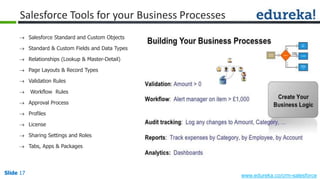
Salesforce Tools for your Business Processes
 Salesforce Standard and Custom Objects
 Standard & Custom Fields and Data Types
 Relationships (Lookup & Master-Detail)
 Page Layouts & Record Types
 Validation Rules
 Workflow Rules
 Approval Process
 Profiles
 License
 Sharing Settings and Roles
 Tabs, Apps & Packages
Slide 18 www.edureka.co/crm-salesforceSlide 18
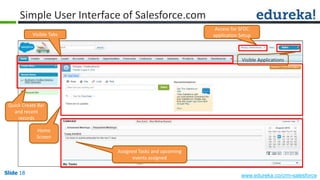
Simple User Interface of Salesforce.com
Visible Tabs
Quick Create Bar
and recent
records
Home
Screen
Assigned Tasks and upcoming
events assigned
Access for SFDC
application Setup
Visible Applications
Slide 19 www.edureka.co/crm-salesforceSlide 19
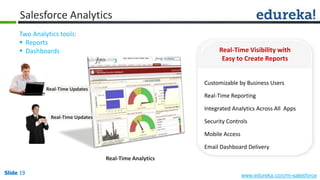
Salesforce Analytics
Real-Time Updates
Real-Time Updates
Real-Time Analytics
Real-Time Visibility with
Easy to Create Reports
Customizable by Business Users
Real-Time Reporting
Integrated Analytics Across All Apps
Security Controls
Mobile Access
Email Dashboard Delivery
Two Analytics tools:
 Reports
 Dashboards
Slide 20 www.edureka.co/crm-salesforceSlide 20
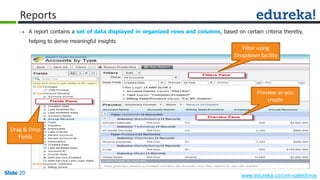
Reports
 A report contains a set of data displayed in organized rows and columns, based on certain criteria thereby,
helping to derive meaningful insights
Drag & Drop
Fields
Filter using
Dropdown facility
Preview as you
create
Slide 21 www.edureka.co/crm-salesforceSlide 21
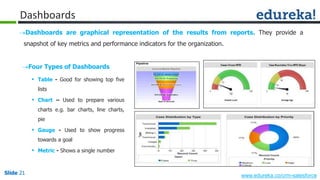
Dashboards
Dashboards are graphical representation of the results from reports. They provide a
snapshot of key metrics and performance indicators for the organization.
Four Types of Dashboards
 Table - Good for showing top five
lists
 Chart – Used to prepare various
charts e.g. bar charts, line charts,
pie
 Gauge - Used to show progress
towards a goal
 Metric - Shows a single number
Slide 22 www.edureka.co/crm-salesforce
Questions
Slide 23 www.edureka.co/crm-salesforce

Salesforce.com Overview

  • 1.
  • 2.
    Slide 2 www.edureka.co/crm-salesforce Agenda Inthis session, we will understand about: » Fundamentals of CRM » Introduction to Cloud Computing – SaaS and PaaS » Overview of Salesforce.com (SFDC)  Sales Cloud  Marketing Cloud  Service Cloud » Introduction to Business Objects » Salesforce Tools » Salesforce Analytics
  • 3.
    Slide 3 www.edureka.co/crm-salesforceSlide3 CRM Overview  Customer Relationship Management  Broadly defined, CRM is a strategy for managing a company’s interactions with clients and sales prospects and ensuring the ‘Connect’ sustains throughout the relation.  Purpose: » Retain existing clients » Energize dormant accounts / clients » Find new clients  Examples » New launch offers from your beloved cosmetics brand » Supermarkets / Retail brands giving out specific deals to customers
  • 4.
    Slide 4 www.edureka.co/crm-salesforceSlide4 CRM – The Why of the Journey...  Sales team always had data on what is selling and who is buying. Then why is it that CRM has become so important in the current world? » Lack of timely data and fragmented systems meant unused data » Companies were worried about getting their house in order •Quick and specific response •Flexible resolutions •No rigidity •Less Bureaucracy •Easy information availability •Higher revenues through lesser personnel •Reduced maintenance (cost & time) •Activities targeted at revenue generation Customers Organizations
  • 5.
    Slide 5 www.edureka.co/crm-salesforceSlide5 CRM – The Why of the Journey... Continuous exchange of information across all customer channels/touch points Personalised products/services based on specific needs and expectations Consistent user experience across all touch-points Real-time access to all customer information to enable quick decisions CRM Systems
  • 6.
    Slide 6 www.edureka.co/crm-salesforceSlide6 CRM – The Result (till now...)  Two main types of CRM systems » On Premise / Traditional systems (Siebel) » On Demand / Cloud Based Systems (SFDC) Today Cloud Computing Applications 1960’s Mainframe 1980’s Client/server
  • 7.
    Slide 7 www.edureka.co/crm-salesforceSlide7 Introduction to Cloud Computing  Cloud computing refers to Internet-based computing » Involves shared resources, software and information provided via computers, mobiles » The term cloud is used to signify the Internet Multi-Tenant: Pay per Use: Scalable: No Capital Expenditure Predictable Operating Costs Scales With You
  • 8.
    Slide 8 www.edureka.co/crm-salesforceSlide8 Software as a Service - SaaS  SaaS (Software as a service) is a model for software delivery » The entire service is managed centrally by the software company inc. infrastructure, network, security etc. » Interested individuals and companies are allowed to “Rent" it rather than “Own “ it » Requires access through a Network (usually Internet but may also be an intranet) » Replicates a One-to-Many model (single instance, multi- tenant architecture) » No need for clients to worry about patch upgrades and version management as all features are updated automatically
  • 9.
    Slide 9 www.edureka.co/crm-salesforceSlide9 Platform as a Service - PaaS  Cloud computing has evolved to include platforms for building and running custom applications, a concept known as “Platform as a Service” (or PaaS)  Types of PaaS Solutions : » Social Application Platforms » Web Application Platforms » Business Platforms (e.g. Force.com) Simplified Deployment Lower Risk
  • 10.
    Slide 10 www.edureka.co/crm-salesforceSlide10 Introduction to Salesforce.com Recruitment Planning Partner Marketing Partner Selling Partner Analytics PARTNERSHIP Search Tagging Subscriptions Publishing Collaboration Recommendations Workspaces CONTENT Post an Idea Vote on Things You Like Discuss Ideas with Community IDEAS Lead Management Opportunity Management Account & Contact Management Activity Management Approvals & Workflow Territory Management Partner Management SALES Online marketplace of Apps Many On-demand Apps Easy Integration APPEXCHANGE Salesforce for Google Apps Salesforce for Google AdWords GOOGLE APPS Self Service Management Web to Case Channel Services Automated Email Management Knowledge Base SERVICES Campaign Management Workflow Automation Marketing Analytics Search Marketing Lead Management Email Marketing MARKETING
  • 11.
    Slide 11 www.edureka.co/crm-salesforceSlide11 How Salesforce.com helps... Multi-Device End User Administration Access Control & Audits Database Web Services API Reporting & Analytics Workflow Engine Forms & Page Layout Editor A B D C Clicks Code Coding Based systems 80% 20% 20% 80%
  • 12.
    Slide 12 www.edureka.co/crm-salesforceSlide12 Sales Cloud – An Overview  Sales Cloud provides Sales reps with a tool that helps them to build stronger relationships with customers and close more deals since everything can be found at one place.
  • 13.
    Slide 13 www.edureka.co/crm-salesforceSlide13 Service Cloud – An Overview  Service Cloud refers to providing customer Service through internet including managing the entire customer service cycle from raising customer service request to solving the request and informing the status of the request to the customer
  • 14.
    Slide 14 www.edureka.co/crm-salesforceSlide14 Marketing Cloud – An Overview  The Marketing Cloud is a collection of cloud-based marketing services that make internal marketing functions more efficient and external marketing programs more effective.
  • 15.
    Slide 15 www.edureka.co/crm-salesforceSlide15 Handling Marketing through Salesforce.com
  • 16.
    Slide 16 www.edureka.co/crm-salesforceSlide16 Introduction to Business Objects  Salesforce.com Objects involves understanding which data are a standard part of SFDC, which data need to be added as custom fields or custom objects, and which data need to be integrated from outside systems.  Two types of business objects: » Standard Objects » Custom objects
  • 17.
    Slide 17 www.edureka.co/crm-salesforceSlide17 Salesforce Tools for your Business Processes  Salesforce Standard and Custom Objects  Standard & Custom Fields and Data Types  Relationships (Lookup & Master-Detail)  Page Layouts & Record Types  Validation Rules  Workflow Rules  Approval Process  Profiles  License  Sharing Settings and Roles  Tabs, Apps & Packages
  • 18.
    Slide 18 www.edureka.co/crm-salesforceSlide18 Simple User Interface of Salesforce.com Visible Tabs Quick Create Bar and recent records Home Screen Assigned Tasks and upcoming events assigned Access for SFDC application Setup Visible Applications
  • 19.
    Slide 19 www.edureka.co/crm-salesforceSlide19 Salesforce Analytics Real-Time Updates Real-Time Updates Real-Time Analytics Real-Time Visibility with Easy to Create Reports Customizable by Business Users Real-Time Reporting Integrated Analytics Across All Apps Security Controls Mobile Access Email Dashboard Delivery Two Analytics tools:  Reports  Dashboards
  • 20.
    Slide 20 www.edureka.co/crm-salesforceSlide20 Reports  A report contains a set of data displayed in organized rows and columns, based on certain criteria thereby, helping to derive meaningful insights Drag & Drop Fields Filter using Dropdown facility Preview as you create
  • 21.
    Slide 21 www.edureka.co/crm-salesforceSlide21 Dashboards Dashboards are graphical representation of the results from reports. They provide a snapshot of key metrics and performance indicators for the organization. Four Types of Dashboards  Table - Good for showing top five lists  Chart – Used to prepare various charts e.g. bar charts, line charts, pie  Gauge - Used to show progress towards a goal  Metric - Shows a single number
  • 22.
  • 23.