BCO6181 - ERP Applications SU01  Creating and Maintaining Users In SAP Mart Leepin Mart Leepin 3092991
Overview SU01 Purpose  Used for creation of a user master, enabling log on and a level of interaction in SAP.  SU01 would be used in  an  administrative or support role. Tasks could be:  Set up of new users for production or test environments; Maintenance of user master information dependant upon internal employee movements within a business.    Roles, Profiles and Authorization In our scenario we will be creating a new  dialogue user, then allocating a role to enable the new user to fulfil their specific business activities.  In SAP activities are protected by authorization.  Access is dependent upon specific corresponding authorization, which is determined by the types of activities within your role.  When a role is created a profile is also generated, it is the profile that contains the required authorizations. Authorization is important as it ensures segregation of duties, therefore an enhanced level of security. Requirements In order to access SU01 a user with a broad profile is required: SAP*  or  BCUSER. Mart Leepin 3092991
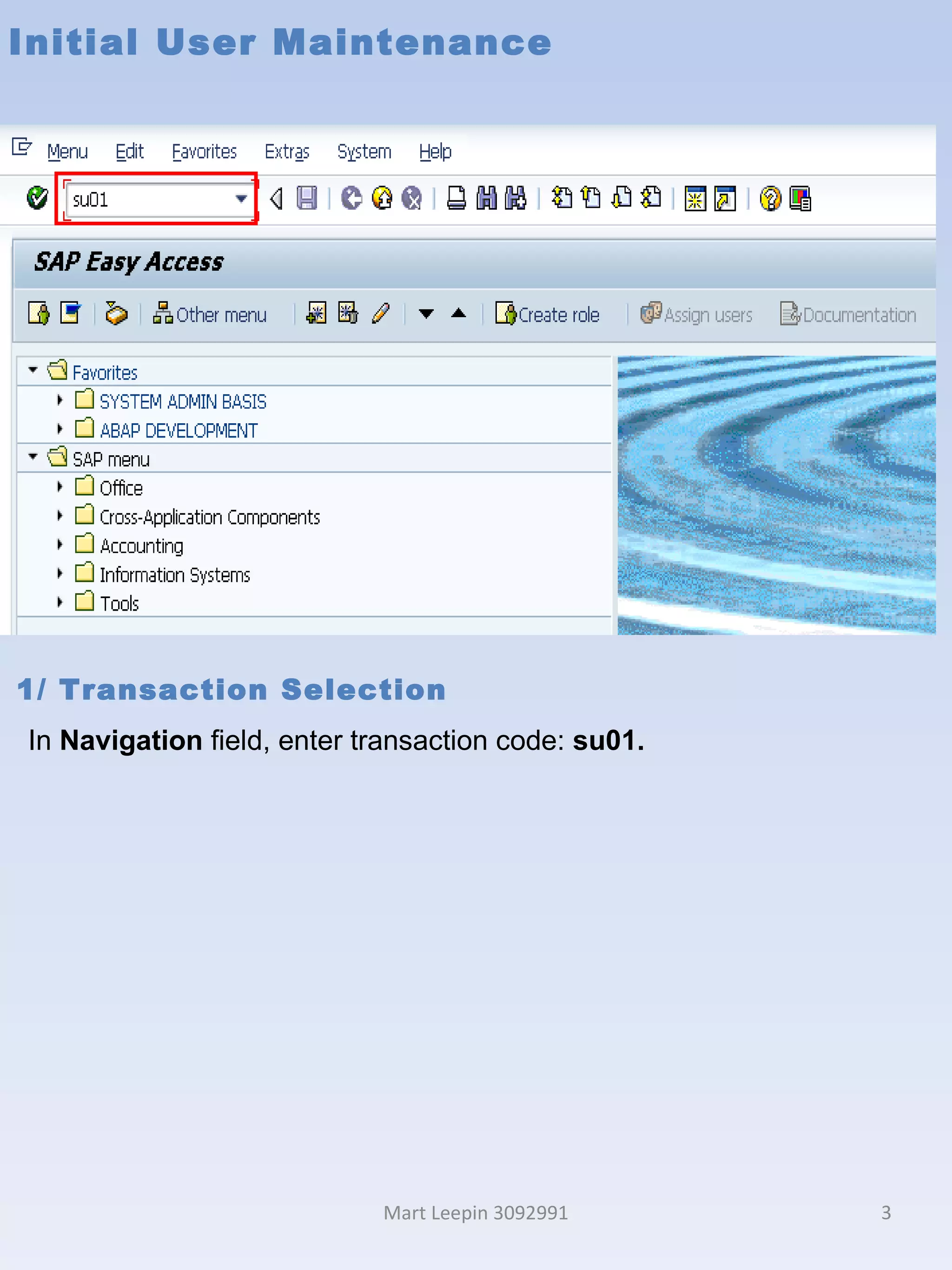
Initial User Maintenance Mart Leepin 3092991 1/ Transaction Selection In  Navigation  field, enter transaction code:  su01.
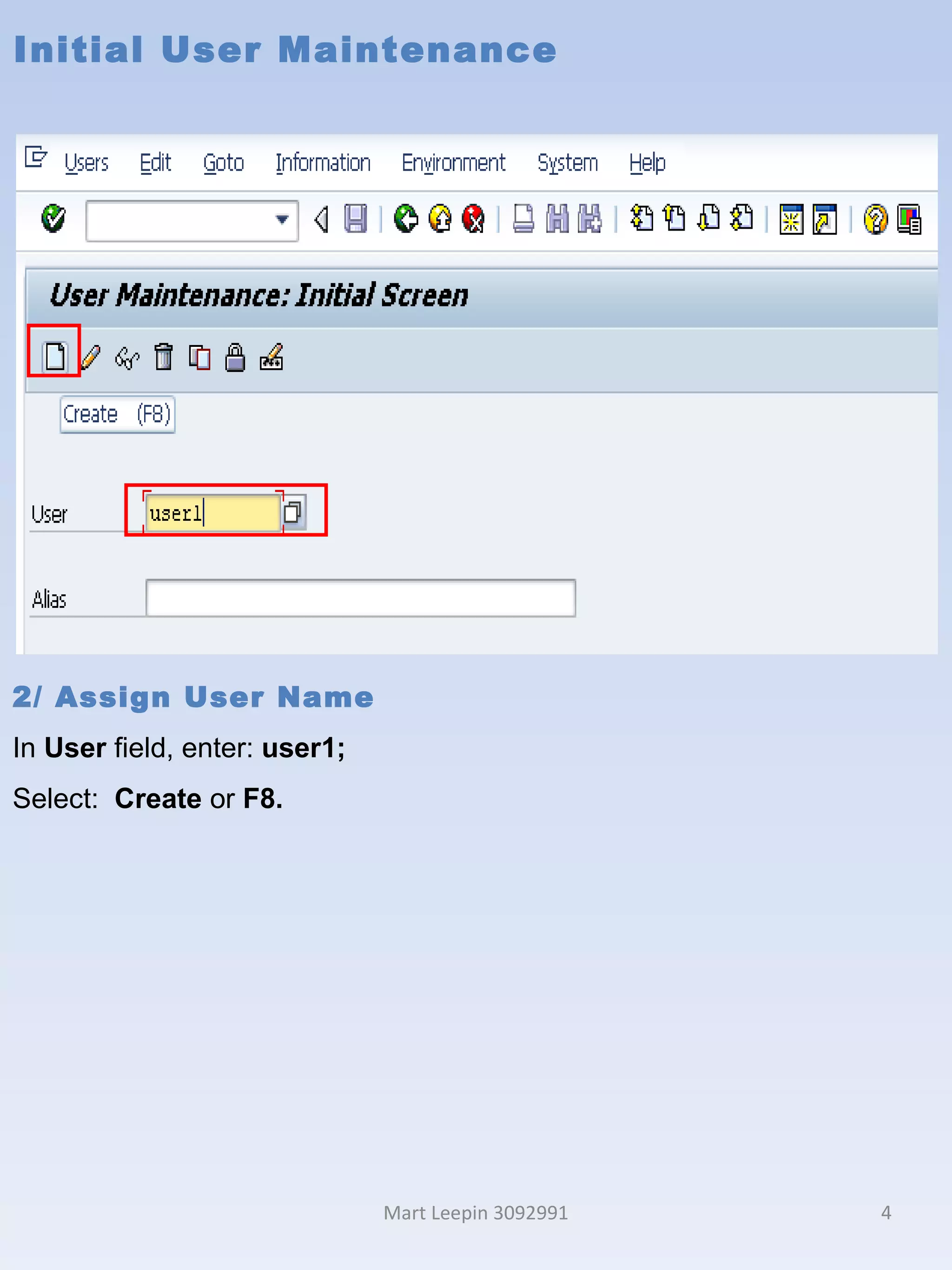
Initial User Maintenance Mart Leepin 3092991 2/ Assign User Name In  User  field, enter:  user1; Select:   Create  or  F8.
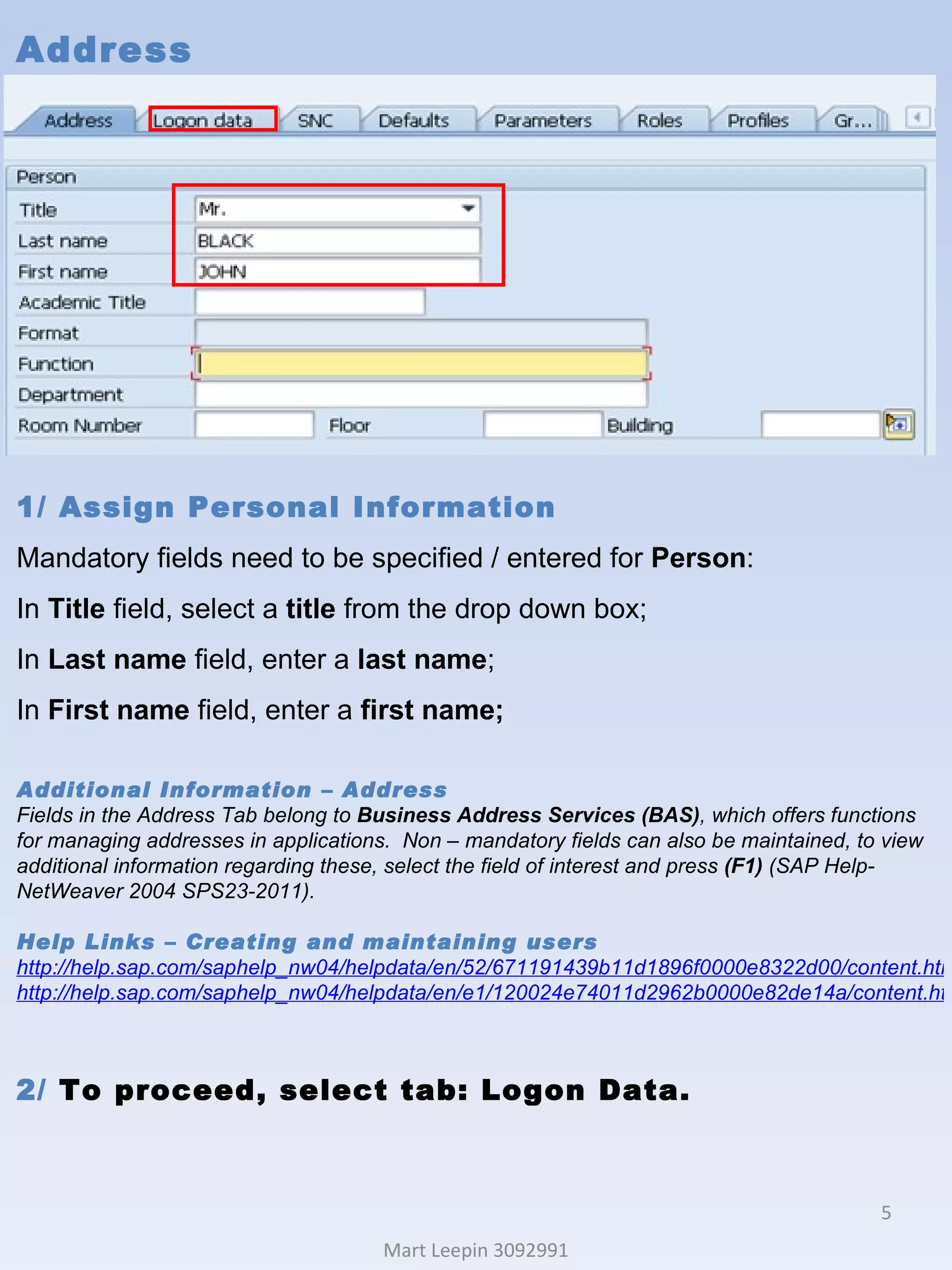
Address Mart Leepin 3092991 1/ Assign Personal Information Mandatory fields need to be specified / entered for  Person : In  Title  field, select a  title  from the drop down box; In  Last name  field, enter a  last name ; In  First name  field, enter a  first name; Additional Information – Address Fields in the Address Tab belong to  Business Address Services (BAS) , which offers functions for managing addresses in applications.  Non – mandatory fields can also be maintained, to view additional information regarding these, select the field of interest and press  (F1)  (SAP Help-NetWeaver 2004 SPS23-2011). Help Links  – Creating and maintaining users http://help.sap.com/saphelp_nw04/helpdata/en/52/671191439b11d1896f0000e8322d00/content.htm http://help.sap.com/saphelp_nw04/helpdata/en/e1/120024e74011d2962b0000e82de14a/content.htm 2/  To proceed, select tab: Logon Data.
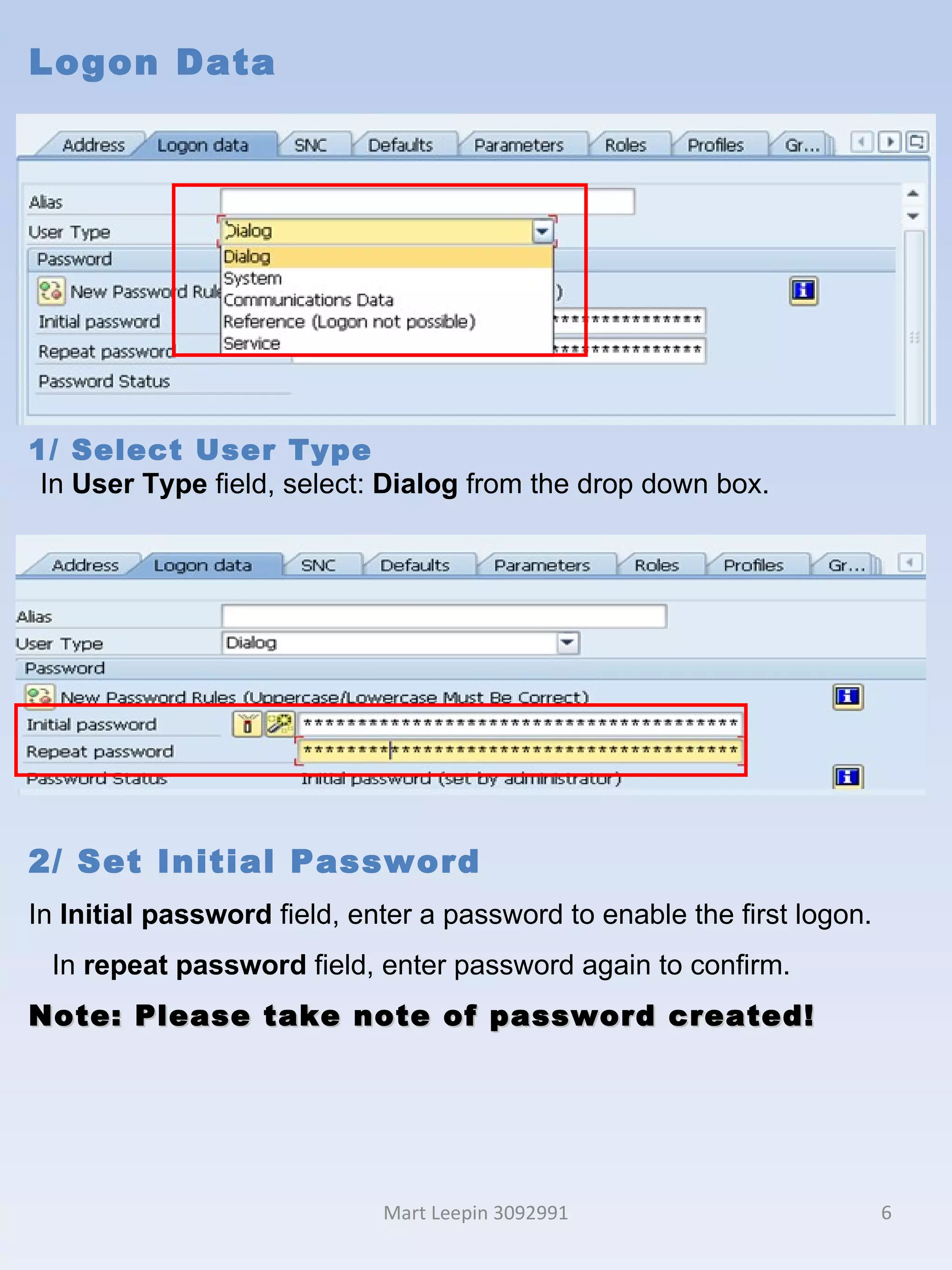
Logon Data Mart Leepin 3092991 1/ Select   User Type In  User Type  field, select:  Dialog  from the drop down box. 2/ Set Initial Password In  Initial password  field, enter a password to enable the first logon.  In  repeat password  field, enter password again to confirm.  Note: Please take note of password created!
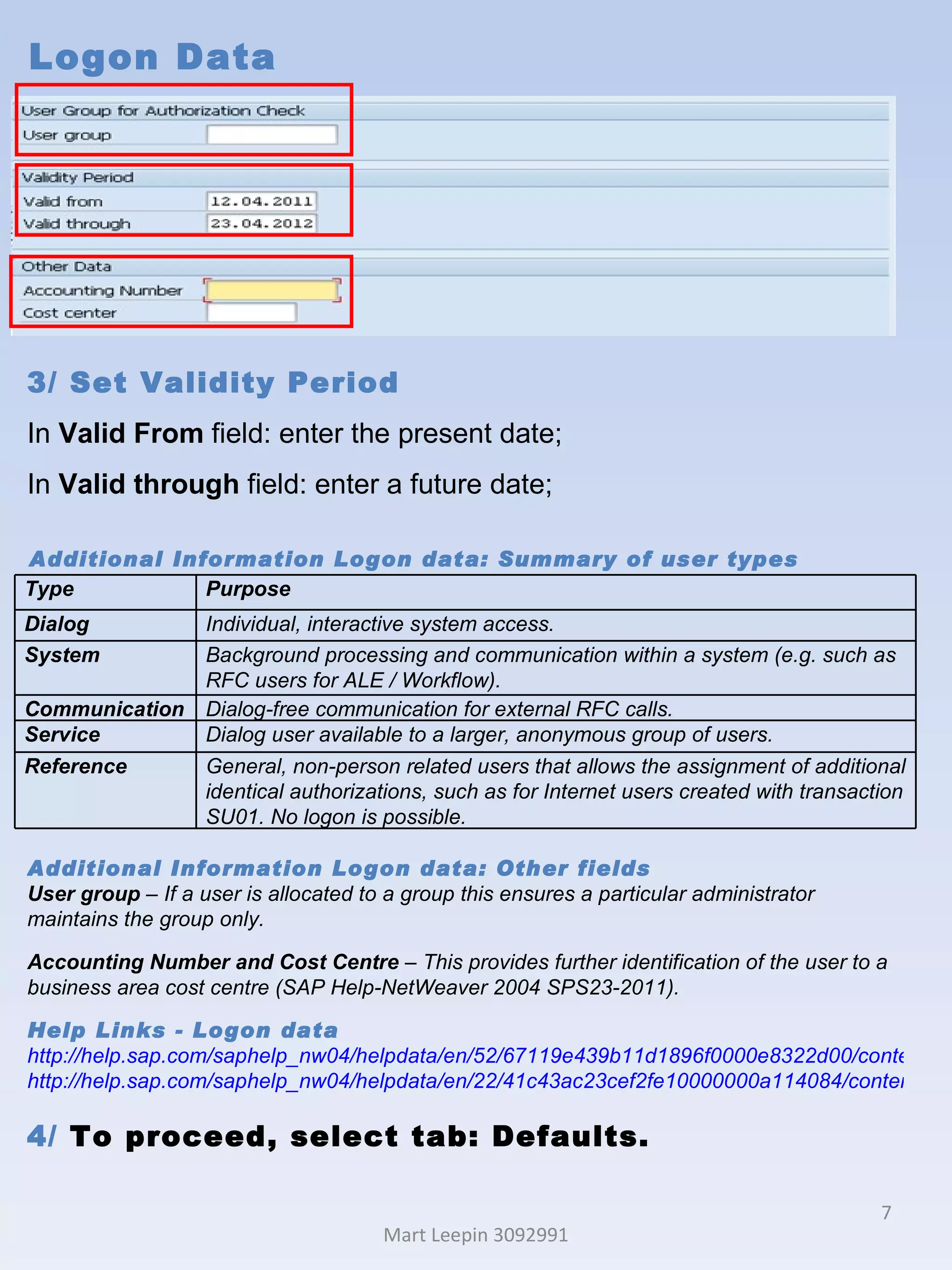
Logon Data Mart Leepin 3092991 3/ Set Validity Period  In  Valid From  field: enter the present date; In  Valid through  field: enter a future date; Additional Information Logon data: Summary of user types  Additional Information Logon data: Other fields User group  – If a user is allocated to a group this ensures a particular administrator maintains the group only.  Accounting Number and Cost Centre  – This provides further identification of the user to a business area cost centre (SAP Help-NetWeaver 2004 SPS23-2011). Help Links -  Logon data http://help.sap.com/saphelp_nw04/helpdata/en/52/67119e439b11d1896f0000e8322d00/content.htm http://help.sap.com/saphelp_nw04/helpdata/en/22/41c43ac23cef2fe10000000a114084/content.htm 4/  To proceed, select tab: Defaults.  Type Purpose Dialog Individual, interactive system access. System Background processing and communication within a system (e.g. such as RFC users for ALE / Workflow). Communication Dialog-free communication for external RFC calls. Service Dialog user available to a larger, anonymous group of users. Reference General, non-person related users that allows the assignment of additional identical authorizations, such as for Internet users created with transaction SU01. No logon is possible.
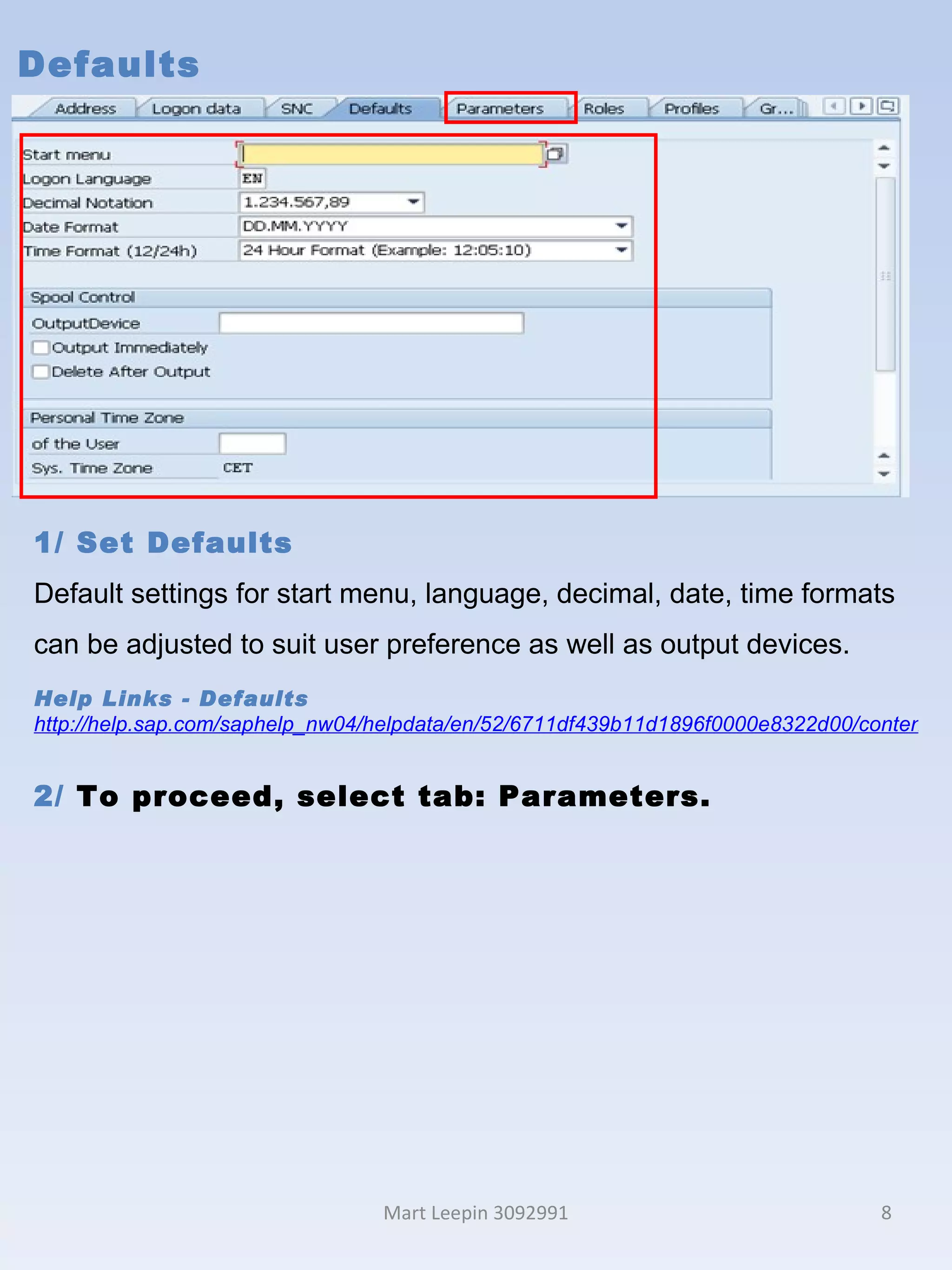
Defaults Mart Leepin 3092991 1/ Set Defaults Default settings for start menu, language, decimal, date, time formats can be adjusted to suit user preference as well as output devices. Help Links -  Defaults http://help.sap.com/saphelp_nw04/helpdata/en/52/6711df439b11d1896f0000e8322d00/content.htm 2/  To proceed, select tab: Parameters.
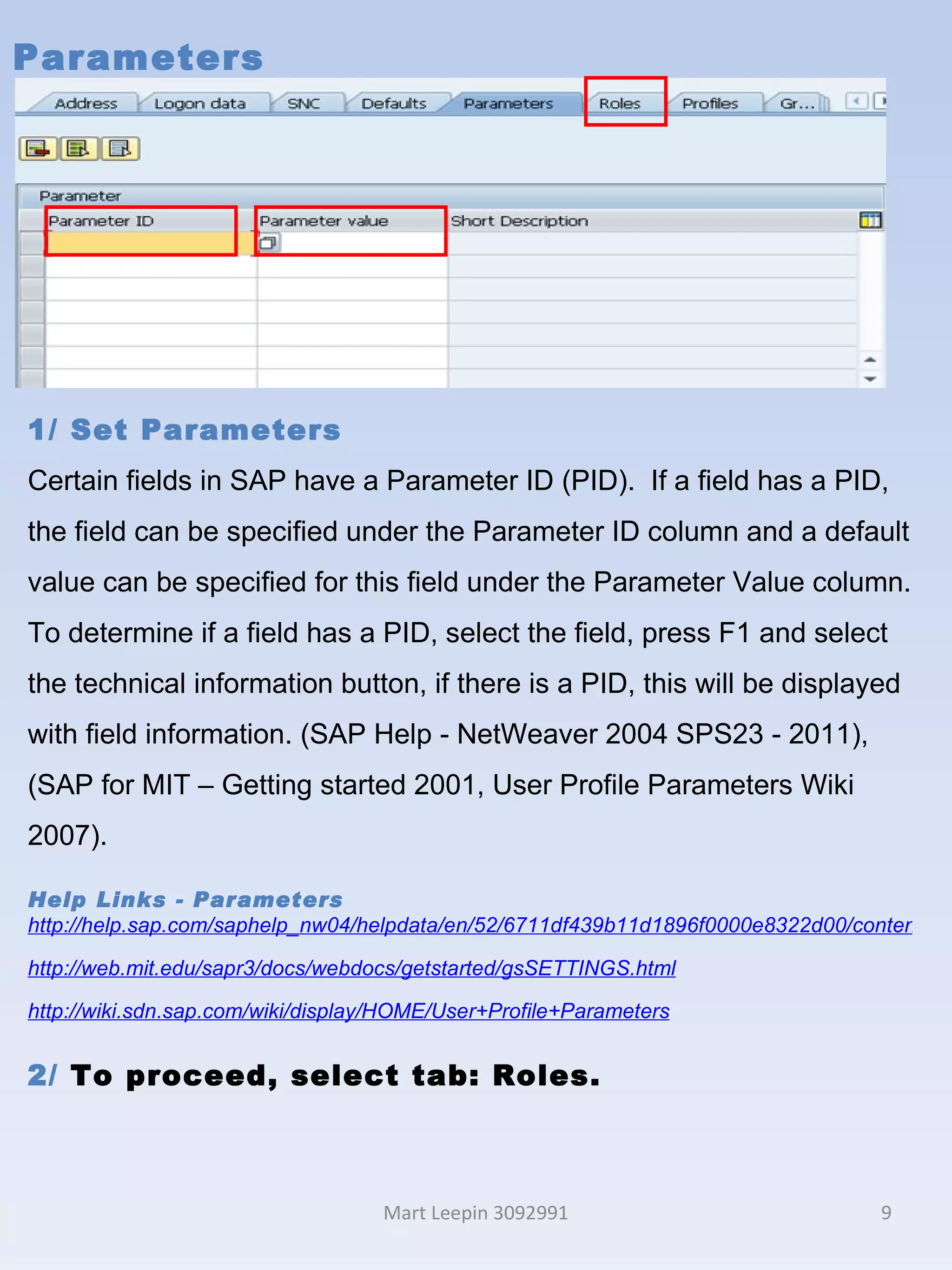
Parameters Mart Leepin 3092991 1/ Set Parameters Certain fields in SAP have a Parameter ID (PID).  If a field has a PID, the field can be specified under the Parameter ID column and a default value can be specified for this field under the Parameter Value column. To determine if a field has a PID, select the field, press F1 and select the technical information button, if there is a PID, this will be displayed with field information. (SAP Help - NetWeaver 2004 SPS23 - 2011),  (SAP for MIT – Getting started 2001, User Profile Parameters Wiki 2007). Help Links - Parameters http://help.sap.com/saphelp_nw04/helpdata/en/52/6711df439b11d1896f0000e8322d00/content.htm http://web.mit.edu/sapr3/docs/webdocs/getstarted/gsSETTINGS.html http://wiki.sdn.sap.com/wiki/display/HOME/User+Profile+Parameters 2/  To proceed, select tab: Roles.
Roles Mart Leepin 3092991 Roles:  Authorization in SAP Transactions, programs, and services in SAP systems are protected from unauthorized access.  To access business objects or execute SAP transactions, a user requires corresponding authorizations, as business objects or transactions are protected by authorization objects. Authorizations are defined depending on the activity and responsibilities of the employee. The authorizations are combined in an authorization profile that is associated  with a role. The user administrators then assign the corresponding roles using the user master record, so that the user can use the appropriate transactions for his or her tasks. Roles:  Roles & Profiles Roles are collections of activities undertaken to fulfil an assignment within a business scenario.  These activities could be transactions or reports.  To ensure security, activities required to perform a role should be carefully defined when roles are created in SAP, ensuring appropriate segregation of duty i.e. access to some activities and restriction to others.  When a role is created, the corresponding profile, which contains the necessary authorizations, is also created.  Once a role is assigned to a user, the corresponding activities and authorizations are then granted. (SAP Help-NetWeaver 2004 SPS23-2011).
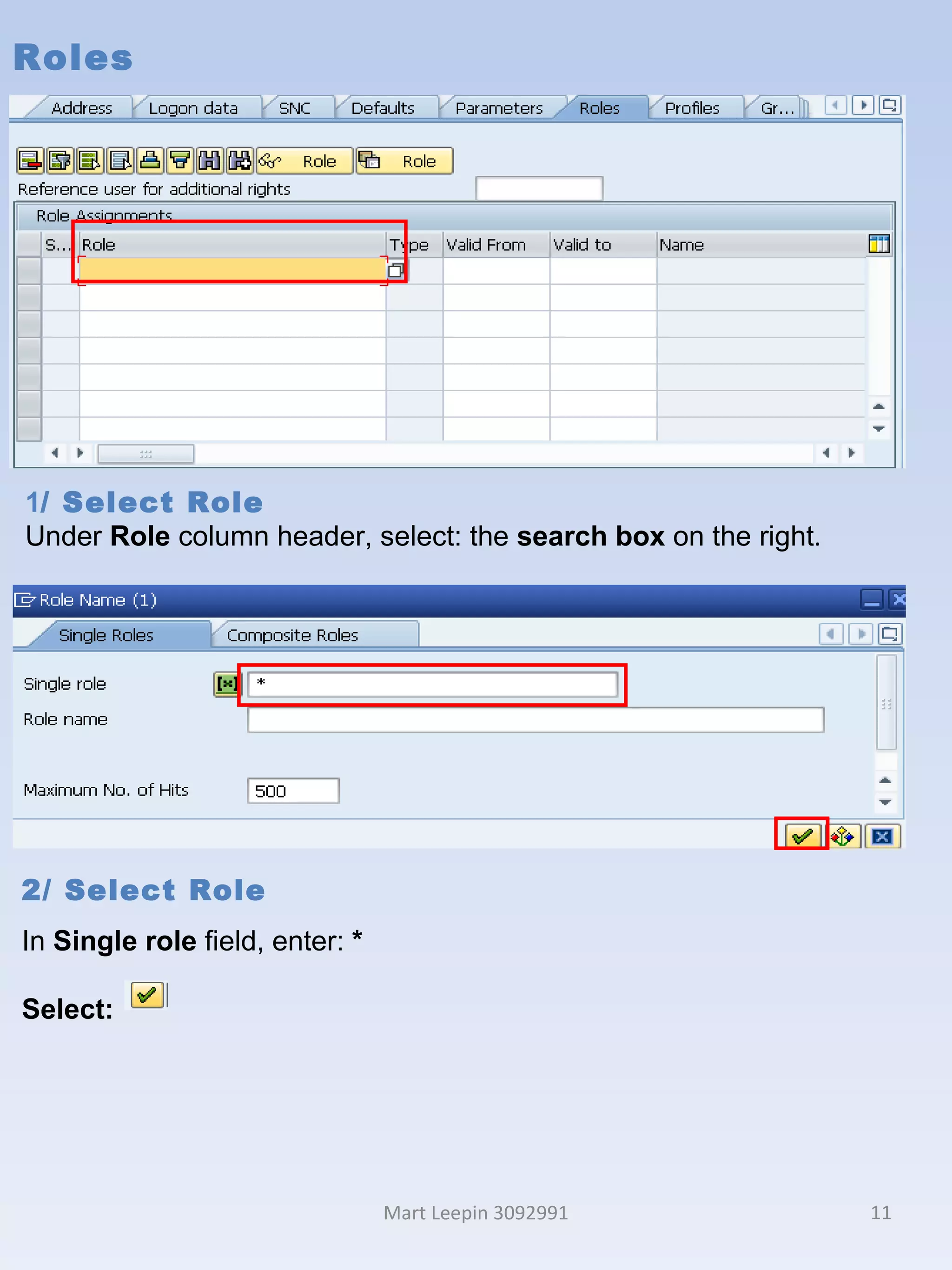
Roles Mart Leepin 3092991 1 / Select Role Under  Role  column header, select: the  search box  on the right . 2/ Select Role In  Single role  field, enter:  * Select:
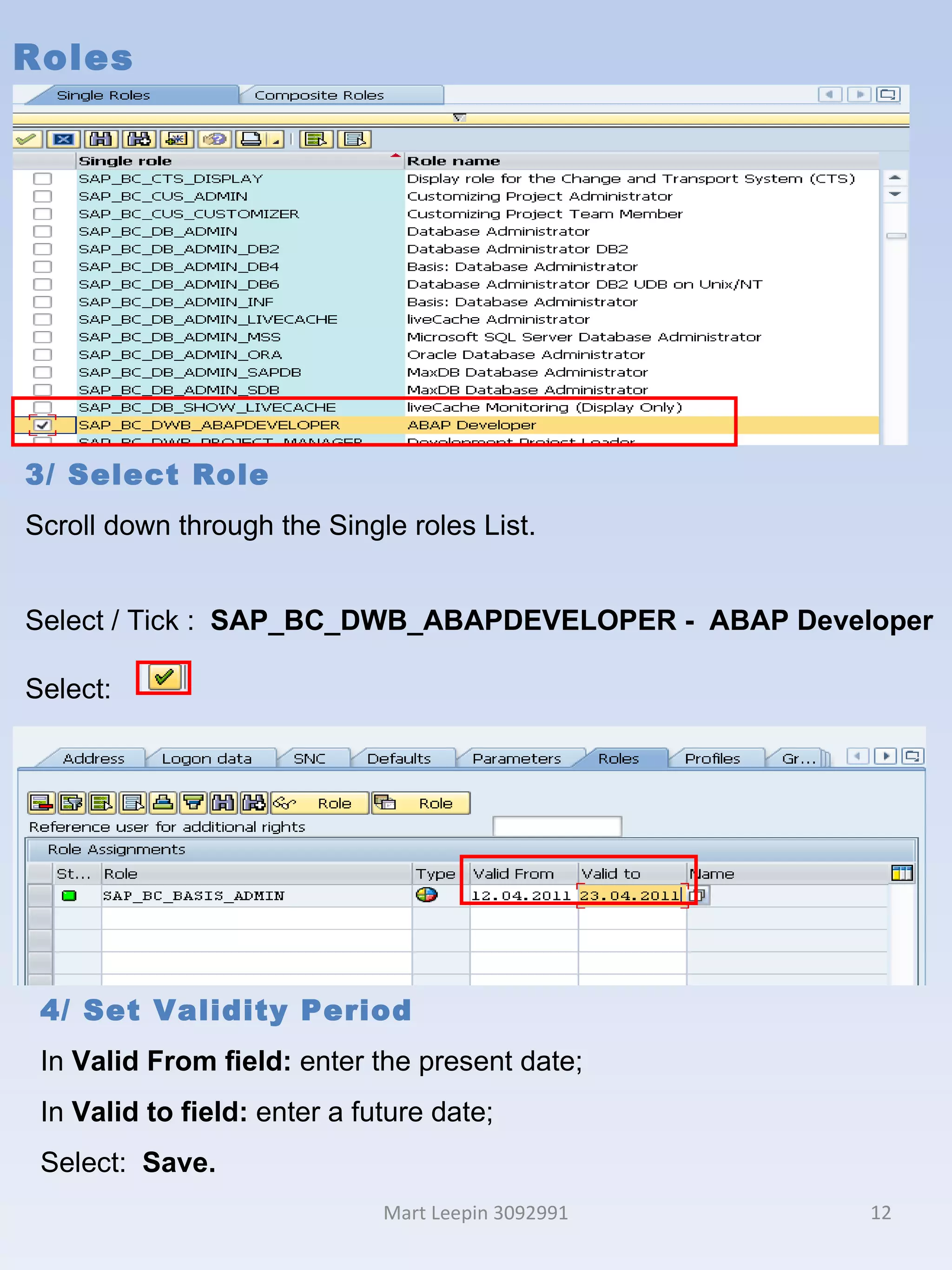
Roles Mart Leepin 3092991 3/ Select Role Scroll down through the Single roles List. Select / Tick :  SAP_BC_DWB_ABAPDEVELOPER -  ABAP Developer Select:  4/ Set Validity Period  In  Valid From field:  enter the present date; In  Valid to field:  enter a future date;  Select:  Save.
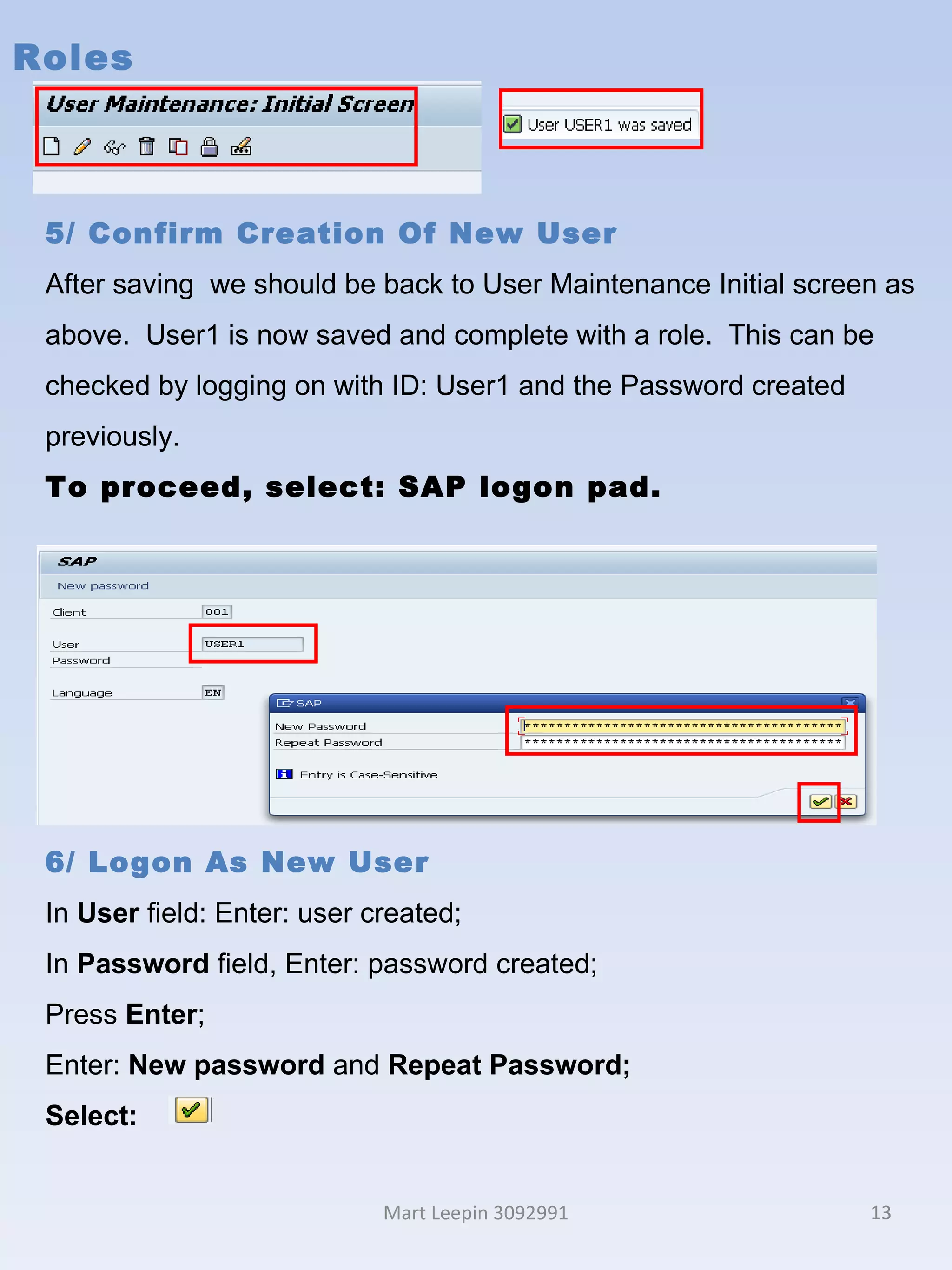
Roles Mart Leepin 3092991 5/ Confirm Creation Of New User After saving  we should be back to User Maintenance Initial screen as above.  User1 is now saved and complete with a role.  This can be checked by logging on with ID: User1 and the Password created previously.  To proceed, select: SAP logon pad. 5/ Roles After saving  we should be 6/ Logon As New User In  User  field: Enter: user created; In  Password  field, Enter: password created; Press  Enter ; Enter:  New password  and  Repeat Password; Select:
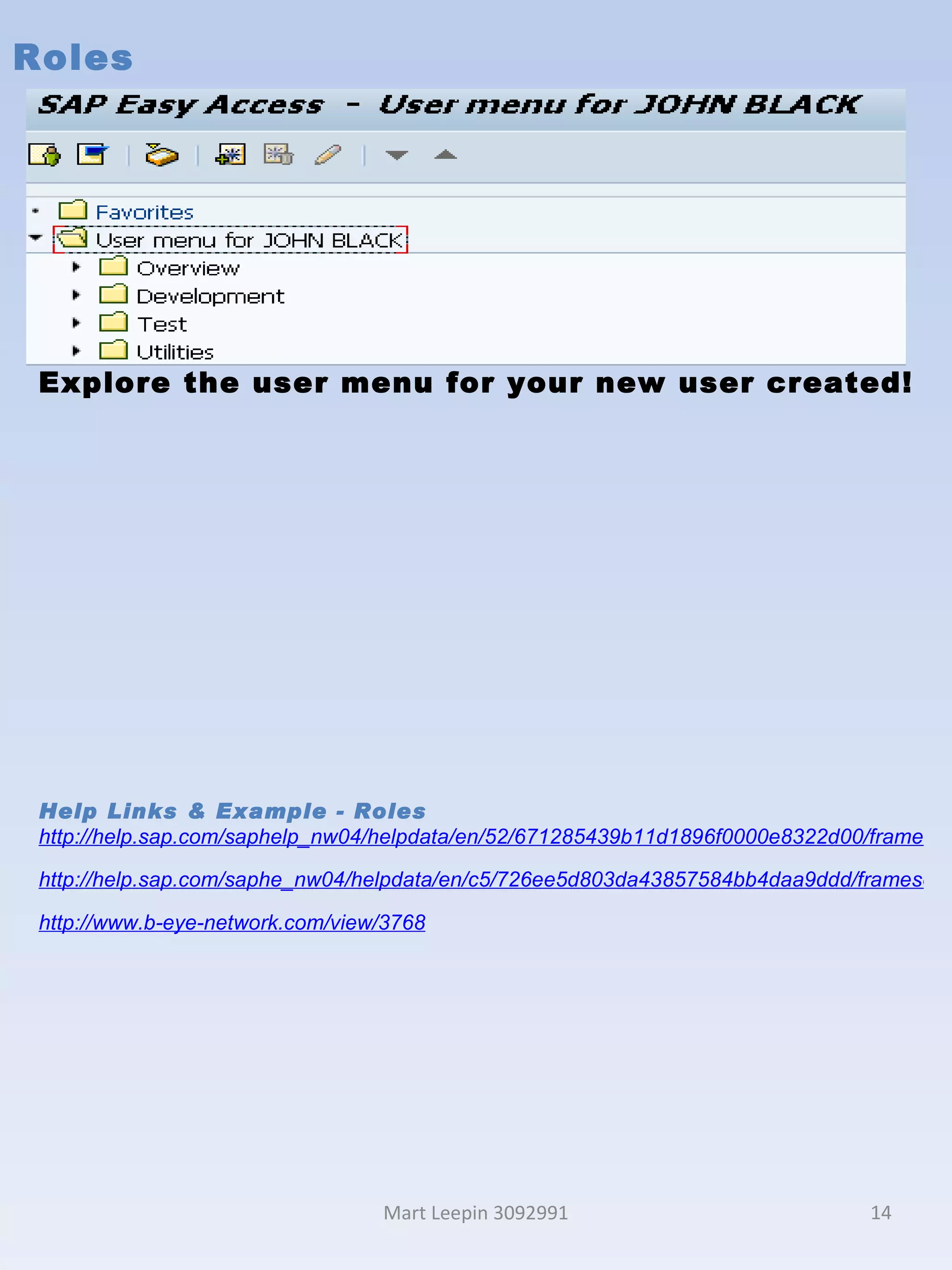
Roles Mart Leepin 3092991 Explore the user menu for your new user created! Help Links & Example - Roles http://help.sap.com/saphelp_nw04/helpdata/en/52/671285439b11d1896f0000e8322d00/frameset.htm http://help.sap.com/saphe_nw04/helpdata/en/c5/726ee5d803da43857584bb4daa9ddd/frameset.htm http://www.b-eye-network.com/view/3768
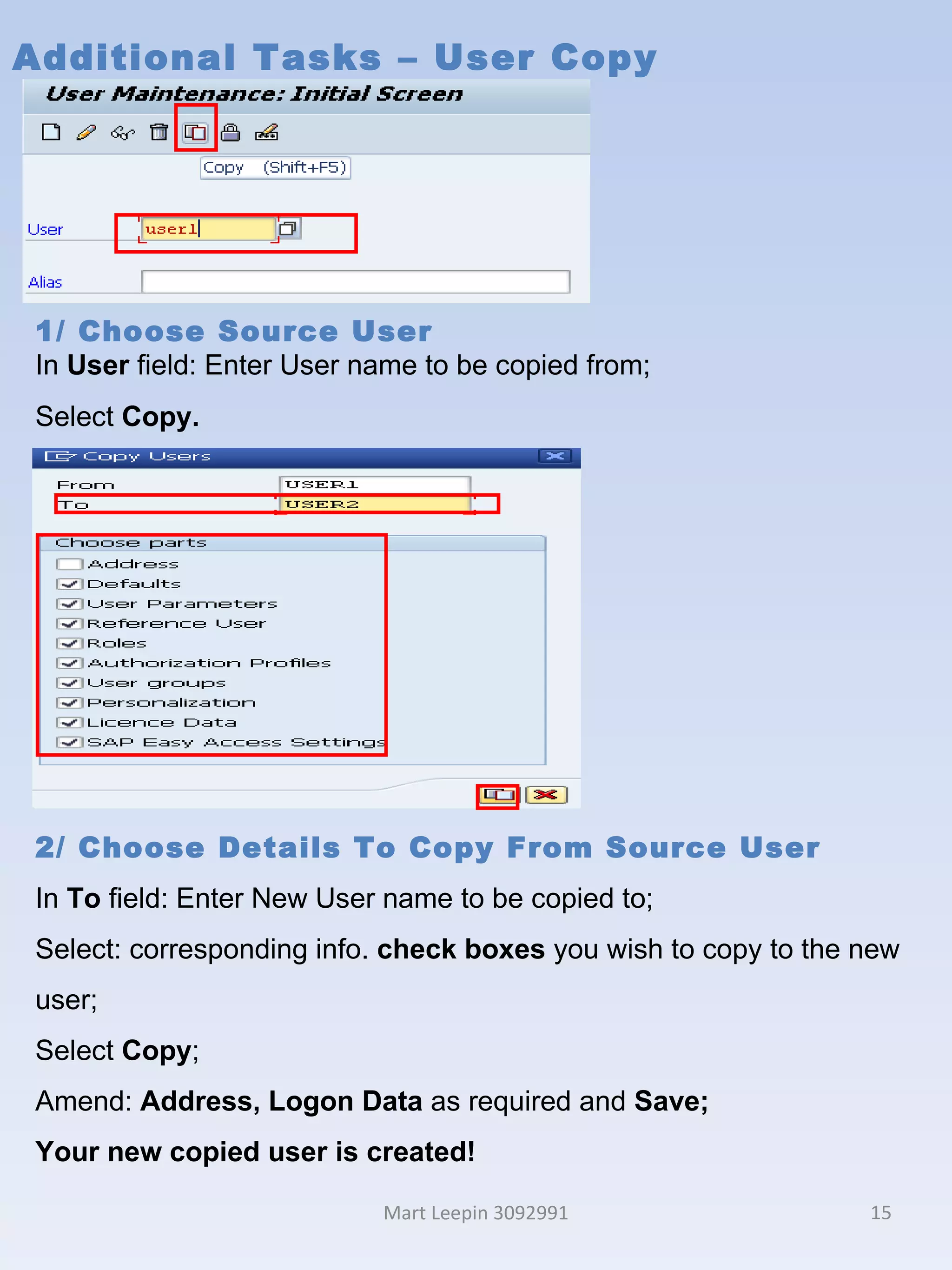
Additional Tasks – User Copy Mart Leepin 3092991 1/ Choose Source User In  User  field: Enter User name to be copied from; Select  Copy. 2/ Choose Details To Copy From Source User In  To  field: Enter New User name to be copied to; Select: corresponding info.  check boxes  you wish to copy to the new user; Select  Copy ; Amend:  Address, Logon Data  as required and  Save; Your new copied user is created!
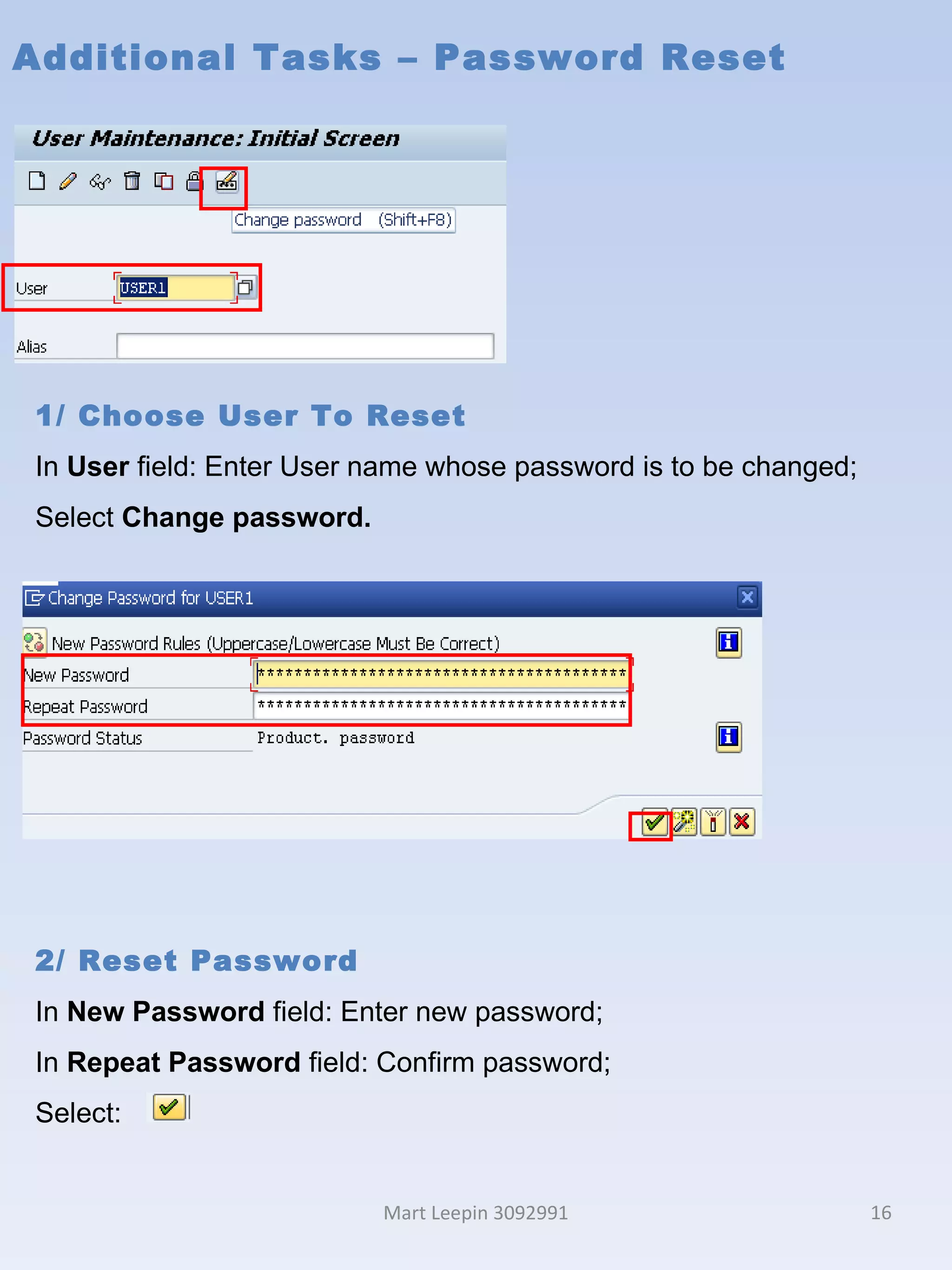
Additional Tasks – Password Reset Mart Leepin 3092991 1/ Choose User To Reset In  User  field: Enter User name whose password is to be changed; Select  Change password. 2/ Reset Password  In  New Password  field: Enter new password; In  Repeat Password  field: Confirm password; Select:
References Mart Leepin 3092991 SAP for MIT – Getting started , 2001, Instructional documentation, Massachusetts Institute of Technology, viewed 20 th  April 2011,  http://web.mit.edu/sapr3/docs/webdocs/getstarted/gsSETTINGS.html ; SAP Help - NetWeaver 2004  SPS23 , 2011, SAP Help Portal, viewed 20 th  April 2011,  http://help.sap.com/ ; SAP Developers Network Wiki 2007,  User Profile Parameters , wiki article, 01 st   March, viewed 28 th   April 2011,  http://wiki.sdn.sap.com/wiki/display/HOME/User+Profile+Parameters . Houze, G. 2007.  SAP R/3 Security: Would You Like Roles With That Logon?,  online article, viewed 01st May 2011,  http://www.b-eye-network.com/view/3768

SU01 - Background and Instruction

  • 1.
    BCO6181 - ERPApplications SU01 Creating and Maintaining Users In SAP Mart Leepin Mart Leepin 3092991
  • 2.
    Overview SU01 Purpose Used for creation of a user master, enabling log on and a level of interaction in SAP.  SU01 would be used in an administrative or support role. Tasks could be: Set up of new users for production or test environments; Maintenance of user master information dependant upon internal employee movements within a business.    Roles, Profiles and Authorization In our scenario we will be creating a new dialogue user, then allocating a role to enable the new user to fulfil their specific business activities.  In SAP activities are protected by authorization. Access is dependent upon specific corresponding authorization, which is determined by the types of activities within your role. When a role is created a profile is also generated, it is the profile that contains the required authorizations. Authorization is important as it ensures segregation of duties, therefore an enhanced level of security. Requirements In order to access SU01 a user with a broad profile is required: SAP* or BCUSER. Mart Leepin 3092991
  • 3.
    Initial User MaintenanceMart Leepin 3092991 1/ Transaction Selection In Navigation field, enter transaction code: su01.
  • 4.
    Initial User MaintenanceMart Leepin 3092991 2/ Assign User Name In User field, enter: user1; Select: Create or F8.
  • 5.
    Address Mart Leepin3092991 1/ Assign Personal Information Mandatory fields need to be specified / entered for Person : In Title field, select a title from the drop down box; In Last name field, enter a last name ; In First name field, enter a first name; Additional Information – Address Fields in the Address Tab belong to Business Address Services (BAS) , which offers functions for managing addresses in applications. Non – mandatory fields can also be maintained, to view additional information regarding these, select the field of interest and press (F1) (SAP Help-NetWeaver 2004 SPS23-2011). Help Links – Creating and maintaining users http://help.sap.com/saphelp_nw04/helpdata/en/52/671191439b11d1896f0000e8322d00/content.htm http://help.sap.com/saphelp_nw04/helpdata/en/e1/120024e74011d2962b0000e82de14a/content.htm 2/ To proceed, select tab: Logon Data.
  • 6.
    Logon Data MartLeepin 3092991 1/ Select User Type In User Type field, select: Dialog from the drop down box. 2/ Set Initial Password In Initial password field, enter a password to enable the first logon. In repeat password field, enter password again to confirm. Note: Please take note of password created!
  • 7.
    Logon Data MartLeepin 3092991 3/ Set Validity Period In Valid From field: enter the present date; In Valid through field: enter a future date; Additional Information Logon data: Summary of user types Additional Information Logon data: Other fields User group – If a user is allocated to a group this ensures a particular administrator maintains the group only. Accounting Number and Cost Centre – This provides further identification of the user to a business area cost centre (SAP Help-NetWeaver 2004 SPS23-2011). Help Links - Logon data http://help.sap.com/saphelp_nw04/helpdata/en/52/67119e439b11d1896f0000e8322d00/content.htm http://help.sap.com/saphelp_nw04/helpdata/en/22/41c43ac23cef2fe10000000a114084/content.htm 4/ To proceed, select tab: Defaults. Type Purpose Dialog Individual, interactive system access. System Background processing and communication within a system (e.g. such as RFC users for ALE / Workflow). Communication Dialog-free communication for external RFC calls. Service Dialog user available to a larger, anonymous group of users. Reference General, non-person related users that allows the assignment of additional identical authorizations, such as for Internet users created with transaction SU01. No logon is possible.
  • 8.
    Defaults Mart Leepin3092991 1/ Set Defaults Default settings for start menu, language, decimal, date, time formats can be adjusted to suit user preference as well as output devices. Help Links - Defaults http://help.sap.com/saphelp_nw04/helpdata/en/52/6711df439b11d1896f0000e8322d00/content.htm 2/ To proceed, select tab: Parameters.
  • 9.
    Parameters Mart Leepin3092991 1/ Set Parameters Certain fields in SAP have a Parameter ID (PID). If a field has a PID, the field can be specified under the Parameter ID column and a default value can be specified for this field under the Parameter Value column. To determine if a field has a PID, select the field, press F1 and select the technical information button, if there is a PID, this will be displayed with field information. (SAP Help - NetWeaver 2004 SPS23 - 2011), (SAP for MIT – Getting started 2001, User Profile Parameters Wiki 2007). Help Links - Parameters http://help.sap.com/saphelp_nw04/helpdata/en/52/6711df439b11d1896f0000e8322d00/content.htm http://web.mit.edu/sapr3/docs/webdocs/getstarted/gsSETTINGS.html http://wiki.sdn.sap.com/wiki/display/HOME/User+Profile+Parameters 2/ To proceed, select tab: Roles.
  • 10.
    Roles Mart Leepin3092991 Roles: Authorization in SAP Transactions, programs, and services in SAP systems are protected from unauthorized access. To access business objects or execute SAP transactions, a user requires corresponding authorizations, as business objects or transactions are protected by authorization objects. Authorizations are defined depending on the activity and responsibilities of the employee. The authorizations are combined in an authorization profile that is associated with a role. The user administrators then assign the corresponding roles using the user master record, so that the user can use the appropriate transactions for his or her tasks. Roles: Roles & Profiles Roles are collections of activities undertaken to fulfil an assignment within a business scenario. These activities could be transactions or reports. To ensure security, activities required to perform a role should be carefully defined when roles are created in SAP, ensuring appropriate segregation of duty i.e. access to some activities and restriction to others. When a role is created, the corresponding profile, which contains the necessary authorizations, is also created. Once a role is assigned to a user, the corresponding activities and authorizations are then granted. (SAP Help-NetWeaver 2004 SPS23-2011).
  • 11.
    Roles Mart Leepin3092991 1 / Select Role Under Role column header, select: the search box on the right . 2/ Select Role In Single role field, enter: * Select:
  • 12.
    Roles Mart Leepin3092991 3/ Select Role Scroll down through the Single roles List. Select / Tick : SAP_BC_DWB_ABAPDEVELOPER - ABAP Developer Select: 4/ Set Validity Period In Valid From field: enter the present date; In Valid to field: enter a future date; Select: Save.
  • 13.
    Roles Mart Leepin3092991 5/ Confirm Creation Of New User After saving we should be back to User Maintenance Initial screen as above. User1 is now saved and complete with a role. This can be checked by logging on with ID: User1 and the Password created previously. To proceed, select: SAP logon pad. 5/ Roles After saving we should be 6/ Logon As New User In User field: Enter: user created; In Password field, Enter: password created; Press Enter ; Enter: New password and Repeat Password; Select:
  • 14.
    Roles Mart Leepin3092991 Explore the user menu for your new user created! Help Links & Example - Roles http://help.sap.com/saphelp_nw04/helpdata/en/52/671285439b11d1896f0000e8322d00/frameset.htm http://help.sap.com/saphe_nw04/helpdata/en/c5/726ee5d803da43857584bb4daa9ddd/frameset.htm http://www.b-eye-network.com/view/3768
  • 15.
    Additional Tasks –User Copy Mart Leepin 3092991 1/ Choose Source User In User field: Enter User name to be copied from; Select Copy. 2/ Choose Details To Copy From Source User In To field: Enter New User name to be copied to; Select: corresponding info. check boxes you wish to copy to the new user; Select Copy ; Amend: Address, Logon Data as required and Save; Your new copied user is created!
  • 16.
    Additional Tasks –Password Reset Mart Leepin 3092991 1/ Choose User To Reset In User field: Enter User name whose password is to be changed; Select Change password. 2/ Reset Password In New Password field: Enter new password; In Repeat Password field: Confirm password; Select:
  • 17.
    References Mart Leepin3092991 SAP for MIT – Getting started , 2001, Instructional documentation, Massachusetts Institute of Technology, viewed 20 th April 2011, http://web.mit.edu/sapr3/docs/webdocs/getstarted/gsSETTINGS.html ; SAP Help - NetWeaver 2004 SPS23 , 2011, SAP Help Portal, viewed 20 th April 2011, http://help.sap.com/ ; SAP Developers Network Wiki 2007, User Profile Parameters , wiki article, 01 st March, viewed 28 th April 2011, http://wiki.sdn.sap.com/wiki/display/HOME/User+Profile+Parameters . Houze, G. 2007. SAP R/3 Security: Would You Like Roles With That Logon?, online article, viewed 01st May 2011, http://www.b-eye-network.com/view/3768

Editor's Notes

  • #2 Mart Leepin 3092991 SU01 BCO6181 ERP Applications
  • #3 Mart Leepin 3092991 SU01 BCO6181 ERP Applications
  • #4 Mart Leepin 3092991 SU01 BCO6181 ERP Applications
  • #11 SU01 BCO6181 ERP Applications Mart Leepin 3092991
  • #12 SU01 BCO6181 ERP Applications Mart Leepin 3092991
  • #13 SU01 BCO6181 ERP Applications Mart Leepin 3092991
  • #14 SU01 BCO6181 ERP Applications Mart Leepin 3092991
  • #15 SU01 BCO6181 ERP Applications Mart Leepin 3092991
  • #16 SU01 BCO6181 ERP Applications Mart Leepin 3092991
  • #17 SU01 BCO6181 ERP Applications Mart Leepin 3092991
  • #18 SU01 BCO6181 ERP Applications Mart Leepin 3092991