SAFTY
NOTES
1
Computer Hardware
Technician
Centre of Excellence in arts & design, MUET, Jamshoro
2
Poor Safety Habits Can Harm Both
The User And The Computer!
 To protect both yourself and the computer:
 Make sure power is off when disassembling, installing or
removing hardware, or doing preventive maintenance (cleaning).
 Never disassemble the monitor or power supply unless you have
been specifically trained on these components.
 Monitors develop high voltage when turned on, and both
monitors and power supplies have capacitors (electronic parts
that hold an electrical charge) that can hurt you even if the power
has been removed.
 Effective use of computer terms means more than just knowing
and using the correct terminology, it also means using it
appropriately and explaining computer terms with simple,
everyday language and examples.
Computer Hardware
Technician
Centre of Excellence in arts & design, MUET, Jamshoro
MOTHER
BOARD
3
Computer Hardware
Technician
Centre of Excellence in arts & design, MUET, Jamshoro
4
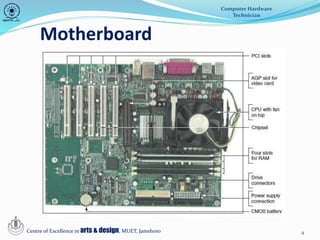
Motherboard
Computer Hardware
Technician
Centre of Excellence in arts & design, MUET, Jamshoro
The Motherboard
5
• Largest, most important circuit board
– Main board or system board
– Contains the CPU, expansion slots, other devices
• Motherboard component categories
– Processing, temporary storage, communication,
power
• All devices communicate with motherboard CPU
• Peripheral device links to motherboard via
cable
• Motherboard ports may be outside of the case
– Keyboard, mouse, parallel, USB ports, sound ports
Computer Hardware
Technician
Centre of Excellence in arts & design, MUET, Jamshoro
6
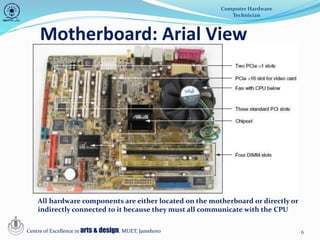
Motherboard: Arial View
Computer Hardware
Technician
Centre of Excellence in arts & design, MUET, Jamshoro
All hardware components are either located on the motherboard or directly or
indirectly connected to it because they must all communicate with the CPU
7
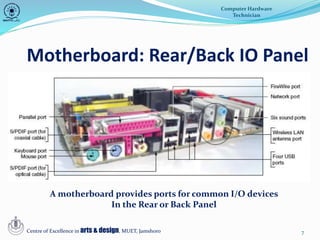
Motherboard: Rear/Back IO Panel
Computer Hardware
Technician
Centre of Excellence in arts & design, MUET, Jamshoro
A motherboard provides ports for common I/O devices
In the Rear or Back Panel
8
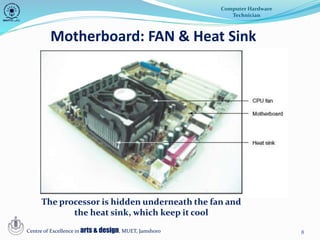
Motherboard: FAN & Heat Sink
Computer Hardware
Technician
Centre of Excellence in arts & design, MUET, Jamshoro
The processor is hidden underneath the fan and
the heat sink, which keep it cool
9
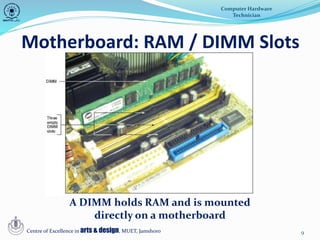
Motherboard: RAM / DIMM Slots
Computer Hardware
Technician
Centre of Excellence in arts & design, MUET, Jamshoro
A DIMM holds RAM and is mounted
directly on a motherboard
10
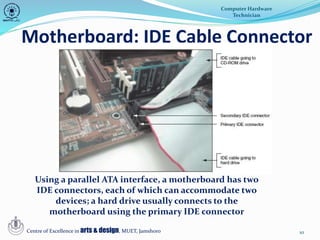
Motherboard: IDE Cable Connector
Computer Hardware
Technician
Centre of Excellence in arts & design, MUET, Jamshoro
Using a parallel ATA interface, a motherboard has two
IDE connectors, each of which can accommodate two
devices; a hard drive usually connects to the
motherboard using the primary IDE connector
11
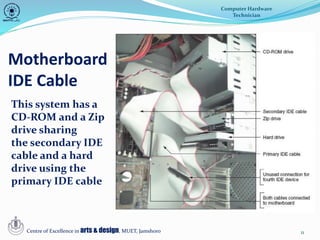
Motherboard
IDE Cable
Computer Hardware
Technician
Centre of Excellence in arts & design, MUET, Jamshoro
This system has a
CD-ROM and a Zip
drive sharing
the secondary IDE
cable and a hard
drive using the
primary IDE cable
12
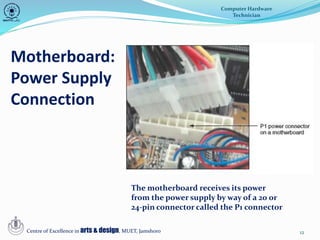
Motherboard:
Power Supply
Connection
Computer Hardware
Technician
Centre of Excellence in arts & design, MUET, Jamshoro
The motherboard receives its power
from the power supply by way of a 20 or
24-pin connector called the P1 connector
13
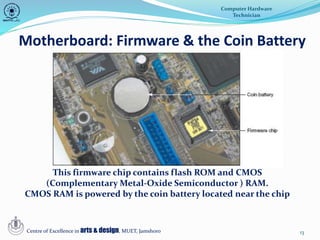
Motherboard: Firmware & the Coin Battery
Computer Hardware
Technician
Centre of Excellence in arts & design, MUET, Jamshoro
This firmware chip contains flash ROM and CMOS
(Complementary Metal-Oxide Semiconductor ) RAM.
CMOS RAM is powered by the coin battery located near the chip
THANK
YOU
14
Computer Hardware
Technician
Centre of Excellence in arts & design, MUET, Jamshoro

Safety note

  • 1.
    SAFTY NOTES 1 Computer Hardware Technician Centre ofExcellence in arts & design, MUET, Jamshoro
  • 2.
    2 Poor Safety HabitsCan Harm Both The User And The Computer!  To protect both yourself and the computer:  Make sure power is off when disassembling, installing or removing hardware, or doing preventive maintenance (cleaning).  Never disassemble the monitor or power supply unless you have been specifically trained on these components.  Monitors develop high voltage when turned on, and both monitors and power supplies have capacitors (electronic parts that hold an electrical charge) that can hurt you even if the power has been removed.  Effective use of computer terms means more than just knowing and using the correct terminology, it also means using it appropriately and explaining computer terms with simple, everyday language and examples. Computer Hardware Technician Centre of Excellence in arts & design, MUET, Jamshoro
  • 3.
    MOTHER BOARD 3 Computer Hardware Technician Centre ofExcellence in arts & design, MUET, Jamshoro
  • 4.
    4 Motherboard Computer Hardware Technician Centre ofExcellence in arts & design, MUET, Jamshoro
  • 5.
    The Motherboard 5 • Largest,most important circuit board – Main board or system board – Contains the CPU, expansion slots, other devices • Motherboard component categories – Processing, temporary storage, communication, power • All devices communicate with motherboard CPU • Peripheral device links to motherboard via cable • Motherboard ports may be outside of the case – Keyboard, mouse, parallel, USB ports, sound ports Computer Hardware Technician Centre of Excellence in arts & design, MUET, Jamshoro
  • 6.
    6 Motherboard: Arial View ComputerHardware Technician Centre of Excellence in arts & design, MUET, Jamshoro All hardware components are either located on the motherboard or directly or indirectly connected to it because they must all communicate with the CPU
  • 7.
    7 Motherboard: Rear/Back IOPanel Computer Hardware Technician Centre of Excellence in arts & design, MUET, Jamshoro A motherboard provides ports for common I/O devices In the Rear or Back Panel
  • 8.
    8 Motherboard: FAN &Heat Sink Computer Hardware Technician Centre of Excellence in arts & design, MUET, Jamshoro The processor is hidden underneath the fan and the heat sink, which keep it cool
  • 9.
    9 Motherboard: RAM /DIMM Slots Computer Hardware Technician Centre of Excellence in arts & design, MUET, Jamshoro A DIMM holds RAM and is mounted directly on a motherboard
  • 10.
    10 Motherboard: IDE CableConnector Computer Hardware Technician Centre of Excellence in arts & design, MUET, Jamshoro Using a parallel ATA interface, a motherboard has two IDE connectors, each of which can accommodate two devices; a hard drive usually connects to the motherboard using the primary IDE connector
  • 11.
    11 Motherboard IDE Cable Computer Hardware Technician Centreof Excellence in arts & design, MUET, Jamshoro This system has a CD-ROM and a Zip drive sharing the secondary IDE cable and a hard drive using the primary IDE cable
  • 12.
    12 Motherboard: Power Supply Connection Computer Hardware Technician Centreof Excellence in arts & design, MUET, Jamshoro The motherboard receives its power from the power supply by way of a 20 or 24-pin connector called the P1 connector
  • 13.
    13 Motherboard: Firmware &the Coin Battery Computer Hardware Technician Centre of Excellence in arts & design, MUET, Jamshoro This firmware chip contains flash ROM and CMOS (Complementary Metal-Oxide Semiconductor ) RAM. CMOS RAM is powered by the coin battery located near the chip
  • 14.
    THANK YOU 14 Computer Hardware Technician Centre ofExcellence in arts & design, MUET, Jamshoro