By Anirban Sen Chowdhary
Have you wondered that your Mule application can be run from a
Java class ?
Yes, it’s true .. You can run your entire Mule flow from a small
java class
So, how can we run a Mule application from Java ????
To start you Mule flow or app from Java, you need to refer Mule
Context.
To know more about MuleContext, please visit :-
https://www.mulesoft.org/docs/site/current3/apidocs/org/mule/api/
MuleEventContext.html
Just like Spring Context, Mule will combine all resource files into a
single ApplicationContext, whether they are "pure" Spring files or Mule
configuration files.
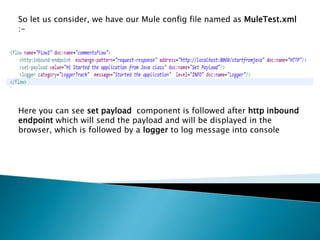
So let us consider, we have our Mule config file named as MuleTest.xml
:-
Here you can see set payload component is followed after http inbound
endpoint which will send the payload and will be displayed in the
browser, which is followed by a logger to log message into console
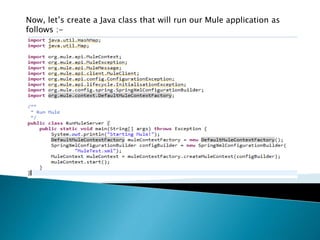
Now, let’s create a Java class that will run our Mule application as
follows :-
.
As you can see that in the Java class, we are using MuleContext for starting
our application.
Here using the following line in the code :-
SpringXmlConfigurationBuilder configBuilder = new SpringXmlConfigurationBuilder(
"MuleTest.xml");
We are loading our MuleTest.xml file.
Now, if there would have multiple XML file in our application, we would have
used a comma-separated list or an array of configuration files the following
:-
SpringXmlConfigurationBuilder configBuilder = new SpringXmlConfigurationBuilder(new String[] {
"mule-config.xml", "another-config.xml" });
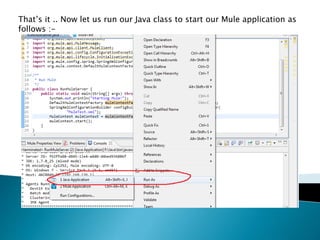
That’s it .. Now let us run our Java class to start our Mule application as
follows :-
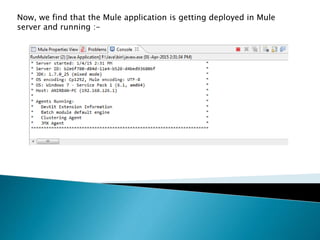
Now, we find that the Mule application is getting deployed in Mule
server and running :-
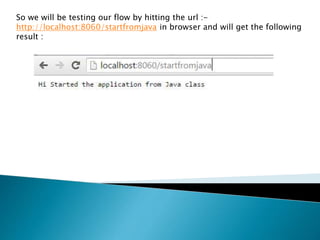
So we will be testing our flow by hitting the url :-
http://localhost:8060/startfromjava in browser and will get the following
result :
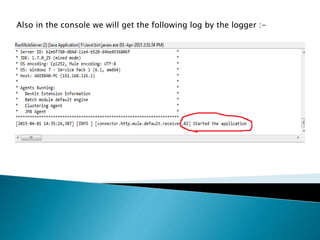
Also in the console we will get the following log by the logger :-
That’s it … Now you can try this example by your own and can run your
single or multiple Mule XML from you Java code..
Hope you enjoyed this little trick …
I have also posted this on my blog :-
http://anirbansenchowdhary.com/blog/?p=201
Happy coding and share your knowledge everywhere 
Running mule from java

Running mule from java

  • 1.
    By Anirban SenChowdhary
  • 2.
    Have you wonderedthat your Mule application can be run from a Java class ?
  • 3.
    Yes, it’s true.. You can run your entire Mule flow from a small java class
  • 4.
    So, how canwe run a Mule application from Java ????
  • 5.
    To start youMule flow or app from Java, you need to refer Mule Context. To know more about MuleContext, please visit :- https://www.mulesoft.org/docs/site/current3/apidocs/org/mule/api/ MuleEventContext.html Just like Spring Context, Mule will combine all resource files into a single ApplicationContext, whether they are "pure" Spring files or Mule configuration files.
  • 6.
    So let usconsider, we have our Mule config file named as MuleTest.xml :- Here you can see set payload component is followed after http inbound endpoint which will send the payload and will be displayed in the browser, which is followed by a logger to log message into console
  • 7.
    Now, let’s createa Java class that will run our Mule application as follows :-
  • 8.
    . As you cansee that in the Java class, we are using MuleContext for starting our application. Here using the following line in the code :- SpringXmlConfigurationBuilder configBuilder = new SpringXmlConfigurationBuilder( "MuleTest.xml"); We are loading our MuleTest.xml file. Now, if there would have multiple XML file in our application, we would have used a comma-separated list or an array of configuration files the following :- SpringXmlConfigurationBuilder configBuilder = new SpringXmlConfigurationBuilder(new String[] { "mule-config.xml", "another-config.xml" });
  • 9.
    That’s it ..Now let us run our Java class to start our Mule application as follows :-
  • 10.
    Now, we findthat the Mule application is getting deployed in Mule server and running :-
  • 11.
    So we willbe testing our flow by hitting the url :- http://localhost:8060/startfromjava in browser and will get the following result :
  • 12.
    Also in theconsole we will get the following log by the logger :-
  • 13.
    That’s it …Now you can try this example by your own and can run your single or multiple Mule XML from you Java code.. Hope you enjoyed this little trick … I have also posted this on my blog :- http://anirbansenchowdhary.com/blog/?p=201 Happy coding and share your knowledge everywhere 