Using Spring Scheduler Mule
• The Spring Framework provides abstractions for asynchronous
execution and scheduling of tasks with the TaskExecutor and
TaskScheduler interfaces, respectively. Spring also features
implementations of those interfaces that support thread pools or
delegation to CommonJ within an application server environment.
Ultimately the use of these implementations behind the common
interfaces abstracts away the differences between Java SE 5, Java
SE 6 and Java EE environments.
We often get a requirement of scheduling a task or monitoring some event consistently when our
application is running on server.
In that case we need to create a thread in our application that will constantly monitor the event in
our application and start the task after every fixed interval of time.
In Mule we get plenty of options of doing it like using Quartz scheduler or Poll component etc.
But what if we want to use our custom java class for that ???
Yes, we can do a scheduling and monitoring activity using a Java class and Spring task scheduler in
our Mule application….
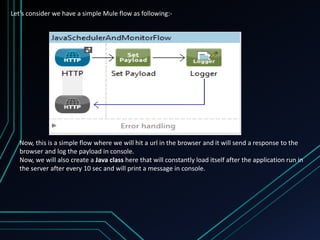
Let’s consider we have a simple Mule flow as following:-
Now, this is a simple flow where we will hit a url in the browser and it will send a response to the
browser and log the payload in console.
Now, we will also create a Java class here that will constantly load itself after the application run in
the server after every 10 sec and will print a message in console.
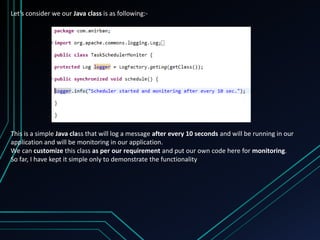
Let’s consider we our Java class is as following:-
This is a simple Java class that will log a message after every 10 seconds and will be running in our
application and will be monitoring in our application.
We can customize this class as per our requirement and put our own code here for monitoring.
So far, I have kept it simple only to demonstrate the functionality
So here is our Spring configuration in the Mule config that will trigger this class after every 10
second and keep the thread alive for monitoring and printing in the console:-
Here you can see the Spring task scheduler is scheduling the Java class after every 10 sec. Also
there is a Mule flow that will print the message in the browser and console if we hit the url
http://localhost:8082/test in browser
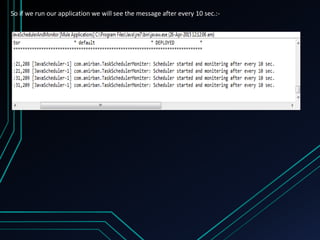
So if we run our application we will see the message after every 10 sec.:-
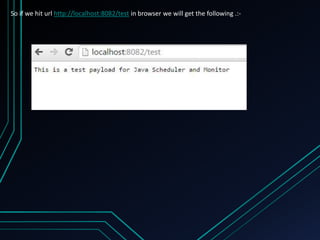
So if we hit url http://localhost:8082/test in browser we will get the following .:-
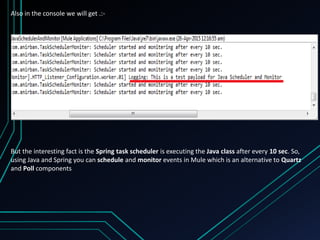
Also in the console we will get .:-
But the interesting fact is the Spring task scheduler is executing the Java class after every 10 sec. So,
using Java and Spring you can schedule and monitor events in Mule which is an alternative to Quartz
and Poll components
In my next slide I will bring some other techniques in Mule implementation .
Hope you have enjoyed this simpler version.
Keep sharing your knowledge and let our Mule community grow 

Using spring scheduler mule

  • 1.
  • 2.
    • The SpringFramework provides abstractions for asynchronous execution and scheduling of tasks with the TaskExecutor and TaskScheduler interfaces, respectively. Spring also features implementations of those interfaces that support thread pools or delegation to CommonJ within an application server environment. Ultimately the use of these implementations behind the common interfaces abstracts away the differences between Java SE 5, Java SE 6 and Java EE environments.
  • 3.
    We often geta requirement of scheduling a task or monitoring some event consistently when our application is running on server. In that case we need to create a thread in our application that will constantly monitor the event in our application and start the task after every fixed interval of time. In Mule we get plenty of options of doing it like using Quartz scheduler or Poll component etc. But what if we want to use our custom java class for that ???
  • 4.
    Yes, we cando a scheduling and monitoring activity using a Java class and Spring task scheduler in our Mule application….
  • 6.
    Let’s consider wehave a simple Mule flow as following:- Now, this is a simple flow where we will hit a url in the browser and it will send a response to the browser and log the payload in console. Now, we will also create a Java class here that will constantly load itself after the application run in the server after every 10 sec and will print a message in console.
  • 7.
    Let’s consider weour Java class is as following:- This is a simple Java class that will log a message after every 10 seconds and will be running in our application and will be monitoring in our application. We can customize this class as per our requirement and put our own code here for monitoring. So far, I have kept it simple only to demonstrate the functionality
  • 8.
    So here isour Spring configuration in the Mule config that will trigger this class after every 10 second and keep the thread alive for monitoring and printing in the console:- Here you can see the Spring task scheduler is scheduling the Java class after every 10 sec. Also there is a Mule flow that will print the message in the browser and console if we hit the url http://localhost:8082/test in browser
  • 9.
    So if werun our application we will see the message after every 10 sec.:-
  • 10.
    So if wehit url http://localhost:8082/test in browser we will get the following .:-
  • 11.
    Also in theconsole we will get .:- But the interesting fact is the Spring task scheduler is executing the Java class after every 10 sec. So, using Java and Spring you can schedule and monitor events in Mule which is an alternative to Quartz and Poll components
  • 12.
    In my nextslide I will bring some other techniques in Mule implementation . Hope you have enjoyed this simpler version. Keep sharing your knowledge and let our Mule community grow 