By Anirban Sen Chowdhary
We have earlier seen how to integrate Mule and ActiveMQ .
We have also seen how to send message to ActiveMQ queue from Mule with a
specific JMS priority and to fetch messages from ActiveMQ queue filtering a
particular JMS priority.
Here we will see how to filter messages to ActiveMQ from Groovy script with a
particular JMS priority
Yes, we can filter payload using Groovy script for the message from ActiveMQ
queue with a particular JMS priority ….
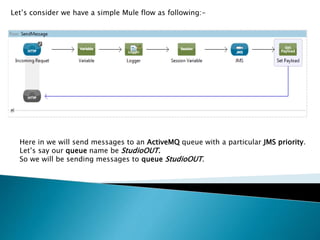
Let’s consider we have a simple Mule flow as following:-
Here in we will send messages to an ActiveMQ queue with a particular JMS priority.
Let’s say our queue name be StudioOUT.
So we will be sending messages to queue StudioOUT.
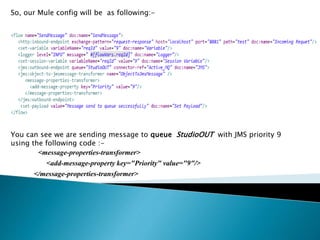
So, our Mule config will be as following:-
You can see we are sending message to queue StudioOUT with JMS priority 9
using the following code :-
<message-properties-transformer>
<add-message-property key="Priority" value="9"/>
</message-properties-transformer>
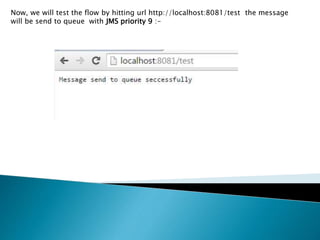
Now, we will test the flow by hitting url http://localhost:8081/test the message
will be send to queue with JMS priority 9 :-
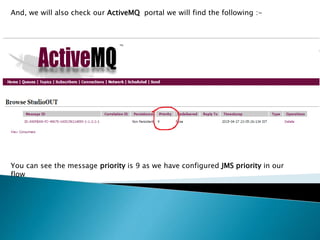
And, we will also check our ActiveMQ portal we will find the following :-
You can see the message priority is 9 as we have configured JMS priority in our
flow
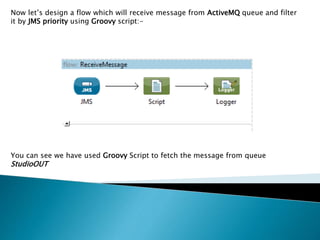
Now let’s design a flow which will receive message from ActiveMQ queue and filter
it by JMS priority using Groovy script:-
You can see we have used Groovy Script to fetch the message from queue
StudioOUT
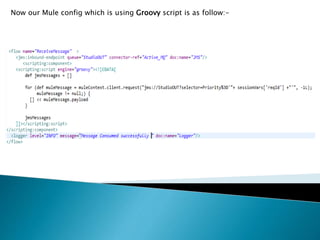
Now our Mule config which is using Groovy script is as follow:-
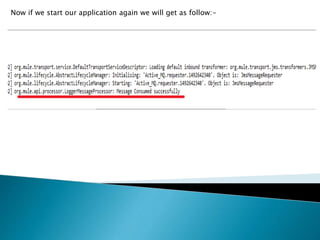
Now if we start our application again we will get as follow:-
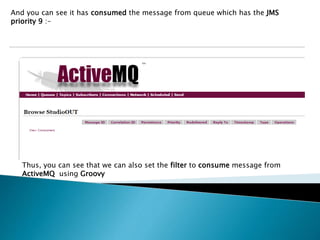
And you can see it has consumed the message from queue which has the JMS
priority 9 :-
Thus, you can see that we can also set the filter to consume message from
ActiveMQ using Groovy
In my next slide I will bring some other techniques in Mule implementation .
Hope you have enjoyed this simpler version.
Keep sharing your knowledge and let our Mule community grow 
Accessing jms in mule using groovy

Accessing jms in mule using groovy

  • 1.
    By Anirban SenChowdhary
  • 2.
    We have earlierseen how to integrate Mule and ActiveMQ . We have also seen how to send message to ActiveMQ queue from Mule with a specific JMS priority and to fetch messages from ActiveMQ queue filtering a particular JMS priority. Here we will see how to filter messages to ActiveMQ from Groovy script with a particular JMS priority
  • 3.
    Yes, we canfilter payload using Groovy script for the message from ActiveMQ queue with a particular JMS priority ….
  • 5.
    Let’s consider wehave a simple Mule flow as following:- Here in we will send messages to an ActiveMQ queue with a particular JMS priority. Let’s say our queue name be StudioOUT. So we will be sending messages to queue StudioOUT.
  • 6.
    So, our Muleconfig will be as following:- You can see we are sending message to queue StudioOUT with JMS priority 9 using the following code :- <message-properties-transformer> <add-message-property key="Priority" value="9"/> </message-properties-transformer>
  • 7.
    Now, we willtest the flow by hitting url http://localhost:8081/test the message will be send to queue with JMS priority 9 :-
  • 8.
    And, we willalso check our ActiveMQ portal we will find the following :- You can see the message priority is 9 as we have configured JMS priority in our flow
  • 9.
    Now let’s designa flow which will receive message from ActiveMQ queue and filter it by JMS priority using Groovy script:- You can see we have used Groovy Script to fetch the message from queue StudioOUT
  • 10.
    Now our Muleconfig which is using Groovy script is as follow:-
  • 11.
    Now if westart our application again we will get as follow:-
  • 12.
    And you cansee it has consumed the message from queue which has the JMS priority 9 :- Thus, you can see that we can also set the filter to consume message from ActiveMQ using Groovy
  • 13.
    In my nextslide I will bring some other techniques in Mule implementation . Hope you have enjoyed this simpler version. Keep sharing your knowledge and let our Mule community grow 