COMPOSITE SOURCE
IN-BOUND AND OUT-BOUND
• Use a composite message source:
<composite-source>
<file:inbound-endpoint ... />
<http:inbound-endpoint ... />
</composite-source>
• If you use CXF, you'll have to stick the service element inside the HTTP inbound
endpoint.
Mule Composite source is actually a scope that listen in parallel on different channels for
incoming messages. Whenever any of these receivers accepts a message, the Composite scope
passes it to the first message processor in the flow, thus triggering that flow.
So, we can say that the Composite source actually accommodate multiple inbound endpoints
such that it can trigger the flow if any of the inbound endpoint is triggered
Let’s consider we have a simple Mule flow as following:-
Here , we can see two inbound endpoints are there in the Composite source scope.
So, now our objective is to schedule a task using Quartz endpoint which will trigger the flow at a
fixed interval of time and print a message in logger. And at the same way we can use HTTP inbound
endpoint to trigger the same flow and achieve the same task !!
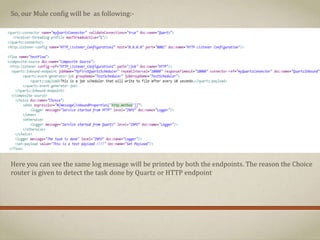
So, our Mule config will be as following:-
Here you can see the same log message will be printed by both the endpoints. The reason the Choice
router is given to detect the task done by Quartz or HTTP endpoint
So, if we run our flow, we will see the following in log :-
Here you can see the “The task is done “ message is printed in the console by the Quartz
endpoint after every 10 seconds that is scheduled. You can also see the message “Service
started from Quartz” which means the Quartz endpoint has triggered the service.
Now, if hit the url http://localhost:8081/job in the browser, we will get in the log:-
Here you can see the same “The task is done “ message is printed in the console by the HTTP
endpoint this time. You can also see the message “Service started from HTTP” which confirms
the HTTP endpoint has triggered the service. This is detected by our Choice router.
So, here you can see that we can use as many inbound endpoints in our flow to perform the
same task. We can accommodate HTTP, File, FTP, JMS etc together in a same flow
In my next slide I will bring some other techniques in Mule implementation .
Hope you have enjoyed this simpler version.
Keep sharing your knowledge and let our Mule community grow 

Composite source in bound and out-bound

  • 1.
  • 2.
    • Use acomposite message source: <composite-source> <file:inbound-endpoint ... /> <http:inbound-endpoint ... /> </composite-source> • If you use CXF, you'll have to stick the service element inside the HTTP inbound endpoint.
  • 3.
    Mule Composite sourceis actually a scope that listen in parallel on different channels for incoming messages. Whenever any of these receivers accepts a message, the Composite scope passes it to the first message processor in the flow, thus triggering that flow. So, we can say that the Composite source actually accommodate multiple inbound endpoints such that it can trigger the flow if any of the inbound endpoint is triggered
  • 4.
    Let’s consider wehave a simple Mule flow as following:- Here , we can see two inbound endpoints are there in the Composite source scope. So, now our objective is to schedule a task using Quartz endpoint which will trigger the flow at a fixed interval of time and print a message in logger. And at the same way we can use HTTP inbound endpoint to trigger the same flow and achieve the same task !!
  • 5.
    So, our Muleconfig will be as following:- Here you can see the same log message will be printed by both the endpoints. The reason the Choice router is given to detect the task done by Quartz or HTTP endpoint
  • 6.
    So, if werun our flow, we will see the following in log :- Here you can see the “The task is done “ message is printed in the console by the Quartz endpoint after every 10 seconds that is scheduled. You can also see the message “Service started from Quartz” which means the Quartz endpoint has triggered the service.
  • 7.
    Now, if hitthe url http://localhost:8081/job in the browser, we will get in the log:- Here you can see the same “The task is done “ message is printed in the console by the HTTP endpoint this time. You can also see the message “Service started from HTTP” which confirms the HTTP endpoint has triggered the service. This is detected by our Choice router.
  • 8.
    So, here youcan see that we can use as many inbound endpoints in our flow to perform the same task. We can accommodate HTTP, File, FTP, JMS etc together in a same flow
  • 9.
    In my nextslide I will bring some other techniques in Mule implementation . Hope you have enjoyed this simpler version. Keep sharing your knowledge and let our Mule community grow 