Anirban Sen Chowdhary
Mule 4 connecting RingCentral
RingCentral as we all familiar with, deals with different kind of APIs that
offers reliable VoIP calling, web meetings, fax, & more features over
cloud communication.
Mulesoft on other hand provides the most widely used integration
platform to help businesses connect data, applications and devices
across on-premises and cloud environment.
The most recent version of Mulesoft is Mule version 4 or simply called
Mule 4 which simplifies the expression language and reduces
management complexity compared to it's previous versions.
In this blog we will see a simple demo of Mule 4 connecting RingCentral
APIs. We will connect RingCentral send SMS API with Mule 4 and will
try to send SMS from Mule 4 application.
Mule 4 has a great improvement compared to it's previous versions
that includes many features like:
• Seamless access to data with new expression
• Repeatable streaming which is a new feature
• New error handling features
• Self-tuning capabilities like threading, exchange pattern etc
• New connectors
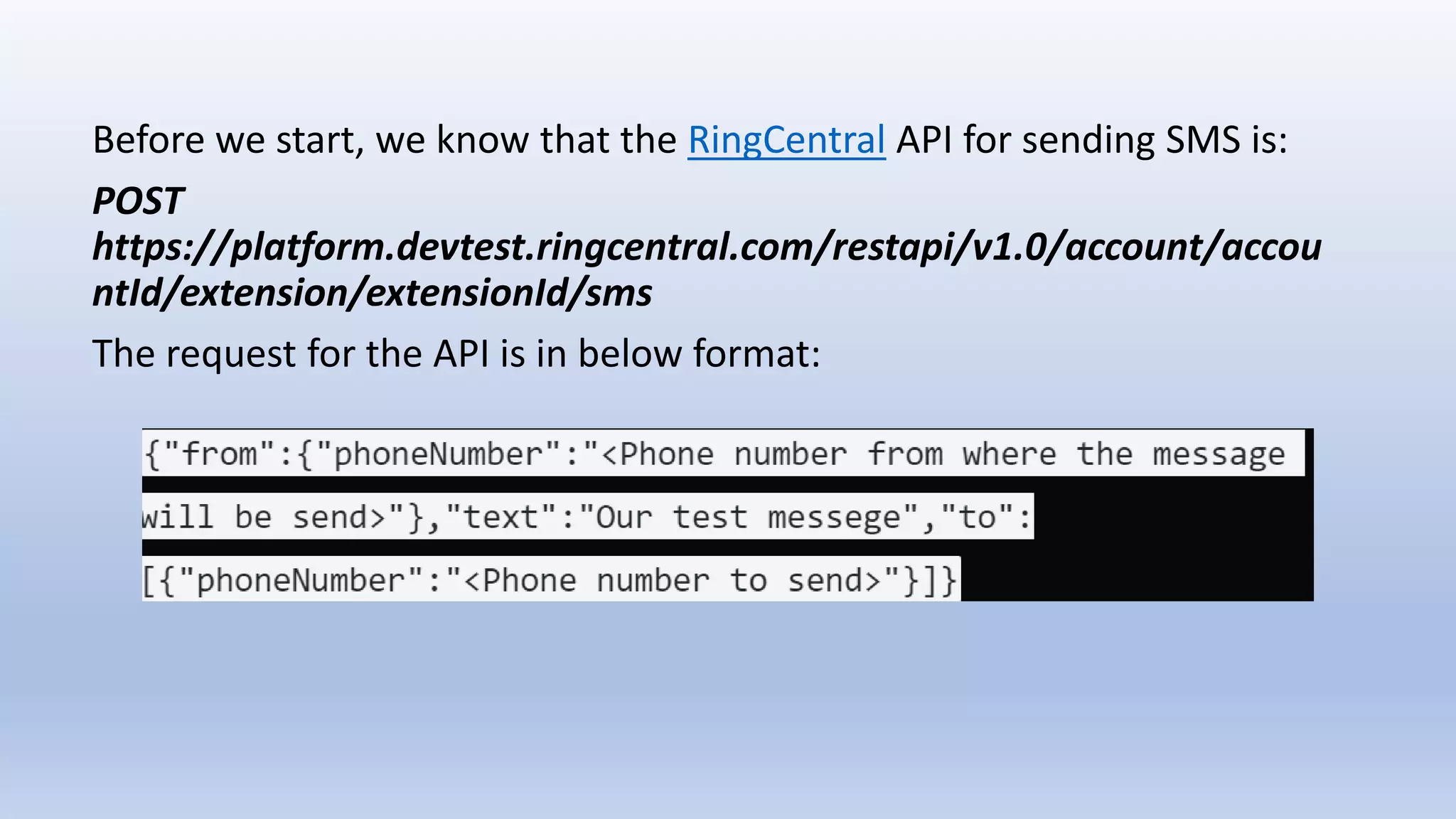
Before we start, we know that the RingCentral API for sending SMS is:
POST
https://platform.devtest.ringcentral.com/restapi/v1.0/account/accou
ntId/extension/extensionId/sms
The request for the API is in below format:
Let's start by creating a new application in Mule 4 as below:
Once the application is created, we will create a following flow with a
Http listner, a payload transformer that will transform every incoming
payload request into json mime type followed by a Http request
component which will call the external RingCentral send SMS API as
below:
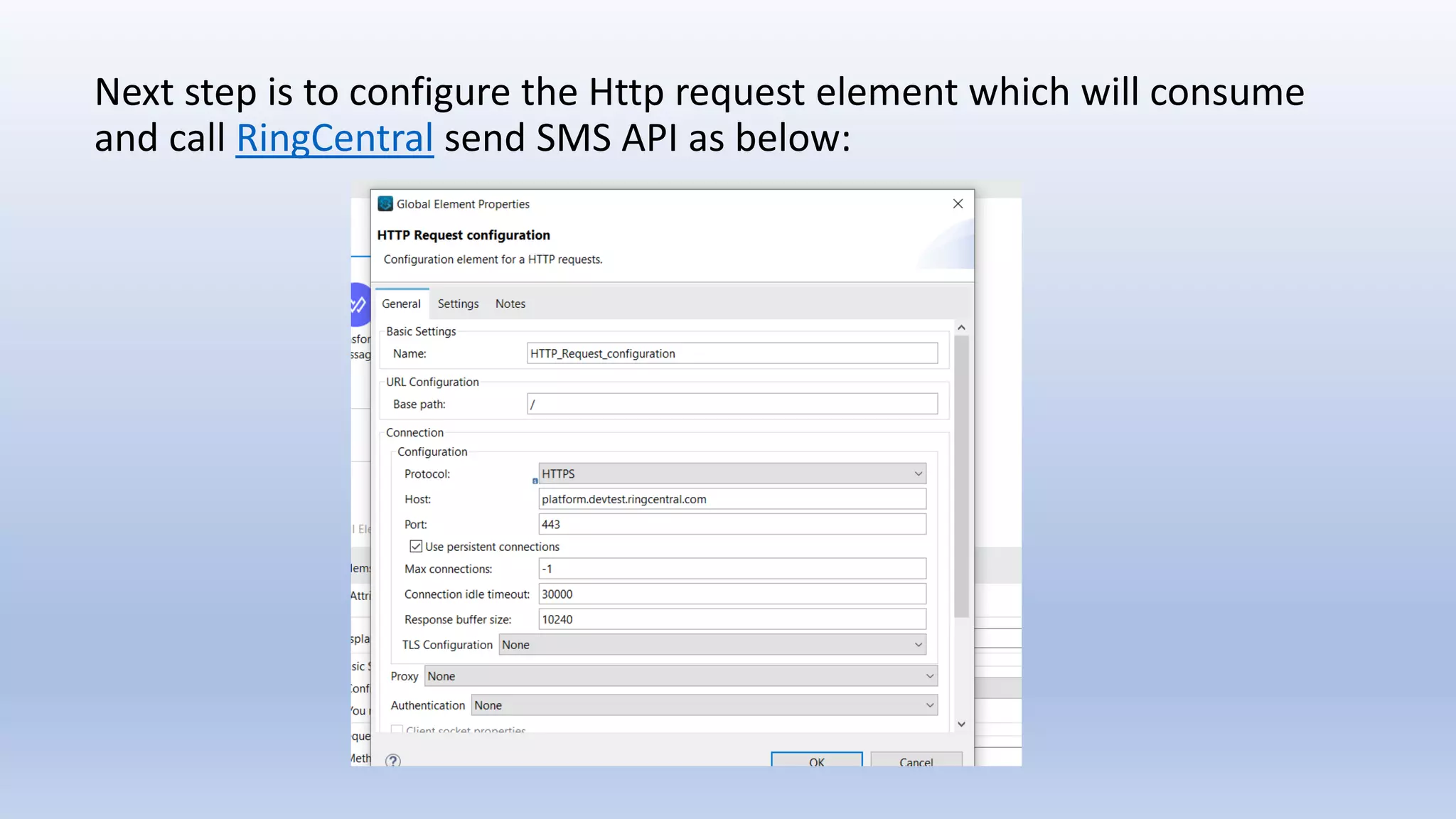
Next step is to configure the Http request element which will consume
and call RingCentral send SMS API as below:
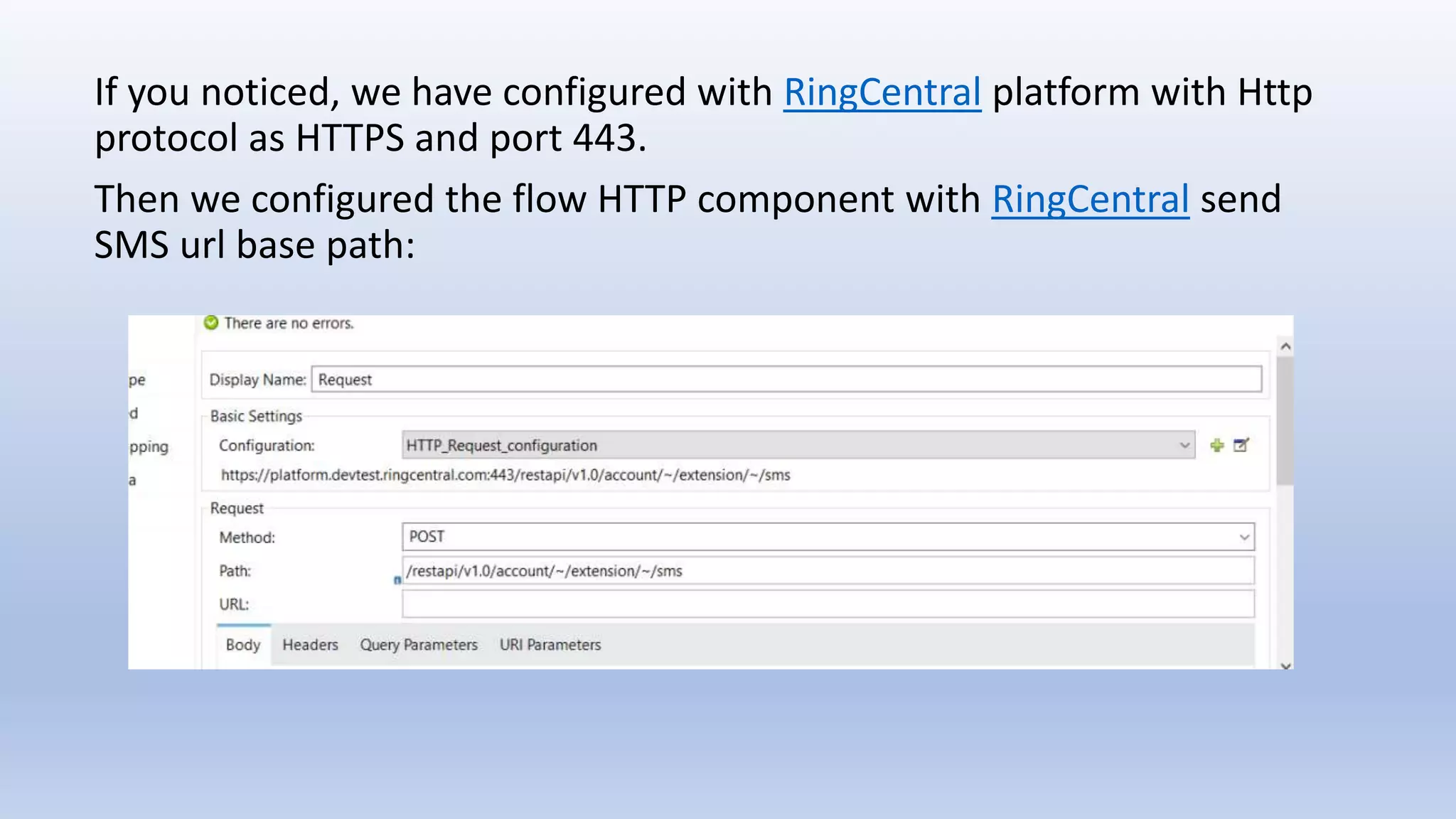
If you noticed, we have configured with RingCentral platform with Http
protocol as HTTPS and port 443.
Then we configured the flow HTTP component with RingCentral send
SMS url base path:
Configuring Authentication
The last step before we call the RingCentral send SMS API via Mule 4
application, we need to configure the Authentication part as every
RingCentral API is secured with Oauth.
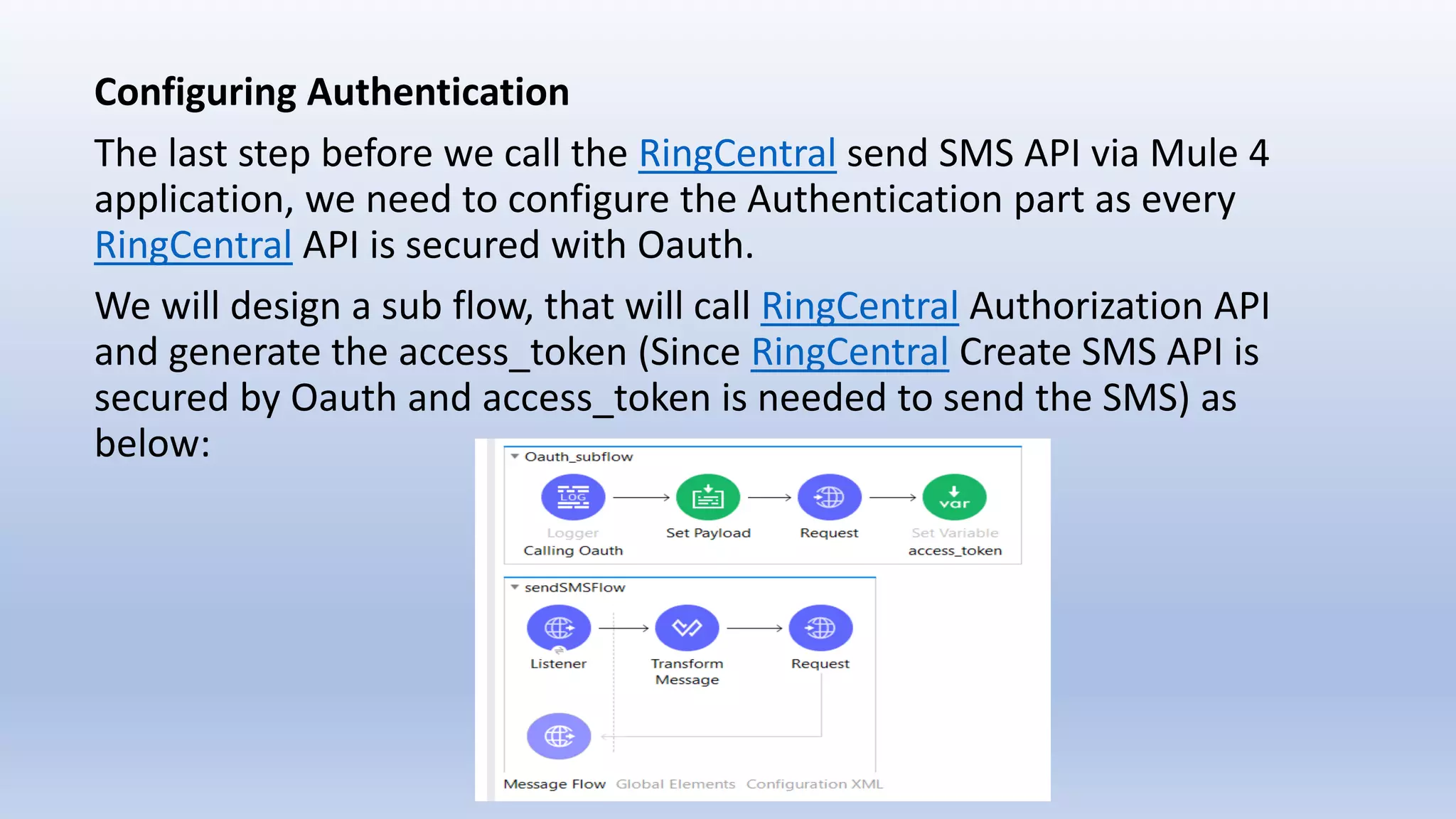
We will design a sub flow, that will call RingCentral Authorization API
and generate the access_token (Since RingCentral Create SMS API is
secured by Oauth and access_token is needed to send the SMS) as
below:
Here in this sub flow also have a Http component that calls RingCentral
Authorization API and collect the access_token in a variable. This
access_token variable will be internally pass to RingCentral Create SMS
API when we call that in our main flow (SendSMS).
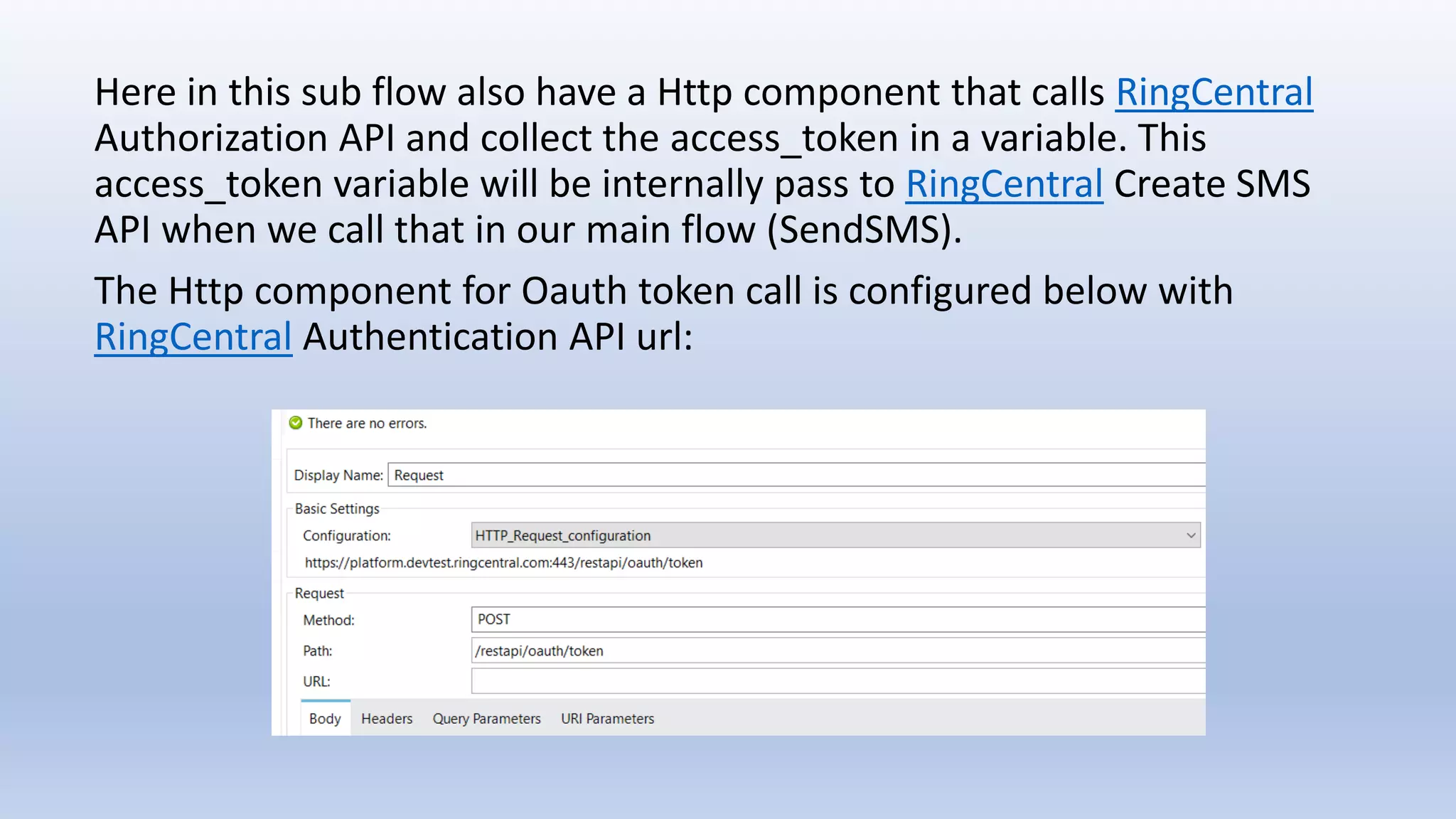
The Http component for Oauth token call is configured below with
RingCentral Authentication API url:
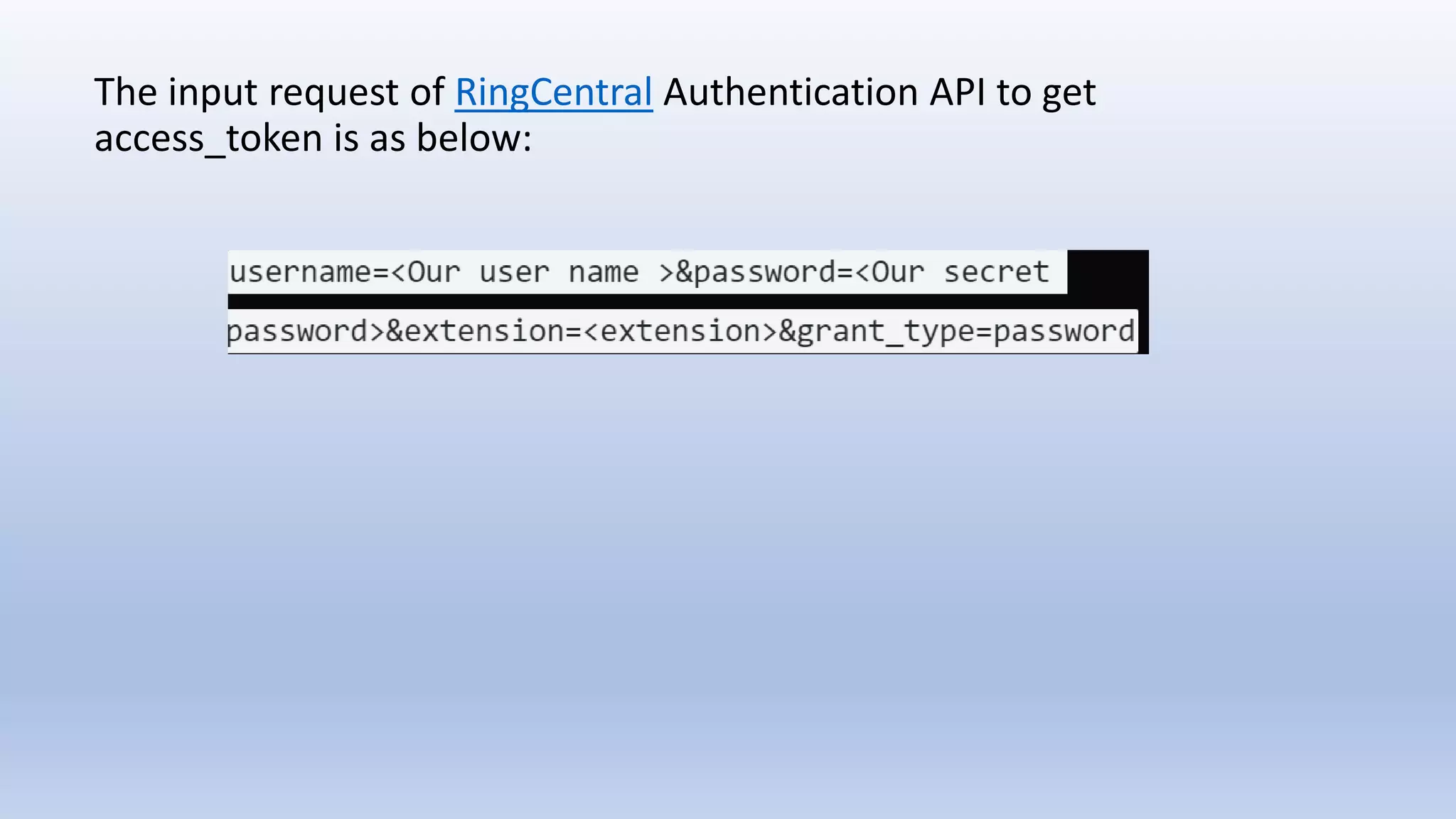
The input request of RingCentral Authentication API to get
access_token is as below:
In the main flow, we call this Oauth sub flow before we call RingCentral
send SMS API to get the access_token and send the SMS text as below
via flow reference:
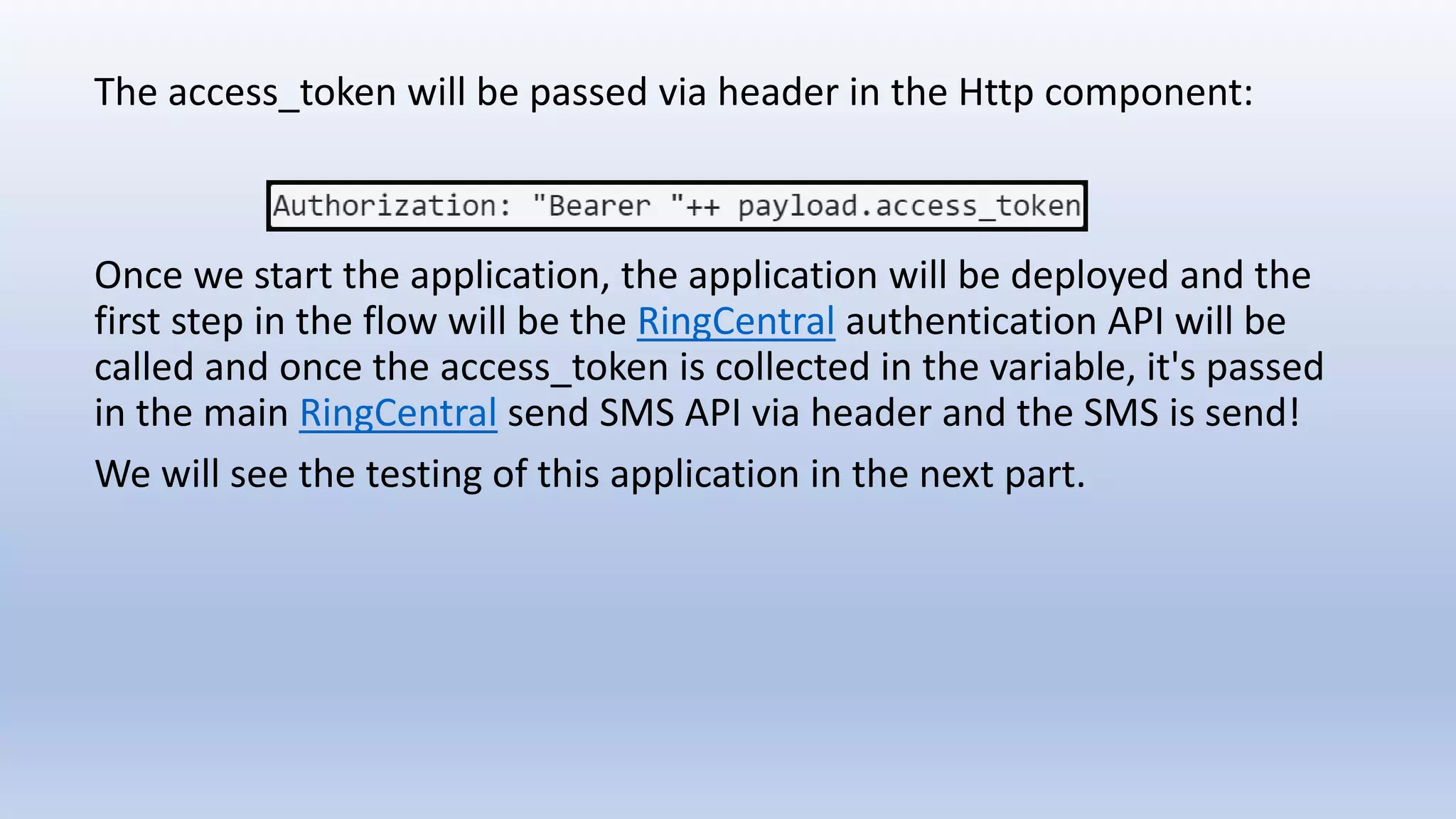
The access_token will be passed via header in the Http component:
Once we start the application, the application will be deployed and the
first step in the flow will be the RingCentral authentication API will be
called and once the access_token is collected in the variable, it's passed
in the main RingCentral send SMS API via header and the SMS is send!
We will see the testing of this application in the next part.
Mule 4 connecting ring central

Mule 4 connecting ring central

  • 1.
    Anirban Sen Chowdhary Mule4 connecting RingCentral
  • 2.
    RingCentral as weall familiar with, deals with different kind of APIs that offers reliable VoIP calling, web meetings, fax, & more features over cloud communication. Mulesoft on other hand provides the most widely used integration platform to help businesses connect data, applications and devices across on-premises and cloud environment.
  • 3.
    The most recentversion of Mulesoft is Mule version 4 or simply called Mule 4 which simplifies the expression language and reduces management complexity compared to it's previous versions. In this blog we will see a simple demo of Mule 4 connecting RingCentral APIs. We will connect RingCentral send SMS API with Mule 4 and will try to send SMS from Mule 4 application.
  • 4.
    Mule 4 hasa great improvement compared to it's previous versions that includes many features like: • Seamless access to data with new expression • Repeatable streaming which is a new feature • New error handling features • Self-tuning capabilities like threading, exchange pattern etc • New connectors
  • 5.
    Before we start,we know that the RingCentral API for sending SMS is: POST https://platform.devtest.ringcentral.com/restapi/v1.0/account/accou ntId/extension/extensionId/sms The request for the API is in below format:
  • 6.
    Let's start bycreating a new application in Mule 4 as below:
  • 7.
    Once the applicationis created, we will create a following flow with a Http listner, a payload transformer that will transform every incoming payload request into json mime type followed by a Http request component which will call the external RingCentral send SMS API as below:
  • 8.
    Next step isto configure the Http request element which will consume and call RingCentral send SMS API as below:
  • 9.
    If you noticed,we have configured with RingCentral platform with Http protocol as HTTPS and port 443. Then we configured the flow HTTP component with RingCentral send SMS url base path:
  • 10.
    Configuring Authentication The laststep before we call the RingCentral send SMS API via Mule 4 application, we need to configure the Authentication part as every RingCentral API is secured with Oauth. We will design a sub flow, that will call RingCentral Authorization API and generate the access_token (Since RingCentral Create SMS API is secured by Oauth and access_token is needed to send the SMS) as below:
  • 11.
    Here in thissub flow also have a Http component that calls RingCentral Authorization API and collect the access_token in a variable. This access_token variable will be internally pass to RingCentral Create SMS API when we call that in our main flow (SendSMS). The Http component for Oauth token call is configured below with RingCentral Authentication API url:
  • 12.
    The input requestof RingCentral Authentication API to get access_token is as below:
  • 13.
    In the mainflow, we call this Oauth sub flow before we call RingCentral send SMS API to get the access_token and send the SMS text as below via flow reference:
  • 14.
    The access_token willbe passed via header in the Http component: Once we start the application, the application will be deployed and the first step in the flow will be the RingCentral authentication API will be called and once the access_token is collected in the variable, it's passed in the main RingCentral send SMS API via header and the SMS is send! We will see the testing of this application in the next part.