


By Anirban Sen Chowdhary
Mule ESB has the ability to split a long and big message into small parts.
It can be done by Mule Splitter .
The Splitter Flow Control splits a message into separate fragments, then sends
these fragments one at a time to the next message processor in the flow.
So, ultimately Splitter a breaks a huge and large message into small part and that
small part can be handled individually.
In last post we have seen this splitter with an XML input.. This part we will see it
with a JSON input
Let us consider we have following JSON data as input:-
{
"getInsertOperation": {
"getInsertContext": {
"messageId": "21",
"messageDateTime": "2014-08-17T14:07:30+0521"
},
"getInsertBody": {
"getInsertRequest": {
"userId": "test123",
"events": [
{
"eventId": 1,
"eventTimestamp": "2015-06-17T14:07:30+0521"
},
{
"eventId": 2,
"eventTimestamp": "2014-12-17T14:07:30+0521"
},
{
"eventId": 0,
"eventTimestamp": "2013-08-17T14:07:30+0521"
}
]
}
}
}
}
Now, you can this JSON has a list of elements as eventId and eventTimestamp
which is repeating.
So, in this case we will be splitting the JSON and log all the eventId and
eventTimestamp in console
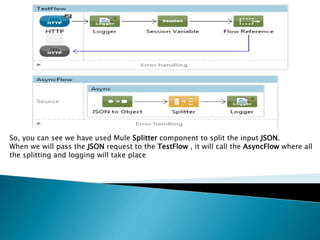
So, you can see we have used Mule Splitter component to split the input JSON.
When we will pass the JSON request to the TestFlow , it will call the AsyncFlow where all
the splitting and logging will take place
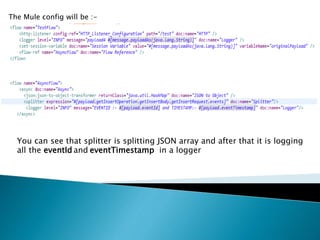
The Mule config will be :-
You can see that splitter is splitting JSON array and after that it is logging
all the eventId and eventTimestamp in a logger
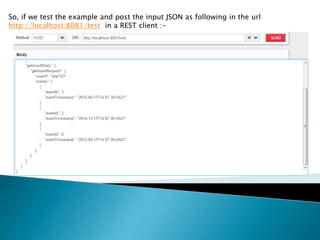
So, if we test the example and post the input JSON as following in the url
http://localhost:8081/test in a REST client :-
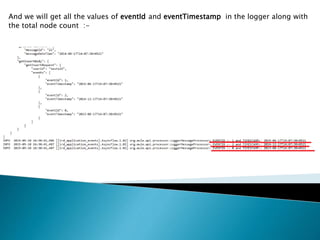
And we will get all the values of eventId and eventTimestamp in the logger along with
the total node count :-
So, here you can see how to use a Mule splitter and split the large payload into
smaller independent value whether it is in XML or in JSON format. It’s pretty simple
and effective in handling larges set of data 
In my next slide I will bring some other techniques in Mule implementation .
Hope you have enjoyed this simpler version.
Keep sharing your knowledge and let our Mule community grow 
Splitting with mule part2

Splitting with mule part2

  • 1.
    By Anirban SenChowdhary
  • 2.
    Mule ESB hasthe ability to split a long and big message into small parts. It can be done by Mule Splitter . The Splitter Flow Control splits a message into separate fragments, then sends these fragments one at a time to the next message processor in the flow. So, ultimately Splitter a breaks a huge and large message into small part and that small part can be handled individually. In last post we have seen this splitter with an XML input.. This part we will see it with a JSON input
  • 4.
    Let us considerwe have following JSON data as input:- { "getInsertOperation": { "getInsertContext": { "messageId": "21", "messageDateTime": "2014-08-17T14:07:30+0521" }, "getInsertBody": { "getInsertRequest": { "userId": "test123", "events": [ { "eventId": 1, "eventTimestamp": "2015-06-17T14:07:30+0521" }, { "eventId": 2, "eventTimestamp": "2014-12-17T14:07:30+0521" }, { "eventId": 0, "eventTimestamp": "2013-08-17T14:07:30+0521" } ] } } } }
  • 5.
    Now, you canthis JSON has a list of elements as eventId and eventTimestamp which is repeating. So, in this case we will be splitting the JSON and log all the eventId and eventTimestamp in console
  • 6.
    So, you cansee we have used Mule Splitter component to split the input JSON. When we will pass the JSON request to the TestFlow , it will call the AsyncFlow where all the splitting and logging will take place
  • 7.
    The Mule configwill be :- You can see that splitter is splitting JSON array and after that it is logging all the eventId and eventTimestamp in a logger
  • 8.
    So, if wetest the example and post the input JSON as following in the url http://localhost:8081/test in a REST client :-
  • 9.
    And we willget all the values of eventId and eventTimestamp in the logger along with the total node count :-
  • 10.
    So, here youcan see how to use a Mule splitter and split the large payload into smaller independent value whether it is in XML or in JSON format. It’s pretty simple and effective in handling larges set of data 
  • 11.
    In my nextslide I will bring some other techniques in Mule implementation . Hope you have enjoyed this simpler version. Keep sharing your knowledge and let our Mule community grow 