Mule ESB
How to build a Hello World Soap Service in 5 minutes
Gennaro Spagnoli - 2016
Contents
 Overview
 Creating the service interface
 Creating the service implementation
 Configuring the HTTP component
 Configuring the CXF component
 Configuring the Java component
 Deployment and testing
Gennaro Spagnoli - 2016
Overview
The goal of the tutorial is to create a simple HelloWorld Web Service using Anypoint Studio and
Mule Esb.
The Soap Service implementation on Mule ESB is based on CXF Framework:
https://cxf.apache.org/
To understand this tutorial you will just need to have a basic knowledge on the JAX-WS api, which
CXF is based on, and some familiarity on flows creation and configuration on Anypoint Studio:
https://jax-ws.java.net/
Gennaro Spagnoli - 2016
Creating the service interface
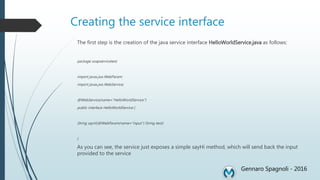
The first step is the creation of the java service interface HelloWorldService.java as follows:
package soapservicetest;
import javax.jws.WebParam;
import javax.jws.WebService;
@WebService(name="HelloWorldService")
public interface HelloWorldService {
String sayHi(@WebParam(name="input") String text);
}
As you can see, the service just exposes a simple sayHi method, which will send back the input
provided to the service
Gennaro Spagnoli - 2016
Creating the service implementation
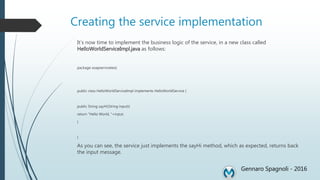
It’s now time to implement the business logic of the service, in a new class called
HelloWorldServiceImpl.java as follows:
package soapservicetest;
public class HelloWorldServiceImpl implements HelloWorldService {
public String sayHi(String input){
return "Hello World, "+input;
}
}
As you can see, the service just implements the sayHi method, which as expected, returns back
the input message.
Gennaro Spagnoli - 2016
Configuring the HTTP component
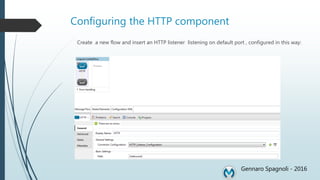
Create a new flow and insert an HTTP listener listening on default port , configured in this way:
Gennaro Spagnoli - 2016
Configuring the CXF component
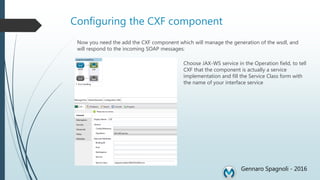
Now you need the add the CXF component which will manage the generation of the wsdl, and
will respond to the incoming SOAP messages:
e
Gennaro Spagnoli - 2016
Choose JAX-WS service in the Operation field, to tell
CXF that the component is actually a service
implementation and fill the Service Class form with
the name of your interface service
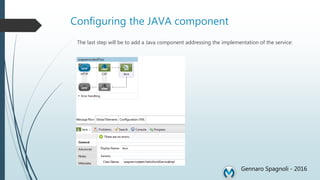
Configuring the JAVA component
The last step will be to add a Java component addressing the implementation of the service:
Gennaro Spagnoli - 2016
Deployment and testing
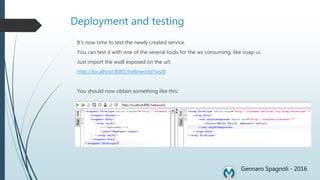
It’s now time to test the newly created service.
You can test it with one of the several tools for the ws consuming, like soap-ui.
Just import the wsdl exposed on the url:
http://localhost:8081/helloworld?wsdl
You should now obtain something like this:
Gennaro Spagnoli - 2016

Mule esb soap_service

  • 1.
    Mule ESB How tobuild a Hello World Soap Service in 5 minutes Gennaro Spagnoli - 2016
  • 2.
    Contents  Overview  Creatingthe service interface  Creating the service implementation  Configuring the HTTP component  Configuring the CXF component  Configuring the Java component  Deployment and testing Gennaro Spagnoli - 2016
  • 3.
    Overview The goal ofthe tutorial is to create a simple HelloWorld Web Service using Anypoint Studio and Mule Esb. The Soap Service implementation on Mule ESB is based on CXF Framework: https://cxf.apache.org/ To understand this tutorial you will just need to have a basic knowledge on the JAX-WS api, which CXF is based on, and some familiarity on flows creation and configuration on Anypoint Studio: https://jax-ws.java.net/ Gennaro Spagnoli - 2016
  • 4.
    Creating the serviceinterface The first step is the creation of the java service interface HelloWorldService.java as follows: package soapservicetest; import javax.jws.WebParam; import javax.jws.WebService; @WebService(name="HelloWorldService") public interface HelloWorldService { String sayHi(@WebParam(name="input") String text); } As you can see, the service just exposes a simple sayHi method, which will send back the input provided to the service Gennaro Spagnoli - 2016
  • 5.
    Creating the serviceimplementation It’s now time to implement the business logic of the service, in a new class called HelloWorldServiceImpl.java as follows: package soapservicetest; public class HelloWorldServiceImpl implements HelloWorldService { public String sayHi(String input){ return "Hello World, "+input; } } As you can see, the service just implements the sayHi method, which as expected, returns back the input message. Gennaro Spagnoli - 2016
  • 6.
    Configuring the HTTPcomponent Create a new flow and insert an HTTP listener listening on default port , configured in this way: Gennaro Spagnoli - 2016
  • 7.
    Configuring the CXFcomponent Now you need the add the CXF component which will manage the generation of the wsdl, and will respond to the incoming SOAP messages: e Gennaro Spagnoli - 2016 Choose JAX-WS service in the Operation field, to tell CXF that the component is actually a service implementation and fill the Service Class form with the name of your interface service
  • 8.
    Configuring the JAVAcomponent The last step will be to add a Java component addressing the implementation of the service: Gennaro Spagnoli - 2016
  • 9.
    Deployment and testing It’snow time to test the newly created service. You can test it with one of the several tools for the ws consuming, like soap-ui. Just import the wsdl exposed on the url: http://localhost:8081/helloworld?wsdl You should now obtain something like this: Gennaro Spagnoli - 2016