
By Anirban Sen Chowdhary
Mule ESB is one of the wonderful applications which easily gel with ActiveMQ. We
will get plenty of examples on internet that will show how to useActiveMQ with
Mule. But here I will demonstrate how use filter with ActiveMQ and Mule.
We can filter JMS messages on based on JMS properties like JMS priority, JMS Type
and Headers etc. We will first look into how we can filter JMS messages on based on
JMS priority and then with Header.
Now, we will start by creating a Mule flow which will send messages to the queue in
ActiveMQ with a customisable JMS priority. Let’s consider we will send messages to
the queue whose JMS priority will be say 9.
So, first we will create a Mule flow that will send messages to the queue of ActiveMQ.
Consider the following flow :-
<jms:activemq-connector name=“Active_MQ” numberOfConcurrentTransactedReceivers=“20”
brokerURL=“tcp://localhost:61616″/>
<flow name=“JMSSender” doc:name=“JMSSender”>
<http:inbound-endpoint exchange-pattern=“request-
response” host=“localhost”port=“8081” path=“jms” doc:name=“HTTP”/>
<logger message=“Payload :- #[message.payload]” level=“INFO” doc:name=“Logger”/>
<jms:outbound-endpoint queue=“MyQueue” connector-ref=“Active_MQ” doc:name=“JMS”>
</jms:outbound-endpoint>
</flow>
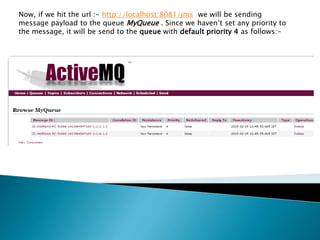
Now, if we hit the url :- http://localhost:8081/jms we will be sending
message payload to the queue MyQueue . Since we haven’t set any priority to
the message, it will be send to the queue with default priority 4 as follows:-
So, here we will be setting priority in our message payload. To set priority in our
payload we will be configuring it as following:-
<message-properties-transformer>
<add-message-property key=“Priority” value=“9”/>
</message-properties-transformer>
As you can see, we are trying to set the message priority to 9.
So, our entire flow configuration will be :-
<flow name=“JMSSender” doc:name=“JMSSender”>
<http:inbound-endpoint exchange-pattern=“request-
response” host=“localhost”port=“8081” path=“jms” doc:name=“HTTP”/>
<logger message=“Payload :- #[message.payload]” level=“INFO”doc:name=“Logger”/>
<jms:outbound-endpoint queue=“MyQueue” connector-ref=“Active_MQ”doc:name=“JMS”>
<message-properties-transformer>
<add-message-property key=“Priority” value=“9”/>
</message-properties-transformer>
</jms:outbound-endpoint>
</flow>
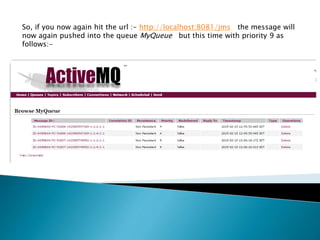
So, if you now again hit the url :- http://localhost:8081/jms the message will
now again pushed into the queue MyQueue but this time with priority 9 as
follows:-
Since we can define our own JMS priority to the messages that we push into the
queue, we can now consume the message from the queue based on the JMS
priority. That means we can now filter the message from queue based on JMS
priority.
So, here will be now creating a flow that will consume messages from JMS queue based
on priority. That means we will be consuming messages from queue MyQueue whose
JMS priority is 9. We will be using jms:selector here to filter JMS messages as follows :-
<flow name=“JMSReceiver” doc:name=“JMSReceiver”>
<jms:inbound-endpoint connector-ref=“Active_MQ” doc:name=“JMS” exchange-
pattern=“request-response” address=“jms://tcp:MyQueue”>
<jms:selector expression=“JMSPriority = 9”/>
</jms:inbound-endpoint>
<logger level=“INFO” message=“Received Payload :-#[message.payload]” doc:name=“Logger”/>
</flow>
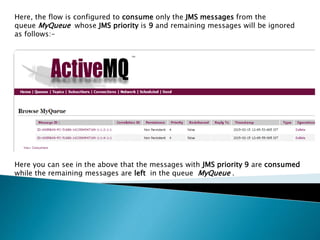
Here, the flow is configured to consume only the JMS messages from the
queue MyQueue whose JMS priority is 9 and remaining messages will be ignored
as follows:-
Here you can see in the above that the messages with JMS priority 9 are consumed
while the remaining messages are left in the queue MyQueue .
In the similar way we can also configure the JMS messages by setting JMS header
as follows:-
<message-properties-transformer>
<add-message-property key=“Header” value=“Custom-Header” />
</message-properties-transformer>
And then consume it based on the Header:-
<jms:inbound-endpoint connector-ref=“Active_MQ” doc:name=“JMS”exchange-
pattern=“request-response” address=“jms://tcp:MyQueue”>
<jms:selector expression=“Header = ‘Custom-Header'”/>
</jms:inbound-endpoint>
So here messages from queue will be consumed only if its header is ‘Custom-
Header’
I hope I am clear enough to demonstrate the way to configure JMS
messages with JMS properties and consuming the messages based on
the properties by applying filters.
Now, you can experiment your own way and configure JMS messages
and implement the example .
Filtering jms messages with mule

Filtering jms messages with mule

  • 1.
    By Anirban SenChowdhary
  • 2.
    Mule ESB isone of the wonderful applications which easily gel with ActiveMQ. We will get plenty of examples on internet that will show how to useActiveMQ with Mule. But here I will demonstrate how use filter with ActiveMQ and Mule.
  • 3.
    We can filterJMS messages on based on JMS properties like JMS priority, JMS Type and Headers etc. We will first look into how we can filter JMS messages on based on JMS priority and then with Header.
  • 4.
    Now, we willstart by creating a Mule flow which will send messages to the queue in ActiveMQ with a customisable JMS priority. Let’s consider we will send messages to the queue whose JMS priority will be say 9.
  • 5.
    So, first wewill create a Mule flow that will send messages to the queue of ActiveMQ. Consider the following flow :- <jms:activemq-connector name=“Active_MQ” numberOfConcurrentTransactedReceivers=“20” brokerURL=“tcp://localhost:61616″/> <flow name=“JMSSender” doc:name=“JMSSender”> <http:inbound-endpoint exchange-pattern=“request- response” host=“localhost”port=“8081” path=“jms” doc:name=“HTTP”/> <logger message=“Payload :- #[message.payload]” level=“INFO” doc:name=“Logger”/> <jms:outbound-endpoint queue=“MyQueue” connector-ref=“Active_MQ” doc:name=“JMS”> </jms:outbound-endpoint> </flow>
  • 6.
    Now, if wehit the url :- http://localhost:8081/jms we will be sending message payload to the queue MyQueue . Since we haven’t set any priority to the message, it will be send to the queue with default priority 4 as follows:-
  • 7.
    So, here wewill be setting priority in our message payload. To set priority in our payload we will be configuring it as following:- <message-properties-transformer> <add-message-property key=“Priority” value=“9”/> </message-properties-transformer> As you can see, we are trying to set the message priority to 9.
  • 8.
    So, our entireflow configuration will be :- <flow name=“JMSSender” doc:name=“JMSSender”> <http:inbound-endpoint exchange-pattern=“request- response” host=“localhost”port=“8081” path=“jms” doc:name=“HTTP”/> <logger message=“Payload :- #[message.payload]” level=“INFO”doc:name=“Logger”/> <jms:outbound-endpoint queue=“MyQueue” connector-ref=“Active_MQ”doc:name=“JMS”> <message-properties-transformer> <add-message-property key=“Priority” value=“9”/> </message-properties-transformer> </jms:outbound-endpoint> </flow>
  • 9.
    So, if younow again hit the url :- http://localhost:8081/jms the message will now again pushed into the queue MyQueue but this time with priority 9 as follows:-
  • 10.
    Since we candefine our own JMS priority to the messages that we push into the queue, we can now consume the message from the queue based on the JMS priority. That means we can now filter the message from queue based on JMS priority.
  • 11.
    So, here willbe now creating a flow that will consume messages from JMS queue based on priority. That means we will be consuming messages from queue MyQueue whose JMS priority is 9. We will be using jms:selector here to filter JMS messages as follows :- <flow name=“JMSReceiver” doc:name=“JMSReceiver”> <jms:inbound-endpoint connector-ref=“Active_MQ” doc:name=“JMS” exchange- pattern=“request-response” address=“jms://tcp:MyQueue”> <jms:selector expression=“JMSPriority = 9”/> </jms:inbound-endpoint> <logger level=“INFO” message=“Received Payload :-#[message.payload]” doc:name=“Logger”/> </flow>
  • 12.
    Here, the flowis configured to consume only the JMS messages from the queue MyQueue whose JMS priority is 9 and remaining messages will be ignored as follows:- Here you can see in the above that the messages with JMS priority 9 are consumed while the remaining messages are left in the queue MyQueue .
  • 13.
    In the similarway we can also configure the JMS messages by setting JMS header as follows:- <message-properties-transformer> <add-message-property key=“Header” value=“Custom-Header” /> </message-properties-transformer> And then consume it based on the Header:- <jms:inbound-endpoint connector-ref=“Active_MQ” doc:name=“JMS”exchange- pattern=“request-response” address=“jms://tcp:MyQueue”> <jms:selector expression=“Header = ‘Custom-Header'”/> </jms:inbound-endpoint> So here messages from queue will be consumed only if its header is ‘Custom- Header’
  • 14.
    I hope Iam clear enough to demonstrate the way to configure JMS messages with JMS properties and consuming the messages based on the properties by applying filters. Now, you can experiment your own way and configure JMS messages and implement the example .