






SQL Server 2012 and
SharePoint 2010:
Reporting Nirvana
Randy Williams
Director of AvePoint Client Services
Randy Williams


  Author         Director of ACS
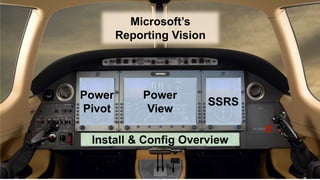
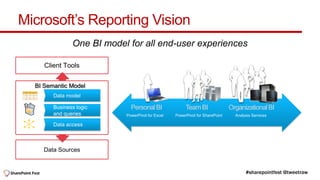
Microsoft’s Reporting Vision
              One BI model for all end-user experiences

     Client Tools


  BI Semantic Model


                            Personal BI               Team BI                Organizational BI
                          PowerPivot for Excel   PowerPivot for SharePoint     Analysis Services


     Data Sources
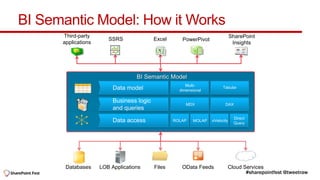
BI Semantic Model: How it Works
      Third-party                                                           SharePoint
                        SSRS            Excel      PowerPivot
      applications                                                           Insights


                                                     Multi-           Tabular
                                                  dimensional


                                                     MDX               DAX


                                                                             Direct
                                                ROLAP   MOLAP   xVelocity
                                                                             Query


       Databases     LOB Applications   Files      OData Feeds          Cloud Services
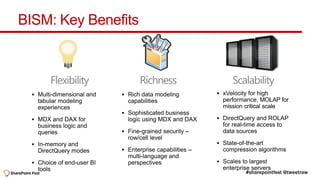
BISM: Key Benefits


    Flexibility      Richness   Scalability
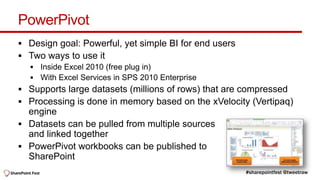
PowerPivot
 Design goal: Powerful, yet simple BI for end users
 Two ways to use it


 Supports large datasets (millions of rows) that are compressed
 Processing is done in memory based on the xVelocity (Vertipaq)
  engine
 Datasets can be pulled from multiple sources
  and linked together
 PowerPivot workbooks can be published to
  SharePoint
What’s new with PowerPivot v2?
   KPI’s
   Diagram view for managing relationships
   Hierarchies
   More robust architecture


 Configuration Tool 
 Full support for BISM, including tabular models
Demo

       PowerPivot
Power View
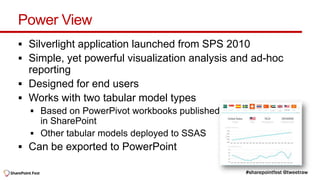
 Silverlight application launched from SPS 2010
 Simple, yet powerful visualization analysis and ad-hoc
  reporting
 Designed for end users
 Works with two tabular model types


 Can be exported to PowerPoint
Power View – important concepts
 Part of Reporting Services in SQL 2012
 It’s presentation ready at all times
 Reports are designed for the screen
 It’s fun because it’s smart and simple
 Requires a basic understanding of Pivot Tables
 Does not replace Report Builder or SSDT (BIDS)
 Does not replace Performance Point or other high-end analysis
  tools
 Remember, it’s Silverlight based (sorry, no iPad… yet)
Demo

       Power View
SQL Server Reporting Services
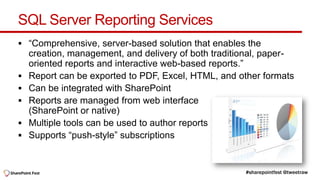
 “Comprehensive, server-based solution that enables the
    creation, management, and delivery of both traditional, paper-
    oriented reports and interactive web-based reports.”
   Report can be exported to PDF, Excel, HTML, and other formats
   Can be integrated with SharePoint
   Reports are managed from web interface
    (SharePoint or native)
   Multiple tools can be used to author reports
   Supports “push-style” subscriptions
What’s new with SSRS 2012
 Did I mention Power View?
 Integration with SharePoint is now done with a service app
 Ability to run native and SharePoint integration side-by-side

 Open XML-based rendering of Word (.docx) and Excel (.xlsx)
 Data alerts notify you when defined patterns are found
 Performance optimizations
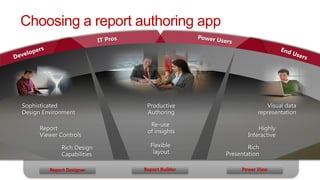
Choosing a report authoring app


    Report Designer   Report Builder   Power View
Demo

       SSRS 2012
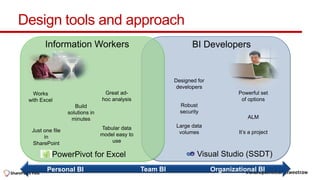
Design tools and approach


    Personal BI   Team BI   Organizational BI
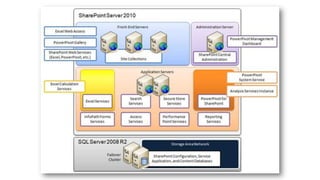
Basic install & config steps
     Be sure you are running SharePoint Server 2010 Enterprise with
                                 SP1
1.    On app server(s), install PowerPivot for SharePoint
2.    On WFE servers, install SQL Server 2012 Add-in for SharePoint
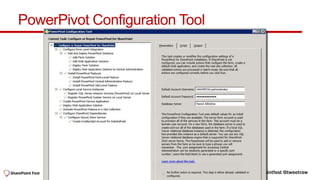
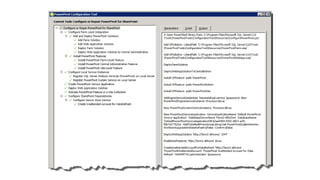
3.    Run PowerPivot Configuration Tool
4.    On app server(s), install SSRS
5.    Run SharePoint Configuration Wizard
6.    Start SSRS service in Central Admin
7.    Create SSRS service app in Central Admin
8.    Create a PowerPivot site collection
9.    Activate site-collection features
PowerPivot Configuration Tool
Resources
   Sqlcat.com
   Reporting Services on Technet - bit.ly/cFwURt
   Introducing SQL 2012 (free MS Press ebook) - bit.ly/AFoMfa
   Installation checklists - bit.ly/IXYgLV
   BI on Technet - bit.ly/Kjz2vo
   BI videos on Technet - bit.ly/KN57Zb
   Microsoft Virtual Academy - bit.ly/A3P488
   www.powerpivot-info.com
   www.microsoft.com/en-us/bi/powerpivot.aspx
Thank you


randy.williams@avepoint.com   @tweetraw

SQL Server 2012 and SharePoint 2010: Reporting Nirvana

  • 1.
    SQL Server 2012and SharePoint 2010: Reporting Nirvana Randy Williams Director of AvePoint Client Services
  • 2.
    Randy Williams Author Director of ACS
  • 4.
    Microsoft’s Reporting Vision One BI model for all end-user experiences Client Tools BI Semantic Model Personal BI Team BI Organizational BI PowerPivot for Excel PowerPivot for SharePoint Analysis Services Data Sources
  • 5.
    BI Semantic Model:How it Works Third-party SharePoint SSRS Excel PowerPivot applications Insights Multi- Tabular dimensional MDX DAX Direct ROLAP MOLAP xVelocity Query Databases LOB Applications Files OData Feeds Cloud Services
  • 6.
    BISM: Key Benefits Flexibility Richness Scalability
  • 8.
    PowerPivot  Design goal:Powerful, yet simple BI for end users  Two ways to use it  Supports large datasets (millions of rows) that are compressed  Processing is done in memory based on the xVelocity (Vertipaq) engine  Datasets can be pulled from multiple sources and linked together  PowerPivot workbooks can be published to SharePoint
  • 9.
    What’s new withPowerPivot v2?  KPI’s  Diagram view for managing relationships  Hierarchies  More robust architecture  Configuration Tool   Full support for BISM, including tabular models
  • 10.
    Demo PowerPivot
  • 12.
    Power View  Silverlightapplication launched from SPS 2010  Simple, yet powerful visualization analysis and ad-hoc reporting  Designed for end users  Works with two tabular model types  Can be exported to PowerPoint
  • 13.
    Power View –important concepts  Part of Reporting Services in SQL 2012  It’s presentation ready at all times  Reports are designed for the screen  It’s fun because it’s smart and simple  Requires a basic understanding of Pivot Tables  Does not replace Report Builder or SSDT (BIDS)  Does not replace Performance Point or other high-end analysis tools  Remember, it’s Silverlight based (sorry, no iPad… yet)
  • 14.
    Demo Power View
  • 16.
    SQL Server ReportingServices  “Comprehensive, server-based solution that enables the creation, management, and delivery of both traditional, paper- oriented reports and interactive web-based reports.”  Report can be exported to PDF, Excel, HTML, and other formats  Can be integrated with SharePoint  Reports are managed from web interface (SharePoint or native)  Multiple tools can be used to author reports  Supports “push-style” subscriptions
  • 17.
    What’s new withSSRS 2012  Did I mention Power View?  Integration with SharePoint is now done with a service app  Ability to run native and SharePoint integration side-by-side  Open XML-based rendering of Word (.docx) and Excel (.xlsx)  Data alerts notify you when defined patterns are found  Performance optimizations
  • 18.
    Choosing a reportauthoring app Report Designer Report Builder Power View
  • 19.
    Demo SSRS 2012
  • 20.
    Design tools andapproach Personal BI Team BI Organizational BI
  • 22.
    Basic install &config steps Be sure you are running SharePoint Server 2010 Enterprise with SP1 1. On app server(s), install PowerPivot for SharePoint 2. On WFE servers, install SQL Server 2012 Add-in for SharePoint 3. Run PowerPivot Configuration Tool 4. On app server(s), install SSRS 5. Run SharePoint Configuration Wizard 6. Start SSRS service in Central Admin 7. Create SSRS service app in Central Admin 8. Create a PowerPivot site collection 9. Activate site-collection features
  • 24.
  • 26.
    Resources  Sqlcat.com  Reporting Services on Technet - bit.ly/cFwURt  Introducing SQL 2012 (free MS Press ebook) - bit.ly/AFoMfa  Installation checklists - bit.ly/IXYgLV  BI on Technet - bit.ly/Kjz2vo  BI videos on Technet - bit.ly/KN57Zb  Microsoft Virtual Academy - bit.ly/A3P488  www.powerpivot-info.com  www.microsoft.com/en-us/bi/powerpivot.aspx
  • 27.

Editor's Notes

  • #2 With SQL Server 2012, Microsoft finally delivers on a critical business need: end-user driven reporting solutions. In this session, be prepared to be amazed by the power and ease of Power View, Microsoft's latest reporting technology that lets regular users build rich, dynamic reporting applications right from the browser. We'll then learn how the next generation of PowerPivot and SQL Server Reporting Services (SSRS) integrates as a pure SharePoint service application, simplifying deployment and the architecture of your reporting platform.