Leveraging PowerPivot

            Dan English
  Business Intelligence Consultant
  Superior Consulting Services, LLC
      denglish@teamscs.com
Speaker Background

             Dan English
             http://denglishbi.wordpress.com

•   Developing with Microsoft technologies for over 14 years
•   Over 7 years experience with Data Warehousing and Business
    Intelligence
•   Microsoft SQL Server MVP, Microsoft Certified IT Professional (MCITP),
    and Microsoft Certified Technology Specialist (MCTS)
•   Architect and develop dashboard solutions for enterprise reporting and
    monitoring
•   Experienced in ETL and Analysis Services development, requirements
    gathering, and data modeling
•   PASSMN 2009/2010 – Executive Board Chair (President)
•   Microsoft MN BI User Group 2011 – Leadership Board
•   Twitter – http://twitter.com/denglishbi
•   Vimeo Videos - http://vimeo.com/user3952239/videos
SCS Background

• Founded in 1997, SCS is a technical consulting firm
  focused exclusively on Microsoft technologies to
  provide custom solutions
• Headquartered in Burnsville, MN
• Microsoft Gold Certified Partner since 2006
• Provide solutions in the areas of Business Intelligence,
  Reporting, Application Development, Networking,
  SharePoint, and Special Projects
• Industry recognized authorities via books, speaker
  engagements, and direct assistance to Microsoft
Session Outline

•   Microsoft Business Intelligence Overview
•   What is PowerPivot?
•   Comparison of SSAS (UDM) & PowerPivot
•   Discuss DAX
•   Demo
•   What’s coming?
•   Questions
Quick Audience Poll

 How many are currently using SSAS (UDM) in
 production?

 How many have Excel 2010 deployed?

 How many are currently using PowerPivot? In
 production? With SharePoint?

 How many are waiting until v2 of PowerPivot?
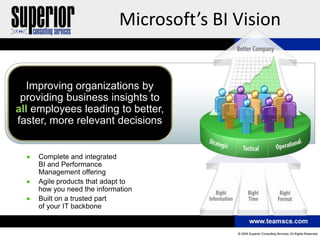
Microsoft’s BI Vision


  Improving organizations by
 providing business insights to
all employees leading to better,
faster, more relevant decisions


    Complete and integrated
    BI and Performance
    Management offering
    Agile products that adapt to
    how you need the information
    Built on a trusted part
    of your IT backbone
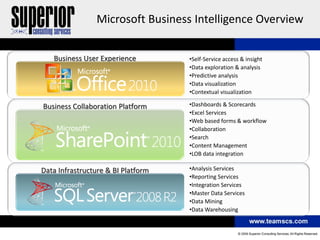
Microsoft Business Intelligence Overview


   Business User Experience         •Self-Service access & insight
                                    •Data exploration & analysis
                                    •Predictive analysis
                                    •Data visualization
                                    •Contextual visualization

Business Collaboration Platform     •Dashboards & Scorecards
                                    •Excel Services
                                    •Web based forms & workflow
                                    •Collaboration
                                    •Search
                                    •Content Management
                                    •LOB data integration

Data Infrastructure & BI Platform   •Analysis Services
                                    •Reporting Services
                                    •Integration Services
                                    •Master Data Services
                                    •Data Mining
                                    •Data Warehousing
What is PowerPivot?
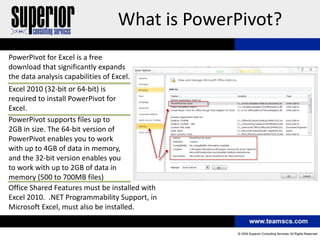
PowerPivot for Excel is a free
download that significantly expands
the data analysis capabilities of Excel.
Excel 2010 (32-bit or 64-bit) is
required to install PowerPivot for
Excel.
PowerPivot supports files up to
2GB in size. The 64-bit version of
PowerPivot enables you to work
with up to 4GB of data in memory,
and the 32-bit version enables you
to work with up to 2GB of data in
memory (500 to 700MB files)
Office Shared Features must be installed with
Excel 2010. .NET Programmability Support, in
Microsoft Excel, must also be installed.
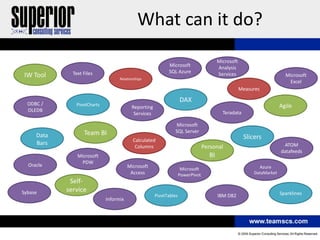
What can it do?
                                                                                        Microsoft
                                                            Microsoft                   Analysis
              Text Files                                    SQL Azure                   Services
IW Tool                            Relationships
                                                                                                                        Microsoft
                                                                                                                         Excel
                                                                                                    Measures

                                                                    DAX
  ODBC /       PivotCharts                                                                                            Agile
                                          Reporting
  OLEDB                                                                                   Teradata
                                           Services

                                                                Microsoft
                   Team BI                                      SQL Server
     Data                                                                                            Slicers
                                          Calculated
     Bars                                                                                                              ATOM
                                           Columns                               Personal
                                                                                                                      datafeeds
                Microsoft                                                          BI
                 PDW
  Oracle                                Microsoft                                                          Azure
                                                                     Microsoft
                                         Access                     PowerPivot                           DataMarket
             Self-
Sybase      service                                                                                                   Sparklines
                                                      PivotTables                       IBM DB2
                             Informix
What does it provide?
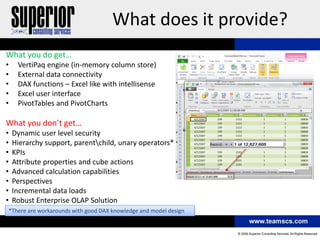
What you do get…
•    VertiPaq engine (in-memory column store)
•    External data connectivity
•    DAX functions – Excel like with intellisense
•    Excel user interface
•    PivotTables and PivotCharts

What you don’t get…
•   Dynamic user level security
•   Hierarchy support, parentchild, unary operators*
•   KPIs
•   Attribute properties and cube actions
•   Advanced calculation capabilities
•   Perspectives
•   Incremental data loads
•   Robust Enterprise OLAP Solution
*There are workarounds with good DAX knowledge and model design
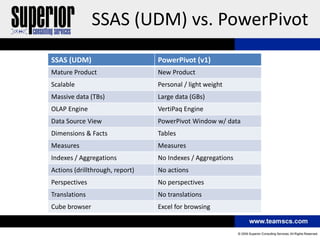
SSAS (UDM) vs. PowerPivot
SSAS (UDM)                       PowerPivot (v1)
Mature Product                   New Product
Scalable                         Personal / light weight
Massive data (TBs)               Large data (GBs)
OLAP Engine                      VertiPaq Engine
Data Source View                 PowerPivot Window w/ data
Dimensions & Facts               Tables
Measures                         Measures
Indexes / Aggregations           No Indexes / Aggregations
Actions (drillthrough, report)   No actions
Perspectives                     No perspectives
Translations                     No translations
Cube browser                     Excel for browsing
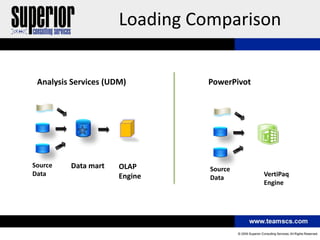
Loading Comparison


 Analysis Services (UDM)       PowerPivot


Source   Data mart    OLAP      Source
Data                  Engine                VertiPaq
                                Data
                                            Engine
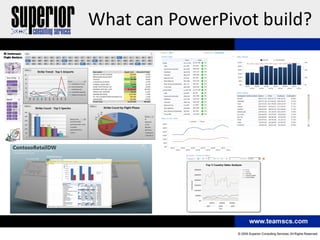
What can PowerPivot build?
Data Analysis Expressions (DAX)


Calculated Columns

• Concatenate values
• Create new values
• Perform lookups

• Examples
    •   Month =CONCATENATE(FORMAT(MONTH([Datekey]),"00 "),LEFT([CalendarMonthLabel],3))
    • Profit =[SalesAmount]-[TotalCost]-[ReturnAmount]
    • ProductCategory =RELATED(DimProductCategory[ProductCategoryName])
    • LifetimeSales =SUMX(RELATEDTABLE(FactSales), FactSales[SalesAmount])
Data Analysis Expressions (DAX)

 Measures
SalesAmount =
         SUM('FactSales'[SalesAmount])
YTDSales =
         TOTALYTD(SUM(FactSales[SalesAmount]),DimDate[Datekey])
PY YTD Sales =
            TOTALYTD(SUM(FactSales[SalesAmount]), DATEADD(DimDate[Datekey],-12,MONTH))
CumulativeSales =
         CALCULATE(SUM(FactSales[SalesAmount]),
         DATESBETWEEN(DimDate[Datekey],
         FIRSTDATE(ALL(DimDate[Datekey])),
         LASTDATE(DimDate[Datekey])))
   http://denglishbi.wordpress.com/2011/01/24/calculating-cumulative-values-in-microsoft-bi-tools/


Profit % = Sum([Profit])/Sum([SalesAmount])
Data Analysis Expressions (DAX)
Retail 454 Calendar Calculation

PY_SalesAmount =
IF(COUNTROWS(VALUES(DimRetailDate[Reporting_Year])) = 1,
CALCULATE([Sum of SalesAmount], DATESBETWEEN(DimRetailDate[PK_Date],
IF(COUNTROWS(VALUES(DimRetailDate[Reporting_Quarter_Of_Year])) = 1,
IF(COUNTROWS(VALUES(DimRetailDate[Reporting_Month_Of_Year])) = 1,
IF(COUNTROWS(VALUES(DimRetailDate[Reporting_Week_Of_Year]))=1,
IF(COUNTROWS(VALUES(DimRetailDate[Reporting_Day_Of_Year]))=1,
FIRSTDATE(DimRetailDate[PY_Date]),
FIRSTDATE(DimRetailDate[PY_Reporting_Week_Start_Date])),
FIRSTDATE(DimRetailDate[PY_Reporting_Month_Start_Date])),
FIRSTDATE(DimRetailDate[PY_Reporting_Quarter_Start_Date])),
FIRSTDATE(DimRetailDate[PY_Reporting_Year_Start_Date])),
IF(COUNTROWS(VALUES(DimRetailDate[Reporting_Quarter_Of_Year])) = 1,
IF(COUNTROWS(VALUES(DimRetailDate[Reporting_Month_Of_Year])) = 1,
IF(COUNTROWS(VALUES(DimRetailDate[Reporting_Week_Of_Year]))=1,
IF(COUNTROWS(VALUES(DimRetailDate[Reporting_Day_Of_Year]))=1,
FIRSTDATE(DimRetailDate[PY_Date]),
FIRSTDATE(DimRetailDate[PY_Reporting_Week_End_Date])),
FIRSTDATE(DimRetailDate[PY_Reporting_Month_End_Date])),
FIRSTDATE(DimRetailDate[PY_Reporting_Quarter_End_Date])),
FIRSTDATE(DimRetailDate[PY_Reporting_Year_End_Date]))))
,BLANK())
    http://denglishbi.wordpress.com/2010/10/09/round-2-calculating-previous-year-marketing-calendar-values-with-dax/
Demo

POWERPIVOT
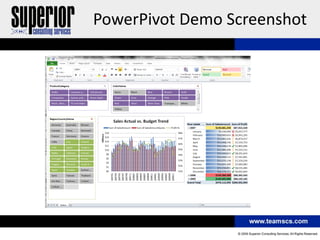
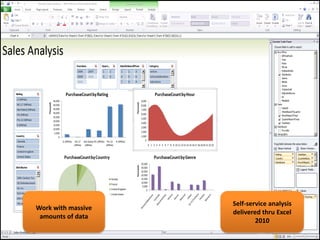
PowerPivot Demo Screenshot
Self-service analysis
Work with massive
                    delivered thru Excel
 amounts of data
                            2010
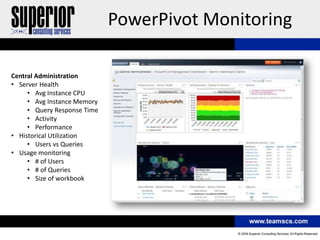
PowerPivot Monitoring

Central Administration
• Server Health
     • Avg Instance CPU
     • Avg Instance Memory
     • Query Response Time
     • Activity
     • Performance
• Historical Utilization
     • Users vs Queries
• Usage monitoring
     • # of Users
     • # of Queries
     • Size of workbook
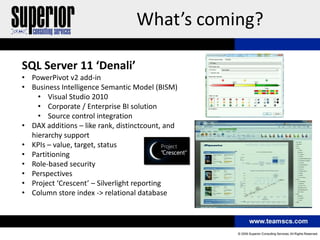
What’s coming?

SQL Server 11 ‘Denali’
• PowerPivot v2 add-in
• Business Intelligence Semantic Model (BISM)
    • Visual Studio 2010
    • Corporate / Enterprise BI solution
    • Source control integration
• DAX additions – like rank, distinctcount, and
  hierarchy support
• KPIs – value, target, status
• Partitioning
• Role-based security
• Perspectives
• Project ‘Crescent’ – Silverlight reporting
• Column store index -> relational database
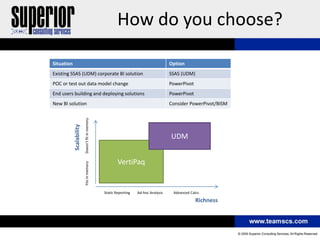
How do you choose?

Situation                                                                              Option
Existing SSAS (UDM) corporate BI solution                                              SSAS (UDM)
POC or test out data model change                                                      PowerPivot
End users building and deploying solutions                                             PowerPivot
New BI solution                                                                        Consider PowerPivot/BISM
                          Doesn’t fit in memory
            Scalability


                                                                                       UDM


                                                          VertiPaq
                          Fits in memory


                                                  Static Reporting   Ad-hoc Analysis    Advanced Calcs

                                                                                                    Richness
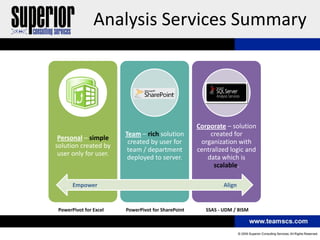
Analysis Services Summary


                                                    Corporate – solution
                        Team – rich solution            created for
 Personal – simple
                         created by user for         organization with
solution created by
                         team / department          centralized logic and
 user only for user.
                         deployed to server.           data which is
                                                          scalable.

       Empower                                                Align


 PowerPivot for Excel   PowerPivot for SharePoint      SSAS - UDM / BISM
Resources
•   Microsoft BI Sites - http://www.microsoft.com/bi/ AND http://technet.microsoft.com/en-us/bi/default.aspx

•   PowerPivot - http://www.powerpivot.com

•   PowerPivot for Excel (Business Intelligence) Portal - http://technet.microsoft.com/en-us/bi/ff604673.aspx

•   PowerPivot Info (Vidas Matelis) - http://www.powerpivot-info.com

•   PowerPivot Pro (Rob Collie) - http://www.powerpivotpro.com

•   PowerPivot Geek (Dave Wickert) - http://msdn.microsoft.com/en-us/sqlserver/bb671432.aspx

•   Alberto Ferrari & Marco Russo - http://sqlblog.com/blogs/marco_russo AND
    http://sqlblog.com/blogs/alberto_ferrari

•   Kasper de Jonge - http://www.powerpivotblog.nl/
QUESTIONS
THANK YOU!
INFO@TEAMSCS.COM

Leveraging PowerPivot

  • 1.
    Leveraging PowerPivot Dan English Business Intelligence Consultant Superior Consulting Services, LLC denglish@teamscs.com
  • 2.
    Speaker Background Dan English http://denglishbi.wordpress.com • Developing with Microsoft technologies for over 14 years • Over 7 years experience with Data Warehousing and Business Intelligence • Microsoft SQL Server MVP, Microsoft Certified IT Professional (MCITP), and Microsoft Certified Technology Specialist (MCTS) • Architect and develop dashboard solutions for enterprise reporting and monitoring • Experienced in ETL and Analysis Services development, requirements gathering, and data modeling • PASSMN 2009/2010 – Executive Board Chair (President) • Microsoft MN BI User Group 2011 – Leadership Board • Twitter – http://twitter.com/denglishbi • Vimeo Videos - http://vimeo.com/user3952239/videos
  • 3.
    SCS Background • Foundedin 1997, SCS is a technical consulting firm focused exclusively on Microsoft technologies to provide custom solutions • Headquartered in Burnsville, MN • Microsoft Gold Certified Partner since 2006 • Provide solutions in the areas of Business Intelligence, Reporting, Application Development, Networking, SharePoint, and Special Projects • Industry recognized authorities via books, speaker engagements, and direct assistance to Microsoft
  • 4.
    Session Outline • Microsoft Business Intelligence Overview • What is PowerPivot? • Comparison of SSAS (UDM) & PowerPivot • Discuss DAX • Demo • What’s coming? • Questions
  • 5.
    Quick Audience Poll How many are currently using SSAS (UDM) in production?  How many have Excel 2010 deployed?  How many are currently using PowerPivot? In production? With SharePoint?  How many are waiting until v2 of PowerPivot?
  • 6.
    Microsoft’s BI Vision Improving organizations by providing business insights to all employees leading to better, faster, more relevant decisions Complete and integrated BI and Performance Management offering Agile products that adapt to how you need the information Built on a trusted part of your IT backbone
  • 7.
    Microsoft Business IntelligenceOverview Business User Experience •Self-Service access & insight •Data exploration & analysis •Predictive analysis •Data visualization •Contextual visualization Business Collaboration Platform •Dashboards & Scorecards •Excel Services •Web based forms & workflow •Collaboration •Search •Content Management •LOB data integration Data Infrastructure & BI Platform •Analysis Services •Reporting Services •Integration Services •Master Data Services •Data Mining •Data Warehousing
  • 8.
    What is PowerPivot? PowerPivotfor Excel is a free download that significantly expands the data analysis capabilities of Excel. Excel 2010 (32-bit or 64-bit) is required to install PowerPivot for Excel. PowerPivot supports files up to 2GB in size. The 64-bit version of PowerPivot enables you to work with up to 4GB of data in memory, and the 32-bit version enables you to work with up to 2GB of data in memory (500 to 700MB files) Office Shared Features must be installed with Excel 2010. .NET Programmability Support, in Microsoft Excel, must also be installed.
  • 9.
    What can itdo? Microsoft Microsoft Analysis Text Files SQL Azure Services IW Tool Relationships Microsoft Excel Measures DAX ODBC / PivotCharts Agile Reporting OLEDB Teradata Services Microsoft Team BI SQL Server Data Slicers Calculated Bars ATOM Columns Personal datafeeds Microsoft BI PDW Oracle Microsoft Azure Microsoft Access PowerPivot DataMarket Self- Sybase service Sparklines PivotTables IBM DB2 Informix
  • 10.
    What does itprovide? What you do get… • VertiPaq engine (in-memory column store) • External data connectivity • DAX functions – Excel like with intellisense • Excel user interface • PivotTables and PivotCharts What you don’t get… • Dynamic user level security • Hierarchy support, parentchild, unary operators* • KPIs • Attribute properties and cube actions • Advanced calculation capabilities • Perspectives • Incremental data loads • Robust Enterprise OLAP Solution *There are workarounds with good DAX knowledge and model design
  • 11.
    SSAS (UDM) vs.PowerPivot SSAS (UDM) PowerPivot (v1) Mature Product New Product Scalable Personal / light weight Massive data (TBs) Large data (GBs) OLAP Engine VertiPaq Engine Data Source View PowerPivot Window w/ data Dimensions & Facts Tables Measures Measures Indexes / Aggregations No Indexes / Aggregations Actions (drillthrough, report) No actions Perspectives No perspectives Translations No translations Cube browser Excel for browsing
  • 12.
    Loading Comparison AnalysisServices (UDM) PowerPivot Source Data mart OLAP Source Data Engine VertiPaq Data Engine
  • 13.
  • 14.
    Data Analysis Expressions(DAX) Calculated Columns • Concatenate values • Create new values • Perform lookups • Examples • Month =CONCATENATE(FORMAT(MONTH([Datekey]),"00 "),LEFT([CalendarMonthLabel],3)) • Profit =[SalesAmount]-[TotalCost]-[ReturnAmount] • ProductCategory =RELATED(DimProductCategory[ProductCategoryName]) • LifetimeSales =SUMX(RELATEDTABLE(FactSales), FactSales[SalesAmount])
  • 15.
    Data Analysis Expressions(DAX) Measures SalesAmount = SUM('FactSales'[SalesAmount]) YTDSales = TOTALYTD(SUM(FactSales[SalesAmount]),DimDate[Datekey]) PY YTD Sales = TOTALYTD(SUM(FactSales[SalesAmount]), DATEADD(DimDate[Datekey],-12,MONTH)) CumulativeSales = CALCULATE(SUM(FactSales[SalesAmount]), DATESBETWEEN(DimDate[Datekey], FIRSTDATE(ALL(DimDate[Datekey])), LASTDATE(DimDate[Datekey]))) http://denglishbi.wordpress.com/2011/01/24/calculating-cumulative-values-in-microsoft-bi-tools/ Profit % = Sum([Profit])/Sum([SalesAmount])
  • 16.
    Data Analysis Expressions(DAX) Retail 454 Calendar Calculation PY_SalesAmount = IF(COUNTROWS(VALUES(DimRetailDate[Reporting_Year])) = 1, CALCULATE([Sum of SalesAmount], DATESBETWEEN(DimRetailDate[PK_Date], IF(COUNTROWS(VALUES(DimRetailDate[Reporting_Quarter_Of_Year])) = 1, IF(COUNTROWS(VALUES(DimRetailDate[Reporting_Month_Of_Year])) = 1, IF(COUNTROWS(VALUES(DimRetailDate[Reporting_Week_Of_Year]))=1, IF(COUNTROWS(VALUES(DimRetailDate[Reporting_Day_Of_Year]))=1, FIRSTDATE(DimRetailDate[PY_Date]), FIRSTDATE(DimRetailDate[PY_Reporting_Week_Start_Date])), FIRSTDATE(DimRetailDate[PY_Reporting_Month_Start_Date])), FIRSTDATE(DimRetailDate[PY_Reporting_Quarter_Start_Date])), FIRSTDATE(DimRetailDate[PY_Reporting_Year_Start_Date])), IF(COUNTROWS(VALUES(DimRetailDate[Reporting_Quarter_Of_Year])) = 1, IF(COUNTROWS(VALUES(DimRetailDate[Reporting_Month_Of_Year])) = 1, IF(COUNTROWS(VALUES(DimRetailDate[Reporting_Week_Of_Year]))=1, IF(COUNTROWS(VALUES(DimRetailDate[Reporting_Day_Of_Year]))=1, FIRSTDATE(DimRetailDate[PY_Date]), FIRSTDATE(DimRetailDate[PY_Reporting_Week_End_Date])), FIRSTDATE(DimRetailDate[PY_Reporting_Month_End_Date])), FIRSTDATE(DimRetailDate[PY_Reporting_Quarter_End_Date])), FIRSTDATE(DimRetailDate[PY_Reporting_Year_End_Date])))) ,BLANK()) http://denglishbi.wordpress.com/2010/10/09/round-2-calculating-previous-year-marketing-calendar-values-with-dax/
  • 17.
  • 18.
  • 19.
    Self-service analysis Work withmassive delivered thru Excel amounts of data 2010
  • 20.
    PowerPivot Monitoring Central Administration •Server Health • Avg Instance CPU • Avg Instance Memory • Query Response Time • Activity • Performance • Historical Utilization • Users vs Queries • Usage monitoring • # of Users • # of Queries • Size of workbook
  • 21.
    What’s coming? SQL Server11 ‘Denali’ • PowerPivot v2 add-in • Business Intelligence Semantic Model (BISM) • Visual Studio 2010 • Corporate / Enterprise BI solution • Source control integration • DAX additions – like rank, distinctcount, and hierarchy support • KPIs – value, target, status • Partitioning • Role-based security • Perspectives • Project ‘Crescent’ – Silverlight reporting • Column store index -> relational database
  • 22.
    How do youchoose? Situation Option Existing SSAS (UDM) corporate BI solution SSAS (UDM) POC or test out data model change PowerPivot End users building and deploying solutions PowerPivot New BI solution Consider PowerPivot/BISM Doesn’t fit in memory Scalability UDM VertiPaq Fits in memory Static Reporting Ad-hoc Analysis Advanced Calcs Richness
  • 23.
    Analysis Services Summary Corporate – solution Team – rich solution created for Personal – simple created by user for organization with solution created by team / department centralized logic and user only for user. deployed to server. data which is scalable. Empower Align PowerPivot for Excel PowerPivot for SharePoint SSAS - UDM / BISM
  • 24.
    Resources • Microsoft BI Sites - http://www.microsoft.com/bi/ AND http://technet.microsoft.com/en-us/bi/default.aspx • PowerPivot - http://www.powerpivot.com • PowerPivot for Excel (Business Intelligence) Portal - http://technet.microsoft.com/en-us/bi/ff604673.aspx • PowerPivot Info (Vidas Matelis) - http://www.powerpivot-info.com • PowerPivot Pro (Rob Collie) - http://www.powerpivotpro.com • PowerPivot Geek (Dave Wickert) - http://msdn.microsoft.com/en-us/sqlserver/bb671432.aspx • Alberto Ferrari & Marco Russo - http://sqlblog.com/blogs/marco_russo AND http://sqlblog.com/blogs/alberto_ferrari • Kasper de Jonge - http://www.powerpivotblog.nl/
  • 25.
  • 26.