Business Intelligence from data to presentation Leonard Mwangi MCDBA, MCSTPartner/Principal Consultant e Tek Global Inc.
Quick SurveyHow many are using SQL Server> 2005?2008?2008 R2?How many are using SharePoint2003?2007?2010?How many are using Microsoft Office 2003?2007?2010?
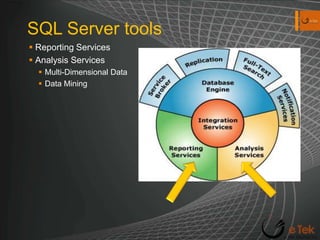
SQL Server toolsReporting ServicesAnalysis ServicesMulti-Dimensional DataData Mining
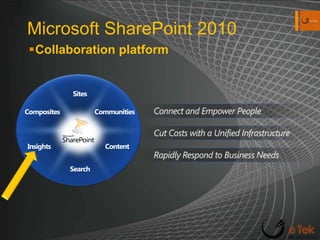
Microsoft SharePoint 2010Collaboration platformSitesCommunitiesCompositesConnect and Empower PeopleCut Costs with a Unified InfrastructureContentInsightsRapidly Respond to Business NeedsSearch
Objectives & GoalsObjectives BI as a solution overviewFunneling data sources Benefits of BI platformMitigating data risks in BISharePoint Server 2010 SSRS/SSAS & SharePointExcel Services PowerPivot (Excel & SharePoint 2010)PerformancePoint 2010Visio Services BI Indexing Connectors GoalBI understanding Manage & Administer BI environmentCreate a usable BI solution
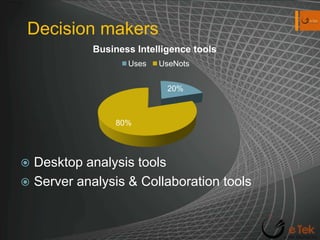
Decision makersDesktop analysis tools
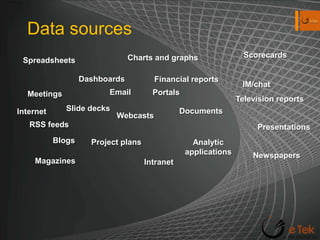
Server analysis & Collaboration toolsData sourcesScorecardsCharts and graphsSpreadsheetsDashboardsFinancial reports IM/chatEmailPortalsMeetingsTelevision reportsSlide decksDocumentsInternetWebcastsRSS feedsPresentationsBlogsProject plansAnalytic applicationsNewspapersMagazinesIntranet
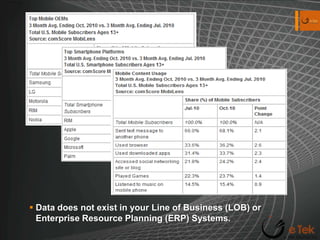
Data does not exist in your Line of Business (LOB) or Enterprise Resource Planning (ERP) Systems.
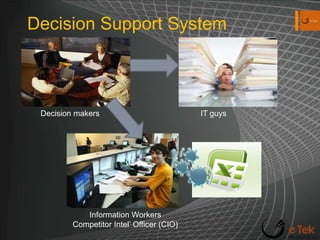
Decision Support SystemDecision makersIT guysInformation Workers Competitor Intel’ Officer (CIO)
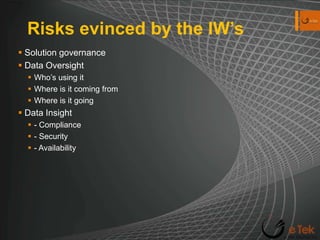
Risks evinced by the IW’sSolution governanceData OversightWho’s using it Where is it coming from Where is it going Data Insight - Compliance - Security - Availability
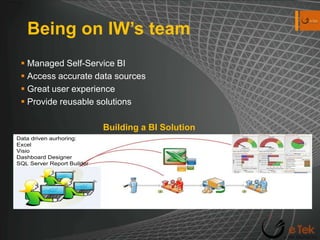
Being on IW’s teamManaged Self-Service BIAccess accurate data sourcesGreat user experienceProvide reusable solutions  Building a BI Solution
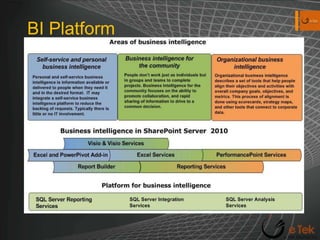
BI Platform
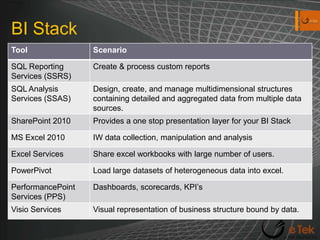
BI Stack
Benefits of Microsoft BI PlatformData entry to a centralized data model like SSAS – Supported by RDBMSData level securityEvery day tools/applications MS Excel SSAS & Excel integration for ad hoc capabilities, data entryCentralized storageData aggregation can be time consuming.Reusable data collection.Business rules easily enforced.
SSAS 2008 R2Good-ol’ data mining and super powerful aggregation toolVery intuitive top-down analysis of large quantities of data
SSRS 2008 R2Reports generation tool. Interactive, tabular, graphical or free-form reports from different data sources.Role based IW  Utilize Report Builder 3.0Analysts  Utilize Report Builder 3.0/ SQL Server BIDSDevelopers  BIDS, API’s, Web ServicesIntegrated with SharePoint Native modeOutside SharePointWeb Parts to view reports (Report Explorer & Viewer)SharePoint Integrated modeSharePoint managed Connect to other web parts
SQL Server & SharePointSQL Server 2008 R2 – offers Self-Service BI Capabilities through Integration with SharePoint Products. Reporting Services (SSRS) – Can run in SharePoint integrated mode for reports deployment.Analysis Services (SSAS) requires SharePoint 2010 integration through MS SQL Server PowerPivot for SharePoint.
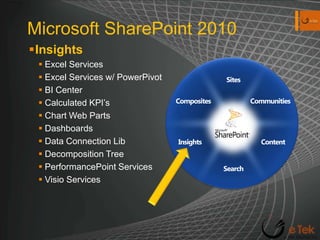
Microsoft SharePoint 2010InsightsExcel ServicesExcel Services w/ PowerPivotBI CenterCalculated KPI’sChart Web PartsDashboardsData Connection LibDecomposition TreePerformancePoint ServicesVisio ServicesSitesCommunitiesCompositesContentInsightsSearch
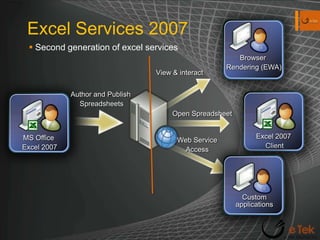
Excel Services 2007Second generation of excel servicesMS Office Excel 2007Excel 2007 ClientCustomapplicationsBrowser Rendering (EWA)View & interactAuthor and Publish SpreadsheetsOpen SpreadsheetWeb ServiceAccess
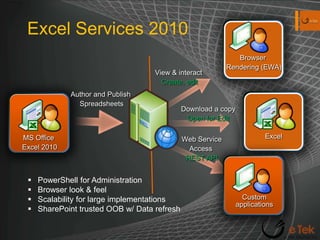
Excel Services 2010MS Office Excel 2010Excel CustomapplicationsBrowser Rendering (EWA)View & interact Create, editAuthor and Publish SpreadsheetsDownload a copyOpen for EditWeb ServiceAccess REST APIPowerShell for Administration
Browser look & feel
Scalability for large implementations
SharePoint trusted OOB w/ Data refresh  DemoExcel Services 2010
Excel Services REST
Excel Web App  PowerPivot for ExcelLarge scale of data into an excel workbook (.xlsx file)Multiple data sources merged into excel file, PowerPivot data relationship layer treats it as a single data source.Using In-Memory BI (IMBI) databaseIMBI database architecture known as VertiPaqEverything running of Memory no I/OPowerPivot part of excel. – Converts .xlsx file into XML Files.Free download for Excel 2010
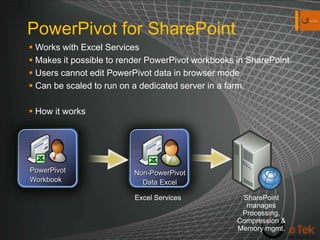
PowerPivot for SharePointWorks with Excel ServicesMakes it possible to render PowerPivot workbooks in SharePoint.Users cannot edit PowerPivot data in browser modeCan be scaled to run on a dedicated server in a farm.How it worksPowerPivotWorkbookNon-PowerPivotData ExcelExcel ServicesSharePoint manages Processing, Compression & Memory mgmt.
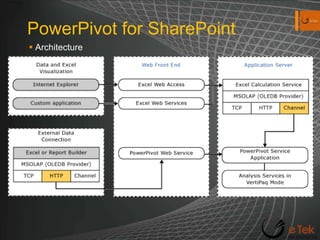
PowerPivot for SharePointArchitecture
DemoPowerPivot for Excel
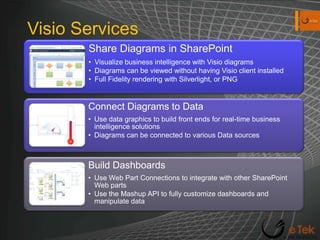
PowerPivot for SharePointVisio Services
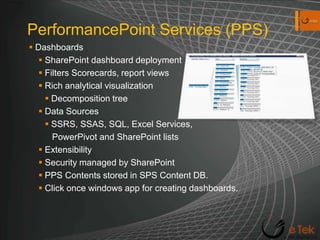
DemoVisio ServicesPerformancePoint Services (PPS)DashboardsSharePoint dashboard deploymentFilters Scorecards, report viewsRich analytical visualizationDecomposition treeData SourcesSSRS, SSAS, SQL, Excel Services,    PowerPivot and SharePoint listsExtensibility Security managed by SharePointPPS Contents stored in SPS Content DB.Click once windows app for creating dashboards.
DemoPerformancePoint ServicesQ & A session
Resourceshttp://technet.microsoft.com/en-us/library/cc179167.aspx#BKMK_WhatsNew – Excel 2010http://msdn.microsoft.com/en-us/library/ms170438.aspx -- Reporting Serviceshttp://sharepoint.microsoft.com/en-us/buy/Pages/Editions-Comparison.aspx--SPS featureshttp://sharepoint.microsoft.com/en-us/buy/Pages/Licensing-Details.aspx - SPS licensing http://www.microsoft.com/downloads/en/details.aspx?displaylang=en&FamilyID=f81e39be-abd3-4b71-9b60-21cfb9761fc9  -- BI indexing Connectorhttp://technet.microsoft.com/en-us/library/ff394320.aspx -- BI Tool

Business intelligence

  • 2.
    Business Intelligence fromdata to presentation Leonard Mwangi MCDBA, MCSTPartner/Principal Consultant e Tek Global Inc.
  • 3.
    Quick SurveyHow manyare using SQL Server> 2005?2008?2008 R2?How many are using SharePoint2003?2007?2010?How many are using Microsoft Office 2003?2007?2010?
  • 4.
    SQL Server toolsReportingServicesAnalysis ServicesMulti-Dimensional DataData Mining
  • 5.
    Microsoft SharePoint 2010CollaborationplatformSitesCommunitiesCompositesConnect and Empower PeopleCut Costs with a Unified InfrastructureContentInsightsRapidly Respond to Business NeedsSearch
  • 6.
    Objectives & GoalsObjectivesBI as a solution overviewFunneling data sources Benefits of BI platformMitigating data risks in BISharePoint Server 2010 SSRS/SSAS & SharePointExcel Services PowerPivot (Excel & SharePoint 2010)PerformancePoint 2010Visio Services BI Indexing Connectors GoalBI understanding Manage & Administer BI environmentCreate a usable BI solution
  • 7.
  • 8.
    Server analysis &Collaboration toolsData sourcesScorecardsCharts and graphsSpreadsheetsDashboardsFinancial reports IM/chatEmailPortalsMeetingsTelevision reportsSlide decksDocumentsInternetWebcastsRSS feedsPresentationsBlogsProject plansAnalytic applicationsNewspapersMagazinesIntranet
  • 9.
    Data does notexist in your Line of Business (LOB) or Enterprise Resource Planning (ERP) Systems.
  • 10.
    Decision Support SystemDecisionmakersIT guysInformation Workers Competitor Intel’ Officer (CIO)
  • 11.
    Risks evinced bythe IW’sSolution governanceData OversightWho’s using it Where is it coming from Where is it going Data Insight - Compliance - Security - Availability
  • 12.
    Being on IW’steamManaged Self-Service BIAccess accurate data sourcesGreat user experienceProvide reusable solutions Building a BI Solution
  • 13.
  • 14.
  • 15.
    Benefits of MicrosoftBI PlatformData entry to a centralized data model like SSAS – Supported by RDBMSData level securityEvery day tools/applications MS Excel SSAS & Excel integration for ad hoc capabilities, data entryCentralized storageData aggregation can be time consuming.Reusable data collection.Business rules easily enforced.
  • 16.
    SSAS 2008 R2Good-ol’data mining and super powerful aggregation toolVery intuitive top-down analysis of large quantities of data
  • 17.
    SSRS 2008 R2Reportsgeneration tool. Interactive, tabular, graphical or free-form reports from different data sources.Role based IW  Utilize Report Builder 3.0Analysts  Utilize Report Builder 3.0/ SQL Server BIDSDevelopers  BIDS, API’s, Web ServicesIntegrated with SharePoint Native modeOutside SharePointWeb Parts to view reports (Report Explorer & Viewer)SharePoint Integrated modeSharePoint managed Connect to other web parts
  • 18.
    SQL Server &SharePointSQL Server 2008 R2 – offers Self-Service BI Capabilities through Integration with SharePoint Products. Reporting Services (SSRS) – Can run in SharePoint integrated mode for reports deployment.Analysis Services (SSAS) requires SharePoint 2010 integration through MS SQL Server PowerPivot for SharePoint.
  • 19.
    Microsoft SharePoint 2010InsightsExcelServicesExcel Services w/ PowerPivotBI CenterCalculated KPI’sChart Web PartsDashboardsData Connection LibDecomposition TreePerformancePoint ServicesVisio ServicesSitesCommunitiesCompositesContentInsightsSearch
  • 20.
    Excel Services 2007Secondgeneration of excel servicesMS Office Excel 2007Excel 2007 ClientCustomapplicationsBrowser Rendering (EWA)View & interactAuthor and Publish SpreadsheetsOpen SpreadsheetWeb ServiceAccess
  • 21.
    Excel Services 2010MSOffice Excel 2010Excel CustomapplicationsBrowser Rendering (EWA)View & interact Create, editAuthor and Publish SpreadsheetsDownload a copyOpen for EditWeb ServiceAccess REST APIPowerShell for Administration
  • 22.
  • 23.
    Scalability for largeimplementations
  • 24.
    SharePoint trusted OOBw/ Data refresh DemoExcel Services 2010
  • 25.
  • 26.
    Excel Web App PowerPivot for ExcelLarge scale of data into an excel workbook (.xlsx file)Multiple data sources merged into excel file, PowerPivot data relationship layer treats it as a single data source.Using In-Memory BI (IMBI) databaseIMBI database architecture known as VertiPaqEverything running of Memory no I/OPowerPivot part of excel. – Converts .xlsx file into XML Files.Free download for Excel 2010
  • 27.
    PowerPivot for SharePointWorkswith Excel ServicesMakes it possible to render PowerPivot workbooks in SharePoint.Users cannot edit PowerPivot data in browser modeCan be scaled to run on a dedicated server in a farm.How it worksPowerPivotWorkbookNon-PowerPivotData ExcelExcel ServicesSharePoint manages Processing, Compression & Memory mgmt.
  • 28.
  • 29.
  • 30.
  • 31.
    DemoVisio ServicesPerformancePoint Services(PPS)DashboardsSharePoint dashboard deploymentFilters Scorecards, report viewsRich analytical visualizationDecomposition treeData SourcesSSRS, SSAS, SQL, Excel Services, PowerPivot and SharePoint listsExtensibility Security managed by SharePointPPS Contents stored in SPS Content DB.Click once windows app for creating dashboards.
  • 32.
  • 33.
    Resourceshttp://technet.microsoft.com/en-us/library/cc179167.aspx#BKMK_WhatsNew – Excel2010http://msdn.microsoft.com/en-us/library/ms170438.aspx -- Reporting Serviceshttp://sharepoint.microsoft.com/en-us/buy/Pages/Editions-Comparison.aspx--SPS featureshttp://sharepoint.microsoft.com/en-us/buy/Pages/Licensing-Details.aspx - SPS licensing http://www.microsoft.com/downloads/en/details.aspx?displaylang=en&FamilyID=f81e39be-abd3-4b71-9b60-21cfb9761fc9 -- BI indexing Connectorhttp://technet.microsoft.com/en-us/library/ff394320.aspx -- BI Tool

Editor's Notes

  • #7 Provide an overview of some of the Microsoft BI tools available and how you can be able to take data from within and without LOB systems and present it in a meaningful manner.
  • #9 Critical for forward views of an organization (planning, budgeting and forecast)
  • #11 IW’s can provide information on the fly on how the business is changing (sales volumes, price comparisons) which can affect the profitability, cash flow or even financial stability.
  • #12 Give a scenario --- access database front-end being used to interact with the database, no data reviews, table locks
  • #23 Atom feed
  • #27 Atom feed
  • #29 Atom feed