See Beyond the Numbers:Data Visualization in SharePoint 2010Princeton NJ SharePoint User GroupSeptember 2011Chris McNulty
About KMAFounded 199529 employees4 partners, including 2 co-foundersPrincipal lines of business:Professional ServicesSharePoint ConsultingSharePoint Managed ServicesCustom Application DevelopmentSoftware ProductMekko Graphics advanced charting softwareRoots in academia (MIT, Harvard, BU)Chris McNultyKMA SharePoint Practice Lead/Manager
Working with SharePoint technologies since 2000/2001
20 years consulting and financial services technology (Santander, John Hancock, GMO, State Street)
MBA in Investment Management from Boston College Carroll School of Management
Write and speak often on Microsoft IW technologies (blogs & books)
Microsoft MCSE/MCTS/MSA/MVTSP
Hiking, cooking, playing guitar, colonial history, photography
My family: Hayley, three kids (16, 7, 4) and my dog StanI live outside Boston…
But I’m from here…
Goals, Terms & Surrounding TechnologyComplexity Levels of These SolutionsTechnology Overview and DemosSimple List and ChartExcel ServicesPower PivotPivotBCS & SQL Server Reporting Services (SSRS)Performance Point 2010MappingSummaryResourcesQuestion and Answer PeriodContact InformationAgenda
Microsoft SharePoint Server 2010 … the bright frontierEastern Long Island, July 4, 2010
Goals for BI DesignAnswering the known questions about our businessAllowing users to self-discover patterns and answers to questions we haven’t yet been asked
The carousel paradox…
BCS – Business Connectivity ServicesSSRS – SQL Server Reporting ServicesCube – a prebuilt matrix of data aggregations, hosted in SQL Server Analysis ServicesWindows Azure DataMarket (fka Project Dallas) – Microsoft initiative to create publicly subscribed data services hosted on Azure and accessed via WCF, PowerPivot, etc. (http://www.sqlazureservices.com)Pivot - Interaction model that accommodates the complexity and scale of a massive collection of informationTerms
Complexity Levels of These SolutionsCostTime
SharePoint BI Evolution
Native to SharePoint (Web Part)Code-free solution – uses web part and native listsData sourcesOther Lists (Site Collection)BCS/Business Data CatalogExcel ServicesStandard TypesBar, Area, Line, Bubble, Financial, Pie, Radar, Polar, Gantt, Range, Error Bar, Box Plot, Funnel, PyramidTypical use - quick visualization of SharePoint dataQuick tip – use the wizardSharePoint Charting
DEMO – Chart Web Part
World’s #1 BI toolRender data, charts, interface using native Excel components (e.g. Slicers) without Excel 2010 on all clientsData stored in Excel; SharePoint hosts a presentation layer using Excel ServicesNative SharePoint Status Indicators (KPIs) Can also work with listsUse when users are skilled in Excel modeling and charting and data lives in spreadsheetsExcel Services
“Project Gemini” – host 1-10MM row datasetsExcel and SharePoint componentsData doesn’t live in spreadsheetReleased with SQL Server 2008 R2 but doesn’t explicitly require the R2 EnginePowerPivot
Like Excel Web Access except underlying data can be sourced from:SQL, Analysis Services Cube, SSRS ReportAccessPower Pivot/ExcelData Feeds (XML, Atom, Azure, WCF OData, Dallas)Oracle, Teradata, Sybase, DB2ODBCText filesExcel optimized to handle data management and memory cache locallySharePoint builds cache and optimizes for server web accessUse when Excel modeling skills are high but data is too large or too heterogeneous to keep in multiple Excel spreadsheetsQuick tip: www.powerpivotgeeks.netPowerPivot
DEMO - PowerPivot
“Interact with massive amounts of data in ways that are powerful, informative, and fun”Interaction model that accommodates the complexity and scale of information rather than the traditional structure of the WebCreate a “collection”- underlying schema is CXML or Collection XML.View in SharePoint via Silverlight viewerComplexity:  Excel tool available Tip: http://getpivot.comPivot
DEMO - Pivot
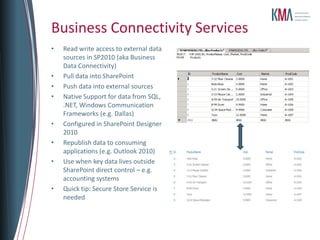
Read write access to external data sources in SP2010 (aka Business Data Connectivity)Pull data into SharePointPush data into external sourcesNative Support for data from SQL, .NET, Windows Communication Frameworks (e.g. Dallas)Configured in SharePoint Designer 2010Republish data to consuming applications (e.g. Outlook 2010)Use when key data lives outside SharePoint direct control – e.g. accounting systemsQuick tip: Secure Store Service is neededBusiness Connectivity Services
“Code free” integrated solution (with SQL 2008 R2)(can also use Business Intelligence Developer Studio)SharePoint integrated mode preferredExport contents to Excel, Word, etc.Reuse in SharePoint and Performance Point DashboardsUse when some reports are printed, multipage, etc.SQL Server Reporting Services (SSRS)
Formerly Project Dallas Azure-based public data subscriptionsAddressed through OData/XMLQuery/view downloadSamples available now at http://www.sqlazureservices.comTIP: Sample data sets are limited in CTPWindows Azure DataMarket
Dashboard Designer (browser downloadable) Integrates Excel Services, SSRS, and Performance Point ElementsSophisticated self service modeling via Decomposition TreeIdeal for SSAS but also work with standard data sources (lists, SQL)Requires true SQL development to build and maintain SSAS cubes for KPIs and scorecardsUse when data structures are stable and modeling skills are at least moderate (dimensions, facts)Quick tip: don’t fear SSAS!  If you have Project Server you already have cubesPerformancePoint 2010
Sophisticated self service modelingDecomposition TreeIdeal for SSAS but also work with standard data sources (lists, SQL)Requires true SQL development to build and maintain SSAS cubes for KPIs and scorecardsUse when data structures are stable and modeling skills are at least moderate (dimensions, facts)Quick tip: don’t fear SSAS!  If you have Project Server you already have cubesPerformancePoint 2010
DEMO – PerformancePoint
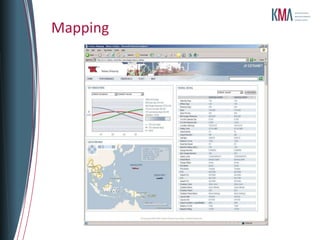
IDC reports that nearly 80% of business data has a location componentMake business tools as engaging as what’s on the webUse cases:  Customer base / trade areasRouting and shippingTargeted marketingSupply chain & disruption resolutionCustom Web Part or Self Service SSRSMapping
Mapping
DEMOMapping

Princeton SPUG BI-Data Visualization

  • 1.
    See Beyond theNumbers:Data Visualization in SharePoint 2010Princeton NJ SharePoint User GroupSeptember 2011Chris McNulty
  • 2.
    About KMAFounded 199529employees4 partners, including 2 co-foundersPrincipal lines of business:Professional ServicesSharePoint ConsultingSharePoint Managed ServicesCustom Application DevelopmentSoftware ProductMekko Graphics advanced charting softwareRoots in academia (MIT, Harvard, BU)Chris McNultyKMA SharePoint Practice Lead/Manager
  • 3.
    Working with SharePointtechnologies since 2000/2001
  • 4.
    20 years consultingand financial services technology (Santander, John Hancock, GMO, State Street)
  • 5.
    MBA in InvestmentManagement from Boston College Carroll School of Management
  • 6.
    Write and speakoften on Microsoft IW technologies (blogs & books)
  • 7.
  • 8.
    Hiking, cooking, playingguitar, colonial history, photography
  • 9.
    My family: Hayley,three kids (16, 7, 4) and my dog StanI live outside Boston…
  • 10.
  • 12.
    Goals, Terms &Surrounding TechnologyComplexity Levels of These SolutionsTechnology Overview and DemosSimple List and ChartExcel ServicesPower PivotPivotBCS & SQL Server Reporting Services (SSRS)Performance Point 2010MappingSummaryResourcesQuestion and Answer PeriodContact InformationAgenda
  • 13.
    Microsoft SharePoint Server2010 … the bright frontierEastern Long Island, July 4, 2010
  • 14.
    Goals for BIDesignAnswering the known questions about our businessAllowing users to self-discover patterns and answers to questions we haven’t yet been asked
  • 15.
  • 16.
    BCS – BusinessConnectivity ServicesSSRS – SQL Server Reporting ServicesCube – a prebuilt matrix of data aggregations, hosted in SQL Server Analysis ServicesWindows Azure DataMarket (fka Project Dallas) – Microsoft initiative to create publicly subscribed data services hosted on Azure and accessed via WCF, PowerPivot, etc. (http://www.sqlazureservices.com)Pivot - Interaction model that accommodates the complexity and scale of a massive collection of informationTerms
  • 17.
    Complexity Levels ofThese SolutionsCostTime
  • 18.
  • 19.
    Native to SharePoint(Web Part)Code-free solution – uses web part and native listsData sourcesOther Lists (Site Collection)BCS/Business Data CatalogExcel ServicesStandard TypesBar, Area, Line, Bubble, Financial, Pie, Radar, Polar, Gantt, Range, Error Bar, Box Plot, Funnel, PyramidTypical use - quick visualization of SharePoint dataQuick tip – use the wizardSharePoint Charting
  • 20.
  • 21.
    World’s #1 BItoolRender data, charts, interface using native Excel components (e.g. Slicers) without Excel 2010 on all clientsData stored in Excel; SharePoint hosts a presentation layer using Excel ServicesNative SharePoint Status Indicators (KPIs) Can also work with listsUse when users are skilled in Excel modeling and charting and data lives in spreadsheetsExcel Services
  • 22.
    “Project Gemini” –host 1-10MM row datasetsExcel and SharePoint componentsData doesn’t live in spreadsheetReleased with SQL Server 2008 R2 but doesn’t explicitly require the R2 EnginePowerPivot
  • 23.
    Like Excel WebAccess except underlying data can be sourced from:SQL, Analysis Services Cube, SSRS ReportAccessPower Pivot/ExcelData Feeds (XML, Atom, Azure, WCF OData, Dallas)Oracle, Teradata, Sybase, DB2ODBCText filesExcel optimized to handle data management and memory cache locallySharePoint builds cache and optimizes for server web accessUse when Excel modeling skills are high but data is too large or too heterogeneous to keep in multiple Excel spreadsheetsQuick tip: www.powerpivotgeeks.netPowerPivot
  • 24.
  • 25.
    “Interact with massiveamounts of data in ways that are powerful, informative, and fun”Interaction model that accommodates the complexity and scale of information rather than the traditional structure of the WebCreate a “collection”- underlying schema is CXML or Collection XML.View in SharePoint via Silverlight viewerComplexity: Excel tool available Tip: http://getpivot.comPivot
  • 26.
  • 27.
    Read write accessto external data sources in SP2010 (aka Business Data Connectivity)Pull data into SharePointPush data into external sourcesNative Support for data from SQL, .NET, Windows Communication Frameworks (e.g. Dallas)Configured in SharePoint Designer 2010Republish data to consuming applications (e.g. Outlook 2010)Use when key data lives outside SharePoint direct control – e.g. accounting systemsQuick tip: Secure Store Service is neededBusiness Connectivity Services
  • 28.
    “Code free” integratedsolution (with SQL 2008 R2)(can also use Business Intelligence Developer Studio)SharePoint integrated mode preferredExport contents to Excel, Word, etc.Reuse in SharePoint and Performance Point DashboardsUse when some reports are printed, multipage, etc.SQL Server Reporting Services (SSRS)
  • 29.
    Formerly Project DallasAzure-based public data subscriptionsAddressed through OData/XMLQuery/view downloadSamples available now at http://www.sqlazureservices.comTIP: Sample data sets are limited in CTPWindows Azure DataMarket
  • 30.
    Dashboard Designer (browserdownloadable) Integrates Excel Services, SSRS, and Performance Point ElementsSophisticated self service modeling via Decomposition TreeIdeal for SSAS but also work with standard data sources (lists, SQL)Requires true SQL development to build and maintain SSAS cubes for KPIs and scorecardsUse when data structures are stable and modeling skills are at least moderate (dimensions, facts)Quick tip: don’t fear SSAS! If you have Project Server you already have cubesPerformancePoint 2010
  • 31.
    Sophisticated self servicemodelingDecomposition TreeIdeal for SSAS but also work with standard data sources (lists, SQL)Requires true SQL development to build and maintain SSAS cubes for KPIs and scorecardsUse when data structures are stable and modeling skills are at least moderate (dimensions, facts)Quick tip: don’t fear SSAS! If you have Project Server you already have cubesPerformancePoint 2010
  • 32.
  • 33.
    IDC reports thatnearly 80% of business data has a location componentMake business tools as engaging as what’s on the webUse cases: Customer base / trade areasRouting and shippingTargeted marketingSupply chain & disruption resolutionCustom Web Part or Self Service SSRSMapping
  • 34.
  • 35.

Editor's Notes

  • #8 TO BE UPDATED
  • #9 Keep?
  • #13 Show of hands!
  • #14 Refer to other sessions!
  • #15 SVB
  • #17 CM
  • #18 CM
  • #19 CM
  • #21 SVB – Created by Microsoft Live Labs
  • #22 Medical imaging, people, products
  • #23 CM
  • #24 CM
  • #26 CM
  • #27 CM
  • #29 SVB
  • #30 SVBPLACEHOLDER SLIDEIf needed – case study – Teekay Shipping Vessel Pool extranet – MOSS 2007 & MapPointView vessel locations and technical specificationsMonitor shipping performanceGet financial reportsAccess timely data via a usable interface
  • #31 Silverlight 4 application that uses a RESTful call to the Yahoo mapping API. Under the covers is using LINQ to post to a Telerik map control. The Telerik control can link to mapping services like Bing or OpenStreets. Uses zip code and country fields from our data to get the longitude & latitude.