Executive summary
AUSTECH pharmaceutical company was established on year 2000. They has
got 150 employees. Now company is planning to expand their business and
establish the new branch in GeorgeStreet, Town hall. Now the scenario is that
they want to put their main server in head office which is located in North
Sydney.
At the moment they have implemented three major servers:
Domain controller
Print server
Proxy server ( Firewall )
According to the scenario of the network the head office is located atN.
Sydneywhichhas four branches:
Account Department
IT Department
Administrative Department
Staff Department with student section.
As a server window server 2003 is implemented with windows XP as a client
operating system.
Same scenario will be implemented in the branch office as well, but will be
updated with all the new devices.
Introduction:
AUSTECH pharmaceutical company was established on year 2000. They has
got 150 employees. Now company is planning to expand their business and
establish the new branch in George Street, Town hall. Now the scenario is that
they want to put their main server in head office which is located in North
Sydney.
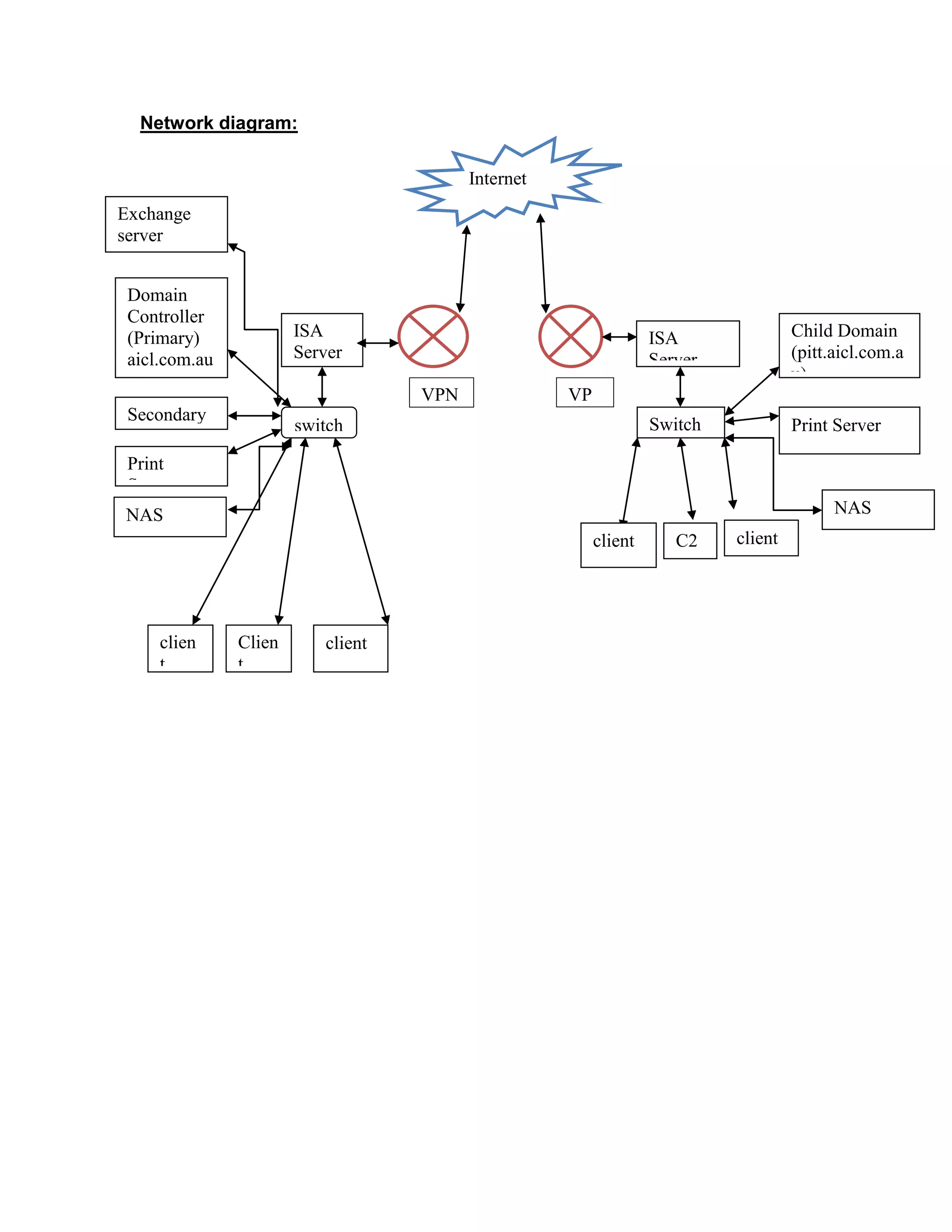
Network diagram:
VP
N
NASNAS
clien
t
Clien
t
client
switch
Domain
Controller
(Primary)
aicl.com.au
P
Secondary
ISA
Server
Print
Server
Internet
ISA
Server
Child Domain
(pitt.aicl.com.a
u)
Switch Print Server
client C2 client
Exchange
server
VPN
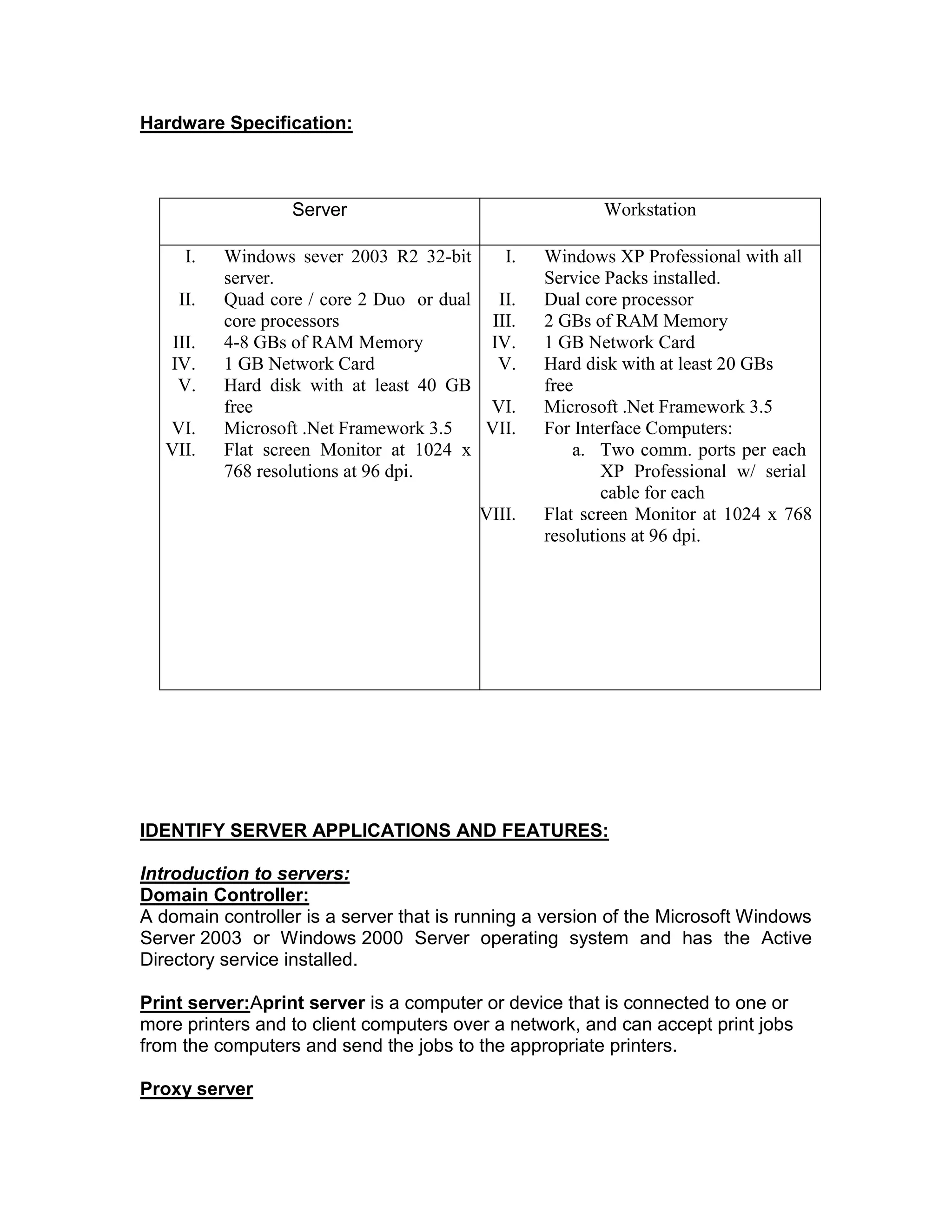
Hardware Specification:
Server Workstation
I. Windows sever 2003 R2 32-bit
server.
II. Quad core / core 2 Duo or dual
core processors
III. 4-8 GBs of RAM Memory
IV. 1 GB Network Card
V. Hard disk with at least 40 GB
free
VI. Microsoft .Net Framework 3.5
VII. Flat screen Monitor at 1024 x
768 resolutions at 96 dpi.
I. Windows XP Professional with all
Service Packs installed.
II. Dual core processor
III. 2 GBs of RAM Memory
IV. 1 GB Network Card
V. Hard disk with at least 20 GBs
free
VI. Microsoft .Net Framework 3.5
VII. For Interface Computers:
a. Two comm. ports per each
XP Professional w/ serial
cable for each
VIII. Flat screen Monitor at 1024 x 768
resolutions at 96 dpi.
IDENTIFY SERVER APPLICATIONS AND FEATURES:
Introduction to servers:
Domain Controller:
A domain controller is a server that is running a version of the Microsoft Windows
Server 2003 or Windows 2000 Server operating system and has the Active
Directory service installed.
Print server:Aprint server is a computer or device that is connected to one or
more printers and to client computers over a network, and can accept print jobs
from the computers and send the jobs to the appropriate printers.
Proxy server
A server that sits between a client application, such as a Web browser and a
real server. It intercepts all requests to the real server to see if it can fulfill the
requests itself. If not, it forwards the request to the real server.
It has two main purposes:
 ImprovePerformance: Proxy servers can dramatically improve
performance for groups of users. This is because it saves the results of all
requests for a certain amount of time. The major online services such as
MSN and Yahoo, for example, employ an array of proxy servers.
 Filter Requests: Proxy servers can also be used to filter requests. For
example, a company might use a proxy server to prevent its employees
from accessing a specific set of Web sites.
ISA Server: Microsoft's ISA Server (Internet Security and Acceleration Server) is
the successor to Microsoft's Proxy Server 2.0 (see proxy server) and is part of
Microsoft's .NET support. ISA Server provides the two basic services of an
enterprise firewall and a Web proxy/cache server. ISA Server's firewall screens
all packet-level, circuit-level, and application-level traffic. The Web cache stores
and serves all regularly accessed Web content in order to reduce network traffic
and provide faster access to frequently-accessed Web pages. ISA Server also
schedules downloads of Web page updates for non-peak times.
ISA Server allows administrators to create policies for regulating usage based on
user, group, application, destination, schedule, and content type criteria. ISA
Server is designed to work with Windows 2000 and later operating systems and
to take advantage of Windows' Kerberos security. ISA Server includes a software
development kit (SDK).
ISA Server comes in two editions, Standard Edition and Enterprise Edition.
Standard Edition is a stand-alone server that supports up to four processors.
Enterprise Edition is for large-scale deployments, server array support, multi-
level policy, and computers with more than four processors. Licenses are based
on the number of processors.
GFI Web Monitor 2009™ boosts employee productivity by giving you complete
internet access control to monitor what users are browsing and downloading in
real-time. Research by IDC shows that up to 40% of employee Internet access is
non-work related. As a network administrator, internet monitoring software
provides you the tools that enable you to have complete Internet access control
to monitor employees' web browsing activities and to ensure that any files
downloaded are free of viruses and other malware.
Microsoft Exchange Server: Exchange is a popular Microsoft
messagingsystem that includes a mail server an e-mail program(e-mail cliet) and
groupware applications. Designed for use in a business setting, the Exchange
server is often used in conjunction with Microsoft Outlook to take advantage of
Outlook's collaborative features, such as the ability to share calendars and
contact lists.
Microsoft Exchange serves two purposes:
Mail Server.Exchange supports POP, IMAP, and web e-mail clients, as
well as its own preferred mail client, Microsoft Outlook.
Collaboration server. Exchange allows users to share information, either
using Outlook on their desktops or Outlook Web Access through a web
browser. It enables Outlook's most important features for collaboration -
public folders to which everyone can contribute and view files, calendars
for scheduling meetings or reserving resources like conference rooms,
common address books for sharing contact information, and much more.
Virtual Private Network (VPN) is implemented toconnect the two wide area
networks in George Street, Town hall and North Sydney where head office are
located. Using Virtual Private Network (VPN) it provides remote offices or
individual users with secure access to the company’s network. It aims to avoid an
expensive system of owned or leased lines that can be used by only one
organization. The goal of a VPN is to provide the organization with the same
secure capabilities but at a much lower cost. It encapsulates data transfers
between two or more networked devices not on the same private network so as
to keep the transferred data private from other devices on one or more
intervening local or wide area networks
Risks Context:
There are many natural and Human made threats to service areas which
could cause business interruption. Potential threats to consider include
personnel, physical environment, hardware/software systems,
telecommunications, applications, and operations.
Disaster Recovery Team proposed to develop a schedule back up within a week
and help to maintain the Faculty as well as student database of the organization.
The major challenge faced by the IT department was to be able to restore the
original applications and database without having to go through the whole
process of installation which would take much longer in the event of a failure.
Specifically, they needed to identify and tackle a large number of system issues
such as which processes to stop, which and who’s files to modify and which
steps to automate or perform manually at the time of the recovery.
Threats affecting contingency planning.
Natural hazards:
Earthquake
Tornado
Flooding
Landslide
Volcanic eruption
Lightning
Smoke, dirt, dust
Sandstorm or blowing dust
Windstorm
Snow/ice storm
Accidents:
Disclosure of confidential information
Electrical disturbance
Electrical interruption
Spill of toxic chemical
Environmental failure:
Water damage
Structural failure
Fire
Hardware failure
Liquid leakage
Operator/user error
Software error
Telecommunications interruption
Intentional acts:
Alteration of data
Alteration of software
Computer virus
Bomb threat
Disclosure of confidential information
Employee sabotage
External sabotage
Terrorist activity
Fraud
Riot/civil disturbance
Strike
Theft
Unauthorized use
Vandalism
IT Threats
Breach of Personal Information
• All data owners must report any suspected or confirmed breach of personal
information on individuals to the Chief Security Officer (CSO) immediately upon
discovery.
• Location managers are responsible for ensuring all employees in their unit are
aware of policies and procedures for protecting personal information.
• Informs the Legal Department and the Chief Privacy Officer that a possible
privacy breach has been reported and provides them an overview of the
situation.
• Contacts the individual who reported the problem.
• Reviews the preliminary details with the Legal Department and the Chief
Privacy Office.
Denial of Service / Distributed Denial of Service
• Inform relevant IT security personnel.
• Ensure all communication links are up.
• Ensure data integrity.
.
• Provide alternate solutions in case primary communication channels are
down.
Virus Outbreak
• Isolate system, devices, servers.
, etc from the network and switch over to backup equipment’s.
• Report the situation to the Network Security Officer.
Fire/Smoke
• Activate the nearest fire alarm. You may find one at development lobby,
server room, kitchen and corridor.
• Call 16 and report location and source of fire, if known.
• If it is possible and safe, turn off all electrical equipments.
• Evacuate the building.
• After reaching a safe location, contact other responsible departments.
Bomb or other terrorist threat
• Call (92-21) 2416626, Bomb Disposal Squad.
• If the threat has been received via phone call then keep talking to the caller
and try to get as much information as possible.
• Evacuate the building; depending on the instructions provided by the disposal
squad.
Power / Connectivity Failure
• Switch off all electrical equipment
• Determine extent of blackout by calling relevant department engineer.
• Make sure that all doors will remain closed before evacuation. Consult the
relevant person if any door found unlocked.
• Initiate the telephone tree to ensure that everyone arrives at home safely.
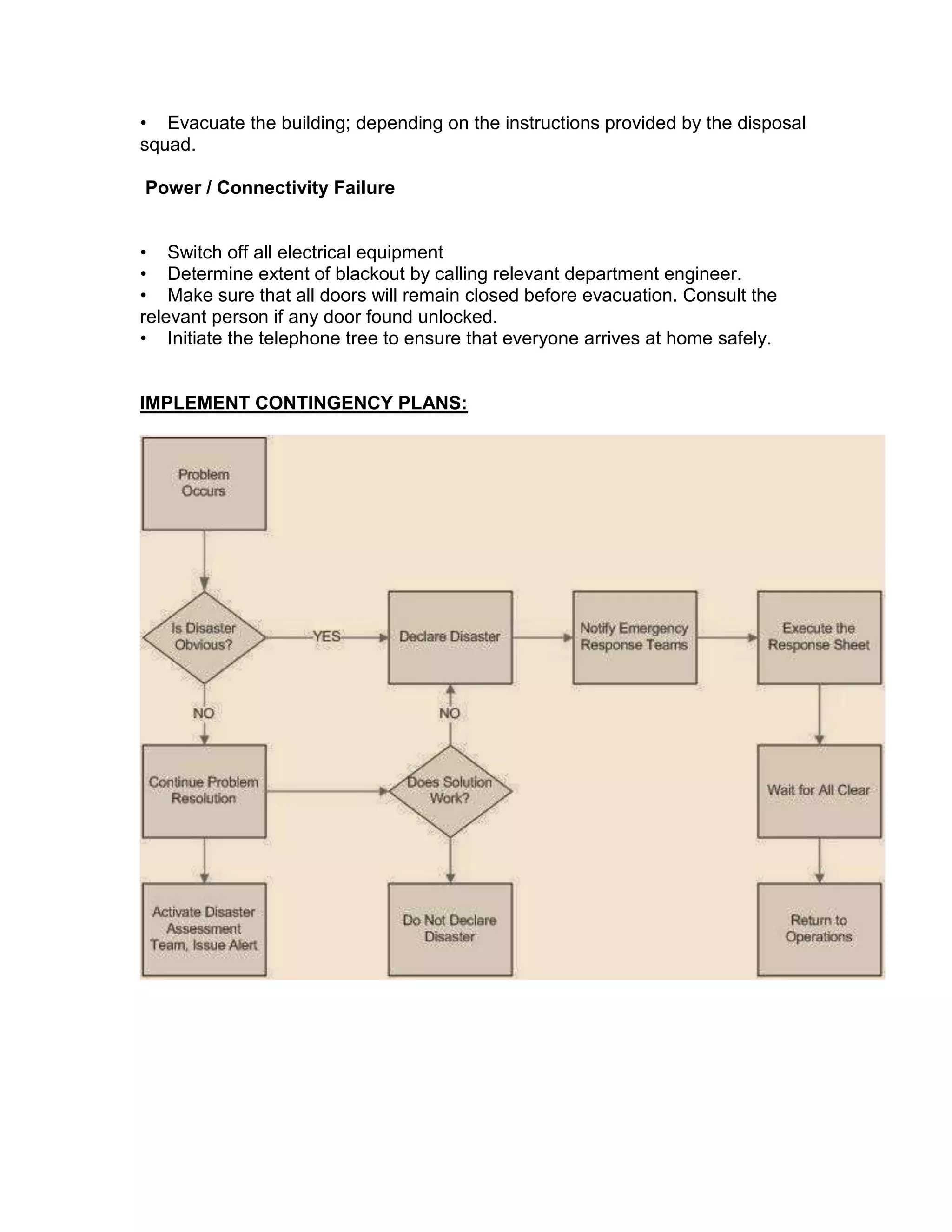
IMPLEMENT CONTINGENCY PLANS:
ALTERNATIVE SOLUTIONS:
Design an IP addressing plan and select appropriate IP routing protocols
Check the devices thoroughly to prevent malfunction of connectivity
devices, such as switch, router.
Similar testing can be done with switches and routers. If these look to be
stable, then check the configuration of the equipment that’s experiencing
the problem. It could well be that it simply needs to be reconfigured to
accommodate the type of equipment that’s been attached to make the
network connection.
Filtering out traffic at the network edge also eliminates backbone
congestion.
Apply network security design principles to boost network security.
Install ISA Server with GFI.
Brand New Turbo NAS Series can be implemented. This is the most
Affordable and Flexible Virtualization Solution.
The TS-559 Pro NAS Drive which is certified as compatible with VMware
vSphere4 (ESX 4.0 and above) virtualization platform.The NAS can be
utilized as the networked shared storage of VMware virtualization
environments and Windows cluster servers. Comparing with traditional
SAN (Storage Area Network), the Turbo NAS is a competitive alternative
with much lower setup and maintenance costs in an IP SAN.
The Feature-rich and Integrated Applications for Business
The NAS supports file sharing across Windows, Mac, Linux, and UNIX
platforms. Versatile business applications such as file server, FTP server,
printer server, web server, and Windows AD support are provided. The
dominant features, such as WebDAV, Share Folder Aggregation (also
known as DFS), IPv6 and IPv4 dual-stack, Wake on LAN, schedule power
on/ off, HDD S.M.A.R.T, comprehensive log systems, and policy-based
unauthorized IP blocking are all included features of a QNAP NAS server.
The Turbo NAS provides flexible and secure storage server deployment with the
following enhanced iSCSI features:
• NAS + iSCSI storage solution---The Turbo NAS can serve as a NAS for
file sharing and iSCSI storage concurrently.
• Flexible multiple LUNs management----The NAS supports multiple LUNs
(Logical Unit Numbers) and iSCSI targets. The LUNs can be flexibly mapped to,
unmapped from, and switched among different iSCSI targets.
• Secure IP SAN environment deployment----Designed with CHAP
authentication and LUN masking, the advanced ACL (Access Control List) offers
you the capability to block unauthorized access from the initiators.
• Designed for virtualized and clustered environments----Comparing with the
high cost of Fibre Channel SAN, the Turbo NAS is an affordable system that can
be deployed as a storage center for virtualized and clustered server
environments, such as VMware and Microsoft Windows Failover Cluster.
The product (electrical, electronic equipment, Mercury-containing button cell
battery) should not be placed in municipal waste. Check local regulations for
disposal of electronic products.
SYSTEM REQUIREMENT:
Number of work station for new employees,100workstationfor town
hallbranch. OS—Microsoft XP with Office 2010 home and business.
Workstation hardware / software specification:
Pentium processor with core 2duo.
1 G.BRAM
100 G.B Hard Disk.
At least 4 gigabytes (GB) of available space on the hard disk
CD-ROM or DVD-ROM drive
ISA server can be implemented in place of Proxy server as a web cache
and Firewall. For better performance of the ISA Server GFI can be
implemented to track all the sites and traffics’ inbound and outbound.
Secondary domain as well as Heart Beat (Clustering and Load Balancing)
can be implemented, for the backup server. (If in case primary server gets
down)
Child domain can be configured in Pitt Street.
Latest antivirus in each machine can be installed with required policy.
Support for a hardware-based "watchdog timer", which can restart the
server if the operating system does not respond within a certain amount of
time.
For all the clients including staffs and students mail, exchange server can
be configured.
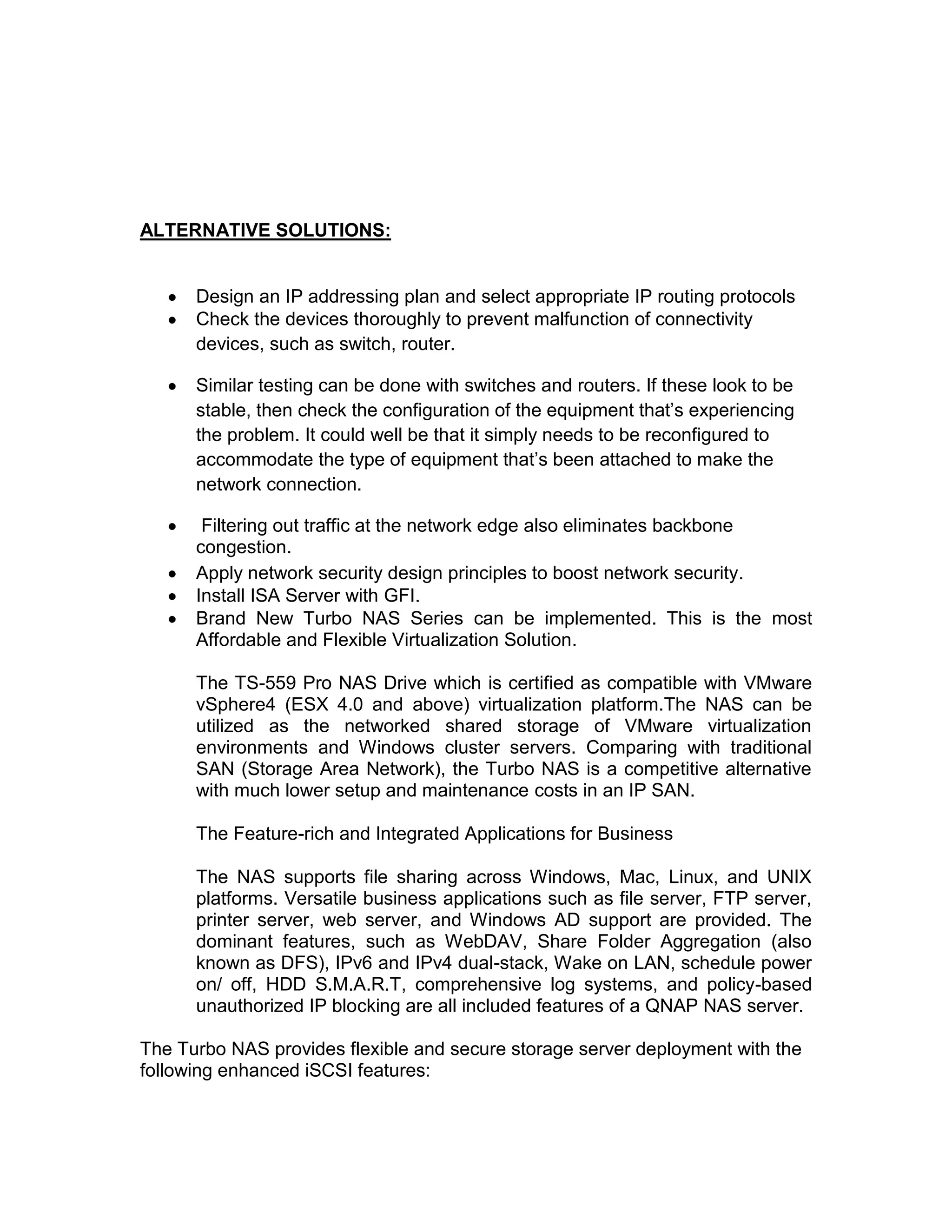
Windows Server 2003 :
Requirement Standard
Edition
Enterprise
Edition
Datacenter
Edition
Web Edition
Minimum CPU
Speed
133 MHz 133 MHz for
x86-based
computers
733 MHz for
Itanium-based
computers*
400 MHz for
x86-based
computers
733 MHz for
Itanium-based
computers*
133 MHz
Recommended
CPU Speed
550 MHz 733 MHz 733 MHz 550 MHz
Minimum
RAM
128 MB 128 MB 512 MB 128 MB
Recommended
Minimum
RAM
256 MB 256 MB 1 GB 256 MB
Maximum
RAM
4 GB 32 GB for x86-
based
computers
512 GB for
Itanium-based
computers*
64 GB for x86-
based
computers
512 GB for
Itanium-based
computers*
2 GB
Multiprocessor
Support **
Up to 4 Up to 8 Minimum 8
required
Maximum 64
Up to 2
Disk Space for
Setup
1.5 GB 1.5 GB for x86-
based
computers
2.0 GB for
Itanium-based
computers*
1.5 GB for x86-
based
computers
2.0 GB for
Itanium-based
computers*
1.5 GB
* Important: The 64-bit versions of Windows Server 2003, Enterprise Edition and
Windows Server 2003, Datacenter Edition are only compatible with 64-bit Intel Itanium-
based systems. They cannot be successfully installed on 32-bit systems.
Linux server requirements:
The exact hardware and software configuration that is needed to support your
organization depends on the volume of data that is planned to maintain on the
system, the number of concurrent users that the system must support, the
backup and recovery requirements of organization, and the performance levels
that the system must meet.
The minimum configuration for server on Linux requires the following:
Red Hat Enterprise Linux (RHEL) AS or ES 3.0 Update 1 (2.4.21-9.EL
kernel, Glibc 2.3.2-95.6)
SuSE Linux Enterprise Server (SLES) 8 SP3 (2.4.21-169 kernel, Glibc
2.3.5-213)
DB2 Universal Database Enterprise Edition Version 8.1 or later (included
with Content Manager Ondemand)
Intel-based 1GHz or greater processor (multiple processors optional)
512 MB of memory
Minimum of 9GB of DASD spread over at least two disks and sufficient
storage for documents
TCP/IP
Token Ring or Ethernet connection
Magnetic storage for the database, report data, and temporary work
space. A minimum of eight gigabytes of space and two separate disks are
required, in addition to sufficient disk space for report storage.
A CD-ROM drive for program installation
A 4mm or 8mm tape drive, automated tape library, or optical library for
data backup and recovery. A tape drive can be used with a small system
configuration. An automated tape library or dedicated optical library is
recommended for medium and large system configurations. (See IBM
DB2 Content Manager OnDemand for Multiplatforms Introduction and
Planning Guide for more information about system configurations.)
Tivoli Storage Manager Version 5.2.2 or later Server and API (included in
your product package), if you plan to maintain report data on archive
storage devices or use Tivoli Storage Manager facilities to backup and
restore DB2 databases. To support these functions, you must install Tivoli
Storage Manager on at least one object server. See Optical and tape
storage for more information.
Infoprint, if you plan to use the OnDemand server print or server FAX
functions. You must install Infoprint on a system that belongs to the same
network as the OnDemand library server. See Server printing
requirements for more information
Java Runtime Environment (JRE) Version 1.4.1 or later
BENCHMARKING AGAINST CLIENT SPECIFICATION AND
REQUIREMENTS:
Benchmarking Overview
Benchmarking results are frequently presented and widelyadvertised, often
without a concrete understanding of whatthey truly mean. A good benchmark
provides an accurateperformance measurement that reflects the way the PC will
beused. Benchmarks should assist IT decision makers as theyanalyze the results
to select an appropriate computing system.
Types of Benchmarks :
There are two basic categories of benchmarks: syntheticbenchmarks and
application benchmarks.
>Synthetic benchmarks use specially createdprograms that impose the workload
on the
Component. Such benchmarks include code fragments written specifically to
mimic the work performed by real worldapplications. They typically use a small
file
that is quick to run. While sometimes criticized for not using actual applications,
synthetic benchmarks can be useful tools for isolating the performance of certain
parts of the hardware.
> Application benchmarks run completeapplications that a user typically runs.
Such benchmarks may include a complete word processor, an e-mail client
application, or graphics authoring software. Performance results usually correlate
closely with the actual performance a user experiences when using the included
applications.
Various software’s can be used to test the performance of the system.
EVEREST Ultimate Edition is the best software for viewing system information.
Its secret is a hardware information database for over 68000 devices! Yet, the
program is very small, about 12MB. It includes "Monitor Diagnostics Test", which
is a complete tool for tweaking your CRT and LCD monitor.
PC Probe II is a utility that helps you to closely monitor vital components of the
computer. It monitors fan speeds, voltages & alerts you if any problem with these
components is found. It is a must have utility for any who want his computer to be
in a healthy state everytime.
UniblueSpeedUpMyPC 3.5 is a very good program. It is a program which does
some windows system maintenance like cleaning / deleting unnecessary files. It
can also be used as a tool to monitor your network usage. Realtime Disk,
Network, Memory and CPU usage graphs are available. Not much features in the
program. Anyway, rating 3.
RivaTuner 2.2 is the best & the foremost tweaking utilty available. It provides you
everything you may need to tune NVIDIA GPU based display adapters.
Advanced tuning features such as driver-level Direct3D / OpenGL and system
tuning, flexible profiling system allowing to make custom settings on per-
application basis etc. are included.
Roles of Team Organization:
Planning for the business continuity of DOI in the aftermath of a disaster is a
complex task. Preparation for, response to, and recovery from a disaster
affecting the administrative functions of the organization requires the cooperative
efforts of many divisions in partnership with the functional areas supporting the
"business" of DOI.
The following personnel are required to be present during pre and post recovery
process.
Responsibilities of Roles
IT System Administrator(Roshan B)
Responsible for the verification and
operational maintenance of the system at
the Server level
Shutdown of the Workgroup(TRIM) and Master
services
Shutdown of the Fulcrum Indexer, PDF
Generator and Encapsulator services
Reconcile Fulcrum and TRIM database with the
execution of the maintenance tool
Perform store check
Perform shakeout testing
Execute SQL query to determine missing
records at the SQL Server database level with
assistance from the SQL Server DBA
Execute SQL query to remove unwanted record
information at the SQL Server database level
with assistance from the SQL Server DBA
Identifying and recovering missing files from
backup or workgroup server cache with
assistance from the SQL Server DBA
Records Manager / System
Administrator
Responsible for the verification and
operational maintenance of the system at
the business level
Notify all users of the DR procedures, advising
them to log off and verify the process
Identifying records to be recreated
Verification and maintenance of the records at
the TRIM level
Identification and removal of information from
the system after the database restoration
process for records supposed to have been
expunged or purged with the assistance of the
SQL Server DBA
SQL Server DBA
Responsible for the operational
maintenance, backup and restoration of the
SQL server database.
Daily full backup of the SQL database
Hourly backup of the SQL log dump
Backup of the corrupted database
Backup of the SQL log files
Restore last SQL backup from tape
Application of SQL logs at SQL Server level
Daily full backup of File System information with
assistance from the IT System Administrator
and NT Administrator
NT Administrator
Responsible for the maintenance of the
system hardware, communications, security
and network operation
Execution of standard hardware maintenance
Maintenance of the Server hardware
environment including communication, network,
etc
Testing the disaster recovery plan:
The Recovery Planning Process
There are nine major phases in the recovery planning process:
1. Project Planning: Define the project scope, organize the project, and identify
the resources needed.
2. Critical Business Requirements: Identify the business functions most
important to protect, and the means to protect them. Analyse risks, threats,
and vulnerabilities.
3. Recovery Strategies: Arrange for alternate processing facilities to use during
a disaster. Make sure to store copies of computer files, work-in-process,
software, and documentation in a safe place.
4. Emergency Response/Problem Escalation: Specify exactly how to respond
to emergencies and how to tell when a "problem" has become a potential
"disaster."
5. Plan Activation: Determine procedures for informing the right people,
assessing the impact on operations, and starting the recovery efforts.
6. Recovery Operations: Develop the specific steps for reducing the risks of an
outage and restoring operations should an outage occur.
7. Training: Make sure everyone understands the recovery plan and can carry it
out efficiently.
8. Testing: Make sure the plan works effectively.
9. Plan Maintenance: Make changes and additions to keep the plan current.
Cost analysis/time frame:
Num. Devices Price in AuD Brand
1 Network cable $1 /mt. SFTP CAT 5/6
2 ISA Server $800 Microsoft
3 Domain controller $890 Microsoft
4 Router $1000 Cisco
5 Printer $800 HP Laserjet
6 Switch $500 Cisco
7 Optical fibre $60/m LC
8 Windows 2003 server $890 Microsoft
9 Anti Virus $135 Nod32
10 Application Programs $300 Various
11 Exchange Server $100 Microsoft
References:
Disaster Recovery, viewed on 20dec 2009
http://searchenterprisewan.techtarget.com/sDefinition/0,,sid200_gci75208
9,00.html
Disaster recovery, Disaster recovery, viewed on 21dec2009,
http://en.wikipedia.org/wiki/Disaster_recovery
Cisco Network Solution, viewed on Nov 06,2009
http://www.cisco.com/en/US/solutions/collateral/ns340/ns517/ns431/ns17/
net_customer_profile0900aecd80459891.html
Active Directory diagrams with ConceptDraw PRO, viewed on Nov
06,2009
http://www.conceptdraw.com/en/products/cd5/ap_active_directory_diagra
m.php
ACM Publications, viewed on Nov 06,2009
https://campus.acm.org/
switch (network switch), viewed on Nov 07,2009
http://compnetworking.about.com/od/hardwarenetworkgear/g/bldef_switch.htm
Exchange Server , viewed on Nov 07,2009
http://searchexchange.techtarget.com/sDefinition/0,,sid43_gci952894,00.html
ISA Server , viewed on Nov 07,2009
www.microsoft.com/forefront/.../isaserver/en/us/default.aspx
Disaster Recovery Plan, viewed on 2dec 2009,
http://www.anbg.gov.au/cpbr/disaster-plan/
Risk Analysis, viewed on 20dec , 2009
http://www.devx.com/security/Article/16390
DISASTER RECOVERY PLANNING FROM A-Zviewed on viewed on 25
Nov 2009
http://www.disaster-recovery-guide.com/

Network Diagram of a company ABCD Roshan basnet it 29

  • 2.
    Executive summary AUSTECH pharmaceuticalcompany was established on year 2000. They has got 150 employees. Now company is planning to expand their business and establish the new branch in GeorgeStreet, Town hall. Now the scenario is that they want to put their main server in head office which is located in North Sydney. At the moment they have implemented three major servers: Domain controller Print server Proxy server ( Firewall ) According to the scenario of the network the head office is located atN. Sydneywhichhas four branches: Account Department IT Department Administrative Department Staff Department with student section. As a server window server 2003 is implemented with windows XP as a client operating system. Same scenario will be implemented in the branch office as well, but will be updated with all the new devices. Introduction: AUSTECH pharmaceutical company was established on year 2000. They has got 150 employees. Now company is planning to expand their business and establish the new branch in George Street, Town hall. Now the scenario is that they want to put their main server in head office which is located in North Sydney.
  • 3.
  • 4.
    Hardware Specification: Server Workstation I.Windows sever 2003 R2 32-bit server. II. Quad core / core 2 Duo or dual core processors III. 4-8 GBs of RAM Memory IV. 1 GB Network Card V. Hard disk with at least 40 GB free VI. Microsoft .Net Framework 3.5 VII. Flat screen Monitor at 1024 x 768 resolutions at 96 dpi. I. Windows XP Professional with all Service Packs installed. II. Dual core processor III. 2 GBs of RAM Memory IV. 1 GB Network Card V. Hard disk with at least 20 GBs free VI. Microsoft .Net Framework 3.5 VII. For Interface Computers: a. Two comm. ports per each XP Professional w/ serial cable for each VIII. Flat screen Monitor at 1024 x 768 resolutions at 96 dpi. IDENTIFY SERVER APPLICATIONS AND FEATURES: Introduction to servers: Domain Controller: A domain controller is a server that is running a version of the Microsoft Windows Server 2003 or Windows 2000 Server operating system and has the Active Directory service installed. Print server:Aprint server is a computer or device that is connected to one or more printers and to client computers over a network, and can accept print jobs from the computers and send the jobs to the appropriate printers. Proxy server
  • 5.
    A server thatsits between a client application, such as a Web browser and a real server. It intercepts all requests to the real server to see if it can fulfill the requests itself. If not, it forwards the request to the real server. It has two main purposes:  ImprovePerformance: Proxy servers can dramatically improve performance for groups of users. This is because it saves the results of all requests for a certain amount of time. The major online services such as MSN and Yahoo, for example, employ an array of proxy servers.  Filter Requests: Proxy servers can also be used to filter requests. For example, a company might use a proxy server to prevent its employees from accessing a specific set of Web sites. ISA Server: Microsoft's ISA Server (Internet Security and Acceleration Server) is the successor to Microsoft's Proxy Server 2.0 (see proxy server) and is part of Microsoft's .NET support. ISA Server provides the two basic services of an enterprise firewall and a Web proxy/cache server. ISA Server's firewall screens all packet-level, circuit-level, and application-level traffic. The Web cache stores and serves all regularly accessed Web content in order to reduce network traffic and provide faster access to frequently-accessed Web pages. ISA Server also schedules downloads of Web page updates for non-peak times. ISA Server allows administrators to create policies for regulating usage based on user, group, application, destination, schedule, and content type criteria. ISA Server is designed to work with Windows 2000 and later operating systems and to take advantage of Windows' Kerberos security. ISA Server includes a software development kit (SDK). ISA Server comes in two editions, Standard Edition and Enterprise Edition. Standard Edition is a stand-alone server that supports up to four processors. Enterprise Edition is for large-scale deployments, server array support, multi- level policy, and computers with more than four processors. Licenses are based on the number of processors. GFI Web Monitor 2009™ boosts employee productivity by giving you complete internet access control to monitor what users are browsing and downloading in real-time. Research by IDC shows that up to 40% of employee Internet access is non-work related. As a network administrator, internet monitoring software provides you the tools that enable you to have complete Internet access control to monitor employees' web browsing activities and to ensure that any files downloaded are free of viruses and other malware. Microsoft Exchange Server: Exchange is a popular Microsoft messagingsystem that includes a mail server an e-mail program(e-mail cliet) and groupware applications. Designed for use in a business setting, the Exchange server is often used in conjunction with Microsoft Outlook to take advantage of Outlook's collaborative features, such as the ability to share calendars and contact lists. Microsoft Exchange serves two purposes:
  • 6.
    Mail Server.Exchange supportsPOP, IMAP, and web e-mail clients, as well as its own preferred mail client, Microsoft Outlook. Collaboration server. Exchange allows users to share information, either using Outlook on their desktops or Outlook Web Access through a web browser. It enables Outlook's most important features for collaboration - public folders to which everyone can contribute and view files, calendars for scheduling meetings or reserving resources like conference rooms, common address books for sharing contact information, and much more. Virtual Private Network (VPN) is implemented toconnect the two wide area networks in George Street, Town hall and North Sydney where head office are located. Using Virtual Private Network (VPN) it provides remote offices or individual users with secure access to the company’s network. It aims to avoid an expensive system of owned or leased lines that can be used by only one organization. The goal of a VPN is to provide the organization with the same secure capabilities but at a much lower cost. It encapsulates data transfers between two or more networked devices not on the same private network so as to keep the transferred data private from other devices on one or more intervening local or wide area networks Risks Context: There are many natural and Human made threats to service areas which could cause business interruption. Potential threats to consider include personnel, physical environment, hardware/software systems, telecommunications, applications, and operations. Disaster Recovery Team proposed to develop a schedule back up within a week and help to maintain the Faculty as well as student database of the organization. The major challenge faced by the IT department was to be able to restore the original applications and database without having to go through the whole process of installation which would take much longer in the event of a failure. Specifically, they needed to identify and tackle a large number of system issues such as which processes to stop, which and who’s files to modify and which steps to automate or perform manually at the time of the recovery. Threats affecting contingency planning. Natural hazards: Earthquake Tornado Flooding Landslide
  • 7.
    Volcanic eruption Lightning Smoke, dirt,dust Sandstorm or blowing dust Windstorm Snow/ice storm Accidents: Disclosure of confidential information Electrical disturbance Electrical interruption Spill of toxic chemical Environmental failure: Water damage Structural failure Fire Hardware failure Liquid leakage Operator/user error Software error Telecommunications interruption Intentional acts: Alteration of data Alteration of software Computer virus Bomb threat Disclosure of confidential information Employee sabotage External sabotage Terrorist activity Fraud Riot/civil disturbance Strike Theft Unauthorized use Vandalism
  • 8.
    IT Threats Breach ofPersonal Information • All data owners must report any suspected or confirmed breach of personal information on individuals to the Chief Security Officer (CSO) immediately upon discovery. • Location managers are responsible for ensuring all employees in their unit are aware of policies and procedures for protecting personal information. • Informs the Legal Department and the Chief Privacy Officer that a possible privacy breach has been reported and provides them an overview of the situation. • Contacts the individual who reported the problem. • Reviews the preliminary details with the Legal Department and the Chief Privacy Office. Denial of Service / Distributed Denial of Service • Inform relevant IT security personnel. • Ensure all communication links are up. • Ensure data integrity. . • Provide alternate solutions in case primary communication channels are down. Virus Outbreak • Isolate system, devices, servers. , etc from the network and switch over to backup equipment’s. • Report the situation to the Network Security Officer. Fire/Smoke • Activate the nearest fire alarm. You may find one at development lobby, server room, kitchen and corridor. • Call 16 and report location and source of fire, if known. • If it is possible and safe, turn off all electrical equipments. • Evacuate the building. • After reaching a safe location, contact other responsible departments. Bomb or other terrorist threat • Call (92-21) 2416626, Bomb Disposal Squad. • If the threat has been received via phone call then keep talking to the caller and try to get as much information as possible.
  • 9.
    • Evacuate thebuilding; depending on the instructions provided by the disposal squad. Power / Connectivity Failure • Switch off all electrical equipment • Determine extent of blackout by calling relevant department engineer. • Make sure that all doors will remain closed before evacuation. Consult the relevant person if any door found unlocked. • Initiate the telephone tree to ensure that everyone arrives at home safely. IMPLEMENT CONTINGENCY PLANS:
  • 10.
    ALTERNATIVE SOLUTIONS: Design anIP addressing plan and select appropriate IP routing protocols Check the devices thoroughly to prevent malfunction of connectivity devices, such as switch, router. Similar testing can be done with switches and routers. If these look to be stable, then check the configuration of the equipment that’s experiencing the problem. It could well be that it simply needs to be reconfigured to accommodate the type of equipment that’s been attached to make the network connection. Filtering out traffic at the network edge also eliminates backbone congestion. Apply network security design principles to boost network security. Install ISA Server with GFI. Brand New Turbo NAS Series can be implemented. This is the most Affordable and Flexible Virtualization Solution. The TS-559 Pro NAS Drive which is certified as compatible with VMware vSphere4 (ESX 4.0 and above) virtualization platform.The NAS can be utilized as the networked shared storage of VMware virtualization environments and Windows cluster servers. Comparing with traditional SAN (Storage Area Network), the Turbo NAS is a competitive alternative with much lower setup and maintenance costs in an IP SAN. The Feature-rich and Integrated Applications for Business The NAS supports file sharing across Windows, Mac, Linux, and UNIX platforms. Versatile business applications such as file server, FTP server, printer server, web server, and Windows AD support are provided. The dominant features, such as WebDAV, Share Folder Aggregation (also known as DFS), IPv6 and IPv4 dual-stack, Wake on LAN, schedule power on/ off, HDD S.M.A.R.T, comprehensive log systems, and policy-based unauthorized IP blocking are all included features of a QNAP NAS server. The Turbo NAS provides flexible and secure storage server deployment with the following enhanced iSCSI features:
  • 11.
    • NAS +iSCSI storage solution---The Turbo NAS can serve as a NAS for file sharing and iSCSI storage concurrently. • Flexible multiple LUNs management----The NAS supports multiple LUNs (Logical Unit Numbers) and iSCSI targets. The LUNs can be flexibly mapped to, unmapped from, and switched among different iSCSI targets. • Secure IP SAN environment deployment----Designed with CHAP authentication and LUN masking, the advanced ACL (Access Control List) offers you the capability to block unauthorized access from the initiators. • Designed for virtualized and clustered environments----Comparing with the high cost of Fibre Channel SAN, the Turbo NAS is an affordable system that can be deployed as a storage center for virtualized and clustered server environments, such as VMware and Microsoft Windows Failover Cluster. The product (electrical, electronic equipment, Mercury-containing button cell battery) should not be placed in municipal waste. Check local regulations for disposal of electronic products. SYSTEM REQUIREMENT: Number of work station for new employees,100workstationfor town hallbranch. OS—Microsoft XP with Office 2010 home and business. Workstation hardware / software specification: Pentium processor with core 2duo. 1 G.BRAM 100 G.B Hard Disk. At least 4 gigabytes (GB) of available space on the hard disk CD-ROM or DVD-ROM drive ISA server can be implemented in place of Proxy server as a web cache and Firewall. For better performance of the ISA Server GFI can be implemented to track all the sites and traffics’ inbound and outbound. Secondary domain as well as Heart Beat (Clustering and Load Balancing) can be implemented, for the backup server. (If in case primary server gets down) Child domain can be configured in Pitt Street. Latest antivirus in each machine can be installed with required policy. Support for a hardware-based "watchdog timer", which can restart the server if the operating system does not respond within a certain amount of time.
  • 12.
    For all theclients including staffs and students mail, exchange server can be configured. Windows Server 2003 : Requirement Standard Edition Enterprise Edition Datacenter Edition Web Edition Minimum CPU Speed 133 MHz 133 MHz for x86-based computers 733 MHz for Itanium-based computers* 400 MHz for x86-based computers 733 MHz for Itanium-based computers* 133 MHz Recommended CPU Speed 550 MHz 733 MHz 733 MHz 550 MHz Minimum RAM 128 MB 128 MB 512 MB 128 MB Recommended Minimum RAM 256 MB 256 MB 1 GB 256 MB Maximum RAM 4 GB 32 GB for x86- based computers 512 GB for Itanium-based computers* 64 GB for x86- based computers 512 GB for Itanium-based computers* 2 GB Multiprocessor Support ** Up to 4 Up to 8 Minimum 8 required Maximum 64 Up to 2 Disk Space for Setup 1.5 GB 1.5 GB for x86- based computers 2.0 GB for Itanium-based computers* 1.5 GB for x86- based computers 2.0 GB for Itanium-based computers* 1.5 GB
  • 13.
    * Important: The64-bit versions of Windows Server 2003, Enterprise Edition and Windows Server 2003, Datacenter Edition are only compatible with 64-bit Intel Itanium- based systems. They cannot be successfully installed on 32-bit systems. Linux server requirements: The exact hardware and software configuration that is needed to support your organization depends on the volume of data that is planned to maintain on the system, the number of concurrent users that the system must support, the backup and recovery requirements of organization, and the performance levels that the system must meet. The minimum configuration for server on Linux requires the following: Red Hat Enterprise Linux (RHEL) AS or ES 3.0 Update 1 (2.4.21-9.EL kernel, Glibc 2.3.2-95.6) SuSE Linux Enterprise Server (SLES) 8 SP3 (2.4.21-169 kernel, Glibc 2.3.5-213) DB2 Universal Database Enterprise Edition Version 8.1 or later (included with Content Manager Ondemand) Intel-based 1GHz or greater processor (multiple processors optional) 512 MB of memory Minimum of 9GB of DASD spread over at least two disks and sufficient storage for documents TCP/IP Token Ring or Ethernet connection Magnetic storage for the database, report data, and temporary work space. A minimum of eight gigabytes of space and two separate disks are required, in addition to sufficient disk space for report storage. A CD-ROM drive for program installation A 4mm or 8mm tape drive, automated tape library, or optical library for data backup and recovery. A tape drive can be used with a small system configuration. An automated tape library or dedicated optical library is recommended for medium and large system configurations. (See IBM DB2 Content Manager OnDemand for Multiplatforms Introduction and Planning Guide for more information about system configurations.) Tivoli Storage Manager Version 5.2.2 or later Server and API (included in your product package), if you plan to maintain report data on archive storage devices or use Tivoli Storage Manager facilities to backup and restore DB2 databases. To support these functions, you must install Tivoli Storage Manager on at least one object server. See Optical and tape storage for more information. Infoprint, if you plan to use the OnDemand server print or server FAX functions. You must install Infoprint on a system that belongs to the same
  • 14.
    network as theOnDemand library server. See Server printing requirements for more information Java Runtime Environment (JRE) Version 1.4.1 or later BENCHMARKING AGAINST CLIENT SPECIFICATION AND REQUIREMENTS: Benchmarking Overview Benchmarking results are frequently presented and widelyadvertised, often without a concrete understanding of whatthey truly mean. A good benchmark provides an accurateperformance measurement that reflects the way the PC will beused. Benchmarks should assist IT decision makers as theyanalyze the results to select an appropriate computing system. Types of Benchmarks : There are two basic categories of benchmarks: syntheticbenchmarks and application benchmarks. >Synthetic benchmarks use specially createdprograms that impose the workload on the Component. Such benchmarks include code fragments written specifically to mimic the work performed by real worldapplications. They typically use a small file that is quick to run. While sometimes criticized for not using actual applications, synthetic benchmarks can be useful tools for isolating the performance of certain parts of the hardware. > Application benchmarks run completeapplications that a user typically runs. Such benchmarks may include a complete word processor, an e-mail client application, or graphics authoring software. Performance results usually correlate closely with the actual performance a user experiences when using the included applications. Various software’s can be used to test the performance of the system. EVEREST Ultimate Edition is the best software for viewing system information. Its secret is a hardware information database for over 68000 devices! Yet, the program is very small, about 12MB. It includes "Monitor Diagnostics Test", which is a complete tool for tweaking your CRT and LCD monitor. PC Probe II is a utility that helps you to closely monitor vital components of the computer. It monitors fan speeds, voltages & alerts you if any problem with these components is found. It is a must have utility for any who want his computer to be in a healthy state everytime. UniblueSpeedUpMyPC 3.5 is a very good program. It is a program which does some windows system maintenance like cleaning / deleting unnecessary files. It
  • 15.
    can also beused as a tool to monitor your network usage. Realtime Disk, Network, Memory and CPU usage graphs are available. Not much features in the program. Anyway, rating 3. RivaTuner 2.2 is the best & the foremost tweaking utilty available. It provides you everything you may need to tune NVIDIA GPU based display adapters. Advanced tuning features such as driver-level Direct3D / OpenGL and system tuning, flexible profiling system allowing to make custom settings on per- application basis etc. are included. Roles of Team Organization: Planning for the business continuity of DOI in the aftermath of a disaster is a complex task. Preparation for, response to, and recovery from a disaster affecting the administrative functions of the organization requires the cooperative efforts of many divisions in partnership with the functional areas supporting the "business" of DOI. The following personnel are required to be present during pre and post recovery process. Responsibilities of Roles IT System Administrator(Roshan B) Responsible for the verification and operational maintenance of the system at the Server level Shutdown of the Workgroup(TRIM) and Master services Shutdown of the Fulcrum Indexer, PDF Generator and Encapsulator services Reconcile Fulcrum and TRIM database with the execution of the maintenance tool Perform store check Perform shakeout testing Execute SQL query to determine missing records at the SQL Server database level with assistance from the SQL Server DBA Execute SQL query to remove unwanted record information at the SQL Server database level with assistance from the SQL Server DBA
  • 16.
    Identifying and recoveringmissing files from backup or workgroup server cache with assistance from the SQL Server DBA Records Manager / System Administrator Responsible for the verification and operational maintenance of the system at the business level Notify all users of the DR procedures, advising them to log off and verify the process Identifying records to be recreated Verification and maintenance of the records at the TRIM level Identification and removal of information from the system after the database restoration process for records supposed to have been expunged or purged with the assistance of the SQL Server DBA SQL Server DBA Responsible for the operational maintenance, backup and restoration of the SQL server database. Daily full backup of the SQL database Hourly backup of the SQL log dump Backup of the corrupted database Backup of the SQL log files Restore last SQL backup from tape Application of SQL logs at SQL Server level Daily full backup of File System information with assistance from the IT System Administrator and NT Administrator NT Administrator Responsible for the maintenance of the system hardware, communications, security and network operation Execution of standard hardware maintenance Maintenance of the Server hardware environment including communication, network, etc
  • 17.
    Testing the disasterrecovery plan: The Recovery Planning Process There are nine major phases in the recovery planning process: 1. Project Planning: Define the project scope, organize the project, and identify the resources needed. 2. Critical Business Requirements: Identify the business functions most important to protect, and the means to protect them. Analyse risks, threats, and vulnerabilities. 3. Recovery Strategies: Arrange for alternate processing facilities to use during a disaster. Make sure to store copies of computer files, work-in-process, software, and documentation in a safe place. 4. Emergency Response/Problem Escalation: Specify exactly how to respond to emergencies and how to tell when a "problem" has become a potential "disaster." 5. Plan Activation: Determine procedures for informing the right people, assessing the impact on operations, and starting the recovery efforts. 6. Recovery Operations: Develop the specific steps for reducing the risks of an outage and restoring operations should an outage occur. 7. Training: Make sure everyone understands the recovery plan and can carry it out efficiently. 8. Testing: Make sure the plan works effectively. 9. Plan Maintenance: Make changes and additions to keep the plan current. Cost analysis/time frame: Num. Devices Price in AuD Brand 1 Network cable $1 /mt. SFTP CAT 5/6 2 ISA Server $800 Microsoft 3 Domain controller $890 Microsoft 4 Router $1000 Cisco 5 Printer $800 HP Laserjet 6 Switch $500 Cisco 7 Optical fibre $60/m LC 8 Windows 2003 server $890 Microsoft 9 Anti Virus $135 Nod32 10 Application Programs $300 Various 11 Exchange Server $100 Microsoft
  • 18.
    References: Disaster Recovery, viewedon 20dec 2009 http://searchenterprisewan.techtarget.com/sDefinition/0,,sid200_gci75208 9,00.html Disaster recovery, Disaster recovery, viewed on 21dec2009, http://en.wikipedia.org/wiki/Disaster_recovery Cisco Network Solution, viewed on Nov 06,2009 http://www.cisco.com/en/US/solutions/collateral/ns340/ns517/ns431/ns17/ net_customer_profile0900aecd80459891.html Active Directory diagrams with ConceptDraw PRO, viewed on Nov 06,2009 http://www.conceptdraw.com/en/products/cd5/ap_active_directory_diagra m.php ACM Publications, viewed on Nov 06,2009 https://campus.acm.org/ switch (network switch), viewed on Nov 07,2009 http://compnetworking.about.com/od/hardwarenetworkgear/g/bldef_switch.htm Exchange Server , viewed on Nov 07,2009 http://searchexchange.techtarget.com/sDefinition/0,,sid43_gci952894,00.html ISA Server , viewed on Nov 07,2009 www.microsoft.com/forefront/.../isaserver/en/us/default.aspx Disaster Recovery Plan, viewed on 2dec 2009, http://www.anbg.gov.au/cpbr/disaster-plan/ Risk Analysis, viewed on 20dec , 2009 http://www.devx.com/security/Article/16390 DISASTER RECOVERY PLANNING FROM A-Zviewed on viewed on 25 Nov 2009 http://www.disaster-recovery-guide.com/