
Davide Benvegnù
InternationalDevelopmentManager – Aruba.it
DotNetToscana StaffMember
davide.benvegnu@gmail.com- blog.dbtek.it
www.davidebenvegnu.com- @davidebenvegnu
Release Management
with TFS 2013
ALM Deep dive with TFS 2013
#vsalmdeep
Session Lineup
About TFS Release Manager
Release Management installation
Release Management in action
#vsalmdeep
Event Sponsor
#vsalmdeep
About
TFS Release Manager
#vsalmdeep
What is it?
#vsalmdeep
From MSDN:
Release Management provides a continuous deployment
solution that makes release cycles repeatable, visible, and
more efficient by automating deployments through every
environment from Team Foundation Server (TFS) to
production.
About TFS RM
#vsalmdeep
 Formerly "InRelease"
 It’s a Standalone product
 Will be integrated in TFS during the coming releases
 It isn’t as complete as “we want” (as developers,
testers or deployers)
About TFS RM
#vsalmdeep
 Release Management Server
 Web service
 Windows Service
 Database
 …will be integrated in TFS
 Release Management Client
 Release Management console
 Release Explorer Web console
 …will be integrated in Visual Studio
About TFS RM
#vsalmdeep
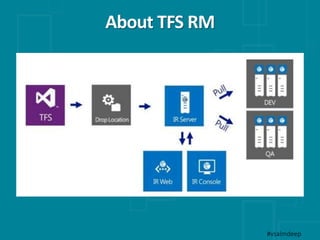
 Release Management Deployer (Agent)
 To install on target servers
 Works in “Pull mode”
 Deployer Tools
 Installing / unistalling components
 Deploying reports to Reporting Services
 Moving / Copying files
 …
About TFS RM
#vsalmdeep
Key Features
#vsalmdeep
 Easily define your release process
 Visually create promotion paths through your
environments
 Drag and drop to create workflows (copy files, create
IIS sites, install MSIs, maintain configurations, …)
 Use the same deployment for every environment,
including deploying to production
Key Features
#vsalmdeep
 Manage a consistent deployment pipeline:
 Schedule builds and trigger your entire release
management flow from within Visual Studio
 Time-schedule each promoted release at a time
that suits them, providing the versatility of
automation, while still maintaining control
 Visualize your release pipeline and model your
release process to know where you are at a glance
Release Management
Installation
#vsalmdeep
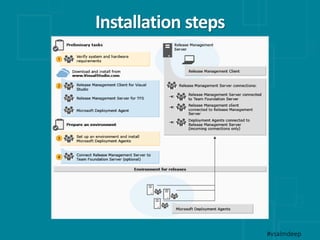
Installation steps
#vsalmdeep
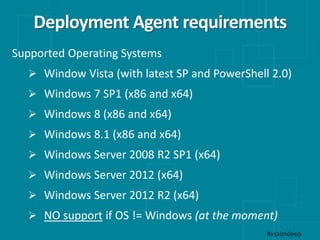
Deployment Agent requirements
#vsalmdeep
Supported Operating Systems
 Window Vista (with latest SP and PowerShell 2.0)
 Windows 7 SP1 (x86 and x64)
 Windows 8 (x86 and x64)
 Windows 8.1 (x86 and x64)
 Windows Server 2008 R2 SP1 (x64)
 Windows Server 2012 (x64)
 Windows Server 2012 R2 (x64)
 NO support if OS != Windows (at the moment)
DEMO
Release Management in action
#vsalmdeep
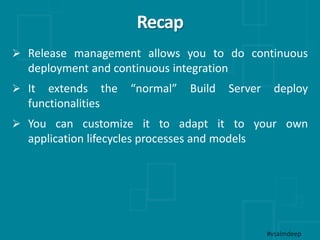
Recap
 Release management allows you to do continuous
deployment and continuous integration
 It extends the “normal” Build Server deploy
functionalities
 You can customize it to adapt it to your own
application lifecycles processes and models
#vsalmdeep

Release management with TFS 2013

  • 1.
    Davide Benvegnù InternationalDevelopmentManager –Aruba.it DotNetToscana StaffMember davide.benvegnu@gmail.com- blog.dbtek.it www.davidebenvegnu.com- @davidebenvegnu Release Management with TFS 2013 ALM Deep dive with TFS 2013 #vsalmdeep
  • 2.
    Session Lineup About TFSRelease Manager Release Management installation Release Management in action #vsalmdeep
  • 3.
  • 4.
  • 5.
    What is it? #vsalmdeep FromMSDN: Release Management provides a continuous deployment solution that makes release cycles repeatable, visible, and more efficient by automating deployments through every environment from Team Foundation Server (TFS) to production.
  • 6.
    About TFS RM #vsalmdeep Formerly "InRelease"  It’s a Standalone product  Will be integrated in TFS during the coming releases  It isn’t as complete as “we want” (as developers, testers or deployers)
  • 7.
    About TFS RM #vsalmdeep Release Management Server  Web service  Windows Service  Database  …will be integrated in TFS  Release Management Client  Release Management console  Release Explorer Web console  …will be integrated in Visual Studio
  • 8.
    About TFS RM #vsalmdeep Release Management Deployer (Agent)  To install on target servers  Works in “Pull mode”  Deployer Tools  Installing / unistalling components  Deploying reports to Reporting Services  Moving / Copying files  …
  • 9.
  • 10.
    Key Features #vsalmdeep  Easilydefine your release process  Visually create promotion paths through your environments  Drag and drop to create workflows (copy files, create IIS sites, install MSIs, maintain configurations, …)  Use the same deployment for every environment, including deploying to production
  • 11.
    Key Features #vsalmdeep  Managea consistent deployment pipeline:  Schedule builds and trigger your entire release management flow from within Visual Studio  Time-schedule each promoted release at a time that suits them, providing the versatility of automation, while still maintaining control  Visualize your release pipeline and model your release process to know where you are at a glance
  • 12.
  • 13.
  • 14.
    Deployment Agent requirements #vsalmdeep SupportedOperating Systems  Window Vista (with latest SP and PowerShell 2.0)  Windows 7 SP1 (x86 and x64)  Windows 8 (x86 and x64)  Windows 8.1 (x86 and x64)  Windows Server 2008 R2 SP1 (x64)  Windows Server 2012 (x64)  Windows Server 2012 R2 (x64)  NO support if OS != Windows (at the moment)
  • 15.
    DEMO Release Management inaction #vsalmdeep
  • 16.
    Recap  Release managementallows you to do continuous deployment and continuous integration  It extends the “normal” Build Server deploy functionalities  You can customize it to adapt it to your own application lifecycles processes and models #vsalmdeep