Microsoft Dynamics 365 User Group
Source Control and Release
Strategy for Dynamics 365
Solutions
Microsoft Dynamics 365 User Group
Hi! I’m Shane Carvalho
• Developer. Geek and Blogger *.
• Worked with small mobile applications to multi-tenant custom SASS
solutions in the .NET ecosystem.
• Dynamics CRM 4  Dynamics 365.
• Passion for ALM and DevOps with Visual Studio Team Services.
• Automate everything!!!
http://nullfactory.net http://github.com/shanec- @shanec_
Microsoft Dynamics 365 User Group
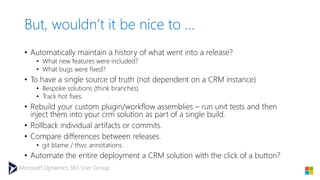
But, wouldn’t it be nice to …
• Automatically maintain a history of what went into a release?
• What new features were included?
• What bugs were fixed?
• To have a single source of truth (not dependent on a CRM instance)
• Bespoke solutions (think branches)
• Track hot fixes.
• Rebuild your custom plugin/workflow assemblies – run unit tests and then
inject them into your crm solution as part of a single build.
• Rollback individual artifacts or commits.
• Compare differences between releases.
• git blame / tfsvc annotations.
• Automate the entire deployment a CRM solution with the click of a button?
Microsoft Dynamics 365 User Group
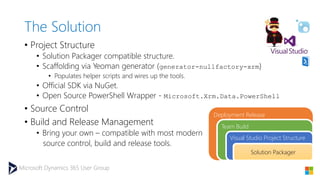
The Solution
• Project Structure
• Solution Packager compatible structure.
• Scaffolding via Yeoman generator (generator-nullfactory-xrm)
• Populates helper scripts and wires up the tools.
• Official SDK via NuGet.
• Open Source PowerShell Wrapper - Microsoft.Xrm.Data.PowerShell
• Source Control
• Build and Release Management
• Bring your own – compatible with most modern
source control, build and release tools.
Deployment Release
Team Build
Visual Studio Project Structure
Solution Packager
Microsoft Dynamics 365 User Group
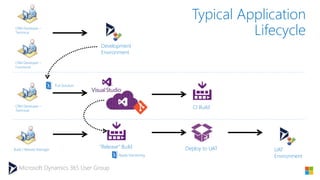
Development
Environment
CRM Developer –
Technical
CRM Developer –
Functional
CRM Developer –
Technical
Build / Release Manager
CI Build
“Release” Build Deploy to UAT UAT
Environment
Pull Solution
Typical Application
Lifecycle
Apply Versioning
Microsoft Dynamics 365 User Group
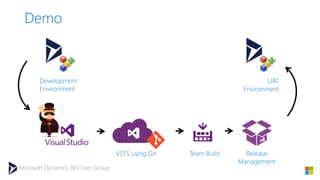
Demo
Development
Environment
UAT
Environment
VSTS using Git Team Build Release
Management
Microsoft Dynamics 365 User Group
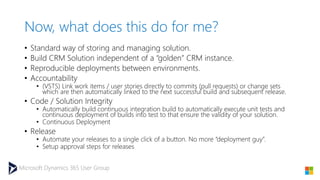
Now, what does this do for me?
• Standard way of storing and managing solution.
• Build CRM Solution independent of a “golden” CRM instance.
• Reproducible deployments between environments.
• Accountability
• (VSTS) Link work items / user stories directly to commits (pull requests) or change sets
which are then automatically linked to the next successful build and subsequent release.
• Code / Solution Integrity
• Automatically build continuous integration build to automatically execute unit tests and
continuous deployment of builds into test to that ensure the validity of your solution.
• Continuous Deployment
• Release
• Automate your releases to a single click of a button. No more “deployment guy”.
• Setup approval steps for releases
Microsoft Dynamics 365 User Group
Thank You
More information available at http://nullfactory.net
generator-nullfactory-xrm
[https://github.com/shanec-/generator-nullfactory-xrm]
• Feedback, Issues, feature requests.
• Fork, customize and contribute.
http://nullfactory.net http://github.com/shanec- @shanec_

Source Control and Release Strategy for Dynamics 365 Solutions

  • 1.
    Microsoft Dynamics 365User Group Source Control and Release Strategy for Dynamics 365 Solutions
  • 2.
    Microsoft Dynamics 365User Group Hi! I’m Shane Carvalho • Developer. Geek and Blogger *. • Worked with small mobile applications to multi-tenant custom SASS solutions in the .NET ecosystem. • Dynamics CRM 4  Dynamics 365. • Passion for ALM and DevOps with Visual Studio Team Services. • Automate everything!!! http://nullfactory.net http://github.com/shanec- @shanec_
  • 3.
  • 4.
    Microsoft Dynamics 365User Group But, wouldn’t it be nice to … • Automatically maintain a history of what went into a release? • What new features were included? • What bugs were fixed? • To have a single source of truth (not dependent on a CRM instance) • Bespoke solutions (think branches) • Track hot fixes. • Rebuild your custom plugin/workflow assemblies – run unit tests and then inject them into your crm solution as part of a single build. • Rollback individual artifacts or commits. • Compare differences between releases. • git blame / tfsvc annotations. • Automate the entire deployment a CRM solution with the click of a button?
  • 5.
    Microsoft Dynamics 365User Group The Solution • Project Structure • Solution Packager compatible structure. • Scaffolding via Yeoman generator (generator-nullfactory-xrm) • Populates helper scripts and wires up the tools. • Official SDK via NuGet. • Open Source PowerShell Wrapper - Microsoft.Xrm.Data.PowerShell • Source Control • Build and Release Management • Bring your own – compatible with most modern source control, build and release tools. Deployment Release Team Build Visual Studio Project Structure Solution Packager
  • 6.
    Microsoft Dynamics 365User Group Development Environment CRM Developer – Technical CRM Developer – Functional CRM Developer – Technical Build / Release Manager CI Build “Release” Build Deploy to UAT UAT Environment Pull Solution Typical Application Lifecycle Apply Versioning
  • 7.
    Microsoft Dynamics 365User Group Demo Development Environment UAT Environment VSTS using Git Team Build Release Management
  • 8.
    Microsoft Dynamics 365User Group Now, what does this do for me? • Standard way of storing and managing solution. • Build CRM Solution independent of a “golden” CRM instance. • Reproducible deployments between environments. • Accountability • (VSTS) Link work items / user stories directly to commits (pull requests) or change sets which are then automatically linked to the next successful build and subsequent release. • Code / Solution Integrity • Automatically build continuous integration build to automatically execute unit tests and continuous deployment of builds into test to that ensure the validity of your solution. • Continuous Deployment • Release • Automate your releases to a single click of a button. No more “deployment guy”. • Setup approval steps for releases
  • 9.
    Microsoft Dynamics 365User Group Thank You More information available at http://nullfactory.net generator-nullfactory-xrm [https://github.com/shanec-/generator-nullfactory-xrm] • Feedback, Issues, feature requests. • Fork, customize and contribute. http://nullfactory.net http://github.com/shanec- @shanec_