Set up Continuous Integration using SalesforceDX
and Jenkins
NIDA KHAN
&
AMIT SINGH
Agenda
● The Problem Statement
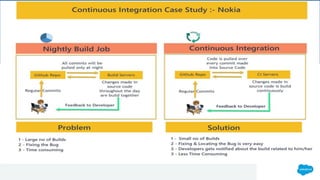
● Continous Integration Case Study
● Why Jenkins
● Continuous Integration , Continuous Delivery &
Continuous Deployment
● Branching Strategy
● Demo
● Q & A
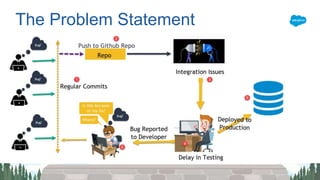
The Problem Statement
Why Jenkins
● Open Source
● 1000+ free plugins
● Huge Ecosystem
● Integrates with almost all Devops tool like
docker to puppet
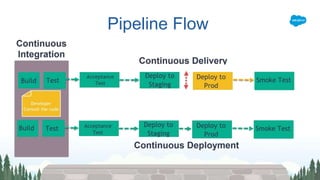
Continuous Integration- The code in any Developer Branch is
always ready to merge with Master branch at regular interval.
Continuous Delivery- CI + Automatic release creation every
time a new build has been created or validated, from where
you can deploy the code to production with just a button
Click.
Continuous Deployment- CI + CD + Production Deployment
Introduction to CI/CD
Pipeline Flow
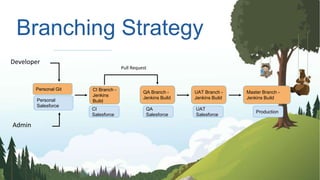
Branching Strategy
Developer
Admin
Personal
Salesforce
CI Branch -
Jenkins
Build
Personal Git
QA Branch -
Jenkins Build
Pull Request
CI
Salesforce
QA
Salesforce
UAT Branch -
Jenkins Build
Master Branch -
Jenkins Build
UAT
Salesforce
Production
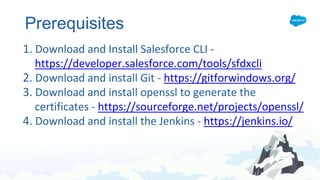
Prerequisites
1. Download and Install Salesforce CLI -
https://developer.salesforce.com/tools/sfdxcli
2. Download and install Git - https://gitforwindows.org/
3. Download and install openssl to generate the
certificates - https://sourceforge.net/projects/openssl/
4. Download and install the Jenkins - https://jenkins.io/
Demo
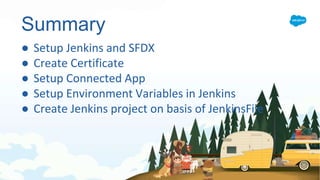
Summary
● Setup Jenkins and SFDX
● Create Certificate
● Setup Connected App
● Setup Environment Variables in Jenkins
● Create Jenkins project on basis of JenkinsFile
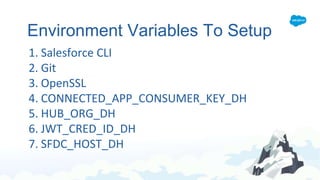
Environment Variables To Setup
1. Salesforce CLI
2. Git
3. OpenSSL
4. CONNECTED_APP_CONSUMER_KEY_DH
5. HUB_ORG_DH
6. JWT_CRED_ID_DH
7. SFDC_HOST_DH
Resources
● Apex Hours - Click here
● Setup SFDX & VsCode - Click here
● Official Documentation for JWT and
Jenkins File - Click here
● Github repository URL - Click Here
● Trailmix - Click here
Q&A
Speakers
Application Architect
10x Salesforce Certificates
Twitter: @cloudyamit
Company: Deloitte
Email: amitasinghsfdc@gmail.com
Salesforce Consultant
6X Salesforce Certificates
Twitter: @Nida_SFDC
Company: TCS
Email: sfdcnida@gmail.com
Set up Continuous Integration using SalesforceDX and Jenkins

Set up Continuous Integration using SalesforceDX and Jenkins

  • 1.
    Set up ContinuousIntegration using SalesforceDX and Jenkins NIDA KHAN & AMIT SINGH
  • 2.
    Agenda ● The ProblemStatement ● Continous Integration Case Study ● Why Jenkins ● Continuous Integration , Continuous Delivery & Continuous Deployment ● Branching Strategy ● Demo ● Q & A
  • 3.
  • 5.
    Why Jenkins ● OpenSource ● 1000+ free plugins ● Huge Ecosystem ● Integrates with almost all Devops tool like docker to puppet
  • 6.
    Continuous Integration- Thecode in any Developer Branch is always ready to merge with Master branch at regular interval. Continuous Delivery- CI + Automatic release creation every time a new build has been created or validated, from where you can deploy the code to production with just a button Click. Continuous Deployment- CI + CD + Production Deployment Introduction to CI/CD
  • 7.
  • 8.
    Branching Strategy Developer Admin Personal Salesforce CI Branch- Jenkins Build Personal Git QA Branch - Jenkins Build Pull Request CI Salesforce QA Salesforce UAT Branch - Jenkins Build Master Branch - Jenkins Build UAT Salesforce Production
  • 9.
    Prerequisites 1. Download andInstall Salesforce CLI - https://developer.salesforce.com/tools/sfdxcli 2. Download and install Git - https://gitforwindows.org/ 3. Download and install openssl to generate the certificates - https://sourceforge.net/projects/openssl/ 4. Download and install the Jenkins - https://jenkins.io/
  • 10.
  • 11.
    Summary ● Setup Jenkinsand SFDX ● Create Certificate ● Setup Connected App ● Setup Environment Variables in Jenkins ● Create Jenkins project on basis of JenkinsFile
  • 12.
    Environment Variables ToSetup 1. Salesforce CLI 2. Git 3. OpenSSL 4. CONNECTED_APP_CONSUMER_KEY_DH 5. HUB_ORG_DH 6. JWT_CRED_ID_DH 7. SFDC_HOST_DH
  • 13.
    Resources ● Apex Hours- Click here ● Setup SFDX & VsCode - Click here ● Official Documentation for JWT and Jenkins File - Click here ● Github repository URL - Click Here ● Trailmix - Click here
  • 14.
  • 15.
    Speakers Application Architect 10x SalesforceCertificates Twitter: @cloudyamit Company: Deloitte Email: amitasinghsfdc@gmail.com Salesforce Consultant 6X Salesforce Certificates Twitter: @Nida_SFDC Company: TCS Email: sfdcnida@gmail.com