North American Leader in ALM Services
Services
TFS 2015
Upgrade Scenarios and
How to Avoid Surprises
David Jung, Sr. ALM Consultant
InCycle Software
New York ▪ Seattle ▪ Montreal
Agenda
• Upgrade Path Considerations
• How to prepare for the Upgrade
• Post Upgrade Gotchas
• Q & A
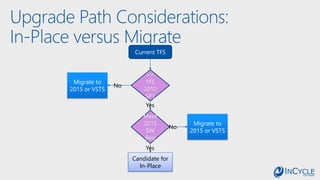
Upgrade Path Considerations:
In-Place versus Migrate
• What version of TFS are you currently using?
• What is the hardware and underlying software is TFS on?
• Do you want to stop hosting it yourself?
Upgrade Path Considerations:
In-Place versus Migrate
Current TFS
>=
TFS
2010
SP1
Meet
2015
SW
Req
Migrate to
2015 or VSTS
Migrate to
2015 or VSTS
Candidate for
In-Place
No
No
Yes
Yes
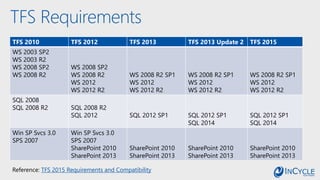
TFS Requirements
TFS 2010 TFS 2012 TFS 2013 TFS 2013 Update 2 TFS 2015
WS 2003 SP2
WS 2003 R2
WS 2008 SP2
WS 2008 R2
WS 2008 SP2
WS 2008 R2
WS 2012
WS 2012 R2
WS 2008 R2 SP1
WS 2012
WS 2012 R2
WS 2008 R2 SP1
WS 2012
WS 2012 R2
WS 2008 R2 SP1
WS 2012
WS 2012 R2
SQL 2008
SQL 2008 R2 SQL 2008 R2
SQL 2012 SQL 2012 SP1 SQL 2012 SP1
SQL 2014
SQL 2012 SP1
SQL 2014
Win SP Svcs 3.0
SPS 2007
Win SP Svcs 3.0
SPS 2007
SharePoint 2010
SharePoint 2013
SharePoint 2010
SharePoint 2013
SharePoint 2010
SharePoint 2013
SharePoint 2010
SharePoint 2013
Reference: TFS 2015 Requirements and Compatibility
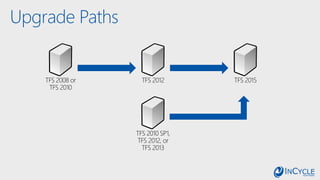
Upgrade Paths
TFS 2008 or
TFS 2010
TFS 2012 TFS 2015
TFS 2010 SP1,
TFS 2012, or
TFS 2013
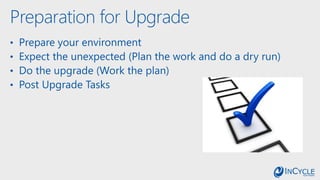
Preparation for Upgrade
• Prepare your environment
• Expect the unexpected (Plan the work and do a dry run)
• Do the upgrade (Work the plan)
• Post Upgrade Tasks
Prepare your environment
• How Big is your Collection Size(s)?
• Do you want to separate App Tier from Data Tier?
• Is it time to clean up your databases?
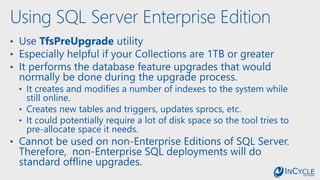
Using SQL Server Enterprise Edition
• Use TfsPreUpgrade utility
• Especially helpful if your Collections are 1TB or greater
• It performs the database feature upgrades that would
normally be done during the upgrade process.
• It creates and modifies a number of indexes to the system while
still online.
• Creates new tables and triggers, updates sprocs, etc.
• It could potentially require a lot of disk space so the tool tries to
pre-allocate space it needs.
• Cannot be used on non-Enterprise Editions of SQL Server.
Therefore, non-Enterprise SQL deployments will do
standard offline upgrades.
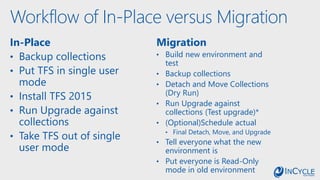
Workflow of In-Place versus Migration
In-Place
• Backup collections
• Put TFS in single user
mode
• Install TFS 2015
• Run Upgrade against
collections
• Take TFS out of single
user mode
Migration
• Build new environment and
test
• Backup collections
• Detach and Move Collections
(Dry Run)
• Run Upgrade against
collections (Test upgrade)*
• (Optional)Schedule actual
• Final Detach, Move, and Upgrade
• Tell everyone what the new
environment is
• Put everyone is Read-Only
mode in old environment
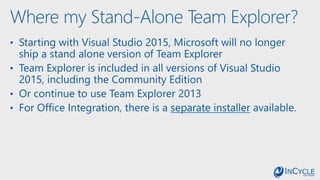
Where my Stand-Alone Team Explorer?
• Starting with Visual Studio 2015, Microsoft will no longer
ship a stand alone version of Team Explorer
• Team Explorer is included in all versions of Visual Studio
2015, including the Community Edition
• Or continue to use Team Explorer 2013
• For Office Integration, there is a separate installer available.
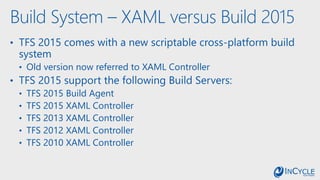
Build System – XAML versus Build 2015
• TFS 2015 comes with a new scriptable cross-platform build
system
• Old version now referred to XAML Controller
• TFS 2015 support the following Build Servers:
• TFS 2015 Build Agent
• TFS 2015 XAML Controller
• TFS 2013 XAML Controller
• TFS 2012 XAML Controller
• TFS 2010 XAML Controller
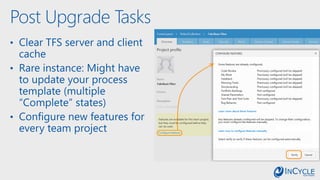
Post Upgrade Tasks
• Clear TFS server and client
cache
• Rare instance: Might have
to update your process
template (multiple
“Complete” states)
• Configure new features for
every team project
Want to Migrate to VSTS?
• Are you currently using customized process templates?
• Are you currently relying on SharePoint with your TFS
install?
• Are you currently relying on SSRS with your TFS install?
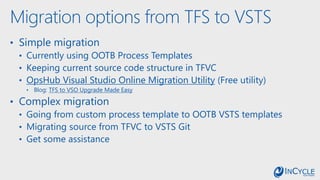
Migration options from TFS to VSTS
• Simple migration
• Currently using OOTB Process Templates
• Keeping current source code structure in TFVC
• OpsHub Visual Studio Online Migration Utility (Free utility)
• Blog: TFS to VSO Upgrade Made Easy
• Complex migration
• Going from custom process template to OOTB VSTS templates
• Migrating source from TFVC to VSTS Git
• Get some assistance
Wrap up slide
• In-Place versus Migration Upgrade Strategy
• Steps for Doing the Upgrade
• Considerations for VSTS
Closing Remarks &
Next Steps:
Promotion:
Book Your TFS
2015 Upgrade by
December 31st!
Microsoft
Funded
Programs
/InCycleSoftware @InCycleSoftware /company/incycle-software incyclesoftware.com/blog/
Contact us: info@incyclesoftware.com
1-(800) 565-0510
Upcoming webcast:
TFS 2015 – Top Upgrade
Questions and Live Q&A
December 17th
2 pm ET/11 am PT
Tfs 2015 Upgrade Tips and Tricks

Tfs 2015 Upgrade Tips and Tricks

  • 1.
    North American Leaderin ALM Services Services
  • 2.
    TFS 2015 Upgrade Scenariosand How to Avoid Surprises David Jung, Sr. ALM Consultant InCycle Software New York ▪ Seattle ▪ Montreal
  • 3.
    Agenda • Upgrade PathConsiderations • How to prepare for the Upgrade • Post Upgrade Gotchas • Q & A
  • 4.
    Upgrade Path Considerations: In-Placeversus Migrate • What version of TFS are you currently using? • What is the hardware and underlying software is TFS on? • Do you want to stop hosting it yourself?
  • 5.
    Upgrade Path Considerations: In-Placeversus Migrate Current TFS >= TFS 2010 SP1 Meet 2015 SW Req Migrate to 2015 or VSTS Migrate to 2015 or VSTS Candidate for In-Place No No Yes Yes
  • 6.
    TFS Requirements TFS 2010TFS 2012 TFS 2013 TFS 2013 Update 2 TFS 2015 WS 2003 SP2 WS 2003 R2 WS 2008 SP2 WS 2008 R2 WS 2008 SP2 WS 2008 R2 WS 2012 WS 2012 R2 WS 2008 R2 SP1 WS 2012 WS 2012 R2 WS 2008 R2 SP1 WS 2012 WS 2012 R2 WS 2008 R2 SP1 WS 2012 WS 2012 R2 SQL 2008 SQL 2008 R2 SQL 2008 R2 SQL 2012 SQL 2012 SP1 SQL 2012 SP1 SQL 2014 SQL 2012 SP1 SQL 2014 Win SP Svcs 3.0 SPS 2007 Win SP Svcs 3.0 SPS 2007 SharePoint 2010 SharePoint 2013 SharePoint 2010 SharePoint 2013 SharePoint 2010 SharePoint 2013 SharePoint 2010 SharePoint 2013 Reference: TFS 2015 Requirements and Compatibility
  • 7.
    Upgrade Paths TFS 2008or TFS 2010 TFS 2012 TFS 2015 TFS 2010 SP1, TFS 2012, or TFS 2013
  • 8.
    Preparation for Upgrade •Prepare your environment • Expect the unexpected (Plan the work and do a dry run) • Do the upgrade (Work the plan) • Post Upgrade Tasks
  • 10.
    Prepare your environment •How Big is your Collection Size(s)? • Do you want to separate App Tier from Data Tier? • Is it time to clean up your databases?
  • 11.
    Using SQL ServerEnterprise Edition • Use TfsPreUpgrade utility • Especially helpful if your Collections are 1TB or greater • It performs the database feature upgrades that would normally be done during the upgrade process. • It creates and modifies a number of indexes to the system while still online. • Creates new tables and triggers, updates sprocs, etc. • It could potentially require a lot of disk space so the tool tries to pre-allocate space it needs. • Cannot be used on non-Enterprise Editions of SQL Server. Therefore, non-Enterprise SQL deployments will do standard offline upgrades.
  • 13.
    Workflow of In-Placeversus Migration In-Place • Backup collections • Put TFS in single user mode • Install TFS 2015 • Run Upgrade against collections • Take TFS out of single user mode Migration • Build new environment and test • Backup collections • Detach and Move Collections (Dry Run) • Run Upgrade against collections (Test upgrade)* • (Optional)Schedule actual • Final Detach, Move, and Upgrade • Tell everyone what the new environment is • Put everyone is Read-Only mode in old environment
  • 14.
    Where my Stand-AloneTeam Explorer? • Starting with Visual Studio 2015, Microsoft will no longer ship a stand alone version of Team Explorer • Team Explorer is included in all versions of Visual Studio 2015, including the Community Edition • Or continue to use Team Explorer 2013 • For Office Integration, there is a separate installer available.
  • 15.
    Build System –XAML versus Build 2015 • TFS 2015 comes with a new scriptable cross-platform build system • Old version now referred to XAML Controller • TFS 2015 support the following Build Servers: • TFS 2015 Build Agent • TFS 2015 XAML Controller • TFS 2013 XAML Controller • TFS 2012 XAML Controller • TFS 2010 XAML Controller
  • 17.
    Post Upgrade Tasks •Clear TFS server and client cache • Rare instance: Might have to update your process template (multiple “Complete” states) • Configure new features for every team project
  • 20.
    Want to Migrateto VSTS? • Are you currently using customized process templates? • Are you currently relying on SharePoint with your TFS install? • Are you currently relying on SSRS with your TFS install?
  • 21.
    Migration options fromTFS to VSTS • Simple migration • Currently using OOTB Process Templates • Keeping current source code structure in TFVC • OpsHub Visual Studio Online Migration Utility (Free utility) • Blog: TFS to VSO Upgrade Made Easy • Complex migration • Going from custom process template to OOTB VSTS templates • Migrating source from TFVC to VSTS Git • Get some assistance
  • 22.
    Wrap up slide •In-Place versus Migration Upgrade Strategy • Steps for Doing the Upgrade • Considerations for VSTS
  • 23.
  • 24.
    Promotion: Book Your TFS 2015Upgrade by December 31st! Microsoft Funded Programs /InCycleSoftware @InCycleSoftware /company/incycle-software incyclesoftware.com/blog/ Contact us: info@incyclesoftware.com 1-(800) 565-0510
  • 25.
    Upcoming webcast: TFS 2015– Top Upgrade Questions and Live Q&A December 17th 2 pm ET/11 am PT