R
e
le
ase
M
an
ag
e
m
e
n
t
EN
V
IR
O
N
M
EN
TS
V
ISU
A
L
STU
D
IO
O
N
LIN
E
W
EB
H
U
B
S
D
e
v/Te
st
Deployment from
Release Management
STA
G
ESTe
st
En
viro
n
m
e
n
t
In
te
g
ratio
n
P
re
P
ro
d
u
ctio
n
Stag
in
g
P
ro
d
u
ctio
n
Fu
n
ctio
n
al
Te
stin
g
In
te
g
ratio
n
Te
stin
g
Lo
ad
Te
stin
g
A
cce
p
tan
ce
Te
stin
g
Visual Studio Online
Sprint 1
Work
Code
Build
Test
49
12
49
12
Metric 1
How to
Work
BacklogTask board
Queries
OpenVisual StudioGetVisual Studio
Request Feedback
Configure schedule
Confgure work
Pinned Items
Team
rooms
Members
other links
Visual Studio
SP
D
e
v/Te
st
C
o
n
tin
u
o
u
s
In
te
g
ratio
n
V
e
rsio
n
C
o
n
tro
l
B
u
ild
B
u
ild
V
e
rificatio
n
Te
st
M
o
n
ito
r
Fe
e
d
b
ack
B
acklo
g
C
O
D
E
W
O
R
K
B
U
ILD
R
ELEA
S
E
EN
V
IR
O
N
M
EN
T
S
IN
S
IG
H
T
S
T
ES
T
A
u
to
m
ate
d
Lo
ad
Te
st
S
e
rvice
© 2014 Microsoft Corporation.
All rights reserved.
Created by the Azure poster team
Email: AzurePoster@microsoft.com
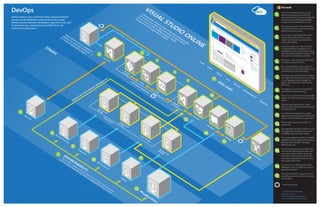
Deliver value to your customers faster, improve software
quality and get feedback on performance and usage.
Remove barriers between developers, operations and users
to streamline your development workflow from the
backlog into production.
VSO environments hosted in Azure.
VMs are provisioned as needed for
each environment. They are configured
using DSC (PowerShell Desired State
Configuration), PowerShell or Chef.
Your developers set up dev machines
using Microsoft Azure and also any test
machines that they need.
Set up VMs using PowerShell Desired
State Configuration (DSC) to easily
create the environments needed for
coding and testing.
Host your code in the cloud to access
it anytime and from anywhere. Pick a
centralized version control system using
Team Foundation Version Control, or use
Git repos for a distributed workflow.
Build your code using the hosted build
controller provided by VSO.
Run build verification tests as part of
your process to check the quality of your
code before you do more testing.
If the tests pass, use that build to deploy
your app to environments for each stage
in your release process. Manage the
steps in the process with approvals for
each step.
First deploy to a test environment for
automated functional testing.
Deploy to an environment for integrated
testing with other services that your app
needs.
Test that your app performs under
load by using cloud-based load testing
provided by VSO.
Use Release Management to assign
approvers that must sign off before any
release can be deployed to production.
When ready, deploy your code into
production.
Use Application Insights to monitor your
live application for performance and
availability issues as well as usage.
The usage feedback and direct customer
feedback are both added to the product
backlog to be included in the agile
planning process.
Use the product backlog to determine
what are the highest priority items for
your users that your team should be
working on. As the work is done, the
continuous integration process checks
the quality of the code.
If an issue occurs during production,
developers can use IntelliTrace logs to
debug the problem.
The VSO hub makes it easy to find out
everything about the status of a project
in one place.
DevOps
V
isualStudio
O
nline
is
a
hub
in
the
cloud
thatprovides
services
to
yourteam
:agile
planning,version
control
ofyoursource
code,building,testing,release
m
anagem
entand
application
insights.
These
V
M
s
can
be
hosted
in
A
zure
and
configured
using
tools
such
as
Pow
erShellD
esired
State
C
onfiguration
(D
SC
)orC
hef.
V
isualStudio
can
be
installed
on
physicalon-prem
ises
hardw
are
,or
on
V
irtual
M
achines
in
A
zure.
= start/end of cycle
1
2
3
5
6
4
7
8
9
10
11
12
13
14
15
16
17
2
3
4
5
6
7
9
11
14
15
16
17
1
13
12
10
8
!

Ms arch dev-ops

  • 1.
    R e le ase M an ag e m e n t EN V IR O N M EN TS V ISU A L STU D IO O N LIN E W EB H U B S D e v/Te st Deployment from Release Management STA G ESTe st En viro n m e n t In te g ratio n P re P ro d u ctio n Stag in g P ro d u ctio n Fu n ctio n al Te stin g In te g ratio n Te stin g Lo ad Te stin g A cce p tan ce Te stin g VisualStudio Online Sprint 1 Work Code Build Test 49 12 49 12 Metric 1 How to Work BacklogTask board Queries OpenVisual StudioGetVisual Studio Request Feedback Configure schedule Confgure work Pinned Items Team rooms Members other links Visual Studio SP D e v/Te st C o n tin u o u s In te g ratio n V e rsio n C o n tro l B u ild B u ild V e rificatio n Te st M o n ito r Fe e d b ack B acklo g C O D E W O R K B U ILD R ELEA S E EN V IR O N M EN T S IN S IG H T S T ES T A u to m ate d Lo ad Te st S e rvice © 2014 Microsoft Corporation. All rights reserved. Created by the Azure poster team Email: AzurePoster@microsoft.com Deliver value to your customers faster, improve software quality and get feedback on performance and usage. Remove barriers between developers, operations and users to streamline your development workflow from the backlog into production. VSO environments hosted in Azure. VMs are provisioned as needed for each environment. They are configured using DSC (PowerShell Desired State Configuration), PowerShell or Chef. Your developers set up dev machines using Microsoft Azure and also any test machines that they need. Set up VMs using PowerShell Desired State Configuration (DSC) to easily create the environments needed for coding and testing. Host your code in the cloud to access it anytime and from anywhere. Pick a centralized version control system using Team Foundation Version Control, or use Git repos for a distributed workflow. Build your code using the hosted build controller provided by VSO. Run build verification tests as part of your process to check the quality of your code before you do more testing. If the tests pass, use that build to deploy your app to environments for each stage in your release process. Manage the steps in the process with approvals for each step. First deploy to a test environment for automated functional testing. Deploy to an environment for integrated testing with other services that your app needs. Test that your app performs under load by using cloud-based load testing provided by VSO. Use Release Management to assign approvers that must sign off before any release can be deployed to production. When ready, deploy your code into production. Use Application Insights to monitor your live application for performance and availability issues as well as usage. The usage feedback and direct customer feedback are both added to the product backlog to be included in the agile planning process. Use the product backlog to determine what are the highest priority items for your users that your team should be working on. As the work is done, the continuous integration process checks the quality of the code. If an issue occurs during production, developers can use IntelliTrace logs to debug the problem. The VSO hub makes it easy to find out everything about the status of a project in one place. DevOps V isualStudio O nline is a hub in the cloud thatprovides services to yourteam :agile planning,version control ofyoursource code,building,testing,release m anagem entand application insights. These V M s can be hosted in A zure and configured using tools such as Pow erShellD esired State C onfiguration (D SC )orC hef. V isualStudio can be installed on physicalon-prem ises hardw are ,or on V irtual M achines in A zure. = start/end of cycle 1 2 3 5 6 4 7 8 9 10 11 12 13 14 15 16 17 2 3 4 5 6 7 9 11 14 15 16 17 1 13 12 10 8 !