Distribute your code with NUget
and build vNext
Gian Maria Ricci
Semantic versioning in
• http://semver.org/
• Version with three number, MAJOR, MINOR,
PATCH
• It enforces a string behavior for Public API
• It can be used with less stringent behavior for a
product without public API
MAJOR, MINOR, PATCH
• PATCH number is incremented only when there
are bugfix or modification done maintaining full
compatibility
• MINOR number is incremented when new
functionalities are introduced in a backward
compatible way
• MAJOR number is incremented when something
about public API changes
GIT AND GITFLOW
A successful branch model used with Git to simplify workflow
GitFlow basic
• CheatSheet here: http://danielkummer.github.io/git-
flow-cheatsheet/
• Detailed explanation here: http://nvie.com/posts/a-
successful-git-branching-model/
• There are two major branches
– Master: is the stable and released branch
– Develop: is the integration branch, represents stable
branch for development
• And some “Support Branches”
– Features
– Releases
– Hotfixes
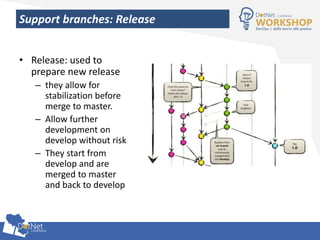
Support branches: Release
• Release: used to
prepare new release
– they allow for
stabilization before
merge to master.
– Allow further
development on
develop without risk
– They start from
develop and are
merged to master
and back to develop
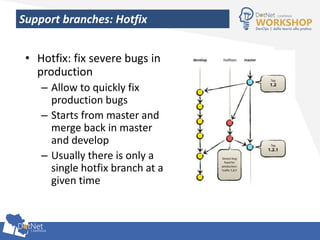
Support branches: Hotfix
• Hotfix: fix severe bugs in
production
– Allow to quickly fix
production bugs
– Starts from master and
merge back in master
and develop
– Usually there is only a
single hotfix branch at a
given time
GitFlow + SemVer = Gitversion.exe
• Gitversion.exe is a simple tools that determine
SemVer for a Git Repo
• It walks the history and gives names depending
on branch name, commits, tag, etc
• Basically it is a much more evolved version of “git
describe”
Build vNext
• Giversion.exe natively integrates with build vNext
• I prefer using a PowerShell Script
– Can be used by developer
– Can be used in a “local build”
– Better flexibility on how to use and parse semantic
versioning
• Invoke a Gitversion.exe and grab SemVer to
versioning assemblies.
DEMO:
Gitversion.exe simple demo
SemVer for product / applications
• If you do not expose public API SemVer can be
simple used to manage versions
• You decide how to handle MAJOR, MINOR, PATCH
• GitVersion gives you high flexibility on how it
determine SemVer number
SemVer for NuGet
• A NuGet Package should implement SemVer
• NuGet package allows also for “unstable or
prerelease” version
• GitVersion natively supports this
– You create stable package from master
– You create Beta version from hotfixes or releases
– You create Unstable version from develop
VSTS package management
• Extension of Visual Studio Team Services
• Allows for creation of private NuGet feeds
• Still in preview, it offers less management features
than NuGet or MyGet
Automate publishing with a build
• Determine version with GitVersion
• Modify AssemblyInfo.cs and AssemblyInfo.vb with
new SemVer Number
• Compile, run test
• Create Nuget Packages
• Publish Nuget Packages
DEMO:
Create build to Pack and Publish NuGet package
Use Chocolatey to distribute an application
• Chocolatey is a package manager for Windows
based on NuGet
• It uses NuGet package to package an application
• Installation is done with PowerShell scripts
Script preparation
• Carefully manage published artifacts
– Pack everything with a script
– Prefer uploading a zipped file containing everything
• Create Installer with PowerShell
– PowerShell script will accept the zip artifacts as
input
– Install your application with whatever you want
(imperative, DSC, etc)
• Include zip and script in NuGet package and you’re
done
DEMO:
Create chocolatey package with build vNext

Distribute your code with NUget and build vNext

  • 1.
    Distribute your codewith NUget and build vNext Gian Maria Ricci
  • 2.
    Semantic versioning in •http://semver.org/ • Version with three number, MAJOR, MINOR, PATCH • It enforces a string behavior for Public API • It can be used with less stringent behavior for a product without public API
  • 3.
    MAJOR, MINOR, PATCH •PATCH number is incremented only when there are bugfix or modification done maintaining full compatibility • MINOR number is incremented when new functionalities are introduced in a backward compatible way • MAJOR number is incremented when something about public API changes
  • 4.
    GIT AND GITFLOW Asuccessful branch model used with Git to simplify workflow
  • 5.
    GitFlow basic • CheatSheethere: http://danielkummer.github.io/git- flow-cheatsheet/ • Detailed explanation here: http://nvie.com/posts/a- successful-git-branching-model/ • There are two major branches – Master: is the stable and released branch – Develop: is the integration branch, represents stable branch for development • And some “Support Branches” – Features – Releases – Hotfixes
  • 6.
    Support branches: Release •Release: used to prepare new release – they allow for stabilization before merge to master. – Allow further development on develop without risk – They start from develop and are merged to master and back to develop
  • 7.
    Support branches: Hotfix •Hotfix: fix severe bugs in production – Allow to quickly fix production bugs – Starts from master and merge back in master and develop – Usually there is only a single hotfix branch at a given time
  • 8.
    GitFlow + SemVer= Gitversion.exe • Gitversion.exe is a simple tools that determine SemVer for a Git Repo • It walks the history and gives names depending on branch name, commits, tag, etc • Basically it is a much more evolved version of “git describe”
  • 9.
    Build vNext • Giversion.exenatively integrates with build vNext • I prefer using a PowerShell Script – Can be used by developer – Can be used in a “local build” – Better flexibility on how to use and parse semantic versioning • Invoke a Gitversion.exe and grab SemVer to versioning assemblies.
  • 10.
  • 11.
    SemVer for product/ applications • If you do not expose public API SemVer can be simple used to manage versions • You decide how to handle MAJOR, MINOR, PATCH • GitVersion gives you high flexibility on how it determine SemVer number
  • 12.
    SemVer for NuGet •A NuGet Package should implement SemVer • NuGet package allows also for “unstable or prerelease” version • GitVersion natively supports this – You create stable package from master – You create Beta version from hotfixes or releases – You create Unstable version from develop
  • 13.
    VSTS package management •Extension of Visual Studio Team Services • Allows for creation of private NuGet feeds • Still in preview, it offers less management features than NuGet or MyGet
  • 14.
    Automate publishing witha build • Determine version with GitVersion • Modify AssemblyInfo.cs and AssemblyInfo.vb with new SemVer Number • Compile, run test • Create Nuget Packages • Publish Nuget Packages
  • 15.
    DEMO: Create build toPack and Publish NuGet package
  • 16.
    Use Chocolatey todistribute an application • Chocolatey is a package manager for Windows based on NuGet • It uses NuGet package to package an application • Installation is done with PowerShell scripts
  • 17.
    Script preparation • Carefullymanage published artifacts – Pack everything with a script – Prefer uploading a zipped file containing everything • Create Installer with PowerShell – PowerShell script will accept the zip artifacts as input – Install your application with whatever you want (imperative, DSC, etc) • Include zip and script in NuGet package and you’re done
  • 18.