Real World  ClickOnce Expert Tips for Practical Use Presented by Craig Adams Senior Architect at Vivus Software
Agenda Introduction Initial Deployment Updating Managing Files Wrapping Up Intro  Init Deployment  Updating  Managing Files  Wrapping Up
What is ClickOnce? Framework 2.0 deployment Technology Targets Windows Forms applications Smart Client Applications Rich Client Applications Usually a Distributed Applications Network deployed and updated Runs securely on Client Machine Intro  Init Deployment  Updating  Managing Files  Wrapping Up
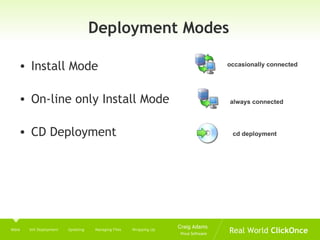
Deployment Modes Install Mode On-line only Install Mode CD Deployment Intro  Init Deployment  Updating  Managing Files  Wrapping Up occasionally connected always connected cd deployment
Client Software Requirements Framework 2.0 Internet Explorer 5.5 Prerequisites for your application Intro  Init Deployment  Updating  Managing Files  Wrapping Up
Server Software Requirements Doesn’t need to be a windows server Return file requests for the deployment manifest, application manifest and files via HTTP or UNC Must return the appropriate MIME file types in the Http headers so they are handled correctly on the client  Intro  Init Deployment  Updating  Managing Files  Wrapping Up
What to Deploy ClickOnce applications are isolated  Applications that aren’t invasive Doesn’t natively support complex setups Intro  Init Deployment  Updating  Managing Files  Wrapping Up
Limitations of ClickOnce No control over the folder location where your application is deployed Other applications cannot locate your application through any supported means No custom install steps inherent in ClickOnce Not for every application Intro  Init Deployment  Updating  Managing Files  Wrapping Up
Smart Client Architecture Windows Application Enterprise functionality  Offline Caching Middle Tier Client application decoupled from Client Machine  ClickOnce requirements need to be considered in the high level architecture early   Intro  Init Deployment  Updating  Managing Files  Wrapping Up
Initial Deployment with ClickOnce – Publishing Options HTTP Wider reach UNC network or file path Limited to those who have access to the network CD-ROM or DVD  Good option if you have a large set of requirements Can be configured to still get updates from the web Intro  Init Deployment   Updating  Managing Files  Wrapping Up
Initial Deployment with ClickOnce – Publishing Location HTTP publishing http://DeploymentServer/myApp/ UNC Publishing \\DeploymentServer\myApp FTP Publishing  ftp://DeploymentServer/myFolder/ Drive Letter Publishing C:\myFolder\MyApp\  Intro  Init Deployment   Updating  Managing Files  Wrapping Up
Initial Deployment with ClickOnce – Installation URL Full HTTP or UNC path to the folder that will contain the deployment  manifest Deployment manifest filename is implicitly set URL to users for HTTP would be:  http:// deploymentServer/myApp/myApp.application Installation URL is stored in the Deployment Manifest under a setting called “DeploymentProvider” Default is blank and will use the Publishing Location Intro  Init Deployment   Updating  Managing Files  Wrapping Up
Manifest generation and signing Deployment manifest Application manifest files the applications contains and required permissions  Both files are digitally signed during creation Guarantees that the application hasn’t been tampered with Guarantees the application was signed by whoever the publish is that holds the certificate  If modified needs to be resigned Intro  Init Deployment   Updating  Managing Files  Wrapping Up
Deployment Manifest Can perform a server side roll back by overwriting the default deployment file with the version specific  Contains identify, descriptive and deployment information Deployment Provider – used to initially launch the application For the purposes of moving the deployment location the Deployment Provider on the server can be modified to point to a new server, or website Intro  Init Deployment   Updating  Managing Files  Wrapping Up
DEMO Server Side Rollback
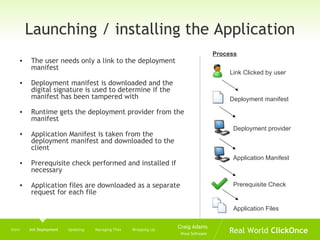
Launching / installing the Application The user needs only a link to the deployment manifest Deployment manifest is downloaded and the digital signature is used to determine if the manifest has been tampered with Runtime gets the deployment provider from the manifest Application Manifest is taken from the deployment manifest and downloaded to the client Prerequisite check performed and installed if necessary Application files are downloaded as a separate request for each file Intro  Init Deployment   Updating  Managing Files  Wrapping Up Link Clicked by user Process Deployment manifest Deployment provider Application Manifest Prerequisite Check Application Files
Manifest Validation Schema validation Digital signature validation Is the signature valid based on current contents Semantic Validation Checks to make sure values are within the allowable values ClickOnce does not let you publish updates with a different publisher certificate Intro  Init Deployment   Updating  Managing Files  Wrapping Up
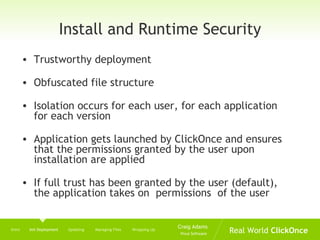
Install and Runtime Security Trustworthy deployment Obfuscated file structure Isolation occurs for each user, for each application for each version Application gets launched by ClickOnce and ensures that the permissions granted by the user upon installation are applied If full trust has been granted by the user (default), the application takes on  permissions  of the user Intro  Init Deployment   Updating  Managing Files  Wrapping Up
User Cache Application files are placed in an obfuscated folder structure for security purposes Current folder schema Windows XP C:\Documents and Settings\<username>\Local Settings\Apps Vista C:\Users\<username>\App Data\Local\Apps Cache exist for current version and one previous version  Users can roll back to a previous version Intro  Init Deployment   Updating  Managing Files  Wrapping Up
Moving an Application to Production Installation URL sets the deployment provider in the Deployment manifest Change the Deployment Provider setting in the Deployment manifest to the new setting Change the deployment provider by using mageui.exe or mage.exe Intro  Init Deployment   Updating  Managing Files  Wrapping Up
DEMO Moving deployment to production Move to a different server using Mage UI Intro  Init Deployment   Updating  Managing Files  Wrapping Up
Demo Moving from Live back to Test while in production using .bat file Intro  Init Deployment   Updating  Managing Files  Wrapping Up
Updating an Application Deploying the update Client Update If update is optional, the user will be prompted If they choose to skip the update, the user will not be prompted again for 7 days. Forcing an update Intro  Init Deployment  Updating   Managing Files  Wrapping Up
Demo Manually Publishing an Update with Mageui Intro  Init Deployment  Updating   Managing Files  Wrapping Up
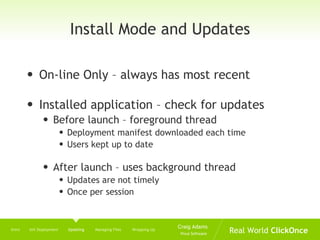
Install Mode and Updates On-line Only – always has most recent Installed application – check for updates Before launch – foreground thread  Deployment manifest downloaded each time Users kept up to date After launch – uses background thread Updates are not timely Once per session Intro  Init Deployment  Updating   Managing Files  Wrapping Up
Schedule Update Checking Enabled when “check for updates after launch” enabled Perform checking on a scheduled basis instead of each time the application launches Interval begins when the application gets installed Warning: interval dialog does not do validation   Intro  Init Deployment  Updating   Managing Files  Wrapping Up
Minimum Required Version Update cannot be skipped Cannot cancel the download/install Can’t rollback to a version lower than the minimum required version Schema changes, middle tier component changes Intro  Init Deployment  Updating   Managing Files  Wrapping Up
Specifying an update location The location to look for updates when the application is launched Written to deployment provider in the manifest Used for two reasons Deploying initially from CD Disabling automatic updates Intro  Init Deployment  Updating   Managing Files  Wrapping Up
Update Tip Server version only has to be  different  not  higher  to cause an update.  Intro  Init Deployment  Updating   Managing Files  Wrapping Up
Update Facts Updates are done in a transactional manner ClickOnce only maintains two versions   User can role back to a previous version as long as it is not below the minimum required version Forcing a server side rollback Intro  Init Deployment  Updating   Managing Files  Wrapping Up
On-demand Updates Can mix with ClickOnce enabled updates Might have scheduled updating once a month with a menu option that allows the user to check for updates Might turn off ClickOnce updates completely Application usage may prevent timely updates ClickOnce API could be used to check for updates and prompt after an update has been downloaded Intro  Init Deployment  Updating   Managing Files  Wrapping Up
ClickOnce API System.Deployment.Application namespace System.Windows.Forms.Application Used to call method to restart the application Warning: Programmatic updates require full trust  Warning: Update Location required when automatic update is turned off Warning: Always check to make sure application is deployed using ClickOnce Intro  Init Deployment  Updating   Managing Files  Wrapping Up
DEMO Using Code to perform updates Intro  Init Deployment  Updating   Managing Files  Wrapping Up
Application and Data Files Referenced assemblies will be included as application files  copy local setting on the file has been set Files must be apart of your project to be included automatically deployment Set the build action to  content  for files that you want to be automatically deployed Publish Status Download Group Intro  Init Deployment  Updating  Managing Files   Wrapping Up
DEMO Download groups Intro  Init Deployment  Updating  Managing Files   Wrapping Up
Managing Application Files with Mage and MageUI Located in C:\Program Files\Microsoft Visual Studio 8\SDK\v2.0\Bin on an XP machine Allows adding additional application files without redeploying Intro  Init Deployment  Updating  Managing Files   Wrapping Up
Data Files Visual Studio 2005 Add to project with build action to  content Mark with a publish status of  data file Programmatically accessing:  Application.UserAppDataPath ApplicationDeployment.DataDirectory Relative pathing -  \Media\MyPhoto.jpg Dealing with data files  Set copy to output directory – copy always or copy if changed Debug vs ClickOnce Deployed Intro  Init Deployment  Updating  Managing Files   Wrapping Up
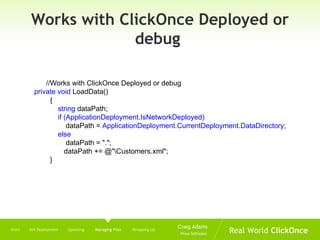
Works with ClickOnce Deployed or debug  //Works with ClickOnce Deployed or debug  private void  LoadData() { string  dataPath; if (ApplicationDeployment.IsNetworkDeployed) dataPath =  ApplicationDeployment.CurrentDeployment.DataDirectory; else dataPath = &quot;.&quot;; dataPath += @&quot;\Customers.xml&quot;; } Intro  Init Deployment  Updating  Managing Files   Wrapping Up
Data Migration New version, data is copied from the previous version’s data folder to the new version’s data folder If schema for the data changed, the newly deployed data file will be copied to the data folder for the newly deployed application The data file from the previous version is copied to a dataFolder\.pre Unless this datafile is migrated to a newer version it will be lost when the next update is installed Intro  Init Deployment  Updating  Managing Files   Wrapping Up
Demo Data Migration
Client Side Caching SQL Server 2005 Express Full featured database Large footprint (53 mb) (admin) SQL Server 2005 Compact Edition Small footprint (1.4mb) No stored procedures Installed as a prerequisite (Admin) or adding DLL files (No Admin) Intro  Init Deployment  Updating  Managing Files   Wrapping Up
Connections SQL Server 2005 Compact Edition string DataConnectionString = @&quot;Data Source=|DataDirectory|\Northwind.sdf &quot;;   SqlCeConnection newConnection = new SqlCeConnection(DataConnectionString); SQL Server 2005 SQL Express  User instances string   DataConnectionString =  @&quot;Server=.\sqlexpress;Database=Northwind;AttachDBFileName= |DataDirectory|\Northwind.mdf;User Instance=True; Integrated Security=true;“; SqlConnection newConnection = new sqlConnection(DataConnectionString); Intro  Init Deployment  Updating  Managing Files   Wrapping Up
Other ClickOnce Areas Prerequisite Deployment with Bootstrapper Deploying Unmanaged Applications  Reg-Free COM Pushing ClickOnce Installations to the Client Machine MSBuild ClickOnce Publishing Intro  Init Deployment  Updating  Managing Files  Wrapping Up
Visual Studio 2008 WPF Web Browser Apps Resigning application now supported Visual Studio Tools for Office (VSTO) Apps Works with Firefox, Opera and Safari Supports file associations  Identifies a name extension to be used with app Intro  Init Deployment  Updating   Managing Files  Wrapping Up
Resources Smart Client Deployment with ClickOnce: Deploying Windows Forms Applications with ClickOnce by Brian Noyes Deploying ClickOnce Applications with Firefox https://addons.mozilla.org/firefox/1608/ ClickOnce Community Resource Kit http://www.codeplex.com/smartclient/Project/FileDownload.aspx?DownloadId =5060   Vista and ClickOnce http:// www.softinsight.com/bnoyes/PermaLink.aspx?guid =435524e7-340c-4b4b-933d-a1c38d27e8ea Intro  Init Deployment  Updating  Managing Files  Wrapping Up
Thank you for your time Any Questions? Please send additional questions/comments to  [email_address]

Real World Click Once

  • 1.
    Real World ClickOnce Expert Tips for Practical Use Presented by Craig Adams Senior Architect at Vivus Software
  • 2.
    Agenda Introduction InitialDeployment Updating Managing Files Wrapping Up Intro Init Deployment Updating Managing Files Wrapping Up
  • 3.
    What is ClickOnce?Framework 2.0 deployment Technology Targets Windows Forms applications Smart Client Applications Rich Client Applications Usually a Distributed Applications Network deployed and updated Runs securely on Client Machine Intro Init Deployment Updating Managing Files Wrapping Up
  • 4.
    Deployment Modes InstallMode On-line only Install Mode CD Deployment Intro Init Deployment Updating Managing Files Wrapping Up occasionally connected always connected cd deployment
  • 5.
    Client Software RequirementsFramework 2.0 Internet Explorer 5.5 Prerequisites for your application Intro Init Deployment Updating Managing Files Wrapping Up
  • 6.
    Server Software RequirementsDoesn’t need to be a windows server Return file requests for the deployment manifest, application manifest and files via HTTP or UNC Must return the appropriate MIME file types in the Http headers so they are handled correctly on the client Intro Init Deployment Updating Managing Files Wrapping Up
  • 7.
    What to DeployClickOnce applications are isolated Applications that aren’t invasive Doesn’t natively support complex setups Intro Init Deployment Updating Managing Files Wrapping Up
  • 8.
    Limitations of ClickOnceNo control over the folder location where your application is deployed Other applications cannot locate your application through any supported means No custom install steps inherent in ClickOnce Not for every application Intro Init Deployment Updating Managing Files Wrapping Up
  • 9.
    Smart Client ArchitectureWindows Application Enterprise functionality Offline Caching Middle Tier Client application decoupled from Client Machine ClickOnce requirements need to be considered in the high level architecture early Intro Init Deployment Updating Managing Files Wrapping Up
  • 10.
    Initial Deployment withClickOnce – Publishing Options HTTP Wider reach UNC network or file path Limited to those who have access to the network CD-ROM or DVD Good option if you have a large set of requirements Can be configured to still get updates from the web Intro Init Deployment Updating Managing Files Wrapping Up
  • 11.
    Initial Deployment withClickOnce – Publishing Location HTTP publishing http://DeploymentServer/myApp/ UNC Publishing \\DeploymentServer\myApp FTP Publishing ftp://DeploymentServer/myFolder/ Drive Letter Publishing C:\myFolder\MyApp\ Intro Init Deployment Updating Managing Files Wrapping Up
  • 12.
    Initial Deployment withClickOnce – Installation URL Full HTTP or UNC path to the folder that will contain the deployment manifest Deployment manifest filename is implicitly set URL to users for HTTP would be: http:// deploymentServer/myApp/myApp.application Installation URL is stored in the Deployment Manifest under a setting called “DeploymentProvider” Default is blank and will use the Publishing Location Intro Init Deployment Updating Managing Files Wrapping Up
  • 13.
    Manifest generation andsigning Deployment manifest Application manifest files the applications contains and required permissions Both files are digitally signed during creation Guarantees that the application hasn’t been tampered with Guarantees the application was signed by whoever the publish is that holds the certificate If modified needs to be resigned Intro Init Deployment Updating Managing Files Wrapping Up
  • 14.
    Deployment Manifest Canperform a server side roll back by overwriting the default deployment file with the version specific Contains identify, descriptive and deployment information Deployment Provider – used to initially launch the application For the purposes of moving the deployment location the Deployment Provider on the server can be modified to point to a new server, or website Intro Init Deployment Updating Managing Files Wrapping Up
  • 15.
  • 16.
    Launching / installingthe Application The user needs only a link to the deployment manifest Deployment manifest is downloaded and the digital signature is used to determine if the manifest has been tampered with Runtime gets the deployment provider from the manifest Application Manifest is taken from the deployment manifest and downloaded to the client Prerequisite check performed and installed if necessary Application files are downloaded as a separate request for each file Intro Init Deployment Updating Managing Files Wrapping Up Link Clicked by user Process Deployment manifest Deployment provider Application Manifest Prerequisite Check Application Files
  • 17.
    Manifest Validation Schemavalidation Digital signature validation Is the signature valid based on current contents Semantic Validation Checks to make sure values are within the allowable values ClickOnce does not let you publish updates with a different publisher certificate Intro Init Deployment Updating Managing Files Wrapping Up
  • 18.
    Install and RuntimeSecurity Trustworthy deployment Obfuscated file structure Isolation occurs for each user, for each application for each version Application gets launched by ClickOnce and ensures that the permissions granted by the user upon installation are applied If full trust has been granted by the user (default), the application takes on permissions of the user Intro Init Deployment Updating Managing Files Wrapping Up
  • 19.
    User Cache Applicationfiles are placed in an obfuscated folder structure for security purposes Current folder schema Windows XP C:\Documents and Settings\<username>\Local Settings\Apps Vista C:\Users\<username>\App Data\Local\Apps Cache exist for current version and one previous version Users can roll back to a previous version Intro Init Deployment Updating Managing Files Wrapping Up
  • 20.
    Moving an Applicationto Production Installation URL sets the deployment provider in the Deployment manifest Change the Deployment Provider setting in the Deployment manifest to the new setting Change the deployment provider by using mageui.exe or mage.exe Intro Init Deployment Updating Managing Files Wrapping Up
  • 21.
    DEMO Moving deploymentto production Move to a different server using Mage UI Intro Init Deployment Updating Managing Files Wrapping Up
  • 22.
    Demo Moving fromLive back to Test while in production using .bat file Intro Init Deployment Updating Managing Files Wrapping Up
  • 23.
    Updating an ApplicationDeploying the update Client Update If update is optional, the user will be prompted If they choose to skip the update, the user will not be prompted again for 7 days. Forcing an update Intro Init Deployment Updating Managing Files Wrapping Up
  • 24.
    Demo Manually Publishingan Update with Mageui Intro Init Deployment Updating Managing Files Wrapping Up
  • 25.
    Install Mode andUpdates On-line Only – always has most recent Installed application – check for updates Before launch – foreground thread Deployment manifest downloaded each time Users kept up to date After launch – uses background thread Updates are not timely Once per session Intro Init Deployment Updating Managing Files Wrapping Up
  • 26.
    Schedule Update CheckingEnabled when “check for updates after launch” enabled Perform checking on a scheduled basis instead of each time the application launches Interval begins when the application gets installed Warning: interval dialog does not do validation Intro Init Deployment Updating Managing Files Wrapping Up
  • 27.
    Minimum Required VersionUpdate cannot be skipped Cannot cancel the download/install Can’t rollback to a version lower than the minimum required version Schema changes, middle tier component changes Intro Init Deployment Updating Managing Files Wrapping Up
  • 28.
    Specifying an updatelocation The location to look for updates when the application is launched Written to deployment provider in the manifest Used for two reasons Deploying initially from CD Disabling automatic updates Intro Init Deployment Updating Managing Files Wrapping Up
  • 29.
    Update Tip Serverversion only has to be different not higher to cause an update. Intro Init Deployment Updating Managing Files Wrapping Up
  • 30.
    Update Facts Updatesare done in a transactional manner ClickOnce only maintains two versions User can role back to a previous version as long as it is not below the minimum required version Forcing a server side rollback Intro Init Deployment Updating Managing Files Wrapping Up
  • 31.
    On-demand Updates Canmix with ClickOnce enabled updates Might have scheduled updating once a month with a menu option that allows the user to check for updates Might turn off ClickOnce updates completely Application usage may prevent timely updates ClickOnce API could be used to check for updates and prompt after an update has been downloaded Intro Init Deployment Updating Managing Files Wrapping Up
  • 32.
    ClickOnce API System.Deployment.Applicationnamespace System.Windows.Forms.Application Used to call method to restart the application Warning: Programmatic updates require full trust Warning: Update Location required when automatic update is turned off Warning: Always check to make sure application is deployed using ClickOnce Intro Init Deployment Updating Managing Files Wrapping Up
  • 33.
    DEMO Using Codeto perform updates Intro Init Deployment Updating Managing Files Wrapping Up
  • 34.
    Application and DataFiles Referenced assemblies will be included as application files copy local setting on the file has been set Files must be apart of your project to be included automatically deployment Set the build action to content for files that you want to be automatically deployed Publish Status Download Group Intro Init Deployment Updating Managing Files Wrapping Up
  • 35.
    DEMO Download groupsIntro Init Deployment Updating Managing Files Wrapping Up
  • 36.
    Managing Application Fileswith Mage and MageUI Located in C:\Program Files\Microsoft Visual Studio 8\SDK\v2.0\Bin on an XP machine Allows adding additional application files without redeploying Intro Init Deployment Updating Managing Files Wrapping Up
  • 37.
    Data Files VisualStudio 2005 Add to project with build action to content Mark with a publish status of data file Programmatically accessing: Application.UserAppDataPath ApplicationDeployment.DataDirectory Relative pathing - \Media\MyPhoto.jpg Dealing with data files Set copy to output directory – copy always or copy if changed Debug vs ClickOnce Deployed Intro Init Deployment Updating Managing Files Wrapping Up
  • 38.
    Works with ClickOnceDeployed or debug //Works with ClickOnce Deployed or debug private void LoadData() { string dataPath; if (ApplicationDeployment.IsNetworkDeployed) dataPath = ApplicationDeployment.CurrentDeployment.DataDirectory; else dataPath = &quot;.&quot;; dataPath += @&quot;\Customers.xml&quot;; } Intro Init Deployment Updating Managing Files Wrapping Up
  • 39.
    Data Migration Newversion, data is copied from the previous version’s data folder to the new version’s data folder If schema for the data changed, the newly deployed data file will be copied to the data folder for the newly deployed application The data file from the previous version is copied to a dataFolder\.pre Unless this datafile is migrated to a newer version it will be lost when the next update is installed Intro Init Deployment Updating Managing Files Wrapping Up
  • 40.
  • 41.
    Client Side CachingSQL Server 2005 Express Full featured database Large footprint (53 mb) (admin) SQL Server 2005 Compact Edition Small footprint (1.4mb) No stored procedures Installed as a prerequisite (Admin) or adding DLL files (No Admin) Intro Init Deployment Updating Managing Files Wrapping Up
  • 42.
    Connections SQL Server2005 Compact Edition string DataConnectionString = @&quot;Data Source=|DataDirectory|\Northwind.sdf &quot;; SqlCeConnection newConnection = new SqlCeConnection(DataConnectionString); SQL Server 2005 SQL Express User instances string DataConnectionString = @&quot;Server=.\sqlexpress;Database=Northwind;AttachDBFileName= |DataDirectory|\Northwind.mdf;User Instance=True; Integrated Security=true;“; SqlConnection newConnection = new sqlConnection(DataConnectionString); Intro Init Deployment Updating Managing Files Wrapping Up
  • 43.
    Other ClickOnce AreasPrerequisite Deployment with Bootstrapper Deploying Unmanaged Applications Reg-Free COM Pushing ClickOnce Installations to the Client Machine MSBuild ClickOnce Publishing Intro Init Deployment Updating Managing Files Wrapping Up
  • 44.
    Visual Studio 2008WPF Web Browser Apps Resigning application now supported Visual Studio Tools for Office (VSTO) Apps Works with Firefox, Opera and Safari Supports file associations Identifies a name extension to be used with app Intro Init Deployment Updating Managing Files Wrapping Up
  • 45.
    Resources Smart ClientDeployment with ClickOnce: Deploying Windows Forms Applications with ClickOnce by Brian Noyes Deploying ClickOnce Applications with Firefox https://addons.mozilla.org/firefox/1608/ ClickOnce Community Resource Kit http://www.codeplex.com/smartclient/Project/FileDownload.aspx?DownloadId =5060 Vista and ClickOnce http:// www.softinsight.com/bnoyes/PermaLink.aspx?guid =435524e7-340c-4b4b-933d-a1c38d27e8ea Intro Init Deployment Updating Managing Files Wrapping Up
  • 46.
    Thank you foryour time Any Questions? Please send additional questions/comments to [email_address]