Getting started
RefWorks 1
RefWorks is….
Bibliographic management software which enables you to:
• Collect, manage, organize and share references that you find
• Create in-text citations and references to use in your written
work
• Format papers that you are writing
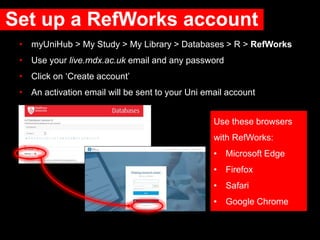
Set up a RefWorks account
• myUniHub > My Study > My Library > Databases > R > RefWorks
• Use your live.mdx.ac.uk email and any password
• Click on ‘Create account’
• An activation email will be sent to your Uni email account
Use these browsers
with RefWorks:
• Microsoft Edge
• Firefox
• Safari
• Google Chrome
Setting up continued….
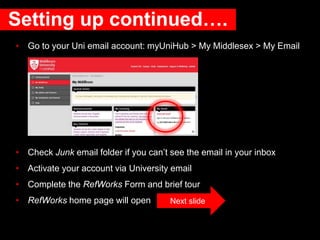
• Go to your Uni email account: myUniHub > My Middlesex > My Email
• Check Junk email folder if you can’t see the email in your inbox
• Activate your account via University email
• Complete the RefWorks Form and brief tour
• RefWorks home page will open Next slide
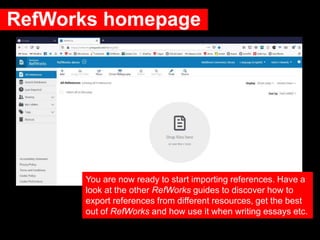
RefWorks homepage
You are now ready to start importing references. Have a
look at the other RefWorks guides to discover how to
export references from different resources, get the best
out of RefWorks and how use it when writing essays etc.
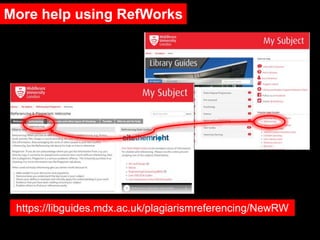
More help using RefWorks
https://libguides.mdx.ac.uk/plagiarismreferencing/NewRW
Need further help?
Your Librarian is:
Vanessa Hill v.hill@mdx.ac.uk
https://libguides.mdx.ac.uk/VanessaHill
June 2020
Referencing http://libguides.mdx.ac.uk/plagiarismreferencing

RefWorks 1: Getting Started

  • 1.
  • 2.
    RefWorks is…. Bibliographic managementsoftware which enables you to: • Collect, manage, organize and share references that you find • Create in-text citations and references to use in your written work • Format papers that you are writing
  • 3.
    Set up aRefWorks account • myUniHub > My Study > My Library > Databases > R > RefWorks • Use your live.mdx.ac.uk email and any password • Click on ‘Create account’ • An activation email will be sent to your Uni email account Use these browsers with RefWorks: • Microsoft Edge • Firefox • Safari • Google Chrome
  • 4.
    Setting up continued…. •Go to your Uni email account: myUniHub > My Middlesex > My Email • Check Junk email folder if you can’t see the email in your inbox • Activate your account via University email • Complete the RefWorks Form and brief tour • RefWorks home page will open Next slide
  • 5.
    RefWorks homepage You arenow ready to start importing references. Have a look at the other RefWorks guides to discover how to export references from different resources, get the best out of RefWorks and how use it when writing essays etc.
  • 6.
    More help usingRefWorks https://libguides.mdx.ac.uk/plagiarismreferencing/NewRW
  • 7.
    Need further help? YourLibrarian is: Vanessa Hill v.hill@mdx.ac.uk https://libguides.mdx.ac.uk/VanessaHill June 2020 Referencing http://libguides.mdx.ac.uk/plagiarismreferencing

Editor's Notes

  • #8 More help available at the link.