Exporting references:
Google Scholar
RefWorks 3
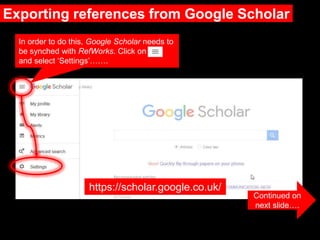
Exporting references from Google Scholar
Continued on
next slide….
https://scholar.google.co.uk/
In order to do this, Google Scholar needs to
be synched with RefWorks. Click on
and select ‘Settings’…….
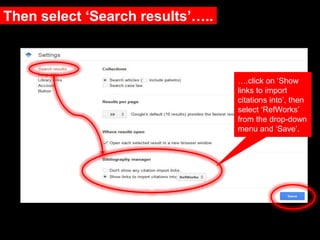
Then select ‘Search results’…..
….click on ‘Show
links to import
citations into’, then
select ‘RefWorks’
from the drop-down
menu and ‘Save’.
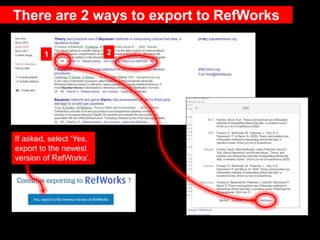
There are 2 ways to export to RefWorks
If asked, select ‘Yes,
export to the newest
version of RefWorks’.
1 2
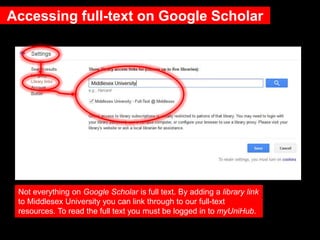
Accessing full-text on Google Scholar
Not everything on Google Scholar is full text. By adding a library link
to Middlesex University you can link through to our full-text
resources. To read the full text you must be logged in to myUniHub.
Need further help?
Contact your Librarian:
https://libguides.mdx.ac.uk/liaisonlibrarians
Chat online with a Librarian:
https://libguides.mdx.ac.uk/chat

3 RefWorks Exporting references from Google Scholar

  • 1.
  • 2.
    Exporting references fromGoogle Scholar Continued on next slide…. https://scholar.google.co.uk/ In order to do this, Google Scholar needs to be synched with RefWorks. Click on and select ‘Settings’…….
  • 3.
    Then select ‘Searchresults’….. ….click on ‘Show links to import citations into’, then select ‘RefWorks’ from the drop-down menu and ‘Save’.
  • 4.
    There are 2ways to export to RefWorks If asked, select ‘Yes, export to the newest version of RefWorks’. 1 2
  • 5.
    Accessing full-text onGoogle Scholar Not everything on Google Scholar is full text. By adding a library link to Middlesex University you can link through to our full-text resources. To read the full text you must be logged in to myUniHub.
  • 6.
    Need further help? Contactyour Librarian: https://libguides.mdx.ac.uk/liaisonlibrarians Chat online with a Librarian: https://libguides.mdx.ac.uk/chat

Editor's Notes

  • #7 More help available at the link.