Saving PDFs
RefWorks 6
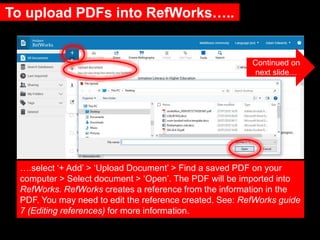
To upload PDFs into RefWorks…..
….select ‘+ Add’ > ‘Upload Document’ > Find a saved PDF on your
computer > Select document > ‘Open’. The PDF will be imported into
RefWorks. RefWorks creates a reference from the information in the
PDF. You may need to edit the reference created. See: RefWorks guide
7 (Editing references) for more information.
Continued on
next slide…
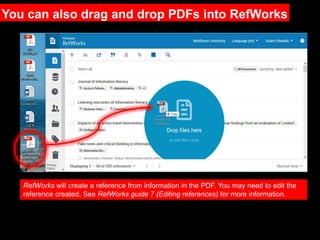
RefWorks will create a reference from information in the PDF. You may need to edit the
reference created. See RefWorks guide 7 (Editing references) for more information.
You can also drag and drop PDFs into RefWorks
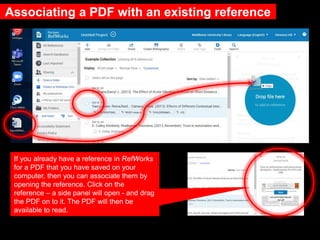
Associating a PDF with an existing reference
If you already have a reference in RefWorks
for a PDF that you have saved on your
computer, then you can associate them by
opening the reference. Click on the
reference – a side panel will open - and drag
the PDF on to it. The PDF will then be
available to read.
Need further help?
Contact your Librarian:
https://libguides.mdx.ac.uk/liaisonlibrarians
Chat online with a Librarian:
https://libguides.mdx.ac.uk/chat

6 RefWorks Saving PDFs

  • 1.
  • 2.
    To upload PDFsinto RefWorks….. ….select ‘+ Add’ > ‘Upload Document’ > Find a saved PDF on your computer > Select document > ‘Open’. The PDF will be imported into RefWorks. RefWorks creates a reference from the information in the PDF. You may need to edit the reference created. See: RefWorks guide 7 (Editing references) for more information. Continued on next slide…
  • 3.
    RefWorks will createa reference from information in the PDF. You may need to edit the reference created. See RefWorks guide 7 (Editing references) for more information. You can also drag and drop PDFs into RefWorks
  • 4.
    Associating a PDFwith an existing reference If you already have a reference in RefWorks for a PDF that you have saved on your computer, then you can associate them by opening the reference. Click on the reference – a side panel will open - and drag the PDF on to it. The PDF will then be available to read.
  • 5.
    Need further help? Contactyour Librarian: https://libguides.mdx.ac.uk/liaisonlibrarians Chat online with a Librarian: https://libguides.mdx.ac.uk/chat

Editor's Notes

  • #6 More help available at the link.