Grocery List
User Manual for Magento
Aitoc
Aitoc
Table of Contents
1. Enabling the extension in Magento.
2. Grocery List features (front-end).
3. Inside a Product List (options).
4. Adding products to a list in shopping cart.
5. Adding products to a list from an Order.
6. The discount feature.
7. Grocery List general settings.
In System > Manage Aitoc Modules, check
Recurring Purchase Assistant (aka Grocery
List) and click "Save modules settings" on
the top right.
Aitoc1. Enabling the extension in Magento
Aitoc2. Grocery List features (front-end)
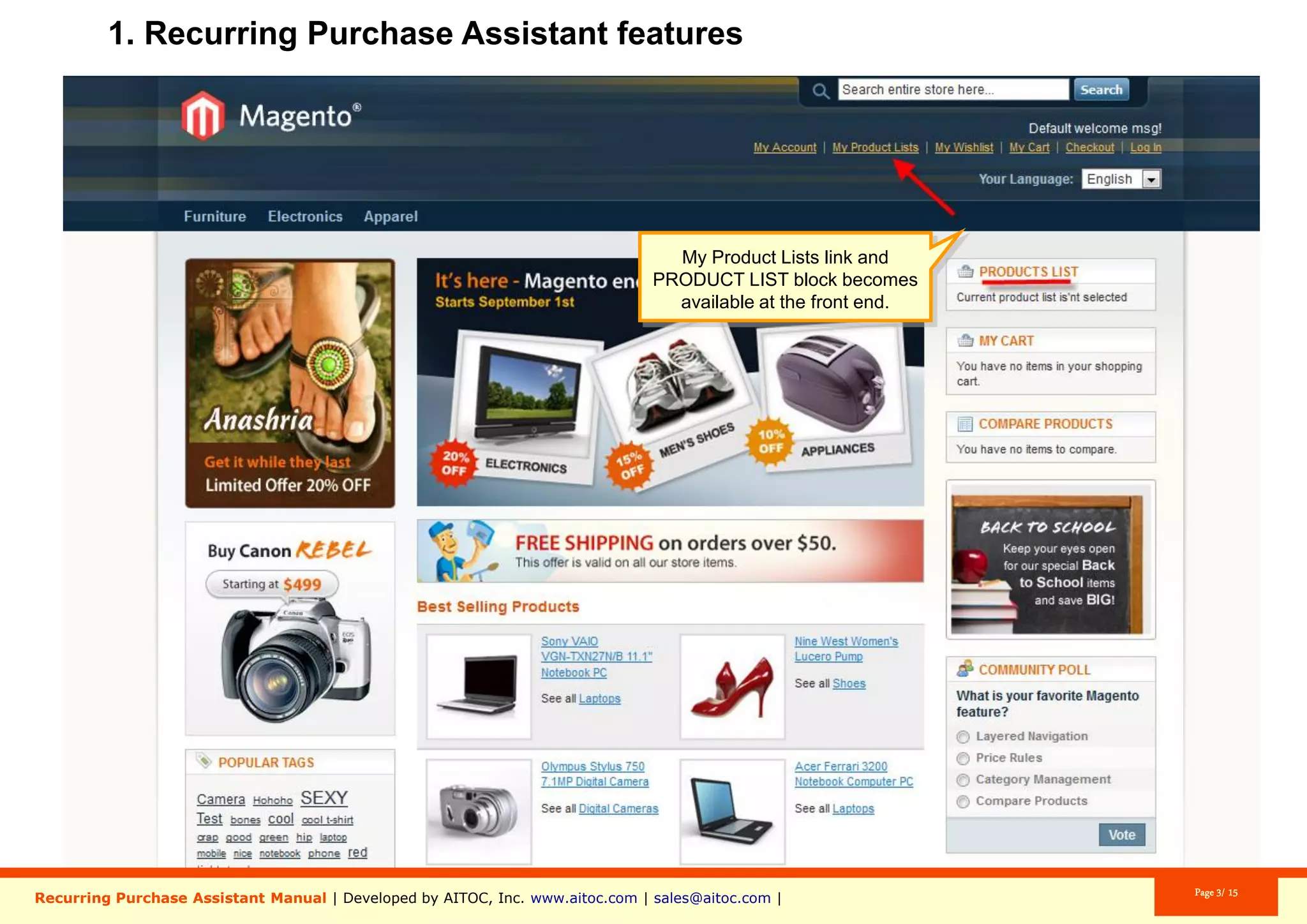
A new “Products List” tab is added.
A new “My Product Lists” link is added.
Aitoc2. Grocery List features (front-end)
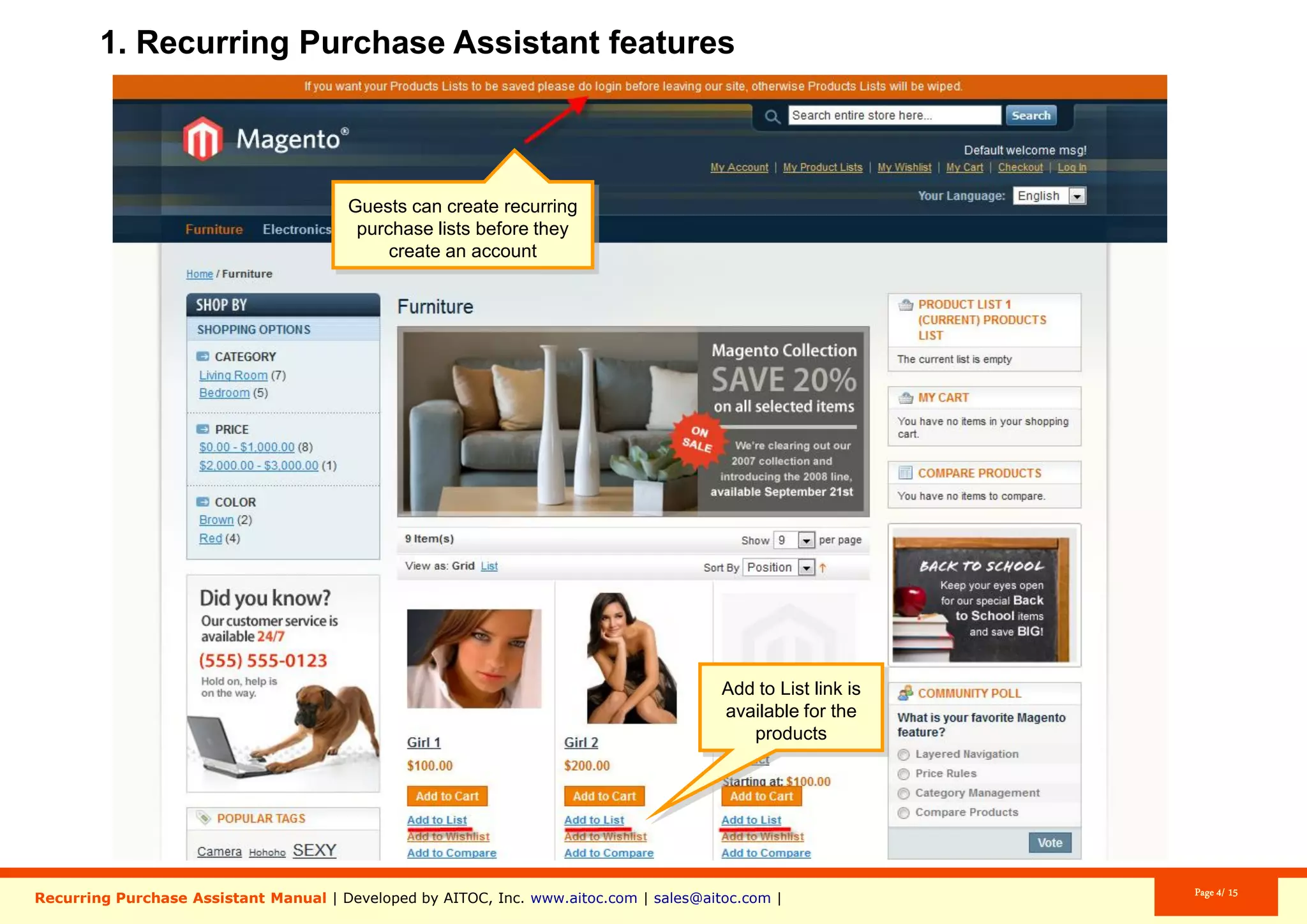
Guests can create gift lists before they
create an account.
Aitoc2. Grocery List features (front-end)
The “Add to List” links becomes available
for products.
Aitoc2. Grocery List features (front-end)
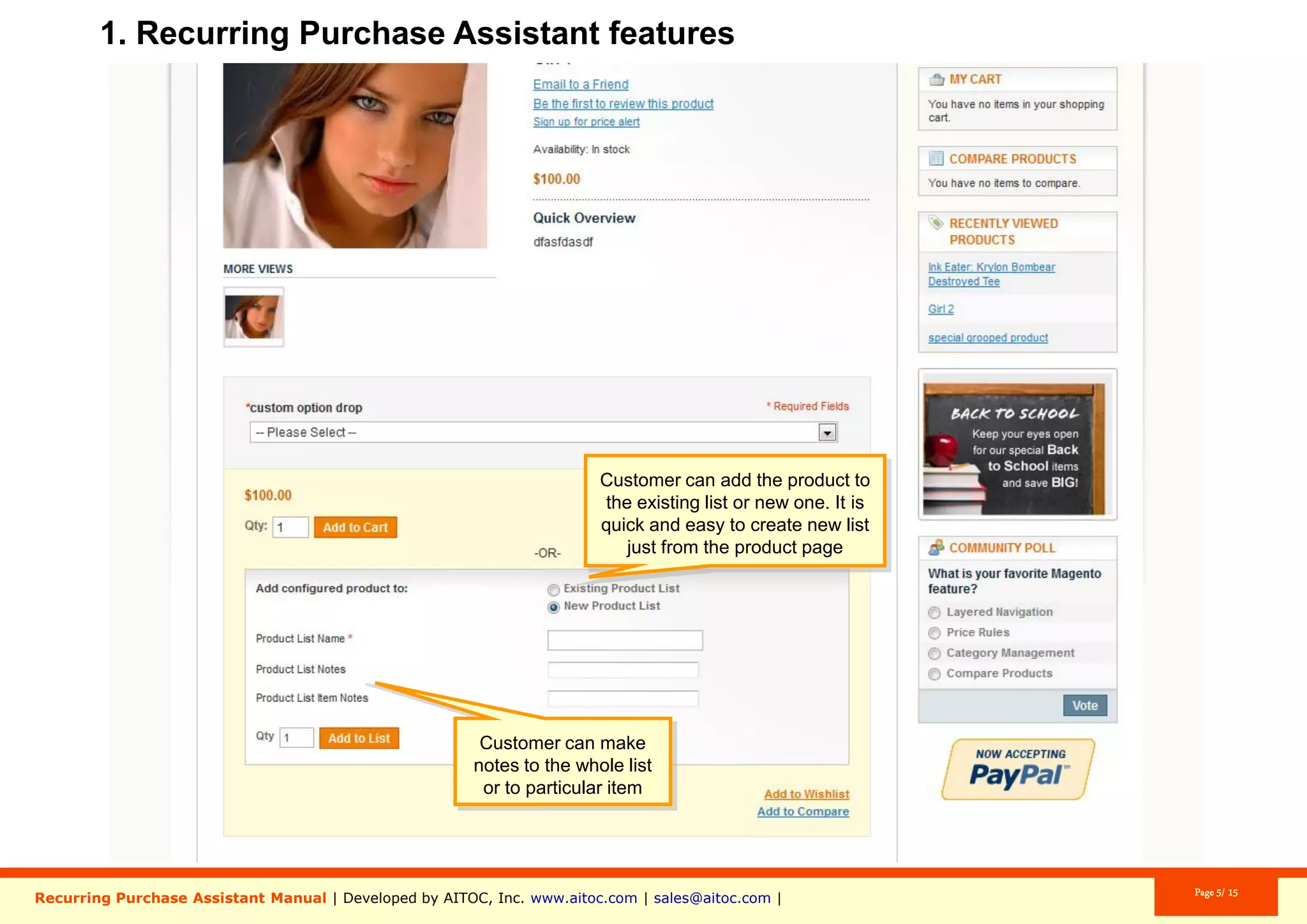
Customers can add a product to an
existing or a new Grocery List (it’s easy to
create a new list from the product page).
Customers can add notes to the whole list
or to the specific item they’re adding.
Aitoc2. Grocery List features (front-end)
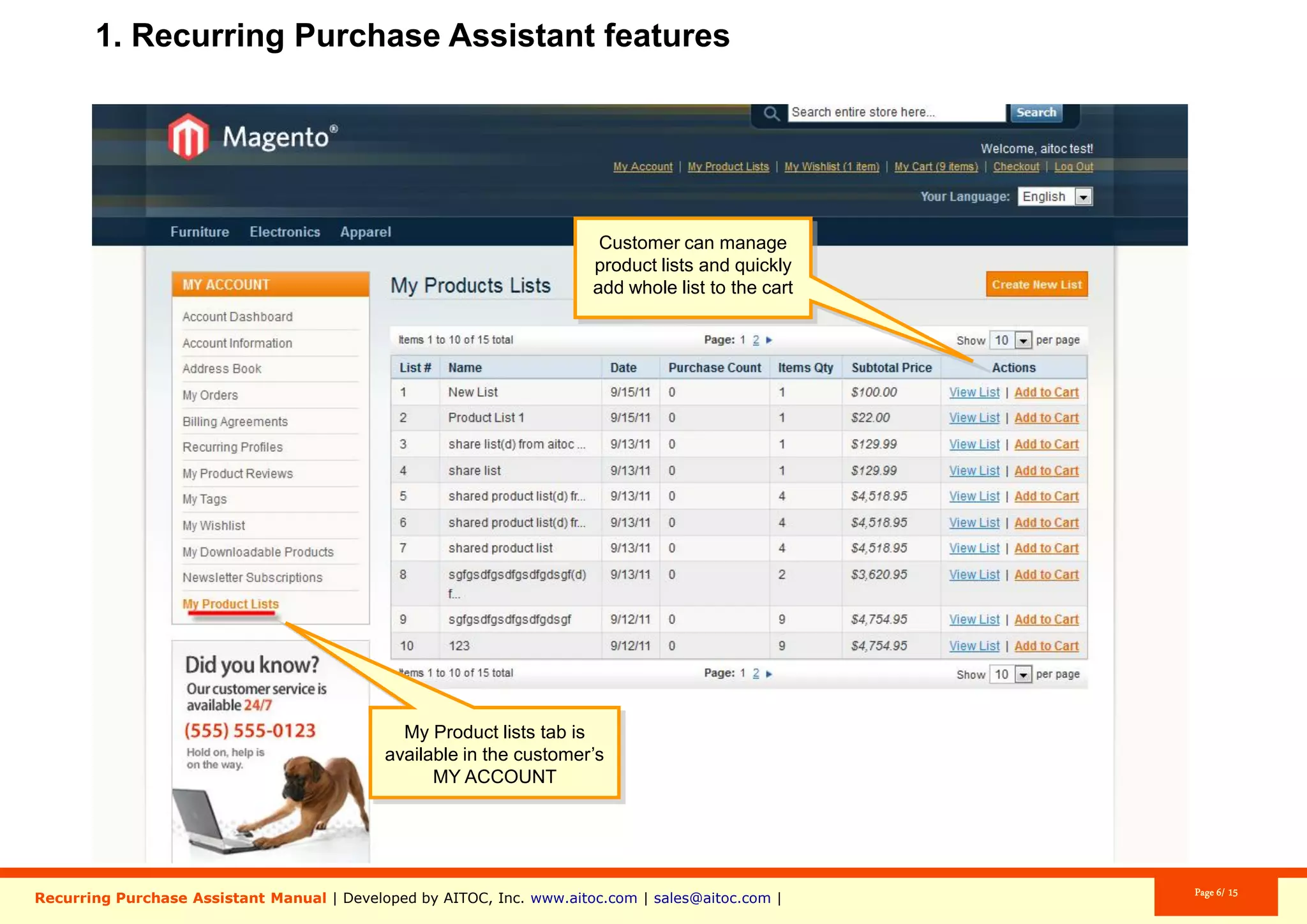
Clients can add all products in a list to the
shopping cart with a single click.
A new tab called “My Product Lists”
appears in the customer’s account.
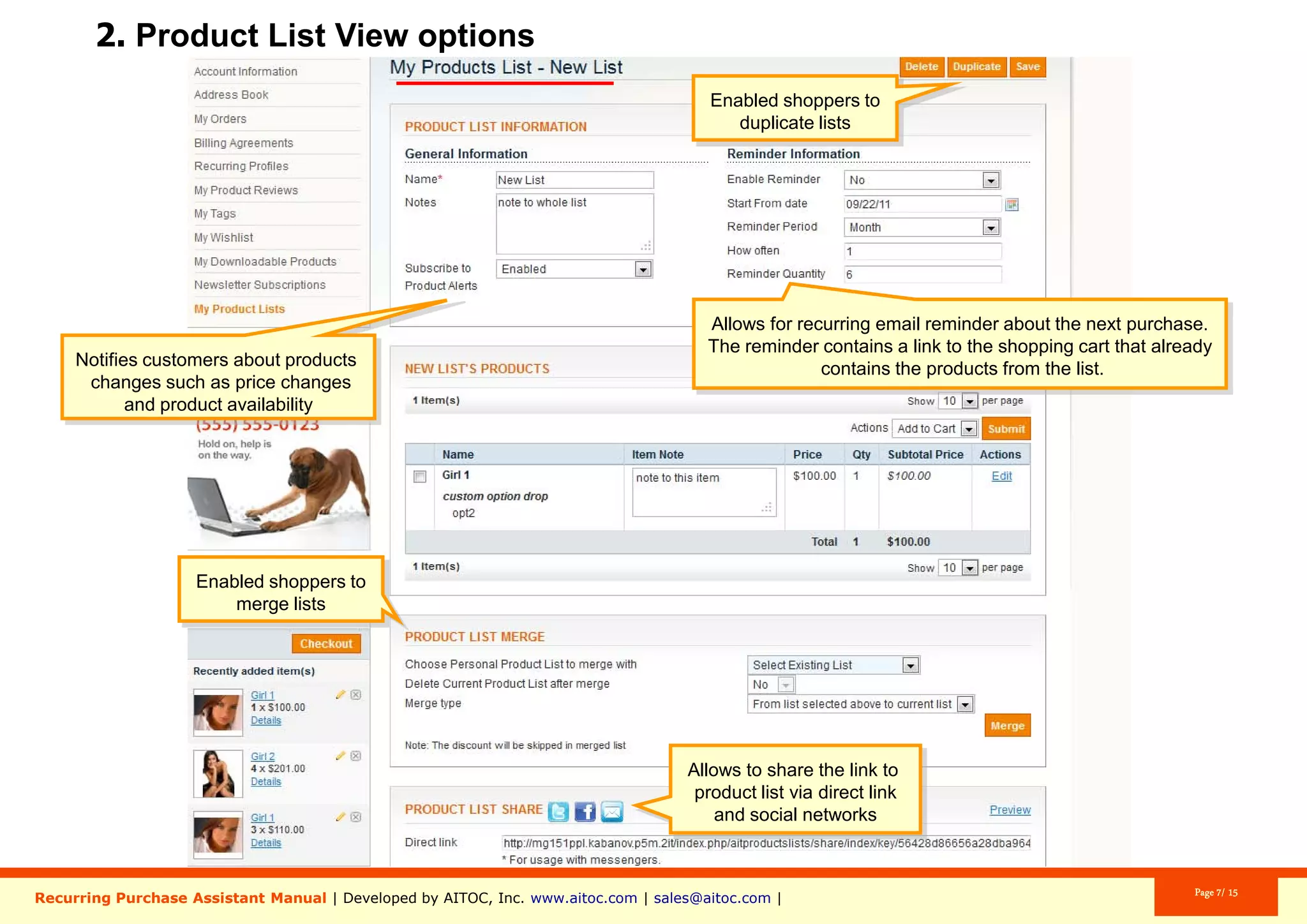
Move products between lists.
Easily share a Grocery List with others.
Merge grocery lists, if necessary.
Aitoc3. Inside a Product List (options)
Clients can choose to be reminded when
it’s time to re-order.
As per this screenshot, one will be
reminded about the purchase “1” “Year”
later, starting from “December 24, 2015”.
And the reminder will be sent with the
same periodicity “100” times.
Aitoc3. Inside a Product List (options)
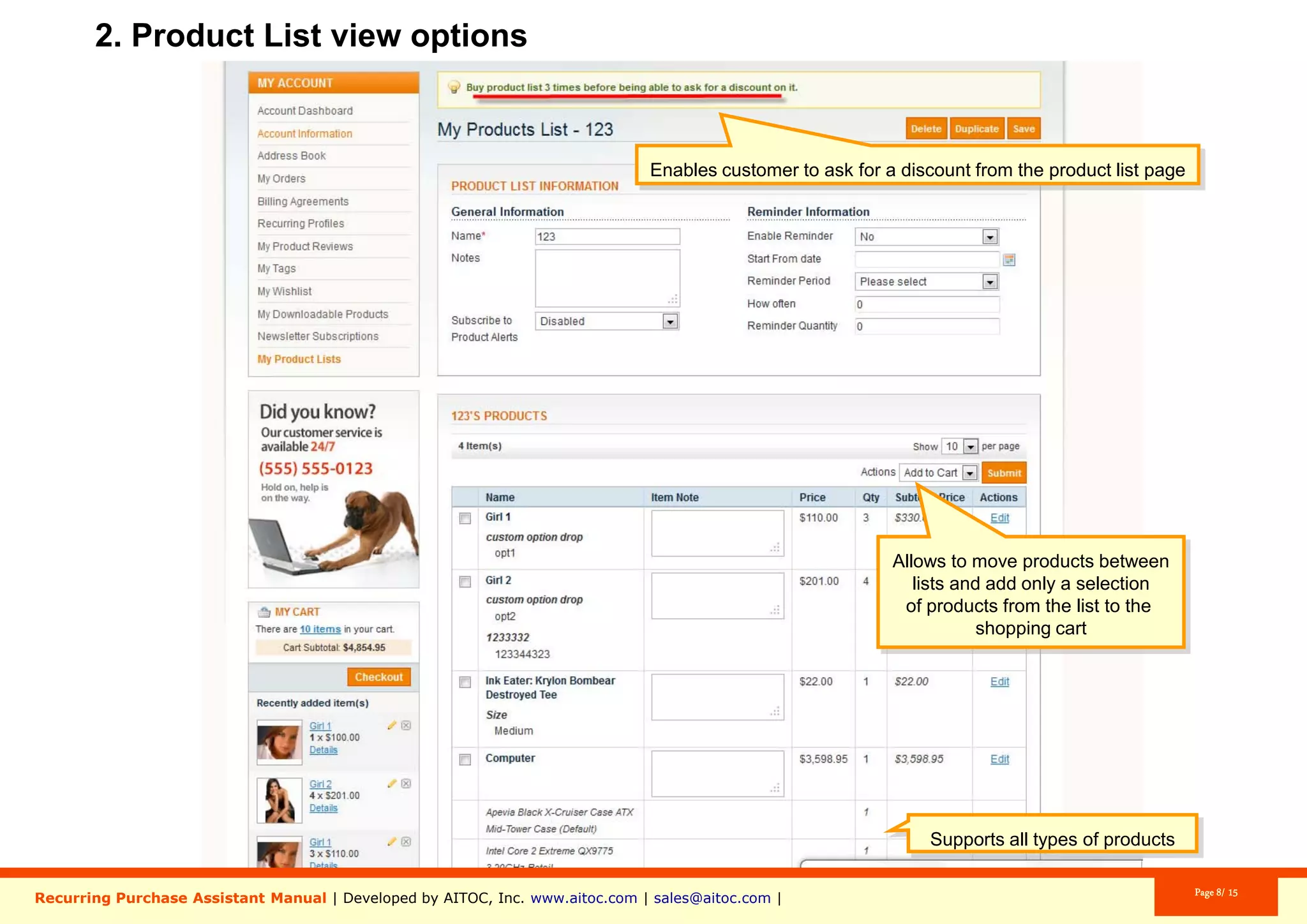
The extension works with all types of
products.
Customers can duplicate product lists.
Aitoc3. Inside a Product List (options)
Clients can add only selected items to
cart from a Product List.
Customers can add products they have in
the shopping cart to a new Product List
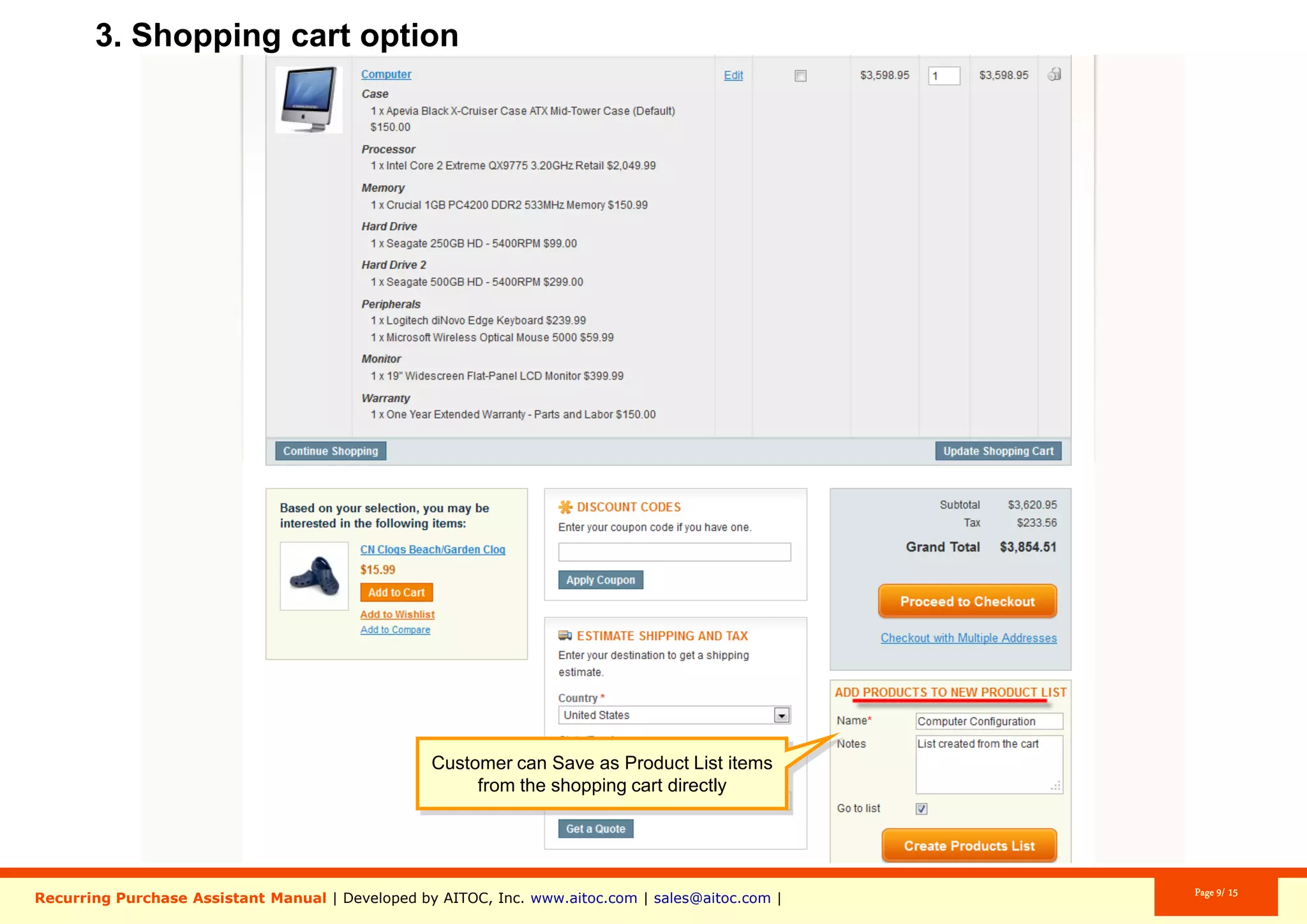
without leaving the cart.
Aitoc4. Adding products to a list in shopping cart
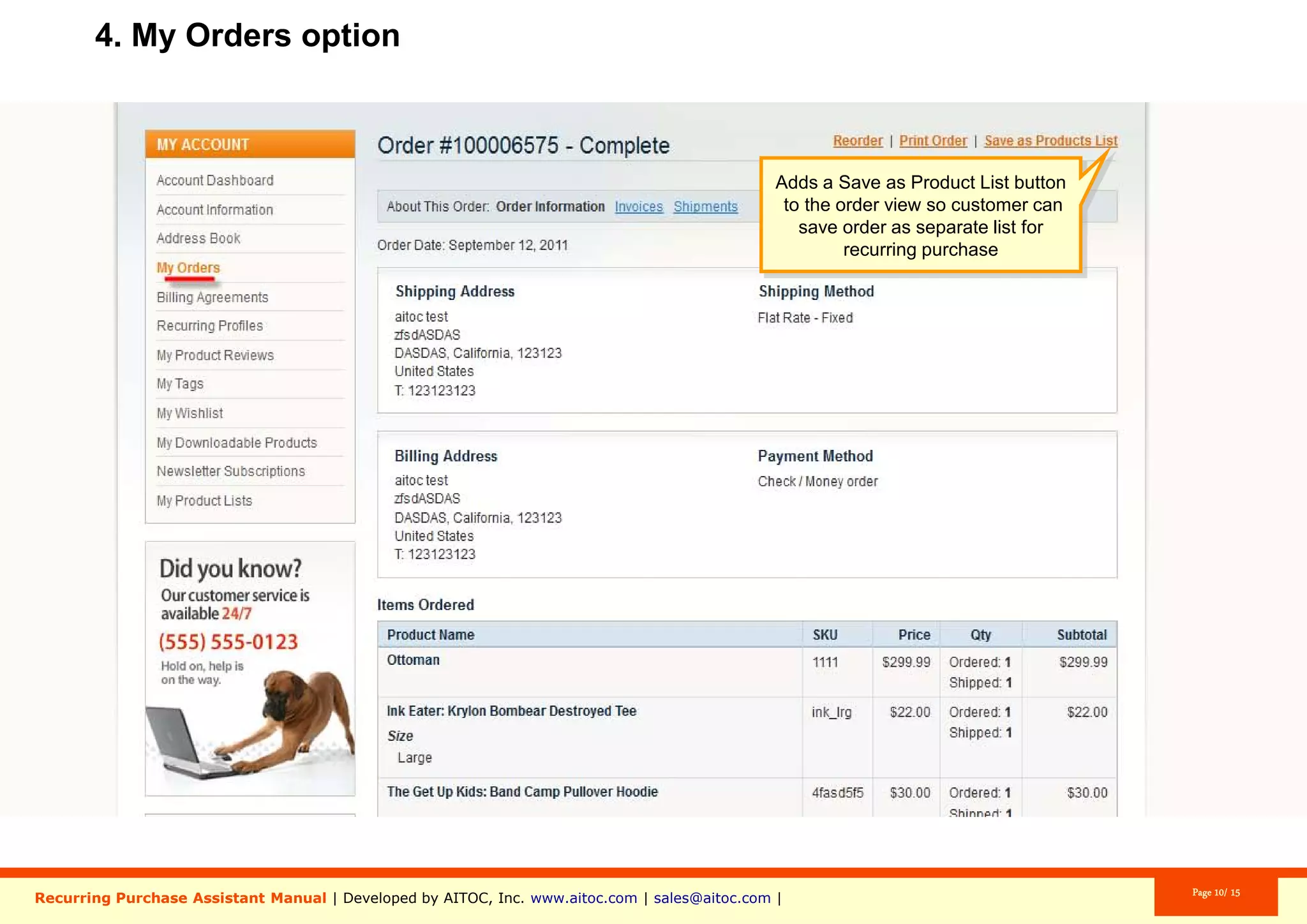
Aitoc5. Adding products to a list from an Order
Customers can add products from their
Order to a Product List in one click.
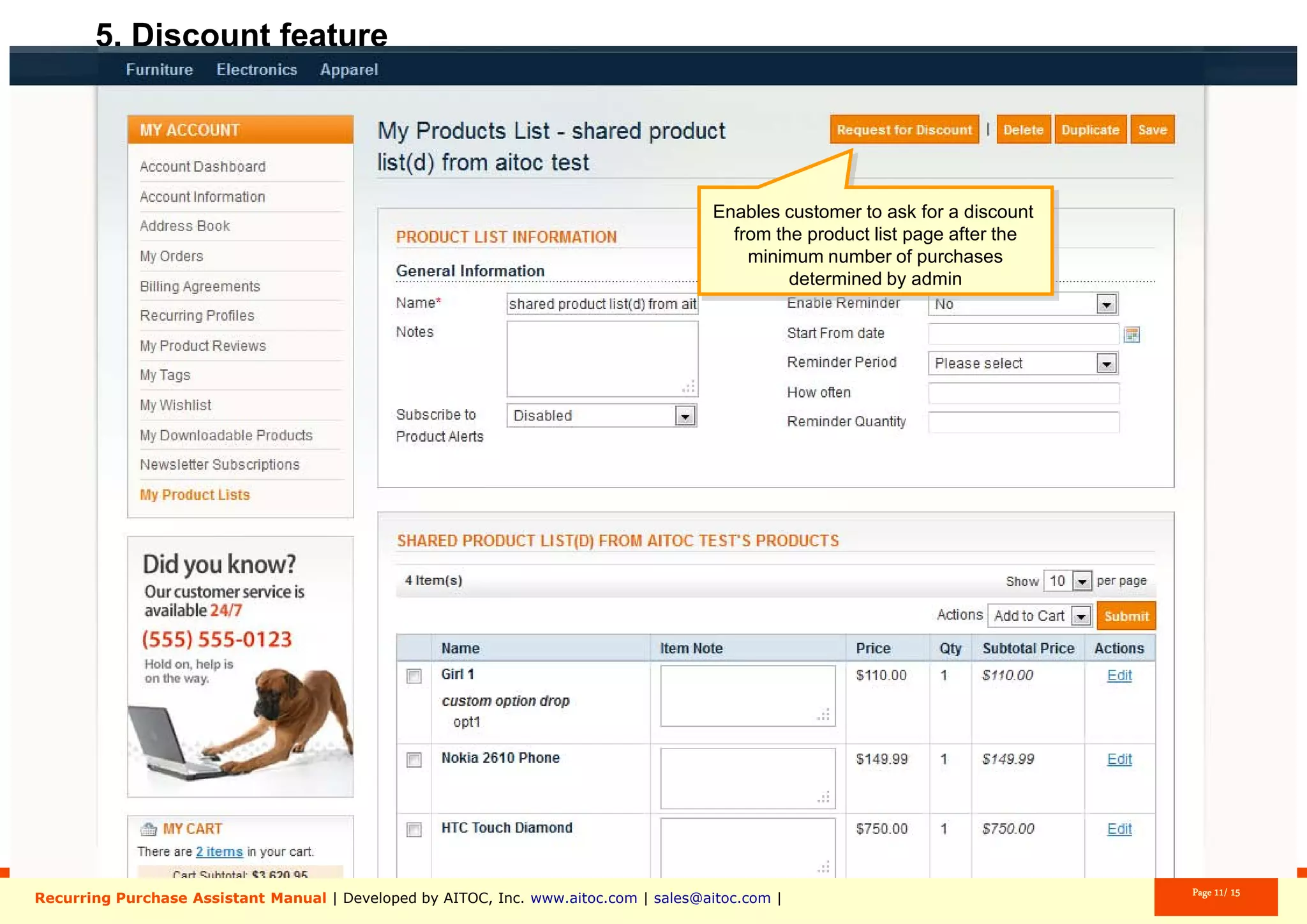
Aitoc6. The discount feature
Your customers will see a note telling
them they can get a discount.
Aitoc6. The discount feature
One can request a discount from the
product list page after they have made
the minimum number of purchases
determined by admin.
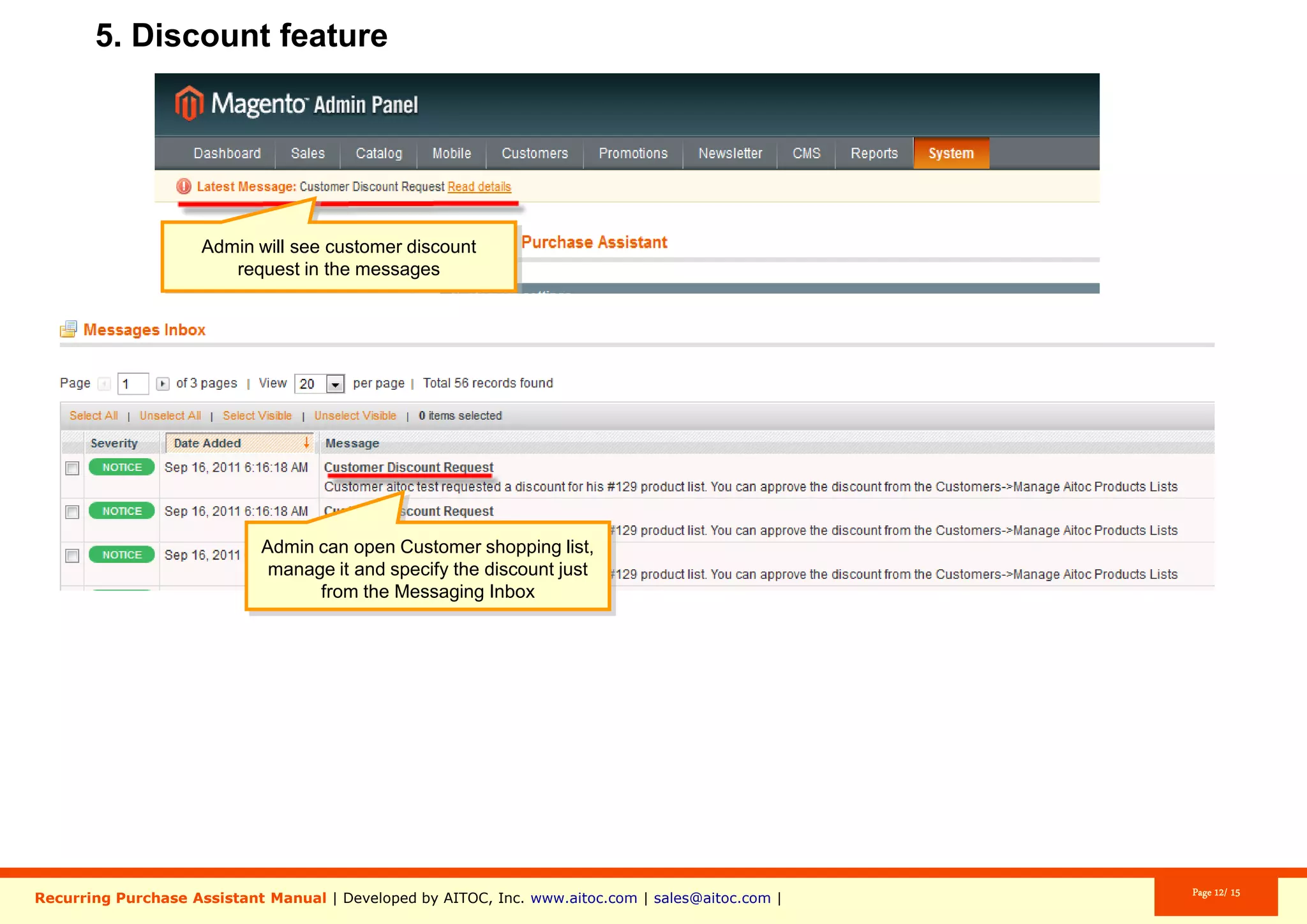
Aitoc6. The discount feature
You will be notified of the customer’s
discount request in the admin panel.
Aitoc6. The discount feature
Admin can open Customer shopping list,
manage it and specify the discount just
from the Messaging Inbox.
Aitoc6. The discount feature
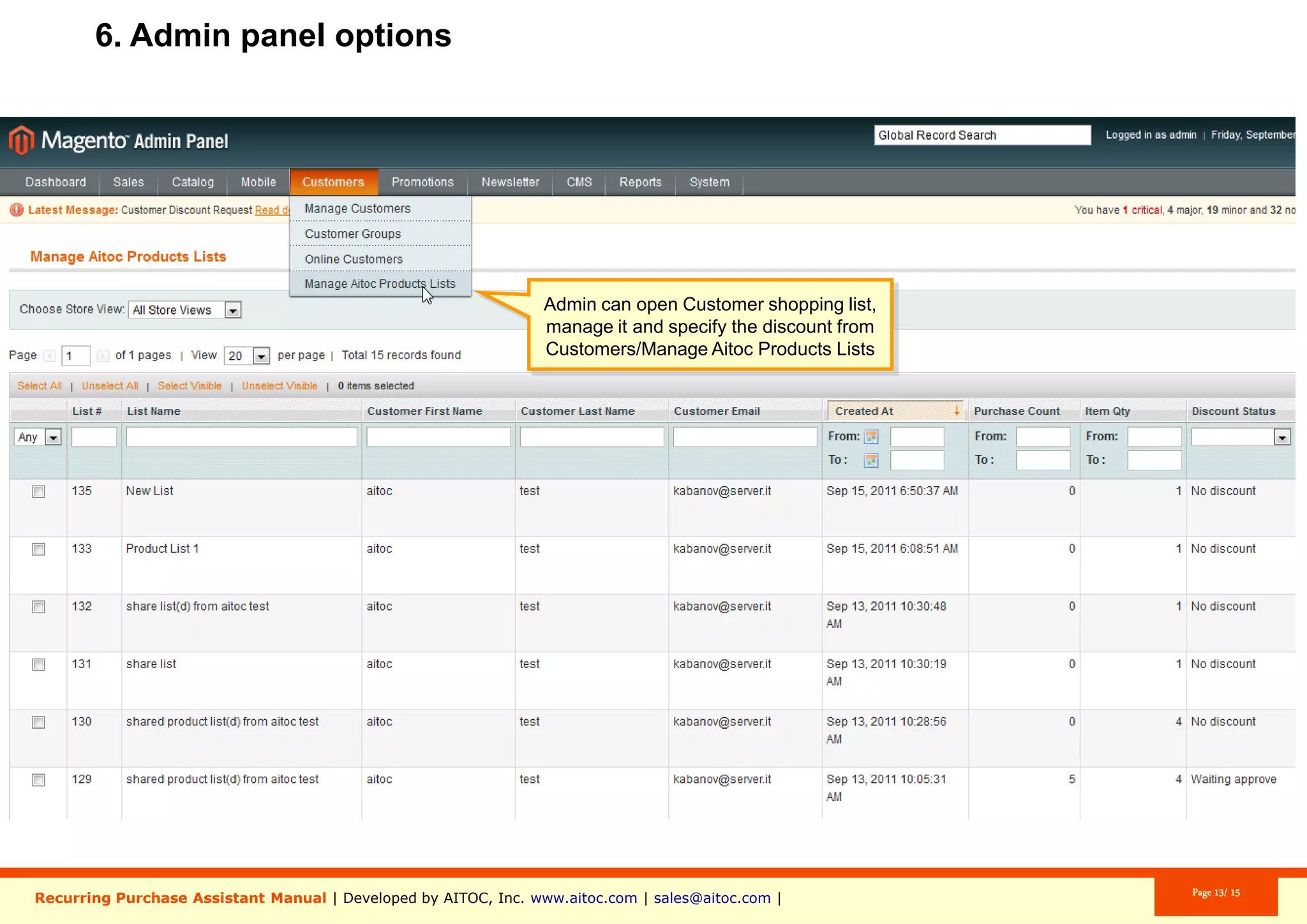
Customers > Manage Aitoc Product Lists
Open a respective customer's shopping list
and specify the discount.
Aitoc7. Grocery List general settings
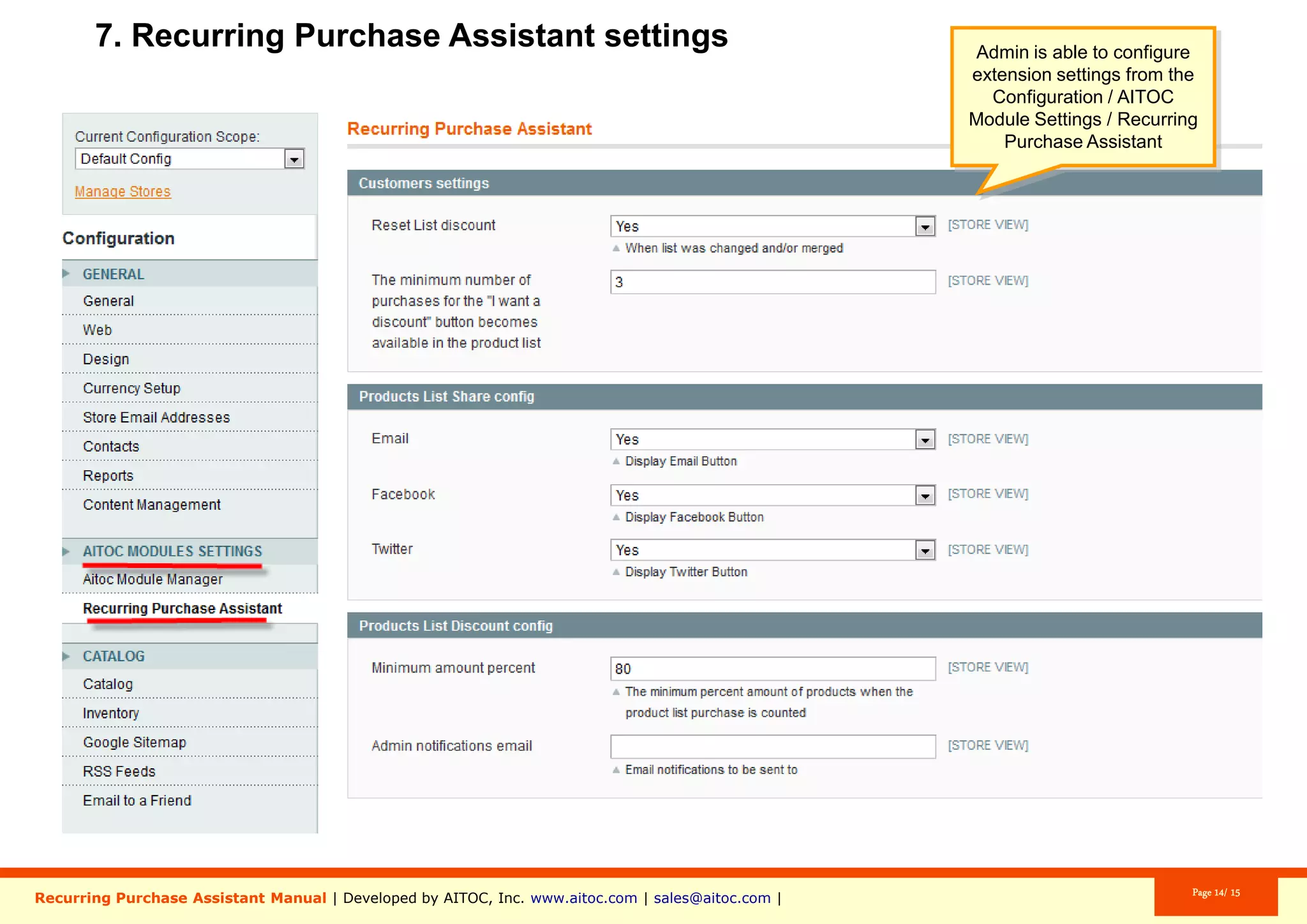
System > Configuration > Aitoc Module Settings > Recurring Purchase Assistant
Here is where you find the Grocery List
extension general settings.
Aitoc
Brought to you by
You can purchase Grocery List at
www.aitoc.com/en/magentomods_recurring_purchase_assistant.html
For questions please email at sales@aitoc.com

Grocery List User Manual by Aitoc

  • 1.
    Grocery List User Manualfor Magento Aitoc
  • 2.
    Aitoc Table of Contents 1.Enabling the extension in Magento. 2. Grocery List features (front-end). 3. Inside a Product List (options). 4. Adding products to a list in shopping cart. 5. Adding products to a list from an Order. 6. The discount feature. 7. Grocery List general settings.
  • 3.
    In System >Manage Aitoc Modules, check Recurring Purchase Assistant (aka Grocery List) and click "Save modules settings" on the top right. Aitoc1. Enabling the extension in Magento
  • 4.
    Aitoc2. Grocery Listfeatures (front-end) A new “Products List” tab is added. A new “My Product Lists” link is added.
  • 5.
    Aitoc2. Grocery Listfeatures (front-end) Guests can create gift lists before they create an account.
  • 6.
    Aitoc2. Grocery Listfeatures (front-end) The “Add to List” links becomes available for products.
  • 7.
    Aitoc2. Grocery Listfeatures (front-end) Customers can add a product to an existing or a new Grocery List (it’s easy to create a new list from the product page). Customers can add notes to the whole list or to the specific item they’re adding.
  • 8.
    Aitoc2. Grocery Listfeatures (front-end) Clients can add all products in a list to the shopping cart with a single click. A new tab called “My Product Lists” appears in the customer’s account.
  • 9.
    Move products betweenlists. Easily share a Grocery List with others. Merge grocery lists, if necessary. Aitoc3. Inside a Product List (options)
  • 10.
    Aitoc3. Inside aProduct List (options) Clients can choose to be reminded when it’s time to re-order. As per this screenshot, one will be reminded about the purchase “1” “Year” later, starting from “December 24, 2015”. And the reminder will be sent with the same periodicity “100” times.
  • 11.
    Aitoc3. Inside aProduct List (options) The extension works with all types of products. Customers can duplicate product lists.
  • 12.
    Aitoc3. Inside aProduct List (options) Clients can add only selected items to cart from a Product List.
  • 13.
    Customers can addproducts they have in the shopping cart to a new Product List without leaving the cart. Aitoc4. Adding products to a list in shopping cart
  • 14.
    Aitoc5. Adding productsto a list from an Order Customers can add products from their Order to a Product List in one click.
  • 15.
    Aitoc6. The discountfeature Your customers will see a note telling them they can get a discount.
  • 16.
    Aitoc6. The discountfeature One can request a discount from the product list page after they have made the minimum number of purchases determined by admin.
  • 17.
    Aitoc6. The discountfeature You will be notified of the customer’s discount request in the admin panel.
  • 18.
    Aitoc6. The discountfeature Admin can open Customer shopping list, manage it and specify the discount just from the Messaging Inbox.
  • 19.
    Aitoc6. The discountfeature Customers > Manage Aitoc Product Lists Open a respective customer's shopping list and specify the discount.
  • 20.
    Aitoc7. Grocery Listgeneral settings System > Configuration > Aitoc Module Settings > Recurring Purchase Assistant Here is where you find the Grocery List extension general settings.
  • 21.
    Aitoc Brought to youby You can purchase Grocery List at www.aitoc.com/en/magentomods_recurring_purchase_assistant.html For questions please email at sales@aitoc.com