Custom Order Number Pro
User Manual for Magento
Aitoc
Aitoc
Table of Contents
1. Enabling the extension in Magento.
2. Custom order number components.
3. Custom Order Number Pro - General settings.
4. Custom Order Number Pro - Store View settings.
Aitoc1. Enabling the extension in Magento
In System > Manage Aitoc Modules, check
Custom Order Number Pro and click "Save
modules settings" on the top right.
Aitoc2. Custom order number components
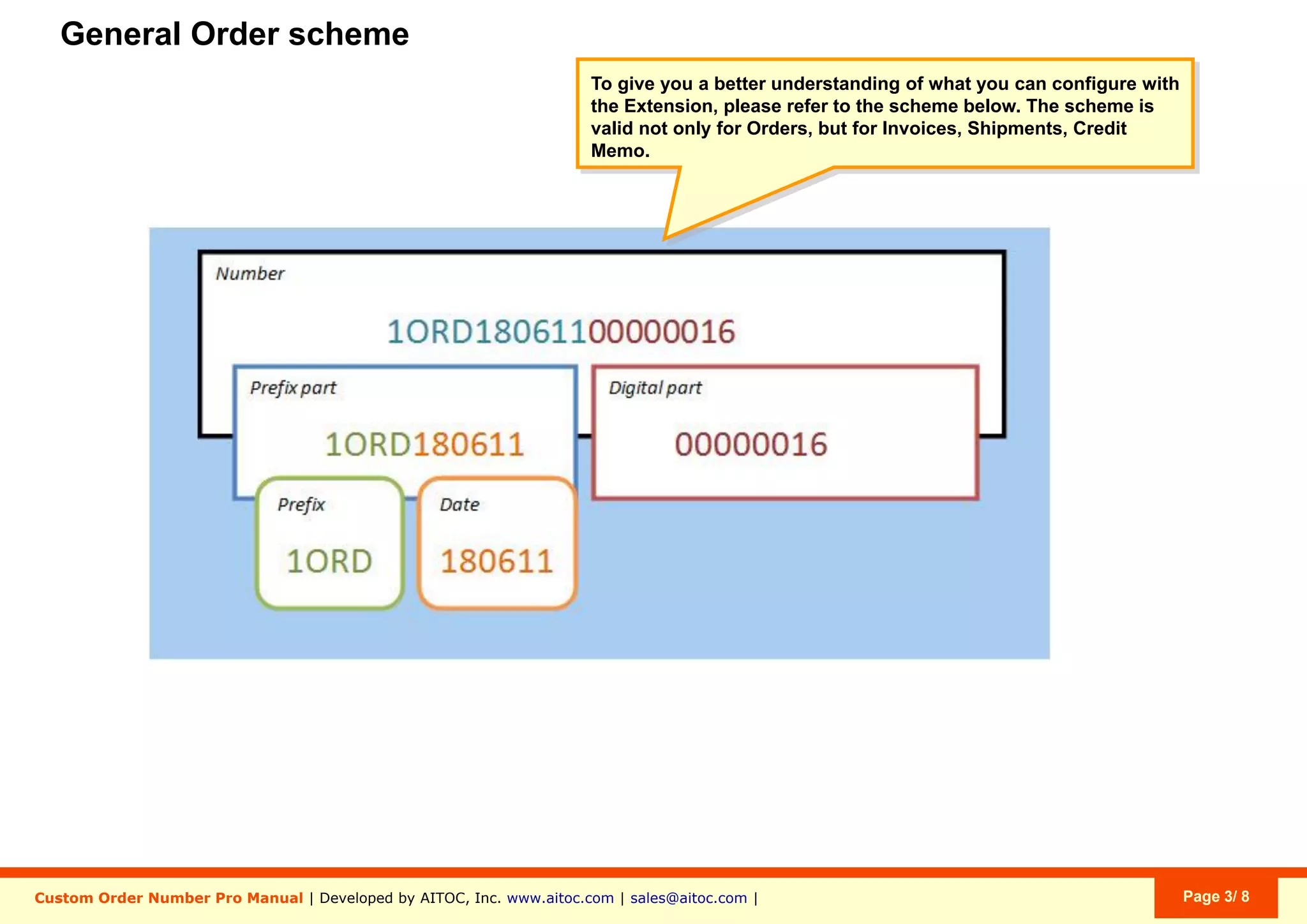
The extension can use this algorithm to
create custom numbers not only for
Orders, but also for Invoices, Shipments
and Credit Memos in Magento.
ORD - Custom Prefix
150610 - Date in Format YYMMDD
1110 - Custom Order Number to which
prefix, suffix & date are added.
DE - Custom Suffix (random)
Aitoc3. Custom Order Number Pro - General settings
Settings can be applied on these levels:
- Global (settings apply to all Websites and
Store Views).
- Website (you are able to set parameters
for each Website separately).
- Store View (you are able set parameters
for each Store View separately).
- Custom (each setting can have a
different application scope).
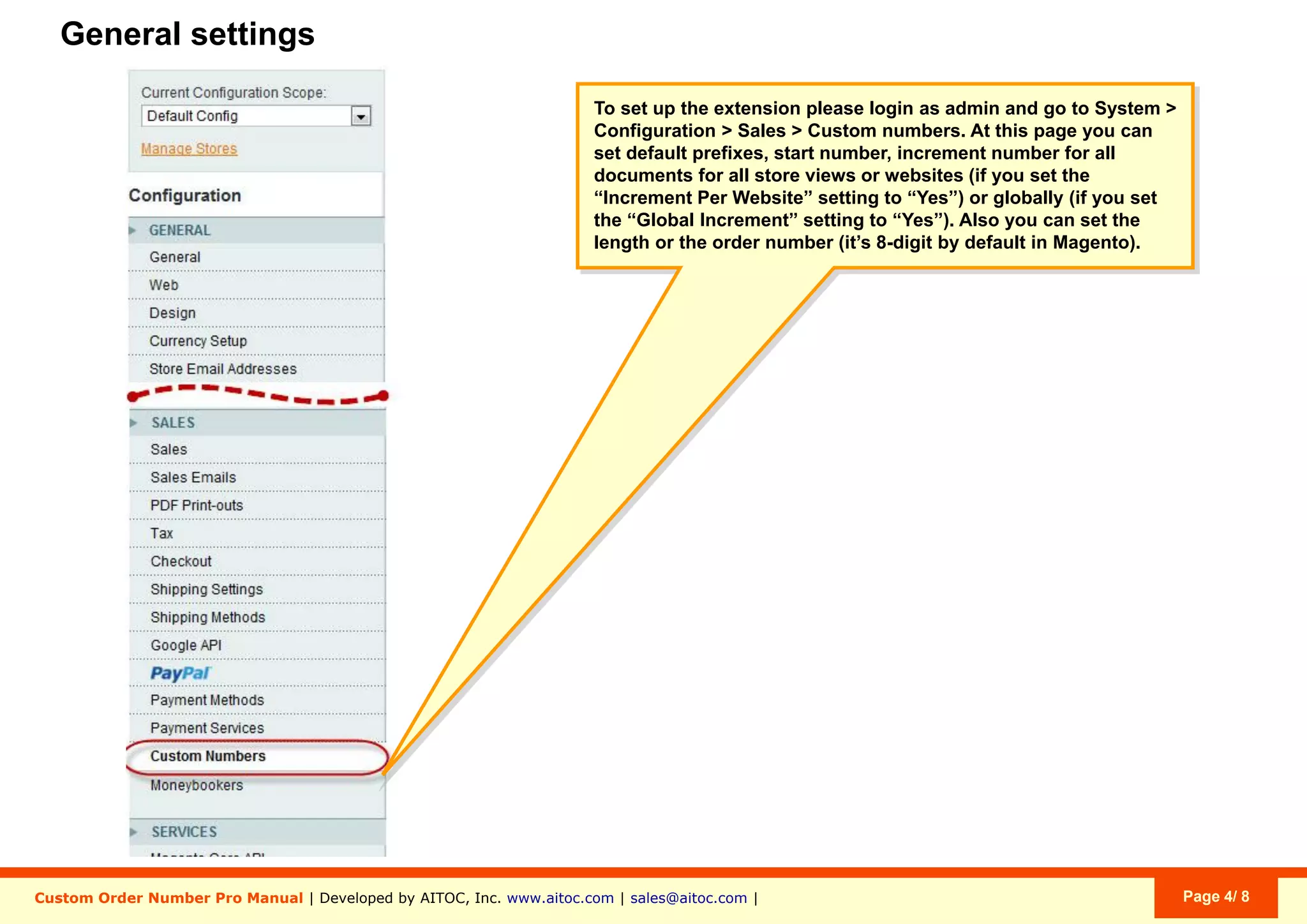
System > Configuration > Sales > Custom Numbers
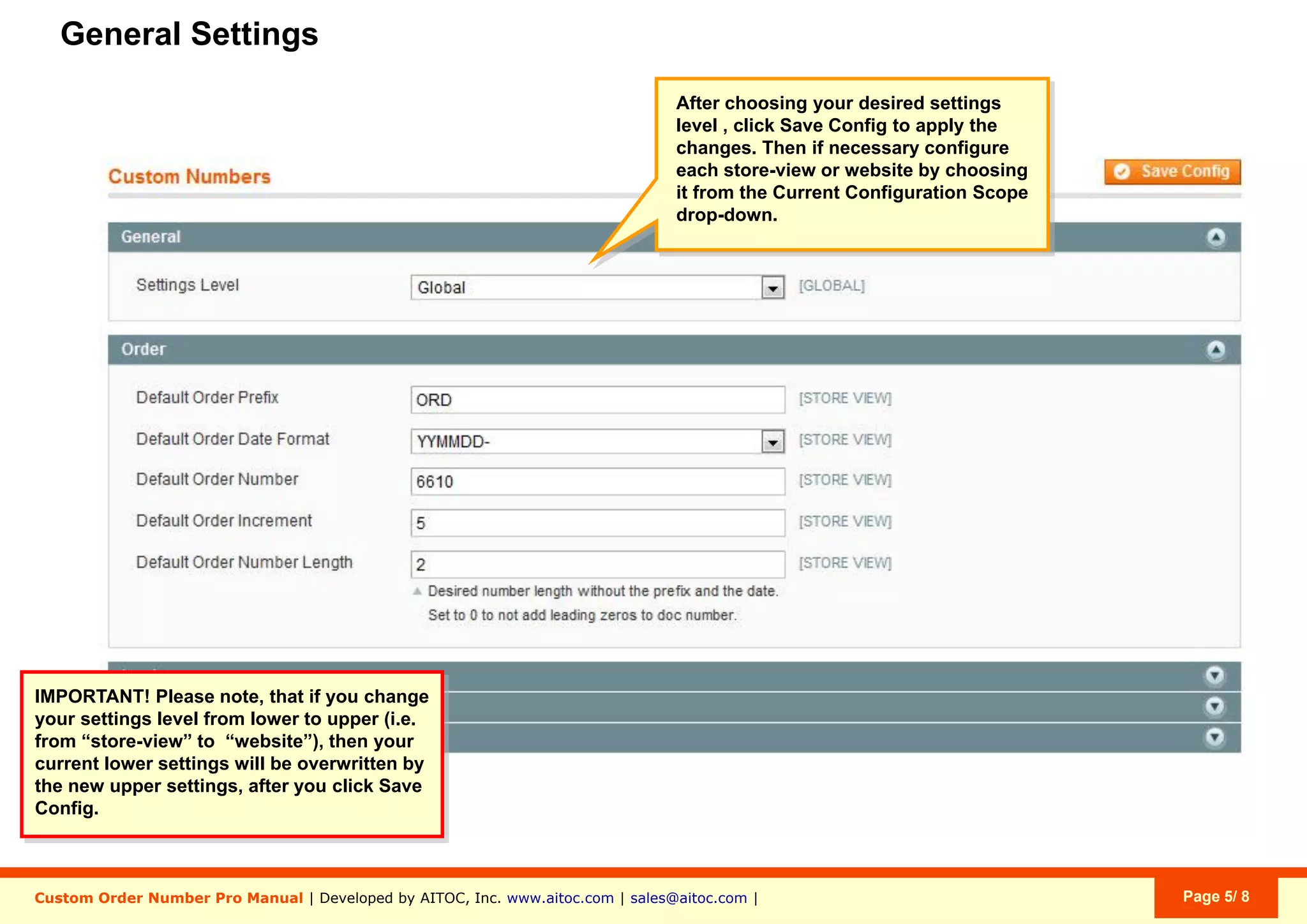
Aitoc3. Custom Order Number Pro - General settings
If you upgrade the level of settings from
lower to higher (e.g., from Website to
Global), the lower-order settings will be
overwritten after you click “Save Config”.
System > Configuration > Sales > Custom Numbers
Aitoc3. Custom Order Number Pro - General settings
Now go to a respective Configuration
Scope to configure the settings.
System > Configuration > Sales > Custom Numbers
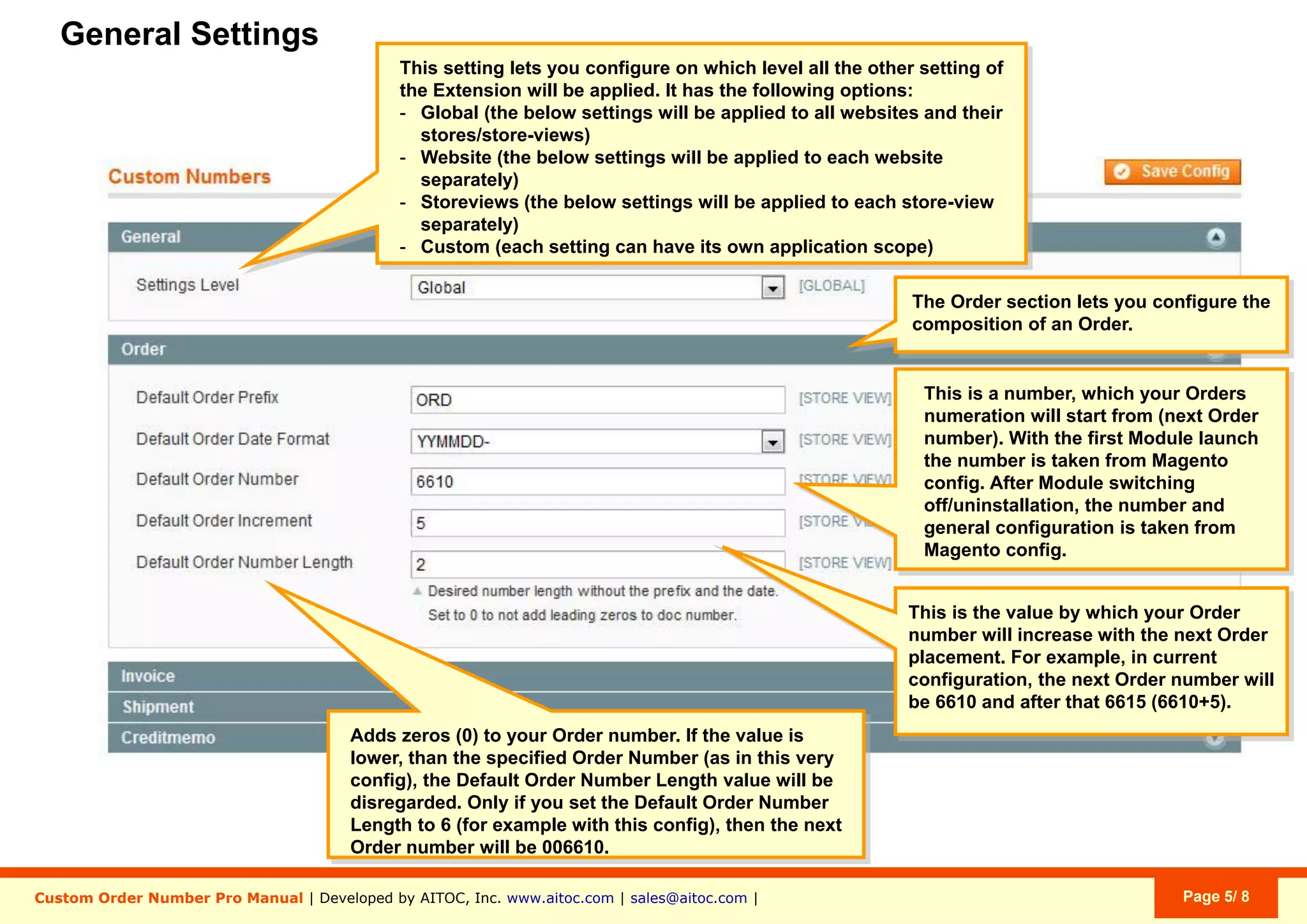
Aitoc3. Custom Order Number Pro - General settings
22
3
1
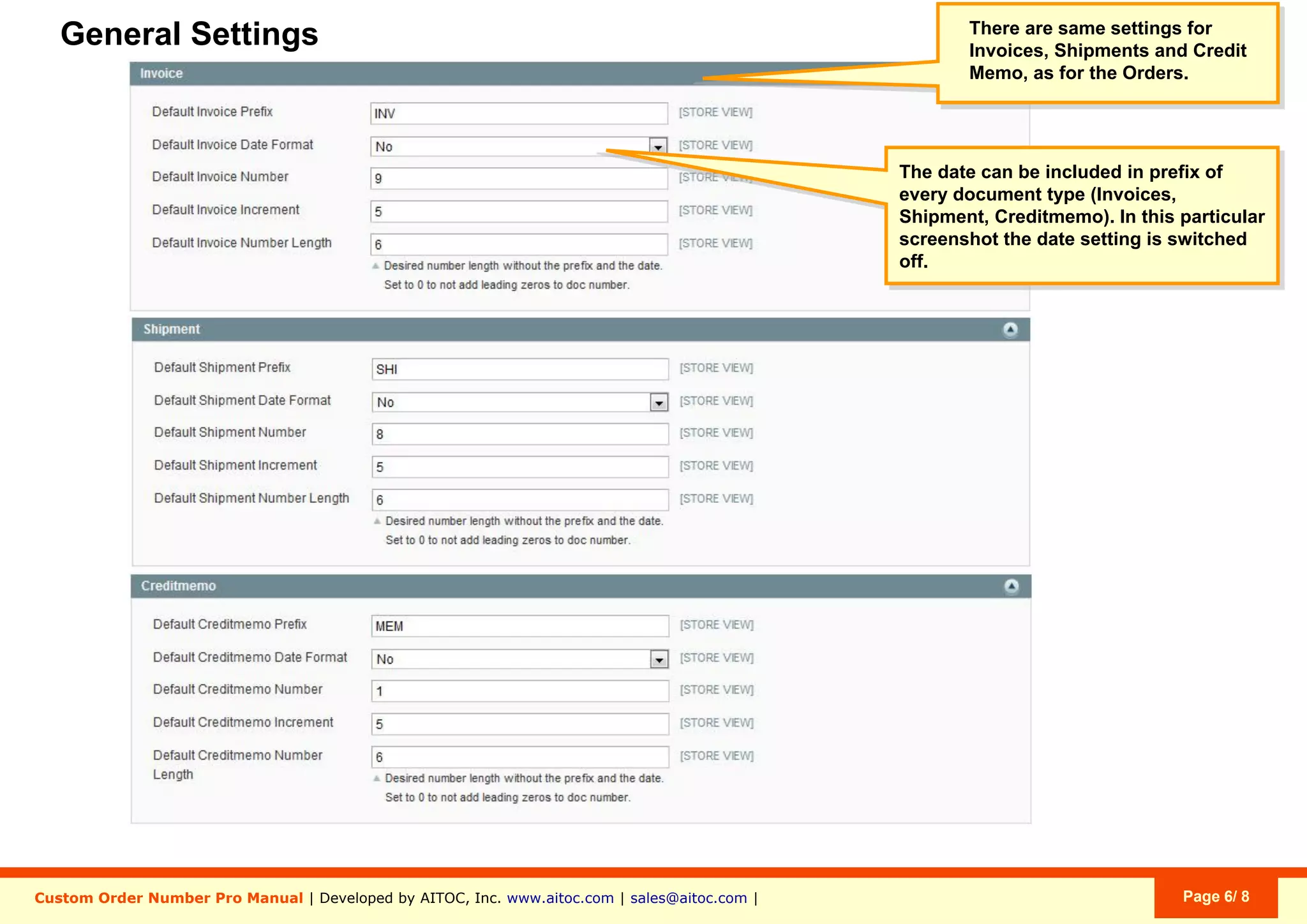
You get a separate set of settings for
Orders, Invoices, Shipments & Credit
Memos.
Set the number, with which your Order numbering
shoud start (starting with the next Order).
With the first module launch, the number is taken
from Magento config. After you switch off/uninstall
the module, the number and general configuration
are taken from Magento config.
1.
Set the value, by which your Order number should
increase with each new Order. For instance, with the
current configuration, the next Order will be #888
(777+111).
2.
Magento’s default Order Number Length is 8 digits.
Here you can specify a custom length (without the
prefix and the date).
If the value is smaller than your current Order
Number, the setting will be ignored.
If the value is larger than your current Order
Number, additional zeros will be added. E.g.:
-Order #777, if specified length is “3”
-Order #0000777, if specified length is “7”.
3.
System > Configuration > Sales > Custom Numbers
Unlike it was the case with Orders, you can
choose not to use Date in the numbers of
Shipments or Invoices.
Aitoc3. Custom Order Number Pro - General settings
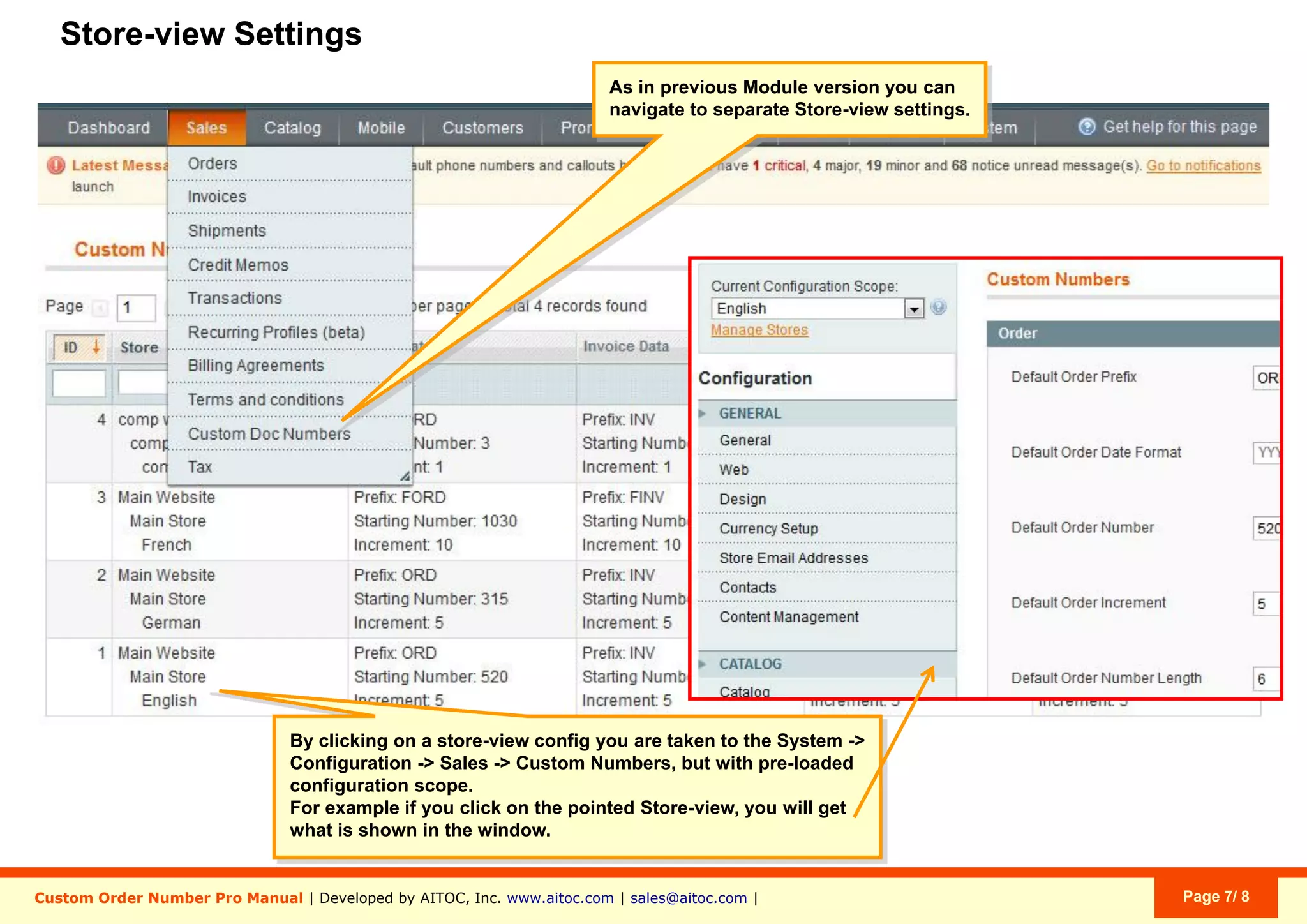
Aitoc4. Custom Order Number Pro - Store View settings
Here you can see the settings you have for
each Store View. Click a Store View to be
taken to a page where you can edit your
settings.
Sales > Custom Doc Numbers
Aitoc
Brought to you by
You can purchase Custom Order Number Pro at
www.aitoc.com/en/magentomods_custom_order_number_pro.html
For questions please email at sales@aitoc.com

Custom Order Number Pro User Manual

  • 1.
    Custom Order NumberPro User Manual for Magento Aitoc
  • 2.
    Aitoc Table of Contents 1.Enabling the extension in Magento. 2. Custom order number components. 3. Custom Order Number Pro - General settings. 4. Custom Order Number Pro - Store View settings.
  • 3.
    Aitoc1. Enabling theextension in Magento In System > Manage Aitoc Modules, check Custom Order Number Pro and click "Save modules settings" on the top right.
  • 4.
    Aitoc2. Custom ordernumber components The extension can use this algorithm to create custom numbers not only for Orders, but also for Invoices, Shipments and Credit Memos in Magento. ORD - Custom Prefix 150610 - Date in Format YYMMDD 1110 - Custom Order Number to which prefix, suffix & date are added. DE - Custom Suffix (random)
  • 5.
    Aitoc3. Custom OrderNumber Pro - General settings Settings can be applied on these levels: - Global (settings apply to all Websites and Store Views). - Website (you are able to set parameters for each Website separately). - Store View (you are able set parameters for each Store View separately). - Custom (each setting can have a different application scope). System > Configuration > Sales > Custom Numbers
  • 6.
    Aitoc3. Custom OrderNumber Pro - General settings If you upgrade the level of settings from lower to higher (e.g., from Website to Global), the lower-order settings will be overwritten after you click “Save Config”. System > Configuration > Sales > Custom Numbers
  • 7.
    Aitoc3. Custom OrderNumber Pro - General settings Now go to a respective Configuration Scope to configure the settings. System > Configuration > Sales > Custom Numbers
  • 8.
    Aitoc3. Custom OrderNumber Pro - General settings 22 3 1 You get a separate set of settings for Orders, Invoices, Shipments & Credit Memos. Set the number, with which your Order numbering shoud start (starting with the next Order). With the first module launch, the number is taken from Magento config. After you switch off/uninstall the module, the number and general configuration are taken from Magento config. 1. Set the value, by which your Order number should increase with each new Order. For instance, with the current configuration, the next Order will be #888 (777+111). 2. Magento’s default Order Number Length is 8 digits. Here you can specify a custom length (without the prefix and the date). If the value is smaller than your current Order Number, the setting will be ignored. If the value is larger than your current Order Number, additional zeros will be added. E.g.: -Order #777, if specified length is “3” -Order #0000777, if specified length is “7”. 3. System > Configuration > Sales > Custom Numbers
  • 9.
    Unlike it wasthe case with Orders, you can choose not to use Date in the numbers of Shipments or Invoices. Aitoc3. Custom Order Number Pro - General settings
  • 10.
    Aitoc4. Custom OrderNumber Pro - Store View settings Here you can see the settings you have for each Store View. Click a Store View to be taken to a page where you can edit your settings. Sales > Custom Doc Numbers
  • 11.
    Aitoc Brought to youby You can purchase Custom Order Number Pro at www.aitoc.com/en/magentomods_custom_order_number_pro.html For questions please email at sales@aitoc.com