Catalogue: Adding a new
variant of the product
In this module we will discuss :-
1. How to add a new variant of an existing product ?
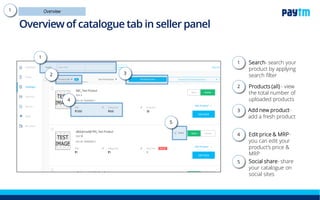
Overview of catalogue tab in seller panel
Search- It enables you to
search your products
1.
Products (all) – These
tabs help you to view your
all active and inactive
products
2.
Add new product- You
can use it to add a new
product
3.
Filter- It enables you to
filter your all your products
aligned to different
warehouses
4.
Edit price & MRP- you
can use it to edit your
product’s price & MRP
5.
Social share- You can
use share feature to share
your catalogue on social
sites
6.
1
2
3
4
5
6
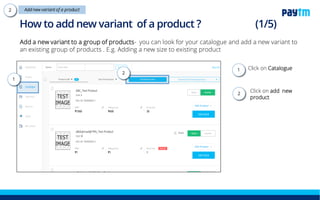
Add a new variant to a group of products- you can look for your catalogue and add a new variant to
an existing group of products . E.g. Adding a new size to existing product
Click on Catalogue
Click on add new
product
How to add a new variant?
1.
2.1
2
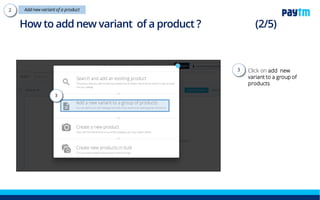
Click on add new
variant to a group of
products
How to add a new variant?
3.
3
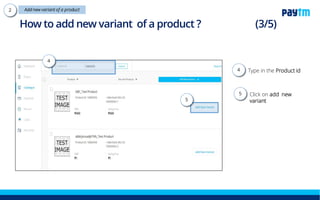
Type in the Product id
and click on submit
button
Click on add new
variant
How to add a new variant?
5
4
4.
5.
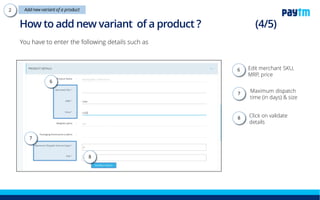
Edit merchant SKU,
MRP, price
Maximum dispatch time
(in days) & size
Click on validate details
You have to enter the following details such as
How to add a new variant?
6
7
8
7.
6.
8.
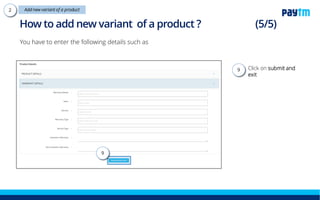
Click on submit and
exit
You have to enter the following details such as
How to add a new variant?
9
9.
Note- The product will get live within 2-3 working days.
Thanks everyone!
For any query please raise a ticket on support

Catalogue add new variant

  • 1.
    Catalogue: Adding anew variant of the product In this module we will discuss :- 1. How to add a new variant of an existing product ?
  • 2.
    Overview of cataloguetab in seller panel Search- It enables you to search your products 1. Products (all) – These tabs help you to view your all active and inactive products 2. Add new product- You can use it to add a new product 3. Filter- It enables you to filter your all your products aligned to different warehouses 4. Edit price & MRP- you can use it to edit your product’s price & MRP 5. Social share- You can use share feature to share your catalogue on social sites 6. 1 2 3 4 5 6
  • 3.
    Add a newvariant to a group of products- you can look for your catalogue and add a new variant to an existing group of products . E.g. Adding a new size to existing product Click on Catalogue Click on add new product How to add a new variant? 1. 2.1 2
  • 4.
    Click on addnew variant to a group of products How to add a new variant? 3. 3
  • 5.
    Type in theProduct id and click on submit button Click on add new variant How to add a new variant? 5 4 4. 5.
  • 6.
    Edit merchant SKU, MRP,price Maximum dispatch time (in days) & size Click on validate details You have to enter the following details such as How to add a new variant? 6 7 8 7. 6. 8.
  • 7.
    Click on submitand exit You have to enter the following details such as How to add a new variant? 9 9. Note- The product will get live within 2-3 working days.
  • 8.
    Thanks everyone! For anyquery please raise a ticket on support