











Real-time content creation
with UE4 ray tracing
Epic Games Japan / Technical Artist Developer Relations
Hiroyuki Kobayashi
#UE4 | @UNREALENGINE
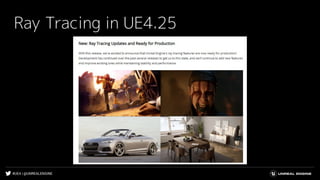
Ray Tracing in UE4.25
#UE4 | @UNREALENGINE
Ray Tracing in UE4.25
Production Ready !
#UE4 | @UNREALENGINE
Are you sure it’s okay?
#UE4 | @UNREALENGINE
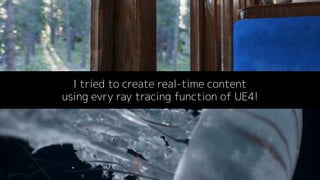
I tried to create real-time content
using evry ray tracing function of UE4!
#UE4 | @UNREALENGINE
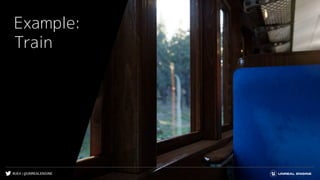
Example:
Train
#UE4 | @UNREALENGINE
Ray tracing verification
● Ambient Occlusion
● Global Illumination
● Sky Light
● Reflection
● Translucency
Verification environment RTX 2080ti Full HD
#UE4 | @UNREALENGINE
Ray tracing verification
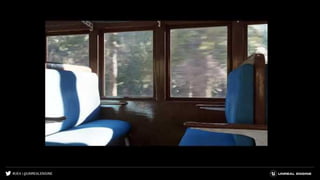
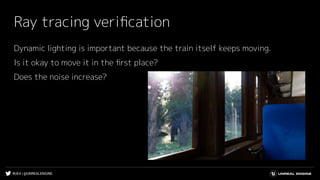
Dynamic lighting is important because the train itself keeps moving.
Is it okay to move it in the first place?
Does the noise increase?
#UE4 | @UNREALENGINE
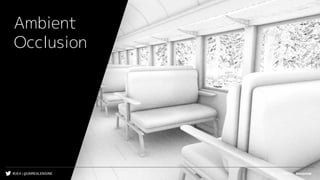
Ambient
Occlusion
#UE4 | @UNREALENGINE
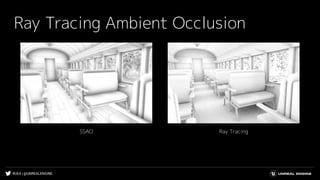
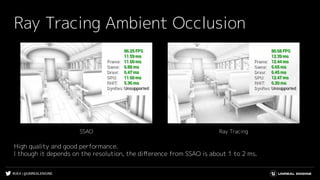
Ray Tracing Ambient Occlusion
Ray TracingSSAO
#UE4 | @UNREALENGINE
Ray Tracing Ambient Occlusion
High quality and good performance.
l though it depends on the resolution, the difference from SSAO is about 1 to 2 ms.
Ray TracingSSAO
#UE4 | @UNREALENGINE
What happens when move the train?
#UE4 | @UNREALENGINE
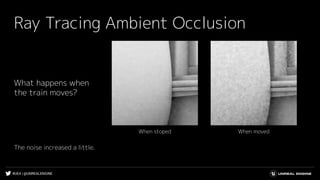
Ray Tracing Ambient Occlusion
When movedWhen stoped
What happens when
the train moves?
The noise increased a little.
#UE4 | @UNREALENGINE
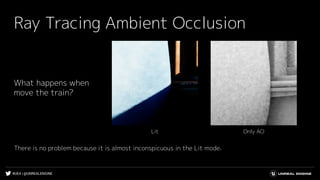
Ray Tracing Ambient Occlusion
Only AOLit
What happens when
move the train?
There is no problem because it is almost inconspicuous in the Lit mode.
#UE4 | @UNREALENGINE
Global
Illumination
#UE4 | @UNREALENGINE
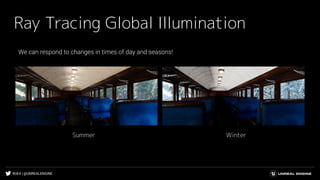
Ray Tracing Global Illumination
Summer Winter
#UE4 | @UNREALENGINE
But...
#UE4 | @UNREALENGINE
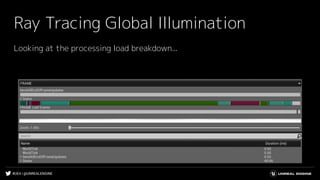
Ray Tracing Global Illumination
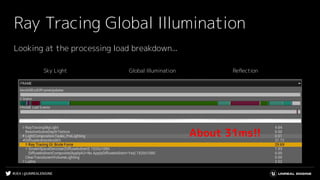
Looking at the processing load breakdown...
#UE4 | @UNREALENGINE
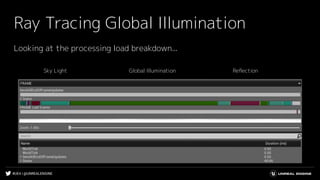
Ray Tracing Global Illumination
Sky Light Global Illumination Reflection
Looking at the processing load breakdown...
#UE4 | @UNREALENGINE
Ray Tracing Global Illumination
Sky Light Global Illumination Reflection
Looking at the processing load breakdown...
#UE4 | @UNREALENGINE
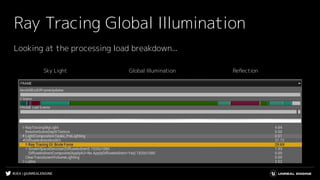
Ray Tracing Global Illumination
Sky Light Global Illumination Reflection
About 31ms!!
Looking at the processing load breakdown...
#UE4 | @UNREALENGINE
It was heavy...
#UE4 | @UNREALENGINE
Ray Tracing Global Illumination
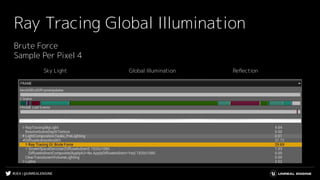
Sky Light Global Illumination Reflection
Brute Force
Sample Per Pixel 4
#UE4 | @UNREALENGINE
Ray Tracing Global Illumination
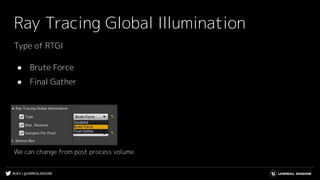
Type of RTGI
● Brute Force
● Final Gather
We can change from post process volume.
#UE4 | @UNREALENGINE
How’s final gather?
#UE4 | @UNREALENGINE
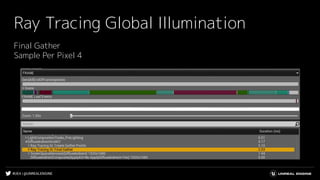
Ray Tracing Global Illumination
Final Gather
Sample Per Pixel 4
#UE4 | @UNREALENGINE
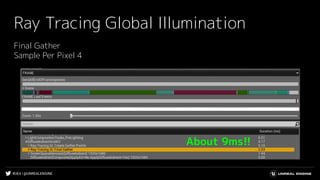
Ray Tracing Global Illumination
Final Gather
Sample Per Pixel 4
About 9ms!!
#UE4 | @UNREALENGINE
But...
#UE4 | @UNREALENGINE
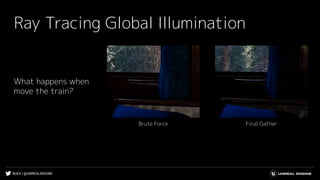
Ray Tracing Global Illumination
Final GatherBrute Force
What happens when
move the train?
#UE4 | @UNREALENGINE
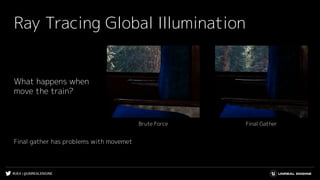
Ray Tracing Global Illumination
Final GatherBrute Force
What happens when
move the train?
Final gather has problems with movemet
#UE4 | @UNREALENGINE
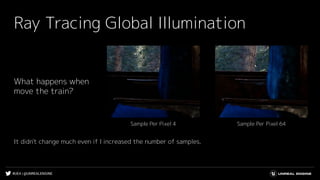
Ray Tracing Global Illumination
What happens when
move the train?
Sample Per Pixel 64Sample Per Pixel 4
It didn't change much even if I increased the number of samples.
#UE4 | @UNREALENGINE
Try lowering the brute force sample per pixel
#UE4 | @UNREALENGINE
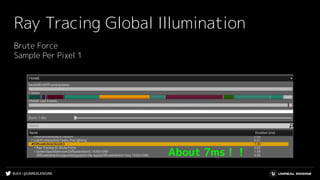
Ray Tracing Global Illumination
Brute Force
Sample Per Pixel 1
About 7ms!!
#UE4 | @UNREALENGINE
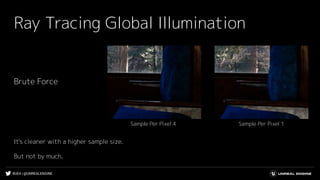
Ray Tracing Global Illumination
Brute Force
Sample Per Pixel 1Sample Per Pixel 4
It's cleaner with a higher sample size.
But not by much.
#UE4 | @UNREALENGINE
Ray Tracing Global Illumination
Brute Force
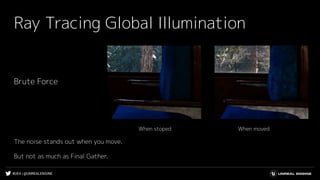
The noise stands out when you move.
But not as much as Final Gather.
When movedWhen stoped
#UE4 | @UNREALENGINE
Ray Tracing Global Illumination
Final Gather
● Fast
● Not good at movement
Brute Force
● Slow
● not good at movement, but better than final gather
#UE4 | @UNREALENGINE
Ray Tracing Global Illumination
Final Gather
● Fast
● Not good at movement
Brute Force
● Slow
● not good at movement, but better than final gather
Neither of them are good at
movement!
#UE4 | @UNREALENGINE
What do we do then?
#UE4 | @UNREALENGINE
Let's adjust the denoiser.
#UE4 | @UNREALENGINE
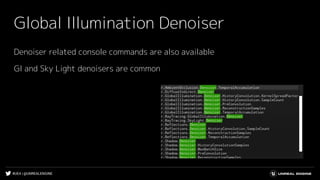
Global Illumination Denoiser
Denoiser related console commands are also available
GI and Sky Light denoisers are common
#UE4 | @UNREALENGINE
Global Illumination Denoiser
r.GlobalIllumination.Denoiser.PreConvolution=2
● Increasing the value suppresses noise to some extent, but gives an overall vague
impression.
r.GlobalIllumination.Denoiser.ReconstructionSamples=1
● Noise jaggies can be suppressed by lowering the value
#UE4 | @UNREALENGINE
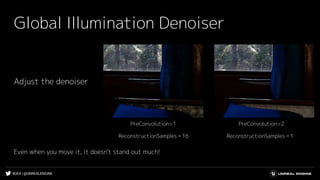
Global Illumination Denoiser
Adjust the denoiser
PreConvolution=2PreConvolution=1
ReconstructionSamples=1ReconstructionSamples=16
Even when you move it, it doesn't stand out much!
#UE4 | @UNREALENGINE
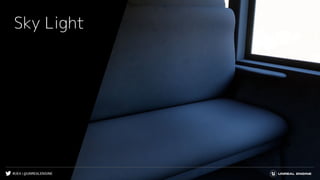
Sky Light
#UE4 | @UNREALENGINE
Ray Tracing Sky Light
Shadow related issues
● Masked material shadow ignores Opacity Mask
● Cast shadow for each material element does not work
● Sky Light looks different in reflection
#UE4 | @UNREALENGINE
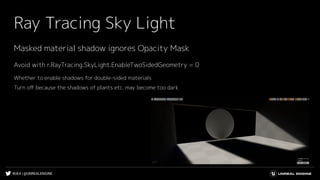
Ray Tracing Sky Light
Avoid with r.RayTracing.SkyLight.EnableTwoSidedGeometry = 0
Whether to enable shadows for double-sided materials
Turn off because the shadows of plants etc. may become too dark
Masked material shadow ignores Opacity Mask
#UE4 | @UNREALENGINE
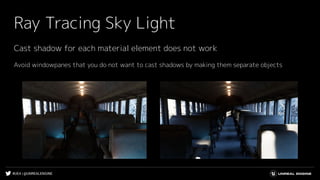
Ray Tracing Sky Light
Avoid windowpanes that you do not want to cast shadows by making them separate objects
Cast shadow for each material element does not work
#UE4 | @UNREALENGINE
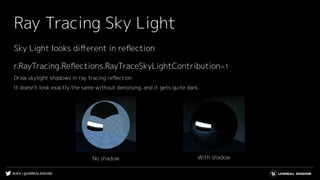
Ray Tracing Sky Light
With shadowNo shadow
r.RayTracing.Reflections.RayTraceSkyLightContribution=1
Draw skylight shadows in ray tracing reflection
It doesn't look exactly the same without denoising, and it gets quite dark.
Sky Light looks different in reflection
#UE4 | @UNREALENGINE
Ray Tracing Sky Light
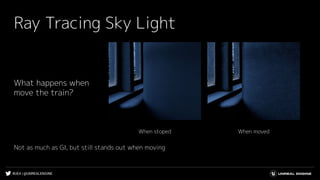
What happens when
move the train?
Not as much as GI, but still stands out when moving
When movedWhen stoped
#UE4 | @UNREALENGINE
Ray Tracing Sky Light
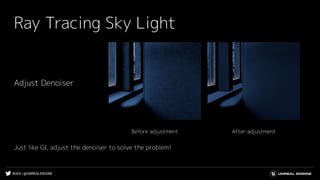
After adjustmentBefore adjustment
Adjust Denoiser
Just like GI, adjust the denoiser to solve the problem!
#UE4 | @UNREALENGINE
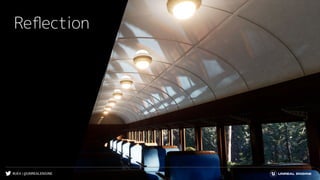
Reflection
#UE4 | @UNREALENGINE
Ray Tracing Sky Light
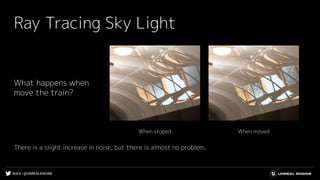
What happens when
move the train?
There is a slight increase in noise, but there is almost no problem.
When movedWhen stoped
#UE4 | @UNREALENGINE
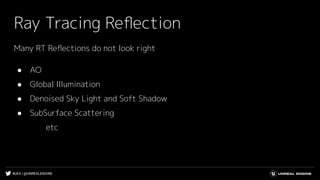
Ray Tracing Reflection
Many RT Reflections do not look right
● AO
● Global Illumination
● Denoised Sky Light and Soft Shadow
● SubSurface Scattering
etc
#UE4 | @UNREALENGINE
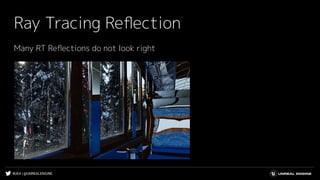
Ray Tracing Reflection
Many RT Reflections do not look right
#UE4 | @UNREALENGINE
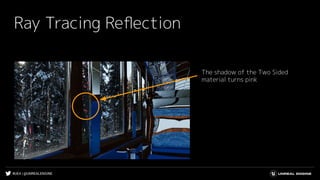
Ray Tracing Reflection
The shadow of the Two Sided
material turns pink
#UE4 | @UNREALENGINE
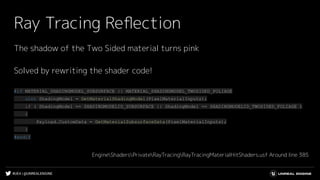
Ray Tracing Reflection
The shadow of the Two Sided material turns pink
Solved by rewriting the shader code!
#if MATERIAL_SHADINGMODEL_SUBSURFACE || MATERIAL_SHADINGMODEL_TWOSIDED_FOLIAGE
uint ShadingModel = GetMaterialShadingModel(PixelMaterialInputs);
if ( ShadingModel == SHADINGMODELID_SUBSURFACE || ShadingModel == SHADINGMODELID_TWOSIDED_FOLIAGE )
{
Payload.CustomData = GetMaterialSubsurfaceData(PixelMaterialInputs);
}
#endif
EngineShadersPrivateRayTracingRayTracingMaterialHitShaders.usf Around line 385
#UE4 | @UNREALENGINE
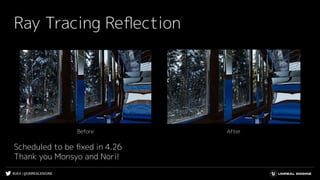
Ray Tracing Reflection
AfterBefore
Scheduled to be fixed in 4.26
Thank you Monsyo and Nori!
#UE4 | @UNREALENGINE
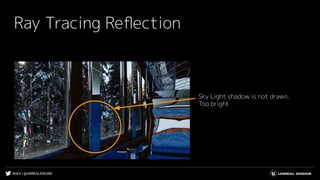
Ray Tracing Reflection
Sky Light shadow is not drawn.
Too bright
#UE4 | @UNREALENGINE
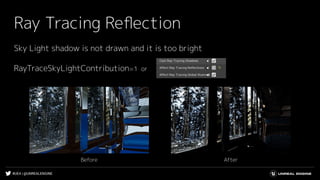
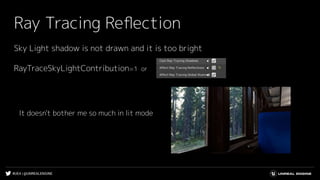
Ray Tracing Reflection
Sky Light shadow is not drawn and it is too bright
RayTraceSkyLightContribution=1 or
AfterBefore
#UE4 | @UNREALENGINE
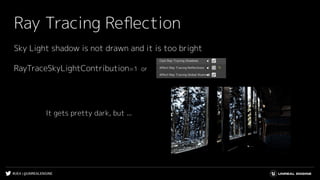
Ray Tracing Reflection
Sky Light shadow is not drawn and it is too bright
It gets pretty dark, but ...
RayTraceSkyLightContribution=1 or
#UE4 | @UNREALENGINE
Ray Tracing Reflection
Sky Light shadow is not drawn and it is too bright
It doesn't bother me so much in lit mode
RayTraceSkyLightContribution=1 or
#UE4 | @UNREALENGINE
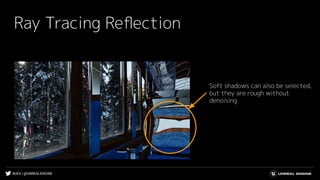
Ray Tracing Reflection
Soft shadows can also be selected,
but they are rough without
denoising
#UE4 | @UNREALENGINE
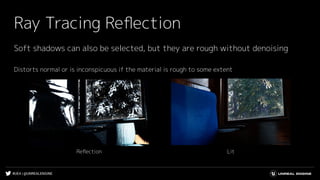
Ray Tracing Reflection
Soft shadows can also be selected, but they are rough without denoising
Distorts normal or is inconspicuous if the material is rough to some extent
LitReflection
#UE4 | @UNREALENGINE
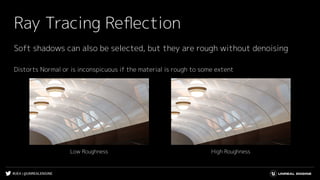
Ray Tracing Reflection
Soft shadows can also be selected, but they are rough without denoising
Distorts Normal or is inconspicuous if the material is rough to some extent
High RoughnessLow Roughness
#UE4 | @UNREALENGINE
Ray Tracing Reflection
I didn't use it this time, but there is also a reflection-related denoiser option
#UE4 | @UNREALENGINE
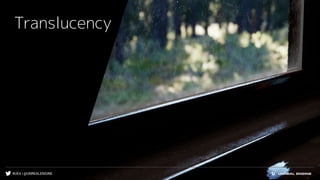
Translucency
#UE4 | @UNREALENGINE
Ray Tracing Translucency
Many RT Reflections and Refraction do not look right
● AO
● Global Illumination
● Denoised Sky Light and Soft Shadow
● SubSurface Scattering
etc
#UE4 | @UNREALENGINE
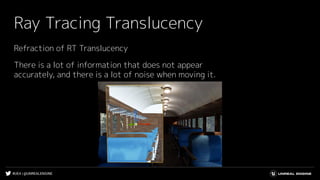
Ray Tracing Translucency
Refraction of RT Translucency
There is a lot of information that does not appear
accurately, and there is a lot of noise when moving it.
#UE4 | @UNREALENGINE
Ray Tracing Translucency
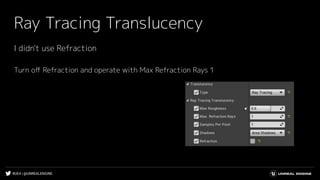
I didn't use Refraction
Turn off Refraction and operate with Max Refraction Rays 1
#UE4 | @UNREALENGINE
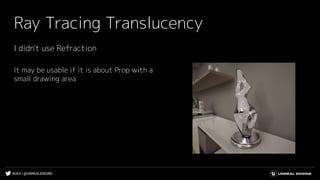
Ray Tracing Translucency
It may be usable if it is about Prop with a
small drawing area
I didn't use Refraction
#UE4 | @UNREALENGINE
Ray Tracing Translucency
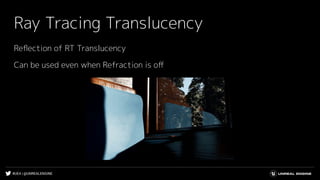
Reflection of RT Translucency
Can be used even when Refraction is off
#UE4 | @UNREALENGINE
Ray Tracing Translucency
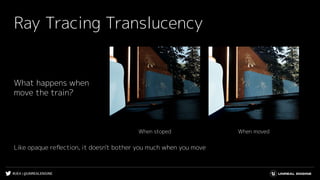
What happens when
move the train?
Like opaque reflection, it doesn't bother you much when you move
When movedWhen stoped
#UE4 | @UNREALENGINE
Ray Tracing Translucency
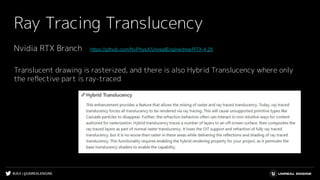
Nvidia RTX Branch https://github.com/NvPhysX/UnrealEngine/tree/RTX-4.25
Translucent drawing is rasterized, and there is also Hybrid Translucency where only
the reflective part is ray-traced
#UE4 | @UNREALENGINE
Ray tracing verification summary
● Ambient Occlusion
● Global Illumination
● Sky Light
● Reflection
● Translucency
#UE4 | @UNREALENGINE
Ray tracing verification summary
Ambient Occlusion
● Excellent quality and performance
#UE4 | @UNREALENGINE
Ray tracing verification summary
Global Illumination
● Slow performance
● Weak to fast movements
● Real-time is also possible by adjusting the denoiser
#UE4 | @UNREALENGINE
Ray tracing verification summary
Sky Light
● Beware of shadow-related issues
● Weak to fast movements, but improved by adjusting the denoiser like GI
#UE4 | @UNREALENGINE
Ray tracing verification summary
Reflection
● Know what isn't exactly reflected in the reflection
● Adjust Normal and Roughness for areas where roughness is noticeable
#UE4 | @UNREALENGINE
Ray tracing verification summary
Translucency
● Know what isn't exactly reflected in Reflection and Refraction
● It may be difficult to use Refraction in a large area
● We can also turn off Refraction and use only Reflection
#UE4 | @UNREALENGINE
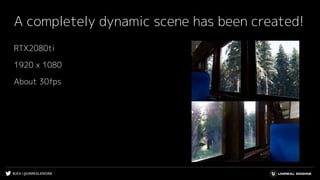
A completely dynamic scene has been created!
RTX2080ti
1920 x 1080
About 30fps
#UE4 | @UNREALENGINE
Let's move the light
#UE4 | @UNREALENGINE
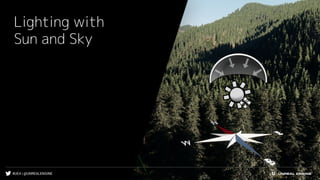
Lighting with
Sun and Sky
#UE4 | @UNREALENGINE
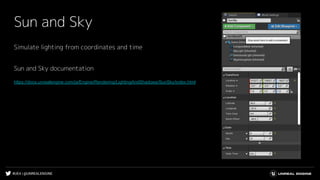
Sun and Sky
Simulate lighting from coordinates and time
Sun and Sky documentation
https://docs.unrealengine.com/ja/Engine/Rendering/LightingAndShadows/SunSky/index.html
#UE4 | @UNREALENGINE
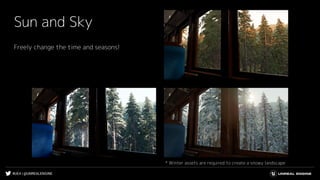
Sun and Sky
Freely change the time and seasons!
* Winter assets are required to create a snowy landscape
#UE4 | @UNREALENGINE
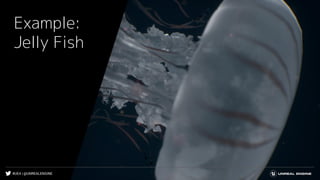
Example:
Jelly Fish
#UE4 | @UNREALENGINE
Verification content
● Ambient Occlusion
● Global Illumination
● Sky Light
● Translucency
● Reflection
#UE4 | @UNREALENGINE
Verification content
● Ambient Occlusion
● Global Illumination
● Sky Light
● Translucency
● Reflection
Not used this time
#UE4 | @UNREALENGINE
Why did se reflection for jellyfish?
#UE4 | @UNREALENGINE
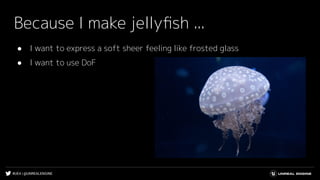
Because I make jellyfish ...
● I want to express a soft sheer feeling like frosted glass
● I want to use DoF
#UE4 | @UNREALENGINE
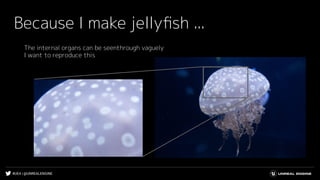
Because I make jellyfish ...
The internal organs can be seenthrough vaguely
I want to reproduce this
#UE4 | @UNREALENGINE
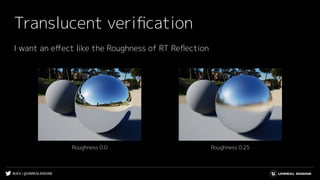
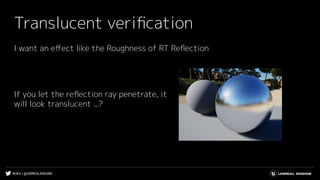
Translucent verification
I want an effect like the Roughness of RT Reflection
Roughness 0.25Roughness 0.0
#UE4 | @UNREALENGINE
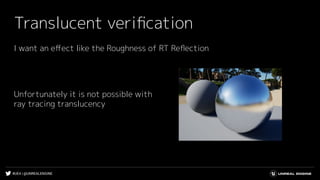
Translucent verification
I want an effect like the Roughness of RT Reflection
Unfortunately it is not possible with
ray tracing translucency
#UE4 | @UNREALENGINE
Translucent verification
I want an effect like the Roughness of RT Reflection
If you let the reflection ray penetrate, it
will look translucent ...?
#UE4 | @UNREALENGINE
How to get through Ray
#UE4 | @UNREALENGINE
Tweak normals in materials
#UE4 | @UNREALENGINE
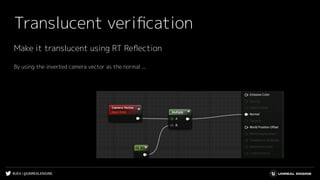
Translucent verification
Make it translucent using RT Reflection
By using the inverted camera vector as the normal ...
#UE4 | @UNREALENGINE
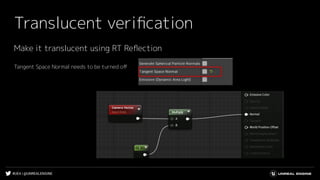
Translucent verification
Make it translucent using RT Reflection
Tangent Space Normal needs to be turned off
#UE4 | @UNREALENGINE
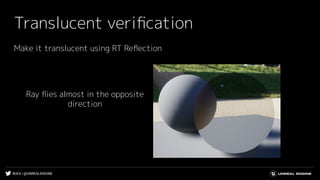
Translucent verification
Make it translucent using RT Reflection
Ray flies almost in the opposite
direction
#UE4 | @UNREALENGINE
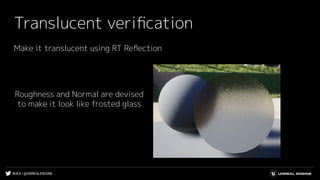
Translucent verification
Make it translucent using RT Reflection
Roughness and Normal are devised
to make it look like frosted glass
#UE4 | @UNREALENGINE
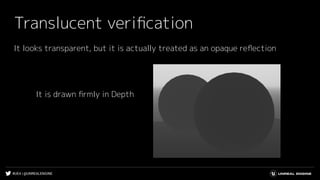
Translucent verification
It looks transparent, but it is actually treated as an opaque reflection
It is drawn firmly in Depth
#UE4 | @UNREALENGINE
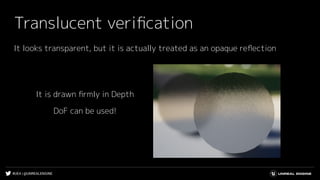
Translucent verification
It looks transparent, but it is actually treated as an opaque reflection
It is drawn firmly in Depth
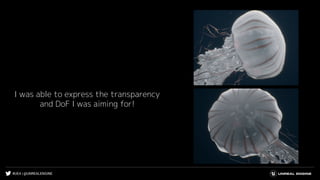
DoF can be used!
#UE4 | @UNREALENGINE
I was able to express the transparency
and DoF I was aiming for!
#UE4 | @UNREALENGINE
Executable file
https://drive.google.com/file/d/1N7K9O1vj6ypwsAB_v6m5k4E2RzPmR5A9/view?usp=sharing
Project
https://drive.google.com/file/d/1nlYv0YoLzNXgeU1sN6BSt5CrB9FKO9M1/view?usp=sharing
Executable file & project is
open to the public
#UE4 | @UNREALENGINE
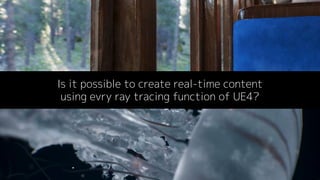
Is it possible to create real-time content
using evry ray tracing function of UE4?
#UE4 | @UNREALENGINE
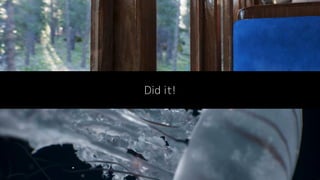
Did it!
#UE4 | @UNREALENGINE
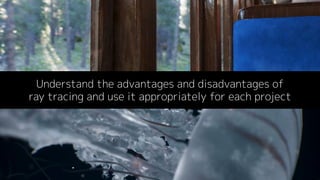
Understand the advantages and disadvantages of
ray tracing and use it appropriately for each project
#UE4 | @UNREALENGINE
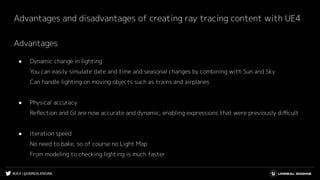
Advantages and disadvantages of creating ray tracing content with UE4
Advantages
● Dynamic change in lighting
You can easily simulate date and time and seasonal changes by combining with Sun and Sky
Can handle lighting on moving objects such as trains and airplanes
● Physical accuracy
Reflection and GI are now accurate and dynamic, enabling expressions that were previously difficult
● Iteration speed
No need to bake, so of course no Light Map
From modeling to checking lighting is much faster
#UE4 | @UNREALENGINE
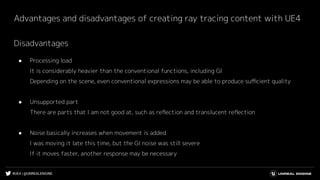
Advantages and disadvantages of creating ray tracing content with UE4
Disadvantages
● Processing load
It is considerably heavier than the conventional functions, including GI
Depending on the scene, even conventional expressions may be able to produce sufficient quality
● Unsupported part
There are parts that I am not good at, such as reflection and translucent reflection
● Noise basically increases when movement is added
I was moving it late this time, but the GI noise was still severe
If it moves faster, another response may be necessary
#UE4 | @UNREALENGINE
Thank you!

Real-time content creation with UE4 ray tracing

  • 1.
    Real-time content creation withUE4 ray tracing Epic Games Japan / Technical Artist Developer Relations Hiroyuki Kobayashi
  • 2.
    #UE4 | @UNREALENGINE RayTracing in UE4.25
  • 3.
    #UE4 | @UNREALENGINE RayTracing in UE4.25 Production Ready !
  • 4.
    #UE4 | @UNREALENGINE Areyou sure it’s okay?
  • 5.
    #UE4 | @UNREALENGINE Itried to create real-time content using evry ray tracing function of UE4!
  • 6.
  • 7.
  • 8.
    #UE4 | @UNREALENGINE Raytracing verification ● Ambient Occlusion ● Global Illumination ● Sky Light ● Reflection ● Translucency Verification environment RTX 2080ti Full HD
  • 9.
    #UE4 | @UNREALENGINE Raytracing verification Dynamic lighting is important because the train itself keeps moving. Is it okay to move it in the first place? Does the noise increase?
  • 10.
  • 11.
    #UE4 | @UNREALENGINE RayTracing Ambient Occlusion Ray TracingSSAO
  • 12.
    #UE4 | @UNREALENGINE RayTracing Ambient Occlusion High quality and good performance. l though it depends on the resolution, the difference from SSAO is about 1 to 2 ms. Ray TracingSSAO
  • 13.
    #UE4 | @UNREALENGINE Whathappens when move the train?
  • 14.
    #UE4 | @UNREALENGINE RayTracing Ambient Occlusion When movedWhen stoped What happens when the train moves? The noise increased a little.
  • 15.
    #UE4 | @UNREALENGINE RayTracing Ambient Occlusion Only AOLit What happens when move the train? There is no problem because it is almost inconspicuous in the Lit mode.
  • 16.
  • 17.
    #UE4 | @UNREALENGINE RayTracing Global Illumination Summer Winter
  • 18.
  • 19.
    #UE4 | @UNREALENGINE RayTracing Global Illumination Looking at the processing load breakdown...
  • 20.
    #UE4 | @UNREALENGINE RayTracing Global Illumination Sky Light Global Illumination Reflection Looking at the processing load breakdown...
  • 21.
    #UE4 | @UNREALENGINE RayTracing Global Illumination Sky Light Global Illumination Reflection Looking at the processing load breakdown...
  • 22.
    #UE4 | @UNREALENGINE RayTracing Global Illumination Sky Light Global Illumination Reflection About 31ms!! Looking at the processing load breakdown...
  • 23.
  • 24.
    #UE4 | @UNREALENGINE RayTracing Global Illumination Sky Light Global Illumination Reflection Brute Force Sample Per Pixel 4
  • 25.
    #UE4 | @UNREALENGINE RayTracing Global Illumination Type of RTGI ● Brute Force ● Final Gather We can change from post process volume.
  • 26.
  • 27.
    #UE4 | @UNREALENGINE RayTracing Global Illumination Final Gather Sample Per Pixel 4
  • 28.
    #UE4 | @UNREALENGINE RayTracing Global Illumination Final Gather Sample Per Pixel 4 About 9ms!!
  • 29.
  • 30.
    #UE4 | @UNREALENGINE RayTracing Global Illumination Final GatherBrute Force What happens when move the train?
  • 31.
    #UE4 | @UNREALENGINE RayTracing Global Illumination Final GatherBrute Force What happens when move the train? Final gather has problems with movemet
  • 32.
    #UE4 | @UNREALENGINE RayTracing Global Illumination What happens when move the train? Sample Per Pixel 64Sample Per Pixel 4 It didn't change much even if I increased the number of samples.
  • 33.
    #UE4 | @UNREALENGINE Trylowering the brute force sample per pixel
  • 34.
    #UE4 | @UNREALENGINE RayTracing Global Illumination Brute Force Sample Per Pixel 1 About 7ms!!
  • 35.
    #UE4 | @UNREALENGINE RayTracing Global Illumination Brute Force Sample Per Pixel 1Sample Per Pixel 4 It's cleaner with a higher sample size. But not by much.
  • 36.
    #UE4 | @UNREALENGINE RayTracing Global Illumination Brute Force The noise stands out when you move. But not as much as Final Gather. When movedWhen stoped
  • 37.
    #UE4 | @UNREALENGINE RayTracing Global Illumination Final Gather ● Fast ● Not good at movement Brute Force ● Slow ● not good at movement, but better than final gather
  • 38.
    #UE4 | @UNREALENGINE RayTracing Global Illumination Final Gather ● Fast ● Not good at movement Brute Force ● Slow ● not good at movement, but better than final gather Neither of them are good at movement!
  • 39.
  • 40.
    #UE4 | @UNREALENGINE Let'sadjust the denoiser.
  • 41.
    #UE4 | @UNREALENGINE GlobalIllumination Denoiser Denoiser related console commands are also available GI and Sky Light denoisers are common
  • 42.
    #UE4 | @UNREALENGINE GlobalIllumination Denoiser r.GlobalIllumination.Denoiser.PreConvolution=2 ● Increasing the value suppresses noise to some extent, but gives an overall vague impression. r.GlobalIllumination.Denoiser.ReconstructionSamples=1 ● Noise jaggies can be suppressed by lowering the value
  • 43.
    #UE4 | @UNREALENGINE GlobalIllumination Denoiser Adjust the denoiser PreConvolution=2PreConvolution=1 ReconstructionSamples=1ReconstructionSamples=16 Even when you move it, it doesn't stand out much!
  • 44.
  • 45.
    #UE4 | @UNREALENGINE RayTracing Sky Light Shadow related issues ● Masked material shadow ignores Opacity Mask ● Cast shadow for each material element does not work ● Sky Light looks different in reflection
  • 46.
    #UE4 | @UNREALENGINE RayTracing Sky Light Avoid with r.RayTracing.SkyLight.EnableTwoSidedGeometry = 0 Whether to enable shadows for double-sided materials Turn off because the shadows of plants etc. may become too dark Masked material shadow ignores Opacity Mask
  • 47.
    #UE4 | @UNREALENGINE RayTracing Sky Light Avoid windowpanes that you do not want to cast shadows by making them separate objects Cast shadow for each material element does not work
  • 48.
    #UE4 | @UNREALENGINE RayTracing Sky Light With shadowNo shadow r.RayTracing.Reflections.RayTraceSkyLightContribution=1 Draw skylight shadows in ray tracing reflection It doesn't look exactly the same without denoising, and it gets quite dark. Sky Light looks different in reflection
  • 49.
    #UE4 | @UNREALENGINE RayTracing Sky Light What happens when move the train? Not as much as GI, but still stands out when moving When movedWhen stoped
  • 50.
    #UE4 | @UNREALENGINE RayTracing Sky Light After adjustmentBefore adjustment Adjust Denoiser Just like GI, adjust the denoiser to solve the problem!
  • 51.
  • 52.
    #UE4 | @UNREALENGINE RayTracing Sky Light What happens when move the train? There is a slight increase in noise, but there is almost no problem. When movedWhen stoped
  • 53.
    #UE4 | @UNREALENGINE RayTracing Reflection Many RT Reflections do not look right ● AO ● Global Illumination ● Denoised Sky Light and Soft Shadow ● SubSurface Scattering etc
  • 54.
    #UE4 | @UNREALENGINE RayTracing Reflection Many RT Reflections do not look right
  • 55.
    #UE4 | @UNREALENGINE RayTracing Reflection The shadow of the Two Sided material turns pink
  • 56.
    #UE4 | @UNREALENGINE RayTracing Reflection The shadow of the Two Sided material turns pink Solved by rewriting the shader code! #if MATERIAL_SHADINGMODEL_SUBSURFACE || MATERIAL_SHADINGMODEL_TWOSIDED_FOLIAGE uint ShadingModel = GetMaterialShadingModel(PixelMaterialInputs); if ( ShadingModel == SHADINGMODELID_SUBSURFACE || ShadingModel == SHADINGMODELID_TWOSIDED_FOLIAGE ) { Payload.CustomData = GetMaterialSubsurfaceData(PixelMaterialInputs); } #endif EngineShadersPrivateRayTracingRayTracingMaterialHitShaders.usf Around line 385
  • 57.
    #UE4 | @UNREALENGINE RayTracing Reflection AfterBefore Scheduled to be fixed in 4.26 Thank you Monsyo and Nori!
  • 58.
    #UE4 | @UNREALENGINE RayTracing Reflection Sky Light shadow is not drawn. Too bright
  • 59.
    #UE4 | @UNREALENGINE RayTracing Reflection Sky Light shadow is not drawn and it is too bright RayTraceSkyLightContribution=1 or AfterBefore
  • 60.
    #UE4 | @UNREALENGINE RayTracing Reflection Sky Light shadow is not drawn and it is too bright It gets pretty dark, but ... RayTraceSkyLightContribution=1 or
  • 61.
    #UE4 | @UNREALENGINE RayTracing Reflection Sky Light shadow is not drawn and it is too bright It doesn't bother me so much in lit mode RayTraceSkyLightContribution=1 or
  • 62.
    #UE4 | @UNREALENGINE RayTracing Reflection Soft shadows can also be selected, but they are rough without denoising
  • 63.
    #UE4 | @UNREALENGINE RayTracing Reflection Soft shadows can also be selected, but they are rough without denoising Distorts normal or is inconspicuous if the material is rough to some extent LitReflection
  • 64.
    #UE4 | @UNREALENGINE RayTracing Reflection Soft shadows can also be selected, but they are rough without denoising Distorts Normal or is inconspicuous if the material is rough to some extent High RoughnessLow Roughness
  • 65.
    #UE4 | @UNREALENGINE RayTracing Reflection I didn't use it this time, but there is also a reflection-related denoiser option
  • 66.
  • 67.
    #UE4 | @UNREALENGINE RayTracing Translucency Many RT Reflections and Refraction do not look right ● AO ● Global Illumination ● Denoised Sky Light and Soft Shadow ● SubSurface Scattering etc
  • 68.
    #UE4 | @UNREALENGINE RayTracing Translucency Refraction of RT Translucency There is a lot of information that does not appear accurately, and there is a lot of noise when moving it.
  • 69.
    #UE4 | @UNREALENGINE RayTracing Translucency I didn't use Refraction Turn off Refraction and operate with Max Refraction Rays 1
  • 70.
    #UE4 | @UNREALENGINE RayTracing Translucency It may be usable if it is about Prop with a small drawing area I didn't use Refraction
  • 71.
    #UE4 | @UNREALENGINE RayTracing Translucency Reflection of RT Translucency Can be used even when Refraction is off
  • 72.
    #UE4 | @UNREALENGINE RayTracing Translucency What happens when move the train? Like opaque reflection, it doesn't bother you much when you move When movedWhen stoped
  • 73.
    #UE4 | @UNREALENGINE RayTracing Translucency Nvidia RTX Branch https://github.com/NvPhysX/UnrealEngine/tree/RTX-4.25 Translucent drawing is rasterized, and there is also Hybrid Translucency where only the reflective part is ray-traced
  • 74.
    #UE4 | @UNREALENGINE Raytracing verification summary ● Ambient Occlusion ● Global Illumination ● Sky Light ● Reflection ● Translucency
  • 75.
    #UE4 | @UNREALENGINE Raytracing verification summary Ambient Occlusion ● Excellent quality and performance
  • 76.
    #UE4 | @UNREALENGINE Raytracing verification summary Global Illumination ● Slow performance ● Weak to fast movements ● Real-time is also possible by adjusting the denoiser
  • 77.
    #UE4 | @UNREALENGINE Raytracing verification summary Sky Light ● Beware of shadow-related issues ● Weak to fast movements, but improved by adjusting the denoiser like GI
  • 78.
    #UE4 | @UNREALENGINE Raytracing verification summary Reflection ● Know what isn't exactly reflected in the reflection ● Adjust Normal and Roughness for areas where roughness is noticeable
  • 79.
    #UE4 | @UNREALENGINE Raytracing verification summary Translucency ● Know what isn't exactly reflected in Reflection and Refraction ● It may be difficult to use Refraction in a large area ● We can also turn off Refraction and use only Reflection
  • 80.
    #UE4 | @UNREALENGINE Acompletely dynamic scene has been created! RTX2080ti 1920 x 1080 About 30fps
  • 81.
  • 82.
  • 83.
    #UE4 | @UNREALENGINE Sunand Sky Simulate lighting from coordinates and time Sun and Sky documentation https://docs.unrealengine.com/ja/Engine/Rendering/LightingAndShadows/SunSky/index.html
  • 84.
    #UE4 | @UNREALENGINE Sunand Sky Freely change the time and seasons! * Winter assets are required to create a snowy landscape
  • 85.
  • 86.
  • 87.
    #UE4 | @UNREALENGINE Verificationcontent ● Ambient Occlusion ● Global Illumination ● Sky Light ● Translucency ● Reflection
  • 88.
    #UE4 | @UNREALENGINE Verificationcontent ● Ambient Occlusion ● Global Illumination ● Sky Light ● Translucency ● Reflection Not used this time
  • 89.
    #UE4 | @UNREALENGINE Whydid se reflection for jellyfish?
  • 90.
    #UE4 | @UNREALENGINE BecauseI make jellyfish ... ● I want to express a soft sheer feeling like frosted glass ● I want to use DoF
  • 91.
    #UE4 | @UNREALENGINE BecauseI make jellyfish ... The internal organs can be seenthrough vaguely I want to reproduce this
  • 92.
    #UE4 | @UNREALENGINE Translucentverification I want an effect like the Roughness of RT Reflection Roughness 0.25Roughness 0.0
  • 93.
    #UE4 | @UNREALENGINE Translucentverification I want an effect like the Roughness of RT Reflection Unfortunately it is not possible with ray tracing translucency
  • 94.
    #UE4 | @UNREALENGINE Translucentverification I want an effect like the Roughness of RT Reflection If you let the reflection ray penetrate, it will look translucent ...?
  • 95.
    #UE4 | @UNREALENGINE Howto get through Ray
  • 96.
    #UE4 | @UNREALENGINE Tweaknormals in materials
  • 97.
    #UE4 | @UNREALENGINE Translucentverification Make it translucent using RT Reflection By using the inverted camera vector as the normal ...
  • 98.
    #UE4 | @UNREALENGINE Translucentverification Make it translucent using RT Reflection Tangent Space Normal needs to be turned off
  • 99.
    #UE4 | @UNREALENGINE Translucentverification Make it translucent using RT Reflection Ray flies almost in the opposite direction
  • 100.
    #UE4 | @UNREALENGINE Translucentverification Make it translucent using RT Reflection Roughness and Normal are devised to make it look like frosted glass
  • 101.
    #UE4 | @UNREALENGINE Translucentverification It looks transparent, but it is actually treated as an opaque reflection It is drawn firmly in Depth
  • 102.
    #UE4 | @UNREALENGINE Translucentverification It looks transparent, but it is actually treated as an opaque reflection It is drawn firmly in Depth DoF can be used!
  • 103.
    #UE4 | @UNREALENGINE Iwas able to express the transparency and DoF I was aiming for!
  • 104.
    #UE4 | @UNREALENGINE Executablefile https://drive.google.com/file/d/1N7K9O1vj6ypwsAB_v6m5k4E2RzPmR5A9/view?usp=sharing Project https://drive.google.com/file/d/1nlYv0YoLzNXgeU1sN6BSt5CrB9FKO9M1/view?usp=sharing Executable file & project is open to the public
  • 105.
    #UE4 | @UNREALENGINE Isit possible to create real-time content using evry ray tracing function of UE4?
  • 106.
  • 107.
    #UE4 | @UNREALENGINE Understandthe advantages and disadvantages of ray tracing and use it appropriately for each project
  • 108.
    #UE4 | @UNREALENGINE Advantagesand disadvantages of creating ray tracing content with UE4 Advantages ● Dynamic change in lighting You can easily simulate date and time and seasonal changes by combining with Sun and Sky Can handle lighting on moving objects such as trains and airplanes ● Physical accuracy Reflection and GI are now accurate and dynamic, enabling expressions that were previously difficult ● Iteration speed No need to bake, so of course no Light Map From modeling to checking lighting is much faster
  • 109.
    #UE4 | @UNREALENGINE Advantagesand disadvantages of creating ray tracing content with UE4 Disadvantages ● Processing load It is considerably heavier than the conventional functions, including GI Depending on the scene, even conventional expressions may be able to produce sufficient quality ● Unsupported part There are parts that I am not good at, such as reflection and translucent reflection ● Noise basically increases when movement is added I was moving it late this time, but the GI noise was still severe If it moves faster, another response may be necessary
  • 110.