Generative
Art
—
Made
with
Unity
FidelityFX Super Resolution (FSR)
Timothy Lottes, Kleber Garcia
Unity Technologies
Advances in Real-Time Rendering in Games course
Introductions
Advances in Real-Time Rendering in Games course, SIGGRAPH 2021
— FidelityFX Super Resolution version 1 (FSR 1.0)
– Developed by AMD
— Timothy Lottes (Unity Graphics Innovation Group)
(AMD prior, author of FSR 1.0)
– Covering the FSR 1.0 algorithm
— Kleber Garcia (Unity High Definition Rendering Pipeline Team)
– Covering the FSR 1.0 integration into Unity
Generative
Art
—
Made
with
Unity
FSR 1.0 Algorithm
Timothy Lottes
FSR 1.0 Goals
Advances in Real-Time Rendering in Games course, SIGGRAPH 2021
— Goal: Provide a Dynamic Resolution Scaling solution
– To reduce frame cost by reducing render resolution
— Something easy to integrate, easily portable to just about anything
– And something which adds no temporal artifacts to the video signal
— Thus FSR 1.0 focuses on a spatial scaling algorithm
– FSR 1.0 attempts to remove resampling artifacts on existing edges during scaling
– But does not introduce new edges that didn’t exist in the source image
FSR 1.0 Source
Advances in Real-Time Rendering in Games course, SIGGRAPH 2021
— https://gpuopen.com/fidelityfx-superresolution/
— ffx_a.h - Portability header
— ffx_fsr1.h - Collection of a bunch of algorithms
– [EASU] Edge Adaptive Spatial Upsampling (topic of this part of the talk)
– [RCAS] Robust Contrast Adaptive Sharpening
– [LFGA] Linear Film Grain Applicator
– [SRTM] Simple Reversible Tonemapper
– [TEPD] Temporal Energy Preserving Dither
[EASU] Edge Adaptive Spatial Upsampling
Advances in Real-Time Rendering in Games course, SIGGRAPH 2021
— EASU is the upsampling algorithm in FSR 1.0
Lanczos Resampling
Sinc function windowed by larger sinc function
Sinc is a “theoretically” optimal reconstruction filter
CAS (Contrast Adaptive Sharpening)
Sharpening varied per output pixel based on signal
— Aim of EASU was to provide better scaling than CAS [3] + hardware scaling
– A quality improvement, which carries higher cost due to scaling in a shader
– Hardware scaling on scanout visually matches horizontal and vertical Lanczos
– EASU is a locally adaptive elliptical Lanczos-like filter [1]
— Due to directional adaptability, EASU requires input with good anti-aliasing
EASU Algorithm
Advances in Real-Time Rendering in Games course, SIGGRAPH 2021
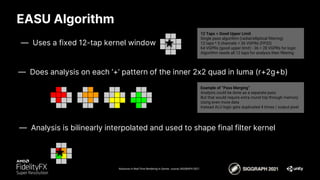
— Uses a fixed 12-tap kernel window
12 Taps = Good Upper Limit
Single pass algorithm (radial/elliptical filtering)
12 taps * 3 channels = 36 VGPRs (FP32)
64 VGPRs (good upper limit) - 36 = 28 VGPRs for logic
Algorithm needs all 12 taps for analysis then filtering
Example of “Pass Merging”
Analysis could be done as a separate pass
But that would require extra round trip through memory
Using even more data
Instead ALU logic gets duplicated 4 times / output pixel
— Does analysis on each ‘+’ pattern of the inner 2x2 quad in luma (r+2g+b)
— Analysis is bilinearly interpolated and used to shape final filter kernel
EASU Sampling
Advances in Real-Time Rendering in Games course, SIGGRAPH 2021
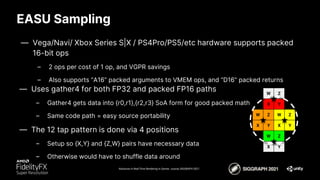
— Vega/Navi/ Xbox Series S|X / PS4Pro/PS5/etc hardware supports packed
16-bit ops
– 2 ops per cost of 1 op, and VGPR savings
– Also supports “A16” packed arguments to VMEM ops, and “D16” packed returns
X Y
Z
W
X Y
Z
W
X Y
Z
W
X Y
Z
W
— Uses gather4 for both FP32 and packed FP16 paths
– Gather4 gets data into {r0,r1},{r2,r3} SoA form for good packed math
– Same code path = easy source portability
— The 12 tap pattern is done via 4 positions
– Setup so {X,Y} and {Z,W} pairs have necessary data
– Otherwise would have to shuffle data around
EASU Analysis
Advances in Real-Time Rendering in Games course, SIGGRAPH 2021
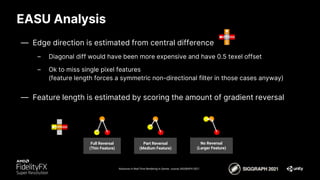
— Edge direction is estimated from central difference
– Diagonal diff would have been more expensive and have 0.5 texel offset
– Ok to miss single pixel features
(feature length forces a symmetric non-directional filter in those cases anyway)
Full Reversal
(Thin Feature)
Part Reversal
(Medium Feature)
No Reversal
(Larger Feature)
— Feature length is estimated by scoring the amount of gradient reversal
EASU and Color Spaces
Advances in Real-Time Rendering in Games course, SIGGRAPH 2021
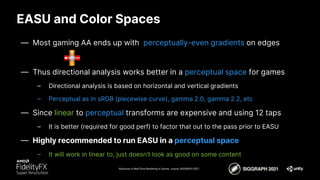
— Most gaming AA ends up with perceptually-even gradients on edges
— Thus directional analysis works better in a perceptual space for games
– Directional analysis is based on horizontal and vertical gradients
– Perceptual as in sRGB (piecewise curve), gamma 2.0, gamma 2.2, etc
— Since linear to perceptual transforms are expensive and using 12 taps
– It is better (required for good perf) to factor that out to the pass prior to EASU
— Highly recommended to run EASU in a perceptual space
– It will work in linear to, just doesn’t look as good on some content
EASU Kernel Shaping
Advances in Real-Time Rendering in Games course, SIGGRAPH 2021
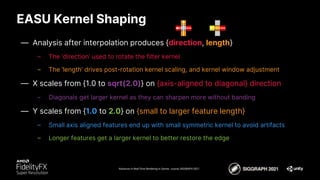
— Analysis after interpolation produces {direction, length}
– The ‘direction’ used to rotate the filter kernel
– The ‘length’ drives post-rotation kernel scaling, and kernel window adjustment
— X scales from {1.0 to sqrt(2.0)} on {axis-aligned to diagonal} direction
– Diagonals get larger kernel as they can sharpen more without banding
— Y scales from {1.0 to 2.0} on {small to larger feature length}
– Small axis aligned features end up with small symmetric kernel to avoid artifacts
– Longer features get a larger kernel to better restore the edge
EASU Kernel
Advances in Real-Time Rendering in Games course, SIGGRAPH 2021
– Instead base*window via
– Where window term ‘w’ varies from 1/4 for {+/- 2} kernel, and 1/2 for {+/- sqrt(2)}
Wide Kernel
Has
Strong Negative Lobe
Narrow Kernel
Has
Weak Negative Lobe
— Uses a polynomial approximation to lanczos [2]
– Lanczos is expensive, using {sin(),rcp(),sqrt()}
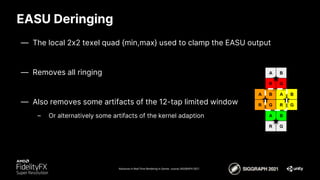
EASU Deringing
Advances in Real-Time Rendering in Games course, SIGGRAPH 2021
— The local 2x2 texel quad {min,max} used to clamp the EASU output
— Removes all ringing
— Also removes some artifacts of the 12-tap limited window
– Or alternatively some artifacts of the kernel adaption
R G
B
A
R G
B
A
R G
B
A
R G
B
A
Generative
Art
—
Made
with
Unity
Case Study:
FSR 1.0 Game Engine Integration
(Unity)
Kleber Garcia
Book of the dead
https://github.com/Unity-Technologies/ScriptableRenderPipeline
The Road toward Unified Rendering with Unity’s High Definition Render Pipeline
Sébastien Lagarde, Evgenii Golubev
Advances in Real-Time Rendering in Games course, SIGGRAPH 2018
High Definition Render Pipeline (HDRP)
Advances in Real-Time Rendering in Games course, SIGGRAPH 2021
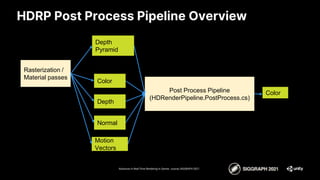
Rasterization /
Material passes
Depth
Pyramid
Color
Depth
Normal
Motion
Vectors
Post Process Pipeline
(HDRenderPipeline.PostProcess.cs)
Color
HDRP Post Process Pipeline Overview
Advances in Real-Time Rendering in Games course, SIGGRAPH 2021
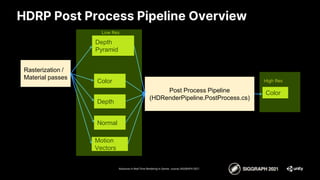
Rasterization /
Material passes
Depth
Pyramid
Color
Depth
Normal
Motion
Vectors
Post Process Pipeline
(HDRenderPipeline.PostProcess.cs)
Color
Low Res
HDRP Post Process Pipeline Overview
High Res
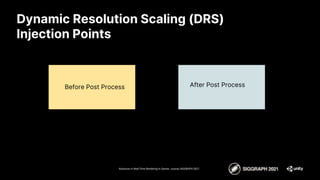
Dynamic Resolution Scaling (DRS)
Injection Points
Advances in Real-Time Rendering in Games course, SIGGRAPH 2021
Before Post Process After Post Process
Advances in Real-Time Rendering in Games course, SIGGRAPH 2021
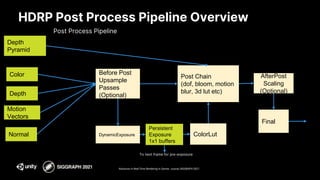
HDRP Post Process Pipeline Overview
Depth
Pyramid
Color
Depth
Normal
Motion
Vectors
Post Process Pipeline
DynamicExposure
Persistent
Exposure
1x1 buffers
Before Post
Upsample
Passes
(Optional)
Post Chain
(dof, bloom, motion
blur, 3d lut etc)
ColorLut
To next frame for pre-exposure
AfterPost
Scaling
(Optional)
Final
Advances in Real-Time Rendering in Games course, SIGGRAPH 2021
HDRP Post Process Pipeline Overview
Depth
Pyramid
Color
Depth
Normal
Motion
Vectors
Post Process Pipeline
DynamicExposure
Persistent
Exposure
1x1 buffers
Before Post
Upsample
Passes
(Optional)
Post Chain
(dof, bloom, motion
blur, 3d lut etc)
ColorLut
To next frame for pre-exposure
AfterPost
Scaling
(Optional)
Final
FidelityFX
Super
Resolution
DRS Aliasing Techniques
Advances in Real-Time Rendering in Games course, SIGGRAPH 2021
Software-Based
DirectX 11 / 12, Vulkan, Metal, Gnm
Hardware-Based
DirectX 12, Vulkan, Metal, Gnm
Advances in Real-Time Rendering in Games course, SIGGRAPH 2021
Hardware Based
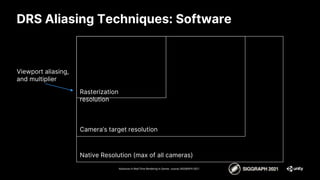
DRS Aliasing Techniques: Software
Native Resolution (max of all cameras)
Camera’s target resolution
Rasterization
resolution
Viewport aliasing,
and multiplier
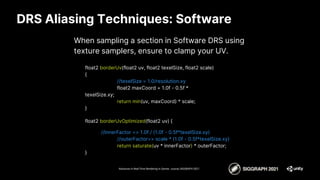
DRS Aliasing Techniques: Software
When sampling a section in Software DRS using
texture samplers, ensure to clamp your UV.
Advances in Real-Time Rendering in Games course, SIGGRAPH 2021
float2 borderUv(float2 uv, float2 texelSize, float2 scale)
{
//texelSize = 1.0/resolution.xy
float2 maxCoord = 1.0f - 0.5f *
texelSize.xy;
return min(uv, maxCoord) * scale;
}
float2 borderUvOptimized(float2 uv) {
//innerFactor => 1.0f / (1.0f - 0.5f*texelSize.xy)
//outerFactor=> scale * (1.0f - 0.5f*texelSize.xy)
return saturate(uv * innerFactor) * outerFactor;
}
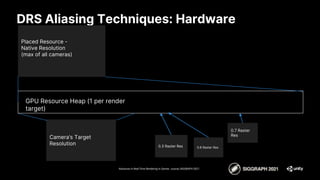
DRS Aliasing Techniques: Hardware
Advances in Real-Time Rendering in Games course, SIGGRAPH 2021
GPU Resource Heap (1 per render
target)
Placed Resource -
Native Resolution
(max of all cameras)
Camera’s Target
Resolution 0.3 Raster Res 0.8 Raster Res
0.7 Raster
Res
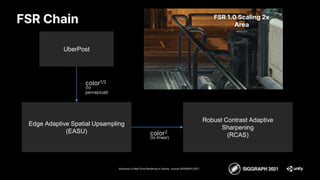
FSR Chain
Advances in Real-Time Rendering in Games course, SIGGRAPH 2021
Edge Adaptive Spatial Upsampling
(EASU)
Robust Contrast Adaptive
Sharpening
(RCAS)
UberPost
color1/2
(to
perceptual)
color2
(to linear)
FSR 1.0 Scaling 2x
Area
Advances in Real-Time Rendering in Games course, SIGGRAPH 2021
Native Render
360p Crop of 4K Output
Advances in Real-Time Rendering in Games course, SIGGRAPH 2021
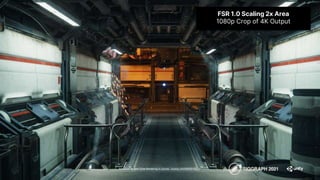
FSR 1.0 Scaling 2x Area
360p Crop of 4K Output
Advances in Real-Time Rendering in Games course, SIGGRAPH 2021
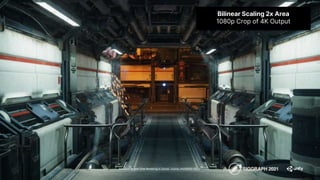
Bilinear Scaling 2x Area
360p Crop of 4K Output
Advances in Real-Time Rendering in Games course, SIGGRAPH 2021
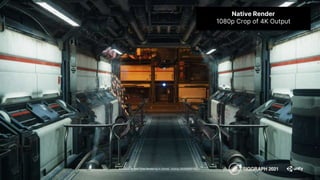
Native Render
1080p Crop of 4K Output
Advances in Real-Time Rendering in Games course, SIGGRAPH 2021
FSR 1.0 Scaling 2x Area
1080p Crop of 4K Output
Advances in Real-Time Rendering in Games course, SIGGRAPH 2021
Bilinear Scaling 2x Area
1080p Crop of 4K Output
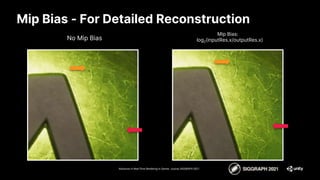
Mip Bias - For Detailed Reconstruction
Advances in Real-Time Rendering in Games course, SIGGRAPH 2021
No Mip Bias
Mip Bias:
log2(inputRes.x/outputRes.x)
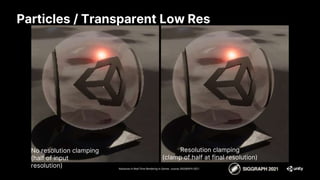
Particles / Transparent Low Res
Advances in Real-Time Rendering in Games course, SIGGRAPH 2021
No resolution clamping
(half of input
resolution)
Resolution clamping
(clamp of half at final resolution)
EASU Runtime Cost
Advances in Real-Time Rendering in Games course, SIGGRAPH 2021
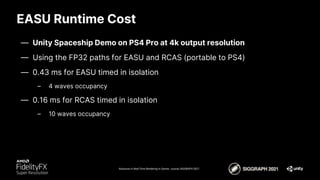
— Unity Spaceship Demo on PS4 Pro at 4k output resolution
— Using the FP32 paths for EASU and RCAS (portable to PS4)
— 0.43 ms for EASU timed in isolation
– 4 waves occupancy
— 0.16 ms for RCAS timed in isolation
– 10 waves occupancy
References
1. “Applied Analysis” (Cornelius Lanczos)
2. Review of Conventional 2D Resampling Filters (Anthony Thyssen)
https://legacy.imagemagick.org/Usage/filter/
1. CAS (AMD / Timothy Lottes)
https://gpuopen.com/fidelityfx-cas/
1. Review of Checkerboard (EA / Graham Wihlidal)
https://www.ea.com/frostbite/news/4k-checkerboard-in-battlefield-1-and-mass-effect-andromeda
1. “A Survey of Temporal Antialiasing Techniques”
(NVIDIA / Lei Yang, Shiqiu Liu, and Marco Salvi)
http://behindthepixels.io/assets/files/TemporalAA.pdf [preprint]
Advances in Real-Time Rendering in Games course, SIGGRAPH 2021
Special Thanks!
Advances in Real-Time Rendering in Games course, SIGGRAPH 2021
– Francesco Cifariello
– Julien Ignace
– Mathieu Muller
– Meriem Ghomari
– Natalya Tatarchuk
– Nick Thibieroz
– Sebastian Lagarde
– Lydia White
– Thomas Iché
Hiring
Hiring
Hiring
Hiring
Hiring
careers.unity.com
577 open positions across 38 locations + remote in
14 departments
Hiring Graphics Researchers, Developers,
Tech Artists, and more
Generative
Art
—
Made
with
Unity
Thank you.
#unity3d
Advances in Real-Time Rendering in
Games course, SIGGRAPH 2021

Unity AMD FSR - SIGGRAPH 2021.pptx

  • 1.
    Generative Art — Made with Unity FidelityFX Super Resolution(FSR) Timothy Lottes, Kleber Garcia Unity Technologies Advances in Real-Time Rendering in Games course
  • 2.
    Introductions Advances in Real-TimeRendering in Games course, SIGGRAPH 2021 — FidelityFX Super Resolution version 1 (FSR 1.0) – Developed by AMD — Timothy Lottes (Unity Graphics Innovation Group) (AMD prior, author of FSR 1.0) – Covering the FSR 1.0 algorithm — Kleber Garcia (Unity High Definition Rendering Pipeline Team) – Covering the FSR 1.0 integration into Unity
  • 3.
  • 4.
    FSR 1.0 Goals Advancesin Real-Time Rendering in Games course, SIGGRAPH 2021 — Goal: Provide a Dynamic Resolution Scaling solution – To reduce frame cost by reducing render resolution — Something easy to integrate, easily portable to just about anything – And something which adds no temporal artifacts to the video signal — Thus FSR 1.0 focuses on a spatial scaling algorithm – FSR 1.0 attempts to remove resampling artifacts on existing edges during scaling – But does not introduce new edges that didn’t exist in the source image
  • 5.
    FSR 1.0 Source Advancesin Real-Time Rendering in Games course, SIGGRAPH 2021 — https://gpuopen.com/fidelityfx-superresolution/ — ffx_a.h - Portability header — ffx_fsr1.h - Collection of a bunch of algorithms – [EASU] Edge Adaptive Spatial Upsampling (topic of this part of the talk) – [RCAS] Robust Contrast Adaptive Sharpening – [LFGA] Linear Film Grain Applicator – [SRTM] Simple Reversible Tonemapper – [TEPD] Temporal Energy Preserving Dither
  • 6.
    [EASU] Edge AdaptiveSpatial Upsampling Advances in Real-Time Rendering in Games course, SIGGRAPH 2021 — EASU is the upsampling algorithm in FSR 1.0 Lanczos Resampling Sinc function windowed by larger sinc function Sinc is a “theoretically” optimal reconstruction filter CAS (Contrast Adaptive Sharpening) Sharpening varied per output pixel based on signal — Aim of EASU was to provide better scaling than CAS [3] + hardware scaling – A quality improvement, which carries higher cost due to scaling in a shader – Hardware scaling on scanout visually matches horizontal and vertical Lanczos – EASU is a locally adaptive elliptical Lanczos-like filter [1] — Due to directional adaptability, EASU requires input with good anti-aliasing
  • 7.
    EASU Algorithm Advances inReal-Time Rendering in Games course, SIGGRAPH 2021 — Uses a fixed 12-tap kernel window 12 Taps = Good Upper Limit Single pass algorithm (radial/elliptical filtering) 12 taps * 3 channels = 36 VGPRs (FP32) 64 VGPRs (good upper limit) - 36 = 28 VGPRs for logic Algorithm needs all 12 taps for analysis then filtering Example of “Pass Merging” Analysis could be done as a separate pass But that would require extra round trip through memory Using even more data Instead ALU logic gets duplicated 4 times / output pixel — Does analysis on each ‘+’ pattern of the inner 2x2 quad in luma (r+2g+b) — Analysis is bilinearly interpolated and used to shape final filter kernel
  • 8.
    EASU Sampling Advances inReal-Time Rendering in Games course, SIGGRAPH 2021 — Vega/Navi/ Xbox Series S|X / PS4Pro/PS5/etc hardware supports packed 16-bit ops – 2 ops per cost of 1 op, and VGPR savings – Also supports “A16” packed arguments to VMEM ops, and “D16” packed returns X Y Z W X Y Z W X Y Z W X Y Z W — Uses gather4 for both FP32 and packed FP16 paths – Gather4 gets data into {r0,r1},{r2,r3} SoA form for good packed math – Same code path = easy source portability — The 12 tap pattern is done via 4 positions – Setup so {X,Y} and {Z,W} pairs have necessary data – Otherwise would have to shuffle data around
  • 9.
    EASU Analysis Advances inReal-Time Rendering in Games course, SIGGRAPH 2021 — Edge direction is estimated from central difference – Diagonal diff would have been more expensive and have 0.5 texel offset – Ok to miss single pixel features (feature length forces a symmetric non-directional filter in those cases anyway) Full Reversal (Thin Feature) Part Reversal (Medium Feature) No Reversal (Larger Feature) — Feature length is estimated by scoring the amount of gradient reversal
  • 10.
    EASU and ColorSpaces Advances in Real-Time Rendering in Games course, SIGGRAPH 2021 — Most gaming AA ends up with perceptually-even gradients on edges — Thus directional analysis works better in a perceptual space for games – Directional analysis is based on horizontal and vertical gradients – Perceptual as in sRGB (piecewise curve), gamma 2.0, gamma 2.2, etc — Since linear to perceptual transforms are expensive and using 12 taps – It is better (required for good perf) to factor that out to the pass prior to EASU — Highly recommended to run EASU in a perceptual space – It will work in linear to, just doesn’t look as good on some content
  • 11.
    EASU Kernel Shaping Advancesin Real-Time Rendering in Games course, SIGGRAPH 2021 — Analysis after interpolation produces {direction, length} – The ‘direction’ used to rotate the filter kernel – The ‘length’ drives post-rotation kernel scaling, and kernel window adjustment — X scales from {1.0 to sqrt(2.0)} on {axis-aligned to diagonal} direction – Diagonals get larger kernel as they can sharpen more without banding — Y scales from {1.0 to 2.0} on {small to larger feature length} – Small axis aligned features end up with small symmetric kernel to avoid artifacts – Longer features get a larger kernel to better restore the edge
  • 12.
    EASU Kernel Advances inReal-Time Rendering in Games course, SIGGRAPH 2021 – Instead base*window via – Where window term ‘w’ varies from 1/4 for {+/- 2} kernel, and 1/2 for {+/- sqrt(2)} Wide Kernel Has Strong Negative Lobe Narrow Kernel Has Weak Negative Lobe — Uses a polynomial approximation to lanczos [2] – Lanczos is expensive, using {sin(),rcp(),sqrt()}
  • 13.
    EASU Deringing Advances inReal-Time Rendering in Games course, SIGGRAPH 2021 — The local 2x2 texel quad {min,max} used to clamp the EASU output — Removes all ringing — Also removes some artifacts of the 12-tap limited window – Or alternatively some artifacts of the kernel adaption R G B A R G B A R G B A R G B A
  • 14.
    Generative Art — Made with Unity Case Study: FSR 1.0Game Engine Integration (Unity) Kleber Garcia
  • 15.
    Book of thedead https://github.com/Unity-Technologies/ScriptableRenderPipeline The Road toward Unified Rendering with Unity’s High Definition Render Pipeline Sébastien Lagarde, Evgenii Golubev Advances in Real-Time Rendering in Games course, SIGGRAPH 2018 High Definition Render Pipeline (HDRP)
  • 16.
    Advances in Real-TimeRendering in Games course, SIGGRAPH 2021 Rasterization / Material passes Depth Pyramid Color Depth Normal Motion Vectors Post Process Pipeline (HDRenderPipeline.PostProcess.cs) Color HDRP Post Process Pipeline Overview
  • 17.
    Advances in Real-TimeRendering in Games course, SIGGRAPH 2021 Rasterization / Material passes Depth Pyramid Color Depth Normal Motion Vectors Post Process Pipeline (HDRenderPipeline.PostProcess.cs) Color Low Res HDRP Post Process Pipeline Overview High Res
  • 18.
    Dynamic Resolution Scaling(DRS) Injection Points Advances in Real-Time Rendering in Games course, SIGGRAPH 2021 Before Post Process After Post Process
  • 19.
    Advances in Real-TimeRendering in Games course, SIGGRAPH 2021 HDRP Post Process Pipeline Overview Depth Pyramid Color Depth Normal Motion Vectors Post Process Pipeline DynamicExposure Persistent Exposure 1x1 buffers Before Post Upsample Passes (Optional) Post Chain (dof, bloom, motion blur, 3d lut etc) ColorLut To next frame for pre-exposure AfterPost Scaling (Optional) Final
  • 20.
    Advances in Real-TimeRendering in Games course, SIGGRAPH 2021 HDRP Post Process Pipeline Overview Depth Pyramid Color Depth Normal Motion Vectors Post Process Pipeline DynamicExposure Persistent Exposure 1x1 buffers Before Post Upsample Passes (Optional) Post Chain (dof, bloom, motion blur, 3d lut etc) ColorLut To next frame for pre-exposure AfterPost Scaling (Optional) Final FidelityFX Super Resolution
  • 21.
    DRS Aliasing Techniques Advancesin Real-Time Rendering in Games course, SIGGRAPH 2021 Software-Based DirectX 11 / 12, Vulkan, Metal, Gnm Hardware-Based DirectX 12, Vulkan, Metal, Gnm
  • 22.
    Advances in Real-TimeRendering in Games course, SIGGRAPH 2021 Hardware Based DRS Aliasing Techniques: Software Native Resolution (max of all cameras) Camera’s target resolution Rasterization resolution Viewport aliasing, and multiplier
  • 23.
    DRS Aliasing Techniques:Software When sampling a section in Software DRS using texture samplers, ensure to clamp your UV. Advances in Real-Time Rendering in Games course, SIGGRAPH 2021 float2 borderUv(float2 uv, float2 texelSize, float2 scale) { //texelSize = 1.0/resolution.xy float2 maxCoord = 1.0f - 0.5f * texelSize.xy; return min(uv, maxCoord) * scale; } float2 borderUvOptimized(float2 uv) { //innerFactor => 1.0f / (1.0f - 0.5f*texelSize.xy) //outerFactor=> scale * (1.0f - 0.5f*texelSize.xy) return saturate(uv * innerFactor) * outerFactor; }
  • 24.
    DRS Aliasing Techniques:Hardware Advances in Real-Time Rendering in Games course, SIGGRAPH 2021 GPU Resource Heap (1 per render target) Placed Resource - Native Resolution (max of all cameras) Camera’s Target Resolution 0.3 Raster Res 0.8 Raster Res 0.7 Raster Res
  • 25.
    FSR Chain Advances inReal-Time Rendering in Games course, SIGGRAPH 2021 Edge Adaptive Spatial Upsampling (EASU) Robust Contrast Adaptive Sharpening (RCAS) UberPost color1/2 (to perceptual) color2 (to linear) FSR 1.0 Scaling 2x Area
  • 26.
    Advances in Real-TimeRendering in Games course, SIGGRAPH 2021 Native Render 360p Crop of 4K Output
  • 27.
    Advances in Real-TimeRendering in Games course, SIGGRAPH 2021 FSR 1.0 Scaling 2x Area 360p Crop of 4K Output
  • 28.
    Advances in Real-TimeRendering in Games course, SIGGRAPH 2021 Bilinear Scaling 2x Area 360p Crop of 4K Output
  • 29.
    Advances in Real-TimeRendering in Games course, SIGGRAPH 2021 Native Render 1080p Crop of 4K Output
  • 30.
    Advances in Real-TimeRendering in Games course, SIGGRAPH 2021 FSR 1.0 Scaling 2x Area 1080p Crop of 4K Output
  • 31.
    Advances in Real-TimeRendering in Games course, SIGGRAPH 2021 Bilinear Scaling 2x Area 1080p Crop of 4K Output
  • 32.
    Mip Bias -For Detailed Reconstruction Advances in Real-Time Rendering in Games course, SIGGRAPH 2021 No Mip Bias Mip Bias: log2(inputRes.x/outputRes.x)
  • 33.
    Particles / TransparentLow Res Advances in Real-Time Rendering in Games course, SIGGRAPH 2021 No resolution clamping (half of input resolution) Resolution clamping (clamp of half at final resolution)
  • 34.
    EASU Runtime Cost Advancesin Real-Time Rendering in Games course, SIGGRAPH 2021 — Unity Spaceship Demo on PS4 Pro at 4k output resolution — Using the FP32 paths for EASU and RCAS (portable to PS4) — 0.43 ms for EASU timed in isolation – 4 waves occupancy — 0.16 ms for RCAS timed in isolation – 10 waves occupancy
  • 35.
    References 1. “Applied Analysis”(Cornelius Lanczos) 2. Review of Conventional 2D Resampling Filters (Anthony Thyssen) https://legacy.imagemagick.org/Usage/filter/ 1. CAS (AMD / Timothy Lottes) https://gpuopen.com/fidelityfx-cas/ 1. Review of Checkerboard (EA / Graham Wihlidal) https://www.ea.com/frostbite/news/4k-checkerboard-in-battlefield-1-and-mass-effect-andromeda 1. “A Survey of Temporal Antialiasing Techniques” (NVIDIA / Lei Yang, Shiqiu Liu, and Marco Salvi) http://behindthepixels.io/assets/files/TemporalAA.pdf [preprint] Advances in Real-Time Rendering in Games course, SIGGRAPH 2021
  • 36.
    Special Thanks! Advances inReal-Time Rendering in Games course, SIGGRAPH 2021 – Francesco Cifariello – Julien Ignace – Mathieu Muller – Meriem Ghomari – Natalya Tatarchuk – Nick Thibieroz – Sebastian Lagarde – Lydia White – Thomas Iché
  • 37.
    Hiring Hiring Hiring Hiring Hiring careers.unity.com 577 open positionsacross 38 locations + remote in 14 departments Hiring Graphics Researchers, Developers, Tech Artists, and more
  • 38.
    Generative Art — Made with Unity Thank you. #unity3d Advances inReal-Time Rendering in Games course, SIGGRAPH 2021

Editor's Notes

  • #3 Timothy: Hi! I’m Timothy Lottes and I work at Unity’s Graphics innovation group where we’re focused on developing novel algorithms for pushing the boundaries of graphics tech. I have worked at AMD prior to this role where I developed FSR 1.0 algorithm. Kleber: Hello everybody! My name is Kleber Garcia. I am a render engineer for unity technologies and I worked on the FSR 1 integration to the unity engine, HD Rendering Pipeline.
  • #4 First part of this talk is the FSR 1.0 algorithm.
  • #5 The goals for FSR 1.0 is to provide a framework for scaling that fits in Dynamic Resolution Scaling. So that means that scaling can change every frame if it needs to. The goal here is to reduce frame cost by reducing render resolution whenever needed to maintain stable, good performance. The other main thing about this is that it had to be easy to integrate, easily portable to just about anything, wide range of platforms, and something which adds no temporal artifacts ot the video signal (which normally causes unpleasant flickering or ghosting) So if you use an anti-aliasing which adds no temporal artifacts and you process through this algorithm, it cannot be adding any temporal artifacts which didn’t exist. Thus for FSR 1.0 the algorithm focused on spatial scaling and spatial sharpening. The scalar of FSR 1.0 attempts to remove resampling artifacts on existing edges that would normally happen during traditional resampling during scaling. The goal here is to basically make the edge look as if it is native, but not introduce new edges that didn’t exist in the source image.
  • #6 The source code for FSR can be found on GPUOpen. There are two components to the source code. This is a portability header. Then there is an algorithm header. The algorithm header has a collection of algorithms. There is approximately 5. The first one is the scaling algorithm. It is called EASU, or Edge Adaptive Spatial Upsampling, and that is what I’m going to be covering now.
  • #7 EASU had an aim. That aim to provide better scaling than the previous solution of using CAS, which is Contrast Adaptive Sharpening, followed by hardware scaling that is built into the graphics card. The hardware scaling built into the graphics card visually looks like horizontal and vertical Lanczos. Lanczos being a resampling algorithm that is a sinc function, which is a theoretically optimal reconstruction filter, windowed by another sync function which is truncated. The windowing enables the function to be computationally feasible. In order to do better than the hardware scaling, we had to do something more adaptive. So EASU focuses on something that is locally adaptive to the properties around the pixel. It is direction, length, and window adaptive. And thus EASU is probably best described as a locally adaptive elliptical Lanczos-like filter. Due to this adaptability EASU requires input with good anti-aliasing as a base. It is not an anti-aliasing solution by itself, and thus it does definitely require good AA going into it.
  • #8 EASU starts with a 12-tap kernel window. So the nearest 12-taps in a circular pattern. The reason why 12 taps was chosen, instead of 16, is because with 12 taps you only need 36 registers for the 32-bit version. EASU requires an analysis on those 12 taps before it can figure out the filter kernel. So in order to avoid reading the 12 taps twice, it has to keep all them in registers during the full algorithm. And therefore if you wanted to do anything higher, you’d run out of temporary registers for logic. And the goal being that we want to around or under 64 registers, as that is a good upper limit on AMD’s hardware to be able to hide latency. So for analysis EASU first starts looking at the plus patterns which surround the inner 2x2 pixel quad. So if we look at the 12-tap kernel, there is 4 taps in the center, and for each one of those it needs to compute the analysis for direction and length. And to do the analysis it is working in luma, and by luma I mean an approximation, red plus two green plus blue. So is it not a complicated luma, it is more of a “get all the channels included so we don’t miss anything” approximation. The analysis done on the 2x2 quad, and this is effectively a form of pass merging. As the analysis could have been done in a separate pass, but then one would require two round trips through memory, and therefore we don’t want to do that, instead we duplicate a little amount of work in the shader, thus we don’t have to go through memory many times. Once the analysis is finished we are going to bilinearly interpolate the analysis at the position we actually want to filter at. And that is going to be used to shape the final filter kernel.
  • #9 For the sampling of this 12-tap pattern, Vega, Navi, PS4 Pro, PS5 and other hardware that supports packed 16-bit ops can find some advantages. Specifically you can do two 16-bit ops for the cost of one 32-bit op, and you can save register space. AMD’s hardware also supports an A16 modifier to vector memory operations which enables packed arguments so you can have an {x,y} in one register for the coordinates for the load, and also D16 packed returns so you can get the results of that load or texture fetched packed for you so you do not need to pack them later. If we want to use Structure-of-Array form we can use gather4. Gather4 will pull all the reds and provide 2 32-bit registers back with all 4 values. And by doing this we can do packed computation really well without having to swizzle things around. The other way we facilitate this is the 12-tap pattern is using something that is not a regular grid for sampling, it is more of a plus pattern. So that the {X,Y} and {Z,W} pairs have the necessary data for the 12 taps we are interested in If instead a 4x4 pattern was used then the corners would have to be thrown away
  • #10 For the analysis once the taps are in the edge direction is estimated using a central difference. The central difference does miss single pixel features, however as we will see later, as feature length becomes very small, the filter kernel becomes symmetric and non-directional so we don’t care about directionality for thin features. Therefore a diagonal diff is not used, and also a diagonal diff would have been more expensive and we would have had to deal with a half-texel offset which would have made the logic a little more complicated. So once the edge direction is finished, we look at feature length, and by feature length we are estimating that by looking at the 3 texels in the horizontal and 3 texels in the vertical. And looking what happens with the luma gradient. If the luma gradient has a reversal, for instance starting at black going to white and returning to black, that would be a “Full Reversal” which is a significant probably of being a thin feature. Where as if we look at something that has no reversal, say going from black to white to white, that is probably a large feature which we can have a larger filter kernel on.
  • #11 EASU and color spaces. Most gaming AA ends up with perceptual even gradients on edges. And therefore we want the directional analysis to be done in the perceptual colorspace. Perceptual as in sRGB, gamma 2.0, gamma 2.2 or something similar. This way the computation is not that expensive, because if we were to input in linear and convert to perceptual, we would have to do that 12 times for the 12 taps. So it is much better and in fact required for good performance to factor any linear to perceptual translation into the prior pass, prior to EASU. You can still run EASU in linear, it just won’t look as good on some content. The one compromise of course is that if we are running on perceptual, we are running all the filtering in perceptual, but as it turns out it is typically acceptable in this case.
  • #12 So once we have all the analysis finished, we have a {direction and length} for all the 2x2 quad, we are going to use the interpolated direction to rotate the filter kernel, the length to scale the post-rotation kernel scaling on the X and Y axis, and we are also going to use the length to adjust the kernel window (which I will show on another slide). So in the X axis, we are going to go from no scaling to sqrt(2) based on whether we are axis aligned or we are running on the diagonal. So when we are axis aligned we don’t do any scaling on the X axis, but when we are on a diagonal we are scaling by sqrt(2) because we can allow a larger kernel there without seeing any banding. The banding would have been created by the negative lobe. The Y axis has no scaling to double size. We use the no-scaling for the small features, and that way we end up with a small symmetric kernel which does not sample outside the feature itself. And as the feature gets larger we are using a longer kernel so we can better restore the edge.
  • #13 The EASU kernel itself started as a polynomial approximation to lanczos(2). Lanczos is an expensive using a {sin(),rcp(),sqrt()} and those are transcendentals those run at quarter rate depending on your hardware. And therefore they are best to be avoided if possible. So instead this is broken down into a base and a window, similar to the way lanczos is a sync function that is windowed by another sync function, and also because we want the window to be adaptable to the length. When the window is small, we have a kernel which goes from +/- sqrt(2). That window has been shortened which truncates the negative lobe. We don’t get as much sharpening. We don’t have the ringing and other problems that we would potentially have. The wide kernel goes from +/- 2, and that kernel has a very strong negative lobe which helps restore the edge.
  • #14 We move on to the deringing step where we take the local 2x2 texel quad, the min and max of RGB, and we use that to clamp the EASU output. This removes all the ringing. This also removes artifacts of the limited 12-tap window. Therefore when scaling is larger, and you might see the clipping of the window, it is best to run the reringing step to try to minimize that.
  • #15 For Engine integration ill be speaking about some of the details and interesting choices we had for unity.
  • #16 The first step is to introduce you guys to HDRP which is what we did this integration of FSR into. HDRP stands for ‘high definition rendering pipeline’ and this is essentially our AAA pipeline that we have at unity. This pipeline has a full on post process setup, physically based rendering and many advanced GPU algorithms. It can utilize ray tracing and more advanced features. For more information feel free to check this slide’s links provided here so you can explore what HDRP does. https://github.com/Unity-Technologies/ScriptableRenderPipeline http://advances.realtimerendering.com/s2018/index.htm
  • #17 In HDRP and as well as other engines, the typical path for rendering pipeline is like this. First on the left side you have your rasterization passes; that is everything that is Graphics, that is utilizing the rasterizer. This outputs a bunch of surfaces / textures that contain information about your scene. For example motion vectors, normals, depth, color (as in color resolved for lighting) and other things like depth pyramid. All these surfaces are utilized as inputs in your post process pipeline which then outputs the final image which goes into your frame buffer. Now it’s important to realize that there are two key spots in this pipeline. What we talk about in a dynamic resolution setting is that we usually assume that there is a high cost on rasterization particularly around high resolution setups. Like 4k or 2160p.
  • #18 Usually inside the post processing pipeline there is some effect or some pass that takes this low resolution buffer along with some metadata and converts it to the target resolution. For our dynamic resolution scaling setup, we have two points in scheduling.
  • #19 We have Before Post Processing and After Post Processing. So in this example, before post processing is everything that occurs before the post process chain.
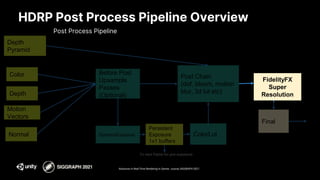
  • #20  So we apply the scaling right after we have our color, depth, motion vectors and normals output from our rasterization passes. It is during here that we do our upresing and we send that to our post processing chain. The disadvantage of this path is that we are actually spending a lot of cost in our post processing chain because it is at full resolution. For example depth of field typically becomes a bottleneck on these cases when is high quality. An example of a ‘Before Post Process’ upsample pass would be something like TAA upsample (Temporal Anti Aliasing Upsample) or checkerboard rendering. We have the other side of the coin, which his the after post process scaling. What this does is that it runs the post processing pipeline at low resolution and is right at the end, right before going to the final pass that it performs the upscaling.
  • #21  It is exactly in this spot where we decided to integrate our FSR, FidelityFX Super Resolution algorithm.
  • #22 It's important to understand that in unity we have two ways of doing aliasing, that is ways of looking at a piece of memory so we can rasterize to it in different resolutions. The first one is software based. This works in rendering platforms like dx11, dx12, Vulkan, Metal and GNM. Essentially all the ones that HDRP supports. The second one is hardware base, which works on a subset of rendering APIs that contain more advanced features like direct access to resource descriptors and also texture / resource aliasing.
  • #23 For software based, the technique is quite simple. All we do is that during sampling time we apply a scale on the x and y axis. We just scaled the uvs of whatever texture we are sampling from. We do take care of the borders as you will see in the next slide. For rasterization what we do in software base is that we setup a viewport that is a subset of the size of final target. In unity we have this setup in our render graph, where we usually keep a render target that is the maximum resolution of all the cameras within this render target that we create virtual or software views, utilizing the software scales.
  • #24 This is an example of the functions you can use to border your uvs. So you have to be very careful when you are upscaling uvs, because you don't want to tap a texel at the corner if you are doing bilinear sampling. You want to make sure your UVs are nicely clamped so you don’t have that problem.
  • #25 For hardware based aliasing, what we do is a bit different. We have a very big heap on the C++ side of unity, where we essentially allocate a placed resource. We start placing these resources on the heap on demand, depending on the resolution that we need on the moment. This is where the aliasing is occuring. The only tricky thing about this approach is that is much faster than software based, since we don’t have to use multipliers or viewports, we are actually dealing at the hardware level with that native resolution. But the problem is that we are creating descriptors for every resolution that we encounter. We have to be very careful on the CPU implementation to make sure we recycle these descriptors and we don’t inflate memory and incur in a CPU performance cost.
  • #26  For the chain of our effect, what we do is that we start our uber post process. This is everything that outputs after bloom. And after tone mapping. We do a squareroot of that target so we output at the squareroot space. What we call the spatial perceptual color space, this goes into the EASU algorithm which consumes it and applies the upsampler. After it outputs in the upsampler, we make sure we go back to linear space and then we apply the RCAS algorithm. The RCAS algorithm improves on edging and all the details that were potentially loss before.
  • #27 You can see here 2 images where we differentiate between native resolution. This would be a 360 crop of a 4k output.
  • #28 And in here is with FSR applied, you can see that we recover almost all that loss detail. There should be more detailed power point images in the slides attached to this presentation.
  • #33 The next step is to take care of the extra detail that we lose because of the derivatives that we are doing when we are rendering at a lower rasterization resolution. What we are doing in this case is pushing the mip bias in all our material textures so that we can recover this detail. In this example you can see that we can do quite well by recovering most of the detail loss in this texture. The mip bias formula that we use is the ratio of the input resolution divided by the output resolution. Then what we do is that we take the log base 2 of this ratio and we get a negative mip bias, assuming that the input resolution is smaller. All we do is that we push that to our sampler functions. We decided to use SampleLodBias which is a function available in dx11 and in vulkan platforms. Then we utilize that value and we are able to push that in the software. It became quite easy for us. A big advantage that unity has is that we have a pretty good distinction of what is a material texture and what is a system texture. Is quite easy to differentiate between and only apply the bias to those resources that are dependent on that.
  • #34 Lastly, particles and transparent low resolution so in unity we have a pass that is for transparency low resolution. What this does is that it rasterizes transparency to half resolution with a down sampled depth buffer. This of course if you are using DRS (dynamic resolution scaling) is gonna look very small. You are going to lose a lot of quality because you are already at half resolution so if you start downscaling your half resolution buffer it’s not gonna look nice. So one of the fixes we have for this pass is to actually clamp the min resolution at which it could go and give this control to the artist so they can decide which setting in the pipeline is affected. It’s important to know that transparent resolution frees us quite a bit to do more expensive, usually very low occupancy shadings, such as transparencies that utilize refraction and things like that.
  • #35 For performance we decided to use a standard 4k scenario. We are utilizing our scene in spaceship demo in a PS4 Neo. The resolution is 2160p. For EASU turns out we are spending 0.43 ms with an occupancy of 4 waves. For RCAS we have 0.16ms with an occupancy of 10 waves. This is the non optimized 32fp path for these algorithms. With this we cover pretty much all the pieces we had to touch on the unity high definition rendering pipeline. As you can see some of these pieces werent challenging, they were quite straightforward to land in the engine. And that's it.
  • #38 Last but not least, Unity continues hiring graphics researchers, developers, tech artists and more world wide. If you found our architecture interesting, come join us, help us evolve and improve it further! We are also hiring principal rendering engineers for the graphics innovation group.