REAL TIME OPERATING SYSTEMVIVEK  JAISWAL0813331103EC VI B
Operating SystemCollection of system calls (functions)Provides a set of basic services to interact with the hardwareCore of the OS is KernelBasic structural unit of OSTypically a library or set of libraries	A bridge between applications and the actual data processing done at the hardware level
Basic Structure of Operating System
Real Time Operating SystemCompletes its task and deliver services on time
Deterministic – guarantees task completion at a set deadline
Operates in constrained environment where computer memory and processing power is limited
Provides services in definite amount of time
Multitasking or multi-threadingFeaturesFast
Small and occupy very little memory
Consume fewer resources
Mission-critical
Response times are highly predictable
Unpredictable environment
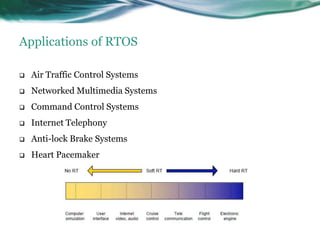
Life risking applicationsApplications of RTOSAir Traffic Control Systems
Networked Multimedia Systems
Command Control Systems
Internet Telephony
Anti-lock Brake Systems
Heart PacemakerTypes of RTOSHard Real-Time SystemsMeets deadlines with zero degree of flexibility	Missed deadlines cause catastrophe	Cost of catastrophe is highSoft Real-Time SystemsMeets deadlines with some degree of flexibility	Missed deadline does not cause catastrophe	Costs rise in proportion to the delay
Example of Hard Real-Time SystemsWeapons defense system
Missile guidance systemWeapons Defense System
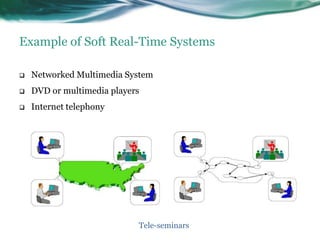
Example of Soft Real-Time SystemsNetworked Multimedia System
DVD or multimedia players

Real Time Operating System

Editor's Notes

  • #2 This template can be used as a starter file to give updates for project milestones.SectionsRight-click on a slide to add sections. Sections can help to organize your slides or facilitate collaboration between multiple authors.NotesUse the Notes section for delivery notes or to provide additional details for the audience. View these notes in Presentation View during your presentation. Keep in mind the font size (important for accessibility, visibility, videotaping, and online production)Coordinated colors Pay particular attention to the graphs, charts, and text boxes.Consider that attendees will print in black and white or grayscale. Run a test print to make sure your colors work when printed in pure black and white and grayscale.Graphics, tables, and graphsKeep it simple: If possible, use consistent, non-distracting styles and colors.Label all graphs and tables.
  • #3 What is the project about?Define the goal of this projectIs it similar to projects in the past or is it a new effort?Define the scope of this projectIs it an independent project or is it related to other projects?* Note that this slide is not necessary for weekly status meetings
  • #4 * If any of these issues caused a schedule delay or need to be discussed further, include details in next slide.
  • #5 Duplicate this slide as necessary if there is more than one issue.This and related slides can be moved to the appendix or hidden if necessary.
  • #24 Prepare slides for the appendix in the event that more details or supplemental slides are needed. The appendix is also useful if the presentation is distributed later.